okrs
64 Topics
Measuring the progress of KRs as a percentage.
I'm creating a sales objective with 4 KRs. I choose "number" as the metric because the currency I need (SAR) isn't available (thank you very much, Microsoft!). Anyway, the mode of update is automatic through Excel Online. The problem is, the progress of each KR is calculated as an achievement out of a total number without specifying the percentage of that achievement! How can I get it to also display the percentage?445Views0likes1CommentAlternatives to Viva Goals?
Viva Goals being retired wasn't good news. It put many of us in the community in a pretty tough spot. There is less than a year to find a new OKR software and migrate. We really liked Viva Goals because our team could use it inside Microsoft Teams. Some of the alternatives we are considering switching to are: Teamflect WorkBoard Perdoo All three of these have great Microsoft Teams integration and solid OKR features. We are also considering other alternatives such as Profit Co and Lattice. Any opinions on or experience with these tools?Solved5.2KViews4likes6Comments
Filter sub-OKRs and sub-key results without hiding the main OKRs
I use Viva Goals to monitor goals and key results for team with multiple OKR- and key result owners. I have got three levels: Main OKRs Sub OKRs Sub key results The OKRs on level 1 and 2 applies for all the entire team, but the key results on level 3 are assigned to each of the team members/key result owners. When a team member add the "owner" filter, to list his key results only, all the member's key results are listed without the OKR hierarchy / OKRs on level 1 and 2 showing. This happens because the OKRs on leven 1 and 2 are not assigned to the team member, which makes sense. I thought that the solution would be to assign the OKRs on leven 1 and 2 to the team member, but when I do that, all team members's key results on level 3 are listed because they belong to a level 1 and 2 OKR that is assigned to the specific team member in the "owner" filter. The same problem appears when assigning and filtering with teams and tags. In other words, I want a list of one team member's key results, that also shows the level 1 and 2 OKRs that they belong to. Any suggestions how to make that happen?184Views0likes1CommentViva Goals + Planner Integration - Planners don't show up.
Hello, I am using Viva Goals to track our OKRs, we also use the planner integration to have better tracking. But we have problems connecting viva goals to the planner. It's a little bit random: In the window where you chose your planner the ones I want don't show up. Some did in the past and vanished later. But I can see other planners as well, even new ones. Some of my coworkers have the problems, others not. The permissions on teams, planner, and viva goals are all set to "Owner". On the ones that vanished from selection we didn't change anything. We also tried to remove someone from the team and then added again. Or a planner without a team and viva goals. Does somebody has an idea how to fix it? Best, Erik444Views0likes1CommentExport Viva Goals OKR to Excel not listed as an option
I'm looking to export my OKRs to Excel and the option is not available to me in the export selection. I am able to export to PowerPoint, but the formatting is not useful. I am the admin and the option for "OKR export to excel" in my Admin Dashboard has "Anyone in the organization" selected. Has anybody experienced this and found a resolution?3.6KViews1like9CommentsChanged Planning year and lost our OKR's
Hey Everyone, Trying to figure out a solution here. I have recently become the Viva Goals admin (we only have viva goals) at our organization. We are rolling out OKR's to manage objectives for management in IT. On of the departments in IT was doing a POC with Viva Goals last year, and despite our actual planning year starting in April, they didn't realize that the planning year setting let you set it so they left it at January created custom time ranges for our planning year. This year we decided to change the planning year setting for full roll out - so I went ahead and made this change. Unfortunately, when I made this change, we are now unable to find last year's OKR's. Can you offer any suggestions for how we might recover them? They're mostly closed out, but the group wants to do a retrospective next week.452Views1like1Comment
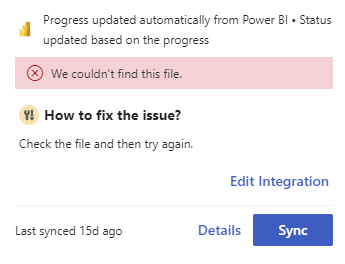
Viva Goals Power BI Integration Errors
My organization has several key results with Power BI connections that have integration errors. These key results use integration connections and are connected to Power BI reports that are behaving as expected for other key results. Viva Goals gives me an error message that it could not find the file. The issue appears to happen randomly. Has anyone else encountered this issue?173Views0likes0Comments
Closing and scoring OKRs
Hi Viva Goals community, I have a question related to closing and scoring OKRs. When I go to close an Objective (blue bullseye icon) or Key Result (purple speedometer), I am given the option to adjust the score if desired. However, when I go to close an Initiative (green calendar), the Close dialogue box does not have the Score line that allows me to adjust the score - I am forced to take the score that is auto-calculated by Viva Goals. 1) Can people confirm that this is the case for them as well? 2) If this is indeed the case, can anyone from Microsoft or otherwise help me understand why the score adjustment feature is not available on Initiatives? 3) Is there any plan to change this for Initiatives in the future? Thanks everyone! Evan1.1KViews0likes5CommentsHow do I create a Gantt Chart of all my Key Results under an organisation OKR in Viva Goals?
Im trying to set up all my organisations OKRs and Key Projects and every functionality is great... except when it comes to Visualisation. Im trying to play around with the dashboards and what I want to create is a Gantt Chart for an OKR displaying in a Gantt Chart (By month) the different Key Results and when during the project period they are supposed to happen. The start and due date is written in so it should be able to make it? I just cant figure it out.. please help. Best Sebastian560Views0likes3Comments