office graph
171 TopicsWhat is the Office Graph?
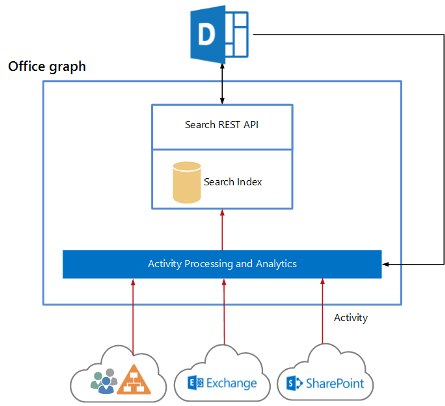
Office Graph - the intelligent fabric to Office 365 data The Office Graph represents a collection of content and activity, and the relationships between them that happen across the entire Office suite. From email, social conversations, and meetings, to documents in SharePoint and OneDrive, the Office Graph maps the relationships among people and information, and acts as the foundation for Office experiences that are more relevant and personalized to each individual. The Office Graph uses sophisticated machine learning techniques to connect people to the relevant content, conversations and people around them. Office Graph has mapped over billions actions and interactions within Office 365, making it clear that organizations have been sitting on an untapped gold mine of business value. As it continues to analyze relationships and deliver insights from across the tools people use at work every day, it will enable experiences that go above and beyond search and discovery. Going forward, the Office Graph will continue to evolve and deliver increasingly rich insights in Office 365, and incorporate support for extensibility to reach beyond Office 365.Solved44KViews6likes14CommentsQuery the Office Graph using GQL and SharePoint Online Search REST APIs
The Office Graph computes insights across Office 365 and makes these insights available through the Microsoft Graph, the single endpoint that you can use to access a number of Microsoft's cloud technologies. Graph Query Language (GQL) is a preliminary query language designed to query the Office Graph via the SharePoint Online Search REST API. By using GQL, you can query the Office Graph to get items for an actor that satisfies a particular filter. Get started!2.5KViews3likes1Comment
Slow UI update for deleted events
I've built an integration that continuously syncs events between an external scheduling system and Exchange Online using Microsoft Graph. I'm observing a recurring issue when deleting calendar events via Graph: A DELETE request to Graph returns success (204 No Content). A subsequent GET /events/{id} returns 404, confirming the event is deleted server-side. However, the event continues to appear in the Outlook UI (both Outlook Web and desktop) for an extended period (sometimes hours), even after page reloads or app restarts. The odd behaviour The event is still displayed in the user interface for up to several hours The event persist through page reloads If the user clicks the event it opens briefly and immediately closes, the event disappears from the UI afterward. Additional details Delete endpoint: /users/{id}/events/{id} Graph response: 204 No Content Verified deletion via GET → 404 Reproduces in both Outlook Web and Outlook desktop Questions Is this a known Outlook client caching or calendar view indexing issue? Is there a way to force client reconciliation after deletes? Are there Graph or Exchange constraints around rapid create/update/delete cycles that could cause this UI inconsistency?468Views2likes1Comment
Reorder Teams Channel tabs, move a 3rd tab to be the last tab?
I have an automate power automate flow which Create a Teams site, channels & tabs. now inside the General channel, we add the following custom tabs (Active DashBoard, Incident -12: Tasks and Template & training), as follow:- but i will get those 3 built-in tabs; Posts, Files and Notes.. now how i can move the Notes tab to be last tab ? using Graph API? Thanks134Views1like0CommentsGet-MgProfile : The term 'Get-MgProfile' is not recognized as the name of a cmdlet, function, script
Hi everyone, The cmdlet Get-MgProfile is no longer available after updating to v2.1.0 Even the link is no longer available: https://learn.microsoft.com/en-us/powershell/module/microsoft.graph.people/get-mguserprofile What is the replacement Graph SDK cmdlet to get the existing Microsoft Graph PowerShell SDK connection profile name? Thanks in advance.17KViews1like5Comments
OneNote create page with multipart/form-data - The multi-part payload was malformed.
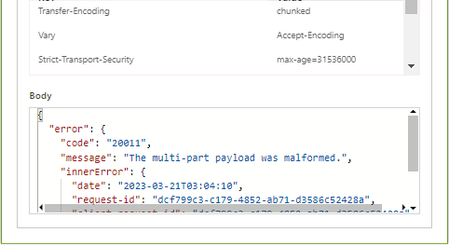
Good day, I am trying to create a OneNote page using the Graph OneNote endpoint below, but can't seem to get the multipart right and keep on getting an error that "The multi-part payload was malformed." https://graph.microsoft.com/v1.0/groups/{id}/onenote/sections Any ideas what could be wrong with the below?Solved1.5KViews1like2CommentsMialbox Forwarding in Graph API
Is there away to retrieve the ForwardingSmtpAddress and DeliverToMailboxAndForward settings for a mailbox via the Graph API? I'm building an application that aggregates information about a user from multiple sources, one of them being AzureAD/M365. We want to show a support engineer the forwarding information that is set on a user's mailbox, but it seems the only way to get this is via PowerShell, which means settings up a runspace and powershell remoting, which I'd rather not do, sense I'm using the graph API already for license information.2.9KViews1like2CommentsIs there any REST API for creating new Excel (.xlsx) file in OneDrive cloud
I'm trying to create a new excel file in OneDrive with the below properties of the REST API call. URL: https://graph.microsoft.com//v1.0/me/drive/root/children Body: { "name": "MyFile.xlsx", "file": {}, "@microsoft.graph.conflictBehavior": "rename" } Header: Content-Type:application/json With the help of the above properties, I'm able to create the file in OneDrive. But it is created without size & If I try to open the workbook it says Couldn't Open the Workbook Error The workbook cannot be opened. Basically, whenever I create a new excel file from UI it has a default size of 7.81KB (Could be used for metadata of file). I have taken reference from https://docs.microsoft.com/en-us/graph/api/driveitem-post-children?view=graph-rest-1.0&tabs=http Is there anyone who knows how to resolve this issue?2.1KViews1like3Comments
graph url scopes not supported for smtp and imap
For authentication, we are using below scopes as mentioned in the doc https://docs.microsoft.com/en-us/exchange/client-developer/legacy-protocols/how-to-authenticate-an-imap-pop-smtp-application-by-using-oauth offline_access https://outlook.office.com/IMAP.AccessAsUser.All https://outlook.office.com/SMTP.Send We are able to get access_token and refresh_token successfully We want get userPrincipalName using graph api https://graph.microsoft.com/v1.0/me however we are getting error , looks like for hitting graph api only graph scopes would work. We tried with graph scopes urls, https://graph.microsoft.com/IMAP.AccessAsUser.All , https://graph.microsoft.com/SMTP.Send and able to hit graph api , however smtp and imap authentication is not working with these scopes. since Microsoft is deprecating outlook rest apis and asking to move to graph api then why graph scopes urls are not supported for SMTP and IMAP ?834Views1like0Comments