office 2021
7 Topics
Microsoft ActionPack - still missing Office 2021!
For £420 per year it's pretty disgraceful that with Office 2024 due for release soon we still don't have access to Office 2021 in the Microsoft Action Pack Subscription (stuck on Office 2019). Back in the day MS would send out CDs/DVDs in the post as soon as new software was launched but now they can't even be bothered uploading it to the website for us to download it ourselves! I've spoken to two people at Microsoft about this, and even had a teams call. While they were very friendly and understanding they were not senior enough to actually do anything about it. Come on Microsoft - we're your 'partners' and you expect us to pay a LOT of money every year for the privilege. At least get the latest versions on the Software Benefits site!890Views2likes1Comment
Office 2021 Classic not showing images in Signatures
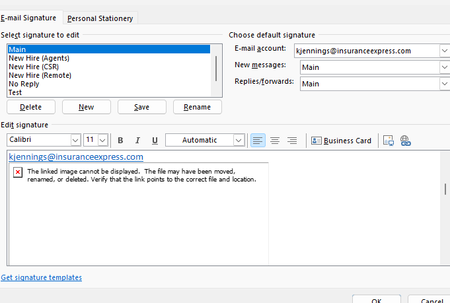
Hello I work in IT and trying to find a solution to this problem that our outlook are not showing the images in the signatures. Our Outlook 2021 Version is 2608, Build 16.0.20326.20072. This occurs even when creating a completely new signature and inserting a new local PNG/JPG using Insert Picture. The image initially appears correctly when inserted, but after saving/reopening the signature it becomes a red X with the message "The linked image cannot be displayed. The file may have been moved, renamed, or deleted." Existing signatures have the same problem. Recreating the signature does not resolve it. Here are some details we tried already. BlockHTTPimages is not configured in either the normal Office registry location or the Policies location. Uninstall Reinstalling Office didn't work We are under AD profiles, with new profiles and even rebuilding current profiles didn't solve it. Attempted a full reset of windows 10/11 didn't work. This appears to be an Outlook/Word signature-image regression rather than a corrupted signature or externally hosted image. Per Microsoft status that this should've been resolved back in June but the issue still persisted. https://support.microsoft.com/en-us/support/known-issues/images-are-not-displayed-in-emails-newsletters-or-signatures-in-classic-outlook?utm_source=chatgpt.com I did try using ChatGPT to help with the issue. I will share the thread link here if you wish to look into of all troubleshoots that was attempted. https://chatgpt.com/share/6aac0312-a08c-83ea-b1a8-2192b3677136 If anyone has any better knowledge of finding a solution as we have reported this issue to Microsoft via the help feature in outlook classic, but gotten no response since the last month since the issue started.233Views1like1Comment
Office 2021 LTSC version fallback option or install older version?
We are using Microsoft Office LTSC Professional Plus 2021 volume licensed versions in our company environment and deploy automatic updates and installation via CDN. Now the question arises whether, if necessary, we can go back to an older Office version (fallback) if the latest update causes problems. I have not found any options for this. Another option would be to simply install an older version, but we run the updates and installs via CDN, so we don't have any older Office versions. I also could not find a way to install an older version via CDN (always only the latest version) or to download older versions separately. I hope someone can help me here.Whether "fallbacks" are possible and where to get older Office 2021 LTSC versions?Solved3.8KViews1like4Comments