observability
19 TopicseBPF-Powered Observability Beyond Azure: A Multi-Cloud Perspective with Retina
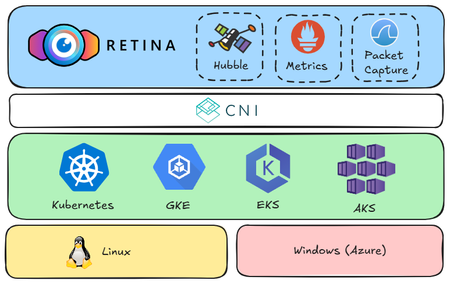
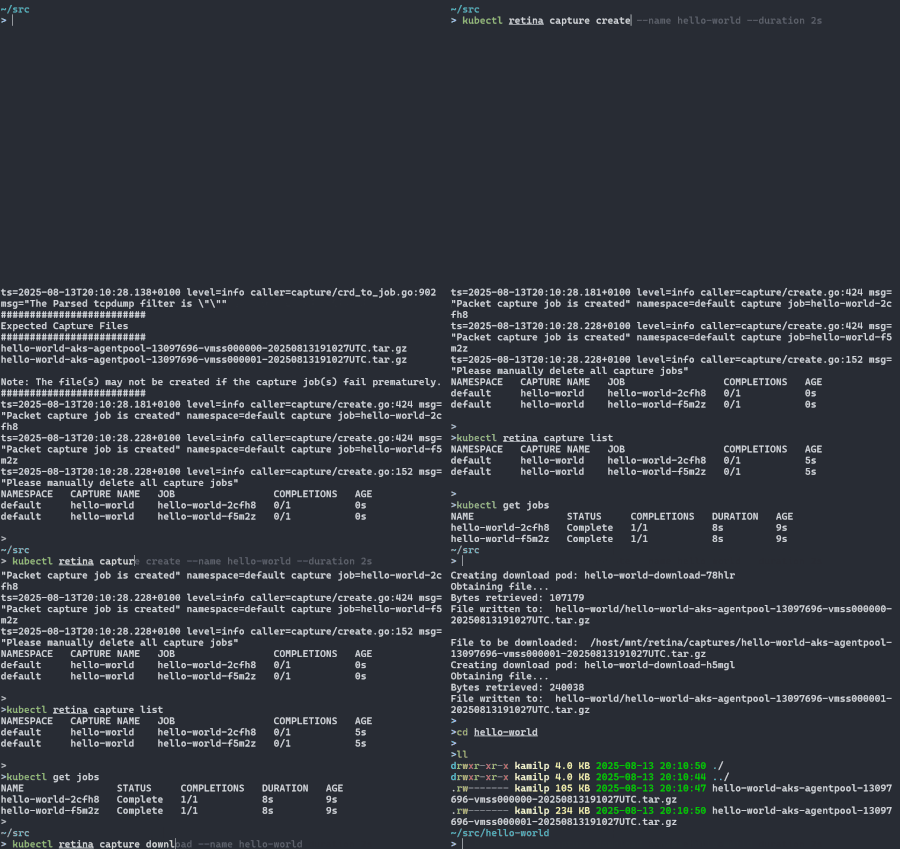
Kubernetes simplifies container orchestration but introduces observability challenges due to dynamic pod lifecycles and complex inter-service communication. eBPF technology addresses these issues by providing deep system insights and efficient monitoring. The open-source Retina project leverages eBPF for comprehensive, cloud-agnostic network observability across AKS, GKE, and EKS, enhancing troubleshooting and optimization through real-world demo scenarios.1.4KViews10likes0Comments
Beyond the Chat Window: How Change-Driven Architecture Enables Ambient AI Agents
AI agents are everywhere now. Powering chat interfaces, answering questions, helping with code. We've gotten remarkably good at this conversational paradigm. But while the world has been focused on chat experiences, something new is quietly emerging: ambient agents. These aren't replacements for chat, they're an entirely new category of AI system that operates in the background, sensing, processing, and responding to the world in real time. And here's the thing, this is a new frontier. The infrastructure we need to build these systems barely exists yet. Or at least, it didn't until now. Two Worlds: Conversational and Ambient Let me paint you a picture of the conversational AI paradigm we know well. You open a chat window. You type a question. You wait. The AI responds. Rinse and repeat. It's the digital equivalent of having a brilliant assistant sitting at a desk, ready to help when you tap them on the shoulder. Now imagine a completely different kind of assistant. One that watches for important changes, anticipates needs, and springs into action without being asked. That's the promise of ambient agents. AI systems that, as LangChain puts it: "listen to an event stream and act on it accordingly, potentially acting on multiple events at a time." This isn't an evolution of chat; it's a fundamentally different interaction paradigm. Both have their place. Chat is great for collaboration and back-and-forth reasoning. Ambient agents excel at continuous monitoring and autonomous response. Instead of human-initiated conversations, ambient agents operate through detecting changes in upstream systems and maintaining context across time without constant prompting. The use cases are compelling and distinct from chat. Imagine a project management assistant that operates in two modes: you can chat with it to ask, "summarize project status", but it also runs in the background, constantly monitoring new tickets that are created, or deployment pipelines that fail, automatically reassigning tasks. Or consider a DevOps agent that you can query conversationally ("what's our current CPU usage?") but also monitors your infrastructure continuously, detecting anomalies and starting remediation before you even know there's a problem. The Challenge: Real-Time Change Detection Here's where building ambient agents gets tricky. While chat-based agents work perfectly within the request-response paradigm, ambient agents need something entirely different: continuous monitoring and real-time change detection. How do you efficiently detect changes across multiple data sources? How do you avoid the performance nightmare of constant polling? How do you ensure your agent reacts instantly when something critical happens? Developers trying to build ambient agents hit the same wall: creating a reliable, scalable change detection system is hard. You either end up with: Polling hell: Constantly querying databases, burning through resources, and still missing changes between polls Legacy system rewrites: Massive expensive multi-year projects to re-write legacy systems so that they produce domain events Webhook spaghetti: Managing dozens of event sources, each with different formats and reliability guarantees This is where the story takes an interesting turn. Enter Drasi: The Change Detection Engine You Didn't Know You Needed Drasi is not another AI framework. Instead, it solves the problem that ambient agents need solved: intelligent change detection. Think of it as the sensory system for your AI agents, the infrastructure that lets them perceive changes in the world. Drasi is built around three simple components: Sources: Connectivity to the systems that Drasi can observe as sources of change (PostgreSQL, MySQL, Cosmos DB, Kubernetes, EventHub) Continuous Queries: Graph-based queries (using Cypher/GQL) that monitor for specific change patterns Reactions: What happens when a continuous query detects changes, or lack thereof But here's the killer feature: Drasi doesn't just detect that something changed. It understands what changed and why it matters, and even if something should have changed but did not. Using continuous queries, you can define complex conditions that your agents care about, and Drasi handles all the plumbing to deliver those insights in real time. The Bridge: langchain-drasi Integration Now, detecting changes is only part of the challenge. You need to connect those changes to your AI agents in a way that makes sense. That's where langchain-drasi comes in, a purpose-built integration that bridges Drasi's change detection with LangChain's agent frameworks. It achieves this by leveraging the Drasi MCP Reaction, which exposes Drasi continuous queries as MCP resources. The integration provides a simple Tool that agents can use to: Discover available queries automatically Read current query results on demand Subscribe to real-time updates that flow directly into agent memory and workflow Here's what this looks like in practice: from langchain_drasi import create_drasi_tool, MCPConnectionConfig # Configure connection to Drasi MCP server mcp_config = MCPConnectionConfig(server_url="http://localhost:8083") # Create the tool with notification handlers drasi_tool = create_drasi_tool( mcp_config=mcp_config, notification_handlers=[buffer_handler, console_handler] ) # Now your agent can discover and subscribe to data changes # No more polling, no more webhooks, just reactive intelligence The beauty is in the notification handlers: pre-built components that determine how changes flow into your agent's consciousness: BufferHandler: Queues changes for sequential processing LangGraphMemoryHandler: Automatically integrates changes into agent checkpoints LoggingHandler: Integrates with standard logging infrastructure This isn't just plumbing; it's the foundation for what we might call "change-driven architecture" for AI systems. Example: The Seeker Agent Has Entered the Chat Let's make this concrete with my favorite example from the langchain-drasi repository: a hide and seek inspired non-player character (NPC) AI agent that seeks human players in a multi-player game environment. The Scenario Imagine a game where players move around a 2D map, updating their positions in a PostgreSQL database. But here's the twist: the NPC agent doesn't have omniscient vision. It can only detect players under specific conditions: Stationary targets: When a player doesn't move for more than 3 seconds (they're exposed) Frantic movement: When a player moves more than once in less than a second (panicking reveals your position) This creates interesting strategic gameplay, players must balance staying still (safe from detection but vulnerable if found) with moving carefully (one move per second is the sweet spot). The NPC agent seeks based on these glimpses of player activity. These detection rules are defined as Drasi continuous queries that monitor the player positions table. For reference, these are the two continuous queries we will use: When a player doesn't move for more than 3 seconds, this is a great example of detecting the absence of change use the trueLater function: MATCH (p:player { type: 'human' }) WHERE drasi.trueLater( drasi.changeDateTime(p) <= (datetime.realtime() - duration( { seconds: 3 } )), drasi.changeDateTime(p) + duration( { seconds: 3 } ) ) RETURN p.id, p.x, p.y When a player moves more than once in less than a second is an example of using the previousValue function to compare that current state with a prior state: MATCH (p:player { type: 'human' }) WHERE drasi.changeDateTime(p).epochMillis - drasi.previousValue(drasi.changeDateTime(p).epochMillis) < 1000 RETURN p.id, p.x, p.y Here's the neat part: you can dynamically adjust the game's difficulty by adding or removing queries with different conditions; no code changes required, just deploy new Drasi queries. The traditional approach would have your agent constantly polling the data source checking these conditions: "Any player moves? How about now? Now? Now?" The Workflow in Action The agent operates through a LangGraph based state machine with two distinct phases: 1. Setup Phase (First Run Only) Setup queries prompt - Prompts the AI model to discover available Drasi queries Setup queries call model - AI model calls the Drasi tool with discover operation Setup queries tools - Executes the Drasi tool calls to subscribe to relevant queries This phase loops until the AI model has discovered and subscribed to all relevant queries 2. Main Seeking Loop (Continuous) Check sensors - Consumes any new Drasi notifications from the buffer into the workflow state Evaluate targets - Uses AI model to parse sensor data and extract target positions Select and plan - Selects closest target and plans path Execute move - Executes the next move via game API Loop continues indefinitely, reacting to new notifications No polling. No delays. No wasted resources checking positions that don't meet the detection criteria. Just pure, reactive intelligence flowing from meaningful data changes to agent actions. The continuous queries act as intelligent filters, only alerting the agent when relevant changes occur. Click here for the full implementation The Bigger Picture: Change-Driven Architecture What we're seeing with Drasi and ambient agents isn't just a new tool, it's a new architectural pattern for AI systems. The core idea is profound: AI agents can react to the world changing, not just wait to be asked about it. This pattern enables entirely new categories of applications that complement traditional chat interfaces. The example might seem playful, but it demonstrates that AI agents can perceive and react to their environment in real time. Today it's seeking players in a game. Tomorrow it could be: Managing city traffic flows based on real-time sensor data Coordinating disaster response as situations evolve Optimizing supply chains as demand patterns shift Protecting networks as threats emerge The change detection infrastructure is here. The patterns are emerging. The only question is: what will you build? Where to Go from Here Ready to dive deeper? Here are your next steps: Explore Drasi: Head to drasi.io and discover the power of the change detection platform Try langchain-drasi: Clone the GitHub repository and run the Hide-and-Seek example yourself Join the conversation: The space is new and needs diverse perspectives. Join the community on Discord. Let us know if you have built ambient agents and what challenges you faced with real-time change detection.595Views2likes0CommentsNow Generally Available: Built-in CIS Benchmark Auditing for Linux on Azure
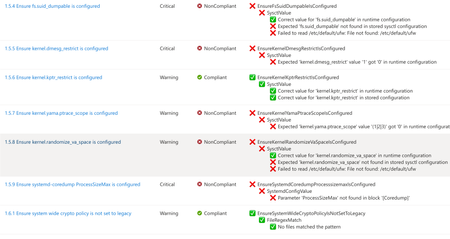
A few months ago, in From Policy to Practice: Built-in CIS Benchmarks on Azure – Flexible, Hybrid-Ready, we introduced a new way to bring Center for Internet Security (CIS) Benchmarks to your Linux estate using Azure Policy with Machine Configuration. It builds on the broader customizable security baseline policies in Machine Configuration capability. Today we're excited to share the next milestone: the audit capability for CIS Benchmarks on Linux is now Generally Available (GA). This release is officially powered by kompli - our native Linux compliance and hardening engine for CIS, STIG, and custom baselines. kompli is the evolution of the engine that drove the preview, now established as the dedicated home for this capability going forward. What "GA" means for you The audit experience is now ready for production use. You can continuously assess your Linux workloads against official, CIS-certified benchmarks - at scale, across Azure and hybrid environments through Azure Arc - and get clear, CIS-style compliance reporting directly in Azure Policy and Azure Resource Graph. If you've read the previous post, the how hasn't changed, so we'll keep this one short: Automated compliance assessment - continuously monitor Linux systems against official CIS benchmarks. Tailored benchmarks - customize evaluations with exceptions and custom parameters, no code changes required. Compliance reporting - detailed, CIS-style reports across your fleet. Hybrid-ready - the same baselines apply to Azure VMs and Arc-enabled servers on-premises or in other clouds. All supported benchmarks are CIS Benchmark Assessment Certified and stay in parity with the content published on the CIS website. Supported distributions and benchmark versions With this release, audit is GA across the following distributions, covering Level 1 + Level 2 Server profiles: Distribution CIS Benchmark Version(s) Profiles Audit Ubuntu 20.04 / 22.04 / 24.04 LTS + Pro v3.0.0 / v2.0.0 + v3.0.0 / v1.0.0 L1 + L2 Server ✓ Red Hat Enterprise Linux 8 / 9 / 10 v3.0.0 + v4.0.0 / v2.0.0 / v1.0.1 L1 + L2 Server ✓ AlmaLinux 8 / 9 v3.0.0 + v4.0.0 / v2.0.0 L1 + L2 Server ✓ Rocky Linux 8 / 9 v2.0.0 + v3.0.0 / v2.0.0 L1 + L2 Server ✓ Oracle Linux 8 / 9 v3.0.0 + v4.0.0 / v2.0.0 L1 + L2 Server ✓ Debian 11 / 12 v2.0.0 / v1.1.0 L1 + L2 Server ✓ SUSE Linux Enterprise 12 / 15 v3.2.1 / v2.0.1 L1 + L2 Server ✓ AKS Optimized Azure Linux 3 v1.0.0 L1 + L2 Server ✓ This GA covers the audit (assessment) capability. Looking ahead, STIG benchmarks are coming next, followed by a granular per-rule auto-remediation capability with dynamic scope assignments. You can run these benchmarks against your own hardened images, against CIS hardened images, and against custom images built on top of vanilla distros — as long as /etc/os-release retains its original content. We're also working with vendors to minimize deviations. Getting started Open Azure Policy in the Azure portal. Under Authoring, select the new Machine Configuration blade. Choose Official Center for Internet Security (CIS) Benchmarks for Linux Workloads, then Modify Settings to pick the distributions you want to assess. Full documentation, including per-distribution rule details, supported parameters, and any known deviations from the official CIS toolset, is available here: Overview: CIS Security Benchmarks for Linux Workloads Per-distribution references: AlmaLinux, Azure Linux, Debian, Oracle Linux, Red Hat Enterprise Linux, Rocky Linux, SUSE Linux Enterprise, and Ubuntu - all linked from the overview page. We're building this with you As part of this GA release, we've also expanded the set of exposed rule parameters compared to the preview - giving you more out-of-the-box customization across rules and distributions. That said, our customer-driven approach still stands: we keep the experience clean by enabling parameters based on real demand, so if there's a rule, benchmark version, or distribution you'd like parameters enabled for - or any feedback on rules, evaluations, or distro coverage - let us know: Open a GitHub issue in the kompli repository Open an Azure support case Try it out, tell us what you think, and help shape what we build next.422Views1like0CommentsIntroducing kars - an Agent Reference Stack for Kubernetes
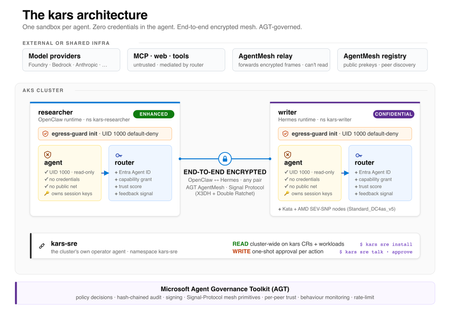
kars is an open-source, Kubernetes-native runtime for AI agents on Azure. It treats every agent as untrusted code - per-pod kernel isolation, zero credentials in the agent process, and an end-to-end encrypted inter-agent mesh - and governs agents on any framework with one set of Kubernetes policies via the Microsoft Agent Governance Toolkit. kars dev runs a governed agent on your laptop in minutes.2.4KViews1like2CommentsApplying Site Reliability Engineering to Autonomous AI Agents
If you practice SRE, you already have a mental model for running reliable production systems. You define SLOs. You track error budgets. You use circuit breakers to stop cascading failures. You run chaos experiments to find weaknesses before customers do. You treat every operational decision as a tradeoff between reliability and velocity. That mental model transfers directly to AI agents. It just needs four new ideas. In the Agent Governance Toolkit: Architecture Deep Dive, Policy Engines, Trust, and SRE for AI Agents, we covered Agent SRE briefly as one of AGT's nine packages: SLOs, error budgets, circuit breakers, chaos engineering, and progressive delivery, adapted from the patterns your SRE team already applies to microservices. Several teams asked for the full story. This is it. Agent SRE is one of the more novel parts of the toolkit. The policy engine, zero-trust identity, and execution sandboxing have clear analogs in existing security practice. Agent SRE explores newer ground. Established patterns for defining SLOs for AI agent behavior, building chaos experiments for LLM provider failures, or applying error budgets to agent autonomy are still emerging across the industry. We built these capabilities because running agents in production without them is the equivalent of running a fleet of microservices without circuit breakers, health checks, or an on-call runbook. This post is for SRE teams, platform engineers, and anyone responsible for running AI agents in production. You do not need to be an AI specialist. If you know what a burn rate is, you are ready for this. The Problem: Agents Fail in Ways Your Existing SRE Tooling Cannot See When a service fails, your observability stack tells you: latency went up, error rate crossed the SLO threshold, the circuit breaker opened. You page the on-call engineer. They look at traces and find the slow database query. When an AI agent fails, your observability stack is silent. The agent returned HTTP 200. Latency was normal. Error rate was zero. But the agent quietly approved a transaction it was not authorized to approve, hallucinated a database path and wrote to the wrong table, or got stuck in a reasoning loop that consumed $800 of LLM API budget before anyone noticed. These are not infrastructure failures. They are behavioral failures. And they are invisible to monitoring tools built for stateless, deterministic services, because those tools only watch for crashes and timeouts. They do not watch for wrong behavior. This gap is the problem Agent SRE was designed to solve. The solution borrows everything from the SRE playbook and adds one concept that extends it: the Safety SLI. The Safety SLI: A New Reliability Dimension Traditional SLIs measure system behavior from the user's perspective: latency, availability, error rate, throughput. They answer: did the service respond correctly? For AI agents, correctness is not enough. An agent that responds correctly but acts outside its authorized scope has not succeeded. It has failed in a way that none of your existing SLIs can detect. The Safety SLI answers a different question: did the agent act within policy? from agent_sre import SLO, ErrorBudget from agent_sre.slo.indicators import PolicyCompliance # Define a safety SLO: 99% of agent actions must comply with policy safety_slo = SLO( name="safety-compliance", indicators=[ PolicyCompliance( target=0.99, window="7d", ), ], error_budget=ErrorBudget( total=0.01, # 1% budget (1 - 0.99 target) window_seconds=2592000, # 30-day window burn_rate_alert=2.0, # warn at 2x sustainable rate burn_rate_critical=5.0, # page at 5x sustainable rate ), ) When an agent's policy compliance rate drops below 99%, the error budget starts burning. The ErrorBudget tracks consumption automatically and exposes burn rate alerts through its firing_alerts() method. When the budget is exhausted, the configured exhaustion_action determines the system response: from agent_sre.slo.objectives import ExhaustionAction # Configure what happens when error budget is exhausted safety_slo = SLO( name="safety-compliance", indicators=[PolicyCompliance(target=0.99, window="7d")], error_budget=ErrorBudget( total=0.01, window_seconds=2592000, burn_rate_alert=2.0, # fires at 2x sustainable burn rate burn_rate_critical=5.0, # fires at 5x sustainable burn rate exhaustion_action=ExhaustionAction.CIRCUIT_BREAK, # suspend agent when budget is gone ), ) # In your monitoring loop, check for firing alerts alerts = safety_slo.error_budget.firing_alerts() for alert in alerts: print(f"Alert firing: {alert.name} (severity: {alert.severity})") # Check budget status print(f"Budget remaining: {safety_slo.error_budget.remaining_percent:.1f}%") print(f"Current burn rate: {safety_slo.error_budget.burn_rate():.2f}x") print(f"Exhausted: {safety_slo.error_budget.is_exhausted}") This is the governance dial from the other direction. The error budget is not just a metric: it is the mechanism that drives agent autonomy decisions. An agent with a clean 30-day safety record earns autonomy. An agent whose budget is burning at 5x the sustainable rate triggers a critical alert, and when the budget is exhausted, the exhaustion_action fires: ALERT, THROTTLE, FREEZE_DEPLOYMENTS, or CIRCUIT_BREAK. The graduated response mirrors what SRE teams already do with service SLOs, applied to agent behavior. There are multiple SLI dimensions built into Agent SRE. Safety SLIs and Performance SLIs track different aspects of the same agent: SLI Type What It Measures Target Pattern When Budget Burns Safety SLI PolicyCompliance -- fraction of actions within authorized scope >= 99% Restrict capabilities, increase human oversight Performance SLI TaskSuccessRate, ResponseLatency, CostPerTask Configurable per workload Alert, throttle, or circuit-break LLM provider Additional built-in indicators include ToolCallAccuracy, DelegationChainDepth, HallucinationRate, and CalibrationDeltaSLI. Both SLOs feed into the same error budget dashboard. An agent can have excellent performance but a degrading safety record, or perfect safety compliance and terrible cost efficiency. You need both dimensions to understand whether an agent is production-ready. Circuit Breakers: Governing Agent Failure Modes That Don't Exist in Microservices Circuit breakers for services protect against one failure mode: a backend that is slow or unreachable. The pattern is CLOSED -> OPEN -> HALF_OPEN. You know it well. Agent SRE implements the same state machine for failure modes that are specific to autonomous reasoning systems and do not exist in traditional microservice architectures: from agent_sre.cascade.circuit_breaker import CircuitBreakerConfig, CircuitBreaker from agent_sre.chaos.engine import FaultType config = CircuitBreakerConfig( failure_threshold=5, # Open after 5 failures in the window recovery_timeout_seconds=60, # Stay OPEN for 60s before HALF_OPEN half_open_max_calls=3, # Allow 3 probes in HALF_OPEN ) breaker = CircuitBreaker(agent_id="analyst-agent-001", config=config) # Failure modes tracked by the circuit breaker: tracked_faults = [ FaultType.POLICY_BYPASS, # Agent exceeds authorized scope FaultType.ERROR_INJECTION, # Upstream model API fails FaultType.TIMEOUT_INJECTION, # Tool calls exceed time budget FaultType.TRUST_PERTURBATION, # Agent trust score falls below threshold FaultType.DEADLOCK_INJECTION, # Agent stuck in iterative reasoning ] Each failure mode has different circuit-breaking semantics: Failure Mode What Triggers It Circuit-Break Behavior Policy bypass Action denied by policy engine Count toward threshold; log with full context LLM provider error HTTP 5xx from model API Immediately open; route to fallback model if configured Tool timeout Tool call exceeds timeout_ms Count toward threshold; cancel in-flight call Trust score degradation Agent trust score drops below configured floor Open; escalate to Ring 3 (untrusted) until score recovers Reasoning loop / deadlock Token or iteration count exceeds budget Open; trigger human review before resuming The reasoning loop breaker deserves attention. A microservice cannot get stuck reasoning. An AI agent absolutely can, and when it does, the failure is not an error code: it is an agent that keeps calling tools, consuming tokens, and generating audit events indefinitely. The circuit breaker detects this pattern from the iteration count and token budget and terminates the loop: # Reasoning loop detection configuration loop_detection_config = { "max_iterations": 15, # Hard stop after 15 reasoning steps "max_tokens_per_session": 50000, # Hard stop on token consumption "repetition_threshold": 0.85, # Stop if >85% of recent actions repeat prior ones "on_detection": "circuit_break_and_escalate", } The state machine behaves identically to what you know from Hystrix or Resilience4j. What changes is the definition of "failure." CLOSED (serving) | | failure_threshold crossed for any tracked fault v OPEN (rejecting -- agent action denied, fallback or human-in-loop fires) | | recovery_timeout expires v HALF_OPEN (probe -- limited requests allowed through) | |-- success_threshold met --> CLOSED |-- any failure --> OPEN (reset timeout) Chaos Engineering for Agents: Fault Injection for Autonomous Systems The only way to know if your agent system is resilient is to break it intentionally. Traditional chaos engineering targets infrastructure: kill a pod, inject network latency, saturate a disk. Agent chaos engineering targets the failure modes specific to autonomous reasoning systems. Agent SRE ships fault injection templates that cover the failure modes teams consistently underestimate until they hit production: from agent_sre.chaos.engine import ChaosExperiment, Fault, FaultType # Experiment 1: LLM provider degrades -- model returns valid responses but with # increased latency and occasional malformed outputs experiment = ChaosExperiment( name="llm-degradation-resilience", target_agent="analyst-agent-001", description="Test agent behavior under degraded LLM provider", faults=[ Fault.latency_injection(target="llm-provider", delay_ms=8000), Fault.error_injection(target="llm-provider", rate=0.05), ], duration_seconds=300, ) # Experiment 2: Trust score manipulation -- simulates an agent receiving # messages from a peer with a spoofed trust score trust_experiment = ChaosExperiment( name="trust-manipulation-resilience", target_agent="orchestrator-001", faults=[ Fault( fault_type=FaultType.TRUST_PERTURBATION, target="did:mesh:orchestrator-001", params={"spoofed_score": 950}, ), ], duration_seconds=120, ) # Experiment 3: Tool timeout cascade -- multiple tools time out simultaneously, # testing whether the agent abandons gracefully or enters a reasoning loop cascade_experiment = ChaosExperiment( name="tool-timeout-cascade", target_agent="analyst-agent-001", faults=[ Fault.timeout_injection(target="database.read", delay_ms=30000), Fault.timeout_injection(target="api.call", delay_ms=30000), ], duration_seconds=180, ) # Run the experiment experiment.start() # ... inject faults during agent execution ... resilience = experiment.calculate_resilience( baseline_success_rate=0.95, experiment_success_rate=0.87, recovery_time_ms=48000, ) experiment.complete(resilience=resilience) print(f"Resilience score: {resilience.overall}/100 -- {'PASSED' if resilience.passed else 'FAILED'}") Additional fault types built into the chaos engine cover: prompt injection attempts, privilege escalation, data exfiltration attempts, identity spoofing, deadlock injection, and contradictory instruction scenarios. Each maps to a FaultType enum value and can be composed into multi-fault experiments. Important: The chaos engine records that a fault was injected and triggers the governance response pipeline. Actual infrastructure-level fault injection (network partition, process kill) should be implemented using your existing chaos tooling (Chaos Mesh, Gremlin, Azure Chaos Studio, or similar). Agent SRE governs the agent's behavioral response to faults; it does not own infrastructure manipulation. These two layers are designed to compose. Each chaos experiment produces a structured resilience score via calculate_resilience(), which compares baseline and experiment success rates. A score of 90+ with passed=True means the agent maintained at least 90% of its baseline performance under fault conditions. Teams use this to set minimum resilience thresholds for production readiness. Replay Debugging: Reproduce Behavioral Failures Exactly Infrastructure incidents are reproducible because infrastructure is deterministic. AI agent incidents are hard to reproduce because agent behavior depends on model state, context window content, and the sequence of tool call results, none of which are preserved by default after a session ends. Agent SRE's replay engine records every agent session as a replayable artifact: the full trace at each step, every tool call with its inputs and outputs, every policy evaluation with its decision, and every trust score at the time of each inter-agent message. from agent_sre.replay.capture import TraceStore from agent_sre.replay.engine import ReplayEngine, ReplayMode # Traces are captured automatically when SRE tracing is active store = TraceStore( backend="azure_blob", retention_days=30, ) # When an incident occurs, replay the session exactly engine = ReplayEngine(store=store) # Full replay: re-run the session against the same recorded inputs # Uses recorded tool outputs -- no live tool calls -- so replay is deterministic result = await engine.replay( trace_id="trace_2026_05_a7f3b2", mode=ReplayMode.FULL, ) for step in result.steps: print(f"Step {step.index}: {step.action} -> {step.decision}") # Divergence analysis: replay with a policy change applied # Shows exactly which actions would have been blocked under the new policy diff_result = await engine.diff( trace_id="trace_2026_05_a7f3b2", policy_override="policies/stricter-v2.yaml", ) for diff in diff_result.diffs: if diff.description: print(f"Step {diff.span_name}: was {diff.original}, " f"would be {diff.replayed} under new policy") The divergence analysis is the feature teams use most. When a policy change is proposed, you replay recent production traces against the new policy to see how many actions would have been blocked, which sessions would have failed, and what the error budget impact would have been. Policy changes stop being guesswork. Progressive Delivery: Safely Rolling Out New Agent Capabilities When you ship a new service version, you do not send it to all traffic at once. You use canary deployments, feature flags, or traffic splitting. You watch the SLOs. If they degrade, you roll back. Agent SRE brings the same discipline to agent capability rollout. When you expand an agent's authorized scope, giving it write access it did not have, connecting it to a new tool, or raising its trust floor, you do not expand to the full fleet immediately. You expand progressively, with automated SLO gates controlling each stage. from agent_sre.delivery.rollout import ( AnalysisCriterion, CanaryRollout, RollbackCondition, RolloutStep, ) rollout = CanaryRollout( name="database-write-capability", steps=[ RolloutStep( name="canary", weight=0.05, # 5% of agents get the new capability duration_seconds=86400, # 24 hours analysis=[ AnalysisCriterion(metric="safety_sli", threshold=0.995), AnalysisCriterion(metric="performance_sli", threshold=0.90), AnalysisCriterion( metric="error_budget_consumed", threshold=0.10, comparator="lte", # canary can burn at most 10% ), ], ), RolloutStep( name="early-adopters", weight=0.25, # 25% traffic duration_seconds=172800, # 48 hours analysis=[ AnalysisCriterion(metric="safety_sli", threshold=0.990), AnalysisCriterion(metric="performance_sli", threshold=0.88), ], ), RolloutStep( name="general-availability", weight=1.0, # 100% traffic duration_seconds=604800, # 1 week of full observation analysis=[ AnalysisCriterion(metric="safety_sli", threshold=0.990), AnalysisCriterion(metric="performance_sli", threshold=0.85), ], ), ], rollback_conditions=[ RollbackCondition(metric="safety_sli", threshold=0.95, comparator="lte"), ], ) # Start the rollout -- SLO gates evaluate at each step rollout.start() # Advance to next step when analysis criteria pass if rollout.advance(): print(f"Advanced to step: {rollout.current_step.name}") print(f"Progress: {rollout.progress_percent:.0f}%") The SLO gate at each step is the same mechanism as a CI/CD quality gate, but measured on live production behavior rather than test results. An agent capability that degrades the safety SLI during canary does not promote to the next step. If a RollbackCondition fires, the rollout rolls back automatically. This is the mechanism that makes it operationally safe to expand agent autonomy: every expansion is measurable, every measurement gates the next expansion, and rollback is automatic. Health Checks and Backpressure Traditional health checks answer: is the service alive? For agents, alive is not enough. A healthy agent is one that is alive, operating within policy, consuming resources within budget, and maintaining a trust score above the Ring threshold it was assigned. # Agent health check covering multiple dimensions health = await agent_health_check( agent_id="analyst-agent-001", dimensions=[ "liveness", # Is the agent process running? "policy_compliance", # Is safety SLI above threshold? "trust_score", # Is trust score above Ring floor? "resource_budget", # Is token/API spend within limits? "tool_availability", # Are the tools the agent needs reachable? ], ) # health.status: "healthy" | "degraded" | "unhealthy" # health.dimensions: per-dimension pass/fail with values # health.recommended_action: "none" | "restrict" | "suspend" | "terminate" When health checks report degradation, backpressure controls engage before the circuit breaker opens. Backpressure is the earlier, softer response: accept fewer concurrent tasks, reject low-priority work, drain in-flight tasks gracefully before the situation escalates. # Backpressure configuration backpressure_config = { "backpressure_threshold": 0.80, # Engage when resource utilization > 80% "max_concurrent": 5, # Hard cap on simultaneous agent tasks "priority_shedding": True, # Drop low-priority tasks first "drain_timeout_seconds": 30, # Allow in-flight tasks to complete } The ordering matters: backpressure first, then circuit breaker, then suspension. Each stage is recoverable. Each stage preserves more agent state than the next. The SRE principle of graduated response applies to agents exactly as it applies to services. Observability: Governance Metrics Flow Into Your Existing Stack Agent SRE does not ask you to adopt a new observability platform. Governance metrics are exported through the same adapters your infrastructure monitoring already uses, including OpenTelemetry, Prometheus, Datadog, and others. from agent_sre.tracing.exporters import configure_exporters configure_exporters( backends=[ {"type": "prometheus", "endpoint": "http://prometheus:9090"}, {"type": "opentelemetry", "endpoint": "http://otel-collector:4317"}, ], include_metrics=[ "slo.safety_sli", # Per-agent safety compliance rate "slo.error_budget_remaining", # Error budget in percentage "slo.burn_rate", # Current burn rate vs sustainable "circuit_breaker.state", # CLOSED / OPEN / HALF_OPEN "circuit_breaker.failure_count", "trust_score.current", # Agent trust score (0-1000) "trust_score.ring", # Current execution ring "chaos.experiments_run", # Chaos experiment telemetry "health.status", # Aggregate health status "backpressure.load", # Current load vs threshold ], ) Key governance metrics available in your existing dashboards: Metric What It Tells You Alert Condition slo.safety_sli Fraction of agent actions within policy < 0.99 slo.burn_rate Rate at which error budget is consumed > 2.0 (warn), > 5.0 (page) slo.error_budget_remaining Budget left for the SLO window < 20% circuit_breaker.state Current breaker state per agent OPEN or HALF_OPEN trust_score.ring Execution ring (privilege level) Ring 3 (untrusted) health.status Aggregate health across all dimensions degraded or unhealthy If you are already running Grafana dashboards for your services, a governance dashboard for your agent fleet is a new data source and a new set of panels, not a new monitoring stack. The SRE Mental Model for Agents: Four New Concepts Everything in Agent SRE is built on the SRE mental model you already have, extended with four concepts that adapt traditional reliability thinking for autonomous systems: Traditional SRE Agent SRE Equivalent What Changes Latency SLI Safety SLI Correctness of *action*, not speed of *response* Error budget Autonomy budget Burns on policy violations, not just errors Circuit breaker Behavioral circuit breaker Opens on wrong *behavior*, not just failure codes Canary deployment Capability rollout Rolls out *scope*, not just code The governance insight is that error budgets work in both directions for agents. A service's error budget only decreases. An agent's autonomy is also a budget: it grows when the safety SLI is strong and shrinks when it degrades. The error budget mechanism becomes the operational mechanism for expanding and contracting agent autonomy in response to evidence, which is exactly what regulated industries and risk-averse enterprise teams need before they will trust an autonomous agent with consequential actions. Getting Started with Agent SRE pip install agent-sre A minimal Agent SRE integration requires three things: a safety SLO definition, a circuit breaker, and a health check. The progressive delivery and chaos engineering features layer on top when you are ready for them. from agent_sre import SLO, ErrorBudget from agent_sre.slo.indicators import TaskSuccessRate from agent_sre.cascade.circuit_breaker import CircuitBreakerConfig, CircuitBreaker # Step 1: Define your safety SLO slo = SLO( name="production-safety", indicators=[TaskSuccessRate(target=0.99, window="24h")], error_budget=ErrorBudget(total=0.01, burn_rate_alert=2.0, burn_rate_critical=5.0), ) # Step 2: Configure a circuit breaker breaker_config = CircuitBreakerConfig( failure_threshold=5, recovery_timeout_seconds=60, half_open_max_calls=3, ) breaker = CircuitBreaker(agent_id="my-agent", config=breaker_config) # Step 3: Wire into your existing agent loop async def governed_agent_loop(agent, task): # Check health first if not await agent_is_healthy(agent.id): return {"error": "agent suspended", "reason": "health check failed"} # Run within circuit breaker protection async with breaker: result = await agent.run(task) slo.record_event(good=result.policy_compliant) return result The quickstart in the repository walks through a complete setup with safety SLOs, circuit breakers, and a Prometheus dashboard export in under 50 lines. Why This Matters Most AI observability tools today focus on what you might call model quality: hallucination rate, latency, token cost, task completion. These are useful metrics. They are not SRE metrics. They do not answer whether the agent acted within its authorized scope, whether its behavioral error budget is burning at a dangerous rate, or whether it would survive the LLM provider going down. Agent SRE answers those questions using the operational vocabulary that SRE teams already understand: SLOs, error budgets, circuit breakers, chaos experiments, and health checks. The goal is not to replace your observability stack. It is to make agent governance visible inside it. The reliability of an autonomous agent is not a property of the model. It is a property of the governance infrastructure around it. Agent SRE is that infrastructure. Resources GitHub: github.com/microsoft/agent-governance-toolkit Install: pip install agent-sre Tutorials: 40+ tutorials including dedicated Agent SRE walkthroughs for SLO setup, chaos experiments, and progressive delivery Architecture reference: ARCHITECTURE.md OWASP compliance mapping: OWASP-COMPLIANCE.md -- Agent SRE addresses ASI-08 (Cascading Failures) directly through circuit breakers and SLO-based fault detection Part 1 -- Runtime governance: Policy engines, trust, and SRE overview Part 2 -- Shift-left governance: Catching violations before production Part 3 -- Post-hoc accountability: After the agent acts The Agent Governance Toolkit is an open-source project released under the MIT License. All features described in this post are available in the public repository. The `agent-sre` package is currently in public preview; APIs may change before general availability. Questions about Agent SRE in your environment? Open an issue at aka.ms/agent-governance-toolkit or start a discussion in the comments below.892Views1like1CommentProject Pavilion Presence at KubeCon NA 2025
KubeCon + CloudNativeCon NA took place in Atlanta, Georgia, from 10-13 November, and continued to highlight the ongoing growth of the open source, cloud-native community. Microsoft participated throughout the event and supported several open source projects in the Project Pavilion. Microsoft’s involvement reflected our commitment to upstream collaboration, open governance, and enabling developers to build secure, scalable and portable applications across the ecosystem. The Project Pavilion serves as a dedicated, vendor-neutral space on the KubeCon show floor reserved for CNCF projects. Unlike the corporate booths, it focuses entirely on open source collaboration. It brings maintainers and contributors together with end users for hands-on demos, technical discussions, and roadmap insights. This space helps attendees discover emerging technologies and understand how different projects fit into the cloud-native ecosystem. It plays a critical role for idea exchanges, resolving challenges and strengthening collaboration across CNCF approved technologies. Why Our Presence Matters KubeCon NA remains one of the most influential gatherings for developers and organizations shaping the future of cloud-native computing. For Microsoft, participating in the Project Pavilion helps advance our goals of: Open governance and community-driven innovation Scaling vital cloud-native technologies Secure and sustainable operations Learning from practitioners and adopters Enabling developers across clouds and platforms Many of Microsoft’s products and cloud services are built on or aligned with CNCF and open-source technologies. Being active within these communities ensures that we are contributing back to the ecosystem we depend on and designing by collaborating with the community, not just for it. Microsoft-Supported Pavilion Projects containerd Representative: Wei Fu The containerd team engaged with project maintainers and ecosystem partners to explore solutions for improving AI model workflows. A key focus was the challenge of handling large OCI artifacts (often 500+ GiB) used in AI training workloads. Current image-pulling flows require containerd to fetch and fully unpack blobs, which significantly delays pod startup for large models. Collaborators from Docker, NTT, and ModelPack discussed a non-unpacking workflow that would allow training workloads to consume model data directly. The team plans to prototype this behavior as an experimental feature in containerd. Additional discussions included updates related to nerdbox and next steps for the erofs snapshotter. Copacetic Representative: Joshua Duffney The Copa booth attracted roughly 75 attendees, with strong representation from federal agencies and financial institutions, a sign of growing adoption in regulated industries. A lightning talk delivered at the conference significantly boosted traffic and engagement. Key feedback and insights included: High interest in customizable package update sources Demand for application-level patching beyond OS-level updates Need for clearer CI/CD integration patterns Expectations around in-cluster image patching Questions about runtime support, including Podman The conversations revealed several documentation gaps and feature opportunities that will inform Copa’s roadmap and future enablement efforts. Drasi Representative: Nandita Valsan KubeCon NA 2025 marked Drasi’s first in-person presence since its launch in October 2024 and its entry into the CNCF Sandbox in early 2025. With multiple kiosk slots, the team interacted with ~70 visitors across shifts. Engagement highlights included: New community members joining the Drasi Discord and starring GitHub repositories Meaningful discussions with observability and incident management vendors interested in change-driven architectures Positive reception to Aman Singh’s conference talk, which led attendees back to the booth for deeper technical conversations Post-event follow-ups are underway with several sponsors and partners to explore collaboration opportunities. Flatcar Container Linux Representatives: Sudhanva Huruli and Vamsi Kavuru The Flatcar project had some fantastic conversations at the pavilion. Attendees were eager to learn about bare metal provisioning, GPU support for AI workloads, and how Flatcar’s fully automated build and test process keeps things simple and developer friendly. Questions around Talos vs. Flatcar and CoreOS sparked lively discussions, with the team emphasizing Flatcar’s usability and independence from an OS-level API. Interest came from government agencies and financial institutions, and the preview of Flatcar on AKS opened the door to deeper conversations about real-world adoption. The Project Pavilion proved to be the perfect venue for authentic, technical exchanges. Flux Representatives: Dipti Pai The Flux booth was active throughout all three days of the Project Pavilion, where Microsoft joined other maintainers to highlight new capabilities in Flux 2.7, including improved multi-tenancy, enhanced observability, and streamlined cloud-native integrations. Visitors shared real-world GitOps experiences, both successes and challenges, which provided valuable insights for the project’s ongoing development. Microsoft’s involvement reinforced strong collaboration within the Flux community and continued commitment to advancing GitOps practices. Headlamp Representatives: Joaquim Rocha, Will Case, and Oleksandr Dubenko Headlamp had a booth for all three days of the conference, engaging with both longstanding users and first-time attendees. The increased visibility from becoming a Kubernetes sub-project was evident, with many attendees sharing their usage patterns across large tech organizations and smaller industrial teams. The booth enabled maintainers to: Gather insights into how teams use Headlamp in different environments Introduce Headlamp to new users discovering it via talks or hallway conversations Build stronger connections with the community and understand evolving needs Inspektor Gadget Representatives: Jose Blanquicet and Mauricio Vásquez Bernal Hosting a half-day kiosk session, Inspektor Gadget welcomed approximately 25 visitors. Attendees included newcomers interested in learning the basics and existing users looking for updates. The team showcased new capabilities, including the tcpdump gadget and Prometheus metrics export, and invited visitors to the upcoming contribfest to encourage participation. Istio Representatives: Keith Mattix, Jackie Maertens, Steven Jin Xuan, Niranjan Shankar, and Mike Morris The Istio booth continued to attract a mix of experienced adopters and newcomers seeking guidance. Technical discussions focused on: Enhancements to multicluster support in ambient mode Migration paths from sidecars to ambient Improvements in Gateway API availability and usage Performance and operational benefits for large-scale deployments Users, including several Azure customers, expressed appreciation for Microsoft’s sustained investment in Istio as part of their service mesh infrastructure. Notary Project Representative: Feynman Zhou and Toddy Mladenov The Notary Project booth saw significant interest from practitioners concerned with software supply chain security. Attendees discussed signing, verification workflows, and integrations with Azure services and Kubernetes clusters. The conversations will influence upcoming improvements across Notary Project and Ratify, reinforcing Microsoft’s commitment to secure artifacts and verifiable software distribution. Open Policy Agent (OPA) - Gatekeeper Representative: Jaydip Gabani The OPA/Gatekeeper booth enabled maintainers to connect with both new and existing users to explore use cases around policy enforcement, Rego/CEL authoring, and managing large policy sets. Many conversations surfaced opportunities around simplifying best practices and reducing management complexity. The team also promoted participation in an ongoing Gatekeeper/OPA survey to guide future improvements. ORAS Representative: Feynman Zhou and Toddy Mladenov ORAS engaged developers interested in OCI artifacts beyond container images which includes AI/ML models, metadata, backups, and multi-cloud artifact workflows. Attendees appreciated ORAS’s ecosystem integrations and found the booth examples useful for understanding how artifacts are tagged, packaged, and distributed. Many users shared how they leverage ORAS with Azure Container Registry and other OCI-compatible registries. Radius Representative: Zach Casper The Radius booth attracted the attention of platform engineers looking for ways to simplify their developer's experience while being able to enforce enterprise-grade infrastructure and security best practices. Attendees saw demos on deploying a database to Kubernetes and using managed databases from AWS and Azure without modifying the application deployment logic. They also saw a preview of Radius integration with GitHub Copilot enabling AI coding agents to autonomously deploy and test applications in the cloud. Conclusion KubeCon + CloudNativeCon North America 2025 reinforced the essential role of open source communities in driving innovation across cloud native technologies. Through the Project Pavilion, Microsoft teams were able to exchange knowledge with other maintainers, gather user feedback, and support projects that form foundational components of modern cloud infrastructure. Microsoft remains committed to building alongside the community and strengthening the ecosystem that powers so much of today’s cloud-native development. For anyone interested in exploring or contributing to these open source efforts, please reach out directly to each project’s community to get involved, or contact Lexi Nadolski at lexinadolski@microsoft.com for more information.313Views1like0CommentsAutomating the Linux Quality Assurance with LISA on Azure
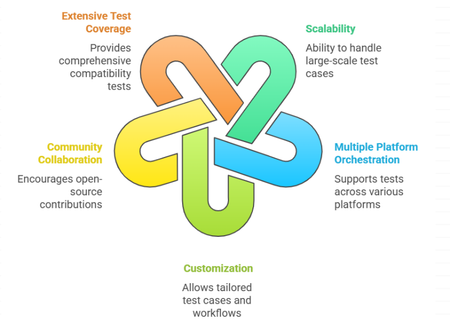
Introduction Building on the insights from our previous blog regarding how MSFT ensures the quality of Linux images, this article aims to elaborate on the open-source tools that are instrumental in securing exceptional performance, reliability, and overall excellence of virtual machines on Azure. While numerous testing tools are available for validating Linux kernels, guest OS images and user space packages across various cloud platforms, finding a comprehensive testing framework that addresses the entire platform stack remains a significant challenge. A robust framework is essential, one that seamlessly integrates with Azure's environment while providing the coverage for major testing tools, such as LTP and kselftest and covers critical areas like networking, storage and specialized workloads, including Confidential VMs, HPC, and GPU scenarios. This unified testing framework is invaluable for developers, Linux distribution providers, and customers who build custom kernels and images. This is where LISA (Linux Integration Services Automation) comes into play. LISA is an open-source tool specifically designed to automate and enhance the testing and validation processes for Linux kernels and guest OS images on Azure. In this blog, we will provide the history of LISA, its key advantages, the wide range of test cases it supports, and why it is an indispensable resource for the open-source community. Moreover, LISA is available under the MIT License, making it free to use, modify, and contribute. History of LISA LISA was initially developed as an internal tool by Microsoft to streamline the testing process of Linux images and kernel validations on Azure. Recognizing the value it could bring to the broader community, Microsoft open-sourced LISA, inviting developers and organizations worldwide to leverage and enhance its capabilities. This move aligned with Microsoft's growing commitment to open-source collaboration, fostering innovation and shared growth within the industry. LISA serves as a robust solution to validate and certify that Linux images meet the stringent requirements of modern cloud environments. By integrating LISA into the development and deployment pipeline, teams can: Enhance Quality Assurance: Catch and resolve issues early in the development cycle. Reduce Time to Market: Accelerate deployment by automating repetitive testing tasks. Build Trust with Users: Deliver stable and secure applications, bolstering user confidence. Collaborate and Innovate: Leverage community-driven improvements and share insights. Benefits of Using LISA Scalability: Designed to run large-scale test cases, from 1 test case to 10k test cases in one command. Multiple platform orchestration: LISA is created with modular design, to support run the same test cases on various platforms including Microsoft Azure, Windows HyperV, BareMetal, and other cloud-based platforms. Customization: Users can customize test cases, workflow, and other components to fit specific needs, allowing for targeted testing strategies. It’s like building kernels on-the-fly, sending results to custom database, etc. Community Collaboration: Being open source under the MIT License, LISA encourages community contributions, fostering continuous improvement and shared expertise. Extensive Test Coverage: It offers a rich suite of test cases covering various aspects of compatibility of Azure and Linux VMs, from kernel, storage, networking to middleware. How it works Infrastructure LISA is designed to be componentized and maximize compatibility with different distros. Test cases can focus only on test logic. Once test requirements (machines, CPU, memory, etc) are defined, just write the test logic without worrying about environment setup or stopping services on different distributions. Orchestration. LISA uses platform APIs to create, modify and delete VMs. For example, LISA uses Azure API to create VMs, run test cases, and delete VMs. During the test case running, LISA uses Azure API to collect serial log and can hot add/remove data disks. If other platforms implement the same serial log and data disk APIs, the test cases can run on the other platforms seamlessly. Ensure distro compatibility by abstracting over 100 commands in test cases, allowing focus on validation logic rather than distro compatibility. Pre-processing workflow assists in building the kernel on-the-fly, installing the kernel from package repositories, or modifying all test environments. Test matrix helps one run to test all. For example, one run can test different vm sizes on Azure, or different images, even different VM sizes and different images together. Anything is parameterizable, can be tested in a matrix. Customizable notifiers enable the saving of test results and files to any type of storage and database. Agentless and low dependency LISA operates test systems via SSH without requiring additional dependencies, ensuring compatibility with any system that supports SSH. Although some test cases require installing extra dependencies, LISA itself does not. This allows LISA to perform tests on systems with limited resources or even different operating systems. For instance, LISA can run on Linux, FreeBSD, Windows, and ESXi. Getting Started with LISA Ready to dive in? Visit the LISA project at aka.ms/lisa to access the documentation. Install: Follow the installation guide provided in the repository to set up LISA in your testing environment. Run: Follow the instructions to run LISA on local machine, Azure or existing systems. Extend: Follow the documents to extend LISA by test cases, data sources, tools, platform, workflow, etc. Join the Community: Engage with other users and contributors through forums and discussions to share experiences and best practices. Contribute: Modify existing test cases or create new ones to suit your needs. Share your contributions with the community to enhance LISA's capabilities. Conclusion LISA offers open-source collaborative testing solutions designed to operate across diverse environments and scenarios, effectively narrowing the gap between enterprise demands and community-led innovation. By leveraging LISA, customers can ensure their Linux deployments are reliable and optimized for performance. Its comprehensive testing capabilities, combined with the flexibility and support of an active community, make LISA an indispensable tool for anyone involved in Linux quality assurance and testing. Your feedback is invaluable, and we would greatly appreciate your insights.757Views1like0Comments