observability
56 TopicseBPF-Powered Observability Beyond Azure: A Multi-Cloud Perspective with Retina
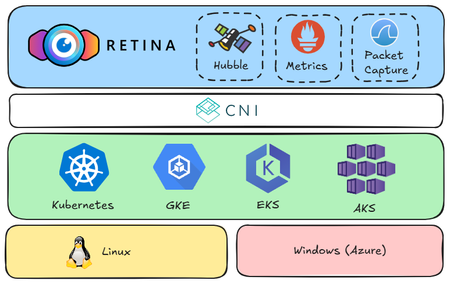
Kubernetes simplifies container orchestration but introduces observability challenges due to dynamic pod lifecycles and complex inter-service communication. eBPF technology addresses these issues by providing deep system insights and efficient monitoring. The open-source Retina project leverages eBPF for comprehensive, cloud-agnostic network observability across AKS, GKE, and EKS, enhancing troubleshooting and optimization through real-world demo scenarios.1.4KViews10likes0CommentsBuilding Production-Ready AI Agents in Microsoft Foundry: 10 Lessons Learned
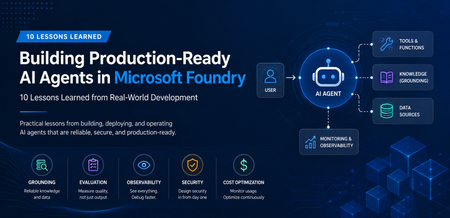
A Real-World Scenario Imagine a customer support agent that answers invoice questions. During testing, everything works perfectly. But in production: The Finance API occasionally times out. The knowledge base contains outdated information. Tool calls fail during peak traffic. Token consumption rises unexpectedly. The result isn't a broken AI model. It's an unreliable system. This is where Microsoft Foundry becomes critical. Building production-ready agents requires grounding, observability, resiliency, governance, and continuous monitoring. New challenges appear: Challenge Impact Hallucinated responses Reduced trust Missing citations Verification issues Tool failures Broken workflows High token consumption Increased cost Latency spikes Poor user experience Limited monitoring difficult troubleshooting Security concerns Compliance risks The lesson was clear: Production readiness is not about making the agent smarter. It is about making the agent reliable. My Observation While experimenting with AI agents in Microsoft Foundry, I found that model selection was rarely the primary challenge. Most production issues stemmed from grounding quality, tool reliability, observability, and security controls. Addressing these operational concerns often had a greater impact on user trust than changing the underlying model. Production AI Agent Reference Architecture A production-ready AI agent typically includes several components beyond the language model itself. Layer Technology User Interface Web App, Teams, Copilot Agent Runtime Microsoft Foundry Agent Service Knowledge Layer Azure AI Search Foundation Model GPT-4o Tool Integration APIs and Functions Monitoring Azure Monitor Security Managed Identity and Key Vault Request Flow Lesson 1: Start with the Use Case, Not the Model One of the most common mistakes is beginning with model selection. Many teams ask: Which model should I use? Should I choose GPT-4o? Should I use a larger context window? A more important question is: What business problem are we solving? Before evaluating models, define: Users Business goals Success metrics Compliance requirements Operational constraints An enterprise support agent and a financial compliance agent may use the same model but require completely different architectures. Key Takeaway Successful AI projects start with business outcomes, not model benchmarks. Lesson 2: Grounding Matters More Than Prompting Prompt engineering helps. Grounding drives trust. Without access to reliable enterprise data, even advanced models can generate confident but incorrect responses. Grounding Sources Azure AI Search SharePoint documents Internal knowledge bases Structured enterprise data Approved policy repositories Example from azure.ai.projects import AIProjectClient # Configure grounding with Azure AI Search agent = client.agents.create_agent( model="gpt-4o", name="support-agent", tools=[ { "type": "azure_ai_search", "azure_ai_search": { "index_name": "support-kb", "endpoint": "https://your-search.search.windows.net" } } ] ) In production environments, grounding through Azure AI Search helps agents retrieve trusted enterprise information rather than relying solely on model knowledge. This significantly improves response accuracy and trustworthiness. Try it yourself: Configure Azure AI Search as a knowledge source in Microsoft Foundry and compare grounded versus non-grounded responses. Key Takeaway Reliable retrieval is usually more valuable than sophisticated prompting. Lesson 3: Design Tool Usage Carefully AI agents become powerful when they can interact with external tools. Examples include: CRM systems Databases APIs Ticketing systems Business applications However, every tool increase complexity. Ask yourself: When should the agent call the tool? What happens if the tool is unavailable? How should failures be handled? Example Failure Scenario +-----------------------------+ | User asks for invoice status | +-------------+---------------+ | v +-----------------------------+ | Agent calls Finance API | +-------------+---------------+ | v +-----------------------------+ | API timeout detected | +-------------+---------------+ | v +-----------------------------+ | Fallback response returned | +-----------------------------+ Example Failure Scenario: A production-ready agent should gracefully handle external service failures and return a fallback response instead of failing completely. Key Takeaway Design for failure before designing for capability. Lesson 4: Evaluate Before Deployment Many teams test only for response quality. Production agents require broader evaluation. Evaluation Area Why It Matters Accuracy Correct answers Grounding Quality Faithful responses Latency User experience Safety Risk reduction Cost Sustainability Tool Success Rate Reliability Evaluation should become part of every deployment pipeline. Key Takeaway You cannot improve what you do not measure. Lesson 5: Make Observability a First-Class Feature Observability is often neglected until something breaks. Unfortunately, production systems always encounter unexpected behavior. Track metrics such as: Metric Purpose Request Volume Demand tracking Average Latency Performance Token Usage Cost visibility Grounding Success Rate Quality Tool Failure Rate Reliability User Satisfaction Business value Setting Up Tracing in Foundry from azure.ai.projects import AIProjectClient from azure.monitor.opentelemetry import configure_azure_monitor # Configure Azure Monitor for tracing configure_azure_monitor( connection_string="InstrumentationKey=xxx" ) # Run the agent response = agent.run( thread_id=thread.id, instructions="..." ) Tracing provides visibility into how an AI agent processes requests, invokes tools, and generates responses. By integrating Azure Monitor, teams can track latency, identify failed tool calls, analyze token usage, and troubleshoot unexpected agent behavior. This observability is essential for operating AI agents reliably in production environments. Try it yourself: Enabling tracing and monitoring for a Microsoft Foundry agent using Azure Monitor. Example Dashboard +-----------------------------+ | Production Monitoring Dashboard | +-----------------------------+ | Requests Today | 5,120 | | Average Latency | 3.2s | | Grounding Success | 97% | | Tool Failure Rate | 1% | | Average Tokens | 2,800 | +-----------------------------+ Monitoring production metrics helps teams understand agent performance, reliability, and cost efficiency. Key indicators such as latency, grounding success rate, tool failure rate, and token consumption provide valuable insights into the operational health of an AI agent and enable proactive troubleshooting before users are impacted. Key Takeaway What you can't observe, you can't effectively operate or improve. Tracing is a critical capability for maintaining production-ready AI agents. Lesson 6: Monitor Token Consumption Token usage directly impacts cost. A highly successful agent can quickly become expensive if token growth is unmanaged. Common optimization techniques: Optimization Benefit Prompt Compression Lower token usage Response Caching Reduced model calls RAG Filtering Focused context Context Trimming Smaller requests Model Selection Cost control Key Takeaway Cost optimization should be planned from day one. Lesson 7: Build Security into the Design Security should never be an afterthought. Enterprise AI systems must enforce the same security boundaries as traditional applications. Recommended Controls Control Purpose Managed Identity Secure authentication Azure Key Vault Secret management RBAC Authorization Audit Logs Compliance Content Filtering Safety Private Endpoints Network Security Guiding Principle An AI agent should never access data beyond a user's permissions. Key Takeaway Security is a design requirement, not a deployment task. Lesson 8: Expect Tool Failures External dependencies inevitably fail. Production-ready agents should anticipate: API downtime Authentication failures Network interruptions Rate limiting Unexpected responses Recommended Strategy Key Takeaway async def call_tool_with_resilience(tool_name, params): try: result = await tool_client.execute( tool_name, params, timeout=5.0 ) return result except TimeoutError: return await cache.get_fallback( tool_name, params ) Example Outcome: Introducing retry and fallback logic can significantly improve reliability. By handling temporary API failures gracefully and returning cached responses, when necessary, agents can reduce user-facing errors and provide a more consistent experience. Lesson 9: Evaluate the Process, Not Just the Output A correct answer does not always mean the process was correct. In production environments, teams should evaluate not only the final response but also the steps the agent took to generate that response. An answer may appear accurate even when it was based on incorrect retrieval results, unnecessary tool calls, or incomplete citations. Review: Retrieval quality Tool execution Citation accuracy Security compliance Reasoning path User Query | v Retrieval | v Tool Execution | v Reasoning | v Response For example, an agent might generate the correct answer by chance, even though it retrieved irrelevant documents or used an inefficient workflow. Without evaluating the process, these hidden issues may go unnoticed until they affect reliability, compliance, or user trust. Key Takeaway Inspect the entire workflow, not just the final answer. Lesson 10: Think Like a Production Engineer As adoption grows, operational excellence becomes the differentiator. Ask questions such as: Can we troubleshoot failures? Can we measure business impact? Can we control costs? Can we scale safely? Can we govern usage? These questions become more important than model selection over time. Key Takeaway Production success comes from engineering discipline, not model size. Microsoft Foundry Features That Helped Improve Reliability Foundry Capability Production Benefit Agent Service Agent orchestration Knowledge Sources Grounded responses Evaluations Quality measurement Tracing Workflow visibility Model Catalog Model flexibility Safety Systems Risk mitigation These capabilities help teams move beyond proofs of concept and build solutions that are ready for real-world adoption. Production Readiness Checklist Before releasing an AI agent, verify: ✅ Business goals defined ✅ Grounding strategy implemented ✅ Security controls enabled ✅ Evaluation pipeline established ✅ Monitoring configured ✅ Failure handling tested ✅ Cost optimization reviewed ✅ Governance process defined ✅ User feedback loop available ✅ Deployment rollback strategy prepared Get Started with Production-Ready Agents If you're building AI agents using Microsoft Foundry, start by focusing on grounding, observability, security, and evaluation from day one. Suggested next steps: Build your first agent in Microsoft Foundry Configure Azure AI Search grounding Enable tracing and monitoring Evaluate agent quality before deployment Add resilience and fallback strategies Which of these 10 lessons has been most valuable in your own AI agent journey? Share your experiences and insights in the comments.913Views5likes1CommentDiscover the Future of Data Engineering with Microsoft Fabric for Technical Students & Entrepreneurs
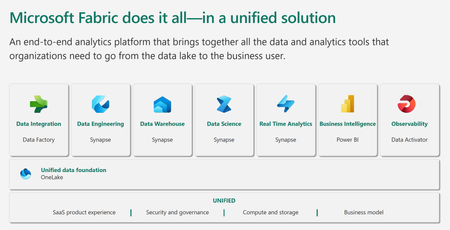
Microsoft Fabric is an all-in-one analytics solution for enterprises that covers everything from data movement to data science, Real-Time Analytics, and business intelligence. It offers a comprehensive suite of services, including data lake, data engineering, and data integration, all in one place. This makes it an ideal platform for technical students and entrepreneurial developers looking to streamline their data engineering and analytics workflows.6.2KViews4likes1CommentFoundry Agent Service at Ignite 2025: Simple to Build. Powerful to Deploy. Trusted to Operate.
The upgraded Foundry Agent Service delivers a unified, simplified platform with managed hosting, built-in memory, tool catalogs, and seamless integration with Microsoft Agent Framework. Developers can now deploy agents faster and more securely, leveraging one-click publishing to Microsoft 365 and advanced governance features for streamlined enterprise AI operations.11KViews3likes1CommentObservability for Multi-Agent Systems with Microsoft Agent Framework and Azure AI Foundry
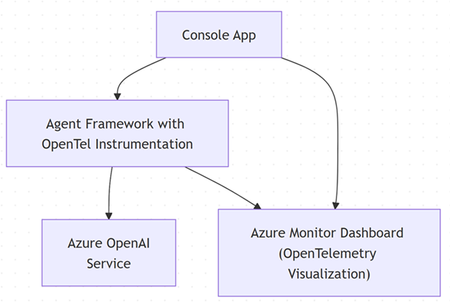
Agentic applications are revolutionizing enterprise automation, but their dynamic toolchains and latent reasoning make them notoriously hard to operate. In this post, you'll learn how to instrument a Microsoft Agent Framework–based service with OpenTelemetry, ship traces to Azure AI Foundry observability, and adopt a practical workflow to debug, evaluate, and improve multi-agent behavior in production. We'll show how to wire spans around reasoning steps and tool calls (OpenAPI / MCP), enabling deep visibility into your agentic workflows. Who Should Read This? Developers building agents with Microsoft Agent Framework (MAF) in .NET or Python Architects/SREs seeking enterprise-grade visibility, governance, and reliability for deployments on Azure AI Foundry Why Observability Is Non-Negotiable for Agents Traditional logs fall short for agentic systems: Reasoning and routing (which tool? which doc?) are opaque without explicit spans/events Failures often occur between components (e.g., retrieval mismatch, tool schema drift) Without traces across agents ⇄ tools ⇄ data stores, you can't reproduce or evaluate behavior Microsoft has introduced multi-agent observability patterns and OpenTelemetry (OTel) conventions that unify traces across Agent Framework, Foundry, and popular stacks—so you can see one coherent timeline for each task. Reference Architecture Key Capabilities Agent orchestration & deployment via Microsoft Agent Framework Model access using Foundry’s OpenAI-compatible endpoint OpenTelemetry for traces/spans + attributes (agent, tool, retrieval, latency, tokens) Step-by-Step Implementation Assumption: This article uses Azure Monitor (via Application Insights) as the OpenTelemetry exporter, but you can configure other supported exporters in the same way. Prerequisites .NET 8 SDK or later Azure OpenAI service (endpoint, API key, deployed model) Application Insights and Grafana Create an Agent with OpenTelemetry (ASP.NET Core or Console App) Install required packages: dotnet add package Azure.AI.OpenAI dotnet add package Azure.Monitor.OpenTelemetry.Exporter dotnet add package Microsoft.Agents.AI.OpenAI dotnet add package Microsoft.Extensions.Logging dotnet add package OpenTelemetry dotnet add package OpenTelemetry.Trace dotnet add package OpenTelemetry.Metrics dotnet add package OpenTelemetry.Extensions.Hosting dotnet add package OpenTelemetry.Instrumentation.Http Setup environment variables: AZURE_OPENAI_ENDPOINT: https://<your_service_name>.openai.azure.com/ AZURE_OPENAI_API_KEY: <your_azure_openai_apikey> APPLICATIONINSIGHTS_CONNECTION_STRING: <your_application_insights_connectionstring_for_azuremonitor_exporter> Configure tracing once at startup: var applicationInsightsConnectionString = Environment.GetEnvironmentVariable("APPLICATIONINSIGHTS_CONNECTION_STRING"); // Create a resource describing the service var resource = ResourceBuilder.CreateDefault() .AddService(serviceName: ServiceName) .AddAttributes(new Dictionary<string, object> { ["deployment.environment"] = "development", ["service.instance.id"] = Environment.MachineName }) .Build(); // Setup OpenTelemetry TracerProvider var traceProvider = Sdk.CreateTracerProviderBuilder() .SetResourceBuilder(ResourceBuilder.CreateDefault().AddService(ServiceName)) .AddSource(SourceName) .AddSource("Microsoft.Agents.AI") .AddHttpClientInstrumentation() .AddAzureMonitorTraceExporter(options => { options.ConnectionString = applicationInsightsConnectionString; }) .Build(); // Setup OpenTelemetry MeterProvider var meterProvider = Sdk.CreateMeterProviderBuilder() .SetResourceBuilder(ResourceBuilder.CreateDefault().AddService(ServiceName)) .AddMeter(SourceName) .AddAzureMonitorMetricExporter(options => { options.ConnectionString = applicationInsightsConnectionString; }) .Build(); // Configure DI and OpenTelemetry var serviceCollection = new ServiceCollection(); // Setup Logging with OpenTelemetry and Application Insights serviceCollection.AddLogging(loggingBuilder => { loggingBuilder.SetMinimumLevel(LogLevel.Debug); loggingBuilder.AddOpenTelemetry(options => { options.SetResourceBuilder(ResourceBuilder.CreateDefault().AddService(ServiceName)); options.IncludeScopes = true; options.IncludeFormattedMessage = true; options.AddAzureMonitorLogExporter(exporterOptions => { exporterOptions.ConnectionString = applicationInsightsConnectionString; }); }); loggingBuilder.AddApplicationInsights( configureTelemetryConfiguration: (config) => { config.ConnectionString = Environment.GetEnvironmentVariable("APPLICATIONINSIGHTS_CONNECTION_STRING"); }, configureApplicationInsightsLoggerOptions: options => { options.TrackExceptionsAsExceptionTelemetry = true; options.IncludeScopes = true; }); }); Configure custom metrics and activity source for tracing: using var activitySource = new ActivitySource(SourceName); using var meter = new Meter(SourceName); // Create custom metrics var interactionCounter = meter.CreateCounter<long>("chat_interactions_total", description: "Total number of chat interactions"); var responseTimeHistogram = meter.CreateHistogram<double>("chat_response_time_ms", description: "Chat response time in milliseconds"); 2. Wire-up the AI Agent: // Create OpenAI client var endpoint = Environment.GetEnvironmentVariable("AZURE_OPENAI_ENDPOINT"); var apiKey = Environment.GetEnvironmentVariable("AZURE_OPENAI_API_KEY"); var deploymentName = "gpt-4o-mini"; using var client = new AzureOpenAIClient(new Uri(endpoint), new AzureKeyCredential(apiKey)) .GetChatClient(deploymentName) .AsIChatClient() .AsBuilder() .UseOpenTelemetry(sourceName: SourceName, configure: (cfg) => cfg.EnableSensitiveData = true) .Build(); logger.LogInformation("Creating Agent with OpenTelemetry instrumentation"); // Create AI Agent var agent = new ChatClientAgent( client, name: "AgentObservabilityDemo", instructions: "You are a helpful assistant that provides concise and informative responses.") .AsBuilder() .UseOpenTelemetry(SourceName, configure: (cfg) => cfg.EnableSensitiveData = true) .Build(); var thread = agent.GetNewThread(); logger.LogInformation("Agent created successfully with ID: {AgentId}", agent.Id); 3. Instrument Agent logic with semantic attributes and call OpenAI-compatible API: // Create a parent span for the entire agent session using var sessionActivity = activitySource.StartActivity("Agent Session"); Console.WriteLine($"Trace ID: {sessionActivity?.TraceId} "); var sessionId = Guid.NewGuid().ToString("N"); sessionActivity? .SetTag("agent.name", "AgentObservabilityDemo") .SetTag("session.id", sessionId) .SetTag("session.start_time", DateTimeOffset.UtcNow.ToString("O")); logger.LogInformation("Starting agent session with ID: {SessionId}", sessionId); using (logger.BeginScope(new Dictionary<string, object> { ["SessionId"] = sessionId, ["AgentName"] = "AgentObservabilityDemo" })) { var interactionCount = 0; while (true) { Console.Write("You (or 'exit' to quit): "); var input = Console.ReadLine(); if (string.IsNullOrWhiteSpace(input) || input.Equals("exit", StringComparison.OrdinalIgnoreCase)) { logger.LogInformation("User requested to exit the session"); break; } interactionCount++; logger.LogInformation("Processing interaction #{InteractionCount}", interactionCount); // Create a child span for each individual interaction using var activity = activitySource.StartActivity("Agent Interaction"); activity? .SetTag("user.input", input) .SetTag("agent.name", "AgentObservabilityDemo") .SetTag("interaction.number", interactionCount); var stopwatch = Stopwatch.StartNew(); try { logger.LogInformation("Starting agent execution for interaction #{InteractionCount}", interactionCount); var response = await agent.RunAsync(input); Console.WriteLine($"Agent: {response}"); Console.WriteLine(); stopwatch.Stop(); var responseTimeMs = stopwatch.Elapsed.TotalMilliseconds; // Record metrics interactionCounter.Add(1, new KeyValuePair<string, object?>("status", "success")); responseTimeHistogram.Record(responseTimeMs, new KeyValuePair<string, object?>("status", "success")); activity?.SetTag("interaction.status", "success"); logger.LogInformation("Agent interaction #{InteractionNumber} completed successfully in {ResponseTime:F2} seconds", interactionCount, responseTimeMs); } catch (Exception ex) { Console.WriteLine($"Error: {ex.Message}"); Console.WriteLine(); stopwatch.Stop(); var responseTimeMs = stopwatch.Elapsed.TotalSeconds; // Record error metrics interactionCounter.Add(1, new KeyValuePair<string, object?>("status", "error")); responseTimeHistogram.Record(responseTimeMs, new KeyValuePair<string, object?>("status", "error")); activity? .SetTag("response.success", false) .SetTag("error.message", ex.Message) .SetStatus(ActivityStatusCode.Error, ex.Message); logger.LogError(ex, "Agent interaction #{InteractionNumber} failed after {ResponseTime:F2} seconds: {ErrorMessage}", interactionCount, responseTimeMs, ex.Message); } } // Add session summary to the parent span sessionActivity? .SetTag("session.total_interactions", interactionCount) .SetTag("session.end_time", DateTimeOffset.UtcNow.ToString("O")); logger.LogInformation("Agent session completed. Total interactions: {TotalInteractions}", interactionCount); Azure Monitor dashboard Once you run the agent and generate some traffic, your dashboard in Azure Monitor will be populated as shown below: You can drill down to specific service / activity source / spans by applying relevant filters: Key Features Demonstrated OpenTelemetry instrumentation with Microsoft Agent framework Custom metrics for user interactions End-to-end Telemetry correlation Real time telemetry visualization along with metrics and logging interactions Further reading Introducing Microsoft Agent Framework Azure AI Foundry docs OpenTelemetry Aspire Demo with Azure OpenAI2.4KViews3likes0Comments