numbering
3 Topics
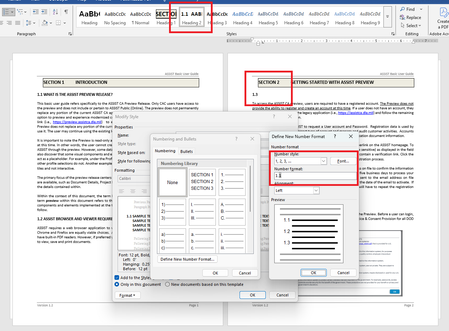
How do I correct heading numbering?
UPDATE: I couldn't remove this post, after I discovered the issue. Thanks! I need to update heading numbering within an old document. Custom headings were made (as pictured) but I need the heading levels 2 and 3 to include the parent heading number of each. When I attempt to update the level 2 heading for Section 2, it wants to continue with Section 1 (see pictured example). In the number format, I do not know how to tell Word to include the parent numbers? I included "1." thinking it was intelligent enough to know that was just a format designation of the parent heading, but I guess that isn't how. I realize I may be making some glaring mistakes, but just trying to get it right. So this is a learning moment. The caveat here is that I'm not creating the heading from scratch but rather, trying to update the existing document headings. I did follow some online suggestions but none of them addressed including the parent value in this scenario. Section 2 <Heading Level 1 text format> <-- Here I need the word "Section" to proceed the level 1 heading number 2.1 <Heading Level 2> <-- Here I need the level 2 heading to include the parent section level number 2.1.1 <Heading Level 3> <-- Here I need the level 3 heading to include level 1 and 2 numbers.Solved6.9KViews0likes8CommentsSharepoint Numbering Column won't let me have 001 or 012, it won't let me start with 0
Is there a way to set a SharePoint number column to allow numbers that start with 0? We're setting up an index system and for some reason it always removes the 0 and there doesn't seem to be a way to have it not do that. I also tried to use a text row instead, but even that converts 001 to 1.00000004.3KViews0likes3Comments
Blacked out Style elements
I'm having an issue with numbering.xml. For some reason, Word only shows black boxes in the "Styles" menu section, if numbering.xml does not contain the following element: <w:num w:numId="1"> <w:abstractNumId w:val="0"/> </w:num> Previously it worked fine without this element, but now it only shows black boxes if I don't put this element into the xml. I've checked the document with OpenXml_SDK Validator, and it does not complain about this missing element and says the document is valid. Is it really a mandatory xml tag or should I report it as a new bug?1.5KViews1like0Comments