notifications
202 Topics
SentinelOne detected \Config.Msi\4e6142cc.rbf as Ransomware in Windows Server
Hi, Recently, one of our Dell Windows servers triggered a critical ransomware detection in SentinelOne. Here are the specific alert details: File Path: \Device\HarddiskVolume3\Config.Msi\4e6142cc.rbf Originating Process: msiexec.exe (SupportAssist_x64.msi) SentinelOne Alert Summary: The alert indicates a critical detection on the Windows server involving an unsigned file (4e6142cc.rbf) located in the system's MSI configuration directory. Executed under the NT AUTHORITY\SYSTEM context by msiexec.exe (associated with SupportAssist_x64.msi), the file was flagged as ransomware under a "User-Defined Blocklist" policy with a malicious confidence rating. The system highlighted potential ransomware activity utilizing MSI installer processes, prompting immediate enforcement and investigation. We attempted to remove the file, but it reappears periodically, likely triggered by background installer/update tasks. Has anyone encountered similar alerts with Dell SupportAssist or SentinelOne? Is this a known false positive associated with MSI rollback (.rbf) files, or is further remediation required? Any insights or recommendations would be greatly appreciated. Many thanks, SebastianSolved425Views0likes1CommentWhat is the best Dell laptop for digital marketing and video editing?
Hi everyone, I'm looking for recommendations for a Dell laptop that can handle both digital marketing work and video editing. My main requirements are: - Smooth performance with multiple browser tabs and marketing tools - Good CPU and enough RAM for multitasking - Dedicated graphics for video editing - Good display and color accuracy - Fast SSD storage - Good cooling and battery life - Reliable performance for long working sessions I'm considering different Dell models but would appreciate recommendations from people who have actually used them for similar workloads. Which Dell laptop would you recommend, and what model/specifications have worked well for you? thanks in advance!209Views0likes1CommentAzure
Hi Microsoft Tech Community, I have an idea around bringing Azure cloud operations into Microsoft Teams through a conversational assistant. The concept is to provide a single Teams interface for Azure Monitor alerts, Log Analytics, Application Insights, Azure Cost Management, Microsoft Defender for Cloud, Resource Graph and Service Health. The idea goes beyond sending Azure alerts to Teams. For example, after receiving an alert, an engineer could ask questions such as “Why did this happen?”, “Show related errors”, “Are any production resources unhealthy?” or “What caused the cost increase?”, and the assistant could retrieve the relevant Azure telemetry and provide a summarized response. I would like to share the complete architecture and technical approach with the Microsoft community. Could you please advise which Microsoft Tech Community, discussion space, or feedback/ideas portal would be the most appropriate place to publish this? Thank you.179Views1like2Comments
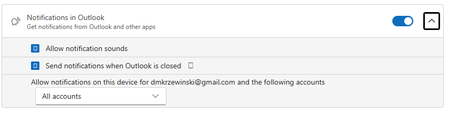
Custom notification sounds on multiple accounts in New Outlook
So, with this configuration/setting, am I correct in assuming that whatever sound I choose for a New Mail notification should apply to all accounts (I have four)? No matter what I do, I can configure only the Primary account sound, while all others insist on using the default sound. Very frustrating...391Views0likes3CommentsUnable to follow the Viva Glint Blog
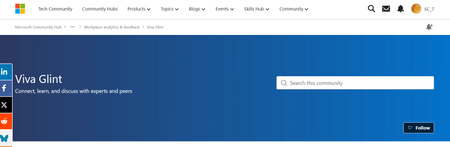
This post was originally submitted as a question in MS Learn on July 2 and I was advised to move it to the tech community. Hi MS team, I continue to click "Follow" on the Viva Glint blog to ensure I receive release updates but then get automatically set to not follow. https://techcommunity.microsoft.com/category/Viva-Glint For the second time, I am being automatically set to not follow. I checked with my admin team (there are 4 of us) and this is not an individual/isolated incident. They are also being automatically set to unfollow the Viva Glint blog. Please see screenshots attached from myself and my manager. We should be seeing the button as "Unfollow" indicating that we are following, instead it is showing "Follow" indicating that we are not following. I have opened an MS ticket about this already and was directed to contact the Microsoft Tech Community platform team. I followed the Glint blog back on 4/9/2026 and then was set to unfollow. I followed again at the beginning of June (maybe on 6/4/2026) and I was set to unfollow again. I did receive one "Microsoft Community Hub Weekly Digest" email on 6/7/2026 so I must have still been following then but I have not received any communications before or after. Can you please provide an explanation and a solution? We need to receive email notifications about updates and releases. Following the blog should be a reliable process. As of today, 7/28/2026, I am still following the Glint blog which is great but how do I know I won't be automatically set to "unfollow" a third time?278Views0likes2CommentsTechcommunity Follow email notification no longer working
Hello, Not sure if this is the right place to post this issue but I could not find another method to report this issue.. As an Exchange Admin in our invironment it's very usefull to stay up to date on the latest new posted in a variety of blogs on this website (Exchange Blog, M365 Blog, ...) This all went well until a few months ago where I started noticing I didn't receive any weekly updates anymore regarding new blogposts & tried to manually go check periodically, thinking it would be a temporary system. After investigation i've noticed that i'm not the only admin in our company that no longer receives these emails from mailto:email address removed for privacy reasons So I wonder if something bigger is up or if it's only my company being affected, not receiving these follow notifications anymore? Is there any other way that I should report this issue, to those managing this website so it can be investigated in detail if it's only us? Already tried to unfollow/delete follows in my profile - save - follow again, same on the respective blog pages, but this does not seem to change anything.274Views0likes2Comments