msix
138 Topics
Trying to MSIX package LOB application that needs TWAIN access
So I think this isn't possible but I just wanted to ask. I've a LOB application that needs to access TWAIN scanning devices. How this works in a normal environment is that the TWAINDSM.dll (TWAIN Data source manager) is loaded from c:\windows\system32 This then scans the C:\Windows\twain_32 or C:\Windows\twain_64 depending on if the app is x86 or x64 The scanning manufacturers will have their TWAIN drivers installed to c:\windows\twain_32 (or 64) as subfolders and the TWAIN Data source manager scans these subfolders for available TWAIN devices that can be connected to. All this breaks down in an MSIX environment because the container doesn't have access to C:\windows\twain_32\ManfactureDriverN folder It can see the folders and when the TWAINDSM tries to initialize the driver it fails, most likely due to sandbox limitations. Does anyone know of a solution to this, or apps like this will always need to stick to MSI packaging because of this limiation. Thanks.883Views1like15CommentsWindowsAppRuntime 1.4 Failures in AVD Multi-Session – Event ID 404 Production Case
We recently experienced a production issue in an Azure Virtual Desktop multi-session environment that initially looked random — but turned out to be a shared framework instability amplified by scale. Environment: AVD multi-session host pools FSLogix profile containers MSIX App Attach Intune-managed Clean golden image Everything looked healthy. Yet packaged applications started failing across multiple host pools. Symptoms observed Users reported: Error 0x80070005 AppXDeploymentServer Event ID 404 WindowsAppRuntime 1.4 marked as NeedsRemediation Failures persisted after: Reboots Host redeployments Image rebuild This was not: A profile corruption issue An App Attach packaging issue An Intune deployment failure What actually broke Under session churn conditions (logoff / new session / runtime re-validation), WindowsAppRuntime 1.4 entered a NeedsRemediation state. Event Viewer showed: AppXDeploymentServer Event ID 404 HRESULT 0x80070005 Runtime file creation failure under WindowsApps Multi-session did not cause the issue. It amplified it. Shared framework registration timing under concurrent sessions made a rare condition systemic. Why multi-session exposed it In single-session environments, runtime inconsistencies remain isolated. In multi-session: Shared framework dependencies are reused Concurrent validation occurs Host pools recycle under load Registration timing becomes critical What would be a rare edge case became recurring instability. Remediation approach Instead of periodic polling, we moved to event-driven self-healing. Detection trigger: AppXDeploymentServer Event ID 404 Remediation logic: Restart AppXSVC Re-provision WindowsAppRuntime 1.4 Prevent concurrent duplicate execution Log execution We implemented a Scheduled Task: Monitoring Operational log Triggering immediately on Event ID 404 Running under SYSTEM Deployed via Intune Win32 package Detection logic validating task presence This converted reactive troubleshooting into automated correction across host pools. Architectural takeaway Multi-session environments amplify shared dependency weaknesses. WindowsAppRuntime is not “just another component” — it is a platform dependency. If the runtime layer drifts, everything layered above it collapses: MSIX App Attach Packaged apps Registration consistency Self-healing must be part of AVD design. For the structured technical case study (including deployment pattern and remediation logic), full write-up here: https://modernendpoint.tech/avd-multi-session-failure-analysis/ Has anyone else observed WindowsAppRuntime 1.4 entering a NeedsRemediation state under multi-session load? Curious if others saw correlation with specific Windows updates. — Menahem Suissa Modern Endpoint Architect643Views1like2Comments
Shortcut icons disappear
Hello! I wanted to add shortcuts of some applications to my desktop, then I found out it's impossible for a normal user. You have to either attach it to the task bar or the Start menu, and pray Microsoft won't mess up with your Start menu layout in the next update (happened twice already). I found out this discussion and followed the instructions (going to explorer.exe shell:AppsFolder and creating shortcuts from there), but it only worked for a few minutes. In less than 10 minutes, two of the six shortcuts I've created using this method had their icons replaced by white paper icons. After restarting the computer, only one remained with its original icon (Figma Desktop). And after updating Figma, it completely disappeared (not leaving just a white paper, the shortcut completely vanished from the desktop). When I go to the same folder, they are iconless there as well. So, how can I make desktop shortcuts that keep their nice icons even after restarting or updating the software? Thanks in advance!187Views0likes0CommentsUser can not create Desktop shortcut
Hello, i have migrated an application from MSI to MSIX. The application is used by 9000 users and some users created a desktop shortcut for themself. Now, i delete the MSI on every PC and deploy the MSIX to the users. The desktop shortcut, which they manually created, doesn't work any more. Now the users ask me how they can create a new desktop shortcut and i have no answer. The users can pin the app to the taskbar, but i don't know how the can pin the app to the desktop. I think that Microsoft recommends that user preferences are exclusively chosen by the user. So the user should have the posibility to create an desktop shortcut for an MSIX application. Best Regards FrankSolved3.7KViews0likes6CommentsAdd Environment Variable to MSIX package using PSF Fixups in Packaging Tool - what am I missing?
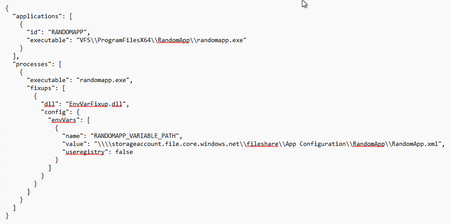
Hi everyone, I am currently testing packaging apps into the MSIX format and have been successful for any simple installers. Now that I am trying to package more advanced installers I have to utilize PSF Fixups, in which I have issues with the Environment Fixup. Even though I have read up on previous discussions regarding this, I simply cannot get this fixup to be successfully added and recognized within the MSIX App. I am judging this based on that the same app will tell in its own app options whether the environment variable is available or not. Some key info (Tried attaching several screenshots, but it wilI not let me. Hopefully the necessary information comes across): Using MSIX Packaging Tool version 1.2024.405.0 Using the included PSF Fixup for Environment Variables within MSIX Packaging Tool. All PSF Fixup files are included in the MSIX Package. In the manifest file the executable "PsfLauncher64.exe" is pointed at. Basically, the config.json is formatted in the following way if I were to change out anything referring to the actual app name. What am I possibly missing out on or have misunderstood here? Any help in leading me into the right direction is very much appreciated, thanks!571Views0likes5Comments
Reset user choice for windows.protocol tel:
Hi everyone, we ship an MSIX that registers a full-trust Dialer.exe as a windows.protocol handler for tel: so users can place calls from Outlook etc. Goal After installing our MSIX, we’d like Windows to show the “How do you want to open this?” prompt again for tel: so users see the new option. With our old MSI this was easy, we deleted HKCU\Software\Microsoft\Windows\Shell\Associations\UrlAssociations\<protocol>\UserChoice via the manifest entry: <RemoveRegistryKey Id="WipeDialerOnInstall" Root="HKCU" Key="SOFTWARE\Microsoft\Windows\Shell\Associations\UrlAssociations\tel\UserChoice" Action="removeOnInstall"/> Problem With MSIX there seems to be no manifest option to mimic that. We tried deleting UserChoice on first app start (HKCU, RegDeleteTree/SHDeleteKey), but it did not work. Questions Is there any supported or recommended way to trigger the default-app prompt (or clear the choice) for a specific protocol when using MSIX? Is deleting UserChoice from a full-trust MSIX app considered supported/allowed for Store submissions? Any guidance or stance appreciated! Thanks!425Views0likes3Comments.WapProj build using "unvirtualizedResources" removed entry from manifest
I have a .wapproj that needs to use RegistryWriteVirtualization (aka "Flexible Virtualization) as described in Flexible virtualization - MSIX | Microsoft Learn This is for an MSIX package that will not be delivered via the Microsoft Store. The changes are made to the Package.appxmanifest file, and saved. The build action in Visual Studio removed the Capability declaration line for "unvirtualizedResources" from the Package.appxmaifest file before processing the file, leading to an error complaining that the RegistryWriteVirtualization requires this capability. Workaround: I can mark the file read-only outside of Visual Studio to keep VS from changing the file as a temporary workaround to prove out that the code depending upon these settings works. Why workaround is not acceptable: This workaround is not long-term viable, as other developers and automated workflows working on the project will lose the read-only setting (as it will not persist in GitHub) and have a broken build. It is clear that the VS code looking at this file is aware of both the desktop6 and virtualization schemas and their requirements and restrictions, but seemingly, although aware of other rescap capability extensions is unaware of this one. Requested action: Please add support for missing capabilities declarations in Visual Studio and/or underlying tools.428Views1like2CommentsI'm not seeing what I expected to see with Windows Application Packaging
I'm following along in a YouTube video I found that covers MSIX. I've created a simple WPF app in .NET 9, which is just a Hello World app. Then I added the Windows Application Packaging project. Or at least that's what I'm trying to do. What I got was two new projects added to my VS solution. Given my app's name is MyApp, one of the new projects is called MyAppInstaller, and the other new app is called "MyAppInstaller (Package)". I was expecting to see only the MyAppInstaller project added. I'm wondering if I've done something wrong.259Views0likes1Comment