msignite
95 TopicsScale Data Collection Endpoint private connectivity with IP Endpoint Compression - Preview
Scale Azure Monitor Private Link with data collection endpoint IP compression As organizations expand their Azure Monitor deployments, private networking needs to scale with them. For enterprises running large, distributed environments, that can create an increasingly important challenge: how do you grow private monitoring without consuming private IP address space at the same rate? Azure Monitor is introducing private IP endpoint compression for data collection endpoints (DCEs) connected through Azure Monitor Private Link Scope (AMPLS). This capability is designed to reduce the private IP footprint by ~90%-95% associated with DCEs while preserving the Azure Monitor Private Link architecture and the security controls customers already use. The challenge: private monitoring at enterprise scale Organizations often centralize Azure Monitor connectivity through carefully governed hub-and-spoke networks. As these environments grow, they can include monitored resources, data collection rules (DCRs), DCEs, and Log Analytics workspaces distributed across multiple regions. When private connectivity is required, DCEs are connected through AMPLS. The associated private endpoint uses addresses from a customer-managed subnet. As more DCEs are added, this can increase the private IP footprint required for Azure Monitor connectivity and create challenges such as: Increased subnet-capacity planning Additional network-governance reviews Delays when onboarding workloads or regions Provisioning challenges when available subnet capacity becomes constrained More operational complexity in centralized DNS and hub-and-spoke environments As customers onboard more Azure resources to send telemetry over private networks, they need a scalable way to preserve valuable private IP address space without increasing the operational complexity of their network-isolated monitoring environment. Introducing DCE private IP endpoint compression DCE private IP endpoint compression changes how DCE service endpoints are represented behind an AMPLS private endpoint. Instead of having the private IP footprint scale directly with every DCE, the compressed architecture groups compatible DCE service endpoints regionally and allows them to use a smaller, bounded set of private IP configurations. Requests continue to be routed to the intended DCE based on the requested endpoint and the existing Azure Monitor authorization context. The result is a more scalable private-network architecture without introducing a new data collection model. What does this mean for customers? Large enterprises have limited, tightly managed, often fragmented private IPv4 spaces. Private endpoints require IP addresses from customers' private IPv4 subnets. With private IP endpoint compression, all DCEs in a region share 3 regional private IPs. For example, 20 DCEs drop from 60 private IPs to 3, which is 95% fewer. Private IP address use stops growing with every DCE you add. There are no changes to how DCEs, DCRs, AMPLS, Azure Monitor Agent or Log Analytics work. Use private address space more efficiently A smaller, bounded private IP footprint can preserve valuable subnet capacity for additional workloads and Azure services. This can be particularly useful for enterprises operating with constrained private IP address space or centralized network-allocation processes. Make network planning more predictable Instead of treating each additional DCE as a proportional increase in private IP requirements, network teams can plan capacity around the regional architecture. This approach makes the network planning more predictable for enterprise customers. Scale monitoring across more workloads and regions Reducing pressure on private IP address space can make it easier to expand monitoring across applications, subscriptions, and regions without repeatedly redesigning private endpoint subnets. Reduce operational friction A more compact endpoint representation can reduce the networking work associated with subnet capacity reviews, expansion planning, and Private Link onboarding. What stays the same? One of the goals of this design is to improve network scalability while preserving the Azure Monitor model customers already use. DCE private IP endpoint compression doesn't change: The role of AMPLS as the private Azure Monitor network boundary The role of the private endpoint connecting a virtual network to AMPLS AMPLS Open and Private Only access modes DCR collection, transformation, and routing logic Azure Monitor Agent configuration semantics Log Analytics tables, retention, or KQL query behavior The amount of telemetry ingested into Azure Monitor Application Insights data collection, which doesn't use DCEs Azure Monitor ingestion charges Azure Private Link data-processing charges based on data volume Customers should continue following their existing DNS, routing, network security, public network access, and AMPLS configuration requirements. Preparing for the controlled preview DCE private IP endpoint compression is currently intended for subscriptions participating in a controlled preview. For customers participating in the preview, we recommend starting with a nonproduction or limited deployment. Before expanding the deployment: Map your topology. Understand the virtual networks, peering, AMPLS resources, private endpoints, DCEs, DCRs, workspaces, DNS zones, and supporting subnets involved. Review DNS ownership. Pay particular attention to networks sharing Azure Monitor private DNS zones and use a deliberate AMPLS topology. Establish a baseline. Record your existing private endpoint IP configurations and DCE DNS responses. Confirm regional alignment. Review the relationship between monitored resources, DCE configuration access, ingestion endpoints, and destination workspaces. Review access modes. Confirm the appropriate use of AMPLS Open or Private Only access modes for your security requirements. Validate end to end. Verify DNS resolution, Azure Monitor Agent configuration access, DCR health, ingestion, transformation, and query behavior before expanding the deployment. Looking ahead Bottom line: DCE private IP endpoint compression is designed to make private Azure Monitor deployments easier to scale by reducing the relationship between DCE growth and private IP consumption, while preserving the Azure Monitor and AMPLS architecture customers use today. Customers interested in participating in the controlled preview can contact the author via email with their subscription need to be allowlisted for the preview. This preview is available only to allowlisted subscriptions. To request access, submit your Azure subscription ID through the DCE IP Endpoint Compression preview onboarding form. Wait for Microsoft to confirm that your subscription is preview-enabled before you create the test DCEs. IP compression applies automatically to newly created DCEs in preview-enabled subscriptions. There's no additional setting to enable when you create a DCE or associate it with AMPLS. We look forward to helping customers scale private Azure Monitor deployments while making more efficient use of their network address space. Resources Learn more about designing and configuring private connectivity for Azure Monitor: Scale Data Collection Endpoint (DCE) private connectivity with IP Endpoint Compression (Preview) - Azure Monitor | Microsoft Learn Use Azure Private Link to connect networks to Azure Monitor Learn how Azure Monitor Private Link Scope (AMPLS), private endpoints, and Azure Monitor resources work together to provide private connectivity. Design your Azure Monitor Private Link configuration Review network topology, DNS, AMPLS limits, hub-and-spoke architectures, and other considerations when planning Azure Monitor Private Link. Configure Azure Monitor Private Link Follow the configuration guidance for creating an AMPLS, connecting Azure Monitor resources such as Data Collection Endpoints (DCEs), and connecting the AMPLS to a private endpoint. Prevent IPv4 Exhaustion in Azure - Azure Architecture Center | Microsoft Learn171Views0likes0Comments
Workload Orchestration in the Azure portal is now available: Deploy in minutes, scale with ease
Edge deployments rarely stay simple for long. What begins as an application running on a single Kubernetes cluster can quickly expand across stores, factories, branches, or other distributed locations, each having different configuration needs. That is exactly where workload orchestration for Azure Arc comes in. Workload orchestration helps teams manage that complexity by providing a centralized approach to consistently define, configure, and deploy applications across distributed cloud, on-premises, and edge environments, all while catering to custom configuration needs of individual sites and deployment targets. See the experience in action Evaluating a new deployment approach often starts slowly: study the documentation, package an application, complete the setup, and only then decide whether it fits. The Azure portal reverses that order with its jumpstart onboarding experience. Bring your Azure Arc-enabled Kubernetes cluster and deploy a pre-packaged application in minutes. Whether you are validating a proof of concept or introducing the product to your broader team, the new portal onboarding experience turns the end-to-end workflow into something you can quickly try on your own cluster. Scale from first deployment to production Once you have validated the first deployment, you can evolve the same approach for production. Onboard your infrastructure into workload orchestration, organize your deployment sites into hierarchies, and define shared configurations for all deployments – all without leaving the portal. This lets you expand from one cluster to a distributed fleet while retaining centralized governance, repeatability, and site-level flexibility. Ready to try it? Try now by deploying your first application with workload orchestration in the Azure portal. Explore the product documentation for the complete set of capabilities.485Views0likes0CommentsPUBLIC PREVIEW - Azure Monitor - Collect Azure Resource Platform Logs at Scale with DCRs
PUBLIC PREVIEW - Azure Monitor - Collect Azure Resource Platform Logs at Scale with DCRs. How DCR-based platform logs simplify the telemetry collection for organizations managing 1,000+ resources.1.3KViews2likes1CommentAzure Event Grid: Powering IoT and Event-Driven Applications at Scale
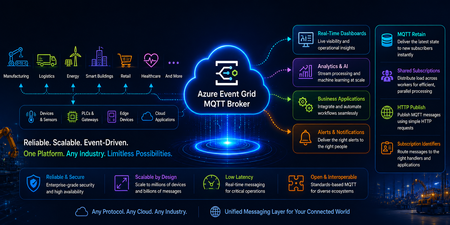
Modern IoT and event-driven applications demand more than reliable messaging. They require the ability to handle larger payloads, efficiently route data at scale, and automatically adapt to changing workloads. Today, we're excited to introduce a new set of capabilities in Azure Event Grid Namespace (MQTT Broker & Event Broker) that help organizations build more scalable, resilient, and cost-efficient connected solutions. With support for MQTT v5 Subscription Identifiers, larger messages(1MB), and Auto scale-up and scale-down, customers can simplify architecture, reduce operational overhead, and accelerate deployments across manufacturing, automotive, retail, energy, and other connected industries. Event Grid Standard: MQTT v5 Subscription Identifier (GA) What it solves In many MQTT applications, one client subscribes to several topics at the same time. When a message arrives, the application needs a quick way to tell which subscription triggered it and what should happen next. Which subscription triggered this message? Which business rule should process it? What’s new MQTT v5 Subscription Identifier is now generally available in Event Grid MQTT broker. Each subscription can have an ID, and that ID is included when the message is delivered. Each subscription can have an ID, and when a message is delivered, that ID comes with it. Why it matters Faster message routing Cleaner application logic No need to parse topic strings Simple example Example subscriptions: Subscription ID 101 = factory/line1/temperature Subscription ID 202 = factory/line1/vibration When a message arrives If the message comes in with Subscription ID 101, the app immediately knows it is temperature data and can send it to the correct processing path without inspecting the topic string. Common use cases Manufacturing lines with hundreds of sensors Automotive telemetry platforms Multi‑tenant IoT solutions Rule engines and stream processors Event Grid Standard: 1MB Message Support (GA) - Coming Soon Applies to both MQTT and non-MQTT workloads. What it solves As devices and applications become more capable, the events they send are becoming richer too. In many real-world scenarios, a single message may need to include things like: Sensor batches Telemetry snapshots Diagnostics data Configuration payloads Before this, customers often had to split large messages into smaller pieces or store the payload somewhere else and send only a reference. What’s new Event Grid Standard Namespace now supports larger event payloads upto 1MB for both MQTT and non-MQTT scenarios. That means customers can send more complete information in one message and reduce complex workarounds in design. Why it matters Fewer architectural components Simpler producers and consumers Lower latency for real‑time decisions Example Before: A factory device sent the main payload to storage and then published a small event that pointed to that file. Now: The same device can publish the full event payload directly through Event Grid, making the flow easier to build and easier to operate. Example: A smart machine can send a larger diagnostic package in one event, including the machine ID, a batch of readings, and a timestamp, instead of splitting the information across multiple services. Common use cases Smart manufacturing telemetry Vehicle diagnostics and firmware data Batch sensor readings from edge devices Rich business events for analytics Event Grid Standard: Autoscale Up and Down (Preview) - Coming Soon Applies to both MQTT and non-MQTT workloads. What it solves Event-driven systems rarely operate at a constant rate. Traffic patterns fluctuate throughout the day, with predictable peaks, seasonal surges, and unexpected bursts that can quickly overwhelm static infrastructure. Think about: Morning factory startup Fleet check‑ins at the top of the hour Flash sales or system bursts Manually sizing infrastructure leads to: Over‑provisioning (higher cost) Under‑provisioning (missed events) What’s new Azure Event Grid Standard Namespace now supports Autoscale Up and Down, automatically adjusting capacity based on real-time workload demand. Whether you're running MQTT-based IoT workloads or event-driven applications using HTTP, AMQP, or CloudEvents, Event Grid dynamically scales resources to match traffic patterns without manual intervention. As demand grows, Event Grid automatically adds capacity to absorb increased traffic and maintain performance. When activity subsides, resources scale back down to optimize efficiency and reduce costs. Why it matters With Autoscale, customers can focus on building applications instead of managing infrastructure and reap benefits like: Scale seamlessly during traffic spikes without pre-provisioning for peak demand. Reduce costs during quieter periods by automatically scaling capacity down. Maintain consistent performance and reliability across changing workloads. Eliminate manual tuning and capacity planning, reducing operational overhead. Optimize resource utilization while supporting millions of devices and high-volume event streams. Use case: A Modern Event-Driven Manufacturing Platform A smart manufacturing company uses Microsoft to connect factory machines, sensors, edge gateways, and enterprise applications through a single scalable eventing platform. Devices publish rich telemetry and diagnostic payloads using MQTT, while cloud applications send operational and business events using HTTP. The company has steady traffic during the day, a large spike during shift changes, and much lower usage overnight. With autoscale, Event Grid adjusts capacity automatically, so performance stays strong when traffic is high and costs stay more efficient when traffic is low. Common use cases Shift‑based manufacturing systems Connected vehicle platforms Event‑driven commerce backends Analytics pipelines with bursty data Building IoT platforms, manufacturing and automotive solutions, or high-scale event-driven applications? Azure Event Grid MQTT Broker now delivers larger messages, subscription Identifiers, and autoscale up/down, helping you simplify operations, improve performance, and optimize costs all on a single eventing platform. Event Grid Basic: Powering Event Driven Payments with Stripe (GA) Developers can seamlessly route Stripe events into Azure Event Grid to build scalable, event driven architectures without managing webhooks or custom brokers. Event Grid acts as a fully managed event broker between Stripe and Azure services. Azure Event Grid now delivers Stripe events directly to Azure subscribers, including: Azure Functions Logic Apps Event Hubs Service Bus And more With Event Grid’s native integration with Microsoft Fabric, Stripe events can also be ingested as continuous streams, enabling real time transformation, enrichment, and analytics within Fabric. Learn more.342Views0likes0CommentsBuild Smarter, Simpler IoT Messaging with Azure Event Grid MQTT Broker
Why this matters for modern IoT solutions As IoT solutions grow, teams need messaging that is reliable, scalable, and simple enough to operate across devices, apps, and cloud services. Azure Event Grid MQTT broker helps organizations connect devices and applications using standard MQTT patterns while also integrating with Azure services for downstream processing and automation. The result is a managed, cloud-native approach to messaging that supports both technical flexibility and business agility. With support for MQTT v3.1.1 and MQTT v5, Azure Event Grid MQTT broker enables device-to-device, device-to-cloud, and server-to-device communication patterns. It is especially useful in scenarios where customers want to ingest telemetry, send commands, broadcast alerts, and route data into analytics or workflow systems without building and maintaining broker infrastructure themselves. In this post, we focus on four capabilities that make the experience even more powerful and easier to adopt: MQTT Retain support, Shared Subscriptions, HTTP Publish of MQTT messages, and Subscription Identifiers. These features help new subscribers get context immediately, allow multiple consumers to scale out work, let HTTP-native back-end services participate in MQTT workflows, and make message handling more efficient for clients. Four features that make MQTT messaging easier to use These capabilities are designed to solve everyday problems that customers face when building real-world IoT systems. MQTT Retain support helps newly connected clients get the latest known value right away. Shared Subscriptions help distribute message processing across multiple consumers for better scale and resilience. HTTP Publish of MQTT messages enables back-end services to send MQTT messages without keeping long-lived MQTT sessions open. Subscription Identifiers help clients understand which subscription matched a received message, making routing and processing simpler. Together, these features reduce application complexity, improve responsiveness, and make it easier for teams to build user-friendly, production-ready IoT experiences. MQTT Retain support: Give new subscribers the latest known value instantly One of the most helpful MQTT patterns is the ability to retain the latest message on a topic. With MQTT Retain support in Azure Event Grid, the broker stores the last known good value for a topic and delivers it immediately to a new subscriber. That means a client does not have to wait for the next live publish to understand the current state. This is especially valuable for scenarios such as device state, configuration settings, last reported sensor readings, and control values. When a new application, dashboard, or device comes online, it can immediately understand the current state of the system and take action faster. Example Imagine a smart factory dashboard subscribing to the topic factory/line1/status. If the latest retained message says Running, a newly opened dashboard can display that status immediately instead of waiting for the next update. Retained messages ensure new subscribers instantly receive the latest device state without waiting for the next publish Why customers like it Faster onboarding for newly connected devices and apps Better user experience in dashboards and operator tools Less waiting for current state information Simpler application logic for recovering context Common use cases Device online or offline state Latest environmental reading such as temperature or humidity Machine mode, recipe, or configuration profile Current command state for field equipment Shared Subscriptions: Scale message processing without extra complexity As message volume grows, a single subscriber may not be enough to process all incoming data efficiently. Shared Subscriptions solve this by allowing multiple consumers to share the work for a subscription. Instead of every consumer receiving every message, the broker distributes messages across members of the shared group. This is a powerful pattern for scaling out telemetry processing, command handling, or event enrichment pipelines. It also helps improve resilience because work can continue even if one consumer instance goes offline. Example Suppose you have a fleet of connected vehicles publishing telemetry to vehicles/+/telemetry. A back-end processing service might run three worker instances subscribed through a shared subscription. Rather than each worker processing all messages, the workload is divided across the three instances, which improves throughput and reduces duplicate effort. Shared subscriptions distribute telemetry messages across multiple worker nodes for scalable, load-balanced, and resilient stream processing. Why customers like it Easier horizontal scaling for high-volume topics Improved throughput for back-end processing Better fault tolerance for worker-based applications Cleaner architecture for stream processing pipelines Common use cases Telemetry ingestion at scale Alarm processing pipelines Order or command handling across multiple workers Message transformation before routing to analytics platforms Shared Subscriptions help teams grow from pilot projects to production-scale deployments without redesigning their application model. They make it easier to add processing capacity as business needs expand. HTTP Publish of MQTT messages: Bring HTTP-native back-end systems into MQTT workflows Not every application wants to maintain a persistent MQTT connection. Many back-end systems are built around stateless HTTP APIs and prefer simple request-based interactions. Azure Event Grid supports publishing MQTT messages over HTTP, which makes it easier for server-side applications to send messages into MQTT-based solutions. This capability is a strong fit for server-to-device command and control, updates from enterprise systems, and retained message management. It also helps protect broker stability by reducing the need for a large number of long-lived sessions from services that do not truly need them. Example Imagine a support application that needs to send a message to a field device asking it to refresh its configuration. Instead of opening an MQTT session, the application can make an HTTP POST request that maps to an MQTT publish operation and sends the command to the desired topic. Why customers like it Simple integration for HTTP-native applications No need for persistent broker sessions in back-end services Consistent messaging flow across HTTP and MQTT publishers Easier integration with business systems and automation workflows Common use cases Server-to-device commands Application-driven updates and prompts Retained message management Integration with business processes, portals, and line-of-business apps Subscription Identifiers: Make client-side message handling smarter As applications grow, a single client may subscribe to many topic filters at the same time. Subscription Identifiers help the client understand which subscription matched a delivered message. This makes application logic cleaner because the client does not have to guess why a message arrived or manually compare it against every subscribed filter. In practical terms, this is useful when one client is listening for different kinds of data such as telemetry, alerts, and control acknowledgments. Instead of writing extra parsing logic, the client can use the identifier to route the message to the right processing path immediately. Example A monitoring application subscribes to one filter for devices/+/telemetry and another for devices/+/alerts. When a message arrives, the subscription identifier helps the application know whether the message should be shown on a live dashboard, routed to alert handling, or stored for analysis. Why customers like it Simpler client code Cleaner separation of processing paths Easier troubleshooting and observability Better support for sophisticated MQTT v5 client applications Common use cases Applications subscribing to multiple topic categories Edge gateways handling mixed streams Dashboards that separate operational data from alerts Services that apply different business logic based on subscription intent Putting it all together: A simple customer scenario Consider a smart manufacturing plant. Machines, PLCs, and industrial sensors continuously publish telemetry such as production counts, machine health, vibration, and temperature. Operations dashboards subscribe to real-time machine status and line performance. Maintenance systems send commands to equipment when anomalies or thresholds are detected. Meanwhile, analytics workers process high-volume telemetry streams in parallel for quality monitoring, predictive maintenance, and throughput optimization. In this scenario, MQTT Retain support ensures that a newly opened operations dashboard immediately sees the latest machine state without waiting for the next update. Shared Subscriptions enable multiple analytics workers to process telemetry streams in parallel, improving scalability and avoiding duplicate processing. HTTP Publish of MQTT messages allows MES or maintenance applications to send commands to machines through simple HTTP requests, without needing a persistent MQTT connection. Subscription Identifiers help downstream systems distinguish between telemetry, alerts, and control signals, enabling clean routing to the right processing pipelines. The result is a unified, event-driven architecture that is scalable, efficient, and easier to operate—supporting real-time visibility, faster decision-making, and continuous optimization across the manufacturing floor. Azure Event Grid MQTT broker continues to make cloud-scale MQTT messaging more approachable for customers building modern IoT and event-driven solutions. Features such as MQTT Retain support, Shared Subscriptions, HTTP Publish of MQTT messages, and Subscription Identifiers help simplify application design while improving responsiveness, scale, and operational efficiency. For teams looking to build customer-ready solutions faster, these capabilities can reduce custom code, accelerate onboarding, and create a smoother path from proof of concept to production. Whether you are building connected products, industrial monitoring systems, smart spaces, or data-driven operations, Azure Event Grid MQTT broker provides a flexible foundation for reliable communication across devices, services, and applications. Now is a great time to explore how these features can help simplify your architecture and unlock new patterns for device connectivity and cloud integration.441Views0likes0CommentsNew Azure API management service limits
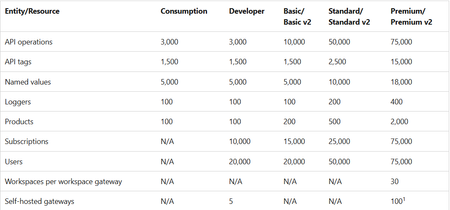
Azure API Management operates on finite physical infrastructure. To ensure reliable performance for all customers, the service enforces limits calibrated based on: Azure platform capacity and performance characteristics Service tier capabilities Typical customer usage patterns Resource limits are interrelated and tuned to prevent any single aspect from disrupting overall service performance. Changes to service limits - 2026 update Starting March 2026 and over the following several months, Azure API Management is introducing updated resource limits for instances across all tiers. The limits are shown in the following table. Entity/Resource Consumption Developer Basic/ Basic v2 Standard/ Standard v2 Premium/ Premium v2 API operations 3,000 3,000 10,000 50,000 75,000 API tags 1,500 1,500 1,500 2,500 15,000 Named values 5,000 5,000 5,000 10,000 18,000 Loggers 100 100 100 200 400 Products 100 100 200 500 2,000 Subscriptions N/A 10,000 15,000 25,000 75,000 Users N/A 20,000 20,000 50,000 75,000 Workspaces per workspace gateway N/A N/A N/A N/A 30 Self-hosted gateways N/A 5 N/A N/A 100 1 1 Applies to Premium tier only. What's changing Limits in the classic tiers now align with those set in the v2 tiers. Limits are enforced for a smaller set of resource types that are directly related to service capacity and performance, such as API operations, tags, products, and subscriptions. Rollout process New limits roll out in a phased approach by tier as follows: Tier Expected rollout date Consumption Developer Basic Basic v2 March 15, 2026 Standard Standard v2 April 15, 2026 Premium Premium v2 May 15, 2026 Limits policy for existing classic tier customers After the new limits take effect, you can continue using your preexisting API Management resources without interruption. Existing classic tier services, where current usage exceeds the new limits, are "grandfathered" when the new limits are introduced. (Instances in the v2 tiers are already subject to the new limits.) Limits in grandfathered services will be set 10% higher than the customer's observed usage at the time new limits take effect. Grandfathering applies per service and service tier. Other existing services and new services are subject to the new limits when they take effect. Guidelines for limit increases In some cases, you might want to increase a service limit. Before requesting a limit increase, note the following guidelines: Explore strategies to address the issue proactively before requesting a limit increase. See the article here Manage resources within limits. Consider potential impacts of the limit increase on overall service performance and stability. Increasing a limit might affect your service's capacity or increase latency in some service operations. Requesting a limit increase The product team considers requests for limit increases only for customers using services in the following tiers that are designed for medium to large production workloads: Standard and Standard v2 Premium and Premium v2 Requests for limit increases are evaluated on a case-by-case basis and aren't guaranteed. The product team prioritizes Premium and Premium v2 tier customers for limit increases. To request a limit increase, create a support request from the Azure portal. For more information, see Azure support plans. Documentation For more information, please see documentation here
Accelerating SCOM to Azure Monitor Migrations with Automated Analysis and ARM Template Generation
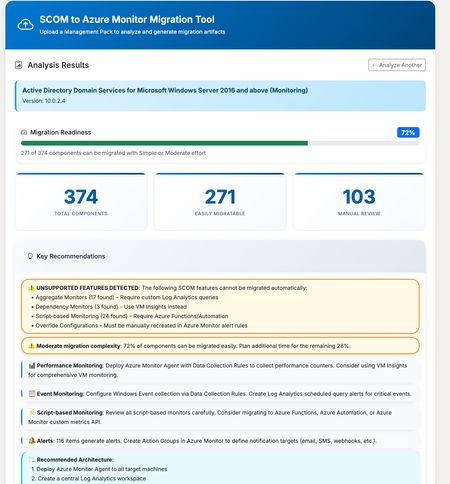
Accelerating SCOM to Azure Monitor Migrations with Automated Analysis and ARM Template Generation Azure Monitor has become the foundation for modern, cloud-scale monitoring on Azure. Built to handle massive volumes of telemetry across infrastructure, applications, and services, it provides a unified platform for metrics, logs, alerts, dashboards, and automation. As organizations continue to modernize their environments, Azure Monitor is increasingly the target state for enterprise monitoring strategies. With Azure Monitor increasingly becoming the destination platform, many organizations face a familiar challenge: migrating from System Center Operations Manager (SCOM). While both platforms serve the same fundamental purpose—keeping your infrastructure healthy and alerting you to problems—the migration path isn’t always straightforward. SCOM Management Packs contain years of accumulated monitoring logic: performance thresholds, event correlation rules, service discoveries, and custom scripts. Translating all of this into Azure Monitor’s paradigm of Log Analytics queries, alert rules, and Data Collection Rules can be a significant undertaking. To help with this challenge, members of the community have built and shared a tool that automates much of the analysis and artifact generation. The community-driven SCOM to Azure Monitor Migration Tool accepts Management Pack XML files and produces several outputs designed to accelerate migration planning and execution. The tool parses the Management Pack structure and identifies all monitors, rules, discoveries, and classes. Each component is analyzed for migration complexity: some translate directly to Azure Monitor equivalents, while others require custom implementation or may not have a direct equivalent. Results are organized into two clear categories: Auto-Migrated Components – Covered by the generated templates and ready for deployment Requires Manual Migration – Components that need custom implementation or review Instead of manually authoring Azure Resource Manager templates, the tool generates deployable infrastructure-as-code artifacts, including: Scheduled Query Alert rules mapped from SCOM monitors and rules Data Collection Rules for performance counters and Windows Events Custom Log DCRs for collecting script-generated log files Action Groups for notification routing Log Analytics workspace configuration (for new environments) For streamlined deployment, the tool offers a combined ARM template that deploys all resources in a single operation: Log Analytics workspace (create new or connect to an existing workspace) Action Groups with email notification All alert rules Data Collection Rules Monitoring Workbook One download, one deployment command — with configurable parameters for workspace settings, notification recipients, and custom log paths. The tool generates an Azure Monitor Workbook dashboard tailored to the Management Pack, including: Performance counter trends over time Event monitoring by severity with drill-down tables Service health overview (stopped services) Active alerts summary from Azure Resource Graph This provides immediate operational visibility once the monitoring configuration is deployed. Each migrated component includes the Kusto Query Language (KQL) equivalent of the original SCOM monitoring logic. These queries can be used as-is or refined to match environment-specific requirements. The workflow is designed to reduce the manual effort involved in migration planning: Export your Management Pack XML from SCOM Upload it to the tool Review the analysis — components are separated into auto-migrated and requires manual work Download the All-in-One ARM template (or individual templates) Customize parameters such as workspace name and action group recipients Deploy to your Azure subscription For a typical Management Pack, such as Windows Server Active Directory monitoring, you may see 120+ components that can be migrated directly, with an additional 15–20 components requiring manual review due to complex script logic or SCOM-specific functionality. The tool handles straightforward translations well: Performance threshold monitors become metric alerts or log-based alerts Windows Event collection rules become Data Collection Rule configurations Service monitors become scheduled query alerts against Heartbeat or Event tables Components that typically require manual attention: Complex PowerShell or VBScript probe actions Monitors that depend on SCOM-specific data sources Correlation rules spanning multiple data sources Custom workflows with proprietary logic The tool clearly identifies which category each component falls into, allowing teams to plan their migration effort with confidence. A Note on Validation This is a community tool, not an officially supported Microsoft product. Generated artifacts should always be reviewed and tested in a non-production environment before deployment. Every environment is different, and the tool makes reasonable assumptions that may require adjustment. Even so, starting with structured ARM templates and working KQL queries can significantly reduce time to deployment. Try It Out The tool is available at https://tinyurl.com/Scom2Azure.Upload a Management Pack, review the analysis, and see what your migration path looks like.1.1KViews1like0CommentsAzure Networking 2025: Powering cloud innovation and AI at global scale
In 2025, Azure’s networking platform proved itself as the invisible engine driving the cloud’s most transformative innovations. Consider the construction of Microsoft’s new Fairwater AI datacenter in Wisconsin – a 315-acre campus housing hundreds of thousands of GPUs. To operate as one giant AI supercomputer, Fairwater required a single flat, ultra-fast network interconnecting every GPU. Azure’s networking team delivered: the facility’s network fabric links GPUs at 800 Gbps speeds in a non-blocking architecture, enabling 10× the performance of the world’s fastest supercomputer. This feat showcases how fundamental networking is to cloud innovation. Whether it’s uniting massive AI clusters or connecting millions of everyday users, Azure’s globally distributed network is the foundation upon which new breakthroughs are built. In 2025, the surge of AI workloads, data-driven applications, and hybrid cloud adoption put unprecedented demands on this foundation. We responded with bold network investments and innovations. Each new networking feature delivered in 2025, from smarter routing to faster gateways, was not just a technical upgrade but an innovation enabling customers to achieve more. Recapping the year’s major releases across Azure Networking services and key highlights how AI both drive and benefit from these advancements. Unprecedented connectivity for a hybrid and AI era Hybrid connectivity at scale: Azure’s network enhancements in 2025 focused on making global and hybrid connectivity faster, simpler, and ready for the next wave of AI-driven traffic. For enterprises extending on-premises infrastructure to Azure, Azure ExpressRoute private connectivity saw a major leap in capacity: Microsoft announced support for 400 Gbps ExpressRoute Direct ports (available in 2026) to meet the needs of AI supercomputing and massive data volumes. These high-speed ports – which can be aggregated into multi-terabit links – ensure that even the largest enterprises or HPC clusters can transfer data to Azure with dedicated, low-latency links. In parallel, Azure VPN Gateway performance reached new highs, with a generally available upgrade that delivers up to 20 Gbps aggregate throughput per gateway and 5 Gbps per individual tunnel. This is a 3× increase over previous limits, enabling branch offices and remote sites to connect to Azure even more seamlessly without bandwidth bottlenecks. Together, the ExpressRoute and VPN improvements give customers a spectrum of high-performance options for hybrid networking – from offices and datacenters to the cloud – supporting scenarios like large-scale data migrations, resilient multi-site architectures, and hybrid AI processing. Simplified global networking: Azure Virtual WAN (vWAN) continued to mature as the one-stop solution for managing global connectivity. Virtual WAN introduced forced tunneling for Secure Virtual Hubs (now in preview), which allows organizations to route all Internet-bound traffic from branch offices or virtual networks back to a central hub for inspection. This capability simplifies the implementation of a “backhaul to hub” security model – for example, forcing branches to use a central firewall or security appliance – without complex user-defined routing. Empowering multicloud and NVA integration: Azure recognizes that enterprise networks are diverse. Azure Route Server improvements enhanced interoperability with customer equipment and third-party network virtual appliances (NVAs). Notably, Azure Route Server now supports up to 500 virtual network connections (spokes) per route server, a significant scale boost that enables larger hub-and-spoke topologies and simplified Border Gateway Protocol (BGP) route exchange even in very large environments. This helps customers using SD-WAN appliances or custom firewalls in Azure to seamlessly learn routes from hundreds of VNet spokes – maintaining central routing control without manual configuration. Additionally, Azure Route Server introduced a preview of hub routing preference, giving admins the ability to influence BGP route selection (for example, preferring ExpressRoute over a VPN path, or vice versa). This fine-grained control means hybrid networks can be tuned for optimal performance and cost. Resilience and reliability by design Azure’s growth has been underpinned by making the network “resilient by default.” We shipped tools to help validate and improve network resiliency. ExpressRoute Resiliency Insights was released for general availability – delivering an intelligent assessment of an enterprise’s ExpressRoute setup. This feature evaluates how well your ExpressRoute circuits and gateways are architected for high availability (for example, using dual circuits in diverse locations, zone-redundant gateways, etc.) and assigns a resiliency index score as a percentage. It will highlight suboptimal configurations – such as routes advertised on only one circuit, or a gateway that isn’t zone-redundant – and provide recommendations for improvement. Moreover, Resiliency Insights includes a failover simulation tool that can test circuit redundancy by mimicking failures, so you can verify that your connections will survive real-world incidents. By proactively monitoring and testing resilience, Azure is helping customers achieve “always-on” connectivity even in the face of fiber cuts, hardware faults, or other disruptions. Security, governance, and trust in the network As enterprises entrust more core business to Azure, the platform’s networking services advanced on security and governance – helping customers achieve Zero Trust networks and high compliance with minimal complexity. Azure DNS now offers DNS Security Policies with Threat Intelligence feeds (GA). This capability allows organizations to protect their DNS queries from known malicious domains by leveraging continuously updated threat intel. For example, if a known phishing domain or C2 (command-and-control) hostname appears in DNS queries from your environment, Azure DNS can automatically block or redirect those requests. Because DNS is often the first line of detection for malware and phishing activities, this built-in filtering provides a powerful layer of defense that’s fully managed by Azure. It’s essentially a cloud-delivered DNS firewall using Microsoft’s vast threat intelligence – enabling all Azure customers to benefit from enterprise-grade security without deploying additional appliances. Network traffic governance was another focus. The introduction of forced tunneling in Azure Virtual WAN hubs (preview) shared above is a prime example where networking meets security compliance. Optimizing cloud-native and edge networks We previewed DNS intelligent traffic control features – such as filtering DNS queries to prevent data exfiltration and applying flexible recursion policies – which complement the DNS Security offering in safeguarding name resolution. Meanwhile, for load balancing across regions, Azure Traffic Manager’s behind-the-scenes upgrades (as noted earlier) improved reliability, and it’s evolving to integrate with modern container-based apps and edge scenarios. AI-powered networking: Both enabling and enabled by AI We are infusing AI into networking to make management and troubleshooting more intelligent. Networking functionality in Azure Copilot accelerates tasks like never before: it outlines the best practices instantly and troubleshooting that once required combing through docs and logs can be conversational. It effectively democratizes networking expertise, helping even smaller IT teams manage sophisticated networks by leveraging AI recommendations. The future of cloud networking in an AI world As we close out 2025, one message is clear: networking is strategic. The network is no longer a static utility – it is the adaptive circulatory system of the cloud, determining how far and fast customers can go. By delivering higher speeds, greater reliability, tighter security, and easier management, Azure Networking has empowered businesses to connect everything to anything, anywhere – securely and at scale. These advances unlock new scenarios: global supply chains running in real-time over a trusted network, multi-player AR/VR and gaming experiences delivered without lag, and AI models trained across continents. Looking ahead, AI-powered networking will become the norm. The convergence of AI and network tech means we will see more self-optimizing networks that can heal, defend, and tune themselves with minimal human intervention.1.7KViews3likes0Comments2025 Year in Review: What’s new across SQL Server, Azure SQL and SQL database in Fabric
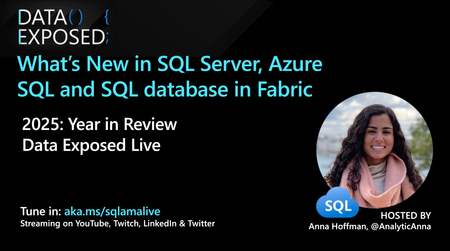
What a year 2025 has been for SQL! ICYMI and are looking for some hype, might I recommend you start with this blog from Priya Sathy, the product leader for all of SQL at Microsoft: One consistent SQL: The launchpad from legacy to innovation. In this blog post, Priya explains how we have developed and continue to develop one consistent SQL which “unifies your data estate, bringing platform consistency, performance at scale, advanced security, and AI-ready tools together in one seamless experience and creates one home for your SQL workloads in the era of AI.” For the FIFTH(!!) year in a row (my heart is warm with the number, I love SQL and #SQLfamily, and time is flying), I am sharing my annual Year in Review blog with all the SQL Server, Azure SQL and SQL database in Fabric news this year. Of course, you can catch weekly episodes related to what’s new and diving deeper on the Azure SQL YouTube channel at aka.ms/AzureSQLYT. This year, in addition to Data Exposed (52 new episodes and over 70K views!). We saw many new series related to areas like GitHub Copilot, SSMS, VS Code, and Azure SQL Managed Instance land in the channel, in addition to Data Exposed. Microsoft Ignite announcements Of course, if you’re looking for the latest announcements from Microsoft Ignite, Bob Ward and I compiled this slide of highlights. Comprehensive list of 2025 updates You can read this blog (or use AI to reference it later) to get all the updates and references from the year (so much happened at Ignite but before it too!). Here’s all the updates from the year: SQL Server, Arc-enabled SQL Server, and SQL Server on Azure VMs Generally Available SQL Server 2025 is Now Generally Available Backup/Restore capabilities in SQL Server 2025 SQL Server 2025: Deeply Integrated and Feature-rich on Linux Resource Governor for Standard Edition Reimagining Data Excellence: SQL Server 2025 Accelerated by Pure Storage Security Update for SQL Server 2022 RTM CU21 Cumulative Update #22 for SQL Server 2022 RTM Backup/Restore enhancements in SQL Server 2025 Unified configuration and governance Expanding Azure Arc for Hybrid and Multicloud Management US Government Virginia region support I/O Analysis for SQL Server on Azure VMs NVIDIA Nemotron RAG Integration Preview Azure Arc resource discovery in Azure Migrate Multicloud connector support for Google Cloud Migrations Generally Available SQL Server migration in Azure Arc Azure Database Migration Service Hub Experience SQL Server Migration Assistant (SSMA) v10.3, including Db2 SKU recommendation (preview) Database Migration Service: PowerShell, Azure CLI, and Python SDK SQL Server Migration Assistant (SSMA) v10.4, including SQL Server 2025 support, Oracle conversion Copilot Schema migration support in Azure Database Migration Service Preview Azure Arc resource discovery in Azure Migrate Azure SQL Managed Instance Generally Available Next-gen General Purpose Service Tier Improved connectivity types in Azure SQL Managed Instance Improved resiliency with zone redundancy for general purpose, improved log rate for business critical Apply reservation discount for zone redundant Business Critical databases Free offer Windows principals use to simplify migrations Data exfiltration improvements Preview Windows Authentication for Cloud-Native Identities New update policy for Azure SQL Managed Instance Azure SQL Database Generally Available LTR Backup Immutability Free Azure SQL Database Offer updates Move to Hyperscale while preserving existing geo-replication or failover group settings Improve redirect connection type to require only port 1433 and promote to default Bigint support in DATEADD for extended range calculations Restart your database from the Azure portal Replication lag metric Enhanced server audit and server audit action groups Read-access geo-zone redundant storage (RA-GZRS) as a backup storage type for non-Hyperscale Improved cutover experience to Hyperscale SLA-compliant availability metric Use database shrink to reduced allocated space for Hyperscale databases Identify causes of auto-resuming serverless workloads Preview Multiple geo-replicas for Azure SQL Hyperscale Backup immutability for Azure SQL Database LTR backups Updates across SQL Server, Azure SQL and Fabric SQL database Generally Available Regex Support and fuzzy-string matching Geo-replication and Transparent Data Encryption key management Optimized locking v2 Azure SQL hub in the Azure portal UNISTR intrinsic function and ANSI SQL concatenation operator (||) New vector data type JSON index JSON data type and aggregates Preview Stream data to Azure Event Hubs with Change Event Streaming (Azure SQL DB Public Preview/Fabric SQL Private Preview) DiskANN vector indexing SQL database in Microsoft Fabric and Mirroring Generally Available Fabric Databases SQL database in Fabric Unlocking Enterprise ready SQL database in Microsoft Fabric: ALM improvements, Backup customizations and retention, Copilot enhancements & more update details Mirroring for SQL Server Mirroring for Azure SQL Managed Instance in Microsoft Fabric Connect to your SQL database in Fabric using Python Notebook Updates to database development tools for SQL database in Fabric Using Fast Copy for data ingestion Copilot for SQL analytics endpoint Any updates across Microsoft Fabric that apply to the SQL analytics endpoint are generally supported in mirrored databases and Fabric SQL databases via the SQL analytics endpoint. This includes many exciting areas, like Data Agents. See the Fabric blog to get inspired Preview Data virtualization support Workspace level Private Link support (Private Preview) Customer-managed keys in Fabric SQL Database Auditing for Fabric SQL Database Fabric CLI: Create a SQL database in Fabric SQL database workload in Fabric with Terraform Spark Connector for SQL databases Tools and developer Blog to Read: How the Microsoft SQL team is investing in SQL tools and experiences SQL Server Management Studio (SSMS) 22.1 GitHub Copilot Walkthrough (Preview): Guided onboarding from the Copilot badge. Copilot right-click actions (Preview): Document, Explain, Fix, and Optimize. Bring your own model (BYOM) support in Copilot (Preview). Copilot performance: improved response time after the first prompt in a thread. Fixes: addressed Copilot “Run ValidateGeneratedTSQL” loop and other stability issues. SQL Server Management Studio (SSMS) 22 Support for SQL Server 2025 Modern connection dialog as default + Fabric browsing on the Browse tab. Windows Arm64 support (initial) for core scenarios (connect + query). GitHub Copilot in SSMS (Preview) is available via the AI Assistance workload in the VS Installer. T-SQL/UX improvements: open execution plan in new tab, JSON viewer, results grid zooms. New index support: create JSON and Vector indexes from Object Explorer SQL Server Management Studio (SSMS) 21 Installation and automatic updates via Visual Studio Installer. Workloads/components model: smaller footprint + customizable install. Git integration is available via the Code tools workload. Modern connection dialog experience (Preview). New customization options (e.g., vertical tabs, tab coloring, results in grid NULL styling). Always Encrypted Assessment in the Always Encrypted Wizard. Migration assistance via the Hybrid and Migration workload. mssql-python Driver ODBC: Microsoft ODBC Driver 18.5.2.1 for SQL Server OLE DB: Microsoft OLE DB Driver 19.4.1 for SQL Server JDBC (latest train): Microsoft JDBC Driver for SQL Server 13.2.1 Also updated in 2025: supported JDBC branches received multiple servicing updates (including Oct 13, 2025, security fixes). See the same JDBC release notes for the full list. .NET: Microsoft.Data.SqlClient 6.0.2 Related - some notes on drivers released/updated in 2025 (recap): MSSQL extension for VS Code 1.37.0 GitHub Copilot integration : Ask/Agent modes, slash commands, onboarding. Edit Data : interactive grid for editing table data (requires mssql.enableExperimentalFeatures: true). Data-tier Application dialog : deploy/extract .dacpac and import/export .bacpac (requires mssql.enableExperimentalFeatures: true). Publish SQL Project dialog : deploy .sqlproj to an existing DB or a local SQL dev container. Added “What’s New” panel + improved query results grid stability/accessibility. MSSQL extension for VS Code 1.36.0 Fabric connectivity : browse Fabric workspaces and connect to SQL DBs / SQL analytics endpoints. SQL database in Fabric provisioning : create Fabric SQL databases from Deployments. GitHub Copilot slash commands : connection, schema exploration, query tasks. Schema Compare extensibility: new run command for external extensions/SQL Projects (incl. Update Project from Database support). Query results in performance/reliability improvements (incremental streaming, fewer freezes, better settings handling). SqlPackage 170.0.94 release notes (April 2025) Vector: support for vector data type in Azure SQL Database target platform (import/export/extract/deploy/build). SQL projects: default compatibility level for Azure SQL Database and SQL database in Fabric set to 170. Parquet: expanded supported types (including json, xml, and vector) + bcp fallback for unsupported types. Extract: unpack a .dacpac to a folder via /Action:Extract. Platform: Remove .NET 6 support; .NET Framework build updated to 4.7.2. SqlPackage 170.1.61 release notes (July 2025) Data virtualization (Azure SQL DB): added support for data virtualization objects in import/export/extract/publish. Deployment: new publishing properties /p:IgnorePreDeployScript and /p:IgnorePostDeployScript. Permissions: support for ALTER ANY EXTERNAL MIRROR (Azure SQL DB + SQL database in Fabric) for exporting mirrored tables. SQL Server 2025 permissions: support for CREATE ANY EXTERNAL MODEL, ALTER ANY EXTERNAL MODEL, and ALTER ANY INFORMATION PROTECTION. Fixes: improved Fabric compatibility (e.g., avoid deploying unsupported server objects; fixes for Fabric extraction scripting). SqlPackage 170.2.70 release notes (October 2025) External models: support for external models in Azure SQL Database and SQL Server 2025. AI functions: support for AI_GENERATE_CHUNKS and AI_GENERATE_EMBEDDINGS. JSON: support for JSON indexes + functions JSON_ARRAYAGG, JSON_OBJECTAGG, JSON_QUERY. Vector: vector indexes + VECTOR_SEARCH and expanded vector support for SQL Server 2025. Regex: support for REGEXP_LIKE. Microsoft.Build.Sql 1.0.0 (SQL database projects SDK) Breaking: .NET 8 SDK required for dotnet build (Visual Studio build unchanged). Globalization support. Improved SDK/Templates docs (more detailed README + release notes links). Code analyzer template defaults DevelopmentDependency. Build validation: check for duplicate build items. Microsoft.Build.Sql 2.0.0 (SQL database projects SDK) Added SQL Server 2025 target platform (Sql170DatabaseSchemaProvider). Updated DacFx version to 170.2.70. .NET SDK targets imported by default (includes newer .NET build features/fixes; avoids full rebuilds with no changes Azure Data Studio retirement announcement (retirement February 28, 2026) Anna’s Pick of the Month Year It’s hard to pick a highlight representative of the whole year, so I’ll take the cheesy way out: people. I get to work with great people working on a great set of products for great people (like you) solving real world problems for people. So, thank YOU and you’re my pick of the year 🧀 Until next time… That’s it for now! We release new episodes on Thursdays and new #MVPTuesday episodes on the last Tuesday of every month at aka.ms/azuresqlyt. The team has been producing a lot more video content outside of Data Exposed, which you can find at that link too! Having trouble keeping up? Be sure to follow us on twitter to get the latest updates on everything, @AzureSQL. And if you lose this blog, just remember aka.ms/newsupdate2025 We hope to see you next YEAR, on Data Exposed! --Anna and Marisa1.7KViews1like1CommentSecure, Seamless Access using Managed Identities with Azure Files SMB
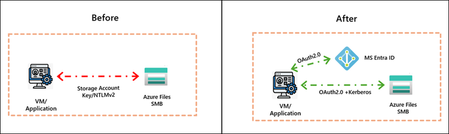
As organizations evolve their application and storage environments, whether on‑premises, hybrid, or cloud, secure access is top of mind. Organizations are vigilant about protecting sensitive data while enabling agile application access across distributed environments. SMB shares are commonly used for persistent storage in applications like AKS for container workloads, web applications, and App Services. Traditional models that rely on credentials like storage account keys do not meet the demands of a Zero Trust architecture, where every access request must be verified explicitly, granted with least privilege, and designed to assume malicious access from bad actors. We are excited to announce the Public Preview of Managed Identities support with Azure Files SMB. This capability provides a secure, identity-driven approach for customer applications that eliminates credentials-based access and integrates seamlessly with MS Entra ID. Azure virtual machines, containers, and applications running in Azure can now authenticate to Azure Files using their own managed identity, and mount shares using short lived OAuth tokens over Kerberos. This unlocks secure file share access for both first party and customer applications, including Azure Kubernetes Service (AKS), Azure Functions, App Services, and other cloud native services By leveraging Managed Identities, customers gain: Zero Trust Alignment–Identity tied to a specific resource, token refreshes every hour, and no passwords or keys to manage or rotate with Azure handling end-to-end identity management Role Based Access Control – Built-in RBAC for least-privilege enforcement Compliance Mandate Resolution – Compliant with FIPS, removing need for NTLMv2 Multi-Client Support – Works with Windows and Linux clients over SMB This capability brings a secure, simple, and scalable access model that helps organizations meet industry standard security requirements while inheriting Microsoft Entra ID’s enterprise grade identity, governance, and security capabilities for file shares. Securing Real World Applications To illustrate how Managed Identities strengthen security, the following example workloads highlight where customers will benefit from this capability. Eliminate Secret Sprawl for Continuous Integration, Continuous Deployment (CI/CD) workloads Azure Files SMB provides a centralized location for storing software development artifacts generated during CI/CD pipelines. CI/CD workloads span far beyond application code, covering infrastructure updates, data engineering workflows, ML pipelines, and compliance automation, making them foundational to modern DevOps practices. Build agents in Azure DevOps or other CI/CD systems often run on both Linux and Windows, requiring a common storage backend for binaries and configuration files. Historically, these agents authenticated to Azure Files using storage account keys. With Managed Identities, build agents can now authenticate using their own identity from Microsoft Entra ID, with authorization governed through Azure RBAC. This enhances security, removes static credentials, and simplifies compliance. “Managed Identities support with SMB shares will enable us to remove dependencies on storage account keys to run our CI/CD pipelines, enabling stronger security and alignment with Zero-Trust principles." Alex Garcia, Staff Dev Ops Engineer, Unity Technologies. Secure Persistent Files Storage with Azure Kubernetes Service (AKS) Stateful AKS workloads rely on persistent volumes for configuration, logs, and application data. Previously, mounting Azure Files required storing account keys or secrets in Kubernetes. Organizations requested exceptions from their security organizations to continue using shared keys until a secure managed identities-based solution was available. With this feature, AKS clusters can authenticate directly to Azure Files SMB without storage account keys. This enables secure, token‑based access for persistent volume mounts, improving security posture and eliminating the need for exceptions to use access tied to storage account keys. Learn more in the Azure Files AKS CSI documentation. Get Started with Managed Identities with SMB Azure Files Start using Managed Identities with Azure Files today at no additional cost. This feature is supported on HDD and SSD SMB shares across all billing models. Refer to our documentation for complete set-up guidance. Whether provisioning new storage or enhancing existing deployments, this capability provides secure, enterprise‑grade access with a streamlined configuration experience. Secure your workloads today! For any questions, reach out to the team at azurefiles@microsoft.com1.2KViews0likes0Comments