monitoring & reporting
60 Topics
Live Monitoring Billable Network Out for Current Day
Hi All, Problem Unable to monitor network usage for the current day for a subscription or resource group to identify the number of bytes which are billable. More Info I am looking for a way to query the Network Out for selected resources to identify how much data has gone in and out for the current day. The reason for doing so is to identify if any users on a system are moving huge amounts of data out of a resource in order to prevent/notify large billable data transfers as they are happening. Clarification I am aware that Data Out + Billable Data metrics can be queried for a resource group or subscription after the day has ended, I am looking for a way to do this for the current day. Cheers, Stu2.7KViews0likes6CommentsDynamically route alerts to the right team.
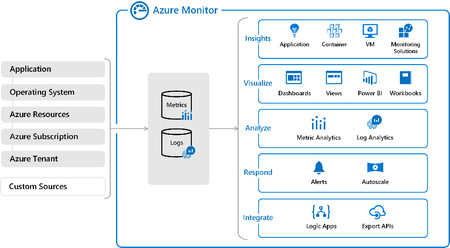
Hello folks, After a discussion with a customer where they were expressing their “displeasure” with the number of alert notifications that the IT department was receiving from environments that were not critical but still in need of monitoring. I started thinking about how we could dynamically decide when, where, how, and to whom these alert notifications are sent. Then I remembered an interview with Aditya Balaji (PM for Azure Backup) where we discussed Azure Backup Alerts and monitoring and I remembered that in his demo they were using a Logic App to manage the delivery of alert notifications. I decided to try it and see if I could produce a way to limit the number of action groups in Azure monitor alerting while enhancing the “decision” flow of how the notifications are handled. Here’s what I came up with.4.3KViews1like1Comment
Using Azure Lighthouse and Azure Monitor for SAP Solutions to view telemetry across Multiple Tenants
Azure Monitor for SAP Solutions allows for telemetry data collection from Azure infrastructure and databases running SAP in one central location and for visually correlating telemetry data to illustrate the health of the SAP on Azure estate. Combining Azure Monitor for SAP Solutions with Azure Lighthouse allows for the creation of dashboards to show telemetry data across multiple subscriptions or even multiple Tenants.SFB: Tearing down sessino due to failure in pending disclaimer state
Hello everyone I have monitoring reports deployed. in the conferencing diagnostic report, i am seeing unexpected failure with diagnostic header "52507; reason="Tearing down session due to failure in pending disclaimer state"". What does this mean? Cheers and stay safe1.2KViews0likes0Comments
Reporting on user status history
Is there anyway to report on a user's status history (Active, Mobile, vs inactive)? I have a manager that's trying to review some data related to her employees who are currently WFH, and how much time they are active on their workstations. Since Skype for Business shows their current status, I thought it had to be logged somewhere. I've searched through the reporting and logs, message boards, etc, and can't seem to find anything other than user activity related to Chat, email, calls, etc. Thanks, Rob796Views0likes0Comments
"Skype for Business admin center" reports down?
Can anyone get to the "PSTN usage details" report in the "Skype for Business admin center"? It was working last week, but today it pulls up nothing and returns "Trouble getting data for this report. If the issue persists, please contact Microsoft support." The Help button at the top-right open a blank window.864Views0likes1Comment
Skype For Business - Monitor Infrastructure
May be an easy one for you guys. I'm looking for best practice, and advice on monitoring our Skype Infrastructure. We have SFB 2016 on premise. At the moment other than monitoring the topology via the control panel I am unsure as the best way to manage the infrastrucutre. It tends to be more of a reactive environment rather than pro-active. Usually an issue will be reported via our helpdesk which will alert ourselves to a problem. Can you reccomend the best way to monitor : Servers within the environment Services that need to be monitored. (What services) SIP etc Would we be best buying a monitoring tool? Would we be best carrying out an hour a week to carry out manual checks? (hopefully this isn't the case). Any advice would be greatly appreciated1.2KViews0likes1CommentAnalytics / Details on Skype for Business Auto Attendants and Queues
We are using Skype for Business and the Microsoft Phone System Cloud PBX functionality. I'm trying to find some details about some specific calls and not sure where to look. What I have from the PTSN usage report is the details for the ucap_in call to a service number which is an auto attendant. I'm trying to figure out which queue it may have been directed to and if it was answered and by whom and I'm not sure where to look. Can anyone point me in the right direction of where to look for more details?1.3KViews0likes0Comments