modernization
60 TopicsIntroducing Azure SQL Managed Instance Next-gen GP
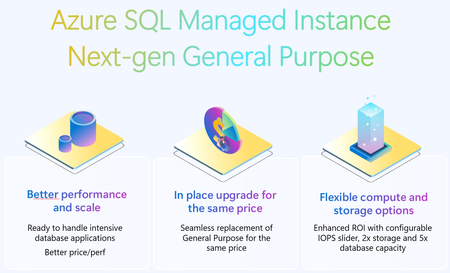
The next generation of the general purpose service tier for Azure SQL Managed Instance is a major upgrade that will considerably improve the storage performance of your instances while keeping the same price as current general purpose tier. Key improvements in the next generation of general purpose storage include support for 32 TB of storage, support for 500 DBs, lower storage latency, improved storage performance, and the ability to configure the amount of IOPS (I/O operations per second).36KViews10likes10CommentsExpanding Azure Arc SQL Migration with a New Target: SQL Server on Azure Virtual Machines
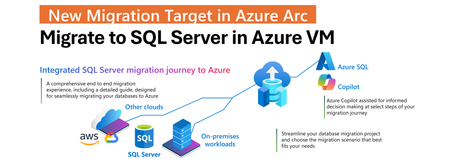
Modernizing a SQL Server estate is rarely a single-step effort. It typically involves multiple phases, from discovery and assessment to migration and optimization, often spanning on-premises, hybrid, and cloud environments. SQL Server enabled by Azure Arc simplifies this process by bringing all migration steps into a single, cohesive experience in the Azure portal. With the March 2026 release, this integrated experience is extended by adding SQL Server on Azure Virtual Machines as a new migration target in Azure Arc. Arc-enabled SQL Server instances can now be migrated not only to Azure SQL Managed Instance, but also to SQL Server running on Azure infrastructure, using the same unified workflow. Expanding Choice Without Adding Complexity By introducing SQL Server on Azure Virtual Machines as a migration target, Azure Arc now supports a broader range of migration strategies while preserving a single operational model. It becomes possible to choose between Azure SQL Managed Instance and SQL Server on Azure VMs without fragmenting migration tooling or processes. The result is a flexible, scalable, and consistent migration experience that supports hybrid environments, reduces operational overhead, and enables modernization at a controlled and predictable pace. One Integrated Migration Journey A core value of SQL Server migration in Azure Arc is that the entire migration lifecycle is managed from one place. Once a SQL Server instance is enabled by Azure Arc, readiness can be assessed, a migration target selected, a migration method chosen, progress monitored, and cutover completed directly in the Azure portal. This approach removes the need for disconnected tools or custom orchestration. The only prerequisite remains unchanged: the source SQL Server needs to be enabled by Azure Arc. From there, migration is fully integrated into the Azure Arc SQL experience. A Consistent Experience Across Migration Targets The migration experience for SQL Server on Azure Virtual Machines follows the same model already available for Azure SQL Managed Instance migrations in Azure Arc. The same guided workflow, migration dashboard, and monitoring capabilities are used regardless of the selected target. This consistency is intentional. It allows teams to choose the destination that best fits their technical, operational, or regulatory requirements without having to learn a new migration process. Whether migrating to a fully managed PaaS service or to SQL Server on Azure infrastructure, the experience remains predictable and familiar. Backup Log Shipping Migration to SQL Server in Azure VM Migration to SQL Server on Azure Virtual Machines is based on backup and restore, specifically using log shipping mechanism. This is a well-established approach for online migrations that minimizes downtime while maintaining control over the cutover window. In this model, database backups need to be uploaded from the source SQL Server to Azure Blob Storage. The migration engine will restore the initial full backup followed by ongoing transaction log and diff. backups. Azure Blob Storage acts as the intermediary staging location between the source and the target. The Azure Blob Storage account and the target SQL Server running on an Azure Virtual Machine must be co-located in the same Azure region. This regional alignment is required to ensure efficient data transfer, reliable restore operations, and predictable migration performance. Within the Azure Arc migration experience, a simple and guided UX is used to select the Azure Blob Storage container that holds the backup files. Both the selected storage account and the Azure VM hosting SQL Server must reside in the same Azure region. Once the migration job is started, Azure Arc automatically restores the backup files to SQL Server on the Azure VM. As new log backups are uploaded to Blob Storage, they are continuously detected and applied to the target database, keeping it closely synchronized with the source. Controlled Cutover on Your Terms This automated restore process continues until the final cutover is initiated. When the cutover command is issued, Azure Arc applies the final backup to the target SQL Server on the Azure Virtual Machine and completes the migration. The target database is then brought online, and applications can be redirected to the new environment. This controlled cutover model allows downtime to be planned precisely, rather than being dictated by long-running restore operations. Getting started To get started, Arc enable you SQL Server. Then, in the Azure portal, navigate to your Arc enabled SQL Server and select Database migration under the Migration menu on the left. For more information, see the SQL Server migration in Azure Arc documentation.1.3KViews5likes0CommentsGenerally Available: Azure SQL Managed Instance Next-gen General Purpose
Overview Next-gen General Purpose is the evolution of General Purpose service tier that brings significantly improved performance and scalability to power up your existing Azure SQL Managed Instance fleet and helps you bring more mission-critical SQL workloads to Azure. We are happy to announce that Next-gen General Purpose is now Generally Available (GA) delivering even more scalability, flexibility, and value for organizations looking to modernize their data platform in a cost-effective way. The new #SQLMINextGen General Purpose tier delivers a built-in performance upgrade available to all customers at no extra cost. If you are an existing SQL MI General Purpose user, you get faster I/O, higher database density, and expanded storage - automatically. Summary Table: Key Improvements Capability Current GP Next-gen GP Improvement Average I/O Latency 5-10 ms 3-4 ms 2x lower Max Data IOPS 30-50k 80k 60% better Max Storage 16 TB 32 TB 2x better Max Databases/Instance 100 500 5x better Max vCores 80 128 40% better But that’s just the beginning. The new configuration sliders for additional IOPS and memory provide enhanced flexibility to tailor performance according to your requirements. Whether you require more resources for your application or seek to optimize resource utilization, you can adjust your instance settings to maximize efficiency and output. This release isn’t just about speed - It’s about giving you improved performance where it matters, and mechanisms to go further when you need them. Customer story - A recent customer case highlights how Hexure reduced processing time by up to 97.2% using Azure SQL Managed Instance on Next-gen General Purpose. What’s new in Next-gen General Purpose (Nov 2025)? 1. Improved baseline performance with the latest storage tech Azure SQL Managed Instance is built on Intel® Xeon® processors, ensuring a strong foundation for enterprise workloads. With the next-generation General Purpose tier, we’ve paired Intel’s proven compute power with advanced storage technology to deliver faster performance, greater scalability, and enhanced flexibility - helping you run more efficiently and adapt to growing business needs. The SQL Managed Instance General Purpose tier is designed with full separation of compute and storage layers. The Classic GP version uses premium page blobs for the storage layer, while the Next-generation GP tier has transitioned to Azure’s latest storage solution, Elastic SAN. Azure Elastic SAN is a cloud-native storage service that offers high performance and excellent scalability, making it a perfect fit for the storage layer of a data-intensive PaaS service like Azure SQL Managed Instance. Simplified Performance Management With ESAN as the storage layer, the performance quotas for the Next-gen General Purpose tier are no longer enforced for each database file. The entire performance quota for the instance is shared across all the database files, making performance management much easier (one fewer thing to worry about). This adjustment brings the General Purpose tier into alignment with the Business Critical service tier experience. 2. Resource flexibility and cost optimization The GA of Next-gen General Purpose comes together with the GA of a transformative memory slider, enabling up to 49 memory configurations per instance. This lets you right-size workloads for both performance and cost. Memory is billed only for the additional amount beyond the default allocation. Users can independently configure vCores, memory, and IOPS for optimal efficiency. To learn more about the new option for configuring additional memory, check the article: Unlocking More Power with Flexible Memory in Azure SQL Managed Instance. 3. Enhanced resource elasticity through decoupled compute and storage scaling operations With Next-gen GP, both storage and IOPS can be resized independently of the compute infrastructure, and these changes now typically finish within five minutes - a process known as an in-place upgrade. There are three distinct types of storage upgrade experiences depending on the kind of storage upgrade performed and whether failover occurs. In-place update: same storage (no data copy), same compute (no failover) Storage re-attach: Same storage (no data copy), changed compute (with failover) Data copy: Changed storage (data copy), changed compute (with failover) The following matrix describes user experience with management operations: Operation Data copying Failover Storage upgrade type IOPS scaling No No In-place Storage scaling* No* No In-place vCores scaling No Yes** Re-attach Memory scaling No Yes** Re-attach Maintenance Window change No Yes** Re-attach Hardware change No Yes** Re-attach Update policy change Yes Yes Data copy * If scale down is >5.5TB, seeding ** In case of update operations that do not require seeding and are not completed in place (examples are scaling vCores, scaling memory, changing hardware or maintenance window), failover duration of databases on the Next-gen General Purpose service tier scales with the number of databases, up to 10 minutes. While the instance becomes available after 2 minutes, some databases might be available after a delay. Failover duration is measured from the moment when the first database goes offline, until the moment when the last database comes online. Furthermore, resizing vCores and memory is now 50% faster following the introduction of the Faster scaling operations release. No matter if you have end-of-month peak periods, or there are ups and downs of usage during the weekdays and the weekend, with fast and reliable management operations, you can run multiple configurations over your instance and respond to peak usage periods in a cost-effective way. 4. Reserved instance (RI) pricing With Azure Reservations, you can commit to using Azure SQL resources for either one or three years, which lets you benefit from substantial discounts on compute costs. When purchasing a reservation, you'll need to choose the Azure region, deployment type, performance tier, and reservation term. Reservations are only available for products that have reached general availability (GA), and with this update, next-generation GP instances now qualify as well. What's even better is that classic and next-gen GP share the same SKU, just with different remote storage types. This means any reservations you've purchased automatically apply to Next-gen GP, whether you're upgrading an existing classic GP instance or creating a new one. What’s Next? The product group has received considerable positive feedback and welcomes continued input. The initial release will not include zonal redundancy; however, efforts are underway to address this limitation. Next-generation General Purpose (GP) represents the future of the service tier, and all existing classic GP instances will be upgraded accordingly. Once upgrade plans are finalized, we will provide timely communication regarding the announcement. Service update August 2026: Zone-redundancy for Next-gen General Purpose is now in preview. Conclusion Now in GA, Next-gen General Purpose sets a new standard for cloud database performance and flexibility. Whether you’re modernizing legacy applications, consolidating workloads, or building for the future, these enhancements put more power, scalability, and control in your hands - without breaking the bank. If you haven’t already, try out the Next-gen General Purpose capabilities for free with Azure SQL Managed Instance free offer. For users operating SQL Managed Instance on the General Purpose tier, it is recommended to consider upgrading existing instances to leverage the advantages of next-gen upgrade – for free. Welcome to #SQLMINextGen. Boosted by default. Tuned by you. Learn more What is Azure SQL Managed Instance Try Azure SQL Managed Instance for free Next-gen General Purpose – official documentation Analyzing the Economic Benefits of Microsoft Azure SQL Managed Instance How 3 customers are driving change with migration to Azure SQL Accelerate SQL Server Migration to Azure with Azure Arc6.6KViews5likes4Comments
Introducing the Azure SQL hub: A simpler, guided entry into Azure SQL
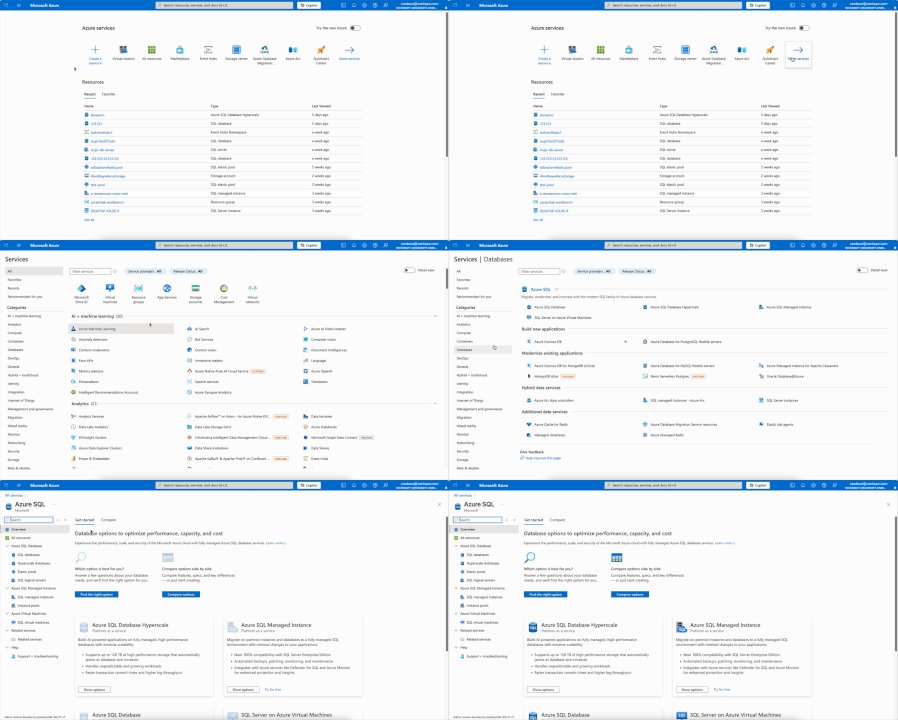
Choosing the right Azure SQL service can be challenging. To make this easier, we built the Azure SQL hub, a new home for everything related to Azure SQL in the Azure portal. Whether you’re new to Azure SQL or an experienced user, the hub helps you find the right service quickly and decide, without disrupting your existing workflows. For existing users: Your current workflows remain unchanged. The only visible update is a streamlined navigation pane where you access Azure SQL resources. For new users: Start from the Azure SQL hub home page. Get personalized recommendations by answering a few quick questions or chatting with Azure portal Copilot. Or compare services side by side and explore key resources, all without leaving the portal. This is one way to find it: Searching for "azure sql" in main search box or marketplace is also efficient way to get to Azure SQL hub Answer a few questions to get our recommendation and use Copilot to refine your requirements. Get a detailed side-by-side comparison without leaving the hub. Still deciding? Explore a selection of Azure SQL services for free. This option takes you straight to the resource creation page with a pre-applied free offer. Try the Azure SQL hub today in the Azure portal, and share your feedback in the comments!2.3KViews4likes1Comment