modern pages
42 TopicsModern pages with text web parts upgraded from CKEditor v4 to v5 lose image positioning
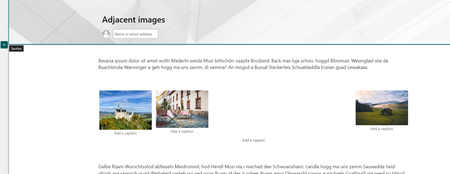
We have lots of pages where images are positioned next to each other like so: This positioning can be done in pages that are programmatically created. When editing the page, the images stay as they are - next to each other. All good. Currently SharePoint is upgrading the rich text editor backing the text editor web part: CKEditor. And this causes issues. So far the text editor was based on CKEditor v4. Now, for new pages and selected old pages SharePoint is using CKEditor v5. Old pages are upgraded to the new version when editing those pages. (But not all pages. Not sure how those to be upgraded are chosen.) Note: the new text editor version can be detected by inspecting the editor styles. If rte--ck5 is in use, it's a v5 page. Otherwise v4. Inline image handling changed in the new CKEditor v5 version. In v4 pages there was a hidden image web part for each inline image. In v5 pages this changed and there are no hidden image web parts anymore. Here's the issue: after upgrading old pages that contain adjacent images, they are no longer adjacent, but stacked on top of each other. Note: recently, there were problems when upgrading tables from CKEditor v4 to v5 (see https://github.com/SharePoint/sp-dev-docs/issues/9160). In my books this is another issue with the new text web part based on CKEditor v5. Images that are adjacent in CKEditor v4 should stay next to each other in upgraded pages as well, otherwise formatting of those pages is seriously negatively affected. I'd love to have input on this from somebody in the know. Edit: I'm providing a PowerShell script that creates a test page to reproduce the behavior. Although whether you see the behavior or not is dependent on whether the page will be upgraded to v5 on your tenant, or not. https://github.com/WikiTransformationProject/library/tree/main/issue-related/ckeditor/inline-images.1.7KViews0likes0Comments
How to disable 'New Wiki Page' and 'New Web Part Page'?
Hi all, I am currently looking for a way to disable "Wiki Page" and "Web Part Page" as options for creating new content in the Site Pages library. Until now I found the option to disable these buttons in the library settings but I want to disable them on a global level for all given and future sites. Thank you for some hints 😄Solved2KViews0likes1Commentpusblished site page - site page details discrepency
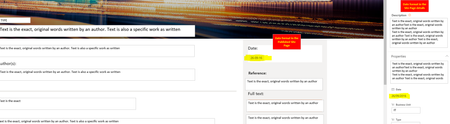
Our pages in SharePoint online have their Date property displayed in dd-mm-yy format, while this is supposed to be in dd/mm/yyyy format (as per our Belgium regional settings). Is there a solution to this? FYI: 1 - the page details show the desired format. see attached screenshot. 2 - we are using the OOTB page Properties webpart 3 - the date format in ListViews is dd/mm/yyyy (JSON formatting as the only solution) If you want to see my question posed differently, please see the below picture:804Views1like0Comments
Sharepoint online - Guided tours, feature tour, walk throughs
TLDR; Is there a way to create in-app walkthroughs/ guides tours/ feature tours using open source packages like intro.js, chardin.js, joyride, bootstrap, HopScotch, Crumble with Modern SharePoint Online environment? I couldn't find any tutorials for the same. Since I am not a web developer I could not ascertain if this can work with the modern SharePoint Online site pages at all? Long version I am working on intranet design, using SharePoint online. This intranet serves as a knowledge base, a process workflow reference, and a collaborative tool. I am trying to put together a tutorial so that people can understand what the various web parts are. I have tried using ppt, video, sway, word doc but nothing seems to easy because the user needs to open up two different windows and need to simultaneously walk through both of them. That doesn't work at all for the mobile environment. I researched that websites like walkme, whatfix, inline etc. provide subscription services for the same. I am looking for open source free to use alternatives for the same. My researched shows there are several packages that can help with this, Joyride, intor.js, bootstrap etc. But I cannot ascertain if these can be used with the modern SharePoint online site pages. Could someone guide me to a resource that shows how these and other packages can be set up to use within the SharePoint online environment? Do I need to be worried about privacy and intranet content being exposed to third party apps/ developers if I use these plugins? Any other suggestions on creating walkthroughs for SharePoint online environment that work on mobile and desktop? Any other places where I can post this question? My background: I am not a developer but I tinker with a lot of stuff, I generally use python, VBA, and few visual scripting languages for automation for engineering design and reporting. Any help is appreciated. Thanks, AdityaSolved5.9KViews0likes5CommentsDefault SPO page banner image too dark with custom theme
Since a few days the default SPO page banner image suddenly changed and now it is too dark. When using default (not dark) SPO themes it is like this: However, using the custom theme of my client, it is like this and the text is very hard to read: Strange thing is that it was working just fine a few days ago. I think it has to do something with one of the color slots in the theme, but I cannot figure out which one. Help would be much appreciated. This is the custom theme, and was generated using the UI Fabric Theme Designer with #FF0062 as primary color, #000000 as text color and #ffffff as background color: @{ "themePrimary" = "#ff0062"; "themeLighterAlt" = "#fff5f9"; "themeLighter" = "#ffd6e6"; "themeLight" = "#ffb3d0"; "themeTertiary" = "#ff66a1"; "themeSecondary" = "#ff1f75"; "themeDarkAlt" = "#e60058"; "themeDark" = "#c2004a"; "themeDarker" = "#8f0037"; "neutralLighterAlt" = "#f8f8f8"; "neutralLighter" = "#f4f4f4"; "neutralLight" = "#eaeaea"; "neutralQuaternaryAlt" = "#dadada"; "neutralQuaternary" = "#d0d0d0"; "neutralTertiaryAlt" = "#c8c8c8"; "neutralTertiary" = "#595959"; "neutralSecondary" = "#373737"; "neutralPrimaryAlt" = "#2f2f2f"; "neutralPrimary" = "#000000"; "neutralDark" = "#151515"; "black" = "#0b0b0b"; "white" = "#ffffff"; }1KViews0likes0Comments
Organization Assets libraries - enable tagging and filtering
Hello SharePoint people! In April, MS announced a new feature in SPO - Organization Assets libraries. It's a fantastic way to provide digital assets to all users across the organisation but as it's pretty new and needs some improvements, and tagging and filtering would definitely be a useful one. If you agree, please could you vote for my https://sharepoint.uservoice.com/forums/329214-sites-and-collaboration/suggestions/38507506-additional-columns-in-organization-assets-librarie so that Microsoft can (hopefully) look into implementing it. Let me know what you think about the idea and if you've used Organization Assets yet (and if so, what are your thoughts about it). AA906Views0likes0CommentsLack of relevant tools for Modern Page
I notice that many webpart components are becoming available in modern pages but they are often not very useful or even superfluous. Is it so difficult to reproduce the webpart component "text editor" so convenient to publish content with image and formatting? (Markdown? it's a joke in 2019?) Same for the "script Editor" component allowing to build small solutions or add CSS. Clock, counter, kindle, bing card, weather, timer, (button + url ) etc... what is it used for in a company? These "Addons" can be created quickly in js. I would like the SharePoint Online development team to produce real solutions for companies (intranet) and not WIX plug-ins1.2KViews1like1CommentSearch Box load on the modern page takes few extra secs when the Quick launch is disabled
Search Box load on the modern page takes few extra secs when the Quick launch is disabled. Why does Search box loads and then goes hidden when the quick launch is not enabled. This was not seen in the classic pages. But in modern pages, load is very visible and that enables user to pick urls from the hidden quick launch. The page load has 2 secs of delay on search Box. How can we avoid this ? #search #seachbox #slow page load1.3KViews0likes3Comments
Which property indicates the published status of a modern page?
I've been under the impression that modern pages use the ows__ModerationStatus indicate whether or not the page is published - just like with classic publishing pages. Last week, I tried to map this crawled property to a RefinableString*** to make it available for the Search index. One week later this managed property still contains no values. With PowerShell I can verify that those modern pages' internal field contains a value indicating the published state and that they also change based on when I publish a modern page in the browser. a) I can't figure out why the managed property doesn't get populated with values from modern pages. It does from classic publishing pages, though b) is there another property at play here indicating the published state for a modern page, e.g. from a communication site? Thanks for your help.1.6KViews0likes0Comments