modern experience
61 TopicsSharePoint Online: Apply JSON View formatting using SharePoint REST API
JSON View formatting in SharePoint Online can be a useful tool for customizing the way list/library data is presented to end users. This can help improve the user experience and make it easier for users to understand and interact with the SharePoint list/library data. Learn how to apply JSON View formatting using SharePoint REST API to your SharePoint online lists / Microsoft Lists at: SharePoint Online: Apply JSON View formatting using SharePoint REST API Please consider giving a Like if my post helped you in any way. For SharePoint/Power Platform blogs, visit: Ganesh Sanap Blogs3.9KViews0likes0Comments
SharePoint Online Modern: How to remove vertical scroll bar in Embed web part?
The site is in the modern experience. I want to embed an image map. The code for the image map is saved as an .aspx file. When I put https://company.com/toolsresources/TestModernSite/SiteAssets/SitePages/Play/ImageMapTest.aspx in the Embed web part, the image displays, and the image map works but there is a vertical scrollbar. When I try: <iframe scr="URL" width="1400px" height="690px"></iframe>, or <iframe scr="URL" width="1400" height="690"></iframe> I get the error message: "We can't show this embedded content because the code seems to be incomplete. Make sure that the embed code includes width, height and a valid address for the src attribute." How do I remove the vertical scroll bar? Thanks.7.4KViews0likes2CommentsEditing left-side menu of modern site takes you to classic settings page
The site collection is classic mode; the site in question is modern; the left navigation behaves like the classic experience. Clicking the Edit link in the left navigation opens a new page which is in the classic mode: Settings > Navigation Settings. However, when I checked a SharePoint site associated with a Teams site, you are able to make changes on the site page when you click the Edit link -- the modern experience. How do I fix the left navigation on the site in question so that it behaves in the modern mode? Thanks.Solved8.5KViews0likes5Comments
Is a Modern SharePoint Discussion board capability in the roadmap?
Hi, We have many requests for discussion forum capabilities. Now, we know the classic version still exists for SharePoint and is/will be deprecated. We also know that Yammer is positioned as a replacement BUT we do not have Yammer enabled (yet), so I want to know if a new modern version of discussion forum content type is on the roadmap? In addition, am interested in hearing what others are using instead? Thanks Alon10KViews0likes2Comments
Archiving Calendar Items in SharePoint Online (Modern Eperience)
Hello all, I am a technician for an IT managed service provider, and we have a customer who uses SharePoint calendars to track PTO for their employees. It is shared between all of them, and they have the calendars connected to their desktop Outlook apps. One of the issues we have run into is the item count on these calendars has exceeded 5000 (over 6000 at this point), and in the past few weeks this has become increasingly unstable in Outlook particularly. Viewing on SharePoint seems to be okay, but multiple users are starting to have send/receive issues in Outlook and they cannot see recent events. The solution we would like to explore is archiving calendar items to a new calendar that meet the following criteria: Older than some date (e.g. Jan 1st, 2019) Is a non-recurring event I have sufficient day-to-day SP administration skills, but not to the extent of using scripting or PnP solutions, so I was really hoping there was an "easy" workaround as this can't wait for me to gain the skills to be able to do this. I have already done a half-day's worth of research, and have tried a number of solutions. Using legacy SP features such as Content and Structure and List Templates are not an option at this point. One thing I have learned is that doing this appears to be non-trivial, unless I am missing something obvious (hence, my presence here). I am open to any solutions or workarounds you may have for this issue. I understand things in this setup may not be ideal or "best-practice" but pointing that out to me will be less useful than a suggestion for a potential solution. Thanks in advance!! -NRB2.2KViews0likes1Comment
RTL support in Sharepoint 2019 server communication site search page
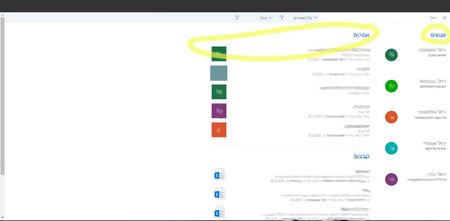
Hi, We built a communication site collection on Sharepoint 2019 Server platform. The site collection's langauage is Hebrew. The language of the browser and the operating system is Hebrew, too. All pages are right-to-left, like a mirror display of the LTR version, except for the search results page: People results are displayed before sites and documents results (in RTL display, they should be located on the left side of the screen). "Show all" link at the serach results section is displayed at the right side instaed of the left side, under the section title. Result thumbnail picture is located on the left side of the text (should be on the right). What can cause this problem? Is there a known issue with RTL support on sharepoint OOTB search results page? Thanks, Rumi1.6KViews0likes0Comments
Unable to switch to Modern Experience
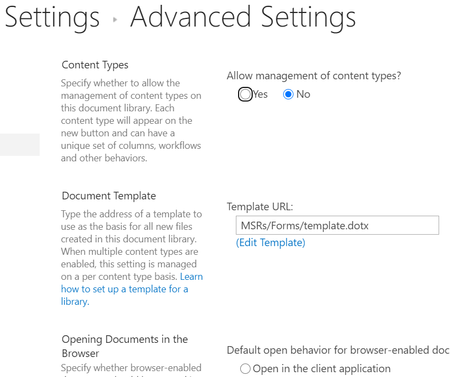
I'm working on creating a new repository for our team, and I want to be able to copy and reuse folders in the folder structure. Apparently, I can only accomplish this in the Modern Experience. Okay, great. https://support.microsoft.com/en-us/office/switch-the-default-experience-for-lists-and-libraries-from-new-or-classic-66dac24b-4177-4775-bf50-3d267318caa9 At a previous job, there was a link in the bottom left that allowed one to toggle, but that's not there. The place the instructions say to change the setting doesn't exist. The "List Experience" section isn't there. This is what my Advanced Settings for a library looks like: I am not the highest up admin, so perhaps it's something I have no control over? Is it in some other location in whatever crazy version of SP I have? Thanks in advance!901Views0likes0CommentsGoogle tag manager preview mode debug pane not working on modern pages
Hello everyone! I tried to add the code for the Google Tag Manager in the browser's console while I was on a modern page, but unfortunately when I'm in the tag manager's preview mode, the debug pane does not open and this error pops up in the console: goog.asserts.AssertionError { message: "Failure: Bad value `d8aec69a-5e9c-4c7a-ae18-1f0ba39af3bc` for |filterCspNonceValue", stack: "AssertionError: Failure: Bad value `d8aec69a-5e9c-4c7a-ae18-1f0ba39af3bc` for |filterCspNonceValue at new goog.asserts.AssertionError (https://tagmanager.google.com/debug:46:1056) at Object.goog.asserts.fail (https://tagmanager.google.com/debug:49:89) at Object.soy.esc.$$filterCspNonceValueHelper (https://tagmanager.google.com/debug:738:137) at Object.soy.$$filterCspNonceValue (https://tagmanager.google.com/debug:706:443) at Object.gtm.debugui.soy.frame.renderContent (https://tagmanager.google.com/debug:748:488) at Object.gtm.debugui.frame.createInlineFrame_ (https://tagmanager.google.com/debug:756:404) at Object.gtm.debugui.frame.init (https://tagmanager.google.com/debug:761:237) at https://tagmanager.google.com/debug:761:385 at https://tagmanager.google.com/debug:762:3" Adding the same script from google tag manager in a classic experience page and opening the debug pane works fine, without the assertion error occurring. I also tried to use the SPFx extension (that seems to do pretty much the same thing) from this repository: https://gitlab.lsonline.fr/SharePoint/sp-dev-fx-webparts/gtm but the same issue occurs. I am using SharePoint 2019 but this error pops up in SharePoint online too.2.4KViews0likes0CommentsThumbnails in a modern library
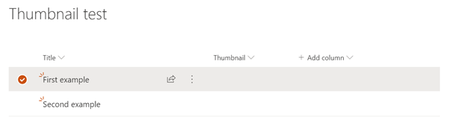
I want to display images against items in a document library or list within the rows of the list. As an example, I created a basic list with two columns - title and thumbnail. The thumbnail column is of type picture. When you look at the information on the item, there is a thumbnail image there. How do I get this to show up in the list/library itself? If I switch back to classic mode, the pictures show up (a bit too big to be called thumbnails, but present). How do I make images display like this in a modern view? Thanks for any help.2.7KViews0likes0CommentsWhere is the "Column Formatting" Field?
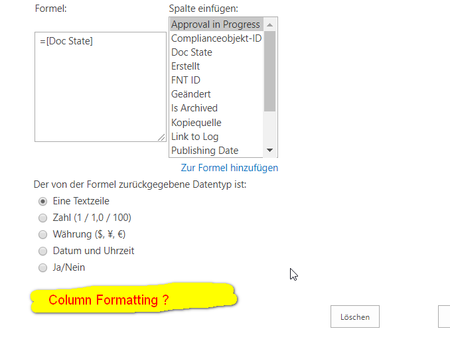
Hi Community, today I saw that the field "Column Formatting" is no longer present in the detail view of a column. Do you have more information about that? I know that it is possible to format a column on the library/list directly via modern ui, but I want to set this formatting on site level to reuse it on multiple list. How can I implement this yet? Do I have to set it for each list separately? If so, thats a bad joke 😞 Regards, Ingrid1.2KViews0likes2Comments