ml catalog
15 TopicsStop Experimenting, Start Building: AI Apps & Agents Dev Days Has You Covered
The AI landscape has shifted. The question is no longer “Can we build AI applications?” it’s “Can we build AI applications that actually work in production?” Demos are easy. Reliable, scalable, resilient AI systems that handle real-world complexity? That’s where most teams struggle. If you’re an AI developer, software engineer, or solution architect who’s ready to move beyond prototypes and into production-grade AI, there’s a series built specifically for you. What Is AI Apps & Agents Dev Days? AI Apps & Agents Dev Days is a monthly technical series from Microsoft Reactor, delivered in partnership with Microsoft and NVIDIA. You can explore the full series at https://developer.microsoft.com/en-us/reactor/series/s-1590/ This isn’t a slide deck marathon. The series tagline says it best: “It’s not about slides, it’s about building.” Each session tackles real-world challenges, shares patterns that actually work, and digs into what’s next in AI-driven app and agent design. You bring your curiosity, your code, and your questions. You leave with something you can ship. The sessions are led by experienced engineers and advocates from both Microsoft and NVIDIA, people like Pamela Fox, Bruno Capuano, Anthony Shaw, Gwyneth Peña-Siguenza, and solutions architects from NVIDIA’s Cloud AI team. These aren’t theorists; they’re practitioners who build and ship the tools you use every day. What You’ll Learn The series covers the full spectrum of building AI applications and agent-based systems. Here are the key themes: Building AI Applications with Azure, GitHub, and Modern Tooling Sessions walk through how to wire up AI capabilities using Azure services, GitHub workflows, and the latest SDKs. The focus is always on code-first learning, you’ll see real implementations, not abstract architecture diagrams. Designing and Orchestrating AI Agents Agent development is one of the series’ strongest threads. Sessions cover how to build agents that orchestrate long-running workflows, persist state automatically, recover from failures, and pause for human-in-the-loop input, without losing progress. For example, the session “AI Agents That Don’t Break Under Pressure” demonstrates building durable, production-ready AI agents using the Microsoft Agent Framework, running on Azure Container Apps with NVIDIA serverless GPUs. Scaling LLM Inference and Deploying to Production Moving from a working prototype to a production deployment means grappling with inference performance, GPU infrastructure, and cost management. The series covers how to leverage NVIDIA GPU infrastructure alongside Azure services to scale inference effectively, including patterns for serverless GPU compute. Real-World Architecture Patterns Expect sessions on container-based deployments, distributed agent systems, and enterprise-grade architectures. You’ll learn how to use services like Azure Container Apps to host resilient AI workloads, how Foundry IQ fits into agent architectures as a trusted knowledge source, and how to make architectural decisions that balance performance, cost, and scalability. Why This Matters for Your Day Job There’s a critical gap between what most AI tutorials teach and what production systems actually require. This series bridges that gap: Production-ready patterns, not demos. Every session focuses on code and architecture you can take directly into your projects. You’ll learn patterns for state persistence, failure recovery, and durable execution — the things that break at 2 AM. Enterprise applicability. The scenarios covered — travel planning agents, multi-step workflows, GPU-accelerated inference — map directly to enterprise use cases. Whether you’re building internal tooling or customer-facing AI features, the patterns transfer. Honest trade-off discussions. The speakers don’t shy away from the hard questions: When do you need serverless GPUs versus dedicated compute? How do you handle agent failures gracefully? What does it actually cost to run these systems at scale? Watch On-Demand, Build at Your Own Pace Every session is available on-demand. You can watch, pause, and build along at your own pace, no need to rearrange your schedule. The full playlist is available at This is particularly valuable for technical content. Pause a session while you replicate the architecture in your own environment. Rewind when you need to catch a configuration detail. Build alongside the presenters rather than just watching passively. What You’ll Walk Away Wit After working through the series, you’ll have: Practical agent development skills — how to design, orchestrate, and deploy AI agents that handle real-world complexity, including state management, failure recovery, and human-in-the-loop patterns Production architecture patterns — battle-tested approaches for deploying AI workloads on Azure Container Apps, leveraging NVIDIA GPU infrastructure, and building resilient distributed systems Infrastructure decision-making confidence — a clearer understanding of when to use serverless GPUs, how to optimise inference costs, and how to choose the right compute strategy for your workload Working code and reference implementations — the sessions are built around live coding and sample applications (like the Travel Planner agent demo), giving you starting points you can adapt immediately A framework for continuous learning — with new sessions each month, you’ll stay current as the AI platform evolves and new capabilities emerge Start Building The AI applications that will matter most aren’t the ones with the flashiest demos — they’re the ones that work reliably, scale gracefully, and solve real problems. That’s exactly what this series helps you build. Whether you’re designing your first AI agent system or hardening an existing one for production, the AI Apps & Agents Dev Days sessions give you the patterns, tools, and practical knowledge to move forward with confidence. Explore the series at https://developer.microsoft.com/en-us/reactor/series/s-1590/ and start watching the on-demand sessions at the link above. The best time to level up your AI engineering skills was yesterday. The second-best time is right now and these sessions make it easy to start.If You're Building AI on Azure, ECS 2026 is Where You Need to Be
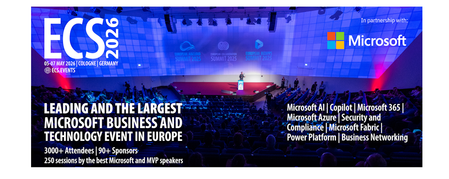
Let me be direct: there's a lot of noise in the conference calendar. Generic cloud events. Vendor showcases dressed up as technical content. Sessions that look great on paper but leave you with nothing you can actually ship on Monday. ECS 2026 isn't that. As someone who will be on stage at Cologne this May, I can tell you the European Collaboration Summit combined with the European AI & Cloud Summit and European Biz Apps Summit is one of the few events I've seen where engineers leave with real, production-applicable knowledge. Three days. Three summits. 3,000+ attendees. One of the largest Microsoft-focused events in Europe, and it keeps getting better. If you're building AI systems on Azure, designing cloud-native architectures, or trying to figure out how to take your AI experiments to production — this is where the conversation is happening. What ECS 2026 Actually Is ECS 2026 runs May 5–7 at Confex in Cologne, Germany. It brings together three co-located summits under one roof: European Collaboration Summit — Microsoft 365, Teams, Copilot, and governance European AI & Cloud Summit — Azure architecture, AI agents, cloud security, responsible AI European BizApps Summit — Power Platform, Microsoft Fabric, Dynamics For Azure engineers and AI developers, the European AI & Cloud Summit is your primary destination. But don't ignore the overlap, some of the most interesting AI conversations happen at the intersection of collaboration tooling and cloud infrastructure. The scale matters here: 3,000+ attendees, 100+ sessions, multiple deep-dive tracks, and a speaker lineup that includes Microsoft executives, Regional Directors, and MVPs who have built, broken, and rebuilt production systems. The Azure + AI Track - What's Actually On the Agenda The AI & Cloud Summit agenda is built around real technical depth. Not "intro to AI" content, actual architecture decisions, patterns that work, and lessons from things that didn't. Here's what you can expect: AI Agents and Agentic Systems This is where the energy is right now, and ECS is leaning in. Expect sessions covering how to design agent workflows, chain reasoning steps, handle memory and state, and integrate with Azure AI services. Marco Casalaina, VP of Products for Azure AI at Microsoft, is speaking if you want to understand the direction of the Azure AI platform from the people building it, this is a direct line. Azure Architecture at Scale Cloud-native patterns, microservices, containers, and the architectural decisions that determine whether your system holds up under real load. These sessions go beyond theory you'll hear from engineers who've shipped these designs at enterprise scale. Observability, DevOps, and Production AI Getting AI to production is harder than the demos suggest. Sessions here cover monitoring AI systems, integrating LLMs into CI/CD pipelines, and building the operational practices that keep AI in production reliable and governable. Cloud Security and Compliance Security isn't optional when you're putting AI in front of users or connecting it to enterprise data. Tracks cover identity, access patterns, responsible AI governance, and how to design systems that satisfy compliance requirements without becoming unmaintainable. Pre-Conference Deep Dives One underrated part of ECS: the pre-conference workshops. These are extended, hands-on sessions typically 3–6 hours that let you go deep on a single topic with an expert. Think of them as intensive short courses where you can actually work through the material, not just watch slides. If you're newer to a particular area of Azure AI, or you want to build fluency in a specific pattern before the main conference sessions, these are worth the early travel. The Speaker Quality Is Different Here The ECS speaker roster includes Microsoft executives, Microsoft MVPs, and Regional Directors, people who have real accountability for the products and patterns they're presenting. You'll hear from over 20 Microsoft speakers: Marco Casalaina — VP of Products, Azure AI at Microsoft Adam Harmetz — VP of Product at Microsoft, Enterprise Agent And dozens of MVPs and Regional Directors who are in the field every day, solving the same problems you are. These aren't keynote-only speakers — they're in the session rooms, at the hallway track, available for real conversations. The Hallway Track Is Not a Cliché I know "networking" sounds like a corporate afterthought. At ECS it genuinely isn't. When you put 3,000 practitioners, engineers, architects, DevOps leads, security specialists in one venue for three days, the conversations between sessions are often more valuable than the sessions themselves. You get candid answers to "how are you actually handling X in production?" that you won't find in documentation. The European Microsoft community is tight-knit and collaborative. ECS is where that community concentrates. Why This Matters Right Now We're in a period where AI development is moving fast but the engineering discipline around it is still maturing. Most teams are figuring out: How to move from AI prototype to production system How to instrument and observe AI behaviour reliably How to design agent systems that don't become unmaintainable How to satisfy security and compliance requirements in AI-integrated architectures ECS 2026 is one of the few places where you can get direct answers to these questions from people who've solved them — not theoretically, but in production, on Azure, in the last 12 months. If you go, you'll come back with practical patterns you can apply immediately. That's the bar I hold events to. ECS consistently clears it. Register and Explore the Agenda Register for ECS 2026: ecs.events Explore the AI & Cloud Summit agenda: cloudsummit.eu/en/agenda Dates: May 5–7, 2026 | Location: Confex, Cologne, Germany Early registration is worth it the pre-conference workshops fill up. And if you're coming, find me, I'll be the one talking too much about AI agents and Azure deployments. See you in Cologne.Building an Offline AI Interview Coach with Foundry Local, RAG, and SQLite
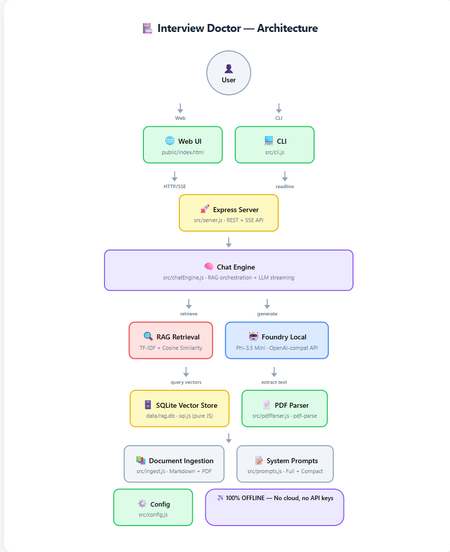
How to build a 100% offline, AI-powered interview preparation tool using Microsoft Foundry Local, Retrieval-Augmented Generation, and nothing but JavaScript. Foundry Local 100% Offline RAG + TF-IDF JavaScript / Node.js Contents Introduction What is RAG and Why Offline? Architecture Overview Setting Up Foundry Local Building the RAG Pipeline The Chat Engine Dual Interfaces: Web & CLI Testing Adapting for Your Own Use Case What I Learned Getting Started Introduction Imagine preparing for a job interview with an AI assistant that knows your CV inside and out, understands the job you're applying for, and generates tailored questions, all without ever sending your data to the cloud. That's exactly what Interview Doctor does. Interview Doctor's web UI, a polished, dark-themed interface running entirely on your local machine. In this post, I'll walk you through how I built an interview prep tool as a fully offline JavaScript application using: Foundry Local — Microsoft's on-device AI runtime SQLite — for storing document chunks and TF-IDF vectors RAG (Retrieval-Augmented Generation) — to ground the AI in your actual documents Express.js — for the web server Node.js built-in test runner — for testing with zero extra dependencies No cloud. No API keys. No internet required. Everything runs on your machine. What is RAG and Why Does It Matter? Retrieval-Augmented Generation (RAG) is a pattern that makes AI models dramatically more useful for domain-specific tasks. Instead of relying solely on what a model learned during training (which can be outdated or generic), RAG: Retrieves relevant chunks from your own documents Augments the model's prompt with those chunks as context Generates a response grounded in your actual data For Interview Doctor, this means the AI doesn't just ask generic interview questions, it asks questions specific to your CV, your experience, and the specific job you're applying for. Why Offline RAG? Privacy is the obvious benefit, your CV and job applications never leave your device. But there's more: No API costs — run as many queries as you want No rate limits — iterate rapidly during your prep Works anywhere — on a plane, in a café with bad Wi-Fi, anywhere Consistent performance — no cold starts, no API latency Architecture Overview Complete architecture showing all components and data flow. The application has two interfaces (CLI and Web) that share the same core engine: Document Ingestion — PDFs and markdown files are chunked and indexed Vector Store — SQLite stores chunks with TF-IDF vectors Retrieval — queries are matched against stored chunks using cosine similarity Generation — relevant chunks are injected into the prompt sent to the local LLM Step 1: Setting Up Foundry Local First, install Foundry Local: # Windows winget install Microsoft.FoundryLocal # macOS brew install microsoft/foundrylocal/foundrylocal The JavaScript SDK handles everything else — starting the service, downloading the model, and connecting: import { FoundryLocalManager } from "foundry-local-sdk"; import { OpenAI } from "openai"; const manager = new FoundryLocalManager(); const modelInfo = await manager.init("phi-3.5-mini"); // Foundry Local exposes an OpenAI-compatible API const openai = new OpenAI({ baseURL: manager.endpoint, // Dynamic port, discovered by SDK apiKey: manager.apiKey, }); ⚠️ Key Insight Foundry Local uses a dynamic port never hardcode localhost:5272 . Always use manager.endpoint which is discovered by the SDK at runtime. Step 2: Building the RAG Pipeline Document Chunking Documents are split into overlapping chunks of ~200 tokens. The overlap ensures important context isn't lost at chunk boundaries: export function chunkText(text, maxTokens = 200, overlapTokens = 25) { const words = text.split(/\s+/).filter(Boolean); if (words.length <= maxTokens) return [text.trim()]; const chunks = []; let start = 0; while (start < words.length) { const end = Math.min(start + maxTokens, words.length); chunks.push(words.slice(start, end).join(" ")); if (end >= words.length) break; start = end - overlapTokens; } return chunks; } Why 200 tokens with 25-token overlap? Small chunks keep retrieved context compact for the model's limited context window. Overlap prevents information loss at boundaries. And it's all pure string operations, no dependencies needed. TF-IDF Vectors Instead of using a separate embedding model (which would consume precious memory alongside the LLM), we use TF-IDF, a classic information retrieval technique: export function termFrequency(text) { const tf = new Map(); const tokens = text .toLowerCase() .replace(/[^a-z0-9\-']/g, " ") .split(/\s+/) .filter((t) => t.length > 1); for (const t of tokens) { tf.set(t, (tf.get(t) || 0) + 1); } return tf; } export function cosineSimilarity(a, b) { let dot = 0, normA = 0, normB = 0; for (const [term, freq] of a) { normA += freq * freq; if (b.has(term)) dot += freq * b.get(term); } for (const [, freq] of b) normB += freq * freq; if (normA === 0 || normB === 0) return 0; return dot / (Math.sqrt(normA) * Math.sqrt(normB)); } Each document chunk becomes a sparse vector of word frequencies. At query time, we compute cosine similarity between the query vector and all stored chunk vectors to find the most relevant matches. SQLite as a Vector Store Chunks and their TF-IDF vectors are stored in SQLite using sql.js (pure JavaScript — no native compilation needed): export class VectorStore { // Created via: const store = await VectorStore.create(dbPath) insert(docId, title, category, chunkIndex, content) { const tf = termFrequency(content); const tfJson = JSON.stringify([...tf]); this.db.run( "INSERT INTO chunks (...) VALUES (?, ?, ?, ?, ?, ?)", [docId, title, category, chunkIndex, content, tfJson] ); this.save(); } search(query, topK = 5) { const queryTf = termFrequency(query); // Score each chunk by cosine similarity, return top-K } } 💡 Why SQLite for Vectors? For a CV plus a few job descriptions (dozens of chunks), brute-force cosine similarity over SQLite rows is near-instant (~1ms). No need for Pinecone, Qdrant, or Chroma — just a single .db file on disk. Step 3: The RAG Chat Engine The chat engine ties retrieval and generation together: async *queryStream(userMessage, history = []) { // 1. Retrieve relevant CV/JD chunks const chunks = this.retrieve(userMessage); const context = this._buildContext(chunks); // 2. Build the prompt with retrieved context const messages = [ { role: "system", content: SYSTEM_PROMPT }, { role: "system", content: `Retrieved context:\n\n${context}` }, ...history, { role: "user", content: userMessage }, ]; // 3. Stream from the local model const stream = await this.openai.chat.completions.create({ model: this.modelId, messages, temperature: 0.3, stream: true, }); // 4. Yield chunks as they arrive for await (const chunk of stream) { const content = chunk.choices[0]?.delta?.content; if (content) yield { type: "text", data: content }; } } The flow is straightforward: vectorize the query, retrieve with cosine similarity, build a prompt with context, and stream from the local LLM. The temperature: 0.3 keeps responses focused — important for interview preparation where consistency matters. Step 4: Dual Interfaces — Web & CLI Web UI The web frontend is a single HTML file with inline CSS and JavaScript — no build step, no framework, no React or Vue. It communicates with the Express backend via REST and SSE: File upload via multipart/form-data Streaming chat via Server-Sent Events (SSE) Quick-action buttons for common follow-up queries (coaching tips, gap analysis, mock interview) The setup form with job title, seniority level, and a pasted job description — ready to generate tailored interview questions. CLI The CLI provides the same experience in the terminal with ANSI-coloured output: npm run cli It walks you through uploading your CV, entering the job details, and then generates streaming questions. Follow-up questions work interactively. Both interfaces share the same ChatEngine class, they're thin layers over identical logic. Edge Mode For constrained devices, toggle Edge mode to use a compact system prompt that fits within smaller context windows: Edge mode activated, uses a minimal prompt for devices with limited resources. Step 5: Testing Tests use the Node.js built-in test runner, no Jest, no Mocha, no extra dependencies: import { describe, it } from "node:test"; import assert from "node:assert/strict"; describe("chunkText", () => { it("returns single chunk for short text", () => { const chunks = chunkText("short text", 200, 25); assert.equal(chunks.length, 1); }); it("maintains overlap between chunks", () => { // Verifies overlapping tokens between consecutive chunks }); }); npm test Tests cover the chunker, vector store, config, prompts, and server API contract, all without needing Foundry Local running. Adapting for Your Own Use Case Interview Doctor is a pattern, not just a product. You can adapt it for any domain: What to Change How Domain documents Replace files in docs/ with your content System prompt Edit src/prompts.js Chunk sizes Adjust config.chunkSize and config.chunkOverlap Model Change config.model — run foundry model list UI Modify public/index.html — it's a single file Ideas for Adaptation Customer support bot — ingest your product docs and FAQs Code review assistant — ingest coding standards and best practices Study guide — ingest textbooks and lecture notes Compliance checker — ingest regulatory documents Onboarding assistant — ingest company handbooks and processes What I Learned Offline AI is production-ready. Foundry Local + small models like Phi-3.5 Mini are genuinely useful for focused tasks. You don't need vector databases for small collections. SQLite + TF-IDF is fast, simple, and has zero infrastructure overhead. RAG quality depends on chunking. Getting chunk sizes right for your use case is more impactful than the retrieval algorithm. The OpenAI-compatible API is a game-changer. Switching from cloud to local was mostly just changing the baseURL . Dual interfaces are easy when you share the engine. The CLI and Web UI are thin layers over the same ChatEngine class. ⚡ Performance Notes On a typical laptop (no GPU): ingestion takes under 1 second for ~20 documents, retrieval is ~1ms, and the first LLM token arrives in 2-5 seconds. Foundry Local automatically selects the best model variant for your hardware (CUDA GPU, NPU, or CPU). Getting Started git clone https://github.com/leestott/interview-doctor-js.git cd interview-doctor-js npm install npm run ingest npm start # Web UI at http://127.0.0.1:3000 # or npm run cli # Interactive terminal The full source code is on GitHub. Star it, fork it, adapt it — and good luck with your interviews! Resources Foundry Local — Microsoft's on-device AI runtime Foundry Local SDK (npm) — JavaScript SDK Foundry Local GitHub — Source, samples, and documentation Local RAG Reference — Reference RAG implementation Interview Doctor (JavaScript) — This project's source codeMicrosoft Foundry Labs: A Practical Fast Lane from Research to Real Developer Work
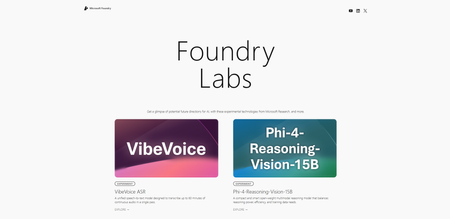
Why developers need a fast lane from research → prototypes AI engineering has a speed problem, but it is not a shortage of announcements. The hard part is turning research into a useful prototype before the next wave of models, tools, or agent patterns shows up. That gap matters. AI engineers want to compare quality, latency, and cost before they wire a model into a product. Full-stack teams want to test whether an agent workflow is real or just demo. Platform and operations teams want to know when an experiment can graduate into something observable and supportable. Microsoft makes that case directly in introducing Microsoft Foundry Labs: breakthroughs are arriving faster, and time from research to product has compressed from years to months. If you build real systems, the question is not "What is the coolest demo?" It is "Which experiments are worth my next hour, and how do I evaluate them without creating demo-ware?" That is where Microsoft Foundry Labs becomes interesting. What is Microsoft Foundry Labs? Microsoft Foundry Labs is a place to explore early-stage experiments and prototypes from Microsoft, with an explicit focus on research-driven innovation. The homepage describes it as a way to get a glimpse of potential future directions for AI through experimental technologies from Microsoft Research and more. The announcement adds the operating idea: Labs is a single access point for developers to experiment with new models from Microsoft, explore frameworks, and share feedback. That framing matters. Labs is not just a gallery of flashy ideas. It is a developer-facing exploration surface for projects that are still close to research: models, agent systems, UX ideas, and tool experiments. Here's some things you can do on Labs: Play with tomorrow’s AI, today: 30+ experimental projects—from models to agents—are openly available to fork and build upon, alongside direct access to breakthrough research from Microsoft. Go from prototype to production, fast: Seamless integration with Microsoft Foundry gives you access to 11,000+ models with built-in compute, safety, observability, and governance—so you can move from local experimentation to full-scale production without complex containerization or switching platforms. Build with the people shaping the future of AI: Join a thriving community of 25,000+ developers across Discord and GitHub with direct access to Microsoft researchers and engineers to share feedback and help shape the most promising technologies. What Labs is not: it is not a promise that every project has a production deployment path today, a long-term support commitment, or a hardened enterprise operating model. Spotlight: a few Labs experiments worth a developer's attention Phi-4-Reasoning-Vision-15B: A compact open-weight multimodal reasoning model that is interesting if you care about the quality-versus-efficiency tradeoff in smaller reasoning systems. BitNet: A native 1-bit large language model that is compelling for engineers who care about memory, compute, and energy efficiency. Fara-7B: An ultra-compact agentic small language model designed for computer use, which makes it relevant for builders exploring UI automation and on-device agents. OmniParser V2: A screen parsing module that turns interfaces into actionable elements, directly relevant to computer-use and UI-interaction agents. If you want to inspect actual code, the Labs project pages also expose official repository links for some of these experiments, including OmniParser, Magentic-UI, and BitNet. Labs vs. Foundry: how to think about the boundary The simplest mental model is this: Labs is the exploration edge; Foundry is the platform layer. The Microsoft Foundry documentation describes the broader platform as "the AI app and agent factory" to build, optimize, and govern AI apps and agents at scale. That is a different promise from Labs. Foundry is where you move from curiosity to implementation: model access, agent services, SDKs, observability, evaluation, monitoring, and governance. Labs helps you explore what might matter next. Foundry helps you build, optimize, and govern what matters now. Labs is where you test a research-shaped idea. Foundry is where you decide whether that idea can survive integration, evaluation, tracing, cost controls, and production scrutiny. That also means Labs is not a replacement for the broader Foundry workflow. If an experiment catches your attention, the next question is not "Can I ship this tomorrow?" It is "What is the integration path, and how will I measure whether it deserves promotion?" What's real today vs. what's experimental Real today: Labs is live as an official exploration hub, and Foundry is the broader platform for building, evaluating, monitoring, and governing AI apps and agents. Experimental by design: Labs projects are presented as experiments and prototypes, so they still need validation for your use case. A developer's lens: Models, Agents, Observability What makes Labs useful is not that it shows new things. It is that it gives developers a way to inspect those things through the same three concerns that matter in every serious AI system: model choice, agent design, and observability. Diagram description: imagine a loop with three boxes in a row: Models, Agents, and Observability. A forward arrow runs across the row, and a feedback arrow loops from Observability back to Models. The point is that evaluation data should change both model choices and agent design, instead of arriving too late. Models: what to look for in Labs experiments If you are model-curious, Labs should trigger an evaluation mindset, not a fandom mindset. When you see something like Phi-4-Reasoning-Vision-15B or BitNet on the Labs homepage, ask three things: what capability is being demonstrated, what constraints are obvious, and what the integration path would look like. This is where the Microsoft Foundry Playgrounds mindset is useful even if you started in Labs. The documentation emphasizes model comparison, prompt iteration, parameter tuning, tools, safety guardrails, and code export. It also pushes the right pre-production questions: price-to-performance, latency, tool integration, and code readiness. That is how I would use Labs for models: not to choose winners, but to generate hypotheses worth testing. If a Labs experiment looks promising, move quickly into a small evaluation matrix around capability, latency, cost, and integration friction. Agents: what Labs unlocks for agent builders Labs is especially interesting for agent builders because many of the projects point toward orchestration and tool-use patterns that matter in practice. The official announcement highlights projects across models and agentic frameworks, including Magentic-One and OmniParser v2. On the homepage, projects such as Fara-7B, OmniParser V2, TypeAgent, and Magentic-UI point in a similar direction: agents get more useful when they can reason over tools, interfaces, plans, and human feedback loops. For working developers, that means Labs can act as a scouting surface for agent patterns rather than just agent demos. Look for UI or computer-use style agents when your system needs to act through an interface rather than an API. Look for planning or tool-selection patterns when orchestration matters more than raw model quality. My suggestion: when a Labs project looks relevant to agent work, do not ask "Can I copy this architecture?" Ask "Which agent pattern is being explored here, and under what constraints would it be useful in my system?" Observability: how to experiment responsibly and measure what matters Observability is where prototypes usually go to die, because teams postpone it until after they have something flashy. That is backwards. If you care about real systems, tracing, evaluation, monitoring, and governance should start during prototyping. The Microsoft Foundry documentation already puts that operating model in plain view through guidance for tracing applications, evaluating agentic workflows, and monitoring generative AI apps. The Microsoft Foundry Playgrounds page is also explicit that the agents playground supports tracing and evaluation through AgentOps. At the governance layer, the AI gateway in Azure API Management documentation reinforces why this matters beyond demos. It covers monitoring and logging AI interactions, tracking token metrics, logging prompts and completions, managing quotas, applying safety policies, and governing models, agents, and tools. You do not need every one of those controls on day one, but you do need the habit: if a prototype cannot tell you what it did, why it failed, and what it cost, it is not ready to influence a roadmap. "Pick one and try it": a 20-minute hands-on path Keep this lightweight and tool-agnostic. The point is not to memorize a product UI. The point is to run a disciplined experiment. Browse Labs and pick an experiment aligned to your work. Start at Microsoft Foundry Labs and choose one project that is adjacent to a real problem you have: model efficiency, multimodal reasoning, UI agents, debugging workflows, or human-in-the-loop design. Read the project page and jump to the repo or paper if available. Use the Labs entry to understand the claim being made. Then read the supporting material, not just the summary sentence. Define one small test task and explicit success criteria. Keep it concrete: latency budget, accuracy target, cost ceiling, acceptable safety behavior, or failure rate under a narrow scenario. Capture telemetry from the start. At minimum, keep prompts or inputs, outputs, intermediate decisions, and failures. If the experiment involves tools or agents, include tool choices and obvious reasons for failure or recovery. Make a hard call. Decide whether to keep exploring or wait for a stronger production-grade path. "Interesting" is not the same as "ready for integration." Minimal experiment logger (my suggestion): if you want a lightweight way to avoid demo-ware, even a local JSONL log is enough to capture prompts, outputs, decisions, failures, and latency while you compare ideas from Labs. import json import time from pathlib import Path LOG_PATH = Path("experiment-log.jsonl") def record_event(name, payload): # Append one event per line so runs are easy to diff and analyze later. with LOG_PATH.open("a", encoding="utf-8") as handle: handle.write(json.dumps({"event": name, **payload}) + "\n") def run_experiment(user_input): started = time.time() try: # Replace this stub with your real model or agent call. output = user_input.upper() decision = "keep exploring" if len(output) < 80 else "wait" record_event( "experiment_result", { "input": user_input, "output": output, "decision": decision, "latency_ms": round((time.time() - started) * 1000, 2), "failure": None, }, ) except Exception as error: record_event( "experiment_result", { "input": user_input, "output": None, "decision": "failed", "latency_ms": round((time.time() - started) * 1000, 2), "failure": str(error), }, ) raise if __name__ == "__main__": run_experiment("Summarize the constraints of this Labs project.") That script is intentionally boring. That is the point. It gives you a repeatable, runnable starting point for comparing experiments without pretending you already have a full observability stack. Practical tips: how I evaluate Labs experiments before betting a roadmap on them Separate the idea from the implementation path. A strong research direction can still have a weak near-term integration story. Test one workload, not ten. Pick a narrow task that resembles your production reality and see whether the experiment moves the needle. Track cost and latency as first-class metrics. A novel capability that breaks your budget or response-time envelope is still a failed fit. Treat agent demos skeptically unless you can inspect behavior. Tool calls, traces, failure cases, and recovery paths matter more than polished output. Common pitfalls are predictable here. Do not confuse a research win with a deployment path. Labs is for exploration, so you still need to validate integration, safety, and operations. Do not evaluate with vague prompts. Use a narrow task and explicit success criteria, or you will end up comparing vibes instead of outcomes. Do not skip telemetry because the prototype is small. If you cannot inspect failures early, the prototype will teach you very little. Do not ignore known limitations. For example, the Fara-7B project page explicitly notes challenges on more complex tasks, instruction-following mistakes, and hallucinations, which is exactly the kind of constraint you should carry into evaluation. What to explore next Azure AI Foundry Labs matters because it gives developers a practical way to explore research-shaped ideas before they harden into mainstream patterns. The smart move is to use Labs as an input into better platform decisions: explore in Labs, validate with the discipline encouraged by Foundry playgrounds, and then bring the learnings back into the broader Foundry workflow. Takeaway 1: Labs is an exploration surface for early-stage, research-driven experiments and prototypes, not a blanket promise of production readiness. Takeaway 2: The right workflow is Labs for discovery, then Microsoft Foundry for implementation, optimization, evaluation, monitoring, and governance. Takeaway 3: Tracing, evaluations, and telemetry should start during prototyping, because that is how you avoid confusing a compelling demo with a viable system. If you are curious, start with Microsoft Foundry Labs, read the official context in Introducing Microsoft Foundry Labs, and then map what you learn into the platform guidance in Microsoft Foundry documentation. Try this next Open Microsoft Foundry Labs and choose one experiment that matches a real workload you care about. Use the mindset from Microsoft Foundry Playgrounds to define a small validation task around quality, latency, cost, and safety. Write down the minimum telemetry you need before continuing: inputs, outputs, decisions, failures, and token or cost signals. Read the relevant operating guidance in AI gateway in Azure API Management if your experiment may eventually need monitoring, quotas, safety policies, or governance. Promote only the experiments that can explain their value clearly in a Foundry-shaped build, evaluation, and observability workflow.
GenRec Direct Learning: Moving Ranking from Feature Pipelines to Token-Native Sequence Modeling
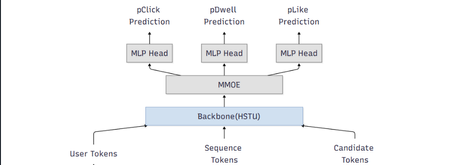
Authors: Chunlong Yu, Han Zheng, Jie Zhu, I-Hong Jhuo, Neal Zhang, Li Xia, Lin Zhu, Sawyer Shen, Yulan Yan TL;DR Most modern ranking stacks rely on large generative models as feature extractors, flattening their outputs into vectors that are then fed into downstream rankers. While effective, this pattern introduces additional pipeline complexity and often dilutes token‑level semantics. GenRec Direct Learning (DirL) explores a different direction: using a generative, token‑native sequential model as the ranking engine itself. In this formulation, ranking becomes an end‑to‑end sequence modeling problem over user behavior, context, and candidate items—without an explicit feature‑extraction stage. Why revisit the classic L2 ranker design? Large‑scale recommender systems have historically evolved as layered pipelines: more signals lead to more feature plumbing, which in turn introduces more special cases. In our previous L2 ranking architecture, signals were split into dense and sparse branches and merged late in the stack (Fig. 1). As the system matured, three recurring issues became increasingly apparent. Figure 1: traditional ranking DNN 1) Growing pipeline surface area Each new signal expands the surrounding ecosystem—feature definitions, joins, normalization logic, validation, and offline/online parity checks. Over time, this ballooning surface area slows iteration, raises operational overhead, and increases the risk of subtle production inconsistencies. 2) Semantics diluted by flattening Generative models naturally capture rich structure: token‑level interactions, compositional meaning, and contextual dependencies. However, when these representations are flattened into sparse or dense feature vectors, much of that structure is lost—undermining the very semantics that make generative representations powerful. 3) Sequence modeling is treated as an add-on While traditional rankers can ingest history features, modeling long behavioral sequences and fine‑grained temporal interactions typically requires extensive manual feature engineering. As a result, sequence modeling is often bolted on rather than treated as a first‑class concern. DirL goal: treat ranking as native sequence learning, not as “MLP over engineered features.” What “Direct Learning” means in DirL The core shift behind Direct Learning (DirL) is simple but fundamental. Instead of the conventional pipeline: generative model → embeddings → downstream ranker, DirL adopts an end‑to‑end formulation: tokenized sequence → generative sequential model → ranking score(s). In DirL, user context, long‑term behavioral history, and candidate item information are all represented within a single, unified token sequence. Ranking is then performed directly by a generative, token‑native sequential model. This design enables several key capabilities: Long‑term behavior modeling beyond short summary windows The model operates over extended user histories, allowing it to capture long‑range dependencies and evolving interests that are difficult to represent with fixed‑size aggregates. Fine‑grained user–content interaction learning By modeling interactions at the token level, DirL learns detailed behavioral and content patterns rather than relying on coarse, pre‑engineered features. Preserved cross‑token semantics within the ranking model Semantic structure is maintained throughout the ranking process, instead of being collapsed into handcrafted dense or sparse vectors before scoring. Architecture overview (from signals to ranking) 1) Unified Tokenization All inputs in DirL are converted into a shared token embedding space, allowing heterogeneous signals to be modeled within a single sequential backbone. Conceptually, each input sequence consists of three token types: User / context tokens These tokens encode user or request‑level information, such as age or cohort‑like attributes, request or canvas context, temporal signals (e.g., day or time), and user‑level statistics like historical CTR. History tokens These represent prior user interactions over time, including signals such as engaged document IDs, semantic or embedding IDs, and topic‑like attributes. Each interaction is mapped to a token, preserving temporal order and enabling long‑range behavior modeling. Candidate tokens Each candidate item to be scored is represented as a token constructed from document features and user–item interaction features. These features are concatenated and projected into a fixed‑dimensional vector via an MLP, yielding a token compatible with the shared embedding space. Categorical features are embedded directly, while dense numerical signals are passed through MLP layers before being fused into their corresponding tokens. As a result, the model backbone consumes a sequence of the form: [1 user/context token] + [N history tokens] + [1 candidate token] 2) Long-sequence modeling backbone (HSTU) To model long input sequence, DirL adopts a sequential backbone designed to scale beyond naïve full attention. In the current setup, the backbone consists of stacked HSTU layers with multi‑head attention and dropout for regularization. The hidden state of the candidate token from the final HSTU layer is then fed into an MMoE module for scoring. 3) Multi-task prediction head (MMoE) Ranking typically optimizes multiple objectives (e.g., engagement‑related proxies). DirL employs a multi‑gate mixture‑of‑experts (MMoE) layer to support multi‑task prediction while sharing representation learning. The MMoE layer consists of N shared experts and one task‑specific expert per task. For each task, a gating network produces a weighted combination of the shared experts and the task‑specific expert. The aggregated representation is then fed into a task‑specific MLP head to produce the final prediction. Figure 2: DirL structure Early experiments: what worked and what didn’t What looked promising Early results indicate that a token‑native setup improves both inhouse evaluation metrics and online engagement (time spent per UU), suggesting that modeling long behavior sequences in a unified token space is directionally beneficial. The hard part: efficiency and scale The same design choices that improve expressiveness also raise practical hurdles: Training velocity slows down: long-sequence modeling and larger components can turn iteration cycles from hours into days, making ablations expensive. Serving and training costs increase: large sparse embedding tables + deep sequence stacks can dominate memory and compute. Capacity constraints limit rollout speed: Hardware availability and cost ceilings become a gating factor for expanding traffic and experimentation. In short: DirL’s main challenge isn’t “can it learn the right dependencies?”—it’s “can we make it cheap and fast enough to be a production workhorse?” Path to production viability: exploratory directions Our current work focuses on understanding how to keep the semantic benefits of token‑native modeling while exploring options that could help reduce overall cost. 1) Embedding tables consolidate and prune oversized sparse tables rely more on shared token representations where possible 2) Right-size the sequence model reduce backbone depth where marginal gains flatten evaluate minimal effective token sets—identify which tokens actually move metrics. explore sequence length vs. performance curves to find the “knee” 3) Inference and systems optimization dynamic batching tuned for token-native inference kernel fusion and graph optimizations quantization strategies that preserve ranking model behavior Why this direction matters DirL explores a broader shift in recommender systems—from feature‑heavy pipelines with shallow rankers toward foundation‑style sequential models that learn directly from user trajectories. If token‑native ranking can be made efficient, it unlocks several advantages: Simpler modeling interfaces, with fewer feature‑plumbing layers. Stronger semantic utilization, reducing information loss from aggressive flattening. A more natural path to long‑term behavior and intent modeling. Early signals are encouraging. The next phase is about translating this promise into practice—making the approach scalable, cost‑efficient, and fast enough to iterate as a production system. Using Microsoft Services to Enable Token‑Native Ranking Research This work was developed and validated within Microsoft’s internal machine learning and experimentation ecosystem. Training data was derived from seven days of MSN production logs and user behavior labels, encompassing thousands of features, including numerical, ID‑based, cross, and sequential features. Model training was performed using a PyTorch‑based deep learning framework built by the MSN infrastructure team and executed on Azure Machine Learning with a single A100 GPU. For online serving, the trained model was deployed on DLIS, Microsoft’s internal inference platform. Evaluation was conducted through controlled online experiments on the Azure Exp platform, enabling validation of user engagement signals under real production traffic. Although the implementation leverages Microsoft’s internal platforms, the core ideas behind DirL are broadly applicable. Practitioners interested in exploring similar approaches may consider the following high‑level steps: Construct a unified token space that captures user context, long‑term behavior sequences, and candidate items. Apply a long‑sequence modeling backbone to learn directly from extended user trajectories. Formulate ranking as a native sequence modeling problem, scoring candidates from token‑level representations. Evaluate both model effectiveness and system efficiency, balancing gains in expressiveness against training and serving cost. Call to action We encourage practitioners and researchers working on large‑scale recommender systems to experiment with token‑native ranking architectures alongside traditional feature‑heavy pipelines, compare trade‑offs in modeling power and system efficiency, and share insights on when direct sequence learning provides practical advantages in production environments. Acknowledgement: We would like to acknowledge the support and contributions from several colleagues who helped make this work possible. We thank Gaoyuan Jiang and Lightning Huang for their assistance with model deployment, Jianfei Wang for support with the training platform, Gong Cheng for ranker monitoring, Peiyuan Xu for sequential feature logging, and Chunhui Han and Peng Hu for valuable discussions on model design.Essential Microsoft Resources for MVPs & the Tech Community from the AI Tour
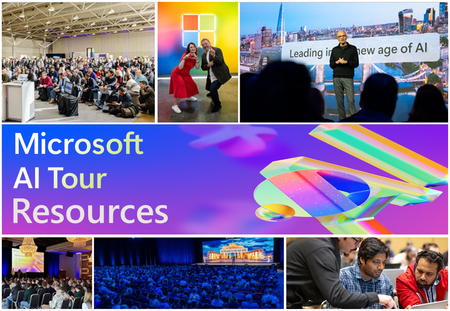
Unlock the power of Microsoft AI with redeliverable technical presentations, hands-on workshops, and open-source curriculum from the Microsoft AI Tour! Whether you’re a Microsoft MVP, Developer, or IT Professional, these expertly crafted resources empower you to teach, train, and lead AI adoption in your community. Explore top breakout sessions covering GitHub Copilot, Azure AI, Generative AI, and security best practices—designed to simplify AI integration and accelerate digital transformation. Dive into interactive workshops that provide real-world applications of AI technologies. Take it a step further with Microsoft’s Open-Source AI Curriculum, offering beginner-friendly courses on AI, Machine Learning, Data Science, Cybersecurity, and GitHub Copilot—perfect for upskilling teams and fostering innovation. Don’t just learn—lead. Access these resources, host impactful training sessions, and drive AI adoption in your organization. Start sharing today! Explore now: Microsoft AI Tour Resources.Model Mondays Season 2: Learn to Choose & Use the Right AI Models with Azure AI
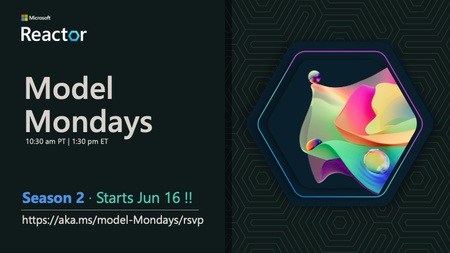
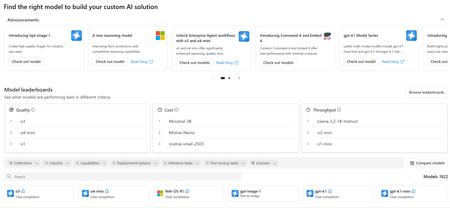
Skill Up on the Latest AI Models & Tools with Model Mondays – Season 2 The world of AI is evolving at lightning speed. With over 11,000 models now available in the Azure AI Foundry catalog—including frontier models from top providers and thousands of open-source variants—developers face a new challenge: How do you choose the right model for your task? That’s where Model Mondays comes in. What Is Model Mondays? Model Mondays is a weekly livestream and AMA series hosted on https://developer.microsoft.com/en-us/reactor/ and the Azure AI Foundry Discord. It’s designed to help developers like you build your Model IQ one spotlight at a time. Each 30-minute episode includes: 5-min Highlights: Catch up on the latest model-related news. 15-min Spotlight: Deep dive into a specific model, model family, or tool. Live Q&A: Ask questions during the stream or join the Friday AMA on Discord. Whether you're just starting out or already building AI-powered apps, this series will help you stay current and confident in your model choices. Season 2 Starts June 16 – Register Now! We’re kicking off Season 2 with three powerful episodes: 🔹 EP1: Advanced Reasoning Models 🗓️ https://developer.microsoft.com/en-us/reactor/events/25905/ 🔹 EP2: Model Context Protocol (MCP) 🗓️ https://developer.microsoft.com/en-us/reactor/events/25906/ 🔹 EP3: SLMs and Reasoning (Phi-4 Ecosystem) 🗓️ https://developer.microsoft.com/en-us/reactor/events/25907/ Why Should You Join? Stay Ahead: Learn about the latest models, tools, and trends in AI. Get Hands-On: Explore real-world use cases and demos. Build Smarter: Discover how to evaluate, fine-tune, and deploy models effectively. Connect: Join the community on Discord and get your questions answered. Quick Links 📚 https://aka.ms/model-mondays 🎥 https://aka.ms/model-mondays/playlist 💬 https://aka.ms/model-mondays/discord Bonus: Learn from Microsoft Build 2025 If you missed Microsoft Build, now’s the time to catch up. Azure AI Foundry is expanding fast—with new tools like Model Router, AI Evaluations SDK, and Foundry Portal making it easier than ever to build, test, and deploy AI apps. Check out http://aka.ms/learnatbuild for the top 10 things you need to know. Ready to Build? Whether you're exploring edge models, open-source AI, or fine-tuning GPTs, Model Mondays will help you level up your skills and build confidently on Azure. Let’s build our model IQ together. See you on June 16!Exploring Azure AI Model Inference: A Comprehensive Guide
Azure AI model inference provides access to a wide range of flagship models from leading providers such as AI21 Labs, Azure OpenAI, Cohere, Core42, DeepSeek, Meta, Microsoft, Mistral AI, and NTT Data https://learn.microsoft.com/azure/ai-foundry/model-inference/concepts/models . These models can be consumed as APIs, allowing you to integrate advanced AI capabilities into your applications seamlessly. Model Families and Their Capabilities Azure AI Foundry categorises its models into several families, each offering unique capabilities: AI21 Labs: Known for the Jamba family models, which are production-grade large language models (LLMs) using AI21's hybrid Mamba-Transformer architecture. These models support chat completions, tool calling, and multiple languages including English, French, Spanish, Portuguese, German, Arabic, and Hebrew. https://learn.microsoft.com/azure/ai-foundry/model-inference/concepts/models Azure OpenAI: Offers diverse models designed for tasks such as reasoning, problem-solving, natural language understanding, and code generation. These models support text and image inputs, multiple languages, and tool calling https://learn.microsoft.com/azure/ai-foundry/model-inference/concepts/models Cohere: Provides models for embedding and command tasks, supporting multilingual capabilities and various response formats https://learn.microsoft.com/azure/ai-foundry/model-inference/concepts/models Core42: Features the Jais-30B-chat model, designed for chat completions https://learn.microsoft.com/azure/ai-foundry/model-inference/concepts/models DeepSeek: Includes models like DeepSeek-V3 and DeepSeek-R1, focusing on advanced AI tasks https://learn.microsoft.com/azure/ai-foundry/model-inference/concepts/models Meta: Offers the Llama series models, which are instruction-tuned for various AI tasks https://learn.microsoft.com/azure/ai-foundry/model-inference/concepts/models Microsoft: Provides the Phi series models, supporting multimodal instructions and vision tasks https://learn.microsoft.com/azure/ai-foundry/model-inference/concepts/models Mistral AI: Features models like Ministral-3B and Mistral-large, designed for high-performance AI tasks https://learn.microsoft.com/azure/ai-foundry/model-inference/concepts/models NTT Data: Offers the Tsuzumi-7b model, focusing on specific AI capabilities https://learn.microsoft.com/azure/ai-foundry/model-inference/concepts/models Deployment and Integration Azure AI model inference supports global standard deployment, ensuring consistent throughput and performance. Models can be deployed in various configurations, including regional deployments and sovereign clouds such as Azure Government, Azure Germany, and Azure China https://learn.microsoft.com/azure/ai-foundry/model-inference/concepts/models To integrate these models into your applications, you can use the Azure AI model inference API, which supports multiple programming languages including Python, C#, JavaScript, and Java. This flexibility allows you to deploy models multiple times under different configurations, providing a robust and scalable solution for your AI needs https://learn.microsoft.com/en-us/azure/ai-foundry/model-inference/overview Conclusion Azure AI model inference in Azure AI Foundry offers a comprehensive solution for integrating advanced AI models into your applications. With a wide range of models from leading providers, flexible deployment options, and robust API support, Azure AI Foundry empowers you to leverage cutting-edge AI capabilities without the complexity of hosting and managing the infrastructure. Explore the Azure AI model catalog today and unlock the potential of AI for your business. Join the Conversation on Azure AI Foundry Discussions! Have ideas, questions, or insights about AI? Don't keep them to yourself! Share your thoughts, engage with experts, and connect with a community that’s shaping the future of artificial intelligence. 👉 Click here to join the discussion!Week 2 . Microsoft Agents Hack Online Events and Readiness Resources
https://aka.ms/agentshack 2025 is the year of AI agents! But what exactly is an agent, and how can you build one? Whether you're a seasoned developer or just starting out, this FREE three-week virtual hackathon is your chance to dive deep into AI agent development. Register Now: https://aka.ms/agentshack 🔥 Learn from expert-led sessions streamed live on YouTube, covering top frameworks like Semantic Kernel, Autogen, the new Azure AI Agents SDK and the Microsoft 365 Agents SDK. Week 2 Events: April 14th-18th Day/Time Topic Track 4/14 08:00 AM PT Building custom engine agents with Azure AI Foundry and Visual Studio Code Copilots 4/15 07:00 AM PT Your first AI Agent in JS with Azure AI Agent Service JS 4/15 09:00 AM PT Building Agentic Applications with AutoGen v0.4 Python 4/15 12:00 PM PT AI Agents + .NET Aspire C# 4/15 03:00 PM PT Prototyping AI Agents with GitHub Models Python 4/16 04:00 AM PT Multi-agent AI apps with Semantic Kernel and Azure Cosmos DB C# 4/16 06:00 AM PT Building declarative agents with Microsoft Copilot Studio & Teams Toolkit Copilots 4/16 07:00 AM PT Prompting is the New Scripting: Meet GenAIScript JS 4/16 09:00 AM PT Building agents with an army of models from the Azure AI model catalog Python 4/16 12:00 PM PT Multi-Agent API with LangGraph and Azure Cosmos DB Python 4/16 03:00 PM PT Mastering Agentic RAG Python 4/17 06:00 AM PT Build your own agent with OpenAI, .NET, and Copilot Studio C# 4/17 09:00 AM PT Building smarter Python AI agents with code interpreters Python 4/17 12:00 PM PT Building Java AI Agents using LangChain4j and Dynamic Sessions Java 4/17 03:00 PM PT Agentic Voice Mode Unplugged Python1.5KViews0likes0CommentsAI Toolkit for Visual Studio Code Now Supports NVIDIA NIM Microservices for RTX AI PCs
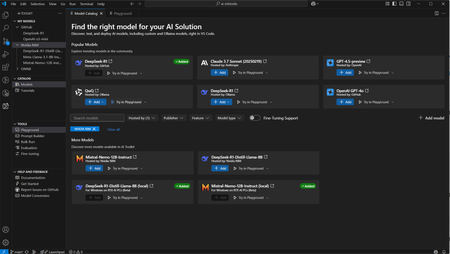
AI Toolkit now supports NVIDIA NIM™ microservice-based foundation models for inference testing in the model playground and advanced features like bulk run, evaluation and building prompts. This collaboration helps AI Engineers streamline development processes with foundational AI models. About AI Toolkit AI Toolkit is a VS Code extension for AI engineers to build, deploy, and manage AI solutions. It includes model and prompt-centric features that allow users to explore and test different AI models, create and evaluate prompts, and perform model finetuning, all from within VS Code. Since its preview launch in 2024, AI Toolkit has helped developers worldwide learn about generative AI models and start building AI solutions. NVIDIA NIM Microservices This January, NVIDIA announced that state-of-the-art AI models spanning language, speech, animation and vision capabilities - offered as NVIDIA NIM microservices - can now run locally on NVIDIA RTX AI PCs. These microservices prepackage optimized AI models with all the necessary runtime components for deployment across NVIDIA GPUs. Developers can now develop and deploy anywhere with the same unified experience and software stack across RTX AI PCs and workstations to the cloud. Developers can jumpstart their AI development journey by downloading and running NIM containers quickly on Windows 11 PCs with GeForce RTX GPUs using Windows Subsystem for Linux (WSL2). The Power of Collaboration Integrating AI Toolkit with NIM provides AI engineers with a more cohesive and efficient workflow: Seamlessly integrate AI Toolkit with NIM to create a unified development environment without the need to switch context. Users can access any NIM supported models from AI Toolkit. Leverage the combined capabilities of both tools to streamline workflows and accelerate AI solution development process around foundation AI models, from within VS Code. How to get started Follow these steps to begin leveraging the power of NIM on AI Toolkit: Download and install the latest version of AI Toolkit for VS Code. Install NIM pre-requisites on RTX PCs using the instructions here. Select a NIM model from the model catalog on AI Toolkit and load it in Playground. Optionally, you can also add your NIM model hosted in the cloud to AI Toolkit by URL Explore NIM models from the playground Start developing prompts with new NIM models in AI Toolkit! Looking Forward We invite you to explore the possibilities of this integration and take your development projects to new heights! Try AI Toolkit today – and please continue sharing your feedback. Stay tuned for more updates and detailed tutorials on how to maximize the benefits of this exciting new collaboration. Together, we are shaping the future of AI development!