microsoft
31 Topics
Agentic Mentor: A Specification-Driven, Multi-Agent Learning Tool
Project Overview Rather than relying on the model to know when the student understands, we built a pipeline where progress itself is gated: a student cannot move forward until they can demonstrate they understood what was just built. And rather than depending on commercial, token-billed APIs to make this teaching possible, the system is designed to run on locally hosted or free-tier models, keeping it accessible to students and institutions alike. As our contribution to Microsoft, we've handed over the full public repository behind Agentic Mentor. Given how central token-based services have become to software development, we see real potential for this approach in initiatives like GitHub Education, where affordable, agentic tools for students matter. In this post, we'll walk through what motivated the project, how Agentic Mentor works under the hood, and what we learned putting it to the test on a real piece of university coursework. The Project Journey This project was completed over three months. The first few weeks were spent on background research and requirements elicitation. We reviewed the literature on AI-assisted learning, specification-driven development and prompt ambiguity, elicited functional and non-functional requirements from our client supervisor at Microsoft, Lee Stott, and our academic supervisors, and broke the work into components we could build and test independently. This told us what was realistically achievable in the time we had, and which features were core to the tool rather than desirable extras. Implementation was coordinated through GitHub, with the team meeting daily to keep parallel work in sync and weekly meetings with both our supervisors and our client to report progress and check we were still building the right thing. We worked this way because the shape of the tool was still settling once implementation began, and that frequency of contact meant a wrong assumption surfaced in days rather than weeks. The most consequential decision of the project came out of those conversations. Agentic Mentor had been proposed as an assessment tool, but the AI does not write the assessment brief, so it cannot be relied on to read it as the academic intended, and grading on top of that reading would carry the model's misunderstanding into a student's mark. We pivoted to a learning tool, and the design of the pipeline followed from there. The final month went on completing both interfaces and evaluating the system, first against SpecBench as a correctness check, then against a real master's-level coursework. Two problems surfaced. Our GPU infrastructure went offline, so we moved to free-tier cloud models and scheduled runs around quota resets. And one of the questions the system generated turned out to be subtly wrong, and we had read it and accepted it without question, which is the automation bias we had spent the project writing about. Technical Details Agentic Mentor is built as a multi-agent, specification-driven pipeline. It has four agents; Research, Ingestion, Mentoring, and Viva. Each agent was implemented using the Microsoft Agent Framework. We chose to give each phase its own dedicated agent so that every stage could be equipped with the specific tools its task required, rather than relying on one general-purpose agent to handle the whole assignment. The agents run linearly, with each one writing its output to disk and the orchestrator passing the resulting file paths to the next stage. This design lets a session pause and resume. An overview of Agentic Mentor's architecture is seen in the figure below. Research Agent. This stage grounds the pipeline in external context. It uses GitHub and arXiv MCP servers to gather relevant literature and existing implementations. MCP gave the agent a uniform interface to both sources, meaning further ones could be added later simply by connecting another server, without reworking the agent itself. Ingestion Agent. Built around GitHub SpecKit, an open-source toolkit for spec-driven development, this agent converts the assignment brief and research context into structured specification files. Rather than letting the model resolve ambiguities in the brief on its own, SpecKit's clarification step surfaces unclear points directly to the student, who must answer before the pipeline continues. This choice keeps the student engaged in design decisions rather than letting the model make them silently. Mentoring Agent. This is where the student and the model actually build the project together, phase by phase, with the agent writing code and explaining its reasoning as it goes. Progress is gated: the student cannot move to the next phase until every task is complete, and a short multiple-choice checkpoint has been passed. The checkpoint tests understanding of what was just built rather than simply advancing on request. Viva Agent. Once implementation is complete, this agent interviews the student. Answers are checked against key points prepared in advance, with feedback given after each response and a full transcript saved for later review. How Microsoft's tools shaped the project. The Microsoft Agent Framework was the backbone that made the multi-agent design practical: it let us build four functionally distinct agents that could each carry their own tools and responsibilities while still communicating cleanly through a shared orchestration layer. Together with GitHub SpecKit's structured approach to specification-driven development, these tools gave Agentic Mentor a technical foundation that would have been considerably harder to assemble from scratch, and were central to making the pipeline's phase-gated, specification-first design actually work in practice rather than remaining a concept on paper. Demo This demo video shows an end-to-end demonstration of the VS Code extension of Agentic Mentor. Results and outcomes We evaluated Agentic Mentor in two phases: a benchmark check for basic correctness, followed by a real master's-level coursework that better matched the system's intended use. Phase 1: Code Correctness We used SpecBench to evaluate Agentic Mentor’s code correctness. SpecBench is a benchmark of 30 systems-level programming tasks with pre-existing test suites. We ran six of them using a locally served Qwen3.6-27B model. Our results show that tasks with common structural logic scored well, such as json_parser achieving a 97.7% pass rate. However, more complex tasks performed worse. On crypto_primitives, hallucinations prevented a testable solution being produced at all. This result reflects the limits of a small local model such as Qwen3.6-27B. However, the success of some tasks show that smaller local models have promise. Phase 2: Student Understanding The second phase evaluated the system against a real academic assignment on Test-Driven Development, which the team had previously completed without Agentic Mentor. Claude Sonnet 5 was used to reduce hallucinations and improve reasoning. We combined our own assessment as students with an interview with Jens Krinke, the module leader who set and assessed the coursework. From our perspective, we found that Agentic Mentor made a large, loosely specified project easier to approach, and the questions at each stage required active recall which helped us understand the assignment better. It improved on our original attempt by constructing a synthetic repository with known test–production pairs as concrete acceptance criteria, linking test and production files by co-occurrence in commit history rather than naming conventions, and producing unit test coverage within a properly separated project structure. The assessment of its understanding was less favourable. Jens rated its comprehension as comparable to a typical student's, but no better: it treated commit history as capable of confirming the presence of TDD, when it can only reveal the degree of its absence, and it missed an implicit hint regarding commit size. Lessons Learned Building Agentic Mentor taught our team a great deal about coding agents, local models, and the practical challenges of applying AI in education. These lessons shaped both the tool itself and how we think about deploying AI in learning contexts. Knowing where the tool fits. One of our clearest takeaways was that Agentic Mentor works best on well-specified, undergraduate-level assignments rather than open-ended, research-style coursework. Our evaluation on SpecBench's json_parser task, where the tool achieved a 97.7% pass rate, showed just how effective it can be on concrete, well-bounded problems. Our Test-Driven Development case study showed the same tool struggling once the task demanded interpreting ambiguous or partially hidden objectives. Even so, our own experience using the tool showed genuine improvements in our learning outcomes and even surfaced implementation ideas we hadn't considered ourselves, which reinforced our belief in the promise of agentic learning tools when applied to the right kind of problem. Navigating the local model trade-off. Our extensive experimentation with locally hosted models taught us that there is a trade-off between accessibility and quality. Local models performed well on smaller, simpler tasks, but as task complexity grew, code correctness declined and hallucinations became more frequent. This was a valuable lesson in engineering trade-offs: a fully local, cost-free deployment is achievable in principle, but a genuinely effective one currently depends on access to larger, cloud-hosted models. Rethinking what the tool should be for. Perhaps our biggest shift in thinking came from an idea we abandoned. We originally envisioned Agentic Mentor as an assessment tool, capable of evaluating a student's understanding for official grading. Working through the implementation made clear why that vision doesn't hold up: an AI system that didn't generate the assessment brief itself cannot be guaranteed to interpret an educator's intent correctly. This is a limitation of natural language interpretation that is well documented in the literature we reviewed. Recognizing this early enough to change course was itself a valuable exercise in engineering judgment, and it led us to reposition Agentic Mentor as a learning tool focused on helping students engage with agentic AI, rather than an assessment tool that asks AI to make judgments it isn't equipped to make reliably. Implications for Educators Our experience building and evaluating Agentic Mentor highlighted three critical takeaways for educators looking to integrate AI into their classrooms. Watch out for automation bias. Our academic evaluation revealed that the AI agents occasionally held technical misconceptions, which raised up the risk of automation bias; one of the biggest risks in AI-assisted education. When an AI speaks with absolute confidence, it’s incredibly easy to believe it. If students trust the model's outputs without sufficient questioning, they bypass the critical thinking the coursework was meant to provoke. Educational AI needs built-in friction to force the AI to highlight its own uncertainties and encourage students to question the output. Be careful using AI as an Assessment tool. The discovery of the AI’s technical misconceptions also suggests caution using AI for grading or formal assessment. Because the model can misunderstand core concepts the exact same way a student might, it cannot reliably evaluate student comprehension. This also led us to pivot Agentic Mentor strictly to a learning tool. AI is an excellent tool for supporting student learning through phased tasks, but it is not currently reliable enough to act as an autonomous judge of a student's underlying understanding. Agentic Development is reshaping software engineering. As agentic development reshapes software engineering, educators must shift their focus from teaching students how to write code manually, to teaching them how to prompt coding agents. This includes using practices such as specification-driven development, which reduces AI errors in code by preventing ambiguities in natural language prompts. Future Development The limitations we encountered while building Agentic Mentor point to two clear directions for further development. Both would make the system a more reliable learning tool for students. Validation agent Agentic Mentor currently interprets a project with the same gaps and misconceptions a typical student might bring to it. Because the system presents its output with confidence, those gaps can be passed on unchallenged. We propose extending the pipeline with a validation agent. This component would be dedicated to interrogating the questions and conclusions the system produces. Its purpose would be to introduce a deliberate layer of hesitation, surfacing assumptions explicitly rather than allowing them to reach the student as established fact. The intended outcome is a reduction in automation bias, encouraging students to engage critically with the system's output rather than accepting it uncritically. Integration with academic platforms As long as the system's understanding of an assignment is constrained in the same ways a student's is, it cannot be relied upon to identify a task's critical elements. A future version could accept explicit input from educators, specifying those critical elements in advance along with guidance on how students should be directed through them. This would require Agentic Mentor to move beyond a standalone local tool and integrate with the institution's existing education platform. Such integration would give educators direct control over the system's behaviour, making it both more trustworthy and more productive as a learning aid. Conclusion Agentic Mentor was built to help students learn from their coding coursework rather than simply complete it, embedding the learning process into the structure of the system instead of relying on vibe coding. We found that a model cannot be trusted to be consistently correct. Running on smaller local models trades capability for accessibility. And measuring student understanding is difficult without a large user study. Agentic Mentor nonetheless represents a step towards integrating AI-assisted development into education while preserving student understanding. With adequate guardrails against automation bias, it can serve as an accessible tool that adapts the learning process to the changes AI has brought to software development. Call to Action The challenge of "one-click" AI code generation in education is here to stay, but with Agentic Mentor, we aim to keep students actively engaged in problem-solving rather than bypassing it. We invite you to explore our work and help us build the future of AI in education. Explore the Code: Visit the Agentic Mentor GitHub Repository Run It Your Way: Execute the orchestrator via the CLI (see the main README), or use our custom GUI by running the VS Code Extension (located in the agentic-mentor-extension folder). Tools: Our pipeline is built on the Microsoft Agent Framework for multi-agent routing and GitHub SpecKit to enforce strict Specification-Driven Development. Team Our team involved in developing this project included 6 members. All of us are Masters students at UCL, studying either Software Systems Engineering or Artificial Intelligence and Data Engineering. Mark Connor – Team Leader – Software Engineer GitHub URL: https://github.com/markjconnor LinkedIn URL: http://www.linkedin.com/in/mark-connor2003 Alexander Filippov – Software Engineer GitHub URL: https://github.com/ucabavf LinkedIn URL: https://www.linkedin.com/in/alexander-f-003a5721b Weeraya Hew – Software Engineer GitHub URL: https://github.com/tingwry LinkedIn URL: https://www.linkedin.com/in/weeraya-hew-924a19261 Tanishka Jaikrishnia – Software Engineer GitHub URL: https://github.com/tanishkajaikrishnia LinkedIn URL: https://www.linkedin.com/in/tanishka-jaikrishnia-96b652274/ Pranav Kannan – Software Engineer GitHub URL: https://github.com/pranavk295 LinkedIn URL: https://www.linkedin.com/in/pranav-kannan-0b2a11221 Gabriel Mardakhaev – Software Engineer GitHub URL: https://github.com/gabmardakhaev LinkedIn URL: https://www.linkedin.com/in/gabriel-mardakhaev Special Thanks to Contributors We want to express our deepest gratitude to the following contributors, whose ongoing support and dedication led to the success of this project. Lee Stott, Principal Cloud Advocate Microsoft He Ye, Academic Supervisor, UCL Jens Krinke, Senior Lecturer and Academic Supervisor, UCL 763Views0likes1Comment
Exploring Azure OpenAI Assistants and Azure AI Agent Services: Benefits and Opportunities
In the rapidly evolving landscape of artificial intelligence, businesses are increasingly turning to cloud-based solutions to harness the power of AI. Microsoft Azure offers two prominent services in this domain: Azure OpenAI Assistants and Azure AI Agent Services. While both services aim to enhance user experiences and streamline operations, they cater to different needs and use cases. This blog post will delve into the details of each service, their benefits, and the opportunities they present for businesses. Understanding Azure OpenAI Assistants What Are Azure OpenAI Assistants? Azure OpenAI Assistants are designed to leverage the capabilities of OpenAI's models, such as GPT-3 and its successors. These assistants are tailored for applications that require advanced natural language processing (NLP) and understanding, making them ideal for conversational agents, chatbots, and other interactive applications. Key Features Pre-trained Models: Azure OpenAI Assistants utilize pre-trained models from OpenAI, which means they come with a wealth of knowledge and language understanding out of the box. This reduces the time and effort required for training models from scratch. Customizability: While the models are pre-trained, developers can fine-tune them to meet specific business needs. This allows for the creation of personalized experiences that resonate with users. Integration with Azure Ecosystem: Azure OpenAI Assistants seamlessly integrate with other Azure services, such as Azure Functions, Azure Logic Apps, and Azure Cognitive Services. This enables businesses to build comprehensive solutions that leverage multiple Azure capabilities. Benefits of Azure OpenAI Assistants Enhanced User Experience: By utilizing advanced NLP capabilities, Azure OpenAI Assistants can provide more natural and engaging interactions. This leads to improved customer satisfaction and loyalty. Rapid Deployment: The availability of pre-trained models allows businesses to deploy AI solutions quickly. This is particularly beneficial for organizations looking to implement AI without extensive development time. Scalability: Azure's cloud infrastructure ensures that applications built with OpenAI Assistants can scale to meet growing user demands without compromising performance. Understanding Azure AI Agent Services What Are Azure AI Agent Services? Azure AI Agent Services provide a more flexible framework for building AI-driven applications. Unlike Azure OpenAI Assistants, which are limited to OpenAI models, Azure AI Agent Services allow developers to utilize a variety of AI models, including those from other providers or custom-built models. Key Features Model Agnosticism: Developers can choose from a wide range of AI models, enabling them to select the best fit for their specific use case. This flexibility encourages innovation and experimentation. Custom Agent Development: Azure AI Agent Services support the creation of custom agents that can perform a variety of tasks, from simple queries to complex decision-making processes. Integration with Other AI Services: Like OpenAI Assistants, Azure AI Agent Services can integrate with other Azure services, allowing for the creation of sophisticated AI solutions that leverage multiple technologies. Benefits of Azure AI Agent Services Diverse Use Cases: The ability to use any AI model opens a world of possibilities for businesses. Whether it's a specialized model for sentiment analysis or a custom-built model for a niche application, organizations can tailor their solutions to meet specific needs. Enhanced Automation: AI agents can automate repetitive tasks, freeing up human resources for more strategic activities. This leads to increased efficiency and productivity. Cost-Effectiveness: By allowing the use of various models, businesses can choose cost-effective solutions that align with their budget and performance requirements. Opportunities for Businesses Improved Customer Engagement Both Azure OpenAI Assistants and Azure AI Agent Services can significantly enhance customer engagement. By providing personalized and context-aware interactions, businesses can create a more satisfying user experience. For example, a retail company can use an AI assistant to provide tailored product recommendations based on customer preferences and past purchases. Data-Driven Decision Making AI agents can analyze vast amounts of data and provide actionable insights. This capability enables organizations to make informed decisions based on real-time data analysis. For instance, a financial institution can deploy an AI agent to monitor market trends and provide investment recommendations to clients. Streamlined Operations By automating routine tasks, businesses can streamline their operations and reduce operational costs. For example, a customer support team can use AI agents to handle common inquiries, allowing human agents to focus on more complex issues. Innovation and Experimentation The flexibility of Azure AI Agent Services encourages innovation. Developers can experiment with different models and approaches to find the most effective solutions for their specific challenges. This culture of experimentation can lead to breakthroughs in product development and service delivery. Enhanced Analytics and Insights Integrating AI agents with analytics tools can provide businesses with deeper insights into customer behavior and preferences. This data can inform marketing strategies, product development, and customer service improvements. For example, a company can analyze interactions with an AI assistant to identify common customer pain points, allowing them to address these issues proactively. Conclusion In summary, both Azure OpenAI Assistants and Azure AI Agent Services offer unique advantages that can significantly benefit businesses looking to leverage AI technology. Azure OpenAI Assistants provide a robust framework for building conversational agents using advanced OpenAI models, making them ideal for applications that require sophisticated natural language understanding and generation. Their ease of integration, rapid deployment, and enhanced user experience make them a compelling choice for businesses focused on customer engagement. Azure AI Agent Services, on the other hand, offer unparalleled flexibility by allowing developers to utilize a variety of AI models. This model-agnostic approach encourages innovation and experimentation, enabling businesses to tailor solutions to their specific needs. The ability to automate tasks and streamline operations can lead to significant cost savings and increased efficiency. Additional Resources To further explore Azure OpenAI Assistants and Azure AI Agent Services, consider the following resources: Agent Service on Microsoft Learn Docs Watch On-Demand Sessions Streamlining Customer Service with AI-Powered Agents: Building Intelligent Multi-Agent Systems with Azure AI Microsoft learn Develop AI agents on Azure - Training | Microsoft Learn Community and Announcements Tech Community Announcement: Introducing Azure AI Agent Service Bonus Blog Post: Announcing the Public Preview of Azure AI Agent Service AI Agents for Beginners 10 Lesson Course https://aka.ms/ai-agents-beginners6.1KViews0likes2CommentsLearn How to Build Smarter AI Agents with Microsoft’s MCP Resources Hub
If you've been curious about how to build your own AI agents that can talk to APIs, connect with tools like databases, or even follow documentation you're in the right place. Microsoft has created something called MCP, which stands for Model‑Context‑Protocol. And to help you learn it step by step, they’ve made an amazing MCP Resources Hub on GitHub. In this blog, I’ll Walk you through what MCP is, why it matters, and how to use this hub to get started, even if you're new to AI development. What is MCP (Model‑Context‑Protocol)? Think of MCP like a communication bridge between your AI model and the outside world. Normally, when we chat with AI (like ChatGPT), it only knows what’s in its training data. But with MCP, you can give your AI real-time context from: APIs Documents Databases Websites This makes your AI agent smarter and more useful just like a real developer who looks up things online, checks documentation, and queries databases. What’s Inside the MCP Resources Hub? The MCP Resources Hub is a collection of everything you need to learn MCP: Videos Blogs Code examples Here are some beginner-friendly videos that explain MCP: Title What You'll Learn VS Code Agent Mode Just Changed Everything See how VS Code and MCP build an app with AI connecting to a database and following docs. The Future of AI in VS Code Learn how MCP makes GitHub Copilot smarter with real-time tools. Build MCP Servers using Azure Functions Host your own MCP servers using Azure in C#, .NET, or TypeScript. Use APIs as Tools with MCP See how to use APIs as tools inside your AI agent. Blazor Chat App with MCP + Aspire Create a chat app powered by MCP in .NET Aspire Tip: Start with the VS Code videos if you’re just beginning. Blogs Deep Dives and How-To Guides Microsoft has also written blogs that explain MCP concepts in detail. Some of the best ones include: Build AI agent tools using remote MCP with Azure Functions: Learn how to deploy MCP servers remotely using Azure. Create an MCP Server with Azure AI Agent Service : Enables Developers to create an agent with Azure AI Agent Service and uses the model context protocol (MCP) for consumption of the agents in compatible clients (VS Code, Cursor, Claude Desktop). Vibe coding with GitHub Copilot: Agent mode and MCP support: MCP allows you to equip agent mode with the context and capabilities it needs to help you, like a USB port for intelligence. When you enter a chat prompt in agent mode within VS Code, the model can use different tools to handle tasks like understanding database schema or querying the web. Enhancing AI Integrations with MCP and Azure API Management Enhance AI integrations using MCP and Azure API Management Understanding and Mitigating Security Risks in MCP Implementations Overview of security risks and mitigation strategies for MCP implementations Protecting Against Indirect Injection Attacks in MCP Strategies to prevent indirect injection attacks in MCP implementations Microsoft Copilot Studio MCP Announcement of the Microsoft Copilot Studio MCP lab Getting started with MCP for Beginners 9 part course on MCP Client and Servers Code Repositories Try it Yourself Want to build something with MCP? Microsoft has shared open-source sample code in Python, .NET, and TypeScript: Repo Name Language Description Azure-Samples/remote-mcp-apim-functions-python Python Recommended for Secure remote hosting Sample Python Azure Functions demonstrating remote MCP integration with Azure API Management Azure-Samples/remote-mcp-functions-python Python Sample Python Azure Functions demonstrating remote MCP integration Azure-Samples/remote-mcp-functions-dotnet C# Sample .NET Azure Functions demonstrating remote MCP integration Azure-Samples/remote-mcp-functions-typescript TypeScript Sample TypeScript Azure Functions demonstrating remote MCP integration Microsoft Copilot Studio MCP TypeScript Microsoft Copilot Studio MCP lab You can clone the repo, open it in VS Code, and follow the instructions to run your own MCP server. Using MCP with the AI Toolkit in Visual Studio Code To make your MCP journey even easier, Microsoft provides the AI Toolkit for Visual Studio Code. This toolkit includes: A built-in model catalog Tools to help you deploy and run models locally Seamless integration with MCP agent tools You can install the AI Toolkit extension from the Visual Studio Code Marketplace. Once installed, it helps you: Discover and select models quickly Connect those models to MCP agents Develop and test AI workflows locally before deploying to the cloud You can explore the full documentation here: Overview of the AI Toolkit for Visual Studio Code – Microsoft Learn This is perfect for developers who want to test things on their own system without needing a cloud setup right away. Why Should You Care About MCP? Because MCP: Makes your AI tools more powerful by giving them real-time knowledge Works with GitHub Copilot, Azure, and VS Code tools you may already use Is open-source and beginner-friendly with lots of tutorials and sample code It’s the future of AI development connecting models to the real world. Final Thoughts If you're learning AI or building software agents, don’t miss this valuable MCP Resources Hub. It’s like a starter kit for building smart, connected agents with Microsoft tools. Try one video or repo today. Experiment. Learn by doing and start your journey with the MCP for Beginners curricula.3.8KViews2likes2CommentsA Recap of the Build AI Agents with Custom Tools Live Session
Artificial Intelligence is evolving, and so are the ways we build intelligent agents. On a recent Microsoft YouTube Live session, developers and AI enthusiasts gathered to explore the power of custom tools in AI agents using Azure AI Studio. The session walked through concepts, use cases, and a live demo that showed how integrating custom tools can bring a new level of intelligence and adaptability to your applications. 🎥 Watch the full session here: https://www.youtube.com/live/MRpExvcdxGs?si=X03wsQxQkkshEkOT What Are AI Agents with Custom Tools? AI agents are essentially smart workflows that can reason, plan, and act — powered by large language models (LLMs). While built-in tools like search, calculator, or web APIs are helpful, custom tools allow developers to tailor agents for business-specific needs. For example: Calling internal APIs Accessing private databases Triggering backend operations like ticket creation or document generation Learn Module Overview: Build Agents with Custom Tools To complement the session, Microsoft offers a self-paced Microsoft Learn module that gives step-by-step guidance: Explore the module Key Learning Objectives: Understand why and when to use custom tools in agents Learn how to define, integrate, and test tools using Azure AI Studio Build an end-to-end agent scenario using custom capabilities Hands-On Exercise: The module includes a guided lab where you: Define a tool schema Register the tool within Azure AI Studio Build an AI agent that uses your custom logic Test and validate the agent’s response Highlights from the Live Session Here are some gems from the session: Real-World Use Cases – Automating customer support, connecting to CRMs, and more Tool Manifest Creation – Learn how to describe a tool in a machine-understandable way Live Azure Demo – See exactly how to register tools and invoke them from an AI agent Tips & Troubleshooting – Best practices and common pitfalls when designing agents Want to Get Started? If you're a developer, AI enthusiast, or product builder looking to elevate your agent’s capabilities — custom tools are the next step. Start building your own AI agents by combining the power of: Microsoft Learn Module YouTube Live Session Final Thoughts The future of AI isn't just about smart responses — it's about intelligent actions. Custom tools enable your AI agent to do things, not just say things. With Azure AI Studio, building a practical, action-oriented AI assistant is more accessible than ever. Learn More and Join the Community Learn more about AI Agents with https://aka.ms/ai-agents-beginnersOpen Source Course and Building Agents. Join the Azure AI Foundry Discord Channel. Continue the discussion and learning: https://aka.ms/AI/discord Have questions or want to share what you're building? Let’s connect on LinkedIn or drop a comment under the YouTube video!446Views0likes0CommentsIntegrating Microsoft Foundry with OpenClaw: Step by Step Model Configuration
Step 1: Deploying Models on Microsoft Foundry Let us kick things off in the Azure portal. To get our OpenClaw agent thinking like a genius, we need to deploy our models in Microsoft Foundry. For this guide, we are going to focus on deploying gpt-5.2-codex on Microsoft Foundry with OpenClaw. Navigate to your AI Hub, head over to the model catalog, choose the model you wish to use with OpenClaw and hit deploy. Once your deployment is successful, head to the endpoints section. Important: Grab your Endpoint URL and your API Keys right now and save them in a secure note. We will need these exact values to connect OpenClaw in a few minutes. Step 2: Installing and Initializing OpenClaw Next up, we need to get OpenClaw running on your machine. Open up your terminal and run the official installation script: curl -fsSL https://openclaw.ai/install.sh | bash The wizard will walk you through a few prompts. Here is exactly how to answer them to link up with our Azure setup: First Page (Model Selection): Choose "Skip for now". Second Page (Provider): Select azure-openai-responses. Model Selection: Select gpt-5.2-codex , For now only the models listed (hosted on Microsoft Foundry) in the picture below are available to be used with OpenClaw. Follow the rest of the standard prompts to finish the initial setup. Step 3: Editing the OpenClaw Configuration File Now for the fun part. We need to manually configure OpenClaw to talk to Microsoft Foundry. Open your configuration file located at ~/.openclaw/openclaw.json in your favorite text editor. Replace the contents of the models and agents sections with the following code block: { "models": { "providers": { "azure-openai-responses": { "baseUrl": "https://<YOUR_RESOURCE_NAME>.openai.azure.com/openai/v1", "apiKey": "<YOUR_AZURE_OPENAI_API_KEY>", "api": "openai-responses", "authHeader": false, "headers": { "api-key": "<YOUR_AZURE_OPENAI_API_KEY>" }, "models": [ { "id": "gpt-5.2-codex", "name": "GPT-5.2-Codex (Azure)", "reasoning": true, "input": ["text", "image"], "cost": { "input": 0, "output": 0, "cacheRead": 0, "cacheWrite": 0 }, "contextWindow": 400000, "maxTokens": 16384, "compat": { "supportsStore": false } }, { "id": "gpt-5.2", "name": "GPT-5.2 (Azure)", "reasoning": false, "input": ["text", "image"], "cost": { "input": 0, "output": 0, "cacheRead": 0, "cacheWrite": 0 }, "contextWindow": 272000, "maxTokens": 16384, "compat": { "supportsStore": false } } ] } } }, "agents": { "defaults": { "model": { "primary": "azure-openai-responses/gpt-5.2-codex" }, "models": { "azure-openai-responses/gpt-5.2-codex": {} }, "workspace": "/home/<USERNAME>/.openclaw/workspace", "compaction": { "mode": "safeguard" }, "maxConcurrent": 4, "subagents": { "maxConcurrent": 8 } } } } You will notice a few placeholders in that JSON. Here is exactly what you need to swap out: Placeholder Variable What It Is Where to Find It <YOUR_RESOURCE_NAME> The unique name of your Azure OpenAI resource. Found in your Azure Portal under the Azure OpenAI resource overview. <YOUR_AZURE_OPENAI_API_KEY> The secret key required to authenticate your requests. Found in Microsoft Foundry under your project endpoints or Azure Portal keys section. <USERNAME> Your local computer's user profile name. Open your terminal and type whoami to find this. Step 4: Restart the Gateway After saving the configuration file, you must restart the OpenClaw gateway for the new Foundry settings to take effect. Run this simple command: openclaw gateway restart Configuration Notes & Deep Dive If you are curious about why we configured the JSON that way, here is a quick breakdown of the technical details. Authentication Differences Azure OpenAI uses the api-key HTTP header for authentication. This is entirely different from the standard OpenAI Authorization: Bearer header. Our configuration file addresses this in two ways: Setting "authHeader": false completely disables the default Bearer header. Adding "headers": { "api-key": "<key>" } forces OpenClaw to send the API key via Azure's native header format. Important Note: Your API key must appear in both the apiKey field AND the headers.api-key field within the JSON for this to work correctly. The Base URL Azure OpenAI's v1-compatible endpoint follows this specific format: https://<your_resource_name>.openai.azure.com/openai/v1 The beautiful thing about this v1 endpoint is that it is largely compatible with the standard OpenAI API and does not require you to manually pass an api-version query parameter. Model Compatibility Settings "compat": { "supportsStore": false } disables the store parameter since Azure OpenAI does not currently support it. "reasoning": true enables the thinking mode for GPT-5.2-Codex. This supports low, medium, high, and xhigh levels. "reasoning": false is set for GPT-5.2 because it is a standard, non-reasoning model. Model Specifications & Cost Tracking If you want OpenClaw to accurately track your token usage costs, you can update the cost fields from 0 to the current Azure pricing. Here are the specs and costs for the models we just deployed: Model Specifications Model Context Window Max Output Tokens Image Input Reasoning gpt-5.2-codex 400,000 tokens 16,384 tokens Yes Yes gpt-5.2 272,000 tokens 16,384 tokens Yes No Current Cost (Adjust in JSON) Model Input (per 1M tokens) Output (per 1M tokens) Cached Input (per 1M tokens) gpt-5.2-codex $1.75 $14.00 $0.175 gpt-5.2 $2.00 $8.00 $0.50 Conclusion: And there you have it! You have successfully bridged the gap between the enterprise-grade infrastructure of Microsoft Foundry and the local autonomy of OpenClaw. By following these steps, you are not just running a chatbot; you are running a sophisticated agent capable of reasoning, coding, and executing tasks with the full power of GPT-5.2-codex behind it. The combination of Azure's reliability and OpenClaw's flexibility opens up a world of possibilities. Whether you are building an automated devops assistant, a research agent, or just exploring the bleeding edge of AI, you now have a robust foundation to build upon. Now it is time to let your agent loose on some real tasks. Go forth, experiment with different system prompts, and see what you can build. If you run into any interesting edge cases or come up with a unique configuration, let me know in the comments below. Happy coding!12KViews2likes2CommentsAZ-500: Microsoft Azure Security Technologies Study Guide
The AZ-500 certification provides professionals with the skills and knowledge needed to secure Azure infrastructure, services, and data. The exam covers identity and access management, data protection, platform security, and governance in Azure. Learners can prepare for the exam with Microsoft's self-paced curriculum, instructor-led course, and documentation. The certification measures the learner’s knowledge of managing, monitoring, and implementing security for resources in Azure, multi-cloud, and hybrid environments. Azure Firewall, Key Vault, and Azure Active Directory are some of the topics covered in the exam.23KViews4likes3CommentsUnlocking the Power of Azure: Mastering Resource Management in Kubernetes
Hi, I’m Pranjal Mishra, a Student Ambassador from Galgotias University specializing in AI & ML. Passionate about cloud computing and DevOps, I often explore how platforms like Azure streamline infrastructure challenges, especially with Kubernetes. In this article, we explore resource management in Kubernetes using Azure Kubernetes Service (AKS)—focusing on setting resource limits and quotas to optimize cost, performance, and stability. We walk through creating namespaces, setting default CPU/memory requests and limits, and applying resource quotas. By using tools like Azure Monitor, Azure Policy, and Virtual Nodes, teams can ensure their containerized applications are efficient, resilient, and cost-effective. Whether you're new to AKS or looking to refine your DevOps practices, this guide offers practical steps and real-world context to get you started.263Views0likes0Comments
DocAider: Automated Documentation Maintenance for Open-source GitHub Repositories
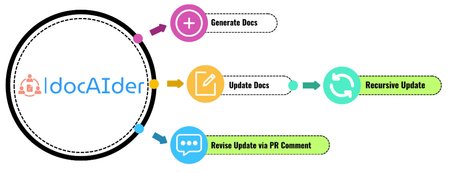
Code–level documentation of a software system provides explanations of the code functionality and usages. Documentation is crucial for giving clear insights into the code for end–users and future developers. However, creating and updating documentation manually is a demanding task, requiring significant resources and labour. With the advancement of generative AI, there is a potential to reduce human labour in documentation tasks significantly. We propose DocAider, an automation tool powered by GPT–4 that integrates the processes of documentation generation and update. DocAider can generate comprehensive and structured documentation in markdown format and update it in response to any changes made in pull requests. The mission of DocAider is to reduce developers’ burden on maintaining documentation for GitHub repositories.6.4KViews2likes0CommentsHow to get a Microsoft Discounted Student Certificationt.
Certifications are a way to stand out from the rest. Other than boosting your confidence, certifications can help you land a new job, get a promotion, or even attract more clients. Microsoft certification offers numerous opportunities, not just for developers but also low code citizen developers. As a student, you can jump start your career with free fundamental certifications.289KViews4likes22CommentsVisual Studio AI Toolkit : Building Phi-3 GenAI Applications
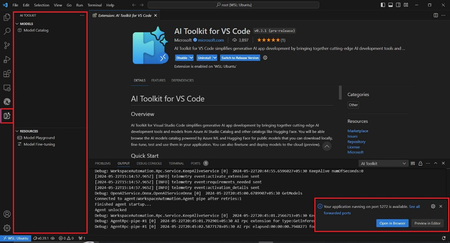
Port Forwarding, a valuable feature within the AI Toolkit, serves as a crucial gateway for seamless communication with the GenAI model. Whether it's through a straightforward API call or leveraging the SDKs, this functionality greatly enhances our ability to harness the power of the LLM/SLM. By enabling Port Forwarding, a plethora of new scenarios unfold, unlocking the full potential of our interactions with the model.10KViews2likes0Comments