microsoft
38 Topics
Windows 11
Windows 11 OS has been the most useless upgrade of Microsoft with highest number of bugs. Mid performance laptops like dell 5510,i5 11th gen(nvidia mx450) which in my case also cannot run smoothly on windows 11. I have got a ton of issues on gpu, display and bugs where display rendering issues and blue screen error messages appear. Even the dark mode sucks. Biggest downfall for Microsoft in terms of stability 👎🏻908Views0likes0Comments
(MAJOR BUGS) "Found81results" is together, no space, and wrong when selected results are 137?
(MAJOR BUGS) "Found81results" is together, no space, and wrong when selected results are 137? Edges of the browser. This is edge browser, which wants us to ditch Google Chrome. Never faced such childish bugs in chrome in 20 years of usage. Common in all edge browsers on all devices. Checked personally every one of them and can confirm.726Views0likes0CommentsIntroducing Edge Master Password | New feature
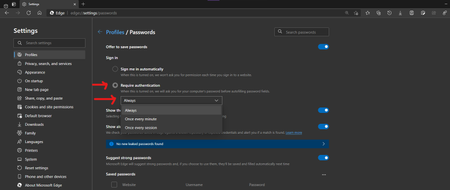
it's this feature: it's controlled feature rollout available in Edge canary, was added few versions ago. this helps your passwords stay safe, by requiring you to enter your Windows Pin/Password when you want to autofill your credentials on a web page. using the same strong authentication method Windows uses to secure your login screen, secure your disks pre-logon etc. next in line is this I'm already seeing some bits of it in Edge canary, but not fully implemented just yet.12KViews3likes2CommentsTHEMES - Now available in Edge Addons store
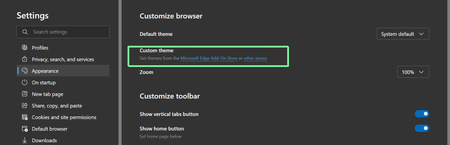
https://microsoftedge.microsoft.com/addons/microsoft-edge-themes Personalize Edge with themes that change the look and feel of your browser and the new tab page to create beautiful and immersive visual experiences. Apply different themes to each profile to help you easily separate home, school, or work. We'll be adding more themes soon, so stay tuned! The category is awesome, contains some game-specific themes too! so which one are you going to use?24KViews3likes63CommentsSaved Passwords in Edge are now available to All apps on Mobile - System Wide Password Manager
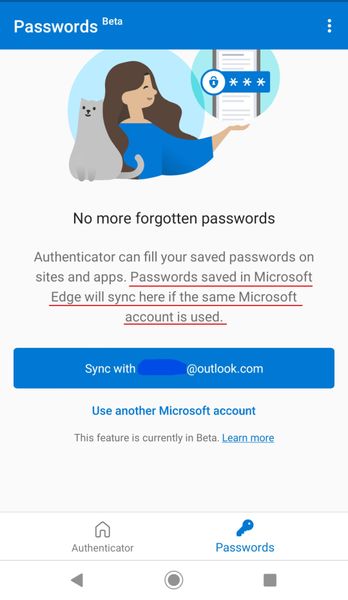
I've been using Microsoft Authenticator Beta app for a while on my Android phone, today I received an update and now the app works as a system-wide password manager (Password filler), for all websites and apps. This should work on IOS too. Links to Google play https://play.google.com/store/apps/details?id=com.azure.authenticator&hl=en_US&gl=US And App store. https://apps.apple.com/us/app/microsoft-authenticator/id983156458 (remember you have to enroll in Beta for now until this is rolled out to the public) Q: How are my passwords protected by the Authenticator app? A: Authenticator app already provides a high level of security for multi-factor authentication and account management, and the same high security bar is also extended to managing your passwords. More info, Q&A and explanation here: https://docs.microsoft.com/en-us/azure/active-directory/user-help/user-help-auth-app-faq#autofill-for-consumers12KViews4likes7CommentsThemes coming soon to Microsoft Edge Add-ons store!
The latest Edge Canary Version 89.0.707.0 (Official build) canary (64-bit) hints at it. The Microsoft Edge Add-ons store link points to here: https://microsoftedge.microsoft.com/addons/microsoft-edge-themes at the moment there is no themes there (except for this one), nor any "themes" category in the site's user interface, but the website's URL is there so we should be expecting the rest soon3.2KViews2likes10Comments