microsoft
38 TopicsBlock Microsoft from running experiments in the Microsoft Edge browser
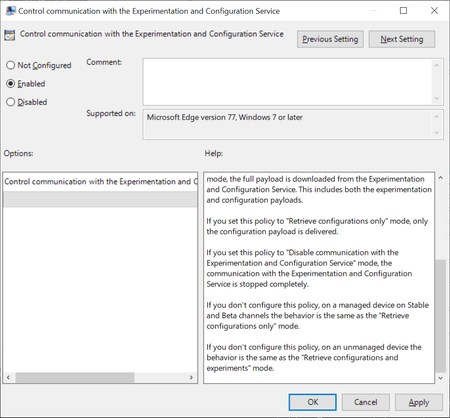
Browsers like Firefox, Chrome or Microsoft Edge come with built-in functionality to run experiments. Browser makers like Mozilla or Google may enable or disable features or changes in select browsers; this is often used to A-B test features or get early feedback on new implementations. While most users may not even notice that experiments are running in their browsers, it happened in the past that experiments caused issues. The latest case was revealed in November when administrators from around the world reported that a Chrome experiment would crash browsers in organizations worldwide. Negative side-effects of experiments are a problem for home users and business users alike, and it is often desirable to disable or block experiments from being downloaded and run. Microsoft distinguishes between controlled feature rollouts and experiments in the company's new Chromium-based Microsoft Edge web browser. Both are made available to part of the user base when they start to roll out but similarities end here. Microsoft notes: Microsoft Edge builds have features and functionality that are still in development or are experimental. Experiments are like CFR, but the size of the user group is much smaller for testing the new concept. These features are hidden by default until the feature's rolled out or the experiment's finished. Experiment flags are used to enable and disable these features. System administrators may use the "Control communication with the Experimentation and Configuration Service" on pro and Enterprise editions of Windows 7, 8.1 or 10 to prevent experiments in the browser. Here is what is needed for that: Get the latest Microsoft Edge policy file from the Microsoft Edge Insider website. It is likely that the policies will become available natively eventually when Edge is released and integrated in Windows. Extract the file (first a cab, then a zip). Open Windows > Admx. Copy the two .admx template files to C:\Windows\PolicyDefinitions\. Open the language folder that matches the system language and copy the .adml files to the corresponding language folder of C:\Windows\PolicyDefinitions\ Open Start, type gpedit.msc and hit the Enter-key to open the Group Policy Editor. Consult this Docs page on the Microsoft website for additional scenarios, e.g. when domain controllers are used. Open Computer Configuration > Administrative Templates > Microsoft Edge. Open the policy "Control communication with the Experimentation and Configuration Service" policy. Set the policy to Enabled. Set it to either "Retrieve configurations only" or "Disable communication with the Experimentation and Configuration Service". Retrieve will download configuration payloads only, disable won't download or enable them. The behavior of not configuring the policy differs depending on whether it is a managed or unmanaged device. Managed devices will download the configuration only while unmanaged devices will retrieve configurations and experiments. Source9.3KViews0likes4Comments
Windows 11
Windows 11 OS has been the most useless upgrade of Microsoft with highest number of bugs. Mid performance laptops like dell 5510,i5 11th gen(nvidia mx450) which in my case also cannot run smoothly on windows 11. I have got a ton of issues on gpu, display and bugs where display rendering issues and blue screen error messages appear. Even the dark mode sucks. Biggest downfall for Microsoft in terms of stability 👎🏻908Views0likes0CommentsNew Feature: Built in Picture in Picture mode (PIP) is added to Microsoft Edge Global Media Controls
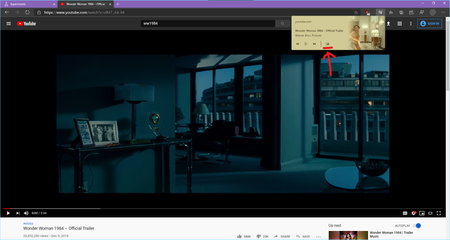
Microsoft Edge Canary Version 82.0.442.0 (Official build) canary (64-bit) The flags you need to enable: edge://flags/ 1. Global Media Controls Picture-in-Picture Enables Picture-in-Picture controls in the Global Media Controls UI. Requires #global-media-controls to also be enabled. – Mac, Windows #global-media-controls-picture-in-picture 2. Global Media Controls Enables the Global Media Controls UI in the toolbar. – Mac, Windows #global-media-controls Microsoft Edge browser now has support for Picture in Picture mode built in. it works in all websites playing video. this is another example for Twitch the PIP pop up video can be dragged to anywhere on the screen and it will stay on top of other applications125KViews11likes17Comments
(MAJOR BUGS) "Found81results" is together, no space, and wrong when selected results are 137?
(MAJOR BUGS) "Found81results" is together, no space, and wrong when selected results are 137? Edges of the browser. This is edge browser, which wants us to ditch Google Chrome. Never faced such childish bugs in chrome in 20 years of usage. Common in all edge browsers on all devices. Checked personally every one of them and can confirm.726Views0likes0Comments[FIXED] Legacy Edge extensions on Windows store after installing the new Edge
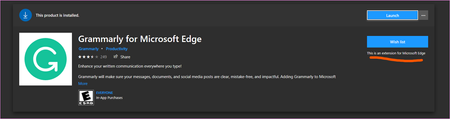
Today I came across this extension when browsing Windows store https://www.microsoft.com/store/productId/9P59WXTBHZZM I could install it without any issue but the thing is it doesn't work when I have the Stable version of Chromium based Edge installed. clicking "launch" opens the new Edge only, nothing else happens. I think the proper way to handle this situation is to either hide these extensions from Windows store once the new Edge is installed, OR show a message to user that: "it's not compatible with the current installed version of Edge browser". My suggestion is to add the new Chromium based Add-ons to the Windows store to be easily available and installed by users. https://microsoftedge.microsoft.com/Solved5.2KViews4likes8CommentsOfficial Download links for Microsoft Edge Stable Enterprise
I'm not 100% sure it's final but anyone who wishes/wants can test it. Microsoft Edge Stable Enterprise X64.msi http://go.microsoft.com/fwlink/?LinkID=2093437 X86.msi http://go.microsoft.com/fwlink/?LinkID=2093505 MicrosoftEdgePolicyTemplates.cab http://go.microsoft.com/fwlink/?LinkID=2099616 MicrosoftEdgeIntunePolicyTemplate.cab http://go.microsoft.com/fwlink/?LinkID=2099617 macOS.pkg http://go.microsoft.com/fwlink/?LinkID=2093438 Blocker Toolkit to disable automatic delivery of Microsoft Edge https://docs.microsoft.com/en-us/deployedge/microsoft-edge-blocker-toolkit94KViews3likes20Comments