microsoft
31 TopicsDP-900: Microsoft Azure Data Fundamentals Study Guide
Microsoft Azure provides an array of services that enable businesses and organizations to undergo digital transformation by making quick and informed decisions. The DP-900 Microsoft Azure Data Fundamentals exam evaluates learners' understanding of data concepts such as relational, non-relational, big data, and analytics. The exam requires learners to demonstrate their knowledge of core data concepts, relational and non-relational data, and Azure data services. Microsoft offers resources such as Microsoft Learn self-paced curriculum, an instructor-led course, and related documentation to help students prepare for the exam. Understanding Azure data principles is vital for more advanced Azure certifications like Azure Database Administrator Associate and Azure Data Engineer Associate.15KViews8likes0CommentsMicrosoft Learn AI Skills Challenge
Join Microsoft's AI Skills Challenge 2023 to enhance your technical expertise in Artificial Intelligence. Register now to access exclusive resources, hands-on labs, and interactive learning sessions. Boost your knowledge in generative AI, machine learning, cognitive services, natural language processing, and computer vision to stay ahead in the ever-evolving world of AI.36KViews5likes6CommentsAZ-500: Microsoft Azure Security Technologies Study Guide
The AZ-500 certification provides professionals with the skills and knowledge needed to secure Azure infrastructure, services, and data. The exam covers identity and access management, data protection, platform security, and governance in Azure. Learners can prepare for the exam with Microsoft's self-paced curriculum, instructor-led course, and documentation. The certification measures the learner’s knowledge of managing, monitoring, and implementing security for resources in Azure, multi-cloud, and hybrid environments. Azure Firewall, Key Vault, and Azure Active Directory are some of the topics covered in the exam.23KViews4likes3CommentsHow to get a Microsoft Discounted Student Certificationt.
Certifications are a way to stand out from the rest. Other than boosting your confidence, certifications can help you land a new job, get a promotion, or even attract more clients. Microsoft certification offers numerous opportunities, not just for developers but also low code citizen developers. As a student, you can jump start your career with free fundamental certifications.289KViews4likes22CommentsIntegrating Microsoft Foundry with OpenClaw: Step by Step Model Configuration
Step 1: Deploying Models on Microsoft Foundry Let us kick things off in the Azure portal. To get our OpenClaw agent thinking like a genius, we need to deploy our models in Microsoft Foundry. For this guide, we are going to focus on deploying gpt-5.2-codex on Microsoft Foundry with OpenClaw. Navigate to your AI Hub, head over to the model catalog, choose the model you wish to use with OpenClaw and hit deploy. Once your deployment is successful, head to the endpoints section. Important: Grab your Endpoint URL and your API Keys right now and save them in a secure note. We will need these exact values to connect OpenClaw in a few minutes. Step 2: Installing and Initializing OpenClaw Next up, we need to get OpenClaw running on your machine. Open up your terminal and run the official installation script: curl -fsSL https://openclaw.ai/install.sh | bash The wizard will walk you through a few prompts. Here is exactly how to answer them to link up with our Azure setup: First Page (Model Selection): Choose "Skip for now". Second Page (Provider): Select azure-openai-responses. Model Selection: Select gpt-5.2-codex , For now only the models listed (hosted on Microsoft Foundry) in the picture below are available to be used with OpenClaw. Follow the rest of the standard prompts to finish the initial setup. Step 3: Editing the OpenClaw Configuration File Now for the fun part. We need to manually configure OpenClaw to talk to Microsoft Foundry. Open your configuration file located at ~/.openclaw/openclaw.json in your favorite text editor. Replace the contents of the models and agents sections with the following code block: { "models": { "providers": { "azure-openai-responses": { "baseUrl": "https://<YOUR_RESOURCE_NAME>.openai.azure.com/openai/v1", "apiKey": "<YOUR_AZURE_OPENAI_API_KEY>", "api": "openai-responses", "authHeader": false, "headers": { "api-key": "<YOUR_AZURE_OPENAI_API_KEY>" }, "models": [ { "id": "gpt-5.2-codex", "name": "GPT-5.2-Codex (Azure)", "reasoning": true, "input": ["text", "image"], "cost": { "input": 0, "output": 0, "cacheRead": 0, "cacheWrite": 0 }, "contextWindow": 400000, "maxTokens": 16384, "compat": { "supportsStore": false } }, { "id": "gpt-5.2", "name": "GPT-5.2 (Azure)", "reasoning": false, "input": ["text", "image"], "cost": { "input": 0, "output": 0, "cacheRead": 0, "cacheWrite": 0 }, "contextWindow": 272000, "maxTokens": 16384, "compat": { "supportsStore": false } } ] } } }, "agents": { "defaults": { "model": { "primary": "azure-openai-responses/gpt-5.2-codex" }, "models": { "azure-openai-responses/gpt-5.2-codex": {} }, "workspace": "/home/<USERNAME>/.openclaw/workspace", "compaction": { "mode": "safeguard" }, "maxConcurrent": 4, "subagents": { "maxConcurrent": 8 } } } } You will notice a few placeholders in that JSON. Here is exactly what you need to swap out: Placeholder Variable What It Is Where to Find It <YOUR_RESOURCE_NAME> The unique name of your Azure OpenAI resource. Found in your Azure Portal under the Azure OpenAI resource overview. <YOUR_AZURE_OPENAI_API_KEY> The secret key required to authenticate your requests. Found in Microsoft Foundry under your project endpoints or Azure Portal keys section. <USERNAME> Your local computer's user profile name. Open your terminal and type whoami to find this. Step 4: Restart the Gateway After saving the configuration file, you must restart the OpenClaw gateway for the new Foundry settings to take effect. Run this simple command: openclaw gateway restart Configuration Notes & Deep Dive If you are curious about why we configured the JSON that way, here is a quick breakdown of the technical details. Authentication Differences Azure OpenAI uses the api-key HTTP header for authentication. This is entirely different from the standard OpenAI Authorization: Bearer header. Our configuration file addresses this in two ways: Setting "authHeader": false completely disables the default Bearer header. Adding "headers": { "api-key": "<key>" } forces OpenClaw to send the API key via Azure's native header format. Important Note: Your API key must appear in both the apiKey field AND the headers.api-key field within the JSON for this to work correctly. The Base URL Azure OpenAI's v1-compatible endpoint follows this specific format: https://<your_resource_name>.openai.azure.com/openai/v1 The beautiful thing about this v1 endpoint is that it is largely compatible with the standard OpenAI API and does not require you to manually pass an api-version query parameter. Model Compatibility Settings "compat": { "supportsStore": false } disables the store parameter since Azure OpenAI does not currently support it. "reasoning": true enables the thinking mode for GPT-5.2-Codex. This supports low, medium, high, and xhigh levels. "reasoning": false is set for GPT-5.2 because it is a standard, non-reasoning model. Model Specifications & Cost Tracking If you want OpenClaw to accurately track your token usage costs, you can update the cost fields from 0 to the current Azure pricing. Here are the specs and costs for the models we just deployed: Model Specifications Model Context Window Max Output Tokens Image Input Reasoning gpt-5.2-codex 400,000 tokens 16,384 tokens Yes Yes gpt-5.2 272,000 tokens 16,384 tokens Yes No Current Cost (Adjust in JSON) Model Input (per 1M tokens) Output (per 1M tokens) Cached Input (per 1M tokens) gpt-5.2-codex $1.75 $14.00 $0.175 gpt-5.2 $2.00 $8.00 $0.50 Conclusion: And there you have it! You have successfully bridged the gap between the enterprise-grade infrastructure of Microsoft Foundry and the local autonomy of OpenClaw. By following these steps, you are not just running a chatbot; you are running a sophisticated agent capable of reasoning, coding, and executing tasks with the full power of GPT-5.2-codex behind it. The combination of Azure's reliability and OpenClaw's flexibility opens up a world of possibilities. Whether you are building an automated devops assistant, a research agent, or just exploring the bleeding edge of AI, you now have a robust foundation to build upon. Now it is time to let your agent loose on some real tasks. Go forth, experiment with different system prompts, and see what you can build. If you run into any interesting edge cases or come up with a unique configuration, let me know in the comments below. Happy coding!12KViews2likes2CommentsLearn How to Build Smarter AI Agents with Microsoft’s MCP Resources Hub
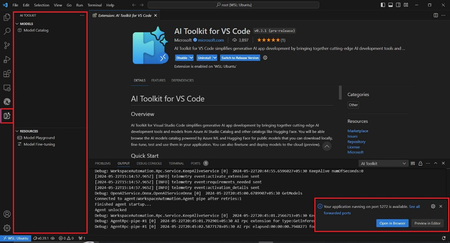
If you've been curious about how to build your own AI agents that can talk to APIs, connect with tools like databases, or even follow documentation you're in the right place. Microsoft has created something called MCP, which stands for Model‑Context‑Protocol. And to help you learn it step by step, they’ve made an amazing MCP Resources Hub on GitHub. In this blog, I’ll Walk you through what MCP is, why it matters, and how to use this hub to get started, even if you're new to AI development. What is MCP (Model‑Context‑Protocol)? Think of MCP like a communication bridge between your AI model and the outside world. Normally, when we chat with AI (like ChatGPT), it only knows what’s in its training data. But with MCP, you can give your AI real-time context from: APIs Documents Databases Websites This makes your AI agent smarter and more useful just like a real developer who looks up things online, checks documentation, and queries databases. What’s Inside the MCP Resources Hub? The MCP Resources Hub is a collection of everything you need to learn MCP: Videos Blogs Code examples Here are some beginner-friendly videos that explain MCP: Title What You'll Learn VS Code Agent Mode Just Changed Everything See how VS Code and MCP build an app with AI connecting to a database and following docs. The Future of AI in VS Code Learn how MCP makes GitHub Copilot smarter with real-time tools. Build MCP Servers using Azure Functions Host your own MCP servers using Azure in C#, .NET, or TypeScript. Use APIs as Tools with MCP See how to use APIs as tools inside your AI agent. Blazor Chat App with MCP + Aspire Create a chat app powered by MCP in .NET Aspire Tip: Start with the VS Code videos if you’re just beginning. Blogs Deep Dives and How-To Guides Microsoft has also written blogs that explain MCP concepts in detail. Some of the best ones include: Build AI agent tools using remote MCP with Azure Functions: Learn how to deploy MCP servers remotely using Azure. Create an MCP Server with Azure AI Agent Service : Enables Developers to create an agent with Azure AI Agent Service and uses the model context protocol (MCP) for consumption of the agents in compatible clients (VS Code, Cursor, Claude Desktop). Vibe coding with GitHub Copilot: Agent mode and MCP support: MCP allows you to equip agent mode with the context and capabilities it needs to help you, like a USB port for intelligence. When you enter a chat prompt in agent mode within VS Code, the model can use different tools to handle tasks like understanding database schema or querying the web. Enhancing AI Integrations with MCP and Azure API Management Enhance AI integrations using MCP and Azure API Management Understanding and Mitigating Security Risks in MCP Implementations Overview of security risks and mitigation strategies for MCP implementations Protecting Against Indirect Injection Attacks in MCP Strategies to prevent indirect injection attacks in MCP implementations Microsoft Copilot Studio MCP Announcement of the Microsoft Copilot Studio MCP lab Getting started with MCP for Beginners 9 part course on MCP Client and Servers Code Repositories Try it Yourself Want to build something with MCP? Microsoft has shared open-source sample code in Python, .NET, and TypeScript: Repo Name Language Description Azure-Samples/remote-mcp-apim-functions-python Python Recommended for Secure remote hosting Sample Python Azure Functions demonstrating remote MCP integration with Azure API Management Azure-Samples/remote-mcp-functions-python Python Sample Python Azure Functions demonstrating remote MCP integration Azure-Samples/remote-mcp-functions-dotnet C# Sample .NET Azure Functions demonstrating remote MCP integration Azure-Samples/remote-mcp-functions-typescript TypeScript Sample TypeScript Azure Functions demonstrating remote MCP integration Microsoft Copilot Studio MCP TypeScript Microsoft Copilot Studio MCP lab You can clone the repo, open it in VS Code, and follow the instructions to run your own MCP server. Using MCP with the AI Toolkit in Visual Studio Code To make your MCP journey even easier, Microsoft provides the AI Toolkit for Visual Studio Code. This toolkit includes: A built-in model catalog Tools to help you deploy and run models locally Seamless integration with MCP agent tools You can install the AI Toolkit extension from the Visual Studio Code Marketplace. Once installed, it helps you: Discover and select models quickly Connect those models to MCP agents Develop and test AI workflows locally before deploying to the cloud You can explore the full documentation here: Overview of the AI Toolkit for Visual Studio Code – Microsoft Learn This is perfect for developers who want to test things on their own system without needing a cloud setup right away. Why Should You Care About MCP? Because MCP: Makes your AI tools more powerful by giving them real-time knowledge Works with GitHub Copilot, Azure, and VS Code tools you may already use Is open-source and beginner-friendly with lots of tutorials and sample code It’s the future of AI development connecting models to the real world. Final Thoughts If you're learning AI or building software agents, don’t miss this valuable MCP Resources Hub. It’s like a starter kit for building smart, connected agents with Microsoft tools. Try one video or repo today. Experiment. Learn by doing and start your journey with the MCP for Beginners curricula.3.8KViews2likes2Comments
DocAider: Automated Documentation Maintenance for Open-source GitHub Repositories
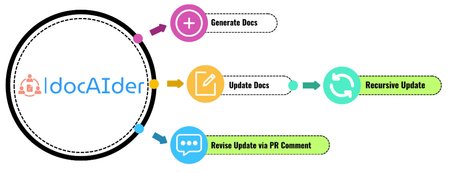
Code–level documentation of a software system provides explanations of the code functionality and usages. Documentation is crucial for giving clear insights into the code for end–users and future developers. However, creating and updating documentation manually is a demanding task, requiring significant resources and labour. With the advancement of generative AI, there is a potential to reduce human labour in documentation tasks significantly. We propose DocAider, an automation tool powered by GPT–4 that integrates the processes of documentation generation and update. DocAider can generate comprehensive and structured documentation in markdown format and update it in response to any changes made in pull requests. The mission of DocAider is to reduce developers’ burden on maintaining documentation for GitHub repositories.6.4KViews2likes0CommentsVisual Studio AI Toolkit : Building Phi-3 GenAI Applications
Port Forwarding, a valuable feature within the AI Toolkit, serves as a crucial gateway for seamless communication with the GenAI model. Whether it's through a straightforward API call or leveraging the SDKs, this functionality greatly enhances our ability to harness the power of the LLM/SLM. By enabling Port Forwarding, a plethora of new scenarios unfold, unlocking the full potential of our interactions with the model.10KViews2likes0Comments