microsoft teams rooms
22 Topics
[MTRoW] How To Set Direct Guest Join instead of Cross Platform meeting via SIP?
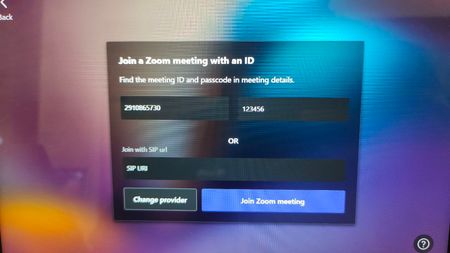
Hi All, I have a MTR on Windows device with App Version 5.3.111.0 When I want to Join to Zoom Meeting using meeting ID, apparently it is joined via SIP (zoomcrc). But because the Zoom Hosted Meeting did not have ZoomCRC license, the call can not established successfully. Can we set the default call for third-party meeting to Direct Guest Join (webrtc) instead of Cross Platform Meeting via SIP?86Views0likes0Comments
MTR account security best practices
When we set up Teams Rooms devices a few years ago, the best practice for account security at the time was to use individual resource accounts coupled with Conditional Access Policies that restrict the accounts to only be allowed to sign in on specific named/trusted network locations. At the time, MFA was discouraged as a complicating factor in the MTR authentication flow. With Microsoft's recent push to increase companywide security with a focus on MFA, have any best practices changed to include MFA for MTR accounts?608Views0likes0CommentsCan you find all your Teams Room System devices on Teams Client?
Hi, Hit to strange issue, when searching my room system devices on Teams client, I could not found all of them. Feeling is, I could find only the latest once, but not sure about that. Same issue with other users and Web App. The devices itself are working normally, but this search is lost. No help if I try to search by UPN or with display name. Any others has faced similar behavior?407Views0likes0CommentsCan you press "back" on Windows based room system?
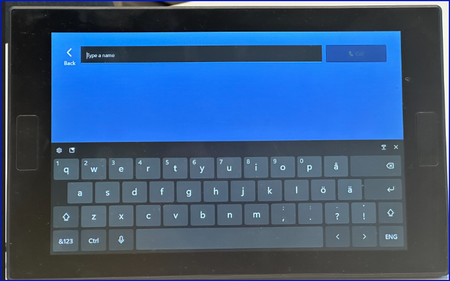
Hi, Have others noticed that if you press "call" on the screen, you end to the following screen: If you try to press "back" on here, that makes no action. Only option is to wait that device realize that you are not going to do anything, then it goes back to the main view. If you type name, and make the call, that is working fine.709Views0likes2Comments
MS Teams Room call status is missing from the log since 4.19.57.0
Dear All, Since today, we see that the log file below no longer contains Teams call status information. I suspect it is because of the 4.19.57.0 update, in which SfB support has been removed. C:\Users\Skype\AppData\Local\Packages\Microsoft.SkypeRoomSystem_8wekyb3d8bbwe\LocalCache\Roaming\Microsoft\Teams\logs.txt Could you please tell me in which file the Teams call related entries are placed? Thanks, Laszlo763Views0likes0CommentsLogitech Tap Scheduler
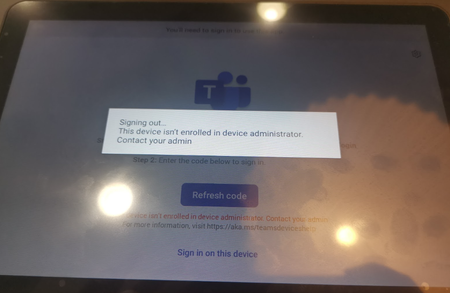
Hi, We're currently unable to log in to our Logi Schedulers with the attached error. We've previously been able to log in to these without having to do anything in Intune. Our config allows Azure device registration from Android devices. Are there any current issues that's affecting this or is there a fix? Logging in with MTR account with Team Room Pro licence. Thanks!7.1KViews0likes8Comments
Cannot fetch Calendar with Microsoft Teams Rooms Basic
I've tried Microsoft Teams Rooms Basic license with Logitech TAP, however it shows "Cannot fetch Calendar" on Logitech TAP. Is it because this is free license and MS has cut down that feature? I couldn't find any info related to this issue.Solved9.8KViews0likes7CommentsAudio and Video Freezes for DGJ to Zoom
I'm encountering a problem on MTRoW devices running latest Teams App and supported Windows version where audio and video feed would freeze intermittently for a period of 2 to 3 minutes when DGJ to Zoom. Initially I thought it might be an issue at the device or network level however after further investigation and test calls between Teams to Teams user/Teams Room, this problem only occur for Zoom meetings. I had not experience this prior to the update, did the update break Zoom web RTC for DGJ? If anyone can shed some light on this matter would be much appreciated! As far as I know, this hasn't been flagged as an known issue on Microsoft docs.2.5KViews1like3Comments
Unable to Auto Login on Microsoft Teams Room devices ?
Experts, We recently joined our Microsoft teams rooms device to Azure AD and upgraded OS from Win10 1903 to Win 10 20H2 (automatic updates). We are not pushing any policies on this device either through SCCM or Intune but after Azure AD joined and system upgrade when the device is rebooted it did not auto login with default Skype user account, its getting stuck on login screen and waiting for user to hit enter. This is big issue now as end users need to hit enter manually to get teams rooms app launch. I tried to set AutoLogon registry also (which it was not present earlier) but still no luck AutoAdminLogon = 1 (REG_DWORD) DefaultDomainName = blank (REG_String) DefaultUserName = Skype (REG_String) Has anyone experienced this before ? Please advice. Regards, Suraj18KViews1like8Comments