microsoft stream
125 Topics
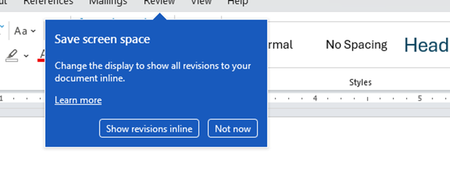
Disable incessant nagware popups
I don't know about everyone else, but I am sick and tired of the nagware pop ups in Word, Excel, PowerPoint, Outlook, etc. Every single product harasses me with pop ups trying to tell me "hey, did you know this feature was here?", "you can do this if you click that", "let me hold your hand through using products you've used for decades even though you don't want daddy Microslop to do that". This is a prime example. I keep getting the same ones again and again and again and everything I've read indicates they should only appear once. But they don't. They keep coming back like a psychotic stalker ex who wants alimony even though you were never married. How do I get this nagware to stop?!71Views0likes1CommentUse Playlists to create collections of video or audio files in Microsoft 365
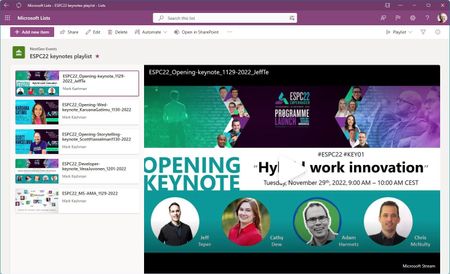
Today, we’re introducing Playlists - a new and simple way to curate and share video or audio collections within Microsoft 365. This combines Microsoft Lists ease of use with the trusted value of Stream (on SharePoint) powering the playback experience.55KViews5likes53CommentsHow to Remove Expiration from Microsoft Teams Recordings (OneDrive/SharePoint and Stream)
Microsoft Teams makes it easy to record meetings, and with the rise of hybrid work, these recordings have become essential for documentation, training, compliance, and knowledge sharing. However, you may have noticed that recordings now automatically expire after a set period—usually 60 days by default. In this blog, I’ll show you how to remove or modify the expiration date on Microsoft Teams recordings—whether they’re stored in OneDrive/SharePoint (the default for most tenants) or in Microsoft Stream (Classic or on SharePoint). https://dellenny.com/how-to-remove-expiration-from-microsoft-teams-recordings-onedrive-sharepoint-and-stream/4.7KViews0likes0CommentsTech Community Live | AMA for SharePoint, OneDrive, Lists, and Stream
Join us for a special Ask Microsoft Anything (AMA) live video stream across four Microsoft content collaboration products: SharePoint, OneDrive, Lists, and Stream! Our product teams will be answering your questions about future roadmap and recent innovation – and offering insights on what to expect in the coming months. Each team will present five minutes of content to catch you up on the highlights, and to spark what questions you might ask, and then have 10-15 minutes to take your questions. Post your questions at any time – starting your question with the product name to help us navigate it to the right experts; example: “SharePoint: How will Copilot help me create pages and news in the future?” This is a great opportunity to get answers to any questions you may have from recent Microsoft 365 Conference (May 2-4, 2023) disclosures: Review Jeff Teper’s May 2nd (5/2) blog post. Agenda + Experts (all times listed in the Pacific Time Zone (PT): 10:00am Kickoff [MC: Mark-Kashman] 10:05 – 10:25am -- AMA | SharePoint Experts: Dave Cohen (US), Cathy_Dew, and Suyog Gadgil. Huge innovations that will make it simpler to build compelling and engaging pages and sites within your company intranet. Review the 5/2 SharePoint blog. 10:25 – 10:45am -- AMA | OneDrive Experts: Miceile Barrett, Paul Diamond , Gaia Carini, Carter Green, and vilodha. Get the most out of your files with significant updates to the overall OneDrive user interface – a more simple and personalized experience. Review the 5/2 OneDrive blog. 10:45 – 11:10am -- AMA | Lists Experts: Miceile Barrett, LincolnDeMaris, and Harini Saladi. Your information collaboration is poised to get more intuitive, focused, and powerful. Review the 5/2 Lists blog. 11:10 – 11:30am -- AMA | Stream Experts: Marc Mroz, descapa_msft, Paul Diamond, Ignacio Davila, and OwenpMSFT. Video in Microsoft 365 is about to get easier, with enhanced playback, putting videos in pages, and recording professional videos with personality. Review the 5/2 Stream blog. 11:30am -- Wrap up Submit your questions anytime during the hour or post them early in the Comments below.23KViews9likes361CommentsMicrosoft 365 Unifies Video Under Clipchamp Brand
A November 26 announcement says that Microsoft 365 Video will bring Stream and Clipchamp together under the Clipchamp brand. A lot of hard work over the past few years created the potential for unification as Stream moved to the SharePoint platform and Clipchamp embraced the Microsoft 365 framework. Bringing the two solutions together into a unified Microsoft 365 video platform makes perfect sense. https://office365itpros.com/2024/12/05/microsoft-365-video-unity/493Views1like0CommentsBlog about: How to Use Microsoft Stream: A Beginner’s Guide
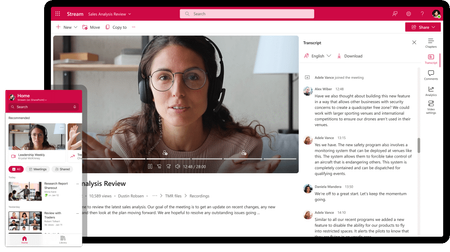
Microsoft Stream is a video-sharing service designed for businesses and organizations to upload, manage, and share videos securely within their enterprise. It’s part of the Microsoft 365 suite, making it easy to collaborate with your team using video content. Whether you’re sharing training videos, presentations, or meetings, Microsoft Stream offers an intuitive platform for video management. Here’s how to get started. https://dellenny.com/how-to-use-microsoft-stream-a-beginners-guide/1.7KViews0likes0CommentsHow to use the latest AI Features in Clipchamp [AI VIDEO EDITING]
If you are a Video content creator like me, don't miss this video to take advantage of the latest AI features in Clipchamp. Clipchamp is a powerful tool that helps you edit videos and create Thumbnails. In this video, I'll show how to remove background noises, images, filler words, and pauses. #Clipchamp #AI #Microsoft365 #MPVbuzz #VideoAI #VideoEditing1.7KViews1like0CommentsStream Moves to Intelligent Versioning
In a change designed to reduce the consumption of storage quota, Stream video versions are no longer being generated for non-video updates such as changes to video metadata. Anything that alters the video content, like trimming some seconds from the start or end of a video, will create a new version. It seems like a perfectly reasonable change to make that might help SharePoint storage not be consumed quite so quickly. https://office365itpros.com/2024/07/24/stream-video-versions/302Views0likes0Comments