microsoft purview
109 Topics
Two labels does not appear in outlook
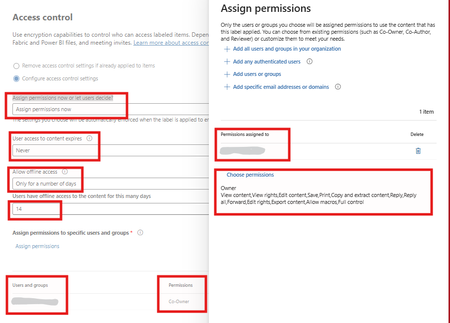
We are at the very beginning of deploying the four sensitivity labels: Public, Internal, Restricted, and Confidential. The labels are visible in Word, Excel, PowerPoint, and other Microsoft 365 apps, but they do not appear in Outlook Desktop or Outlook on the Web (OWA) for me or the pilot users. Restricted and Confidential are configured with encryption and settings for both of them are same , i know strange but that's what mgmt want refer to the attached screenshot.345Views0likes4Comments
Best Way to Exclude Delta _delta_log Folders from Purview Scans?
Hi Purview Community, We're scanning ADLS Gen2 assets with Microsoft Purview Data Map and have encountered issues with _delta_log folders being ingested as catalog assets. Initially, _delta_log folders were included in scans and were ingested into the Data Map. This appears to have introduced a large number of technical assets that are not useful for business users and may be contributing to unexpected metadata and row count discrepancies. Questions What is the recommended ignore pattern to exclude all _delta_log folders from ADLS Gen2 / Fabric scans? After updating a scan rule to exclude _delta_log, how can previously ingested _delta_log assets be completely removed from the Data Map? Is deleting the assets from Data Map sufficient? Is there a metadata purge process? Are there any known limitations where deleted _delta_log assets still affect resource sets, lineage, profiling, DQ, or row count calculations? Has anyone experienced inflated row counts or profiling results after _delta_log folders were previously scanned? For example, we're seeing significant differences between Purview-reported row counts and source system row counts even after excluding _delta_log folders and deleting the corresponding assets. Any guidance, best practices, or Microsoft documentation references would be greatly appreciated. Thanks!129Views0likes0Comments
Microsoft Purview | Share block at external users
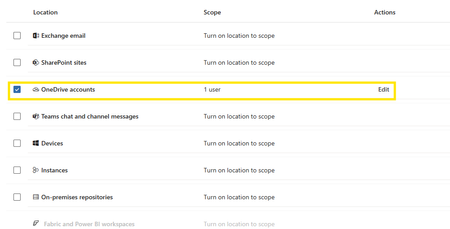
Hello community. I have an issue with Microsoft Purview DLP policies. I am trying to create a policy that prevents documents from being shared through OneDrive with external users, while allowing certain exceptions. However, when I select the option "Block Access to external domains and users" and assign a specific email address to be blocked, it does not work. The configured email address is not being blocked. I was reviewing this with Copilot, and it mentioned that if the external user you are sharing with already exists in Entra ID, the tenant may treat the user differently (not necessarily as an external user). My external user exists in Entra ID as a Guest account. The external user is registered as follows: Displayname: User Name Userprincipalname: user.name_external.domain#EXT#@company.onmicrosoft.com User Type: Guest Has anyone else experienced this issue? I am sharing evidence of the policy configuration.1.1KViews0likes7CommentsInsider Risk Level not being correctly picked up by DLP
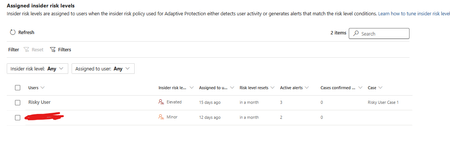
I have two users currently with assigned Insider Risk levels, one elevated and one minor. I have taken the templated DLP policy (DSPM for AI - Block sensitive info from AI sites) which looks for sensitive information being pasted to generative AI sites, and applies a block if the user is an elevated risk user, and a block with override for a moderate/minor risk user (this was audit only originally). For each advanced DLP rule within that policy, I have a separate policy tip which shows so I know which Advanced DLP rule has been hit. However, I'm having some discrepancies with the correct insider risk level being identified by Purview and therefore the wrong advanced DLP rule is being applied. Testing examples: Logged into a Windows 11 PC with the account, and using Medium confidence UK NINO's I try pasting the content into ChatGPT: Elevated risk user: Block with Override Minor Risk user: Block with Override If I try the exact same scenario on a different PC, I can sometimes get to the point where even though its the same set of data, Purview allows me to paste it at after checking the data. Or in another scenario, I was getting both users hitting the "elevated risk" advanced DLP rule. The Devices are all showing as up to date sync wise with DLP policies, and the policy itself is showing as fully synced. Assigned insider risk levels: DLP Rules: Elevated: Moderate/Minor:Solved702Views0likes2Comments
Purview SDK
I've been spending quite a bit of time working with Purview APIs, The APIs themselves are fine, but after a while I realized I was writing the same authentication, pagination and relationship handling code over and over again. So instead of construction the same code from project to project, I turned it into a python package, and now it's available on PyPI pip install purview-unified-sdk Right now, the SDK supports most of the common operations, such as creating, retrieving, updating and deleting business domains, data products, glossary terms, objectives, key results and etc., It also make it much easier to work with relationships, add group id as a owner, navigate resources and retrieve metadata across the unified catalog. https://niki9001.github.io/purview-unified-sdk/ https://github.com/purview-unified-sdk Feel free to fork the project, submit a pull request or open an issue if you have ideas or suggestions232Views0likes0Comments
Missing activity names from Audit Log documentation
We all know that the documentation team is A-tier and amazing at what they do and isn't just copy and pasting marketing materials. But I've noticed that some really obscure functionalities like 'user registered a device' or 'user joined a device' or about half the other things a user can do, are not documented on this list of activity names. The ironically named 'friendly' list doesn't work. So I actually can't audit the unfamiliar devices under our tenants? It appears that this KB is actually locked down, so more can't be added when they are discovered. How are we supposed to use the tool Microsoft has forced everyone towards, when the Documentation team is too bad to document anything, so they outsource it to the community (Microsoft victims), but then they lock down contributions (presumably, because they have some metric that keeps them from being useful - atleast based on my interactions with them). Documentation seems to be a massive fail on Microsoft's part. How did it get this way? Is there a reliable way of finding the activity name - one that ISN'T some preview Graph endpoint that I can't teach my techs to use, because I'm not teaching my techs to program?330Views1like1Comment
Onboarding Devices to Purview
I am not clear on how can I onboard devices to MDE so that I can enforce EDLP policies. We have CrowdStrike as Primary AV and other policies. Devices are managed through Intune for Bitlocker encryption and all the other settings except they don't have Defender. These devices are not showing up in Purview nor under "Endpoint detection and response" location under Endpoint Security. If we create an EDR onboarding policy and deploy to devices, then it shows the devices and says that AMRUnningMode is Passive, but Antivirus is true. Which I feel like Defender is taking over CrowdStrike? or am I wrong. My goal is to make sure CrowdStrike still primary AV and devices should be onboarded to MDE and then to Purview so that we can scope EDLP policies properly. Can anyone help me to understand or provide right steps?592Views0likes1CommentUnlabelled Files
I have a requirement to produce a report which contains the number of files in M365 SharePoint & OneDrive which do not have a sensitivity label applied. I am struggling to find a sensible approach to this and I am fairly certain this is not possible in Purview unless I have missed something. If anyone can help it would be appreciated. ThanksSolved366Views0likes3CommentsConfusion around Purview Definitions and Risk Scoring
In the early days of implementation and we've done our 'Quick setup' of Insider Risk Management which created our Adaptive Protection Policy for IRM, two IRM DLP policies (Endpoint & Teams/Exchange) and the Conditional Access policy. My question is around 'Triggering events', Indicators and Insider Risk Levels. To my understanding, a triggering event is the event that decides when the policy will start assigning risk scores to user activity which will then allow us to then give users risk levels. We have the option to either set this triggering event to either the DLP policies, or when a user performs an exfiltration activity/ sequence. The DLP policies only match activity when a user has a defined risk level and attempts to perform a specific activity i.e. sharing M365 with people outside the organisation. I'm not sure if I'm thinking about this backwards, but if I set my Adaptive protection policy to only start assigning risk scores to user activity when they match a DLP policy, how can they trigger a DLP policy if they wont be assigned a risk level until that scoring begins to happen? Should I be setting my triggering events to be "User performs an Exfiltration Activity" instead of "User Matches a DLP policy"?128Views0likes1Comment