microsoft purview communication compliance
43 TopicsRegistration Open: Community-Led Purview Lightning Talks
Get ready for an electrifying event! The Microsoft Security Community proudly presents Purview Lightning Talks; an action-packed series featuring your fellow Microsoft users, partners and passionate Microsoft Security community members of all sorts. Each 3-12 minute talk cuts straight to the chase, delivering expert insights, real-world use cases, and even a few game-changing tips and tricks. Don’t miss this opportunity to learn, connect, and be inspired! Secure your spot now for the big day: April 30th at 8am Redmond Time. See agenda details below and follow this blog post (sign in and click the "follow" heart in the upper right) to receive notifications. ❗UPDATE❗This event is expected to last around 2 hours and 15 minutes, due to the incredible number of community sessions that were submitted! 💖 Please see the timing table below broken out into sections of four talks each, and plan to arrive 10 minutes before the section that interests you, OR stay for the whole time! Speakers will be available in the chat to answer your questions; please ask your questions during their session. Spillover Q&A forum links will also be shared. The full session recording will be indexed and posted to Microsoft Security Community YouTube within 24 hours after the event. Bookmark this page or follow this blog post for updates! Agenda Legend ↩️ Data Lifecycle Management 🔐 Information Protection 🚫 Data Loss Prevention (DLP) 🦾 Data Security Posture Management (DSPM) for AI 🤖 Purview for AI 👁️ Insider Risk Management (IRM) 🔍 eDiscovery 📊 Governance 🗒️ Compliance Manager 🛡️ Data Security All times are listed in US Pacific/Redmond Time. Session lengths are rounded to the nearest minute. AGENDA Section 1 - approximately 8:00 am - 8:43 am ↩️ The Day Offboarding Exposed Infinite Retention — Nikki Chapple Length: 10 minutes | Topic: Data Lifecycle Management A routine Purview request led to an unexpected discovery: more than 9,000 orphaned OneDrives and thousands of inactive mailboxes still storing content long after employees had left. This talk explains how a retain-only policy created hidden retention debt and how Adaptive Scopes can help organisations separate active users from leavers to avoid similar pitfalls. 🔐 The Purview Label Engine: Automated Classification, Translation, and co-Documentation for Enterprise Tenants — Michael Kirst-Neshva Length: 12 minutes | Topic: Information Protection Global enterprises face the challenge of implementing uniform data protection standards across borders and languages. In this talk, I’ll present a framework that makes Microsoft Purview labels truly scalable. Discover how to roll out parent and child label logics automatically, manage priorities with a single click, and generate instant compliance documentation for every business unit. 🗒️ What's In My Compliance Manager Toolbox: A Cloud Security Architect's Perspective — Jerrad Dahlager Length: 8 minutes | Topic: Compliance Manager A practical walkthrough of how I use Compliance Manager across real client engagements to map controls, track improvement actions, and simplify multi-framework compliance. No theory, just what works in the field. 🛡️ Stop, Think, Protect: Data Security in Real Life with Purview — Oliver Sahlmann Length: 8 minutes | Topic: Data Security With simple labels and matching DLP policies, Purview offers a practical and accessible way to approach data security. This lightning talk uses a real-life traffic light concept to show how a low barrier to adoption can still drive meaningful protection and awareness. Section 2 - approximately 8:44 am - 9:15 am 🔐 Using Purview to prevent oversharing with AI services — Viktor Hedberg Length: 10 minutes | Topic: Information Protection In this day and age, AI is the big thing. However, Copilot has access to everything you can access, including potentially sensitive data. In this session we will look at how to prevent Copilot to access highly sensitive data, using Information Protection. 🦾 How I Helped My Customers Understand their AI Usage (and protect their sensitive data) — Bram de Jager Length: 5 minutes | Topic: Data Security Posture Management (DSPM) for AI As AI tools explode across the web, many organizations still have no idea what’s actually happening in the browser—where employees type prompts, paste sensitive data, or visit public AI sites outside corporate governance. In this lightning talk, I’ll share how I helped customers shine a light on this issue. We’ll explore how Purview Data Security Posture Management (DSPM) can reveal which AI tools employees use, what types of data they input, and where sensitive information may leak through prompts. I’ll walk through real customer scenario where we detected risky AI usage patterns—such as employees pasting confidential documents into public chatbots. 🔐 Four Labels Max for Daily Use: Which Ones & Why? — Romain Dalle Length: 8 minutes | Topic: Information Protection Sensitivity labels are one of the most critical parts of a Purview Risk and compliance deployment, if not the most critical, because it directly impacts how end-users and business units should allow or restrict themselves to share their business data, internally and externally, on a daily basis. Labels have not other options than being precise, meaningful, and balanced in terms of embedded data security. Setting the right taxonomy is core to success, and is everything but a one-time project. 🚫 Data-driven Endpoint DLP Solution with Advanced Hunting — Tatu Seppälä Length: 8 minutes | Topic: Data Loss Prevention (DLP) This lightning talk shows you how to use KQL queries in advanced hunting to easily build initial sensitive service domain groups for authorized and unauthorized domains based on your organization's usage patterns. The same approach can be used for numerous other similar solution refinement and design purposes. Section 3 - approximately 9:16 am - 9:46 am 🔐 The Purview Hack No One Talks About: Container Sensitivity Labels That Fix Oversharing Fast — Nikki Chapple Length: 10 minutes | Topic: Information Protection Most organizations tackle oversharing with manual fixes, but the fastest solution is often overlooked. In this lightning talk, I show how container sensitivity labels automatically apply the right sharing and collaboration controls, ensuring every new Group, Team or SharePoint site starts secure by default. 🔍 Does M365 Support eDiscovery? — Julian Kusenberg Length: 11 minutes | Topic: eDiscovery A myth-busting session that separates perception from reality when it comes to Microsoft 365 eDiscovery capabilities. 📊 Improving Discovery, Trust, and Reuse of Analytics with Purview Data Products — Craig Wyndowe Length: 5 minutes | Topic: Governance This talk shows how bringing Power BI and Fabric assets into Microsoft Purview Governance Domains and Data Products creates a single, trusted view of enterprise analytics. By connecting reports, semantic models, and underlying data with shared metadata, ownership, and business context, organizations can make existing assets easy to discover and safe to reuse. 🔐 Why You Should Create Your Own Sensitive Information Types (SITs) — Niels Jakobsen Length: 5 minutes | Topic: Information Protection An in depth analysis of why Microsoft SITs are not one-size-fits-all, and how to create your own using what Microsoft has already built for you. Section 4 - approximately 9:47 am-10:30 am 👁️ From Zero to First Signal: Insider Risk Management Prerequisites That Actually Matter — Sathish Veerapandian Length: 8 minutes | Topic: Insider Risk Management (IRM) A focused live demo showing the real world prerequisites required for Microsoft Purview Insider Risk Management to work effectively. This session highlights the critical Entra ID, Intune, Microsoft Defender for Endpoint, and Purview DLP configurations that must be in place before creating IRM policies. 🤖 Securing data in the age of AI — Júlio César Gonçalves Vasconcelos Length: 11 minutes | Topic: Purview for AI AI will transform business as we know it; but without proper governance, it can introduce serious risks. We’ll show you how Microsoft Purview enables organizations to accelerate AI adoption while maintaining security, compliance, and transparency. 🔍 Beyond eDiscovery - Purview DSI for Security Investigation — Susantha Silva Length: 11 minutes | Topic: eDiscovery Most people hear “Microsoft Purview” and immediately think compliance, eDiscovery, or legal holds. But this session highlights Data Security Investigations, showing how DSI lets you take a DLP alert or insider risk signal and turn it into a structured investigation. 🚫 Elevating Purview DLP with a real world use case — Victor Wingsing Length: 14 minutes | Topic: Data Loss Prevention (DLP) Learn how I hardened Microsoft Purview DLP beyond out of the box defaults—closing real world data loss gaps, tuning policies to actual user behavior, and turning noisy alerts into protection that really blocks exfiltration. - Quick Closing/ Resource Sharing2.6KViews7likes2CommentsWhy UK Enterprise Cybersecurity Is Failing in 2026 (And What Leaders Must Change)
Enterprise cybersecurity in large organisations has always been an asymmetric game. But with the rise of AI‑enabled cyber attacks, that imbalance has widened dramatically - particularly for UK and EMEA enterprises operating complex cloud, SaaS, and identity‑driven environments. Microsoft Threat Intelligence and Microsoft Defender Security Research have publicly reported a clear shift in how attackers operate: AI is now embedded across the entire attack lifecycle. Threat actors use AI to accelerate reconnaissance, generate highly targeted phishing at scale, automate infrastructure, and adapt tactics in real time - dramatically reducing the time required to move from initial access to business impact. In recent months, Microsoft has documented AI‑enabled phishing campaigns abusing legitimate authentication mechanisms, including OAuth and device‑code flows, to compromise enterprise accounts at scale. These attacks rely on automation, dynamic code generation, and highly personalised lures - not on exploiting traditional vulnerabilities or stealing passwords. The Reality Gap: Adaptive Attackers vs. Static Enterprise Defences Meanwhile, many UK enterprises still rely on legacy cybersecurity controls designed for a very different threat model - one rooted in a far more predictable world. This creates a dangerous "Resilience Gap." Here is why your current stack is failing- and the C-Suite strategy required to fix it. 1. The Failure of Traditional Antivirus in the AI Era Traditional antivirus (AV) relies on static signatures and hashes. It assumes malicious code remains identical across different targets. AI has rendered this assumption obsolete. Modern malware now uses automated mutation to generate unique code variants at execution time, and adapts behaviour based on its environment. Microsoft Threat Intelligence has observed threat actors using AI‑assisted tooling to rapidly rewrite payload components, ensuring that every deployment looks subtly different. In this model, there is no reliable signature to detect. By the time a pattern exists, the attacker has already moved on. Signature‑based detection is not just slow - it is structurally misaligned with AI‑driven attacks. The Risk: If your security relies on "recognising" a threat, you are already breached. By the time a signature exists, the attacker has evolved. The C-Suite Pivot: Shift investment from artifact detection to EDR/XDR (Extended Detection and Response). We must prioritise behavioural analytics and machine learning models that identify intent rather than file names. 2. Why Perimeter Firewalls Fail in a Cloud-First World Many UK enterprise still rely on firewalls enforcing static allow/deny rules based on IP addresses and ports. This model worked when applications were predictable and networks clearly segmented. Today, enterprise traffic is encrypted, cloud‑hosted, API‑driven, and deeply integrated with SaaS and identity services. AI‑assisted phishing campaigns abusing OAuth and device‑code flows demonstrate this clearly. From a network perspective, everything looks legitimate: HTTPS traffic to trusted identity providers. No suspicious port. No malicious domain. Yet the attacker successfully compromises identity. The Risk: Traditional firewalls are "blind" to identity-based breaches in cloud environments. The C-Suite Pivot: Move to Identity-First Security. Treat Identity as the new Control Plane, integrating signals like user risk, device health, and geolocation into every access decision. 3. The Critical Weakness of Single-Factor Authentication Despite clear NCSC guidance, single-factor passwords remain a common vulnerability in legacy applications and VPNs. AI-driven credential abuse has changed the economics of these attacks. Threat actors now deploy adaptive phishing campaigns that evolve in real-time. Microsoft has observed attackers using AI to hyper-target high-value UK identities- specifically CEOs, Finance Directors, and Procurement leads. The Risk: Static passwords are now the primary weak link in UK supply chain security. The C-Suite Pivot: Mandate Phishing‑resistant MFA (Passkeys or hardware security keys). Implement Conditional Access policies that evaluate risk dynamically at the moment of access, not just at login. Legacy Security vs. AI‑Era Reality 4. The Inherent Risk of VPN-Centric Security VPNs were built on a flawed assumption: that anyone "inside" the network is trustworthy. In 2026, this logic is a liability. AI-assisted attackers now use automation to map internal networks and identify escalation paths the moment they gain VPN access. Furthermore, Microsoft has tracked nation-state actors using AI to create synthetic employee identities- complete with fake resumes and deepfake communication. In these scenarios, VPN access isn't "hacked"; it is legally granted to a fraudster. The Risk: A compromised VPN gives an attacker the "keys to the kingdom." The C-Suite Pivot: Transition to Zero Trust Architecture (ZTA). Access must be explicit, scoped to the specific application, and continuously re‑evaluated using behavioural signals. 5. Data: The High-Velocity Target Sensitive data sitting unencrypted in legacy databases or backups is a ticking time bomb. In the AI era, data discovery is no longer a slow, manual process for a hacker. Attackers now use AI to instantly analyse your directory structures, classify your files, and prioritise high-value data for theft. Unencrypted data significantly increases your "blast radius," turning a containable incident into a catastrophic board-level crisis. The Risk: Beyond the technical breach, unencrypted data leads to massive UK GDPR fines and irreparable brand damage. The C-Suite Pivot: Adopt Data-Centric Security. Implement encryption by default, classify data while adding sensitivity labels and start board-level discussions regarding post‑quantum cryptography (PQC) to future-proof your most sensitive assets. 6. The Failure of Static IDS Traditional Intrusion Detection Systems (IDS) rely on known indicators of compromise - assuming attackers reuse the same tools and techniques. AI‑driven attacks deliberately avoid that assumption. Threat actors are now using Large Language Models (LLMs) to weaponize newly disclosed vulnerabilities within hours. While your team waits for a "known pattern" to be updated in your system, the attacker is already using a custom, AI-generated exploit. The Risk: Your team is defending against yesterday's news while the attacker is moving at machine speed. The C-Suite Pivot: Invest in Adaptive Threat Detection. Move toward Graph‑based XDR platforms that correlate signals across email, endpoint, and cloud to automate investigation and response before the damage spreads. From Static Security to Continuous Security Closing Thought: Security Is a Journey, Not a Destination For UK enterprises, the shift toward adaptive cybersecurity is no longer optional - it is increasingly driven by regulatory expectation, board oversight, and accountability for operational resilience. Recent UK cyber resilience reforms and evolving regulatory frameworks signal a clear direction of travel: cybersecurity is now a board‑level responsibility, not a back‑office technical concern. Directors and executive leaders are expected to demonstrate effective governance, risk ownership, and preparedness for cyber disruption - particularly as AI reshapes the threat landscape. AI is not a future cybersecurity problem. It is a current force multiplier for attackers, exposing the limits of legacy enterprise security architectures faster than many organisations are willing to admit. The uncomfortable truth for boards in 2026 is that no enterprise is 100% secure. Intrusions are inevitable. Credentials will be compromised. Controls will be tested. The difference between a resilient enterprise and a vulnerable one is not the absence of incidents, but how risk is managed when they occur. In mature organisations, this means assuming breach and designing for containment: Access controls that limit blast radius Least privilege and conditional access restricting attackers to the smallest possible scope if an identity is compromised Data‑centric security using automated classification and encryption, ensuring that even when access is misused, sensitive data cannot be freely exfiltrated As a Senior Enterprise Cybersecurity Architect, I see this moment as a unique opportunity. AI adoption does not have to repeat the mistakes of earlier technology waves, where innovation moved fast and security followed years later. We now have a rare chance to embed security from day one - designing identity controls, data boundaries, automated monitoring, and governance before AI systems become business‑critical. When security is built in upfront, enterprises don’t just reduce risk - they gain the confidence to move faster and unlock AI’s value safely. Security is no longer a “department”. In the age of AI, it is a continuous business function - essential to preserving trust and maintaining operational continuity as attackers move at machine speed. References: Inside an AI‑enabled device code phishing campaign | Microsoft Security Blog AI as tradecraft: How threat actors operationalize AI | Microsoft Security Blog Detecting and analyzing prompt abuse in AI tools | Microsoft Security Blog Post-Quantum Cryptography | CSRC Microsoft Digital Defense Report 2025 | Microsoft https://www.ncsc.gov.uk/news/government-adopt-passkey-technology-digital-servicesSecurity as the core primitive - Securing AI agents and apps
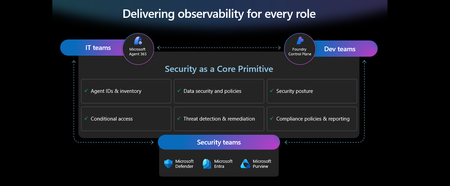
This week at Microsoft Ignite, we shared our vision for Microsoft security -- In the agentic era, security must be ambient and autonomous, like the AI it protects. It must be woven into and around everything we build—from silicon to OS, to agents, apps, data, platforms, and clouds—and throughout everything we do. In this blog, we are going to dive deeper into many of the new innovations we are introducing this week to secure AI agents and apps. As I spend time with our customers and partners, there are four consistent themes that have emerged as core security challenges to secure AI workloads. These are: preventing agent sprawl and access to resources, protecting against data oversharing and data leaks, defending against new AI threats and vulnerabilities, and adhering to evolving regulations. Addressing these challenges holistically requires a coordinated effort across IT, developers, and security leaders, not just within security teams and to enable this, we are introducing several new innovations: Microsoft Agent 365 for IT, Foundry Control Plane in Microsoft Foundry for developers, and the Security Dashboard for AI for security leaders. In addition, we are releasing several new purpose-built capabilities to protect and govern AI apps and agents across Microsoft Defender, Microsoft Entra, and Microsoft Purview. Observability at every layer of the stack To facilitate the organization-wide effort that it takes to secure and govern AI agents and apps – IT, developers, and security leaders need observability (security, management, and monitoring) at every level. IT teams need to enable the development and deployment of any agent in their environment. To ensure the responsible and secure deployment of agents into an organization, IT needs a unified agent registry, the ability to assign an identity to every agent, manage the agent’s access to data and resources, and manage the agent’s entire lifecycle. In addition, IT needs to be able to assign access to common productivity and collaboration tools, such as email and file storage, and be able to observe their entire agent estate for risks such as over-permissioned agents. Development teams need to build and test agents, apply security and compliance controls by default, and ensure AI models are evaluated for safety guardrails and security vulnerabilities. Post deployment, development teams must observe agents to ensure they are staying on task, accessing applications and data sources appropriately, and operating within their cost and performance expectations. Security & compliance teams must ensure overall security of their AI estate, including their AI infrastructure, platforms, data, apps, and agents. They need comprehensive visibility into all their security risks- including agent sprawl and resource access, data oversharing and leaks, AI threats and vulnerabilities, and complying with global regulations. They want to address these risks by extending their existing security investments that they are already invested in and familiar with, rather than using siloed or bolt-on tools. These teams can be most effective in delivering trustworthy AI to their organizations if security is natively integrated into the tools and platforms that they use every day, and if those tools and platforms share consistent security primitives such as agent identities from Entra; data security and compliance controls from Purview; and security posture, detections, and protections from Defender. With the new capabilities being released today, we are delivering observability at every layer of the AI stack, meeting IT, developers, and security teams where they are in the tools they already use to innovate with confidence. For IT Teams - Introducing Microsoft Agent 365, the control plane for agents, now in preview The best infrastructure for managing your agents is the one you already use to manage your users. With Agent 365, organizations can extend familiar tools and policies to confidently deploy and secure agents, without reinventing the wheel. By using the same trusted Microsoft 365 infrastructure, productivity apps, and protections, organizations can now apply consistent and familiar governance and security controls that are purpose-built to protect against agent-specific threats and risks. gement and governance of agents across organizations Microsoft Agent 365 delivers a unified agent Registry, Access Control, Visualization, Interoperability, and Security capabilities for your organization. These capabilities work together to help organizations manage agents and drive business value. The Registry powered by the Entra provides a complete and unified inventory of all the agents deployed and used in your organization including both Microsoft and third-party agents. Access Control allows you to limit the access privileges of your agents to only the resources that they need and protect their access to resources in real time. Visualization gives organizations the ability to see what matters most and gain insights through a unified dashboard, advanced analytics, and role-based reporting. Interop allows agents to access organizational data through Work IQ for added context, and to integrate with Microsoft 365 apps such as Outlook, Word, and Excel so they can create and collaborate alongside users. Security enables the proactive detection of vulnerabilities and misconfigurations, protects against common attacks such as prompt injections, prevents agents from processing or leaking sensitive data, and gives organizations the ability to audit agent interactions, assess compliance readiness and policy violations, and recommend controls for evolving regulatory requirements. Microsoft Agent 365 also includes the Agent 365 SDK, part of Microsoft Agent Framework, which empowers developers and ISVs to build agents on their own AI stack. The SDK enables agents to automatically inherit Microsoft's security and governance protections, such as identity controls, data security policies, and compliance capabilities, without the need for custom integration. For more details on Agent 365, read the blog here. For Developers - Introducing Microsoft Foundry Control Plane to observe, secure and manage agents, now in preview Developers are moving fast to bring agents into production, but operating them at scale introduces new challenges and responsibilities. Agents can access tools, take actions, and make decisions in real time, which means development teams must ensure that every agent behaves safely, securely, and consistently. Today, developers need to work across multiple disparate tools to get a holistic picture of the cybersecurity and safety risks that their agents may have. Once they understand the risk, they then need a unified and simplified way to monitor and manage their entire agent fleet and apply controls and guardrails as needed. Microsoft Foundry provides a unified platform for developers to build, evaluate and deploy AI apps and agents in a responsible way. Today we are excited to announce that Foundry Control Plane is available in preview. This enables developers to observe, secure, and manage their agent fleets with built-in security, and centralized governance controls. With this unified approach, developers can now identify risks and correlate disparate signals across their models, agents, and tools; enforce consistent policies and quality gates; and continuously monitor task adherence and runtime risks. Foundry Control Plane is deeply integrated with Microsoft’s security portfolio to provide a ‘secure by design’ foundation for developers. With Microsoft Entra, developers can ensure an agent identity (Agent ID) and access controls are built into every agent, mitigating the risk of unmanaged agents and over permissioned resources. With Microsoft Defender built in, developers gain contextualized alerts and posture recommendations for agents directly within the Foundry Control Plane. This integration proactively prevents configuration and access risks, while also defending agents from runtime threats in real time. Microsoft Purview’s native integration into Foundry Control Plane makes it easy to enable data security and compliance for every Foundry-built application or agent. This allows Purview to discover data security and compliance risks and apply policies to prevent user prompts and AI responses from safety and policy violations. In addition, agent interactions can be logged and searched for compliance and legal audits. This integration of the shared security capabilities, including identity and access, data security and compliance, and threat protection and posture ensures that security is not an afterthought; it’s embedded at every stage of the agent lifecycle, enabling you to start secure and stay secure. For more details, read the blog. For Security Teams - Introducing Security Dashboard for AI - unified risk visibility for CISOs and AI risk leaders, coming soon AI proliferation in the enterprise, combined with the emergence of AI governance committees and evolving AI regulations, leaves CISOs and AI risk leaders needing a clear view of their AI risks, such as data leaks, model vulnerabilities, misconfigurations, and unethical agent actions across their entire AI estate, spanning AI platforms, apps, and agents. 90% of security professionals, including CISOs, report that their responsibilities have expanded to include data governance and AI oversight within the past year. 1 At the same time, 86% of risk managers say disconnected data and systems lead to duplicated efforts and gaps in risk coverage. 2 To address these needs, we are excited to introduce the Security Dashboard for AI. This serves as a unified dashboard that aggregates posture and real-time risk signals from Microsoft Defender, Microsoft Entra, and Microsoft Purview. This unified dashboard allows CISOs and AI risk leaders to discover agents and AI apps, track AI posture and drift, and correlate risk signals to investigate and act across their entire AI ecosystem. For example, you can see your full AI inventory and get visibility into a quarantined agent, flagged for high data risk due to oversharing sensitive information in Purview. The dashboard then correlates that signal with identity insights from Entra and threat protection alerts from Defender to provide a complete picture of exposure. From there, you can delegate tasks to the appropriate teams to enforce policies and remediate issues quickly. With the Security Dashboard for AI, CISOs and risk leaders gain a clear, consolidated view of AI risks across agents, apps, and platforms—eliminating fragmented visibility, disconnected posture insights, and governance gaps as AI adoption scales. Best of all, there’s nothing new to buy. If you’re already using Microsoft security products to secure AI, you’re already a Security Dashboard for AI customer. Figure 5: Security Dashboard for AI provides CISOs and AI risk leaders with a unified view of their AI risk by bringing together their AI inventory, AI risk, and security recommendations to strengthen overall posture Together, these innovations deliver observability and security across IT, development, and security teams, powered by Microsoft’s shared security capabilities. With Microsoft Agent 365, IT teams can manage and secure agents alongside users. Foundry Control Plane gives developers unified governance and lifecycle controls for agent fleets. Security Dashboard for AI provides CISOs and AI risk leaders with a consolidated view of AI risks across platforms, apps, and agents. Added innovation to secure and govern your AI workloads In addition to the IT, developer, and security leader-focused innovations outlined above, we continue to accelerate our pace of innovation in Microsoft Entra, Microsoft Purview, and Microsoft Defender to address the most pressing needs for securing and governing your AI workloads. These needs are: Manage agent sprawl and resource access e.g. managing agent identity, access to resources, and permissions lifecycle at scale Prevent data oversharing and leaks e.g. protecting sensitive information shared in prompts, responses, and agent interactions Defend against shadow AI, new threats, and vulnerabilities e.g. managing unsanctioned applications, preventing prompt injection attacks, and detecting AI supply chain vulnerabilities Enable AI governance for regulatory compliance e.g. ensuring AI development, operations, and usage comply with evolving global regulations and frameworks Manage agent sprawl and resource access 76% of business leaders expect employees to manage agents within the next 2–3 years. 3 Widespread adoption of agents is driving the need for visibility and control, which includes the need for a unified registry, agent identities, lifecycle governance, and secure access to resources. Today, Microsoft Entra provides robust identity protection and secure access for applications and users. However, organizations lack a unified way to manage, govern, and protect agents in the same way they manage their users. Organizations need a purpose-built identity and access framework for agents. Introducing Microsoft Entra Agent ID, now in preview Microsoft Entra Agent ID offers enterprise-grade capabilities that enable organizations to prevent agent sprawl and protect agent identities and their access to resources. These new purpose-built capabilities enable organizations to: Register and manage agents: Get a complete inventory of the agent fleet and ensure all new agents are created with an identity built-in and are automatically protected by organization policies to accelerate adoption. Govern agent identities and lifecycle: Keep the agent fleet under control with lifecycle management and IT-defined guardrails for both agents and people who create and manage them. Protect agent access to resources: Reduce risk of breaches, block risky agents, and prevent agent access to malicious resources with conditional access and traffic inspection. Agents built in Microsoft Copilot Studio, Microsoft Foundry, and Security Copilot get an Entra Agent ID built-in at creation. Developers can also adopt Entra Agent ID for agents they build through Microsoft Agent Framework, Microsoft Agent 365 SDK, or Microsoft Entra Agent ID SDK. Read the Microsoft Entra blog to learn more. Prevent data oversharing and leaks Data security is more complex than ever. Information Security Media Group (ISMG) reports that 80% of leaders cite leakage of sensitive data as their top concern. 4 In addition to data security and compliance risks of generative AI (GenAI) apps, agents introduces new data risks such as unsupervised data access, highlighting the need to protect all types of corporate data, whether it is accessed by employees or agents. To mitigate these risks, we are introducing new Microsoft Purview data security and compliance capabilities for Microsoft 365 Copilot and for agents and AI apps built with Copilot Studio and Microsoft Foundry, providing unified protection, visibility, and control for users, AI Apps, and Agents. New Microsoft Purview controls safeguard Microsoft 365 Copilot with real-time protection and bulk remediation of oversharing risks Microsoft Purview and Microsoft 365 Copilot deliver a fully integrated solution for protecting sensitive data in AI workflows. Based on ongoing customer feedback, we’re introducing new capabilities to deliver real-time protection for sensitive data in M365 Copilot and accelerated remediation of oversharing risks: Data risk assessments: Previously, admins could monitor oversharing risks such as SharePoint sites with unprotected sensitive data. Now, they can perform item-level investigations and bulk remediation for overshared files in SharePoint and OneDrive to quickly reduce oversharing exposure. Data Loss Prevention (DLP) for M365 Copilot: DLP previously excluded files with sensitivity labels from Copilot processing. Now in preview, DLP also prevents prompts that include sensitive data from being processed in M365 Copilot, Copilot Chat, and Copilot agents, and prevents Copilot from using sensitive data in prompts for web grounding. Priority cleanup for M365 Copilot assets: Many organizations have org-wide policies to retain or delete data. Priority cleanup, now generally available, lets admins delete assets that are frequently processed by Copilot, such as meeting transcripts and recordings, on an independent schedule from the org-wide policies while maintaining regulatory compliance. On-demand classification for meeting transcripts: Purview can now detect sensitive information in meeting transcripts on-demand. This enables data security admins to apply DLP policies and enforce Priority cleanup based on the sensitive information detected. & bulk remediation Read the full Data Security blog to learn more. Introducing new Microsoft Purview data security capabilities for agents and apps built with Copilot Studio and Microsoft Foundry, now in preview Microsoft Purview now extends the same data security and compliance for users and Copilots to agents and apps. These new capabilities are: Enhanced Data Security Posture Management: A centralized DSPM dashboard that provides observability, risk assessment, and guided remediation across users, AI apps, and agents. Insider Risk Management (IRM) for Agents: Uniquely designed for agents, using dedicated behavioral analytics, Purview dynamically assigns risk levels to agents based on their risky handing of sensitive data and enables admins to apply conditional policies based on that risk level. Sensitive data protection with Azure AI Search: Azure AI Search enables fast, AI-driven retrieval across large document collections, essential for building AI Apps. When apps or agents use Azure AI Search to index or retrieve data, Purview sensitivity labels are preserved in the search index, ensuring that any sensitive information remains protected under the organization’s data security & compliance policies. For more information on preventing data oversharing and data leaks - Learn how Purview protects and governs agents in the Data Security and Compliance for Agents blog. Defend against shadow AI, new threats, and vulnerabilities AI workloads are subject to new AI-specific threats like prompt injections attacks, model poisoning, and data exfiltration of AI generated content. Although security admins and SOC analysts have similar tasks when securing agents, the attack methods and surfaces differ significantly. To help customers defend against these novel attacks, we are introducing new capabilities in Microsoft Defender that deliver end-to-end protection, from security posture management to runtime defense. Introducing Security Posture Management for agents, now in preview As organizations adopt AI agents to automate critical workflows, they become high-value targets and potential points of compromise, creating a critical need to ensure agents are hardened, compliant, and resilient by preventing misconfigurations and safeguarding against adversarial manipulation. Security Posture Management for agents in Microsoft Defender now provides an agent inventory for security teams across Microsoft Foundry and Copilot Studio agents. Here, analysts can assess the overall security posture of an agent, easily implement security recommendations, and identify vulnerabilities such as misconfigurations and excessive permissions, all aligned to the MITRE ATT&CK framework. Additionally, the new agent attack path analysis visualizes how an agent’s weak security posture can create broader organizational risk, so you can quickly limit exposure and prevent lateral movement. Introducing Threat Protection for agents, now in preview Attack techniques and attack surfaces for agents are fundamentally different from other assets in your environment. That’s why Defender is delivering purpose-built protections and detections to help defend against them. Defender is introducing runtime protection for Copilot Studio agents that automatically block prompt injection attacks in real time. In addition, we are announcing agent-specific threat detections for Copilot Studio and Microsoft Foundry agents coming soon. Defender automatically correlates these alerts with Microsoft’s industry-leading threat intelligence and cross-domain security signals to deliver richer, contextualized alerts and security incident views for the SOC analyst. Defender’s risk and threat signals are natively integrated into the new Microsoft Foundry Control Plane, giving development teams full observability and the ability to act directly from within their familiar environment. Finally, security analysts will be able to hunt across all agent telemetry in the Advanced Hunting experience in Defender, and the new Agent 365 SDK extends Defender’s visibility and hunting capabilities to third-party agents, starting with Genspark and Kasisto, giving security teams even more coverage across their AI landscape. To learn more about how you can harden the security posture of your agents and defend against threats, read the Microsoft Defender blog. Enable AI governance for regulatory compliance Global AI regulations like the EU AI Act and NIST AI RMF are evolving rapidly; yet, according to ISMG, 55% of leaders report lacking clarity on current and future AI regulatory requirements. 5 As enterprises adopt AI, they must ensure that their AI innovation aligns with global regulations and standards to avoid costly compliance gaps. Introducing new Microsoft Purview Compliance Manager capabilities to stay ahead of evolving AI regulations, now in preview Today, Purview Compliance Manager provides over 300 pre-built assessments for common industry, regional, and global standards and regulations. However, the pace of change for new AI regulations requires controls to be continuously re-evaluated and updated so that organizations can adapt to ongoing changes in regulations and stay compliant. To address this need, Compliance Manager now includes AI-powered regulatory templates. AI-powered regulatory templates enable real-time ingestion and analysis of global regulatory documents, allowing compliance teams to quickly adapt to changes as they happen. As regulations evolve, the updated regulatory documents can be uploaded to Compliance Manager, and the new requirements are automatically mapped to applicable recommended actions to implement controls across Microsoft Defender, Microsoft Entra, Microsoft Purview, Microsoft 365, and Microsoft Foundry. Automated actions by Compliance Manager further streamline governance, reduce manual workload, and strengthen regulatory accountability. Introducing expanded Microsoft Purview compliance capabilities for agents and AI apps now in preview Microsoft Purview now extends its compliance capabilities across agent-generated interactions, ensuring responsible use and regulatory alignment as AI becomes deeply embedded across business processes. New capabilities include expanded coverage for: Audit: Surface agent interactions, lifecycle events, and data usage with Purview Audit. Unified audit logs across user and agent activities, paired with traceability for every agent using an Entra Agent ID, support investigation, anomaly detection, and regulatory reporting. Communication Compliance: Detect prompts sent to agents and agent-generated responses containing inappropriate, unethical, or risky language, including attempts to manipulate agents into bypassing policies, generating risky content, or producing noncompliant outputs. When issues arise, data security admins get full context, including the prompt, the agent’s output, and relevant metadata, so they can investigate and take corrective action Data Lifecycle Management: Apply retention and deletion policies to agent-generated content and communication flows to automate lifecycle controls and reduce regulatory risk. Read about Microsoft Purview data security for agents to learn more. Finally, we are extending our data security, threat protection, and identity access capabilities to third-party apps and agents via the network. Advancing Microsoft Entra Internet Access Secure Web + AI Gateway - extend runtime protections to the network, now in preview Microsoft Entra Internet Access, part of the Microsoft Entra Suite, has new capabilities to secure access to and usage of GenAI at the network level, marking a transition from Secure Web Gateway to Secure Web and AI Gateway. Enterprises can accelerate GenAI adoption while maintaining compliance and reducing risk, empowering employees to experiment with new AI tools safely. The new capabilities include: Prompt injection protection which blocks malicious prompts in real time by extending Azure AI Prompt Shields to the network layer. Network file filtering which extends Microsoft Purview to inspect files in transit and prevents regulated or confidential data from being uploaded to unsanctioned AI services. Shadow AI Detection that provides visibility into unsanctioned AI applications through Cloud Application Analytics and Defender for Cloud Apps risk scoring, empowering security teams to monitor usage trends, apply Conditional Access, or block high-risk apps instantly. Unsanctioned MCP server blocking prevents access to MCP servers from unauthorized agents. With these controls, you can accelerate GenAI adoption while maintaining compliance and reducing risk, so employees can experiment with new AI tools safely. Read the Microsoft Entra blog to learn more. As AI transforms the enterprise, security must evolve to meet new challenges—spanning agent sprawl, data protection, emerging threats, and regulatory compliance. Our approach is to empower IT, developers, and security leaders with purpose-built innovations like Agent 365, Foundry Control Plane, and the Security Dashboard for AI. These solutions bring observability, governance, and protection to every layer of the AI stack, leveraging familiar tools and integrated controls across Microsoft Defender, Microsoft Entra, and Microsoft Purview. The future of security is ambient, autonomous, and deeply woven into the fabric of how we build, deploy, and govern AI systems. Explore additional resources Learn more about Security for AI solutions on our webpage Learn more about Microsoft Agent 365 Learn more about Microsoft Entra Agent ID Get started with Microsoft 365 Copilot Get started with Microsoft Copilot Studio Get started with Microsoft Foundry Get started with Microsoft Defender for Cloud Get started with Microsoft Entra Get started with Microsoft Purview Get started with Microsoft Purview Compliance Manager Sign up for a free Microsoft 365 E5 Security Trial and Microsoft Purview Trial 1 Bedrock Security, 2025 Data Security Confidence Index, published Mar 17, 2025. 2 AuditBoard & Ascend2, Connected Risk Report 2024; as cited by MIT Sloan Management Review, Spring 2025. 3 KPMG AI Quarterly Pulse Survey | Q3 2025. September 2025. n= 130 U.S.-based C-suite and business leaders representing organizations with annual revenue of $1 billion or more 4 First Annual Generative AI study: Business Rewards vs. Security Risks, , Q3 2023, ISMG, N=400 5 First Annual Generative AI study: Business Rewards vs. Security Risks, Q3 2023, ISMG, N=400
Sensitivity Label Permissions
Hello, I have set up sensitivity labels within my company. I have Public, Standard, Confidential and Highly Confidential. When testing with my external email (e.g. Gmail and Yahoo) I am prompted to enter the one-time passcode when opening an email from my test account. But then I tested with an external user who has an Outlook email and he was not prompted to enter the one-time passcode. "Authenticated Users" is included in Standard, Confidential and Highly Confidential permission control when setting up the labels. Is this the normal behavior for the one-time passcode only being prompted for Non-Microsoft emails? Can the one-time passcode be prompted for Microsoft (Outlook) domains? Also how can I have multi-factor authenticator apply to my labels for external clients/users? Any help would be much appreciated. Thank you!279Views0likes3Comments
Optimizing OneDrive Retention Policies with Administrative Units and Adaptive Scopes
A special thank you note to Ashwini_Anand for contributing to the content of this blog. In today's digital landscape, efficient data retention management is a critical priority for organizations of all sizes. Organizations can optimize their OneDrive retention policies, ensuring efficient and compliant data management tailored to their unique user base and licensing arrangements. Scenario: Contoso Org encountered a distinct challenge - managing data retention for their diverse user base of 200,000 employees, which includes 80,000 users with F3 licenses and 120,000 users with E3 and E5 licenses. As per Microsoft licensing, F3 users are allocated only 2 GB of OneDrive storage, whereas E3 and E5 users are provided with a much larger allocation of 5 TB. This difference required creating separate retention policies for these users' groups. The challenge was further complicated by the fact that retention policies utilize the same storage for preserving deleted data. If a unified retention policy were applied to all users such as retaining data for 6 years before deletion - F3 users’ OneDrive storage could potentially fill up within a year or less (depending on usage patterns). This would leave F3 users unable to delete or save new files, severely disrupting productivity and data management. To address this, it is essential to create a separate retention policy for E3 and E5 users, ensuring that the policy applies only to these users and excludes F3 users. This blog will discuss the process of designing and implementing such a policy for the large user base based on separate licenses, ensuring efficient data management and uninterrupted productivity. Challenges with Retention Policy Configuration for large organizations 1. Adaptive Scope Adaptive scopes in Microsoft Purview allow you to dynamically target policies based on specific attributes or properties such as department, location, email address, custom Exchange attributes etc. Refer the link to get the list of supported attributes: Adaptive scopes | Microsoft Learn. Limitation: Although Adaptive scopes can filter by user properties, Contoso, being a large organization, had already utilized all 15 custom attributes for various purposes. Additionally, user attributes also couldn’t be used to segregate users based on licenses. This made it challenging to repurpose any attribute for our filter criteria to apply the retention policy to a specific set of users. Furthermore, refinable strings used in SharePoint do not work for OneDrive sites. 2. Static Scope Static scope refers to manually selected locations (e.g., specific users, mailboxes, or sites) where the policy is applied. The scope remains fixed and does not automatically adjust. Limitation: Static scope allows the inclusion or exclusion of mailboxes and sites but is limited to 100 sites and 1000 mailboxes, making it challenging to utilize for large organizations. Proposed Solution: Administrative Units with Adaptive Scope To address the above challenges, it required utilizing Administrative Units (Admin Units - is a container within an organization that can hold users, groups, or devices. It helps us to manage and organize users within an organization more efficiently, especially in large or complex environments) with Adaptive Scopes for creation of a retention policy targeting E3 and E5 licensed users. This approach allows organizations to selectively apply retention policies based on user licenses, enhancing both efficiency and governance. Prerequisites For Administrative unit - Microsoft Entra ID P1 license For Retention policy - Refer to the link: Microsoft 365 guidance for security & compliance - Service Descriptions | Microsoft Learn Configuration Steps Step 1: Create Administrative Unit: Navigate to Microsoft Entra Admin Center https://entra.microsoft.com/#home Click on ‘Identity’ and then click on ‘Show more’ Expand ‘Roles & admins’ Proceed to ‘Admin units’ -> Add. Figure 1: Create an Administrative unit and enter the name and description Define a name for the Administrative unit. Click on ‘Next: Assign roles’ No role assignment required, click on 'Next: Review + create’) Click on ‘Create’. To get more information about creating administrative unit, refer this link: Create or delete administrative units - Microsoft Entra ID | Microsoft Learn Step 2: Update Dynamic Membership: Select the Administrative Unit which is created in Step1. Navigate to ‘Properties’ Choose ‘Dynamic User’ for Membership type. Click on ‘Add a dynamic query’ for Dynamic user members. Click on ‘Edit' for Rule syntax In order to include E3 and E5 licensed users who are using OneDrive, you need to include SharePoint Online Service Plan 2 enabled users. Use the query below in the code snippet to define the dynamic membership. user.assignedPlans -any (assignedPlan.servicePlanId -eq "5dbe027f-2339-4123-9542-606e4d348a72" -and assignedPlan.capabilityStatus -eq "Enabled") 7. Click on 'Save' to update the Dynamic membership rules 8. Click on 'Save' to update the Administrative unit changes. 9. Open the Administrative Unit and click on the 'Users' tab to check if users have started to populate. Note: It may take some time to replicate all users, depending on the size of your organization. Please wait for minutes and then check again. Step 3: Create Adaptive Scope under Purview Portal: Access https://purview.microsoft.com Navigate to ‘Settings’ Expand ‘Roles & scopes’ and click on ‘Adaptive scopes’ Create a new adaptive scope, providing ‘Name’ and ‘Description’. Proceed to select the Administrative unit which was created earlier. (It takes time for the Admin/Administrative Unit to become visible. Please wait for some time if it does not appear immediately.) Click on ‘Add’ and ‘Next’ Select ‘Users’ and 'Next' Once the Admin unit is selected, we need to specify the criteria which allows to select users within the Admin unit (this is the second level of filtering available). However, in this case since we needed to select all users of the admin unit, hence the below criteria was used. Click 'Add attribute' and form the below query. Email addresses is not equal to $null Note: You can apply any other filter if you need to select a subset of users within the Admin Unit based on your business use case. Click on ‘Next’ Review and ‘Submit’ the adaptive scope. Step 4: Create Retention Policy using Adaptive Scope: Access to the portal https://purview.microsoft.com/datalifecyclemanagement/overview Navigate to ‘Policies’ and then go to ‘Retention Policies’. Create a ‘New Retention policy’, providing a ‘Name’ and ‘Description’. Click on "Next", there is no need to add Admin units here as its already defined in Adaptive scope. Figure 9: Select the 'Admin Units' as Full directory 6. Choose ‘Adaptive’ and click on ‘Next’. Click on ‘Add scopes’ and Select the previously created Adaptive scope. Under Location, select OneDrive. Figure 11: Select the Adaptive scope and location at this point. 8. Click on ‘Next’ to proceed and select the desired retention settings. 9. Click Next and Finish Outcome By implementing Admin Units with adaptive scopes, organizations can effectively overcome challenges associated with applying OneDrive retention policies for distinguished and large set of users. This approach facilitates the dynamic addition of required users, eliminating the need for custom attributes and manual user management. Users are dynamically added or removed from the policy based on license status, ensuring seamless compliance management. FAQ: Why is it important to differentiate retention policies based on user licensing tiers? It is important to differentiate retention policies based on user licensing tiers to ensure that each user group has policies tailored to their specific needs and constraints, avoiding issues such as storage limitations for users with lower-tier licenses like F3. How many Exchange custom attributes are typically available? There are typically 15 Exchange custom attributes available, which can limit scalability when dealing with a large user base. What challenge does Adaptive Scoping face when including a large number of OneDrive sites? Adaptive Scoping faces the challenge of including a large number of OneDrive sites due to limitations in the number of custom attributes allowed. While these custom attributes help in categorizing and managing OneDrive sites, the finite number of attributes available can restrict scalability and flexibility. Why are refinable strings a limitation for Adaptive Scoping in OneDrive? Refinable strings are a limitation for Adaptive Scoping in OneDrive because their usage is restricted to SharePoint only. What are the limitations of Static Scoping for OneDrive sites? Static Scoping for OneDrive sites is limited by the strict limit of including or excluding only 100 sites, making it usage limited for larger environments. Do we need any licenses to create an administrative unit with dynamic membership? Yes, a Microsoft Entra ID P1 license is required for all members of the group.Select the 'Adaptive' retention policy typeFigure 10: Select the 'Adaptive' retention policy type
Building Secure, Enterprise Ready AI Agents with Purview SDK and Agent Framework
At Microsoft Ignite, we announced the public preview of Purview integration with the Agent Framework SDK—making it easier to build AI agents that are secure, compliant, and enterprise‑ready from day one. AI agents are quickly moving from demos to production. They reason over enterprise data, collaborate with other agents, and take real actions. As that happens, one thing becomes non‑negotiable: Governance has to be built in. That’s where Purview SDK comes in. Agentic AI Changes the Security Model Traditional apps expose risks at the UI or API layer. AI agents are different. Agents can: Process sensitive enterprise data in prompts and responses Collaborate with other agents across workflows Act autonomously on behalf of users Without built‑in controls, even a well‑designed agent can create compliance gaps. Purview SDK brings Microsoft’s enterprise data security and compliance directly into the agent runtime, so governance travels with the agent—not after it. What You Get with Purview SDK + Agent Framework This integration delivers a few key things developers and enterprises care about most: Inline Data Protection Evaluate prompts and responses against Data Loss Prevention (DLP) policies in real time. Content can be allowed or blocked automatically. Built‑In Governance Send AI interactions to Purview for audit, eDiscovery, communication compliance, and lifecycle management—without custom plumbing. Enterprise‑Ready by Design Ship agents that meet enterprise security expectations from the start, not as a follow‑up project. All of this is done natively through Agent Framework middleware, so governance feels like part of the platform—not an add‑on. How Enforcement Works (Quickly) When an agent runs: Prompts and responses flow through the Agent Framework pipeline Purview SDK evaluates content against configured policies A decision is returned: allow, redact, or block Governance signals are logged for audit and compliance This same model works for: User‑to‑agent interactions Agent‑to‑agent communication Multi‑agent workflows Try It: Add Purview SDK in Minutes Here’s a minimal Python example using Agent Framework: That’s it! From that point on: Prompts and responses are evaluated against Purview policies setup within the enterprise tenant Sensitive data can be automatically blocked Interactions are logged for governance and audit Designed for Real Agent Systems Most production AI apps aren’t single‑agent systems. Purview SDK supports: Agent‑level enforcement for fine‑grained control Workflow‑level enforcement across orchestration steps Agent‑to‑agent governance to protect data as agents collaborate This makes it a natural fit for enterprise‑scale, multi‑agent architectures. Get Started Today You can start experimenting right away: Try the Purview SDK with Agent Framework Follow the Microsoft Learn docs to configure Purview SDK with Agent Framework. Explore the GitHub samples See examples of policy‑enforced agents in Python and .NET. Secure AI, Without Slowing It Down AI agents are quickly becoming production systems—not experiments. By integrating Purview SDK directly into the Agent Framework, Microsoft is making governance a default capability, not a deployment blocker. Build intelligent agents. Protect sensitive data. Scale with confidence.Purview Community: Call for Sessions!
Microsoft Purview Community Lighting Talks is a virtual event series featuring real-world demos, tips, and solutions directly from you, the Purview Community! The goal of these short, fluff-free lighting sessions is to foster authentic knowledge sharing, community connection, and highlight real experiences to empower others who use Microsoft Purview. The virtual events will be held in a simu-live format across multiple time zones and will include subject-matter experts and the speakers in a live-chat Q&A for community participation. For more information and to apply to speak, please visit the Purview Lighting Talks Call for Speakers Submission Form SUBMISSIONS DUE MARCH 16, 2026 So, to our Purview customers, partners, and developers- gather your session title and description, along with a quick 1-2 sentence bio, and submit today! Event details and registration will be shared here and at aka.ms/securitycommunity as soon as they are scheduled. Wish to be notified? Subscribe to our email list.How to deploy Microsoft Purview DSPM for AI to secure your AI apps
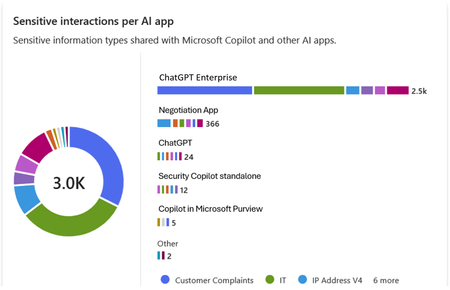
Microsoft Purview Data Security Posture Management (DSPM for AI) is designed to enhance data security for the following AI applications: Microsoft Copilot experiences, including Microsoft 365 Copilot. Enterprise AI apps, including ChatGPT enterprise integration. Other AI apps, including all other AI applications like ChatGPT consumer, Microsoft Copilot, DeepSeek, and Google Gemini, accessed through the browser. In this blog, we will dive into the different policies and reporting we have to discover, protect and govern these three types of AI applications. Prerequisites Please refer to the prerequisites for DSPM for AI in the Microsoft Learn Docs. Login to the Purview portal To begin, start by logging into Microsoft 365 Purview portal with your admin credentials: In the Microsoft Purview portal, go to the Home page. Find DSPM for AI under solutions. 1. Securing Microsoft 365 Copilot Be sure to check out our blog on How to use the DSPM for AI data assessment report to help you address oversharing concerns when you deploy Microsoft 365 Copilot. Discover potential data security risks in Microsoft 365 Copilot interactions In the Overview tab of DSPM for AI, start with the tasks in “Get Started” and Activate Purview Audit if you have not yet activated it in your tenant to get insights into user interactions with Microsoft Copilot experiences In the Recommendations tab, review the recommendations that are under “Not Started”. Create the following data discovery policy to discover sensitive information in AI interactions by clicking into it. Detect risky interactions in AI apps - This public preview Purview Insider Risk Management policy helps calculate user risk by detecting risky prompts and responses in Microsoft 365 Copilot experiences. Click here to learn more about Risky AI usage policy. With the policies to discover sensitive information in Microsoft Copilot experiences in place, head back to the Reports tab of DSPM for AI to discover any AI interactions that may be risky, with the option to filter to Microsoft Copilot Experiences, and review the following for Microsoft Copilot experiences: Total interactions over time (Microsoft Copilot) Sensitive interactions per AI app Top unethical AI interactions Top sensitivity labels references in Microsoft 365 Copilot Insider Risk severity Insider risk severity per AI app Potential risky AI usage Protect sensitive data in Microsoft 365 Copilot interactions From the Reports tab, click on “View details” for each of the report graphs to view detailed activities in the Activity Explorer. Using available filters, filter the results to view activities from Microsoft Copilot experiences based on different Activity type, AI app category and App type, Scope, which support administrative units for DSPM for AI, and more. Then drill down to each activity to view details including the capability to view prompts and response with the right permissions. To protect the sensitive data in interactions for Microsoft 365 Copilot, review the Not Started policies in the Recommendations tab and create these policies: Information Protection Policy for Sensitivity Labels - This option creates default sensitivity labels and sensitivity label policies. If you've already configured sensitivity labels and their policies, this configuration is skipped. Protect sensitive data referenced in Microsoft 365 Copilot - This guides you through the process of creating a Purview Data Loss Prevention (DLP) policy to restrict the processing of content with specific sensitivity labels in Copilot interactions. Click here to learn more about Data Loss Prevention for Microsoft 365 Copilot. Protect sensitive data referenced in Copilot responses - Sensitivity labels help protect files by controlling user access to data. Microsoft 365 Copilot honors sensitivity labels on files and only shows users files they already have access to in prompts and responses. Use Data assessments to identify potential oversharing risks, including unlabeled files. Stay tuned for an upcoming blog post on using DSPM for AI data assessments! Use Copilot to improve your data security posture - Data Security Posture Management combines deep insights with Security Copilot capabilities to help you identify and address security risks in your org. Once you have created policies from the Recommendations tab, you can go to the Policies tab to review and manage all the policies you have created across your organization to discover and safeguard AI activity in one centralized place, as well as edit the policies or investigate alerts associated with those policies in solution. Note that additional policies not from the Recommendations tab will also appear in the Policies tab when DSPM for AI identifies them as policies to Secure and govern all AI apps. Govern the prompts and responses in Microsoft 365 Copilot interactions Understand and comply with AI regulations by selecting “Guided assistance to AI regulations” in the Recommendations tab and walking through the “Actions to take”. From the Recommendations tab, create a Control unethical behavior in AI Purview Communications Compliance policy to detect sensitive information in prompts and responses and address potentially unethical behavior in Microsoft Copilot experiences and ChatGPT for Enterprise. This policy covers all users and groups in your organization. To retain and/or delete Microsoft 365 Copilot prompts and responses, setup a Data Lifecycle policy by navigating to Microsoft Purview Data Lifecycle Management and find Retention Policies under the Policies header. You can also preserve, collect, analyze, review, and export Microsoft 365 Copilot interactions by creating an eDiscovery case. 2. Securing Enterprise AI apps Please refer to this amazing blog on Unlocking the Power of Microsoft Purview for ChatGPT Enterprise | Microsoft Community Hub for detailed information on how to integrate with ChatGPT for enterprise, the Purview solutions it currently supports through Purview Communication Compliance, Insider Risk Management, eDiscovery, and Data Lifecycle Management. Learn more about the feature also through our public documentation. 3. Securing other AI Microsoft Purview DSPM for AI currently supports the following list of AI sites. Be sure to also check out our blog on the new Microsoft Purview data security controls for the browser & network to secure other AI apps. Discover potential data security risks in prompts sent to other AI apps In the Overview tab of DSPM for AI, go through these three steps in “Get Started” to discover potential data security risk in other AI interactions: Install Microsoft Purview browser extension For Windows users: The Purview extension is not necessary for the enforcement of data loss prevention on the Edge browser but required for Chrome to detect sensitive info pasted or uploaded to AI sites. The extension is also required to detect browsing to other AI sites through an Insider Risk Management policy for both Edge and Chrome browser. Therefore, Purview browser extension is required for both Edge and Chrome in Windows. For MacOS users: The Purview extension is not necessary for the enforcement of data loss prevention on macOS devices, and currently, browsing to other AI sites through Purview Insider Risk Management is not supported on MacOS, therefore, no Purview browser extension is required for MacOS. Extend your insights for data discovery – this one-click collection policy will setup three separate Purview detection policies for other AI apps: Detect sensitive info shared in AI prompts in Edge – a Purview collection policy that detects prompts sent to ChatGPT consumer, Micrsoft Copilot, DeepSeek, and Google Gemini in Microsoft Edge and discovers sensitive information shared in prompt contents. This policy covers all users and groups in your organization in audit mode only. Detect when users visit AI sites – a Purview Insider Risk Management policy that detects when users use a browser to visit AI sites. Detect sensitive info pasted or uploaded to AI sites – a Purview Endpoint Data loss prevention (eDLP) policy that discovers sensitive content pasted or uploaded in Microsoft Edge, Chrome, and Firefox to AI sites. This policy covers all users and groups in your org in audit mode only. With the policies to discover sensitive information in other AI apps in place, head back to the Reports tab of DSPM for AI to discover any AI interactions that may be risky, with the option to filter by Other AI Apps, and review the following for other AI apps: Total interactions over time (other AI apps) Total visits (other AI apps) Sensitive interactions per AI app Insider Risk severity Insider risk severity per AI app Protect sensitive info shared with other AI apps From the Reports tab, click on “View details” for each of the report graphs to view detailed activities in the Activity Explorer. Using available filters, filter the results to view activities based on different Activity type, AI app category and App type, Scope, which support administrative units for DSPM for AI, and more. To protect the sensitive data in interactions for other AI apps, review the Not Started policies in the Recommendations tab and create these policies: Fortify your data security – This will create three policies to manage your data security risks with other AI apps: 1) Block elevated risk users from pasting or uploading sensitive info on AI sites – this will create a Microsoft Purview endpoint data loss prevention (eDLP) policy that uses adaptive protection to give a warn-with-override to elevated risk users attempting to paste or upload sensitive information to other AI apps in Edge, Chrome, and Firefox. This policy covers all users and groups in your org in test mode. Learn more about adaptive protection in Data loss prevention. 2) Block elevated risk users from submitting prompts to AI apps in Microsoft Edge – this will create a Microsoft Purview browser data loss prevention (DLP) policy, and using adaptive protection, this policy will block elevated, moderate, and minor risk users attempting to put information in other AI apps using Microsoft Edge. This integration is built-in to Microsoft Edge. Learn more about adaptive protection in Data loss prevention. 3) Block sensitive info from being sent to AI apps in Microsoft Edge - this will create a Microsoft Purview browser data loss prevention (DLP) policy to detect inline for a selection of common sensitive information types and blocks prompts being sent to AI apps while using Microsoft Edge. This integration is built-in to Microsoft Edge. Once you have created policies from the Recommendations tab, you can go to the Policies tab to review and manage all the policies you have created across your organization to discover and safeguard AI activity in one centralized place, as well as edit the policies or investigate alerts associated with those policies in solution. Note that additional policies not from the Recommendations tab will also appear in the Policies tab when DSPM for AI identifies them as policies to Secure and govern all AI apps. Conclusion Microsoft Purview DSPM for AI can help you discover, protect, and govern the interactions from AI applications in Microsoft Copilot experiences, Enterprise AI apps, and other AI apps. We recommend you review the Reports in DSPM for AI routinely to discover any new interactions that may be of concern, and to create policies to secure and govern those interactions as necessary. We also recommend you utilize the Activity Explorer in DSPM for AI to review different Activity explorer events while users interacting with AI, including the capability to view prompts and response with the right permissions. We will continue to update this blog with new features that become available in DSPM for AI, so be sure to bookmark this page! Follow-up Reading Check out this blog on the details of each recommended policies in DSPM for AI: Microsoft Purview – Data Security Posture Management (DSPM) for AI | Microsoft Community Hub Address oversharing concerns with Microsoft 365 blueprint - aka.ms/Copilot/Oversharing Microsoft Purview data security and compliance protections for Microsoft 365 Copilot and other generative AI apps | Microsoft Learn Considerations for deploying Microsoft Purview AI Hub and data security and compliance protections for Microsoft 365 Copilot and Microsoft Copilot | Microsoft Learn Commonly used properties in Copilot audit logs - Audit logs for Copilot and AI activities | Microsoft Learn Supported AI sites by Microsoft Purview for data security and compliance protections | Microsoft Learn Where Copilot usage data is stored and how you can audit it - Microsoft 365 Copilot data protection and auditing architecture | Microsoft Learn Downloadable whitepaper: Data Security for AI Adoption | Microsoft Public roadmap for DSPM for AI - Microsoft 365 Roadmap | Microsoft 365
Unlocking the Power of Microsoft Purview for ChatGPT Enterprise
In today's rapidly evolving technology landscape, data security and compliance are key. Microsoft Purview offers a robust solution for managing and securing interactions with AI based solutions. This integration not only enhances data governance but also ensures that sensitive information is handled with the appropriate controls. Let's dive into the benefits of this integration and outline the steps to integrate with ChatGPT Enterprise in specific. The integration works for Entra connected users on the ChatGPT workspace, if you have needs that goes beyond this, please tell us why and how it impacts you. Important update 1: Effective May 1, these capabilities require you to enable pay-as-you-go billing in your organization. Important update 2: From May 19, you are required to create a collection policy to ingest ChatGPT Enterprise information. In DSPM for AI you will find this one click process. Benefits of Integrating ChatGPT Enterprise with Microsoft Purview Enhanced Data Security: By integrating ChatGPT Enterprise with Microsoft Purview, organizations can ensure that interactions are securely captured and stored within their Microsoft 365 tenant. This includes user text prompts and AI app text responses, providing a comprehensive record of communications. Compliance and Governance: Microsoft Purview offers a range of compliance solutions, including Insider Risk Management, eDiscovery, Communication Compliance, and Data Lifecycle & Records Management. These tools help organizations meet regulatory requirements and manage data effectively. Customizable Detection: The integration allows for the detection of built in can custom classifiers for sensitive information, which can be customized to meet the specific needs of the organization. To help ensures that sensitive data is identified and protected. The audit data streams into Advanced Hunting and the Unified Audit events that can generate visualisations of trends and other insights. Seamless Integration: The ChatGPT Enterprise integration uses the Purview API to push data into Compliant Storage, ensuring that external data sources cannot access and push data directly. This provides an additional layer of security and control. Step-by-Step Guide to Setting Up the Integration 1. Get Object ID for the Purview account in Your Tenant: Go to portal.azure.com and search for "Microsoft Purview" in the search bar. Click on "Microsoft Purview accounts" from the search results. Select the Purview account you are using and copy the account name. Go to portal.azure.com and search for “Enterprise" in the search bar. Click on Enterprise applications. Remove the filter for Enterprise Applications Select All applications under manage, search for the name and copy the Object ID. 2. Assign Graph API Roles to Your Managed Identity Application: Assign Purview API roles to your managed identity application by connecting to MS Graph utilizing Cloud Shell in the Azure portal. Open a PowerShell window in portal.azure.com and run the command Connect-MgGraph. Authenticate and sign in to your account. Run the following cmdlet to get the ServicePrincipal ID for your organization for the Purview API app. (Get-MgServicePrincipal -Filter "AppId eq '9ec59623-ce40-4dc8-a635-ed0275b5d58a'").id This command provides the permission of Purview.ProcessConversationMessages.All to the Microsoft Purview Account allowing classification processing. Update the ObjectId to the one retrieved in step 1 for command and body parameter. Update the ResourceId to the ServicePrincipal ID retrieved in the last step. $bodyParam= @{ "PrincipalId"= "{ObjectID}" "ResourceId" = "{ResourceId}" "AppRoleId" = "{a4543e1f-6e5d-4ec9-a54a-f3b8c156163f}" } New-MgServicePrincipalAppRoleAssignment -ServicePrincipalId '{ObjectId}' -BodyParameter $bodyParam It will look something like this from the command line We also need to add the permission for the application to read the user accounts to correctly map the ChatGPT Enterprise user with Entra accounts. First run the following command to get the ServicePrincipal ID for your organization for the GRAPH app. (Get-MgServicePrincipal -Filter "AppId eq '00000003-0000-0000-c000-000000000000'").id The following step adds the permission User.Read.All to the Purview application. Update the ObjectId with the one retrieved in step 1. Update the ResourceId with the ServicePrincipal ID retrieved in the last step. $bodyParam= @{ "PrincipalId"= "{ObjectID}" "ResourceId" = "{ResourceId}" "AppRoleId" = "{df021288-bdef-4463-88db-98f22de89214}" } New-MgServicePrincipalAppRoleAssignment -ServicePrincipalId '{ObjectId}' -BodyParameter $bodyParam 3. Store the ChatGPT Enterprise API Key in Key Vault The steps for setting up Key vault integration for Data Map can be found here Create and manage credentials for scans in the Microsoft Purview Data Map | Microsoft Learn When setup you will see something like this in Key vault. 4. Integrate ChatGPT Enterprise Workspace to Purview: Create a new data source in Purview Data Map that connects to the ChatGPT Enterprise workspace. Go to purview.microsoft.com and select Data Map, search if you do not see it on the first screen. Select Data sources Select Register Search for ChatGPT Enterprise and select Provide your ChatGPT Enterprise ID Create the first scan by selecting Table view and filter on ChatGPT Add your key vault credentials to the scan Test the connection and once complete click continue When you click continue the following screen will show up, if everything is ok click Save and run. Validate the progress by clicking on the name, completion of the first full scan may take an extended period of time. Depending on size it may take more than 24h to complete. If you click on the scan name you expand to all the runs for that scan. When the scan completes you can start to make use of the DSPM for AI experience to review interactions with ChatGPT Enterprise. The mapping to the users is based on the ChatGPT Enterprise connection to Entra, with prompts and responses stored in the user's mailbox. 5. Review and Monitor Data: Please see this article for required permissions and guidance around Microsoft Purview Data Security Posture Management (DSPM) for AI, Microsoft Purview data security and compliance protections for Microsoft 365 Copilot and other generative AI apps | Microsoft Learn Use Purview DSPM for AI analytics and Activity Explorer to review interactions and classifications. You can expand on prompts and responses in ChatGPT Enterprise 6. Microsoft Purview Communication Compliance Communication Compliance (here after CC) is a feature of Microsoft Purview that allows you to monitor and detect inappropriate or risky interactions with ChatGPT Enterprise. You can monitor and detect requests and responses that are inappropriate based on ML models, regular Sensitive Information Types, and other classifiers in Purview. This can help you identify Jailbreak and Prompt injection attacks and flag them to IRM and for case management. Detailed steps to configure CC policies and supported configurations can be found here. 7. Microsoft Purview Insider Risk Management We believe that Microsoft Purview Insider Risk Management (here after IRM) can serve a key role in protecting your AI workloads long term. With its adaptive protection capabilities, IRM dynamically adjusts user access based on evolving risk levels. In the event of heightened risk, IRM can enforce Data Loss Prevention (DLP) policies on sensitive content, apply tailored Entra Conditional Access policies, and initiate other necessary actions to effectively mitigate potential risks. This strategic approach will help you to apply more stringent policies where it matters avoiding a boil the ocean approach to allow your team to get started using AI. To get started use the signals that are available to you including CC signals to raise IRM tickets and enforce adaptive protection. You should create your own custom IRM policy for this. Do include Defender signals as well. Based on elevated risk you may select to block users from accessing certain assets such as ChatGPT Enterprise. Please see this article for more detail Block access for users with elevated insider risk - Microsoft Entra ID | Microsoft Learn. 8. eDiscovery eDiscovery of AI interactions is crucial for legal compliance, transparency, accountability, risk management, and data privacy protection. Many industries must preserve and discover electronic communications and interactions to meet regulatory requirements. Including AI interactions in eDiscovery ensures organizations comply with these obligations and preserves relevant evidence for litigation. This process also helps maintain trust by enabling the review of AI decisions and actions, demonstrating due diligence to regulators. Microsoft Purview eDiscovery solutions | Microsoft Learn 9. Data Lifecycle Management Microsoft Purview offers robust solutions to manage AI data from creation to deletion, including classification, retention, and secure disposal. This ensures that AI interactions are preserved and retrievable for audits, litigation, and compliance purposes. Please see this article for more information Automatically retain or delete content by using retention policies | Microsoft Learn. Closing By following these steps, organizations can leverage the full potential of Microsoft Purview to enhance the security and compliance of their ChatGPT Enterprise interactions. This integration not only provides peace of mind but also empowers organizations to manage their data more effectively. We are still in preview some of the features listed are not fully integrated, please reach out to us if you have any questions or if you have additional requirements.
Artificial Intelligence & Security
Understanding Artificial Intelligence Artificial intelligence (AI) is a computational system that perform human‑intelligence tasks, learning, reasoning, problem‑solving, perception, and language understanding by leveraging algorithmic and statistical methods to analyse data and make informed decisions. Artificial Intelligence (AI) can also be abbreviated as is the simulation of human intelligence through machines programmed to learn, reason, and act. It blends statistics, machine learning, and robotics to deliver following outcomes: Prediction: The application of statistical modelling and machine learning techniques to anticipate future outcomes, such as detecting fraudulent transactions. Automation: The utilisation of robotics and artificial intelligence to streamline and execute routine processes, exemplified by automated invoice processing. Augmentation: The enhancement of human decision-making and operational capabilities through AI-driven tools, for instance, AI-assisted sales enablement. Artificial Intelligence: Core Capabilities and Market Outlook Key capabilities of AI include: Data-driven decision-making: Analysing large datasets to generate actionable insights and optimise outcomes. Anomaly detection: Identifying irregular patterns or deviations in data for risk mitigation and quality assurance. Visual interpretation: Processing and understanding visual inputs such as images and videos for applications like computer vision. Natural language understanding: Comprehending and interpreting human language to enable accurate information extraction and contextual responses. Conversational engagement: Facilitating human-like interactions through chatbots, virtual assistants, and dialogue systems. With the exponential growth of data, ML learning models and computing power. AI is advancing much faster and as According to industry analyst reports breakthroughs in deep learning and neural network architectures have enabled highly sophisticated applications across diverse sectors, including healthcare, finance, manufacturing, and retail. The global AI market is on a trajectory of significant expansion, projected to increase nearly 5X by 2030, from $391 billion in 2025 to $1.81 trillion. This growth corresponds to a compound annual growth rate (CAGR) of 35.9% during the forecast period. These projections are estimates and subject to change as per rapid growth and advancement in the AI Era. AI and Cloud Synergy AI, and cloud computing form a powerful technological mixture. Digital assistants are offering scalable, cloud-powered intelligence. Cloud platforms such as Azure provide pre-trained models and services, enabling businesses to deploy AI solutions efficiently. Core AI Workloads Capabilities Machine Learning Machine learning (ML) underpins most AI systems by enabling models to learn from historical and real-time data to make predictions, classifications, and recommendations. These models adapt over time as they are exposed to new data, improving accuracy and robustness. Example use cases: Credit risk scoring in banking, demand forecasting in retail, and predictive maintenance in manufacturing. Anomaly Detection Anomaly detection techniques identify deviations from expected patterns in data, systems, or processes. This capability is critical for risk management and operational resilience, as it enables early detection of fraud, security breaches, or equipment failures. Example use cases: Fraud detection in financial transactions, network intrusion monitoring in cybersecurity, and quality control in industrial production. Natural Language Processing (NLP) NLP focuses on enabling machines to understand, interpret, and generate human language in both text and speech formats. This capability powers a wide range of applications that require contextual comprehension and semantic accuracy. Example use cases: Sentiment analysis for customer feedback, document summarisation for legal and compliance teams, and multilingual translation for global operations. Principles of Responsible AI To ensure ethical and trustworthy AI, organisations must embrace: Reliability & Safety Privacy & Security Inclusiveness Fairness Transparency Accountability These principles are embedded in frameworks like the Responsible-AI-Standard and reinforced by governance models such as Microsoft AI Governance Framework. Responsible AI Principles and Approach | Microsoft AI AI and Security AI introduces both opportunities and risks. A responsible approach to AI security involves three dimensions: Risk Mitigation: It Is addressing threats from immature or malicious AI applications. Security Applications: These are used to enhance AI security and public safety. Governance Systems: Establishing frameworks to manage AI risks and ensure safe development. Security Risks and Opportunities Due to AI Transformation AI’s transformative nature brings new challenges: Cybersecurity: This brings the opportunities and advancement to track, detect and act against Vulnerabilities in infrastructure and learning models. Data Security: This helps the tool and solutions such as Microsoft Purview to prevent data security by performing assessments, creating Data loss prevention policies applying sensitivity labels. Information Security: The biggest risk is securing the information and due to the AI era of transformation securing IS using various AI security frameworks. These concerns are echoed in The Crucial Role of Data Security Posture Management in the AI Era, which highlights insider threats, generative AI risks, and the need for robust data governance. AI in Security Applications AI’s capabilities in data analysis and decision-making enable innovative security solutions: Network Protection: applications include use of AI algorithms for intrusion detection, malware detection, security situational awareness, and threat early warning, etc. Data Management: applications refer to the use of AI technologies to achieve data protection objectives such as hierarchical classification, leak prevention, and leak traceability. Intelligent Security: applications refer to the use of AI technology to upgrade the security field from passive defence toward the intelligent direction, developing of active judgment and timely early warning. Financial Risk Control: applications use AI technology to improve the efficiency and accuracy of credit assessment, risk management, etc., and assisting governments in the regulation of financial transactions. AI Security Management Effective AI security requires: Regulations & Policies: Establish and safety management laws specifically designed to for governance by regulatory authorities and management policies for key application domains of AI and prominent security risks. Standards & Specifications: Industry-wide benchmarks, along with international and domestic standards can be used to support AI safety. Technological Methods: Early detection with Modern set of tools such as Defender for AI can be used to support to detect and mitigate and remediate AI threats. Security Assessments: Organization should use proper tools and platforms for evaluating AI risks and perform assessments regularly using automated tools approach Conclusion AI is transforming how organizations operate, innovate, and secure their environments. As AI capabilities evolve, integrating security and governance considerations from the outset remains critical. By combining responsible AI principles, effective governance, and appropriate security measures, organizations can work toward deploying AI technologies in a manner that supports both innovation and trust. Industry projections suggest continued growth in AI‑related security investments over the coming years, reflecting increased focus on managing AI risks alongside its benefits. These estimates are subject to change and should be interpreted in the context of evolving technologies and regulatory developments. Disclaimer References to Microsoft products and frameworks are for informational purposes only and do not imply endorsement, guarantee, or contractual commitment. Market projections referenced are based on publicly available industry analyses and are subject to change.