microsoft intune
70 TopicsI built a free, open-source M365 security assessment tool - looking for feedback
I work as an IT consultant, and a good chunk of my time is spent assessing Microsoft 365 environments for small and mid-sized businesses. Every engagement started the same way: connect to five different PowerShell modules, run dozens of commands across Entra ID, Exchange Online, Defender, SharePoint, and Teams, manually compare each setting against CIS benchmarks, then spend hours assembling everything into a report the client could actually read. The tools that automate this either cost thousands per year, require standing up Azure infrastructure just to run, or only cover one service area. I wanted something simpler: one command that connects, assesses, and produces a client-ready deliverable. So I built it. What M365 Assess does https://github.com/Daren9m/M365-Assess is a PowerShell-based security assessment tool that runs against a Microsoft 365 tenant and produces a comprehensive set of reports. Here is what you get from a single run: 57 automated security checks aligned to the CIS Microsoft 365 Foundations Benchmark v6.0.1, covering Entra ID, Exchange Online, Defender for Office 365, SharePoint Online, and Teams 12 compliance frameworks mapped simultaneously -- every finding is cross-referenced against NIST 800-53, NIST CSF 2.0, ISO 27001:2022, SOC 2, HIPAA, PCI DSS v4.0.1, CMMC 2.0, CISA SCuBA, and DISA STIG (plus CIS profiles for E3 L1/L2 and E5 L1/L2) 20+ CSV exports covering users, mailboxes, MFA status, admin roles, conditional access policies, mail flow rules, device compliance, and more A self-contained HTML report with an executive summary, severity badges, sortable tables, and a compliance overview dashboard -- no external dependencies, fully base64-encoded, just open it in any browser or email it directly The entire assessment is read-only. It never modifies tenant settings. Only Get-* cmdlets are used. A few things I'm proud of Real-time progress in the console. As the assessment runs, you see each check complete with live status indicators and timing. No staring at a blank terminal wondering if it hung. The HTML report is a single file. Logos, backgrounds, fonts -- everything is embedded. You can email the report as an attachment and it renders perfectly. It supports dark mode (auto-detects system preference), and all tables are sortable by clicking column headers. Compliance framework mapping. This was the feature that took the most work. The compliance overview shows coverage percentages across all 12 frameworks, with drill-down to individual controls. Each finding links back to its CIS control ID and maps to every applicable framework control. Pass/Fail detail tables. Each security check shows the CIS control reference, what was checked, what the expected value is, what the actual value is, and a clear Pass/Fail/Warning status. Findings include remediation descriptions to help prioritize fixes. Quick start If you want to try it out, it takes about 5 minutes to get running: # Install prerequisites (if you don't have them already) Install-Module Microsoft.Graph, ExchangeOnlineManagement -Scope CurrentUser Clone and run git clone https://github.com/Daren9m/M365-Assess.git cd M365-Assess .\Invoke-M365Assessment.ps1 The interactive wizard walks you through selecting assessment sections, entering your tenant ID, and choosing an authentication method (interactive browser login, certificate-based, or pre-existing connections). Results land in a timestamped folder with all CSVs and the HTML report. Requires PowerShell 7.x and runs on Windows (macOS and Linux are experimental -- I would love help testing those platforms). Cloud support M365 Assess works with: Commercial (global) tenants GCC, GCC High, and DoD environments If you work in government cloud, the tool handles the different endpoint URIs automatically. What is next This is actively maintained and I have a roadmap of improvements: More automated checks -- 140 CIS v6.0.1 controls are tracked in the registry, with 57 automated today. Expanding coverage is the top priority. Remediation commands -- PowerShell snippets and portal steps for each finding, so you can fix issues directly from the report. XLSX compliance matrix -- A spreadsheet export for audit teams who need to work in Excel. Standalone report regeneration -- Re-run the report from existing CSV data without re-assessing the tenant. I would love your feedback I have been building this for my own consulting work, but I think it could be useful to the broader community. If you try it, I would genuinely appreciate hearing: What checks should I prioritize next? Which security controls matter most in your environment? What compliance frameworks are most requested by your clients or auditors? How does the report land with non-technical stakeholders? Is the executive summary useful, or does it need work? macOS/Linux users -- does it run? What breaks? I have tested it on macOS, but not extensively. Bug reports, feature requests, and contributions are all welcome on GitHub. Repository: https://github.com/Daren9m/M365-Assess License: MIT (free for commercial and personal use) Runtime: PowerShell 7.x Thanks for reading. Happy to answer any questions in the comments.5.7KViews2likes4Comments
How much of your Microsoft 365 environment can you actually see at once?
Not how many users you have. Not how many sites, teams, apps or flows you have. How much of it can you actually see connected together? I've been working across Microsoft 365 environments for a while, and I kept running into the same thing. There is no shortage of information. If anything, there is probably too much of it. Users, groups, permissions, SharePoint, Teams, Power Apps, Power Automate, Power BI, Dataverse, OneDrive, Exchange, Intune, licensing, configuration... It's all there. But when you're actually trying to understand how everything fits together, it can be a different story. You open one blade. Find something. Open another. Cross-check it. Go back. Open something else. Before long, you're jumping between different parts of the tenant trying to build the bigger picture in your head. And if you're working with larger environments, that gets difficult pretty quickly. The information isn't necessarily missing. The relationships between the information are what can be difficult to see. That got me thinking about a slightly different question: Instead of "where do I find this information?" "Show me what's connected to this." That's where VisibleState started. Start anywhere. Follow the connections. Imagine starting with a single user. Instead of seeing that user simply as a record with a list of properties, imagine being able to explore the relationships around them: User → Groups → SharePoint → Teams → Power Apps → Power Automate → Power BI → Dataverse → OneDrive → Exchange → Intune Then the questions become different: What does this user have access to? Is that access direct or coming through a group? What resources are connected to them? What depends on something they're associated with? Which licenses are involved? Are there relationships that look unusual? If something changes, what else might be affected? Those questions aren't necessarily about finding another piece of information. They're about putting information that already exists into context. A report can tell you that something exists. A connected view helps you understand what it is connected to. Illustrative example below — not a real customer environment. I'm not suggesting Microsoft 365 doesn't already give us this information Quite the opposite. Microsoft 365 already gives administrators an incredible amount of information and tooling. The thing I've been thinking about is what happens when you want to look across those boundaries. Sometimes I don't want another export. I don't want another list. I don't necessarily want another dashboard. I want to start with something I'm looking at and ask: "What's connected to this?" And then keep following the trail. That's the idea I'm exploring with VisibleState. The interesting part is what happens when you change the viewpoint The same relationships can be useful for completely different reasons. For example: Administrators may want to understand access, permissions and dependencies. Security and governance teams may want to find unusual relationships or exceptions. Compliance teams may need to understand who can access something and why. People managing multiple environments may want a consistent way to understand what's there without rebuilding the picture manually every time. Leadership may not need to see the graph at all. They may simply want to know what's important, what's exposed and what could be affected. It's still the same underlying environment. You're just looking at it from a different angle. And that's where I think things get interesting. Where I'm at with it VisibleState started as something I was building to make my own work easier. I was spending a lot of time investigating environments, tracing access and putting information together for reports. The individual tasks weren't necessarily difficult. It was the jumping between different places and reconstructing the bigger picture that took the time. So I started building something that would let me approach the environment through the relationships instead. It's grown quite a bit from where it started, and I'm continuing to build it. I'm not posting this as a product launch, and I'm not looking for people to sign up. I'm genuinely interested in whether the problem I'm seeing is familiar to other people working with Microsoft 365. So I'm curious... If you could start with any object in your Microsoft 365 environment and immediately see what it's connected to, where would you start? Would it be: Users and access Groups and permissions SharePoint and Teams Power Apps, Power Automate, Power BI and Dataverse Licensing and resources Governance and unusual relationships Something completely different Maybe you've already got a good way of doing this. Maybe you still find yourself jumping between different services and piecing things together manually. Or maybe I'm looking at the problem from the wrong direction. What's the one relationship in your Microsoft 365 environment that you wish you could see instantly?225Views0likes0Comments
MacOS platform SSO deployment issues
Hello, We tried to deploy MacOS platform SSO but the devices are having problems with their authentication. The devices are connected through company portal but keep asking for logins and authentication, especially on reboot. Some users are prompted to sign-in to their entra account several times per hour. To Deploy it we used the configuration setting template: Authentication > Extensible Single Sign On (SSO) Settings: Extension Identifier: com.microsoft.CompanyPortalMac.ssoextension Authentication Method: Password Token To User Mapping: Account Name: preferred_username Full Name: name Use Shared Device Keys: Disabled Team Identifier: UBXXXXXX Type: Redirect Has anyone here experienced similar issues or found a fix for these constant re-authentication prompts? Thanks!231Views0likes1Comment
Disable incessant nagware popups
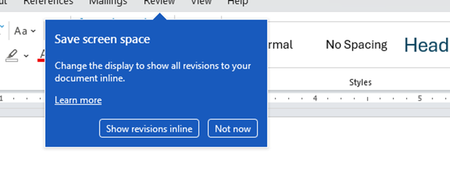
I don't know about everyone else, but I am sick and tired of the nagware pop ups in Word, Excel, PowerPoint, Outlook, etc. Every single product harasses me with pop ups trying to tell me "hey, did you know this feature was here?", "you can do this if you click that", "let me hold your hand through using products you've used for decades even though you don't want daddy Microslop to do that". This is a prime example. I keep getting the same ones again and again and again and everything I've read indicates they should only appear once. But they don't. They keep coming back like a psychotic stalker ex who wants alimony even though you were never married. How do I get this nagware to stop?!387Views1like1Comment
Intune Kiosk setup steps
I'm using intune to create a kiosk mode machine but im finding I have to perform a few pre config tasks first before applying the Kiosk Profile. For example. I have a kiosk profile template created that uses a kiosk template adding multiple apps. I also want to add some shortcuts to websites on the desktop along with the tiles for the applications. To do this I used a PowerShell script using Scripts and Remediation. I'm finding I have to do it in following stages: Install the apps before applying the Kiosk Profile Apply the kiosk profile Run PowerShell script under the kiosk profile to add the shortcuts Anyone know a way to run this as an all-in-one configuration?363Views0likes1CommentIntune iPhone apply policy based on user
Hello, I am pre-enrolling corporate iPhone in Apple Business Manager to point new mobiles to my Intune and deploy a default set of policies. Im wondering if there is a way to specify want device configurations are applied at the "build" stage based on the persons using the phone. For example, we have certain people who need specific configurations versus the default. There are large number of these people, and I'd rather do this at build time hands off rather than having to come back and add a phone to a group to get a policy etc. I also prefer not too if possible, to set some kind of filter etc ahead of time to differentiate what policies a phone gets. Again, it's based on the user, not the device so prefers to not have to go into a portal and set a filter of some sort to make this happen. Any suggestions if this is even possible.111Views0likes1Comment
Partner Intune reporting questions
I need some help for my global partner- SHI International. We have a monthly services modernization briefing with the SHI M365 practice team. They have a need around 1-2 Q&A deep-dive sessions where their team of M365 experts want to ask some in=depth technical and pre-sales related questions related to Intune Reporting Challenges and Customer Pain Points, Current Intune Reporting Limitations, Technical Barriers to Reporting, Permissions and Consent Model Confusion, Feedback on Documentation and User Experience. Appreciate any guidance on a PSA SME on this topic or a global black belt, that would be great. Appreciate if you can point me to the latest updated documentation on this topic. I reached out to several folks in the PSA team with no luck yet. Thanks!161Views0likes2Comments
High CPU usage with Intune in macOs using Tahoe OS version
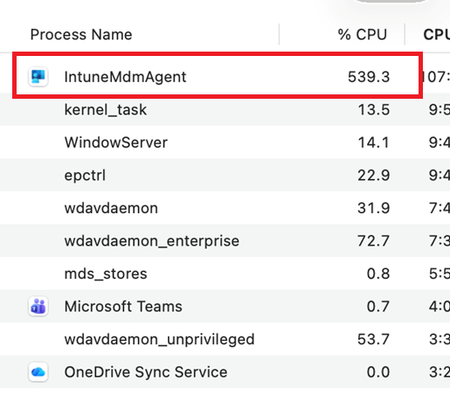
Hi, I have a macOS with the Tahoe version and I noticed that my battery would drain rapidly. When I go check, I noticed that Intune is consuming over 500% of the CPU. Is this a known issue? Is there a temporary fix or workaround? Thank you!1.1KViews0likes1Comment
Multitenant collaboration with existing guest users
Hi, we plan to set up Multitenant collaboration with a few tenants. Regarding this project I got 2 quesstions: 1.) what happens with users from one MTO who is already present as a guest users in one or multiple MTOs? Will that Guest User be merged with the new member status? 2.) Are newly added users from other MTOs treated with the Conditional Access policies from the MTO they are accessing? We have a conditional access polic yin place which forces B2b usre sto re-authenticate every 9 hours. Will the member user from an MTO aplly this policy?Solved600Views0likes1Comment