microsoft information governance
85 Topics
Best practices for maintaining emergency contact information
Hello everyone. Our organization is currently reviewing its emergency contact directory as part of our business continuity and operational processes. What best practices do you recommend for keeping emergency contact information updated and ensuring it remains available during incidents or emergencies? Thank you for your suggestions.Securing AI Agents End‑to‑End: Connecting Purview DSPM, Agent 365, and the AI Security Dashboard
The Challenge: Organizations deploying Microsoft Copilot and custom AI agents face a critical gap: security visibility is fragmented across data protection, identity governance, and threat detection tools. While Microsoft provides powerful capabilities through Purview Data Security Posture Management (DSPM), Agent 365, and the AI Security Dashboard, practitioners often struggle to understand how these components work together to deliver unified AI security posture management. This blog provides an architectural and operational blueprint for connecting these three pillars into a cohesive security framework that security architects can implement today. The Three Pillars: Capabilities Overview Microsoft Purview DSPM for AI Purview DSPM extends data‑centric security controls to AI interactions. Its key capabilities include: Sensitivity labels with EXTRACT usage rights that govern whether AI agents can read and process sensitive content Data Loss Prevention (DLP) policies that block or audit AI interactions involving confidential data across Copilot, SharePoint, OneDrive, and Teams Comprehensive audit logging that captures AI‑to‑data interactions, including user identity, agent identity, data classification, and the action taken Insider Risk Management integration that detects anomalous agent behavior patterns, such as bulk or unusual data access DSPM operates at the data layer, answering a foundational question: What sensitive information can this agent access, and what is it doing with that data? Microsoft Agent 365 Agent 365 provides a unified control plane for governing AI agent identity, access, and lifecycle across the Microsoft 365 ecosystem. Core components include: Agent Registry, backed by Entra Agent IDs, providing a unique identity for every Copilot Studio agent, custom agent, and supported third‑party AI integration Conditional Access policies that enforce real‑time access controls based on agent identity, user context, device compliance, and risk signals Centralized observability, with dashboards showing agent‑to‑agent interactions, agent‑to‑human conversations, and near real‑time telemetry Governance workflows that support agent approval, lifecycle management, suspension, and decommissioning Agent 365 operates at the identity and control layer, answering: Which agents exist, who authorized them, and what access boundaries are enforced? AI Security Dashboard The AI Security Dashboard aggregates security signals from Entra, Purview, and Defender to provide a unified risk view across all AI assets. It delivers: AI asset inventory, cataloging Copilot instances, custom agents, and third‑party models with associated risk context Misconfiguration detection, identifying agents with excessive permissions, missing conditional access policies, or DLP coverage gaps Attack path visualization, showing how compromised agents could pivot to sensitive data or escalate privileges Integration with Microsoft Security Copilot, enabling natural‑language investigation of AI security risks and incidents The Dashboard operates at the aggregation and recommendation layer, answering: What is my overall AI security posture, and where should remediation be prioritized? The Unified Architecture: How Signals Flow End-to-End Understanding the technical integration requires mapping how identity, data, and security signals flow across these three systems. Identity Foundation (Microsoft Entra): Every AI agent is assigned a unique Entra Agent ID at creation. This identity becomes the anchor for all security controls—conditional access policies in Agent 365, audit attribution in Purview, and risk correlation in the AI Security Dashboard. When a Copilot Studio agent is deployed, Entra automatically registers it with Agent 365 and propagates identity metadata to connected security services. Data Interaction Telemetry (Microsoft Purview): When an agent accesses SharePoint files, reads emails, or queries structured data, Purview captures detailed audit events that include agent identity, user context, data classification labels, and enforcement outcomes. These events flow into Purview’s unified audit log and are accessible through the Compliance portal, Microsoft Graph, and SIEM integrations. Crucially, Purview enforces sensitivity labels with EXTRACT usage rights—if a document is labeled Confidential without EXTRACT permission, the agent’s request is blocked before content reaches the AI model. Control Plane Enforcement (Agent 365): Agent 365 applies identity‑based governance by evaluating Entra signals and surfaced risk indicators. During policy evaluation, the control plane verifies whether the agent is registered, whether the invoking user satisfies authentication requirements, and whether recent signals (such as DLP violations) warrant blocking execution. Agent 365 also provides observability views that correlate agent activity with security events, helping administrators identify unmanaged or unauthorized (“shadow”) agents. Aggregated Risk View (AI Security Dashboard): The AI Security Dashboard correlates telemetry from: Entra — conditional access decisions, authentication anomalies, and privileged identity usage Purview — DLP violations, sensitivity label mismatches, and Insider Risk Management signals Defender — threat detections, application posture assessments, and suspicious activity indicators These signals are correlated by agent identity and time, then surfaced as risk cards with contextual severity and recommended remediation actions. The Dashboard does not replace the underlying tools; instead, it provides a consolidated view that helps teams focus on the most impactful risks. The diagram below illustrates how identity, data, and threat signals flow across the three AI security pillars. Figure 1: End‑to‑end AI security architecture. Enforcement happens at the data layer (Purview) and identity layer (Agent 365 via Entra). The AI Security Dashboard aggregates—rather than replaces—underlying security controls. From Architecture to Action: Telemetry & Enforcement Flow Understanding architecture is essential—but practitioners need to know when and where enforcement occurs during a real agent invocation. The sequence below illustrates runtime interaction between a user, an AI agent, and the three security pillars. The Critical Distinction: Two Enforcement Layers Enforcement occurs at two distinct points in the request lifecycle. First, Microsoft Entra validates agent identity and evaluates conditional access policies before execution begins. If the agent is not registered, if the user fails authentication requirements, or if policy conditions require blocking, execution is denied immediately. Second, when execution is permitted, Purview DSPM enforces data access controls inline. Every attempt to access documents, emails, or structured data is evaluated in real time. If a document is labeled Confidential without EXTRACT rights, Purview blocks the request and returns no sensitive content to the agent. Telemetry Generation Across the Stack Each step produces structured telemetry. Entra logs authentication attempts and policy decisions. Purview records AI interaction audit events, including enforcement outcomes. Agent 365 correlates identity and behavior signals to maintain agent posture and observability. These combined signals are surfaced in the AI Security Dashboard, which correlates activity across time and identity to present prioritized risk insights. Make the “where enforcement happens” distinction explicit (data vs. identity). Figure 2: Purview enforces data controls inline, Agent 365 enforces identity and execution controls, and the AI Security Dashboard correlates signals for prioritization. Practitioner Scenario: Detecting and Blocking Agent Data Exposure Context: Your organization deploys a custom Copilot Studio agent to summarize sales proposals stored in SharePoint. Several documents contain customer PII labeled "Highly Confidential" with no EXTRACT usage rights granted. Incident Timeline: Agent Data Exposure Detection → Remediation Detection The agent attempts to access SharePoint files through Microsoft Graph. Purview DSPM evaluates sensitivity labels and identifies restricted documents. A DLP policy blocks access and logs a violation with full context. The audit event appears in the Purview unified audit log within minutes. Visibility Agent 365 flags the blocked interaction in its observability dashboard. The AI Security Dashboard surfaces a High‑severity risk card titled “Agent accessing restricted data.” Security teams investigate the agent using Security Copilot to determine scope and recurrence. Remediation An administrator applies an Entra conditional access policy to suspend the agent. Data permissions are adjusted to restrict access or explicitly grant EXTRACT rights where justified. The AI Security Dashboard reflects a reduced risk score once controls are validated. Outcome: The incident is contained quickly, audit evidence is preserved, and the agent is restored with least‑privilege access—without disrupting legitimate business workflows. Figure 3: A single DLP violation triggers coordinated detection, investigation, and remediation across Purview, Agent 365, and the AI Security Dashboard within 30 minutes. Division of Responsibility: What Each Tool Does Tool Primary Function Key Signals Enforcement Capability Purview DSPM Data-layer protection and audit Sensitivity labels, DLP violations, data access patterns Blocks API calls violating DLP or label policies Agent 365 Identity and lifecycle governance Agent registry, conditional access hits, observability telemetry Denies agent invocation based on Entra policies AI Security Dashboard Unified risk aggregation Cross-product signals from Entra, Purview, Defender No direct enforcement—provides recommendations and prioritization Critical Distinction: Enforcement happens at two layers—Purview blocks data access violations, while Agent 365 (via Entra) blocks agent invocation. The Dashboard does not enforce policies but accelerates investigation and remediation by correlating signals that would otherwise require manual analysis across three separate consoles. Key Takeaways for Practitioners Agent identity is the integration anchor. Every security control—DLP policies, conditional access, audit logs, risk scoring—relies on Entra Agent IDs. Ensure all agents are properly registered in Agent 365 before production deployment. Purview enforces at the data layer, Agent 365 at the identity layer. Use both—Purview prevents unauthorized data exfiltration, while Agent 365 prevents unauthorized agent execution. Neither is redundant. The AI Security Dashboard is for prioritization, not replacement. Continue using Purview Compliance Portal for detailed DLP investigations and Agent 365 registry for operational monitoring. Use the Dashboard to identify which risks warrant immediate attention. Audit logs are your ground truth. All three tools consume Purview audit events. Integrate these logs with Microsoft Sentinel or your SIEM for long-term retention and advanced threat hunting. Shadow agents are your blind spot. Regularly audit the Agent 365 registry against actual AI deployments (Copilot Studio, Azure OpenAI, third-party integrations) to identify unregistered instances. As AI agents become embedded in everyday work, security teams must move beyond feature‑level understanding and adopt an end‑to‑end enforcement mindset. The combination of Purview DSPM, Agent 365, and the AI Security Dashboard provides the building blocks—but value is realized only when they are implemented as a unified model. How are you governing AI agents in your environment today? Share your experiences and patterns in the comments—especially where identity, data, and security signals intersect.4.5KViews4likes0CommentsCollecting Microsoft 365 Copilot Data with Microsoft Purview eDiscovery
Copilot Data Collection Reference Table Data Type Storage Location Item Class Collection Strategy Copilot Prompts (user questions sent to M365 Copilot) Exchange Online: Hidden folder in the user's mailbox. Compliance copies stored similar to Teams chats, but with unique item classes. IPM.SkypeTeams.Message.Copilot.<AppName> (e.g., .Word, .Excel, .Outlook, .BizChat). Additional AI-related classes may also apply: IPM.SkypeTeams.Message.ConnectedAIApp*, IPM.SkypeTeams.Message.CloudAIApp*, IPM.SkypeTeams.Message.TeamCopilot*, IPM.SkypeTeams.TeamCopilot* 1. Add the user's Exchange mailbox as a data source to the search. 2. In the condition builder you can optionally filter the search to only return Copilot prompts by adding a condition of "Item class contains any of Copilot activity". This automatically applies all relevant M365 Copilot item classes as a condition of the search. 3. Add any further additional conditions such as date range or keywords to narrow results as required. You can also use the Item Class condition to exclude M365 Copilot interactions from your collections when targeting a user’s mailbox. Notes: · Additional item classes may be added. The item class condition will be updated accordingly. Copilot Responses (AI-generated answers) Exchange Online: The same hidden folder in the user's mailbox as prompts. The same IPM.SkypeTeams.Message.Copilot.<AppName> pattern as prompts The same collection strategy used for prompts. Copilot Memories (personalized saved information Copilot "remembers") Exchange Online: Hidden CopilotMemory subfolder within the user's mailbox contacts. Stored as contact entries separate from prompts and responses. IPM.Contact Each memory item appears as a contact card within Exchange, which is distinct from the message-based item classes used for prompts/responses. 1. Add the user's Exchange mailbox as a data source to the search. 2. In the condition builder you can optionally filter the search to only return Contacts by adding a condition of "Item class contains any of Contacts". Notes: · Copilot memories will not be preserved under a legal hold or retention policy. · This will return both Copilot memories stored in contacts as well as traditional contacts from the user’s Exchange mailbox. Copilot Pages (AI-generated, user-editable documents) SharePoint Online: Stored in a user-owned SharePoint embedded container (shared with Loop workspace content and Copilot Notebooks). File format is .page. Not stored in the user's mailbox. N/A These are SharePoint files (not Exchange items), so no item class applies. Identify them in search results by the .page file extension. 1. Add the custodian’s SharePoint embedded site URL as a data source to the search. Alternatively, tenant-wide searches of all SPO sites will include all SharePoint Embedded containers 2. Optionally use the condition builder with conditions such as date range, keywords or file type to further filter results returned Facilitator agent interactions in a Team meeting chat Exchange Online: Hidden folder in all meeting attendees’ mailboxes. Compliance copies stored as Teams chats IPM.SkypeTeams.Message 1. Add the user's Exchange mailbox as a data source to the search. 2. In the condition builder you can optionally filter the search to only return Copilot prompts by adding a condition of "Item class contains any of Instant messages". 3. Add any further additional conditions such as date range or keywords to narrow results as required. Facilitator agent meeting notes (loop) SharePoint Online: Facilitator meeting notes are stored as a .loop file in a OneDrive folder titled Meetings of the user who initiated Facilitator in Teams N/A These are SharePoint files (not Exchange items), so no item class applies. Identify them in search results by the .loop file extension. 1. Add the user's OneDrive URL as a data source to the search. 2. In the condition builder you can optionally filter the search to only return loop files by adding a condition of "File type equals any of loop". 3. Add any further additional conditions such as date range or keywords to narrow results as required. Notes: · With eDiscovery premium enabled cases you can follow the standard workflow for collecting Team meeting messages and select to include cloud attachments in your collection. This will automatically pull into the export or review set any Facilitator agent meeting notes. Facilitator created word/loop documents SharePoint Online: When the facilitator agent is asked to create a word or loop document during a meeting they are stored in the requesters OneDrive in a folder called N/A These are SharePoint files (not Exchange items), so no item class applies. Identify them in search results by the .loop file extension. 1. Add the user's OneDrive URL as a data source to the search. 2. In the condition builder you can optionally filter the search to only return loop and doc files by adding a condition of "File type equals any of loop, docx". 3. Add any further additional conditions such as date range or keywords to narrow results as required. Notes: · With eDiscovery premium enabled cases you can follow the standard workflow for collecting Team meeting messages and select to include cloud attachments in your collection. This will automatically pull into the export or review set any Facilitator generated loop or word documents. Facilitator generated and assigned tasks Exchange Online: When the facilitator agent creates and assigns a task to an individual, it is created as a to-do item in the assigned individual's Exchange Mailbox IPM.Task 1. Add the user's Exchange mailbox as a data source to the search. 2. In the condition builder you can optionally filter the search to only return Tasks by adding a condition of "Item class contains any of Tasks". 3. Add any further additional conditions such as date range or keywords to narrow results as required. Application-Specific Item Classes for Prompts & Responses For more granular filtering by Copilot application, the following item class values can be used in KQL queries: Application Context Item Class Value Microsoft Copilot Chat (BizChat / Teams) IPM.SkypeTeams.Message.Copilot.BizChat Copilot in Excel IPM.SkypeTeams.Message.Copilot.Excel Copilot in Loop IPM.SkypeTeams.Message.Copilot.Loop Copilot in Outlook IPM.SkypeTeams.Message.Copilot.Outlook Copilot in PowerPoint IPM.SkypeTeams.Message.Copilot.PowerPoint Copilot in Teams IPM.SkypeTeams.Message.Copilot.Teams Copilot in Whiteboard IPM.SkypeTeams.Message.Copilot.Whiteboard Copilot in Word IPM.SkypeTeams.Message.Copilot.Word To target all Copilot applications at once, use the wildcard query ItemClass:IPM.SkypeTeams.Message.Copilot.*. For a wider list of AI data sources, see the following link: https://learn.microsoft.com/en-us/purview/edisc-search-copilot-data#data-sources-for-ai-data Important Notes for eDiscovery Practitioners Excluding Copilot Data from Broader Searches Because Copilot prompts and responses reside in the same Exchange mailbox as emails and Teams chats, they will appear in broad mailbox searches unless explicitly filtered out. To exclude Copilot items, use the condition "Item Class Contains none of Copilot activity" in the condition builder, or add (-ItemClass:IPM.SkypeTeams.Message.Copilot.*) in KQL. Some eDiscovery managers run separate searches, one for Copilot data and one for other communications, to keep collections distinct. Copilot Memories: Retention & Hold Limitations Purview retention policies and eDiscovery holds do not currently apply to Copilot memory items. Memory items remain until a user deletes them or an admin explicitly removes them via eDiscovery or Graph API. Additionally, deleting a Copilot prompt and response does not delete any memory derived from that conversation. Memories must be removed separately if required. Copilot Pages: Do Not Treat Like Prompts/Responses Copilot Pages are not stored in Exchange mailboxes. Searching only a custodian’s mailbox will not return Copilot Pages. Treat Copilot Pages the same way as you do for SharePoint content in your existing eDiscovery workflow. For collections, keyword searches will generate hits on text content within the .page file if either the SharePoint Embedded URL is included in the search or the search is a tenant-wide search of all SharePoint sites Be aware that full-text search within .page files in Purview eDiscovery review sets is not currently available. Instead you can use filters such as Subject/Title or Native File Type to locate Copilot Pages in your review set and review the content. When an eDiscovery hold is placed on a custodian’s mailbox, it does not automatically extend to the SharePoint Embedded site where the Copilot Pages are stored. Instead, ensure the hold policy includes the URL for the user-owned SharePoint Embedded site that contains the Copilot Page(s) that must be preserved. Audit Logs vs. eDiscovery for Copilot Content Audit logs record that a Copilot interaction occurred (time, user, workload context) but do not include the actual prompt or response text. To retrieve the substance of Copilot interactions, use Purview eDiscovery searches against the mailbox. Copilot Prompts and Responses: HTML Transcription Copilot prompts and responses are stored as individual messages within the user’s mailbox. When collecting Copilot interactions, enabling the “Organize conversations into HTML transcripts” premium option will convert these individual messages into HTML transcripts making for easier review and linkage between the user’s original prompt and the Copilot responses. Copilot Prompts and Responses: Contextual prompts and responses When using the Keywords condition as part of your collection in eDiscovery, it will only return items that match the keywords included in the query. This means that you may only return a part of the Copilot interaction. If using keywords in your collection query you can enable the “Include full conversation for Copilot, Teams and Viva Engage messages” premium option. This will include in the export or review set any prompts or responses from the Copilot interaction within a 12-hour window before and after each responsive item. This means that you are able to see the full context of the prompt or response that was responsive to search. Collecting Referenced Documents (Cloud Attachments) Copilot responses may reference or summarize SharePoint/OneDrive files. When collecting Copilot interactions, enabling the "Access links (cloud attachments) in messages" premium option will additionally collect the files referenced in the prompt or response and include them in the export package. This provides full evidentiary context but can significantly increase export size and processing time so consider if collecting these artifacts are relevant to the investigation. If so, look to use additional conditions such as date to effectively manage volumes or reduce the number of custodians in the collection. Facilitator agent in Microsoft Teams Meetings The Facilitator agent in Microsoft Teams is an AI-powered assistant (included with Microsoft 365 Copilot) that enhances meeting productivity by generating real-time notes, summarizing key decisions, and managing action items. It acts as an active participant, allowing for collaborative editing of notes and answering chat questions during calls. As the Facilitator works within the context of Microsoft Teams meetings (scheduled private meetings only) your existing workflows for collecting Microsoft Teams meetings chat should be used. In addition, enabling the "Access links (cloud attachments) in messages" premium setting will automatically collect any meeting note (loop) or loop or word documents created by the Facilitator agent. Copilot Retention Reference Table Data Type Microsoft Purview Retention Policy Location/Scope Copilot prompts and responses Microsoft Copilot experiences Copilot Memories (personalized saved information Copilot "remembers") Not supported Copilot Pages (AI-generated, user-editable documents) SharePoint classic and communications sites (Static Scopes only) Facilitator interactions in a Team meeting Teams chats Facilitator meeting notes (loop) OneDrive Accounts Facilitator created word/loop documents OneDrive Accounts Facilitator generated and assigned tasks Exchange mailboxes (Tasks with end dates only)5.1KViews4likes0CommentsMicrosoft Purview Data Quality Thresholds: More Control, More Trust
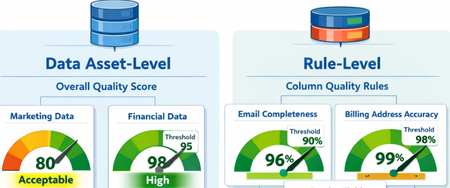
What Are Data Quality Thresholds? A data quality threshold defines the minimum acceptable score for a rule to pass. Instead of applying a single fixed standard across all data, organizations can now set expectations that align with business context and criticality. For example: An email column may require 99% completeness A product description column may only require 85% completeness Financial or regulatory data may require 100% accuracy With customizable thresholds, quality expectations become more meaningful and business-aligned. Why Does This Matter? Previously, using a single hardcoded threshold could lead to misleading quality scores. Critical data might appear “healthy” even when it didn’t meet business standards. With Data Quality Thresholds, you can: Define rule-level expectations Align quality scores with business risk Increase trust in DQ reporting Improve governance decision-making Data Asset-Level Quality Threshold Users can define data quality thresholds at the data asset level to measure how suitable a dataset is for specific business use cases. This allows organizations to quantify the overall health and fitness of a data asset before it is used in analytics, reporting, or data products. If the measured data quality score falls below the predefined threshold, the system can trigger notifications to the data asset owner or steward, prompting them to take corrective actions. It is important to note that not all data assets are equally critical. Therefore, thresholds should be context-driven and use-case specific. Example Scenario A marketing dataset used for campaign analysis may tolerate a lower quality threshold (e.g., 80%), since minor inconsistencies may not significantly impact insights. However, a financial reporting dataset used for regulatory filings may require a very high threshold (e.g., 98–100%), as even small errors can lead to compliance risks. Data Quality Rule-Level Threshold Thresholds can also be defined at the individual rule level, particularly for rules applied to specific columns. This provides more granular control and ensures that critical data elements are held to higher standards. Not all attributes have the same importance, so thresholds should reflect business criticality. Example Scenarios Email vs. Gender (Customer Contact Data) A completeness rule for a customer’s email address should have a higher threshold (e.g., 95–100%), since missing or invalid email addresses directly impact communication and engagement. In contrast, a gender attribute may have a lower threshold (e.g., 70–80%), as it is often less critical for most use cases. Billing Address vs. CRM Address A billing address is highly critical because it directly impacts: Invoice generation Tax calculations Timely delivery of invoices Therefore, the threshold for billing address quality should be very high (e.g., 98–100%). On the other hand, a CRM address used for general customer profiling may have a lower threshold, as occasional inaccuracies may not significantly affect business operations. The Impact By enabling flexible, context-aware scoring, Data Quality Thresholds help organizations move beyond generic quality checks and toward business-driven data quality management. Summary Data Quality Thresholds define the minimum acceptable score for data quality rules, allowing organizations to move beyond a one-size-fits-all approach and align quality expectations with business context and criticality. Instead of using fixed thresholds, organizations can set custom thresholds based on how important the data is. For example, financial data may require near-perfect accuracy, while less critical fields can tolerate lower thresholds. Thresholds can be applied at two levels: Data Asset Level: Measures the overall fitness of a dataset for a specific use case. Critical datasets (e.g., financial reporting) require higher thresholds than less critical ones (e.g., marketing analytics). Rule Level: Applies to individual columns or rules, ensuring that critical attributes (e.g., email, billing address) have stricter quality requirements than less important ones. This approach improves: Alignment with business risk and priorities Trust in data quality reporting Governance decision-making Focus on high-impact data issues Overall, data quality thresholds enable more meaningful, context-aware, and business-driven data quality management, helping organizations prioritize what matters most and build confidence in their data.Microsoft Purview Data Governance - Authoring Custom Data Quality rules using expression languages
The cost of poor-quality data runs into millions of dollars in direct losses. When indirect costs—such as missed opportunities—are included, the total impact is many times higher. Poor data quality also creates significant societal costs. It can lead customers to pay higher prices for goods and services and force citizens to bear higher taxes due to inefficiencies and errors. In critical domains, the consequences can be severe. Defective or inaccurate data can result in injury or loss of life, for example due to medication errors or incorrect medical procedures, especially as healthcare increasingly relies on data- and AI-driven decision-making. Students may be unfairly denied admission to universities because of errors in entrance exam scoring. Consumers may purchase unsafe or harmful food products if nutritional labels are inaccurate or misleading. Research and industry measurements show that 20–35 percent of an organization’s operating revenue is often wasted on recovering from process failures, data defects, information scrap, and rework caused by poor data quality (Larry P. English, Information Quality Applied). Data Quality Rules To maintain high-quality data, organizations must continuously measure and monitor data quality and understand the negative impact of poor-quality data on their specific use cases. Data quality rules play a critical role in objectively measuring, enforcing, and quantifying data quality, enabling organizations to improve trust, reduce risk, and maximize the value of their data assets. Data Quality (DQ) rules define how data should be structured, related, constrained, and validated so it can be trusted for operational, analytical, and AI use cases. Data quality rules are essential guidelines that organizations establish to ensure the accuracy, consistency, and completeness of their data. These rules fall into four major categories: Business Entity rules, Business Attribute rules, Data Dependency rules, and Data Validity rules (Ref: Informit.com/articles). Business Entity Rules These rules ensure that core business objects (such as Customer, Order, Account, or Product) are well-defined and correctly related. Business entity rules prevent duplicate records, broken relationships, and incomplete business processes. Business Entity Rules Definition Example Uniqueness Every entity instance must be uniquely identifiable. Each customer must have a unique Customer ID that is never NULL. Duplicate customer records indicate poor data quality. Cardinality Defines how many instances of one entity can relate to another. One customer can place many orders (one-to-many), but an order belongs to exactly one customer. Optionality Defines whether a relationship is mandatory or optional. An order must be linked to a customer (mandatory), but a customer may exist without having placed any orders (optional). Business Attribute Rules These rules focus on individual data elements (columns/fields) within business entities. Attribute rules ensure consistency, interpretability, and prevent invalid or meaningless values. Business Attribute Rules Definition Example Data Inheritance Attributes defined in a supertype must be consistent across subtypes. An Account Number remains the same whether the account is Checking or Savings. Data Domains Attribute values must conform to allowed formats or ranges. · State Code must be one of the 50 U.S. state abbreviations · Age must be between 0 and 120 · Date must follow CCYY/MM/DD format Data Dependency Rules These rules define logical and conditional relationships between entities and attributes. Data dependency rules enforce business logic and prevent contradictory or illogical data states. Data Dependency Rules Definition Example Entity Relationship Dependency The existence of one relationship depends on another condition. Orders cannot be placed for customers with a “Delinquent” status. Attribute Dependency The value of one attribute depends on others. · If Loan Status = “Funded,” then Loan Amount > 0 and Funding Date is required · Pay Amount = Hours Worked × Hourly Rate · If Monthly Salary > 0, then Commission Rate must be NULL Data Validity Rules These rules ensure that actual data values are complete, correct, accurate, precise, unique, and consistent. Validity rules ensure data is trustworthy for reporting, regulatory compliance, and AI/ML models. Data Validity Rules Definition Example Completeness Required records, relationships, attributes, and values must exist. No NULLs in mandatory fields like Customer ID or Order Date. Correctness & Accuracy Values must reflect real-world truth and business rules. A customer’s credit limit must align with approved financial records. Precision Data must be stored with the required level of detail. Interest rates stored to four decimal places if required for calculations. Uniqueness No duplicate records, keys, definitions, or overloaded columns. A “Customer Type Code” column should not mix customer types and shipping methods. Consistency Duplicate or redundant data must match everywhere it appears. Customer address stored in multiple systems must be identical. Compliance PII and sensitive data Check and validate personal information like credit card, passport number, national id, bank account, etc. System Rules Microsoft Purview Data Quality provides both system (out-of-the-box) rules and custom rules, along with an AI-enabled data quality rule recommendation feature. Together, these capabilities help organizations effectively measure, monitor, and improve data quality by applying the right set of data quality rules. System (out-of-the-box) rules cover the majority of business attribute and data validity scenarios. List of the system rules are illustrated below (see the screenshot below). Custom Rules Custom rules allow you to define validations that evaluate one or more values within a row, enabling complex, context-aware data quality checks tailored to specific business requirements. Custom rules support all four major categories of data quality rules: Business Entity rules, Business Attribute rules, Data Dependency rules, and Data Validity rules. You can use regular expression language, Azure Data Factory expression, and SQL expression language to create custom rules. Purview Data Quality custom rule has three parts: Row expression: This Boolean expression applies to each row that the filter expression approves. If this expression returns true, the row passes. If it returns false, the row fails. Filter expression: This optional condition narrows down the dataset on which the row condition is evaluated. You activate it by selecting the Use filter expression checkbox. This expression returns a Boolean value. The filter expression applies to a row and if it returns true, then that row is considered for the rule. If the filter expression returns false for that row, then it means that row is ignored for the purposes of this rule. The default behavior of the filter expression is to pass all rows, so if you don't specify a filter expression, all rows are considered. Null expression: Checks how NULL values should be handled. This expression returns to a Boolean that handles cases where data is missing. If the expression returns true, the row expression isn't applied. Each part of the rule works similarly to existing Microsoft Purview Data Quality conditions. A rule only passes if the row expression evaluates to TRUE for the dataset that matches the filter expression and handles missing values as specified in the null expression. Examples: Ensure that the location of the salesperson is correct. Azure data factory expression language is used to author this rule. 2. Ensure "fare Amount" is positive and "trip Distance" is valid. SQL expression language is used to author this rule. 3. For each trip, check if the fare is above the average for its payment type. SQL expression language is used to author this rule. Together, above listed four categories of data quality rules: Prevent errors at the source Enforce business logic Improve trust in analytics and AI Reduce remediation costs downstream In short, high-quality data is not accidental—it is enforced through well-defined data quality rules across entities, attributes, relationships, and values. References Create Data Quality Rules in Unified Catalog | Microsoft Learn Expression builder in mapping data flows - Azure Data Factory & Azure Synapse | Microsoft Learn Expression Functions in the Mapping Data Flow - Azure Data Factory & Azure Synapse | Microsoft Learn http://www.informit.com/articles/article.aspx?p=399325&seqNum=3 Information Quality Applied, Larry P. EnglishIntroducing Microsoft Security Store
Security is being reengineered for the AI era—moving beyond static, rulebound controls and after-the-fact response toward platform-led, machine-speed defense. We recognize that defending against modern threats requires the full strength of an ecosystem, combining our unique expertise and shared threat intelligence. But with so many options out there, it’s tough for security professionals to cut through the noise, and even tougher to navigate long procurement cycles and stitch together tools and data before seeing meaningful improvements. That’s why we built Microsoft Security Store - a storefront designed for security professionals to discover, buy, and deploy security SaaS solutions and AI agents from our ecosystem partners such as Darktrace, Illumio, and BlueVoyant. Security SaaS solutions and AI agents on Security Store integrate with Microsoft Security products, including Sentinel platform, to enhance end-to-end protection. These integrated solutions and agents collaborate intelligently, sharing insights and leveraging AI to enhance critical security tasks like triage, threat hunting, and access management. In Security Store, you can: Buy with confidence – Explore solutions and agents that are validated to integrate with Microsoft Security products, so you know they’ll work in your environment. Listings are organized to make it easy for security professionals to find what’s relevant to their needs. For example, you can filter solutions based on how they integrate with your existing Microsoft Security products. You can also browse listings based on their NIST Cybersecurity Framework functions, covering everything from network security to compliance automation — helping you quickly identify which solutions strengthen the areas that matter most to your security posture. Simplify purchasing – Buy solutions and agents with your existing Microsoft billing account without any additional payment setup. For Azure benefit-eligible offers, eligible purchases contribute to your cloud consumption commitments. You can also purchase negotiated deals through private offers. Accelerate time to value – Deploy agents and their dependencies in just a few steps and start getting value from AI in minutes. Partners offer ready-to-use AI agents that can triage alerts at scale, analyze and retrieve investigation insights in real time, and surface posture and detection gaps with actionable recommendations. A rich ecosystem of solutions and AI agents to elevate security posture In Security Store, you’ll find solutions covering every corner of cybersecurity—threat protection, data security and governance, identity and device management, and more. To give you a flavor of what is available, here are some of the exciting solutions on the store: Darktrace’s ActiveAI Security SaaS solution integrates with Microsoft Security to extend self-learning AI across a customer's entire digital estate, helping detect anomalies and stop novel attacks before they spread. The Darktrace Email Analysis Agent helps SOC teams triage and threat hunt suspicious emails by automating detection of risky attachments, links, and user behaviors using Darktrace Self-Learning AI, integrated with Microsoft Defender and Security Copilot. This unified approach highlights anomalous properties and indicators of compromise, enabling proactive threat hunting and faster, more accurate response. Illumio for Microsoft Sentinel combines Illumio Insights with Microsoft Sentinel data lake and Security Copilot to enhance detection and response to cyber threats. It fuses data from Illumio and all the other sources feeding into Sentinel to deliver a unified view of threats across millions of workloads. AI-driven breach containment from Illumio gives SOC analysts, incident responders, and threat hunters unified visibility into lateral traffic threats and attack paths across hybrid and multi-cloud environments, to reduce alert fatigue, prioritize threat investigation, and instantly isolate workloads. Netskope’s Security Service Edge (SSE) platform integrates with Microsoft M365, Defender, Sentinel, Entra and Purview for identity-driven, label-aware protection across cloud, web, and private apps. Netskope's inline controls (SWG, CASB, ZTNA) and advanced DLP, with Entra signals and Conditional Access, provide real-time, context-rich policies based on user, device, and risk. Telemetry and incidents flow into Defender and Sentinel for automated enrichment and response, ensuring unified visibility, faster investigations, and consistent Zero Trust protection for cloud, data, and AI everywhere. PERFORMANTA Email Analysis Agent automates deep investigations into email threats, analyzing metadata (headers, indicators, attachments) against threat intelligence to expose phishing attempts. Complementing this, the IAM Supervisor Agent triages identity risks by scrutinizing user activity for signs of credential theft, privilege misuse, or unusual behavior. These agents deliver unified, evidence-backed reports directly to you, providing instant clarity and slashing incident response time. Tanium Autonomous Endpoint Management (AEM) pairs realtime endpoint visibility with AI-driven automation to keep IT environments healthy and secure at scale. Tanium is integrated with the Microsoft Security suite—including Microsoft Sentinel, Defender for Endpoint, Entra ID, Intune, and Security Copilot. Tanium streams current state telemetry into Microsoft’s security and AI platforms and lets analysts pivot from investigation to remediation without tool switching. Tanium even executes remediation actions from the Sentinel console. The Tanium Security Triage Agent accelerates alert triage, enabling security teams to make swift, informed decisions using Tanium Threat Response alerts and real-time endpoint data. Walkthrough of Microsoft Security Store Now that you’ve seen the types of solutions available in Security Store, let’s walk through how to find the right one for your organization. You can get started by going to the Microsoft Security Store portal. From there, you can search and browse solutions that integrate with Microsoft Security products, including a dedicated section for AI agents—all in one place. If you are using Microsoft Security Copilot, you can also open the store from within Security Copilot to find AI agents - read more here. Solutions are grouped by how they align with industry frameworks like NIST CSF 2.0, making it easier to see which areas of security each one supports. You can also filter by integration type—e.g., Defender, Sentinel, Entra, or Purview—and by compliance certifications to narrow results to what fits your environment. To explore a solution, click into its detail page to view descriptions, screenshots, integration details, and pricing. For AI agents, you’ll also see the tasks they perform, the inputs they require, and the outputs they produce —so you know what to expect before you deploy. Every listing goes through a review process that includes partner verification, security scans on code packages stored in a secure registry to protect against malware, and validation that integrations with Microsoft Security products work as intended. Customers with the right permissions can purchase agents and SaaS solutions directly through Security Store. The process is simple: choose a partner solution or AI agent and complete the purchase in just a few clicks using your existing Microsoft billing account—no new payment setup required. Qualifying SaaS purchases also count toward your Microsoft Azure Consumption Commitment (MACC), helping accelerate budget approvals while adding the security capabilities your organization needs. Security and IT admins can deploy solutions directly from Security Store in just a few steps through a guided experience. The deployment process automatically provisions the resources each solution needs—such as Security Copilot agents and Microsoft Sentinel data lake notebook jobs—so you don’t have to do so manually. Agents are deployed into Security Copilot, which is built with security in mind, providing controls like granular agent permissions and audit trails, giving admins visibility and governance. Once deployment is complete, your agent is ready to configure and use so you can start applying AI to expand detection coverage, respond faster, and improve operational efficiency. Security and IT admins can view and manage all purchased solutions from the “My Solutions” page and easily navigate to Microsoft Cost Management tools to track spending and manage subscriptions. Partners: grow your business with Microsoft For security partners, Security Store opens a powerful new channel to reach customers, monetize differentiated solutions, and grow with Microsoft. We will showcase select solutions across relevant Microsoft Security experiences, starting with Security Copilot, so your offerings appear in the right context for the right audience. You can monetize both SaaS solutions and AI agents through built-in commerce capabilities, while tapping into Microsoft’s go-to-market incentives. For agent builders, it’s even simpler—we handle the entire commerce lifecycle, including billing and entitlement, so you don’t have to build any infrastructure. You focus on embedding your security expertise into the agent, and we take care of the rest to deliver a seamless purchase experience for customers. Security Store is built on top of Microsoft Marketplace, which means partners publish their solution or agent through the Microsoft Partner Center - the central hub for managing all marketplace offers. From there, create or update your offer with details about how your solution integrates with Microsoft Security so customers can easily discover it in Security Store. Next, upload your deployable package to the Security Store registry, which is encrypted for protection. Then define your license model, terms, and pricing so customers know exactly what to expect. Before your offer goes live, it goes through certification checks that include malware and virus scans, schema validation, and solution validation. These steps help give customers confidence that your solutions meet Microsoft’s integration standards. Get started today By creating a storefront optimized for security professionals, we are making it simple to find, buy, and deploy solutions and AI agents that work together. Microsoft Security Store helps you put the right AI‑powered tools in place so your team can focus on what matters most—defending against attackers with speed and confidence. Get started today by visiting Microsoft Security Store. If you’re a partner looking to grow your business with Microsoft, start by visiting Microsoft Security Store - Partner with Microsoft to become a partner. Partners can list their solution or agent if their solution has a qualifying integration with Microsoft Security products, such as a Sentinel connector or Security Copilot agent, or another qualifying MISA solution integration. You can learn more about qualifying integrations and the listing process in our documentation here.Cybersecurity: What Every Business Leader Needs to Know Now
As a Senior Cybersecurity Solution Architect, I’ve had the privilege of supporting organisations across the United Kingdom, Europe, and the United States—spanning sectors from finance to healthcare—in strengthening their security posture. One thing has become abundantly clear: cybersecurity is no longer the sole domain of IT departments. It is a strategic imperative that demands attention at board-level. This guide distils five key lessons drawn from real-world engagements to help executive leaders navigate today’s evolving threat landscape. These insights are not merely technical—they are cultural, operational, and strategic. If you’re a C-level executive, this article is a call to action: reassess how your organisation approaches cybersecurity before the next breach forces the conversation. In this article, I share five lessons (and quotes) from the field that help demystify how to enhance an organisation’s security posture. 1. Shift the Mindset “This has always been our approach, and we’ve never experienced a breach—so why should we change it?” A significant barrier to effective cybersecurity lies not in the sophistication of attackers, but in the predictability of human behaviour. If you’ve never experienced a breach, it’s tempting to maintain the status quo. However, as threats evolve, so too must your defences. Many cyber threats exploit well-known vulnerabilities that remain unpatched or rely on individuals performing routine tasks in familiar ways. Human nature tends to favour comfort and habit—traits that adversaries are adept at exploiting. Unlike many organisations, attackers readily adopt new technologies to advance their objectives, including AI-powered ransomware to execute increasingly sophisticated attacks. It is therefore imperative to recognise—without delay—that the advent of AI has dramatically reduced both the effort and time required to compromise systems. As the UK’s National Cyber Security Centre (NCSC) has stated: “AI lowers the barrier for novice cyber criminals, hackers-for-hire and hacktivists to carry out effective access and information gathering operations. This enhanced access will likely contribute to the global ransomware threat over the next two years.” Similarly, McKinsey & Company observed: “As AI quickly advances cyber threats, organisations seem to be taking a more cautious approach, balancing the benefits and risks of the new technology while trying to keep pace with attackers’ increasing sophistication.” To counter this evolving threat landscape, organisations must proactively leverage AI in their cyber defence strategies. Examples include: Identity and Access Management (IAM): AI enhances IAM by analysing real-time signals across systems to detect risky sign-ins and enforce adaptive access controls. Example: Microsoft Entra Agents for Conditional Access use AI to automate policy recommendations, streamlining access decisions with minimal manual input. Figure 1: Microsoft Entra Agents Threat Detection: AI accelerates detection, response, and recovery, helping organisations stay ahead of sophisticated threats. Example: Microsoft Defender for Cloud’s AI threat protection identifies prompt injection, data poisoning, and wallet attacks in real time. Incident Response: AI facilitates real-time decision-making, removing emotional bias and accelerating containment and recovery during security incidents. Example: Automatic Attack Disruption in Defender XDR, which can automatically contain a breach in progress. AI Security Posture Management AI workloads require continuous discovery, classification, and protection across multi-cloud environments. Example: Microsoft Defender for Cloud’s AI Security Posture Management secures custom AI apps across Azure, AWS, and GCP by detecting misconfigurations, vulnerabilities, and compliance gaps. Data Security Posture Management (DSPM) for AI AI interactions must be governed to ensure privacy, compliance, and insider risk mitigation. Example: Microsoft Purview DSPM for AI enables prompt auditing, applies Data Loss Prevention (DLP) policies to third-party AI apps like ChatGPT, and supports eDiscovery and lifecycle management. AI Threat Protection Organisations must address emerging AI threat vectors, including prompt injection, data leakage, and model exploitation. Example: Defender for AI (private preview) provides model-level security, including governance, anomaly detection, and lifecycle protection. Embracing innovation, automation, and intelligent defence is the secret sauce for cyber resilience in 2026. 2. Avoid One-Off Purchases – Invest with a Strategy “One MDE and one Sentinel to go, please.” Organisations often approach me intending to purchase a specific cybersecurity product—such as Microsoft Defender for Endpoint (MDE)—without a clearly articulated strategic rationale. My immediate question is: what is the broader objective behind this purchase? Is it driven by perceived value or popularity, or does it form part of a well-considered strategy to enhance endpoint security? Cybersecurity investments should be guided by a long-term, holistic strategy that spans multiple years and is periodically reassessed to reflect evolving threats. Strengthening endpoint protection must be integrated into a wider effort to improve the organisation’s overall security posture. This includes ensuring seamless integration between security solutions and avoiding operational silos. For example, deploying robust endpoint protection is of limited value if identities are not safeguarded with multi-factor authentication (MFA), or if storage accounts remain publicly accessible. A cohesive and forward-looking approach ensures that all components of the security architecture work in concert to mitigate risk effectively. Security Adoption Journey (Based on Zero Trust Framework) Assess – Evaluate the threat landscape, attack surface, vulnerabilities, compliance obligations, and critical assets. Align – Link security objectives to broader business goals to ensure strategic coherence. Architect – Design integrated and scalable security solutions, addressing gaps and eliminating operational silos. Activate – Implement tools with robust governance and automation to ensure consistent policy enforcement. Advance – Continuously monitor, test, and refine the security posture to stay ahead of evolving threats. Security tools are not fast food—they work best as part of a long-term plan, not a one-off order. This piecemeal approach runs counter to the modern Zero Trust security model, which assumes no single tool will prevent every breach and instead implements layered defences and integration. 3. Legacy Systems Are Holding You Back “Unfortunately, we are unable to implement phishing-resistant MFA, as our legacy app does not support integration with the required protocols.” A common challenge faced by many organisations I have worked with is the constraint on innovation within their cybersecurity architecture, primarily due to continued reliance on legacy applications—often driven by budgetary or operational necessity. These outdated systems frequently lack compatibility with modern security technologies and may introduce significant vulnerabilities. A notable example is the deployment of phishing-resistant multi-factor authentication (MFA)—such as FIDO2 security keys or certificate-based authentication—which requires advanced identity protocols and conditional access policies. These capabilities are available exclusively through Microsoft Entra ID. To address this issue effectively, it is essential to design security frameworks based on the organisation’s future aspirations rather than its current limitations. By adopting a forward-thinking approach, organisations can remain receptive to emerging technologies that align with their strategic cybersecurity objectives. Moreover, this perspective encourages investment in acquiring the necessary talent, thereby reducing reliance on extensive change management and staff retraining. I advise designing for where you want to be in the next 1–3 years—ideally cloud-first and identity-driven—essentially adopting a Zero Trust architecture, rather than being constrained by the limitations of legacy systems. 4. Collaboration Is a Security Imperative “This item will need to be added to the dev team's backlog. Given their current workload, they will do their best to implement GitHub Security in Q3, subject to capacity.” Cybersecurity threats may originate from various parts of an organisation, and one of the principal challenges many face is the fragmented nature of their defence strategies. To effectively mitigate such risks, cybersecurity must be embedded across all departments and functions, rather than being confined to a single team or role. In many organisations, the Chief Information Security Officer (CISO) operates in isolation from other C-level executives, which can limit their influence and complicate the implementation of security measures across the enterprise. Furthermore, some teams may lack the requisite expertise to execute essential security practices. For instance, an R&D lead responsible for managing developers may not possess the necessary skills in DevSecOps. To address these challenges, it is vital to ensure that the CISO is empowered to act without political or organisational barriers and is supported in implementing security measures across all business units. When the CISO has backing from the COO and HR, initiatives such as MFA rollout happen faster and more thoroughly. Cross-Functional Security Responsibilities Role Security Responsibilities R&D - Adopt DevSecOps practices - Identify vulnerabilities early - Manage code dependencies - Detect exposed secrets - Embed security in CI/CD pipelines CIO - Ensure visibility over organizational data - Implement Data Loss Prevention (DLP) - Safeguard sensitive data lifecycle - Ensure regulatory compliance CTO - Secure cloud environments (CSPM) - Manage SaaS security posture (SSPM) - Ensure hardware and endpoint protection COO - Protect digital assets - Secure domain management - Mitigate impersonation threats - Safeguard digital marketing channels and customer PII Support & Vendors - Deliver targeted training - Prevent social engineering attacks - Improve awareness of threat vectors HR - Train employees on AI-related threats - Manage insider risks - Secure employee data - Oversee cybersecurity across the employee lifecycle Empowering the CISO to act across departments helps organisations shift towards a security-first culture—embedding cybersecurity into every function, not just IT. 5. Compliance Is Not Security “We’re compliant, so we must be secure.” Many organisations mistakenly equate passing audits—such as ISO 27001 or SOC 2—with being secure. While compliance frameworks help establish a baseline for security, they are not a guarantee of protection. Determined attackers are not deterred by audit checklists; they exploit gaps, misconfigurations, and human error regardless of whether an organisation is certified. Moreover, due to the rapidly evolving nature of the cyber threat landscape, compliance frameworks often struggle to keep pace. By the time a standard is updated, attackers may already be exploiting new techniques that fall outside its scope. This lag creates a false sense of security for organisations that rely solely on regulatory checkboxes. Security is a continuous risk management process—not a one-time certification. It must be embedded into every layer of the enterprise and treated with the same urgency as other core business priorities. Compliance may be the starting line, not the finish line. Effective security goes beyond meeting regulatory requirements—it demands ongoing vigilance, adaptability, and a proactive mindset. Conclusion: Cybersecurity Is a Continuous Discipline Cybersecurity is not a destination—it is a continuous journey. By embracing strategic thinking, cross-functional collaboration, and emerging technologies, organisations can build resilience against today’s threats and tomorrow’s unknowns. The lessons shared throughout this article are not merely technical—they are cultural, operational, and strategic. If there is one key takeaway, it is this: avoid piecemeal fixes and instead adopt an integrated, future-ready security strategy. Due to the rapidly evolving nature of the cyber threat landscape, compliance frameworks alone cannot keep pace. Security must be treated as a dynamic, ongoing process—one that is embedded into every layer of the enterprise and reviewed regularly. Organisations should conduct periodic security posture reviews, leveraging tools such as Microsoft Secure Score or monthly risk reports, and stay informed about emerging threats through threat intelligence feeds and resources like the Microsoft Digital Defence Report, CISA (Cybersecurity and Infrastructure Security Agency), NCSC (UK National Cyber Security Centre), and other open-source intelligence platforms. As Ann Johnson aptly stated in her blog: “The most prepared organisations are those that keep asking the right questions and refining their approach together.” Cyber resilience demands ongoing investment—in people (through training and simulation drills), in processes (via playbooks and frameworks), and in technology (through updates and adoption of AI-driven defences). To reduce cybersecurity risk over time, resilient organisations must continually refine their approach and treat cybersecurity as an ongoing discipline. The time to act is now. Resources: https://www.ncsc.gov.uk/report/impact-of-ai-on-cyber-threat Defend against cyber threats with AI solutions from Microsoft - Microsoft Industry Blogs Generative AI Cybersecurity Solutions | Microsoft Security Require phishing-resistant multifactor authentication for Microsoft Entra administrator roles - Microsoft Entra ID | Microsoft Learn AI is the greatest threat—and defense—in cybersecurity today. Here’s why. Microsoft Entra Agents - Microsoft Entra | Microsoft Learn Smarter identity security starts with AI https://www.microsoft.com/en-us/security/blog/2025/06/12/cyber-resilience-begins-before-the-crisis/ https://www.microsoft.com/en-us/security/security-insider/threat-landscape/microsoft-digital-defense-report-2023-critical-cybersecurity-challenges https://www.microsoft.com/en-us/security/blog/2025/06/12/cyber-resilience-begins-before-the-crisis/2.2KViews2likes0CommentsElevating Trust in Data through Data Quality in the AI Era
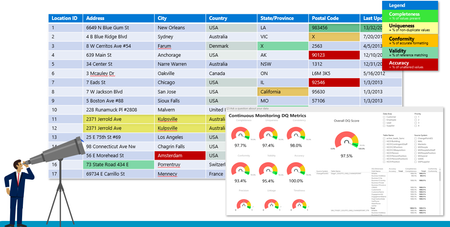
Data collection and utilization are growing rapidly, and organizations are increasingly relying on data as they transition into the era of AI. However, many face significant challenges in effectively managing investments across cloud, data, and AI. This is largely due to a lack of visibility across their entire data estate—which is often fragmented across silos, heterogeneous systems, on-premises environments, and the cloud. Concerns about data trustworthiness, AI-readiness, and uncertainty around security and compliance further complicate the ability to drive timely business insights. Elevating data quality means going beyond merely identifying issues—it's about equipping data stewards, analysts, and engineers with the right tools to proactively improve trust, consistency, and readiness of data for AI, analytics, and operations. Despite the critical importance of data quality, many organizations struggle to activate the full value of their data estate. Research shows that 75% of companies do not have a formal data quality program. This is alarming, especially as data quality has become a cornerstone of successful AI initiatives. Simply put: your AI is only as good as your data. In the past, when humans were always in the loop, minor data quality issues could be corrected manually. But in today’s world—where AI interprets not just the structure but the content of the data—any inconsistencies, inaccuracies, or noncompliance in the data can directly lead to flawed insights, unreliable AI outputs, and poor business decisions. Bad data can make your AI wrong. It can make your BI reports misleading. And it can impact your organization's credibility—as well as your reputation as a data professional. After all, there’s nothing worse than building something that no one trusts or uses. That’s why defining and deploying a robust data quality framework is more critical now than ever before. Organizations must establish a data quality maturity model, track quality across their data estate, and take continuous improvement and remediation actions. Key steps to maintaining data quality and ensuring the health of your data estate include: Define the scope – Identify which data is needed for specific business use cases. Measure quality – Assess whether data meets expected standards. Analyze findings – Understand patterns, gaps, and root causes. Improve quality – Take corrective actions to meet business needs. Control quality – Continuously monitor and govern data to maintain high standards. To ensure your data is fit for purpose, it's essential to establish strong data quality practices within your organization, supported by the right tools, roles, and governance structures. Profile your data to understand the distribution Data profiling is the process of analyzing data to understand its structure, content, and quality. It helps uncover patterns, anomalies, missing values, duplicates, and data types—providing valuable insight into the trustworthiness and usability of data for analytics, decision-making, and quality improvement. By examining datasets for structure, relationships, and inconsistencies, data practitioners can identify potential issues and define validation rules for ongoing data quality assurance. Microsoft Purview Unified Data Catalog provides an integrated data quality experience that supports profiling as a foundational step. With Purview, users can profile data to understand its distribution, patterns, and data types—helping inform data quality programs and define rules for continuous monitoring and improvement. Purview's data profiling leverages AI to recommend which columns in a dataset are most critical and should be profiled. Users remain in control and can adjust these recommendations by deselecting suggested columns or adding others. Additionally, all profiling history is preserved, allowing users to compare current profiles with historical patterns to detect changes over time and continuously assess data health. Define and apply rules to validate your data Applying rules and constraints is essential to ensure that data conforms to predefined requirements or business logic—such as data type, completeness, uniqueness, and consistency. Data profiling results can be leveraged to define these rules and validate data continuously, helping ensure that it is trustworthy and ready for both business and AI use cases. To achieve this, data quality should be measured across all stages: data at creation, data in motion, and data at rest. While many CRM and web-based applications perform UI-level validations to check user inputs before submission, a significant amount of poor-quality data still enters systems through bulk upload processes. These low-quality records often bypass front-end checks and propagate downstream through the data supply chain, leading to broader data integrity issues. In Medallion architecture, you can validate and correct data directly in the pipeline. Bad-quality data detected in the bronze layer can trigger notifications to upstream systems to fix issues at the source. Purview Unified Catalog Data Quality capability provides a user-friendly UI for managing data quality rules. You can configure rules for any supported data sources in cloud or on-premises or datasets in Fabric Lakehouse's bronze layer, schedule DQ jobs, and send notifications to data engineers and stewards when issues arise. This proactive monitoring ensures data quality is addressed early—before data progresses through the silver and gold layers of your architecture. Visualizing Data Quality Metrics and Driving Action Visualizing data quality metrics and trends provides critical insights into the overall health of your data and supports informed, data-driven decision-making. Microsoft Purview Unified Catalog publishes all metadata—including data quality rules and scores—into Fabric OneLake. Data analysts can link Purview metadata with raw data to generate actionable insights. They can also leverage Fabric AI skills to enhance intelligence and integrate with Data Activator to trigger notifications for upstream data publishers and downstream consumers. Alerts and notifications can be configured directly in the Purview Unified Catalog. Data stewards can set thresholds for one or many data assets to automatically notify upstream and downstream contacts if those thresholds are breached. Notifications can be directed to specific individuals or groups (e.g., a support team). These alerts empower data providers to resolve issues at the source, and data engineers can address problems within the bronze layer of their analytical storage—such as in Microsoft Fabric. Additionally, alerts can be used to pause data movement from the bronze to the silver and gold layers, ensuring only high-quality data flows downstream. Users can configure the storage location in the Purview Data Quality solution to publish failed or error records. This allows data stewards and data engineers to review and fix issues, improving data quality before using it for analytics or as input for ML model training. Integrated Data Observability with Data Quality Scores Data observability in Microsoft Purview Unified Catalog offers a comprehensive, bird’s-eye view into the health of the data estate as data flows across various sources. Data stewards, domain experts, and those responsible for data health can monitor their entire data landscape from a single unified interface. This centralized view provides visibility into data lineage—from source to consumption—and reveals how data assets map to governance domains. It enables users to understand where data originates and terminates, pinpoint data quality issues, and assess the impact on reporting and compliance obligations. By consolidating metadata into a single, accessible location, users can explore how data quality is evolving, track usage patterns, and understand who is interacting with the data. With full visibility across the data estate, both central and federated data teams can efficiently identify opportunities to improve metadata quality, clarify ownership, enhance data quality, and optimize data architecture. Summary Defining and implementing a data quality framework has become more critical than ever. Organizations must establish a data quality maturity model and continuously monitor the health of their data estate to enable ongoing improvement and remediation. Microsoft Purview Unified Catalog empowers governance domain owners and data stewards to assess and manage data quality across the ecosystem, driving informed and targeted improvements. In today’s AI-driven world, the trustworthiness of data is directly linked to the effectiveness of AI insights and recommendations. Unreliable data not only weakens AI outcomes but can also diminish trust in the systems themselves and slow their adoption. Poor data quality or inconsistent data structures can disrupt business operations and impair decision-making. Microsoft Purview addresses these challenges with a no-code/low-code approach to defining data quality rules—including out-of-the-box (OOB) and AI-generated rules. These rules are applied at the column level and rolled up into scores at the data asset, data product, and governance domain levels, offering full visibility into data quality across the enterprise. Purview’s AI-powered data profiling capabilities intelligently recommend which columns to profile, while still allowing human review and refinement. This human-in-the-loop process not only improves the relevance and accuracy of profiling but also feeds back into improving AI model performance over time. Elevating data quality is more than identifying problems—it's about equipping stewards, analysts, and engineers with the tools to proactively build trust, ensure consistency, and prepare data for AI, analytics, and business success.Hacking Made Easy, Patching Made Optional: A Modern Cyber Tragedy
In today’s cyber threat landscape, the tools and techniques required to compromise enterprise environments are no longer confined to highly skilled adversaries or state-sponsored actors. While artificial intelligence is increasingly being used to enhance the sophistication of attacks, the majority of breaches still rely on simple, publicly accessible tools and well-established social engineering tactics. Another major issue is the persistent failure of enterprises to patch common vulnerabilities in a timely manner—despite the availability of fixes and public warnings. This negligence continues to be a key enabler of large-scale breaches, as demonstrated in several recent incidents. The Rise of AI-Enhanced Attacks Attackers are now leveraging AI to increase the credibility and effectiveness of their campaigns. One notable example is the use of deepfake technology—synthetic media generated using AI—to impersonate individuals in video or voice calls. North Korean threat actors, for instance, have been observed using deepfake videos and AI-generated personas to conduct fraudulent job interviews with HR departments at Western technology companies. These scams are designed to gain insider access to corporate systems or to exfiltrate sensitive intellectual property under the guise of legitimate employment. Social Engineering: Still the Most Effective Entry Point And yet, many recent breaches have begun with classic social engineering techniques. In the cases of Coinbase and Marks & Spencer, attackers impersonated employees through phishing or fraudulent communications. Once they had gathered sufficient personal information, they contacted support desks or mobile carriers, convincingly posing as the victims to request password resets or SIM swaps. This impersonation enabled attackers to bypass authentication controls and gain initial access to sensitive systems, which they then leveraged to escalate privileges and move laterally within the network. Threat groups such as Scattered Spider have demonstrated mastery of these techniques, often combining phishing with SIM swap attacks and MFA bypass to infiltrate telecom and cloud infrastructure. Similarly, Solt Thypoon (formerly DEV-0343), linked to North Korean operations, has used AI-generated personas and deepfake content to conduct fraudulent job interviews—gaining insider access under the guise of legitimate employment. These examples underscore the evolving sophistication of social engineering and the need for robust identity verification protocols. Built for Defense, Used for Breach Despite the emergence of AI-driven threats, many of the most successful attacks continue to rely on simple, freely available tools that require minimal technical expertise. These tools are widely used by security professionals for legitimate purposes such as penetration testing, red teaming, and vulnerability assessments. However, they are also routinely abused by attackers to compromise systems Case studies for tools like Nmap, Metasploit, Mimikatz, BloodHound, Cobalt Strike, etc. The dual-use nature of these tools underscores the importance of not only detecting their presence but also understanding the context in which they are being used. From CVE to Compromise While social engineering remains a common entry point, many breaches are ultimately enabled by known vulnerabilities that remain unpatched for extended periods. For example, the MOVEit Transfer vulnerability (CVE-2023-34362) was exploited by the Cl0p ransomware group to compromise hundreds of organizations, despite a patch being available. Similarly, the OpenMetadata vulnerability (CVE-2024-28255, CVE-2024-28847) allowed attackers to gain access to Kubernetes workloads and leverage them for cryptomining activity days after a fix had been issued. Advanced persistent threat groups such as APT29 (also known as Cozy Bear) have historically exploited unpatched systems to maintain long-term access and conduct stealthy operations. Their use of credential harvesting tools like Mimikatz and lateral movement frameworks such as Cobalt Strike highlights the critical importance of timely patch management—not just for ransomware defense, but also for countering nation-state actors. Recommendations To reduce the risk of enterprise breaches stemming from tool misuse, social engineering, and unpatched vulnerabilities, organizations should adopt the following practices: 1. Patch Promptly and Systematically Ensure that software updates and security patches are applied in a timely and consistent manner. This involves automating patch management processes to reduce human error and delay, while prioritizing vulnerabilities based on their exploitability and exposure. Microsoft Intune can be used to enforce update policies across devices, while Windows Autopatch simplifies the deployment of updates for Windows and Microsoft 365 applications. To identify and rank vulnerabilities, Microsoft Defender Vulnerability Management offers risk-based insights that help focus remediation efforts where they matter most. 2. Implement Multi-Factor Authentication (MFA) To mitigate credential-based attacks, MFA should be enforced across all user accounts. Conditional access policies should be configured to adapt authentication requirements based on contextual risk factors such as user behavior, device health, and location. Microsoft Entra Conditional Access allows for dynamic policy enforcement, while Microsoft Entra ID Protection identifies and responds to risky sign-ins. Organizations should also adopt phishing-resistant MFA methods, including FIDO2 security keys and certificate-based authentication, to further reduce exposure. 3. Identity Protection Access Reviews and Least Privilege Enforcement Conducting regular access reviews ensures that users retain only the permissions necessary for their roles. Applying least privilege principles and adopting Microsoft Zero Trust Architecture limits the potential for lateral movement in the event of a compromise. Microsoft Entra Access Reviews automates these processes, while Privileged Identity Management (PIM) provides just-in-time access and approval workflows for elevated roles. Just-in-Time Access and Risk-Based Controls Standing privileges should be minimized to reduce the attack surface. Risk-based conditional access policies can block high-risk sign-ins and enforce additional verification steps. Microsoft Entra ID Protection identifies risky behaviors and applies automated controls, while Conditional Access ensures access decisions are based on real-time risk assessments to block or challenge high-risk authentication attempts. Password Hygiene and Secure Authentication Promoting strong password practices and transitioning to passwordless authentication enhances security and user experience. Microsoft Authenticator supports multi-factor and passwordless sign-ins, while Windows Hello for Business enables biometric authentication using secure hardware-backed credentials. 4. Deploy SIEM and XDR for Detection and Response A robust detection and response capability is vital for identifying and mitigating threats across endpoints, identities, and cloud environments. Microsoft Sentinel serves as a cloud-native SIEM that aggregates and analyses security data, while Microsoft Defender XDR integrates signals from multiple sources to provide a unified view of threats and automate response actions. 5. Map and Harden Attack Paths Organizations should regularly assess their environments for attack paths such as privilege escalation and lateral movement. Tools like Microsoft Defender for Identity help uncover Lateral Movement Paths, while Microsoft Identity Threat Detection and Response (ITDR) integrates identity signals with threat intelligence to automate response. These capabilities are accessible via the Microsoft Defender portal, which includes an attack path analysis feature for prioritizing multicloud risks. 6. Stay Current with Threat Actor TTPs Monitor the evolving tactics, techniques, and procedures (TTPs) employed by sophisticated threat actors. Understanding these behaviours enables organizations to anticipate attacks and strengthen defenses proactively. Microsoft Defender Threat Intelligence provides detailed profiles of threat actors and maps their activities to the MITRE ATT&CK framework. Complementing this, Microsoft Sentinel allows security teams to hunt for these TTPs across enterprise telemetry and correlate signals to detect emerging threats. 7. Build Organizational Awareness Organizations should train staff to identify phishing, impersonation, and deepfake threats. Simulated attacks help improve response readiness and reduce human error. Use Attack Simulation Training, in Microsoft Defender for Office 365 to run realistic phishing scenarios and assess user vulnerability. Additionally, educate users about consent phishing, where attackers trick individuals into granting access to malicious apps. Conclusion The democratization of offensive security tooling, combined with the persistent failure to patch known vulnerabilities, has significantly lowered the barrier to entry for cyber attackers. Organizations must recognize that the tools used against them are often the same ones available to their own security teams. The key to resilience lies not in avoiding these tools, but in mastering them—using them to simulate attacks, identify weaknesses, and build a proactive defense. Cybersecurity is no longer a matter of if, but when. The question is: will you detect the attacker before they achieve their objective? Will you be able to stop them before reaching your most sensitive data? Additional read: Gartner Predicts 30% of Enterprises Will Consider Identity Verification and Authentication Solutions Unreliable in Isolation Due to AI-Generated Deepfakes by 2026 Cyber security breaches survey 2025 - GOV.UK Jasper Sleet: North Korean remote IT workers’ evolving tactics to infiltrate organizations | Microsoft Security Blog MOVEit Transfer vulnerability Solt Thypoon Scattered Spider SIM swaps Attackers exploiting new critical OpenMetadata vulnerabilities on Kubernetes clusters | Microsoft Security Blog Microsoft Defender Vulnerability Management - Microsoft Defender Vulnerability Management | Microsoft Learn Zero Trust Architecture | NIST tactics, techniques, and procedures (TTP) - Glossary | CSRC https://learn.microsoft.com/en-us/security/zero-trust/deploy/overviewSecure and govern AI apps and agents with Microsoft Purview
The Microsoft Purview family is here to help you secure and govern data across third party IaaS and Saas, multi-platform data environment, while helping you meet compliance requirements you may be subject to. Purview brings simplicity with a comprehensive set of solutions built on a platform of shared capabilities, that helps keep your most important asset, data, safe. With the introduction of AI technology, Purview also expanded its data coverage to include discovering, protecting, and governing the interactions of AI apps and agents, such as Microsoft Copilots like Microsoft 365 Copilot and Security Copilot, Enterprise built AI apps like Chat GPT enterprise, and other consumer AI apps like DeepSeek, accessed through the browser. To help you view, investigate interactions with all those AI apps, and to create and manage policies to secure and govern them in one centralized place, we have launched Purview Data Security Posture Management (DSPM) for AI. You can learn more about DSPM for AI here with short video walkthroughs: Learn how Microsoft Purview Data Security Posture Management (DSPM) for AI provides data security and compliance protections for Copilots and other generative AI apps | Microsoft Learn Purview capabilities for AI apps and agents To understand our current set of capabilities within Purview to discover, protect, and govern various AI apps and agents, please refer to our Learn doc here: Microsoft Purview data security and compliance protections for Microsoft 365 Copilot and other generative AI apps | Microsoft Learn Here is a quick reference guide for the capabilities available today: Note that currently, DLP for Copilot and adhering to sensitivity label are currently designed to protect content in Microsoft 365. Thus, Security Copilot and Copilot in Fabric, along with Copilot studio custom agents that do not use Microsoft 365 as a content source, do not have these features available. Please see list of AI sites supported by Microsoft Purview DSPM for AI here Conclusion Microsoft Purview can help you discover, protect, and govern the prompts and responses from AI applications in Microsoft Copilot experiences, Enterprise AI apps, and other AI apps through its data security and data compliance solutions, while allowing you to view, investigate, and manage interactions in one centralized place in DSPM for AI. Follow up reading Check out the deployment guides for DSPM for AI How to deploy DSPM for AI - https://aka.ms/DSPMforAI/deploy How to use DSPM for AI data risk assessment to address oversharing - https://aka.ms/dspmforai/oversharing Address oversharing concerns with Microsoft 365 blueprint - aka.ms/Copilot/Oversharing Explore the Purview SDK Microsoft Purview SDK Public Preview | Microsoft Community Hub (blog) Microsoft Purview documentation - purview-sdk | Microsoft Learn Build secure and compliant AI applications with Microsoft Purview (video) References for DSPM for AI Microsoft Purview data security and compliance protections for Microsoft 365 Copilot and other generative AI apps | Microsoft Learn Considerations for deploying Microsoft Purview AI Hub and data security and compliance protections for Microsoft 365 Copilot and Microsoft Copilot | Microsoft Learn Block Users From Sharing Sensitive Information to Unmanaged AI Apps Via Edge on Managed Devices (preview) | Microsoft Learn as part of Scenario 7 of Create and deploy a data loss prevention policy | Microsoft Learn Commonly used properties in Copilot audit logs - Audit logs for Copilot and AI activities | Microsoft Learn Supported AI sites by Microsoft Purview for data security and compliance protections | Microsoft Learn Where Copilot usage data is stored and how you can audit it - Microsoft 365 Copilot data protection and auditing architecture | Microsoft Learn Downloadable whitepaper: Data Security for AI Adoption | Microsoft Explore the roadmap for DSPM for AI Public roadmap for DSPM for AI - Microsoft 365 Roadmap | Microsoft 365PMPur