microsoft graph api
65 TopicsFrom Domain Lists to Decisions: Scaling WHOIS Threat Intelligence with MDTI and Microsoft Graph
The real problem isn't WHOIS. It's what WHOIS costs you at scale. Ask any SOC analyst whether WHOIS data is useful and they'll say yes without hesitation. Registrant emails, creation dates, registrars, and nameservers are among the most durable pivots in domain-based threat intelligence — the threads that tie a single phishing domain back to an entire adversary campaign. Now ask them how often they actually pull WHOIS for every suspicious domain in an alert. The honest answer is: not always. And that gap is the real problem. Here's why. When a campaign surfaces two hundred lookalike domains, manual WHOIS becomes a losing game: It's slow. One-domain-at-a-time portal lookups don't finish before the incident clock runs out. It's inconsistent. Different analysts capture different fields, so the data can't be compared or correlated. It's un-auditable. Screenshots and copy-paste don't hold up in an investigation review months later. It loses the pattern. By the time you've checked twenty domains by hand, the shared registrant email that connected them has scrolled off the screen. The outcome of all this friction is the part that should worry a security leader: analysts quietly stop enriching, or enrich only a sample. The pivot that would have collapsed twenty alerts into one campaign never happens. The newly registered domain that should have been escalated gets triaged as routine. The intelligence exists — the process just can't reach it fast enough. The outcome we're actually after Reframe the goal. This isn't a project to "run WHOIS." It's a project to produce a specific set of outcomes: Every suspicious domain gets enriched — not a hand-picked sample. Enrichment is consistent and structured, so patterns across domains become visible instead of buried. The output is audit-ready — defensible in an investigation and reusable in a report. The whole thing is fast enough to happen inside the incident, not the day after. Get-MDTIWhois.ps1 exists to deliver exactly those outcomes. It reads a list of domains, calls Microsoft Defender Threat Intelligence (MDTI) through Microsoft Graph, and returns both a normalized CSV for immediate triage and the raw JSON for deep investigation — in one pass, read-only, with nothing changed in your environment. What changes for the analyst The clearest way to see the value is the before-and-after. Before: An alert fires on a suspected phishing campaign with two hundred candidate domains. The analyst opens a portal, checks a handful of domains, eyeballs a few registrant fields, and makes a judgment call on incomplete data. Correlation is mental and fragile. Twenty related alerts stay twenty separate alerts. After: The analyst drops the domains into a text file, runs one command, and gets a spreadsheet where all two hundred are enriched with the same fields. Sorting by registrant email instantly reveals that forty of them share one address, one budget registrar, and creation dates in the same week. Twenty alerts become one campaign. One judgment call becomes one defensible conclusion. That's the outcome: not "we ran WHOIS," but "we saw the campaign the manual process would have missed." Where the value shows up This translates into concrete wins across several SOC workflows: Faster campaign triage. Shared registrant emails and nameservers collapse dozens of alerts into a single adversary-infrastructure story — directly reducing mean-time-to-respond. Better newly-registered-domain hunting. Enrich domains from DNS or proxy logs, sort by registration date, and surface the freshly registered domains that are disproportionately malicious — before they're clicked. Enrichment that feeds the platform. The normalized CSV drops straight into a Sentinel watchlist, or the same Graph call can be wrapped in a Logic App / Azure Function playbook to auto-enrich domain entities the moment an incident is created. Reusable intelligence. Registrant and nameserver pivots become custom indicators and hunting queries — value that compounds over time instead of being thrown away after each investigation. Why this approach, specifically There are other ways to get WHOIS. A few reasons this approach earns its place in a modern, Defender-portal-centric SOC: It uses first-party intelligence. MDTI is Microsoft's own threat-intelligence graph, queried natively through Microsoft Graph — no third-party data broker, no separate contract, no data leaving your Microsoft trust boundary. It's read-only by design. The script cannot modify Sentinel, Defender, tenant settings, or domain records. Enrichment tooling should never be able to change the environment it observes — and this one can't. It's built to survive real-world APIs. Throttling (HTTP 429) and transient 5xx errors are retried with backoff; permanent misses (404) aren't retried needlessly; a single failed domain never aborts the run. You always get a complete, dependable result set. It handles secrets the way you'd want. Client secrets come from an environment variable or a secure prompt — never hard-coded, never committed to source control. The engineering exists to protect the outcome: a complete, consistent, trustworthy enrichment set every single time, even when the input list is messy or the API is having a bad day. The output is built for decisions, not just data Two files, two jobs: The normalized CSV is the decision surface. One row per domain, every registrant/registrar/date/nameserver field an analyst pivots on — sortable, filterable, watchlist-ready. This is where twenty alerts become one campaign. The raw JSON is the safety net. Full API fidelity per domain, preserved for the audit trail and for the registrar-specific edge cases the normalized view can't anticipate. Together they answer both questions a SOC actually asks: "What do I do right now?" (CSV) and "Can I stand behind it later?" (JSON). What it takes to get there The barrier to entry is low: An Entra ID app registration with the Graph application permission ThreatIntelligence.Read.All (admin-consented), on a tenant with MDTI API access. A text file of domains, one per line. One command: $env:MDTI_CLIENT_SECRET = "<client-secret>" .\Get-MDTIWhois.ps1 ` -TenantId "<tenant-id>" ` -ClientId "<client-id>" ` -InputTxt ".\domains.txt" Under the covers it authenticates with a client-credentials grant, normalizes and de-duplicates the input, calls GET /security/threatIntelligence/hosts/{domain}/whois per domain, and writes both outputs. Minutes of setup; a repeatable capability afterward. Use it responsibly The project is provided as-is, for educational and demonstration purposes, and is not intended for production use without independent review, validation, and monitoring. Keep in mind: A 404 means MDTI has no current WHOIS record for that host — not that the domain is safe. WHOIS fields vary by registrar — always retain the raw JSON for anything you'll act on. WHOIS can contain personal data — validate your storage and sharing obligations before distributing enrichment output. Never commit secrets — use the environment-variable or secure-prompt path. The bottom line The value here isn't that WHOIS is difficult. It's that the friction of doing WHOIS well, for everything, quietly erodes detection quality — analysts under time pressure enrich less, correlate by memory, and miss the campaign hiding in plain sight. Get-MDTIWhois.ps1 removes that friction. It turns a flat list of domains into structured, audit-ready intelligence in a single read-only pass, so the pivot that reveals the adversary's infrastructure actually happens — inside the incident, not after it. That's the outcome worth automating. Disclaimer This article and the referenced tooling are provided “as-is,” for educational and demonstration purposes only, without warranties of any kind, express or implied. They are not intended for production, safety-critical, or regulated use without independent review, testing, validation, and appropriate safeguards. The views expressed are the author’s own and do not necessarily represent those of any employer or of Microsoft. You are solely responsible for how you deploy, modify, or adapt this tooling, and for ensuring compliance with all applicable laws, regulations, licensing terms, privacy obligations, and organizational security policies. Source: MDTI-WHOIS in the Microsoft Security Operations Toolkit. Provided as-is for educational purposes; test in a controlled environment before production use.
Add shared channel to mulitiple teams
Dear community, I spend some time for searching this forum and the web for answering my question but unfortunately I did not found a suitable answer. Perhabs somebody of you could give me a hint. I'm trying to create a shared channel and add this created channel to multiple teams by the graph api. Creation is not the problem but I haven't found anything for adding a shared channel to one or many teams. As I could see in the api reference there is only a way for create shared channels and unshare a shared channel with a team, but no way for sharing a channel to a team by the graph api. Am I right or do I oversee something? Thank you!424Views1like0Comments
MicrosoftTeams cmdlets not working with AccessToken
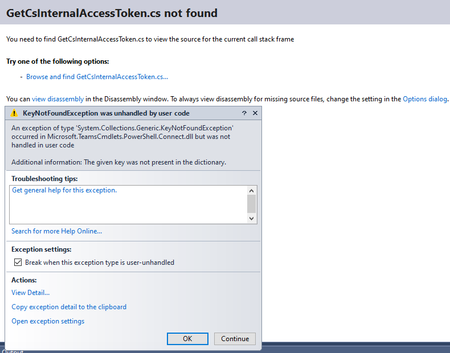
I am trying to run cmdlets from powershell module MicrosoftTeams (version 2.0.0) in a C# web application. I am using Authorization code flow and code from the answer provided in this post to acquire token: https://stackoverflow.com/questions/43488511/acquire-aad-token-using-asp-net-web-forms. Note: I had changed resource in the code to graph.windows.net to acquire AAD token. Token is acquired by using AuthenticationContext.AcquireTokenByAuthorizationCodeAsync method. Once the token is acquired, I run the following lines to create a powershell instance in C# and to import MicrosoftTeams Module. PowerShell pshell InitialSessionState iss; iss = InitialSessionState.CreateDefault2(); iss.ImportPSModule(new[] { "MicrosoftTeams" }); pshell = PowerShell.Create(iss); Then to connect with MicrosoftTeams, I run the following code: var connectCmd = new Command("Connect-MicrosoftTeams"); connectCmd.Parameters.Add("AadAccessToken", AccessToken); connectCmd.Parameters.Add("AccountId", "xxxxxxx@xxxxxx.onmicrosoft.com"); pshell.Commands.AddCommand(connectCmd); var result1 = pshell.Invoke(); Code works fine till here. After this I clear the shell commands and invoke the Get-CsTeamsCallingPolicy cmdlet: pshell.Commands.Clear(); pshell.Streams.Error.Clear(); pshell.AddScript("Get-CsTeamsCallingPolicy"); var result2 = pshell.Invoke(); After Invoke, I get an exception and this dialog pops up: Pressing 'Continue' brings back the same dialogue a couple of times. Exception details from this screen are: System.Collections.Generic.KeyNotFoundException was unhandled by user code HResult=-2146232969 Message=The given key was not present in the dictionary. Source=mscorlib StackTrace: at System.Collections.Concurrent.ConcurrentDictionary`2.get_Item(TKey key) at Microsoft.TeamsCmdlets.Powershell.Connect.Models.AzureSessionProvider.GetAccessToken(String resource, IEnumerable`1 scopes) in D:\a\1\s\src\Microsoft.TeamsCmdlets.PowerShell.Connect\Models\AzureSession.cs:line 80 at Microsoft.TeamsCmdlets.Powershell.Connect.TeamsPowerShellSession.GetAccessToken(String resource, IEnumerable`1 scopes) in D:\a\1\s\src\Microsoft.TeamsCmdlets.PowerShell.Connect\TeamsPowerShellSession.cs:line 82 at Microsoft.TeamsCmdlets.PowerShell.Connect.GetCsInternalAccessToken.ProcessRecord() in D:\a\1\s\src\Microsoft.TeamsCmdlets.PowerShell.Connect\GetCsInternalAccessToken.cs:line 61 at System.Management.Automation.CommandProcessor.ProcessRecord() After pressing continue for the 3rd time, control goes back to C# code, and I receive the following runtime exception: Exception calling "GetSteppablePipeline" with "1" argument(s): "Exception calling "GetRemoteNewCsOnlineSession" with "1" argument(s): "Run either Connect-MicrosoftTeams or new-csonlinesession before running cmdlets."" Trying to run this logic from the powershell editor shows similar behavior: Running the following two lines: $AccessToken = 'xxxxxxxxxxxxxxxxxxxxxxxxxxxxxxxxxxxxxxxxxxxxxxxxxxxxxxxxxxxxxxxxxxxxxxxxxxxxxxxxxxxxxxxx' Connect-MicrosoftTeams -AadAccessToken $AccessToken -AccountId 'xxxxxxx@xxxxxx.onmicrosoft.com' gives this result: Account Environment Tenant TenantId ------- ----------- ------ -------- xxxxxxx@xxxxxx.onmicrosoft.com AzureCloud xxxxxxxx-xxxx-xxxx-xxxx-xxxxxxxxxxxx xxxxxxxx-xxxx-xxxx-xxxx-xxxxxxxxxxxx I then run Get-Team cmdlet: Get-Team -User xxxxxxx@xxxxxxx.onmicrosoft.com which results in this message: Get-Team : The given key was not present in the dictionary. At line:1 char:1 + Get-Team -User xxxxxxx@xxxxxxx.onmicrosoft.com + ~~~~~~~~~~~~~~~~~~~~~~~~~~~~~~~~~~~~~~~~~~~~~~ + CategoryInfo : NotSpecified: (:) [Get-Team], KeyNotFoundException + FullyQualifiedErrorId : System.Collections.Generic.KeyNotFoundException,Microsoft.TeamsCmdlets.PowerShell.Custom.GetTeam Running cmdlet Get-CsTeamsCallingPolicy yields this: Exception calling "GetSteppablePipeline" with "1" argument(s): "Exception calling "GetRemoteNewCsOnlineSession" with "1" argument(s): "Run either Connect-MicrosoftTeams or new-csonlinesession before running cmdlets."" At C:\Program Files\WindowsPowerShell\Modules\MicrosoftTeams\2.0.0\net472\SfBORemotePowershellModule.psm1:11369 char:13 + $steppablePipeline = $scriptCmd.GetSteppablePipeline($myI ... + ~~~~~~~~~~~~~~~~~~~~~~~~~~~~~~~~~~~~~~~~~~~~~~~~~~~~~~~~~ + CategoryInfo : NotSpecified: (:) [], ParentContainsErrorRecordException + FullyQualifiedErrorId : CmdletInvocationException If I run Connect-MicrosoftTeams directly from powershell without providing access token and accountid, I get the login screens and after login everything works fine i.e. I can run Get-Team and Get-CsTeamsCallingPolicy cmdlets successfully but I don't get this behavior when working with AadAccessToken. All the above code works fine if connecting to AzureAD module via Connect-AzureAD cmdlet like this both in web application and powershell editor: Connect-AzureAD -AadAccessToken $AccessToken -AccountId 'xxxxxxx@xxxxxxx.onmicrosoft.com' If someone has faced and successfully resolved this issue or have some tips on how to resolve this, please help. I have already tried a lot of things including searching for the specific exception messages and any possible solutions but found nothing that could help in this particular scenario, installed the latest version of MSTeams module, the previous version was old and did not have all the cmdlets that I am looking to work with. I installed the preview version of MSTeams module also to see if this issue is fixed in the upcoming release. Uninstalled the deprecated SkypeForBuisnessOnline Connector module, updated windows and so on. If you look at https://docs.microsoft.com/en-us/powershell/module/teams/connect-microsoftteams?view=teams-ps#example-4, this is what I am trying to achieve.2.3KViews1like5Comments
How to get User teams id using Microsoft Graph API or via any another method
I want to extract user id of a user to send a proactive message via a bot. I'm able to find the basic details of the user using graph API but unable to find a way where i can query user teams id which looks something like this -> 09:1YuoZA9DSJPbW3ITaCUEHAlIhyLYt8vgFLm9X3dB-L9wQ5YbMZEWi I'm not sure whether this id is only needed to send a message to a user or any basic detail will work to send the notification for ex-: User Principle Name, Azure Active Directory ID etc.Solved34KViews1like1Comment