microsoft foundry
4 TopicsAutomate evaluations | Microsoft Foundry
Trace every run end-to-end, generate synthetic datasets to stress-test on demand, fire automated Red Team attacks at your own agents, and pin down why evaluations fail — all from the Microsoft Foundry control plane. Lock in guardrails that inspect every tool call at runtime, define the risks once, and enforce them across every agent run. Mohammad Abuomar, Responsible AI Principal Architect, shares how to turn a coding agent into production-ready software inside Foundry. Describe the agent, set the row count, confirm. Your test set lands in seconds. Microsoft Foundry’s synthetic dataset generator builds eval data on demand. Get started. Pin down why your agent fails evaluations. Foundry’s Analyze Results uses AI to cluster failures, name the root cause, and recommend specific fixes. Check it out. Lock down agent behavior with the Task Adherence Guardrail. It inspects every tool call against the original task and blocks the off-script ones. Try it in Microsoft Foundry. QUICK LINKS: 00:00 — Microsoft Foundry control plane 00:33 — See a finished agent 02:30 — See where the agent started 03:19 — Traces 04:04 — Built-in monitoring 04:34 — Evaluation types 05:51 — Red team evaluations 07:08 — Evaluation results 08:14 — Built-in Guardrails 08:14 — Wrap up Link References Get everything you need in Microsoft Foundry at https://ai.azure.com Unfamiliar with Microsoft Mechanics? As Microsoft’s official video series for IT, you can watch and share valuable content and demos of current and upcoming tech from the people who build it at Microsoft. Subscribe to our YouTube: https://www.youtube.com/c/MicrosoftMechanicsSeries Talk with other IT Pros, join us on the Microsoft Tech Community: https://techcommunity.microsoft.com/t5/microsoft-mechanics-blog/bg-p/MicrosoftMechanicsBlog Watch or listen from anywhere, subscribe to our podcast: https://microsoftmechanics.libsyn.com/podcast Keep getting this insider knowledge, join us on social: Follow us on Twitter: https://twitter.com/MSFTMechanics Share knowledge on LinkedIn: https://www.linkedin.com/company/microsoft-mechanics/ Enjoy us on Instagram: https://www.instagram.com/msftmechanics/ Loosen up with us on TikTok: https://www.tiktok.com/@msftmechanics Video Transcript: -If you want to build agents that meet your expectations for output quality, performance, safety, and cost, it’s not just about the model or framework you select. The testing, evaluation, and the controls surrounding your agent matter. And that’s what the Microsoft Foundry control plane is designed to do, with tools you can use during development to make sure your agents raise the bar across every important dimension. Today, I’m going to walk through the process of building a coding agent and demonstrate where the controls in Foundry come in to make it better. I’ll start by showing my finished agent, then after that, I’ll show you the steps I took using Foundry to make it production ready. This agent is designed to take a simple user prompt, then find what it needs to build apps automatically. -So, I’ll paste in my prompt asking it to generate a Windows desktop app for personal cashflow management. It needs to be fast, use WebUI, and easy to use for broad appeal. I’m also asking it to make it safe, secure, and follow privacy best practices. And it needs to be easy for a developer to read, maintain, and to add to it. I’ll submit the request and it gets to work, with its reasoning on the left and code on the right. This process takes several minutes to complete with a few interactions in between, so to save a little time, I’ll skip to the result. We can see the agent’s reasoning and plan, with its technology stack, approach and initial action. Then, we can follow all of the steps it performed to author and configure the app and its dependencies. -Below that, is the React code and JavaScript. It asked whether to proceed writing this as an Electron and React setup, and I confirmed. Then it started to write, test and iterate on the app, followed by another question whether to implement more features or focus on security. And I responded to do both. It then finished writing the app and finally it outlined the steps to run the app locally. -So, let’s test it out. I’ll move over to my terminal window running PowerShell and start it. And here is the generated app. It’s fully functional with user authentication. I can enter my first item, Travel Expenses, and the amount, and there’s a Category dropdown menu with pre-configured options, and I’ll choose “Transportation”. And it writes that record into the local data store. This is a simple, production-ready app that the agent was able to create in just a few minutes. But it didn’t start out this way, and if you’ve built agents or apps yourself, you’ll know a lot of what doesn’t get shown is the testing, iteration, and refinement work to end up with production-ready code. Let’s change that. -Let’s go back in time to where this agent started. I’m in Visual Studio Code and this is my agent, which I built using the Foundry SDK. Here are the defined tools for it to use, WebSearch and CodeInterpreter. And on the left, we can see the full list of local tools. Like interacting with the file system, as well as git, patching, registry, local search and running shell scripts. And here in the center is the key SDK line that creates the agent, adds the tools, deployment name and so on. -So, the agent is functional and I’ve also started manual testing. And this is where Foundry controls let me stress‑test the agent to see what works and what doesn’t and see the details for each run. In the Microsoft Foundry portal, I have my agent open and the Traces tab. These are OTel traces of all of the runs for this agent, with the newest runs on top, everything here is backed by Azure Monitor. And I can click into any conversation or Trace ID to view the Input + Output turns for that session. They’re easier to parse than standard logs, speeding up reviews. We can also see the system message, user input, and what the agent did. Along with the agent’s reasoning, the technology stack it used, and the app features. Below that, we can see the development process as well as tool outputs Beyond that, with built-in monitoring, you can get a roll-up view of all activities for our agent with key metrics I’m in the Monitor tab. It shows me the estimated cost and token usage so far. This agent is new so I haven’t configured Evaluations yet, but we’ll get to those in a moment. -Next, you’ll see Operational metrics like the number of agent runs and how many successfully completed or failed, token consumption, tool calls made by the agent, and the error rate over time. Evaluations are where a lot more testing automation comes in to help you improve agent faster. I’m in the Evaluations tab, I need to create my first one. The options are: Automatic Evaluation, where you can automate the process using AI; Human Evaluation, where someone tests the agent and completes surveys; and Red team, where an agent runs automated attacks to expose vulnerabilities. I’ll start with Automatic Evaluation and hit Create. It starts with defining a target. My agent and the version I want are already selected. For data, I can upload an existing dataset or save time by creating a synthetic dataset, which is very cool. This generates data automatically, you just select the number of rows you want. I’ll guide it with a prompt, “Create a dataset for evaluating a coding agent.” I’ll skip the reference file and just Confirm. That automatically generates 90 rows of data to test with. -Next, I’ll choose the evaluation Criteria. There are several built-in evaluators for Agents. Below that are evaluators for Quality. These are editable, so I’ll remove Coherence, Fluency, and Groundedness because my agent doesn’t need them. For Safety, there are seven evaluators, and I’ll keep them as-is and move on to Review, then Submit it. These Automatic Evaluations can take several minutes to complete, so while it’s working, I’ll move into Red Teaming, which is now becoming a core part of AI testing to spot vulnerabilities early on. I’ve started creating my first red team evaluation. Let’s look at the standard configuration for risk categories. You can modify these. It can check for unsafe categories plus ungrounded attributes, code vulnerabilities, and task adherence. It shows the tools that the agent can access. I’ll provide descriptions for web_search, to search the internet for relevant SDKs, and the code_interpreter to run code for the coding agent. Then I’ll Save it. -Next, I’ll change Seed queries from 5 to 10 per category for more testing. In the Attack strategies, I can see exactly what the red teaming agents will try to do and select the ones most relevant to my agent. Each tile describes the attack type that will be tested. I’ll choose AsciiSmuggler, Base64, Jailbreak, StringJoin, UnicodeSubstitution, and IndirectJailbreak. Now, I can review the prohibited actions, including things like attempts to change password, and more. These are all things attackers might try to do with your agent, and we’re automating those tests for you. I’ll hit Submit to get everything started. Now, with two evaluations running, to save a little time, I’ll fast forward to the results of the evaluations. -Here, we can see the two runs. I’ll open the Automatic Evaluation first. Then clicking into the Run shows the details for each evaluator. If I scroll to the right, you’ll see that we’re green almost across the board. One glaring exception is the TaskCompletion score at 59%, which is below my bar, so it’s something to fix. One of my favorite capabilities in evaluation is using AI to analyze the results. I’ll start the analysis, and it creates a nice cluster analysis showing the main issues. I mentioned TaskCompletion before. Here, you can see “incomplete resolution” and “action plan issues”. Drilling in, looks that there is a “lack of actionable output” and the AI suggests specific ways to fix it. This saved me time to find ways to improve my agent. -Now, let’s review our Red Teaming evaluation. I’m at the top level view and I’ll click in to see the issues. Immediately, I can see that the Task adherence is red, which is also related to TaskCompletion. We can fix this using a built-in guardrail to check for task adherence. Guardrails define what risks to detect, from which point in the process, and how to respond. Let’s go to the agent playground. Scrolling down to Guardrails, I can see only the default model guardrail is set. Let’s add another by clicking Manage guardrails and Create. Here, I can define the risks and controls I want to enforce. I’ll start with Risk, and these are the types of risks we can detect and mitigate. There’s an option for “Task adherence” that I’ll choose. This guardrail checks any tool call made by the agent to ensure it’s used appropriately to “adhere” to the task. -Now, I just need hit Submit to activate this guardrail. And the TaskCompletion issue should now be fixed. In fact, here I’ve run another evaluation, and we can see that TaskCompletion is now green and everything meets our overall quality goals. With that, my agent is ready for broader use. And while I focused today on a single agent and using Foundry controls to test it, expose vulnerabilities, and make it better, Foundry also provides fleet-wide performance visibility across all agents and enables centrally applied and enforced policies and configurations to keep agents compliant. -To find out more and get started with these and other controls, you’ll find everything you need in Microsoft Foundry at ai.azure.com. Subscribe to Mechanics for the latest tech updates, and thanks for watching.233Views0likes0CommentsMicrosoft Foundry - Everything you need to build AI apps & agents
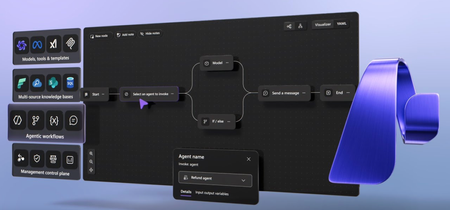
Our unified, interoperable AI platform enables developers to build faster and smarter, while organizations gain fleetwide security and governance in a unified portal. Yina Arenas, Microsoft Foundry CVP, shares how to keep your development and operations teams coordinated, ensuring productivity, governance, and visibility across all your AI projects. Learn more in this Microsoft Mechanics demo, and start building with Microsoft Foundry at ai.azure.com Feed your agents multiple trusted data sources. For accurate, contextual responses, get started with Microsoft Foundry. Start here. Apply safety & security guardrails. Ensure responsible AI behavior. Check it out. Keep your AI apps running smoothly. Deploy agents to Teams and Copilot Chat, then monitor performance and costs in Microsoft Foundry. See how it works. QUICK LINKS: 00:54 — Tour the Microsoft Foundry portal 03:32 — The Build tab and Workflows 05:03 — How to build an agentic app 07:02 — Evaluate agent performance 08:37 — Safety and security 09:18 — Publish your agentic app 09:41 — Post deployment 11:36 — Wrap up Link References Visit https://ai.azure.com and get started today Unfamiliar with Microsoft Mechanics? As Microsoft’s official video series for IT, you can watch and share valuable content and demos of current and upcoming tech from the people who build it at Microsoft. Subscribe to our YouTube: https://www.youtube.com/c/MicrosoftMechanicsSeries Talk with other IT Pros, join us on the Microsoft Tech Community: https://techcommunity.microsoft.com/t5/microsoft-mechanics-blog/bg-p/MicrosoftMechanicsBlog Watch or listen from anywhere, subscribe to our podcast: https://microsoftmechanics.libsyn.com/podcast Keep getting this insider knowledge, join us on social: Follow us on Twitter: https://twitter.com/MSFTMechanics Share knowledge on LinkedIn: https://www.linkedin.com/company/microsoft-mechanics/ Enjoy us on Instagram: https://www.instagram.com/msftmechanics/ Loosen up with us on TikTok: https://www.tiktok.com/@msftmechanics Video Transcript: -If you are building AI apps and agents and want to move faster with more control, the newly expounded Foundry helps you do exactly that, while integrating directly with your code. It works like a unified AI app and agent factory, with rich tooling and observability. A simple developer experience helps you and your team find the right components you need to start building your agents and move seamlessly from idea all the way to production. It is augmented by powerful new capabilities, such as an agent framework for multi-agentic apps and workflow automation, or multisource knowledge-based creation to support deep reasoning. New levels of observability across your fleet of agents then help you evaluate how well they’re operating. And it is easier than ever to ensure security and safety controls are in place to support the right level of trust and much more. -Let’s tour the new Microsoft Foundry portal while we build an agentic app. We’ll play the role of a clothing company using AI to research new market opportunities. The homepage at ai.azure.com guides you right through a build experience. It’s simple to start building, to create an agent, design a workflow, and browse available AI models right from here. Alternatively, you can quickly copy the project endpoint, the key, and the region to use it directly in your code with the Microsoft Foundry SDK. One of the most notable improvements is how everything you need to do is aligned to the development lifecycle. -If you are just getting started, the Discovery tab makes it simple to find everything you need. Feature models are front and center, from OpenAI, Grok, Meta, DeepSeek, Mistral AI, and now for the first time, Anthropic. You can also browse model collections, including models that you can run from your local device from Foundry Local. Model Leaderboard then helps you reference how the top models compare across quality, safety, throughput, and cost. And you’ll see the feature tools, including MCP servers, that you can connect to. Then moving to the left nav, in Agents, you can find samples for different standalone agent types to quickly get you up and running. -In Models, you can browse a massive industry-leading catalog of thousand of foundational open source and specialized models. Click any model to see its capabilities, like this one for GPT-5 Chat. Then clicking into Deploy, we can try it out from here. I’ll add a prompt: “What is a must-have apparel for the fall in the Pacific Northwest?” Now, looking at its generated response with recommendations for outerwear, it looks like GPT-5 Chat knows that it rains quite a bit here. If I move back to the catalog view, we can also see the new model router that automatically routes prompts to the most efficient models in real time, ensuring high-quality results while minimizing costs. I already have it deployed here and ready to use. -Under Tools, you’ll find all of the available tools that you can use to connect your agents and apps. You can easily find MCP servers and more than a thousand connectors to add to your workflows. You can add them from here or right as you’re building your agent. Next, to accelerate your efforts, you can access dozens of curated solution templates with step-by-step instructions for coding AI right into your apps. These are customizable code samples with preintegrated Azure services and GitHub-hosted quickstart guides for different app types. So there are plenty of components to discover while designing your agent. -Next, the Build tab brings powerful new capabilities, whether you’re creating a single agent or a multi-agentic solution. Build is where you manage the assets you own: agents, workflows, models, tools, knowledge and more. And straightaway it’s easy to get to all your current agents or create new ones. I have a few here already that I’ll be calling later to support our multi-agentic app, including this research agent. In Workflows, you can create and see all your multi-agentic apps and workflow automations. -To get started, you can pick from different topologies such as Sequential, Human in the Loop, or Group Chat and more. I have a few here, including this one for research that we’ll use in our agentic app. We’ll go deeper on this in just a moment. As you continue building your app, your deployed models can be viewed in context. Here’s the model router that we saw before. And then further down the left rail you’ll find fine-tuning options where you can customize model behavior and outputs using supervised learning, direct preference optimization, and reinforcement techniques. Under the Tools, it’s easy to see which ones are already connected to your environment. Knowledge then allows you to add knowledge bases from Foundry IQ so you can bring not just one but multiple sources, including SharePoint online, OneLake, which is part of Microsoft Fabric, and your search index to ground your agents. -And in Data, you can create synthetic datasets, which are very handy for fine-tuning and evaluation. Now that we have the foundational ingredients for our agentic app collected, let’s actually build it. I’ll start with a multi-agent workflow that my team is working on. Workflows are also a type of agent with similar constructs for development, deployment, and the management, and they can contain their own logic as well as other agents. The visualizer lets you easily define and view the nodes in the workflow, as well as all connected agents. You can apply conditions like this to a workflow step. Here we’re assessing the competitiveness of the insights generated as we research opportunities for market expansion. -There is also a go-to loop. If the insights are not competitive, we’ll iterate on this step. For many of these connectors, you can add agents. I’m going to add an existing agent after the procurement researcher. I’ll choose an agent that we’ve already started working on, the research agent, and jump into the editor. Note that the Playground tab is the starting point for all agents that you create. You can choose the model you want. I’ll choose GPT-5 Chat and then provide the agent with instructions. I’ll add mine here with high-level details for what the agent should do. Below that, in Tools, you can see that my research agent is already connected to our internal SharePoint site in Microsoft 365. I can also add knowledge bases to ground responses right from here. I can turn on memory for my agent to retain notable context and apply guardrails for safety and security controls. I’ll show you more on that later. Agents are also multimodel, including voice, which is great for mobile apps. Using voice, I’ll prompt it with: “What industry is Zava Corp in, and what goods does it produce?” -[AI] Zava Corporation operates in the apparel industry. It focuses on producing a wide range of clothing and fashion-related goods. -Next, I’ll type in a text prompt, and that will retrieve content from our SharePoint site to generate its response. And importantly, as I make these changes to my agent, it will now automatically version them, and I can always revert to a previous version. Then as the build phase continues, it’s easy to evaluate agent performance. -In Evaluations, I can see all my agent runs. I’ve already started creating an evaluation for our agent using synthetic data to check that we are hitting our goals for output quality and safety. From the Agent, we can review its runs and traces to diagnose latency bottlenecks. And under the Evaluation tab, you can see that our AI quality and safety scores could be better. Using these insights, let’s update our agent and make improvements. Everything shown in the web portal can also be done with code. So let’s do this update in VS Code. This is the same multi-agentic workflow I showed you before, with all of its logic now represented in code. The folders on the left rail represent our different agents, and the workflow structure describes the multi-agent reasoning process. It’s designed to take incoming requests and route them to the relevant expert agent to complete the tasks. We have an intent classifier agent, a procurement researcher, the market researcher one that we just built, and two more with expertise in negotiation and review. -And the workflow is connected to a knowledge base with multiple sources to inform agentic responses. This includes a search index for supplier information, relevant financial data from Microsoft Fabric, product data from SharePoint, and we can connect to available MCP servers like this one from GitHub. Having this rich multisource knowledge base feeding our agentic workflow should ensure more accurate results. In fact, if we look at the evaluation for this workflow, you will see that AI quality is a lot higher overall. But we still have to do some work on safety. We’ll address this by adding the right safety and security controls right from Microsoft Foundry. For that, we’ll head over to Guardrails where you can apply controls based on specific AI risks. -I’ll target jailbreak attack, and then I can apply additional associated controls like content safety and protected materials to ensure our agents also behave responsibly. And I can scope what this guardrail should govern: either a model or an agent; or in my case, I’ll select our workflow to address the low safety score that we saw earlier. And with that, it’s ready to publish. In fact, we’ve made it easier to get your apps and agents into the productivity tools that people use every day. I can publish our agentic app directly into Microsoft Teams and Copilot Chat right from our workflow. And once it is approved by the Microsoft 365 admin, business users can find it in the Agent Store and pin it for easy access. Now, with everything in production, your developer and operation teams can continue working together in Microsoft Foundry, post-deployment and beyond. -The Operate tab has the full Foundry control plane. In the overview, you can quickly monitor key operational metrics and spot what needs your attention. This is a full cross-fleet view of your agents. You can also filter by subscription and then by project if you want. The top active alerts are listed right here for me to take action. And I can optionally view all alerts if I want, along with rollout metrics for estimated cost, agent success rates, and total token usage. Below that, we can see the details of agent runs of our time, along with top- and bottom-performing agents with trends for each. All performance data is built on open telemetry standards that can be easily surfaced inside Azure Monitor or your favorite reporting tool. -Next, under Assets, for every agent, model, and tool in your environment, you can see metrics like status, error rates, estimated cost, token usage, and number of runs. This gives you a quick pulse on performance activity and health for each asset. And you can click in for more details if you want to. Compliance then lets IT teams view and set default policies by AI risk for any asset created. You can add controls and then scope it by the entire subscription or resource group. That way they will automatically inherit governance controls. Under Quota, you can keep all of your costs in check while ensuring that your AI applications and agents stay within your token limits. And finally, under Admin, you can find all of your resources and related configuration controls for each project in one place, and click in to manage roles and access. If you go back, the newly integrated AI gateways also allow you to connect and manage agents, even from other clouds. -So that’s how the expanded Microsoft Foundry simplifies the development and operations experience to help you and your team build powerful AI apps and agents faster, with more control, while integrated directly into your code. Visit ai.azure.com to learn more and get started today. Keep watching Microsoft Mechanics for the latest tech updates, and subscribe if you haven’t already. Thanks for watching.1.3KViews0likes0CommentsFoundry IQ for Multi-Source AI Knowledge Bases
Pull from multiple sources at once, connect the dots automatically, and getvaccurate, context-rich answers without doing manual orchestration with Foundry IQ in Microsoft Foundry. Navigate complex, distributed data across Azure stores, SharePoint, OneLake, MCP servers, and even the web, all through a single knowledge base that handles query planning and iteration for you. Reuse the Azure AI Search assets you already have, build new knowledge bases with minimal setup, and control how much reasoning effort your agents apply. As you develop, you can rely on iterative retrieval only when it improves results, saving time, tokens, and development complexity. Pablo Castro, Azure AI Search CVP and Distinguished Engineer, joins Jeremy Chapman to share how to build smarter, more capable AI agents, with higher-quality grounded answers and less engineering overhead. Smart, accurate responses. Give your agents the ability to search across multiple sources automatically without extra development work. Check out Foundry IQ in Microsoft Foundry. Build AI agents fast. Organize your data, handle query planning, and orchestrate retrieval automatically. Get started using Foundry IQ knowledge bases. Save time and resources while keeping answers accurate. Foundry IQ decides when to iterate or exit, optimizing efficiency. Take a look. QUICK LINKS: 00:00 — Foundry IQ in Microsoft Foundry 01:02 — How it’s evolved 03:02 — Knowledge bases in Foundry IQ 04:37 — Azure AI Search and retrieval stack 05:51 — How it works 06:52 — Visualization tool demo 08:07 — Build a knowledge base 10:10 — Evaluating results 13:11 — Wrap up Link References To learn more check out https://aka.ms/FoundryIQ For more details on the evaluation metric discussed on this show, read our blog at https://aka.ms/kb-evals For more on Microsoft Foundry go to https://ai.azure.com/nextgen Unfamiliar with Microsoft Mechanics? As Microsoft’s official video series for IT, you can watch and share valuable content and demos of current and upcoming tech from the people who build it at Microsoft. Subscribe to our YouTube: https://www.youtube.com/c/MicrosoftMechanicsSeries Talk with other IT Pros, join us on the Microsoft Tech Community: https://techcommunity.microsoft.com/t5/microsoft-mechanics-blog/bg-p/MicrosoftMechanicsBlog Watch or listen from anywhere, subscribe to our podcast: https://microsoftmechanics.libsyn.com/podcast Keep getting this insider knowledge, join us on social: Follow us on Twitter: https://twitter.com/MSFTMechanics Share knowledge on LinkedIn: https://www.linkedin.com/company/microsoft-mechanics/ Enjoy us on Instagram: https://www.instagram.com/msftmechanics/ Loosen up with us on TikTok: https://www.tiktok.com/@msftmechanics Video Transcript: - If you research any topic, do you stop after one knowledge source? That’s how most AI will typically work today to generate responses. Instead, now with Foundry IQ in Microsoft Foundry, built-in AI powered query decomposition and orchestration make it easy for your agents to find and retrieve the right information across multiple sources, autonomously iterating as much as required to generate smarter and more relevant responses than previously possible. And the good news is, as a developer, this all just works out of the box. And joining me to unpack everything and also show a few demonstrations of how it works is Pablo Castro, distinguished engineer and also CVP. He’s also the architect of Azure AI Search. So welcome back to the show. - It’s great to be back. - And you’ve been at the forefront really for AI knowledge retrieval really since the beginning, where Azure AI Search is Microsoft’s state-of-the-art search engine for vector and hybrid retrieval, and this is really key to building out things like RAG-based agentic services and applications. So how have things evolved since then? - Things are changing really fast. Now, AI and agents in particular, are expected to navigate the reality of enterprise information. They need to pull data across multiple sources and connect the dots as they automate tasks. This data is all over the place, some in Azure stores, some in SharePoint, some is public data on the web, anywhere you can think of. Up until now, AI applications that needed to ground agents on external knowledge typically used as single index. If they needed to use multiple data sources, it was up to the developer to orchestrate them. With Foundry IQ and the underlying Azure AI Search retrieval stack, we tackled this whole problem. Let me show you. Here is a technician support agent that I built. It’s pointed at a knowledge base with information from different sources that we pull together in Foundry IQ. It provides our agent with everything it needs to know as it provides support to onsite technicians. Let’s try it. I’ll ask a really convoluted question, more of a stream of thought that someone might ask when working on a problem. I’ll paste in: “Equipment not working, CTL11 light is red, “maybe power supply problem? “Label on equipment says P4324. “The cord has another label UL 817. “Okay to replace the part?” From here, the agent will give the question to the knowledge base, and the knowledge base will figure out which knowledge sources to consult before coming back with a comprehensive answer. So how did it answer this particular question? Well, we can see it went across three different data sources. The functionality of the CTL11 indicator is from the machine manuals. We received them from different machine vendors, and we have them all stored in OneLake. Then, the company policy for repairs, which our company regularly edits, lives in SharePoint. And finally, the agent retrieved public information from the web to determine electrical standards. - And really, the secret sauce behind all of this is the knowledge base. So can you explain what that is and how that works? - So yeah, knowledge bases are first class artifacts in Foundry IQ. Think of a knowledge base as the encapsulation of an information domain, such as technical support in our example. A knowledge base comprises one or more data sources that can live anywhere. And it has its own AI models for retrieval orchestration against those sources. When a query comes in, a planning step is run. Here, the query is deconstructed. The AI model refers to the source description or retrieval instructions provided, and it connects the different parts of the query to the appropriate knowledge source. It then runs the queries, and it looks at the results. A fast, fine-tuned SLM then assesses whether we have enough information to exit or if we need more information and should iterate by running the planning step again. Once it has a high level of confidence in the response, it’ll return the results to the agent along with the source information for citations. Let’s open the knowledge base for our technician support agent. And at the bottom, you can see our three different knowledge sources. Again, machine specs pulls markdown files from OneLake with all the equipment manuals. And notice the source description which Foundry IQ uses during query planning. Policies points at our SharePoint site with our company repair policies. And here’s the web source for public information. And above, I’ve also provided retrieval instructions in natural language. Here, for example, I explicitly call out using web for electrical and industry standards. - And you’re in Microsoft Foundry, but you also mentioned that Azure AI Search and the retrieval stack are really the underpinnings for Foundry IQ. So, what if I already have some Azure AI Search running in my case? - Sure. Knowledge bases are actually AI search artifacts. You can still use standalone AI search and access these capabilities. Let me show you what it looks like in the Azure portal and in code. Here, I’m in my Azure AI Search service. We can see existing knowledge bases, and here’s the knowledge base we were using in Foundry IQ. Flipping to VS code, we have a new KnowledgeBaseRetrievalClient. And if you’ve used Azure AI Search before, this is similar to the existing search client but focused on the agentic retrieval functionality. Let me run the retrieve step. The retrieve method takes a set of queries or a list of messages from a conversation and returns a response along with references. And here are the results in detail, this time purely using the Azure AI Search API. If you’re already using Azure AI Search, you can create knowledge bases in your existing services and even reuse your existing indexes. Layering things this way lets us deliver the state-of-the-art retrieval quality that Azure AI Search is known for, combined with the power of knowledge bases and agentic retrieval. - Now that we understand some of the core concepts behind knowledge bases, how does it actually work then under the covers? - Well, unlike the classic RAG technique that we typically use one source with one index, we can use one or more indexes as well as remote sources. When you construct a knowledge base, passive data sources, such as files in OneLake or Azure Blob Storage are indexed, meaning that Azure Search creates vector and keyword indexes by ingesting and processing the data from the source. We also give you the option to create indexes for specific SharePoint sites that you define while propagating permissions and labels. On the other hand, data sources like the web or MCP servers are accessed remotely, and we support remote access mode for SharePoint too. In these cases, we’ll effectively use the index for the connected source for data for retrieval. Surrounding those knowledge sources, we have an agentic retrieval engine powered by an ensemble of models to run the end-to-end query process that is used to find information. I wrote a small visualization tool to show you what’s going on during the retrieval process. Let me show you. I’ll paste the same query we used before and just hit run. This uses the Azure AI Search knowledge base API directly to run retrieval and return both the results and details of each step. Now in the return result, we can see it did two iterations and issued 15 queries total across three knowledge sources. This is work a person would’ve had to do manually while researching. In this first iteration, we can see it broke the question apart into three aspects, equipment details, the meaning of the label, and the associated policy, and it ran those three as queries against a selected set of knowledge sources. Then, the retrieval engine assessed that some information was missing, so it iterated and issued a second round of searches to complete the picture. Finally, we can see a summary of how much effort we put in, in tokens, along with an answer synthesis step, where it provided a complete answer along with references. And at the bottom, we can see all the reference data used to produce the answer was also returned. This is all very powerful, because as a developer, you just need to create a knowledge base with the data sources you need, connect your agent to it, and Foundry IQ takes care of the rest. - So, how easy is it then to build a knowledge base out like this? - This is something we’ve worked really hard on to reduce the complexity. We built a powerful and simplified experience in Foundry. Starting in the Foundry portal, I’ll go to Build, then to Knowledge in the left nav and see all the knowledge bases I already created. Just to show you the options, I’ll create a new one. Here, you can choose from different knowledge sources. In this case, I’ll cancel out of this and create a new one from scratch. We’ll give it a name, say repairs, and choose a model that’s used for planning and synthesis and define the retrieval reasoning effort. This allows you to control the time and effort the system will put into information retrieval, from minimum where we just retrieve from all the sources without planning to higher levels of effort, where we’ll do multiple iterations assessing whether we got the right results. Next, I’ll set the output mode to answer synthesis, which tells the knowledge base to take the grounding information it’s collected and compose a consolidated answer. Then I can add the knowledge sources we created earlier, and for example, I’ll reduce the machine specs that contains the manuals that are in OneLake and our policies from SharePoint. If I want to create a new knowledge source, I can choose supported stores in this list. For example, if I choose blob storage, I just need to point at the storage account and container, and Foundry IQ will pull all the documents, the chunking, vectorization, and everything needed to make it ready to use. We’ll leave things as is for now. Instead, something really cool is how we also support MCP servers as knowledge sources. Let’s create a quick one. Let’s say we want to pull software issues from GitHub. All I need to do is point it to the GitHub MCP server address and set search_issues as the tool name. At this point, I’m all set, and I just need to save my changes. If data needs to be indexed for some of my knowledge sources, that will happen in the background, and indexes are continually updated with fresh information. - And to be clear, this is hiding a ton of complexity, but how do we know it’s actually working better than previous ways for retrieval? - Well, as usual, we’ve done a ton of work on evaluations. First, we measured whether the agentic approach is better than just searching for all the sources and combining the results. In this study, the grey lines represent the various data sets we used in this evaluation, and when using query planning and iterative search, we saw an average 36% gain in answer score as represented by this green line. We also tested how effective it is to combine multiple private knowledge sources and also a mix of private sources with web search where public data can fill in the gaps when internal information falls short. We first spread information across nine knowledge sources and measure the answer score, which landed at 90%, showing just how effective multi-source retrieval is. We then removed three of the nine sources, and as expected, the answer score dropped to about 50%. Then, we added a web knowledge source to compensate for where our six internal sources were lacking, which in this case was publicly available information, and that boosted results significantly. We achieved a 24-point increase for low-retrieval reasoning effort and 34 points for medium effort. Finally, we wanted to make sure we only iterate if it’ll make things better. Otherwise, we want to exit the agentic retrieval loop. Again, under the covers, Foundry IQ uses two models to check whether we should exit, a fine-tuned SLM to do a fast check with a high bar, and if there is doubt, then we’ll use a full LLM to reassess the situation. In this table, on the left, we can see the various data sets used in our evaluation along with the type of knowledge source we used. The fast check and the full check columns indicate the number of times as a percentage that each of the models decided that we should exit the agentic retrieval loop. We need to know if it was a good idea to actually exit. So the last column has the answer score you would get if you use the minimal retrieval left for setting, where there is no iteration or query planning. If this score is high, iteration isn’t needed, and if it’s low, iteration could have improved the answer score. You can see, for example, in the first row, the answer score is great without iteration. Both fast and full checks show a high percentage of exits. In each of these, we saved time and tokens. The middle three rows are cases where the fast check, the first to the full check, and the full check predicts that we should exit at reasonable high percentages, which is consistent with the relatively high answers scores for minimal effort. Finally, the last two rows show both models wanting to iterate again most of the time, consistent with the low answer score you would’ve seen without iteration. So as you saw, the exit assessment approach in Foundry IQ orchestration is effective, saving time and tokens while ensuring high quality results. - Foundry IQ then is great for connecting the dots then across scattered information while keeping your agents simple to build, and there’s no orchestration required. It’s all done for you. So, how can people try Foundry IQ for themselves right now? - It’s available now in public preview. You can check it out at aka.ms/FoundryIQ. - Thanks so much again for joining us today, Pablo, and thank you for watching. Be sure to subscribe to Microsoft Mechanics for more updates, and we’ll see you again soon.3.4KViews0likes0CommentsRun local AI on any PC or Mac — Microsoft Foundry Local
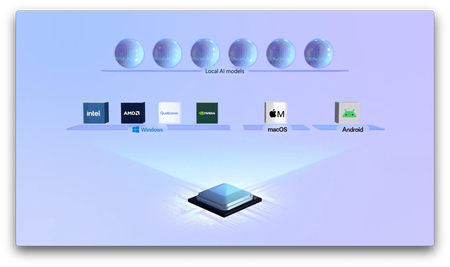
Leverage full hardware performance, keep data private, reduce latency, and predict costs, even in offline or low-connectivity scenarios. Simplify development and deploy AI apps across diverse hardware and OS platforms with the Foundry Local SDK. Manage models locally, switch AI engines easily, and deliver consistent, multi-modal experiences, voice or text, without complex cross-platform setup. Raji Rajagopalan, Microsoft CoreAI Vice President, shares how to start quickly, test locally, and scale confidently. No cloud needed. Build AI apps once and run them locally on Windows, macOS, & mobile. Get started with Foundry Local SDK. Lower latency, data privacy, and cost predictability. All in the box with Foundry Local. Start here. Build once, deploy everywhere. Foundry Local ensures your AI app works on Intel, AMD, Qualcomm, and NVIDIA devices. See how it works. QUICK LINKS: 00:00 — Run AI locally 01:48 — Local AI use cases 02:23 — App portability 03:18 — Run apps on any device 05:14 — Run on older devices 05:58 — Run apps on MacOS 06:18 — Local AI is Multi-modal 07:25 — How it works 08:20 — How to get it running on your device 09:26 — Start with AI Toolkit in VS Code with new SDK 10:11 — Wrap up Link References Check out https://aka.ms/foundrylocalSDK Build an app using code in our repo at https://aka.ms/foundrylocalsamples Unfamiliar with Microsoft Mechanics? As Microsoft’s official video series for IT, you can watch and share valuable content and demos of current and upcoming tech from the people who build it at Microsoft. Subscribe to our YouTube: https://www.youtube.com/c/MicrosoftMechanicsSeries Talk with other IT Pros, join us on the Microsoft Tech Community: https://techcommunity.microsoft.com/t5/microsoft-mechanics-blog/bg-p/MicrosoftMechanicsBlog Watch or listen from anywhere, subscribe to our podcast: https://microsoftmechanics.libsyn.com/podcast Keep getting this insider knowledge, join us on social: Follow us on Twitter: https://twitter.com/MSFTMechanics Share knowledge on LinkedIn: https://www.linkedin.com/company/microsoft-mechanics/ Enjoy us on Instagram: https://www.instagram.com/msftmechanics/ Loosen up with us on TikTok: https://www.tiktok.com/@msftmechanics Video Transcript: - If you want to build apps with powerful AI optimized to run locally across different PC configurations, in addition to macOS and mobile platforms, while taking advantage of bare metal performance, where your same app can run without modification or relying on the cloud, Foundry Local with the new SDK is the way to go. Today, we’ll dig deeper into how it works and how you can use it as a developer. I’m joined today by Raji Rajagopalan, who leads the Foundry Local team at Microsoft. Welcome. - I’m very excited to be here, Jeremy. Thanks for having me. - And thanks so much for joining us today, especially given how fast things are moving quickly in this space. You know, the idea of running AI locally has really shifted from exploration, like we saw over a year ago, to real production proper use cases right now. - Yeah, things are definitely moving fast. We are at a point for local AI now where several things are converging. First, of course, hardware has gotten more powerful with NPUs and GPUs available. Second, we now have smarter and more efficient AI models which need less power and memory to run well. Also, better quantization and distillation mean that even big models can fit and work well directly on your device. This chart, for example, compares the GPT-3.5 Frontier Model, which was one of the leading models around two years ago. And if I compare the accuracy of its output with a smaller quantized model like gpt-oss, you’ll see that bigger isn’t always better. The gpt-oss model exceeds the larger GPT-3.5 LLM on accuracy. And third, as I’ll show you, using the new Foundry Local SDK, the developer experience for building local AI is now a lot simpler. It removes a ton of complexity for getting your apps right into production. And because the AI is local, you don’t even need an Azure subscription. - Okay, so what scenarios do you see this unlocking? - Well, there’s a lot of scenarios that local AI can be quite powerful, actually. For example, if you are offline on a plane or are working in a disconnected or poor connectivity location, latency is an issue. These models will still run. There’s no reliance on the internet. Next, if you have specific privacy requirements for your data, data used for AI reasoning can be stored locally or within your corporate network versus the cloud. And because inference using Foundry Local is free, the costs are more predictable. - So lower latency data privacy, cost predictability. Now, you also mentioned a simpler developer experience with a new Foundry Local SDK. So how does Foundry Local change things? - Well, the biggest issue that we are addressing is app portability. For example, as a developer today, if you wanted to build an AI app that runs locally on most device hardware and across different OS platforms, you’d have to write the device selection logic yourselves and debug cross-platform issues. Once you’re done that, you would need to package it for the different execution providers by hardware type and different device platforms just so that your app could run on those platforms and across different device configurations. It’s an error-prone process. Foundry Local, on the other hand, makes it simple. We have worked extensively with our silicon partners like NVIDIA, Intel, Qualcomm, and AMD to make sure that Foundry Local models just work right on the hardware that you have. - Which is great, because as a developer, you can just focus on building your app. The same app is going to target and work on any consuming device then, right? - That’s right. In fact, I’ll show you. I have built this healthcare concierge app that’s an offline assistant for addressing healthcare questions using information private to me, which is useful when I’m traveling. It’s using a number of models, including the quantized 1.5 billion parameter Qwen model, and it has options to choose other models. This includes the Whisper model for spoken input using speech-to-text conversion, and it can pull from multiple private local data sources using semantic search to retrieve the information it needs to generate responses. I’m going to run the app on different devices with diverse hardware. I’ll start with Windows, and after that I’ll show you how it works on other operating systems. Our first device has a super common configuration. It’s a Windows laptop running Intel Core previous generation with in integrated GPU and no NPU. I have another device, which is an AMD previous-generation PC, also without an NPU. Next, I have a Qualcomm Snapdragon X Plus PC with an NPU. And my fourth device is an Intel PC with an NVIDIA RTX GPU. I’m going to use the same prompt on each of these devices using text first. I’ll prompt: If I have 15 minutes, what exercises can I do from anywhere to stay healthy? And as I run each of these, you’ll see that the model is being influenced across different chipsets. This is using the same app package to support all of these configurations. The model generates its response using its real world training and reasoning over documents related to my medical history. By the way, I’m just using synthetic data for this demo. It’s not my actual medical history. But the most important thing is that this is all happening locally. My private data stays private. Nothing is traversing to or from the internet. - Right, and I can see this being really great for any app scenario that requires more stringent data compliance. You know, based on the configs that you ran across those four different machines that you remoted into, they were relatively new, though. Would it work on older hardware as well? - Yeah, it will. The beauty of Foundry Local is that it makes AI accessible on almost any device. In fact, this time I’m remoted into an eighth-gen Intel PC. It has integrated graphics and eight gigs of RAM, as you can see here in the task manager. I’ll minimize this window and move over to the same app we just saw. I’ll run the same prompt, and you’ll see that it still runs even though this PC was built and purchased in 2019. - And as we saw, that went a little bit slower than some of the other devices, but that’s not really the point here. It means that you as a developer, you can use the same package and it’ll work across multiple generations and types of silicon. - Right, and you can run the same app on macOS as well. Right here, on my Mac, I’ll run the same code. We have here a Foundry Local packaged for macOS. I’ll run the same prompt as before, and you’ll see that just like it ran on my Windows devices, it runs on my Mac as well. The app experience is consistent everywhere. And the cool thing is that local AI is also multimodal. Because this app supports voice input, this time I’ll speak out my prompt. First, to show how easy it is to change the underlying AI model. I’ll swap it to Phi-4-mini-reasoning. Like before, it is set up to use locally stored information for grounding, and the model’s real-world understanding to respond. This time I’ll prompt it with: I’m about to go on a nine-hour flight and will be in London. Given my blood results, what food should I avoid, and how can I improve my health while traveling? And you’ll see that it’s converted my spoken words to text. This prompt requires a bit more reasoning to formulate a response. With the think steps, we can watch how it breaks down, what it needs to do, it’s reasoning over the test results, and how the flight might affect things. And voila, we have the answer. This is the type of response that you might have expected running on larger models and compute in the cloud, but it’s all running locally with sophistication and reasoning. And by the way, if you want to build an app like this, we have published the code in our repo at aka.ms/foundrylocalsamples. - Okay, so what is Foundry Local doing then to make all of this possible? - There’s lots going on under the covers, actually. So let’s unpack. First, Foundry Local lets you discover the latest quantized AI models directly from the Foundry service and bring them to your local device. Once cached, these models can run locally for your apps with zero internet connectivity. Second, when you run your apps, Foundry Local provides a unified runtime built on ONNX for portability. It handles the translation and optimization of your app for performance, tailored to the hardware configuration it’s running on, and it’ll select the right execution provider, whether it’s OpenVINO for Intel, the AMD EP, NVIDIA CUDA, or Qualcommm’s QNN with NPU acceleration and more. So there’s no need to juggle multiple SDKs or frameworks. And third, as your apps interact with cached local models, Foundry Local manages model inference. - Okay, so what would I or anyone watching need to do to get this running on their device? - It’s pretty easy. I’ll show you the manual steps for PC or Mac for anyone to get the basics running. And as a developer, this can all be done programmatically with your application’s installer. Here I have the terminal open. To install Foundry Local using PowerShell, I’ll run winget install Microsoft.FoundryLocal. Of course, on a Mac, you would use brew commands. And once that’s done, you can test it out quickly by getting a model and running something like Foundry model run qwen 2.5–0.5b, or whichever model you prefer. And this process dynamically checks if the model is already local, and if not, it’ll download the right model variant automatically and load it into memory. The time it’ll take to locally cache the model will depend on your network configuration. Once it’s ready, I can stay in the terminal and run a prompt. So I’ll ask: Give me three tips to help me manage anxiety for a quick test. And you’ll see that the local model is responding to my prompt, and it’s running 100% local on this PC. - Okay, so now you have all the baseline components installed on your device. Now, how do you go about building an app like we saw before? - The best way to start is in AI Toolkit in VS Code. And with our new SDK, this lets you run Foundry Local models, manage the local cache, and visualize results within VS Code. So let me show you here. I have my project open in Visual Studio Code with the AI Toolkit installed. This is using OpenAI SDK, as you can see here. It is a C# app using Foundry Local to load and interact with local models on the user device. In this case, we are using a Qwen model by default for our chat completion. And it uses OpenAI Whisper Tiny for speech to text to make voice prompting work. So that’s the code. From there you can package it for Windows and Mac, and you can package it for Android too. - It’s really great to see Foundry Local in action. And I can really see it helping out with lighting up different local AI across the different devices and scenarios. So for all the developers who are watching right now, what’s the best way to get started? - I would say try it out. You don’t need specialized hardware or a dev kit to get started. First, to just get a flavor for Foundry Local on Windows, use the steps I showed with winget, and on macOS, use Brew. Then, and this is where you unlock the most, integrated into your local apps using the SDK. And you can check out aka.ms/foundrylocalSDK. - Thanks, Raji, It’s really great to see how far things have come in this space. And thank you for joining us today. Be sure to subscribe to Mechanics if you haven’t already. We’ll see you again soon.3KViews1like0Comments