microsoft foundry
133 TopicsAzure OpenAI Decisions API: Now generally available in Microsoft Foundry
AI applications and agents do more than generate content. They constantly make decisions about what should happen next. Which model should handle this request? Is a customer issue urgent? Did an agent’s output meet the required criteria? Should a workflow continue, try another approach, or involve a person? As agents become more sophisticated, these decisions can happen hundreds or even thousands of times across a workflow, and not every one of them requires a full generative response. On October 22, we brought the OpenAI Decisions API to Microsoft Foundry, giving developers a purpose-built way to make fast, focused decisions across AI applications and agentic workflows. The Decisions API evaluates text, images, and structured inputs and turns them into actionable choices, probabilities, and scores. It brings intelligence directly into the control flow of an application, helping developers determine what should happen next without relying on traditional generative inference for every step. This represents an important evolution in how models can be used within AI systems. Sometimes you need a model to create. Sometimes you need it to reason deeply across a complex problem. And sometimes, the most valuable thing a model can do is make a focused decision that helps the rest of the system move forward. Decision-making is becoming a core part of agentic applications Consider an AI customer service agent handling an incoming request. Before it generates a response, the application may need to understand what the customer is asking about, determine how urgent the issue is, identify which model or tool is best suited to handle it, and decide whether specialized expertise is required. Once a response has been generated, the application may need to evaluate it again, determining whether it adequately addressed the customer's issue, met the application's requirements, or should be escalated for human review. For an agentic workflow, that distinction can be significant. Before work begins, an application can evaluate an incoming request and route it to the right model or tool. During execution, an agent can assess possible actions and choose the appropriate next step. After another model completes a task, the application can evaluate the output against defined criteria and decide whether to continue, retry, take a different path, or bring a person into the workflow. Before work begins: Evaluate an incoming request and route it to the right model or tool. During execution: Assess possible actions and choose the appropriate next step. After a task completes: Evaluate the output against defined criteria and decide whether to continue, retry, take a different path, or bring a person into the workflow. These decisions may be small individually, but collectively they shape how an agent behaves. Giving developers a model designed specifically for these moments creates an opportunity to build systems that can make these choices efficiently while reserving more computationally intensive reasoning and generation for the parts of the experience that need them. Turn inputs into decisions your application can use The Decisions API gives developers a dedicated endpoint for evaluating inputs against questions they define. Each question supports one of three focused outcomes: a probability, a choice from a predefined set of options, or a score against a defined rubric. Instead of parsing generated text to determine what a model meant, application code can work with defined values designed to inform what happens next. Probability: Determine whether a condition is true and return a confidence value. Multiple choice: Select from a predefined set of options. Rubric scoring: Score an input against defined criteria. Instead of parsing generated text to determine what a model meant, application code can work with defined values designed to inform what happens next. Use the right model for the right moment What makes this especially powerful is the impact on real-world agentic applications. As agents become more sophisticated, they make hundreds or even thousands of decisions across workflows. The latency and cost of each decision can quickly compound. With the Decisions API, developers can bring intelligence directly into these critical decision points, from dynamically routing requests and prioritizing customer issues to evaluating agent outputs and deciding when human intervention is needed. This is an important shift from using AI primarily to generate content toward using AI to drive responsive, efficient, and intelligent systems. For developers, the opportunity isn't simply to build agents capable of doing more. It's to make those agents faster, more cost-efficient, and practical to operate at enterprise scale. That could mean routing a request to the appropriate model rather than automatically using a larger model, prioritizing customer issues before an agent begins working on them, or evaluating an agent's output before deciding whether a workflow can continue autonomously. In each of these cases, the model isn't responsible for producing the final experience. It's helping the application intelligently decide how that experience should unfold. Building AI systems that can decide what comes next The broader shift here is from thinking about AI primarily as something that generates an answer to thinking about intelligence as something that can be embedded throughout an application. Generative models remain essential for creating, reasoning, and interacting with users, but increasingly sophisticated agents also need intelligence between those moments to continuously determine what to do next. Developers can use it alongside other models to create workflows where reasoning, generation, evaluation, routing, and decision-making each happen where they make the most sense. As those workflows become longer and more autonomous, having a focused way to make the many smaller decisions along the way can become just as important as the models performing the largest tasks. Get started with the Decisions API For developers, the Decisions API is available through a dedicated /openai/v1/decisions endpoint on an Azure OpenAI resource and is available with GPT-6 Luna. Developers can call the endpoint using OpenAI SDKs or REST, pass their GPT-6 Luna deployment name in the model field, and authenticate using an API key or Microsoft Entra ID. Learn more about the Decisions API → Learn how it works here. Try the Decisions API in Microsoft Foundry → https://ai.azure.com As we continue expanding the models and capabilities available through Microsoft Foundry, I'm particularly excited about what this unlocks for developers building the next generation of AI applications. The opportunity isn't simply to give agents access to increasingly capable models. It's to build systems that can apply the right intelligence at the right moment, from the complex reasoning and generation that users see to the many decisions happening behind the scenes. The next generation of AI applications won't just be defined by how well they generate. They'll also be defined by how intelligently and efficiently they decide what to do next. Pricing (per 1M tokens) Decision API supported model Input Output Cached input 30-minute cached write GPT-6 Luna $0.10 N/A $0.01 $0.125 Start building with the Azure OpenAI Decisions API in Microsoft Foundry today to bring reliable, structured decision-making to your apps and agents.344Views0likes0Comments
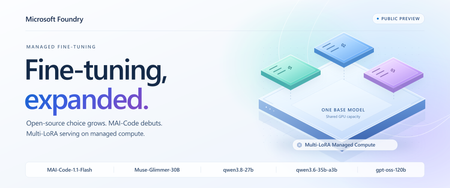
Foundry Fine-Tuning: open-source model expansion, MAI-Code, and shared multi-LoRA deployments
Today, Microsoft Foundry Managed Fine-Tuning expands its collection with four new open-source models and brings MAI-Code-1.1-Flash to Foundry resources, all in public preview. Alongside them, Multi-LoRA Managed Compute deployments enter public preview, letting compatible adapters share base-model weights and GPU capacity instead of each needing a separate serving allocation. More open-source choice for your next custom model Muse-Glimmer-30B, qwen3.8-27b, qwen3.6-35b-a3b and gpt-oss-120b join Foundry's managed open-source model collection, with supervised fine-tuning (SFT) support across all four. You can now bring your example-driven customization workflow to more backbones, choosing for tool-use reliability, coding efficiency, extended planning or reasoning capacity. Here's what each option brings: Model Why put it on your shortlist? Muse-Glimmer-30B Resilient tool orchestration: precise tool calls, interpreting unexpected results and recovering when a workflow goes off-script. qwen3.8-27b Extended research and planning: a dense backbone for sustained autonomous work that adapts to feedback from its environment. qwen3.6-35b-a3b Repository and frontend coding: a sparse mixture-of-experts backbone for navigating codebases and making coordinated changes. gpt-oss-120b Reasoning headroom: a higher-capacity alternative to the existing gpt-oss-20b option for difficult analytical and problem-solving tasks. Use SFT to tailor these models to your application's needs: Coding conventions: organization-specific library usage and preferred implementation patterns. Structured outputs: JSON schemas and extraction responses used by downstream applications. Domain workflows: product terminology, support tone, and classification or triage decisions. Distillation: use teacher-generated example responses to specialize a smaller model for your task. All four also support reinforcement fine-tuning (RFT) if your workflow calls for more advanced, reward-based optimization. MAI makes its fine-tuning debut in Foundry In addition to the open-source models above, we're introducing MAI-Code-1.1-Flash, the first Microsoft model available for Managed Fine-Tuning on Foundry resources. With the base model already available in GitHub Copilot, this compact, coding-focused model brings particular strengths in software development tasks. Its emphasis on responsiveness and token efficiency makes it a compelling backbone for repeated edit-build-test loops, where inspecting code, proposing edits and responding to compiler or test feedback all contribute to the task's latency and token budget. MAI-Code-1.1-Flash supports RFT only in this preview. Use it to target outcomes you can verify: a change that passes task-specific tests, correctly uses an internal software library, or satisfies your repository's acceptance checks. Build rewards around correctness and the required scope of the change, rather than whether an answer reproduces a reference patch. That leaves room for different valid solutions while keeping the customization anchored to your engineering requirements. Share hardware across adapters to reduce serving costs Previously, Foundry's managed fine-tuning outputs went to serverless pay-as-you-go deployments: input/output token charges plus hosting fees for each fine-tuned deployment. More traffic increased usage charges; more deployed variants added hosting costs. With Multi-LoRA adapter deployment on Managed Compute, compatible adapters share LoRA-enabled base-model deployment and GPU capacity. You pay an hourly rate for that hardware, rather than per-token inference charges, so multiple customizations can use one serving allocation instead of funding separate GPU footprints. Three task-specific qwen3.8-27b adapters, for example, can share a LoRA-enabled base deployment while remaining separately addressable. When their combined traffic fits, adding an adapter doesn't mean another hardware bill. You avoid duplicating base-model serving capacity and can improve utilization by pooling requests across variants, instead of paying separate serverless hosting fees for each one. The tradeoff is utilization: running hardware is billed even when idle, so size for aggregate concurrency and context lengths. More traffic can require additional capacity, while serverless remains an option for intermittent workloads on eligible models. The managed compute deployment path supports Muse-Glimmer-30B, both new Qwen models and gpt-oss-120b. Adapters must match the same base model and version; the base deployment needs a compatible LoRA-enabled template. Accelerator quota is required. Put the new models to work in your agents The expanded model collection helps you pick a backbone suited to your tasks; Multi-LoRA lets compatible customizations share serving capacity. These choices come together in agent applications, where different roles can need different model behavior. A coding assistant and a code-review agent, for example, can use separate adapters on the same supported OSS base model while sharing the hardware that serves them. Fine-tuning customizes model behavior, but the goal is to improve the agent application that uses it. Connect your tuned models to your agent applications in Foundry and evaluate them alongside the instructions, tools and workflows they'll use in production. That keeps customization focused on better application outcomes, not just better training results. Put these new capabilities behind your agent's next iteration. Get started with Foundry Fine-Tuning today.254Views2likes0CommentsImplementing Next Best Action (NBA) in Foundry with Microsoft-Decision-1
Imagine a sales rep opening their account list at the start of the day. One customer wants a product demo. Another has a larger potential deal, but its requirements may not match what your product can do. A third has asked you not to contact them for another week. A construction permit looks promising, but you are not even sure the applicant is the company in your CRM. You do not need another summary of the list. You need to know: what should I do next? That is the starting point for this demo: a next best action workbench for sales reps, built with Microsoft Foundry. It compares rules, GPT-4o, and Microsoft-Decision-1 against the same evidence. The accounts and evidence are synthetic; the hosted model responses are real. The interesting part is not which model wins. It is how the sales question changes, and what that reveals about the kind of decision support we need. A Bigger Deal Is Not Always the Next Call The first scenario puts four fictional sales motions in front of the rep: Apex: a $76,000 expansion. The buyer has requested a dispatch demo, and the capability exists today. Summit: a $210,000 cross-sell. The buyer wants capabilities that are not all established as currently supported. Coastal: a $158,000 expansion. The customer has explicitly paused sales contact until October 23. A similar-name permit applicant: a $3.1 million construction project, but an unverified account match and unknown software opportunity value. Sorting by the largest number would miss the point. A construction budget is not software revenue. A large opportunity does not justify promising a roadmap feature. A territory's quota pressure does not override a customer's request not to be contacted. So "next best action" is really two questions: which account deserves attention, and what kind of attention is appropriate? Contact now, clarify requirements, defer, and request human review are different outcomes. Doing nothing yet can be the correct one. Some of those decisions should not be left to a model. In this application, code enforces contact restrictions, evidence requirements, and identity checks before any model recommendation is accepted. Coastal's pause is a boundary, not a factor a model can trade against deal size. The unverified applicant needs review, not a confident sales approach. With those boundaries in place, we can compare how each method handles the remaining judgment. First, Try the Simple Answer The first version uses a transparent scoring formula: software opportunity value, territory quota shortfall, a requested meeting, and whether the buyer needs an unavailable capability. In the recorded routine comparison, all three methods agreed on the ranking and next actions. Rules needed no model tokens and were the simplest adequate implementation for that case. That is a useful outcome. If the relevant facts are already explicit and a few conditions capture the decision, adding a model may add latency and cost without adding useful capability. But consider what happens when "meeting requested" stops telling the whole story. The Same Meeting Request Can Mean Different Things The second scenario is a separate authored version of the synthetic evidence, not a claim that these accounts changed in real time. Apex now has the larger seller-entered estimate, but the meeting is exploratory: there is no established buying process or approved budget. Summit has a smaller funded pilot, completed requirements review, and near-term rollout readiness. Both have requested a meeting. Both need supported capabilities. To the fixed formula, those meeting requests look the same. It ranks Apex first. To a rep reading the context, a discovery invitation and a funded pilot are not equivalent signals. We could extend the rules with readiness fields and more conditions. That may be the right choice. But this is also where a different kind of model becomes interesting: one that interprets the evidence and returns a bounded decision rather than a paragraph. Where Decision Models Fit Models such as TypeSafe AI's Jev have brought attention to this decision-first approach. Supply the situation, define the possible answers, and receive structured choices or scores that software can use directly. TypeSafe calls this a System One model. Microsoft-Decision-1 brings that approach to Microsoft Foundry. Instead of asking it to write a recommendation, this application asks two questions for each eligible account: what action fits, and how much priority should it receive? The application defines the available actions and the priority scale. Decision-1 does not generate a written rationale. It returns a selected action and a score. Its API also supports yes/no probability questions. Jev is context for the emerging category, not a model tested in this comparison. In the recorded contextual runs, both Decision-1 and GPT-4o ranked Summit first, while rules ranked Apex first. One earlier run also showed a useful distinction: GPT-4o suggested outreach for Apex; Decision-1 suggested researching it further. The takeaway is not that models understand sales better than rules. It is narrower: the context changed the models' recommendation in a way this particular formula could not express. That is a reason to evaluate contextual judgment, not proof of better revenue outcomes. These are authored teaching cases, and "Summit first" is the intended case criterion, not a measured commercial result. Choosing the Account Is Only the Beginning Now change the question again. It is no longer just "should we pursue the funded pilot?" It becomes: Can we propose a rollout that fits the customer's deadline and budget? A selected action is no longer the complete answer. The rep needs a proposal: phases, dates, costs, and remaining budget. That is the third scenario. All methods receive the same operational facts, but only the generative adapter is implemented to produce a plan. Rules and Decision-1 remain explicitly decision-only. GPT-4o uses a calculation tool for the budget, then returns a structured schedule and proposal. The successful recorded plan finished on October 22, cost $23,200, and left $300 of budget. Application code independently checked phase order, business-day durations, non-overlap, costs, deadline assessment, and supplied references. The path to that result matters. Earlier model attempts produced correct schedules but incorrect costs, and the application rejected them. The fix was to provide an arithmetic tool, not weaken the checks or substitute a prewritten answer. This is a role for generation alongside deterministic tools. It is not a claim that only an LLM can solve a schedule: a purpose-built scheduler could solve these fixed constraints too. It shows why choosing an action and producing a usable plan are different tasks. The Use Case Gives Us the Framework We started with one sales question, but uncovered three kinds of work: What the rep needs A mechanism to consider What still belongs in code An action from explicit, structured facts Rules The conditions, formula, and permitted actions. A contextual choice within known options A bounded decision model, compared with a structured-output LLM Evidence checks, action boundaries, and output validation. A proposed plan or other generated artifact A generative LLM with tools, or a purpose-built solver where appropriate Calculations, constraint checks, and approval before action. This is why I find "rules, bounded decisions, and generation" more useful here than simply "deterministic versus non-deterministic." Repeatability alone does not tell us whether a recommendation is useful or correct. The required output and the cost of an error tell us more. These mechanisms can coexist in one workflow. Keep hard boundaries deterministic. Use contextual judgment where it adds value. Use generation when you need a generated artifact. Microsoft Agent Framework coordinates the comparison: What This Demo Does, and Does Not, Show The comparison is deliberately small and inspectable. Every method receives the same prepared evidence; expected teaching outcomes stay out of model input. In the recorded decision-only runs, Decision-1 had lower measured branch time and estimated token cost than GPT-4o. Those are single-run observations, not a general speed, quality, or savings benchmark. The planning case performs additional work and is not a like-for-like latency comparison. The scenarios use a fixed simulation time of October 15, 2026, at 12:00 UTC. The primary demo retrieves versioned synthetic snapshots from Azure AI Search, not live CRM or live IQ-agent responses. It does not turn historical records into fresh facts. The workbench opens editable synthetic drafts; it sends no outreach and makes no CRM changes. "Best" therefore means a suggested next action under the supplied evidence and rubric, not a proven optimal action or a prediction of sales success. A valid response shape or evidence reference does not establish a correct judgment. Production use would need representative held-out evaluation, verified access controls, and appropriate human approval. The practical starting point is simple: take a decision your users already make, define the available actions, identify the non-negotiable boundaries, and compare the simplest adequate implementation with the alternatives. Let the use case earn the complexity. Try the Workbench The decision-lead-agent-demo repository contains the local workbench and the three scenarios. Follow the local setup instructions to reproduce the comparison with approved model deployments and credentials. Hosted calls can incur charges. Start with the routine case, where all three may agree. Then inspect what changes in the contextual case, and what extra work the planning task requires. The question to carry into your own application is not "where can I add AI?" It is "what does the next action require that my current approach cannot provide?" Technical Walkthrough: The Code Behind the Comparison The story above does not require reading the implementation. For builders, the following sections retain the exact rules and invocation code, pinned to commit d1a16a5. Microsoft Agent Framework runs each method against an isolated copy of the same prepared snapshot. Shared checks restrict actions before the decision and validate the result afterward. Invalid results are rejected rather than repaired and reported as successes. Snapshot fingerprints verify comparable inputs; evidence-reference checks verify membership, not the truth of a model's judgment. 1. The Rules Baseline The baseline is intentionally transparent. It weights capped software opportunity value at 30%, proportional territory quota shortfall at 20%, a requested meeting at 30%, and no unavailable-capability requirement at 20%. It scales the result to 0-3. Here is the complete rules runner from the implementation at the demo commit. The territory-specific branch supports the separate live research mode; the synthetic comparison uses the opportunity formula. async def rules_runner(snapshot: dict[str, Any]) -> dict[str, Any]: suggestions = [] for candidate in snapshot["candidates"]: signals, policy = candidate["buyingSignals"], candidate["policy"] performance = candidate["territoryPerformance"] gap = max(0, performance["quota"] - performance["revenue"]) / performance["quota"] score = ( 30 * min((candidate["opportunityAmount"] or 0) / 250000, 1) + 20 * min(gap, 1) + 30 * (signals["meetingRequested"] is True) + 20 * (signals["requiresUnavailableCapability"] is False) ) if snapshot.get("scope") == "territory-prospecting": score = 100 * min(gap, 1) action = "outreach" if signals["requiresUnavailableCapability"] is False and signals["meetingRequested"] is True else "research" if not {"outreach", "research"}.intersection(policy["allowedActions"]): action, score = ("defer" if "defer" in policy["allowedActions"] else "cannot_tell"), 0 suggestions.append({ "candidateId": candidate["candidateId"], "action": action, "priority": round(score * 3 / 100, 4), "evidenceIds": [item["evidenceId"] for item in candidate["evidence"]] + [item["evidenceId"] for item in snapshot["productEvidence"]], "basis": (f"Territory research only: proportional quota shortfall {gap:.2f}; no inferred buyer intent." if snapshot.get("scope") == "territory-prospecting" else f"Rules: value {min((candidate['opportunityAmount'] or 0) / 250000, 1):.2f}; quota gap {gap:.2f}; meeting {signals['meetingRequested']}; unavailable capability {signals['requiresUnavailableCapability']}."), }) return validate_recommendations({"status": "ok", "model": "Deterministic rules v1", "suggestions": suggestions, "usage": None, "inferenceCostUsd": 0}, snapshot) These weights are demonstration heuristics, not validated sales economics. Their advantage is that their behavior is easy to inspect. Their limitation is equally concrete: the formula does not read whether a meeting is exploratory or follows an approved, funded pilot. That limitation is not inherent to all rules systems. We could add structured readiness fields or more rules. The question is whether maintaining that logic is preferable to using a model for the contextual part. 2. Invoke Microsoft-Decision-1 Decision-1 is not a drop-in model-name change on the chat endpoint. It uses a different request contract: POST <resource-origin>/providers/microsoft/v1/systemone The request contains the deployment name, shared state, and questions. The following is the complete adapter method from the model adapters. Its surrounding class supplies the HTTP transport; policy_exclusions, ACTIONS, and token_cost are repository helpers. async def decision1(self, snapshot): rubric = snapshot.get("rubric", RUBRIC) priority_criteria = (["No research priority or review required", "Low research priority", "Moderate research priority", "High research priority"] if snapshot.get("scope") == "territory-prospecting" else ["Not actionable or review required", "Exploratory", "Timely but uncertain", "Ready and timely"]) questions, suggestions = {}, policy_exclusions(snapshot) for candidate in snapshot["candidates"]: candidate_id = candidate["candidateId"] allowed = candidate["policy"]["allowedActions"] if not {"outreach", "research"}.intersection(allowed): continue questions[f"action_{candidate_id}"] = { "type": "choice", "instructions": f"{rubric} Choose the next action for {candidate_id}.", "criteria": {action: ACTIONS[action] for action in allowed}, } questions[f"priority_{candidate_id}"] = { "type": "score", "instructions": f"{rubric} Rate attention priority for {candidate_id}.", "criteria": priority_criteria, } if not questions: return {"status": "ok", "model": "No model call: all candidates policy-gated", "suggestions": suggestions, "usage": None, "inferenceCostUsd": 0} response = await self.transport( os.environ["DECISION1_ENDPOINT"].rstrip("/") + "/providers/microsoft/v1/systemone", {"model": os.environ["DECISION1_DEPLOYMENT"], "state": snapshot, "questions": questions}, ) answers = response["answers"] for candidate in snapshot["candidates"]: candidate_id = candidate["candidateId"] if not {"outreach", "research"}.intersection(candidate["policy"]["allowedActions"]): continue action_answer, score_answer = answers[f"action_{candidate_id}"], answers[f"priority_{candidate_id}"] if action_answer.get("type") != "choice" or score_answer.get("type") != "score": raise ValueError("Unexpected Decision-1 answer type") suggestions.append({"candidateId": candidate_id, "action": action_answer["choice"], "priority": score_answer["score"], "evidenceIds": supplied_ids(candidate, snapshot), "basis": "Supplied evidence references; Decision-1 provides no written rationale."}) return {"status": "ok", "suggestions": suggestions, "usage": response.get("usage"), "model": response.get("model", os.environ["DECISION1_DEPLOYMENT"]), "inferenceCostUsd": token_cost(response.get("usage"), "DECISION1")} Two details matter. First, each question identifies the candidate in its instructions, not only in its dictionary key. Second, action criteria come from the application's policy-allowed set. Related action and priority questions share one request and one state. The four score levels run from 0 to 3; a returned score can fall between levels. The demo consumes the selected action and score, not the full probability distributions. The evidence IDs attached here are supplied references, not model-generated citations or a written explanation. 3. Invoke GPT-4o With Structured Output The LLM receives the same snapshot and qualitative rubric, but uses Chat Completions with a strict JSON schema. The basic comparison asks for decisions, not a persuasive paragraph. That gives the LLM a bounded task too, rather than making it generate an explanation that Decision-1 cannot provide. These are exact excerpts from HostedModels.llm, not a standalone script. The method derives eligible_ids from policy and defines this schema: item_schema = { "type": "object", "additionalProperties": False, "properties": {"candidateId": {"type": "string", "enum": eligible_ids}, "action": {"type": "string", "enum": ["outreach", "research", "cannot_tell"]}, "priority": {"type": "number"}, "evidenceIds": {"type": "array", "items": {"type": "string"}}}, "required": ["candidateId", "action", "priority", "evidenceIds"], } schema = {"type": "object", "additionalProperties": False, "properties": {"suggestions": {"type": "array", "items": item_schema}}, "required": ["suggestions"]} For the decision-only task, plan_instruction is "Do not generate an explanation." The payload and endpoint are: payload = { "model": os.environ["LLM_DEPLOYMENT"], "messages": [{"role": "system", "content": rubric + f" Return JSON suggestions ONLY for these eligible candidate IDs: {json.dumps(eligible_ids)}. The application supplies excluded candidates separately. Use candidateId, action, priority and evidenceIds. " + plan_instruction}, {"role": "user", "content": json.dumps(snapshot)}], "response_format": {"type": "json_schema", "json_schema": {"name": "seller_priorities", "strict": True, "schema": schema}}, } endpoint = os.environ["LLM_ENDPOINT"].rstrip("/") + "/openai/v1/chat/completions" After any optional planning-tool interaction, the actual call and parsing are: response = await self.transport(endpoint, payload) responses.append(response) result = json.loads(response["choices"][0]["message"]["content"]) The schema constrains response structure. Shared application validation still checks policy, candidate coverage, score bounds, and evidence references. Structured output is not a substitute for those checks. 4. Run the Demo Locally To try the story yourself, clone the demo repository and open it in WSL. You need Node.js/npm compatible with the project, Python 3.13, and uv. For the full comparison, you also need access to existing GPT-4o and Microsoft-Decision-1 deployments and an Azure AI Search index containing the synthetic snapshots. Starting the local app does not provision those services. Configure your environment. Create a root .env using the repository's .env.example as a template. Set these values for your own resources: Setting What to provide LLM_ENDPOINT / LLM_DEPLOYMENT Your GPT-4o resource origin and deployment name. DECISION1_ENDPOINT / DECISION1_DEPLOYMENT Your Decision-1 resource origin and deployment name. DECISION_RECORDS_SEARCH_ENDPOINT Your Azure AI Search service endpoint. DECISION_RECORDS_SEARCH_INDEX decision-demo-snapshots-v1, populated with the repository's canonical records. Model endpoints must be HTTPS resource origins, not project URLs or complete API paths. Sign in with a local Azure developer identity permitted to invoke both models and read the Search documents; the backend uses that identity, not the simulated UI persona. No credentials belong in the browser configuration. Follow the snapshot-seeding instructions to populate your own index before comparing. Setting its name alone does not create or load it. The seeding tool offers a credential-free preview; uploading requires approved access and index/document-write permissions. The focused three-tab UI retrieves these stored synthetic records and does not silently substitute local fixtures if retrieval fails. You do not need to deploy the separate IQ agents for this path. Start the comparison backend. From the repository root in a WSL terminal: uv venv --python 3.13 .venv uv pip install --python .venv/bin/python -r agent/requirements-workflow.txt npm ci npm run workflow The backend listens on http://127.0.0.1:8008. Restart it after changing environment settings. Start the workbench. In a second WSL terminal, from the same repository root: npm run dev Open http://localhost:5175/. If that port is occupied, run npm run dev -- --port 5176 instead and open http://localhost:5176/. Use the development server, not vite preview: the development server forwards comparison requests to the local backend. Walk through the three scenarios. Select a scenario tab, inspect the account context, then press Compare approaches. Switching tabs does not itself call a model. Start with the routine case, move to the discovery-versus-readiness case, and finish with the rollout plan. Compare the returned actions and ranks, then inspect branch times, token estimates, and the plan's independent checks. If a branch is unavailable or fails, treat that as an incomplete comparison, not a model recommendation. Hosted inference and Search can incur charges. The deployment used for the recorded demo permits one Decision-1 request per minute, so allow at least a minute between comparisons on that deployment; your own limits may differ. This is a local development app: keep the backend on loopback and do not expose it publicly. 5. Measurement Details The repository records these hosted browser observations from October 16, 2026. Each comparison confirmed matching prepared snapshot fingerprints across branches. Scenario Observed result Branch time / estimated inference token cost Routine, 06:06 UTC All methods agreed on ranks and actions. Rules: 0.13 ms / $0; GPT-4o: 3,364.12 ms / $0.003690; Decision-1: 2,570.10 ms / $0.000110418. Contextual, 06:07 UTC Both models ranked Summit first; rules ranked Apex first. GPT-4o: 6,509.38 ms / $0.003795; Decision-1: 3,619.02 ms / $0.000115248. Decision plus plan, 06:04 UTC Tool-assisted GPT-4o plan passed independent checks. Other adapters supplied no plan. GPT-4o: 7,386.28 ms / $0.016510, including both requests. These are single-run observations on deliberately authored synthetic cases, not latency distributions, a held-out accuracy study, or a general savings claim. A future run can produce different timings or decisions. GPT-4o is the existing general-purpose baseline, not an exhaustive search for the best alternative model. Costs use returned token usage and configured retail rates. Cached GPT-4o input is priced separately without double-counting. Estimates exclude Search, IQ retrieval, hosting, taxes, and contract-specific adjustments; $0 for rules means no inference token charge, not zero operating cost. Microsoft's launch pricing lists Decision-1 at $0.042 per million input tokens with free output. Recheck current pricing, deployment availability, and preview lifecycle before reproducing the experiment. Before relying on model scores, evaluate representative held-out cases, paraphrases, and option ordering. Measure abstentions, invalid outputs, failures, latency distributions, and cost per successfully validated task. A priority score is not a probability of closing a sale, and matching actions or rankings does not imply calibrated score equivalence. For model setup and the current API contract, see Deploy and use Microsoft-Decision-1 in Microsoft Foundry.151Views0likes0Comments
Building a Self-Updating RAG System: Handling Document Uploads, Updates and Deletions
The Hidden Challenge of Production RAG Imagine your organization has deployed an AI assistant to answer questions about employee policies. An employee asks, “How many days of annual leave am I entitled to?” The assistant responds confidently: “15 days.” There is just one problem. The company updated its policy last week. Employees are now entitled to 20 days. The updated PDF was uploaded successfully. The storage service is healthy. The search index is responding. The language model is generating answers without errors. Yet the answer is wrong. This is a different kind of production failure. Nothing appears to be broken at the infrastructure level. The failure lies in the relationship between the source document and the information the AI retrieves. Retrieval-Augmented Generation (RAG) systems depend on external knowledge to ground their responses. But that knowledge is not static. Policies change, contracts get revised, product documentation evolves, and outdated documents are removed. When the underlying documents change, the associated chunks, embeddings, metadata, and search-index entries must be managed accordingly. Otherwise, the system can continue generating plausible answers from information that is no longer valid. Building a RAG pipeline is a retrieval problem. Keeping it correct as data changes is a data lifecycle engineering problem. In this article, we will design a self-updating RAG system that handles document creation, updates, and deletion while addressing asynchronous processing, version consistency, failed jobs, and stale retrieval results. The goal is not simply to index documents automatically. It is to make sure that the right version of the right document is available to the right user when a query is executed. Understand the Problem Before Designing the Architecture A basic RAG pipeline is relatively straightforward: Load a document. Extract its text. Split the text into smaller chunks. Generate an embedding for each chunk. Store the chunks and embeddings in a searchable index. Retrieve relevant chunks when a user asks a question. Pass the retrieved context to a language model to generate an answer. This works well when the document collection is relatively static. The difficulty begins when the source data changes after indexing. Consider three common scenarios. Scenario A: A document is uploaded A new policy is added to the knowledge base. The system must process it and make its content searchable. Until indexing finishes, the document may not be available to the chatbot. Scenario B: A document is updated The original policy allows 15 days of annual leave. A revised policy allows 20 days. If the new version is indexed without correctly deactivating the old version, both versions may appear in search results. The language model may then select the wrong passage or combine conflicting information. Scenario C: A document is deleted An administrator removes a document from the application. However, deleting the original PDF from storage does not automatically delete the corresponding records from Azure AI Search. The content may remain searchable until its indexed chunks are removed. Azure AI Search document deletion itself can also take time to be reflected in index statistics. Microsoft Learn: Delete documents in Azure AI Search These scenarios reveal an important design principle: The source document, its metadata, the background processing jobs, and the search index must be treated as parts of one logical lifecycle—even though they are separate systems. We need a design that can handle failures between these systems without exposing outdated or unauthorized content. Design the System Around Clear Responsibilities Rather than making the upload API responsible for every operation, we can separate the system into a document management path, an asynchronous processing path, and a query path. The Proposed Architecture The design uses the following components: Component Responsibility Azure Blob Storage Stores the original document files Azure Cosmos DB Maintains document metadata, versions, and lifecycle state Azure Service Bus Queues ingestion and deletion jobs Background worker Extracts text, creates chunks, generates embeddings, and updates the index Microsoft Foundry Provides the models used for embedding generation and response generation Azure AI Search Stores searchable document chunks, metadata, and vectors FastAPI Exposes document management and chat APIs Microsoft Agent Framework Supports agentic query workflows when multi-step reasoning or tool use is required The background worker can be implemented as a separate Python service or another suitable compute component. It does not have to be part of the FastAPI process. Why separate these responsibilities? Suppose a user uploads a 100-page contract. The application may need to extract text, split thousands of characters into chunks, generate embeddings, and send multiple indexing requests. Performing all of that synchronously inside the upload request increases latency and makes the API vulnerable to timeouts. Instead, FastAPI accepts the request, persists the document and its metadata, and arranges for the work to be processed asynchronously. The worker performs the expensive operations independently. This allows ingestion to scale separately from query traffic and makes retries easier to manage. The query path remains separate: it retrieves eligible, relevant chunks and uses them to ground the model's response. Establish a source of truth Azure Cosmos DB should hold the authoritative lifecycle metadata in this design. Azure AI Search is the retrieval index, not the authority on whether a document is currently active. For example, a document record might look like this: { "id": "policy-123", "documentId": "policy-123", "currentVersion": 2, "indexedVersion": 1, "status": "PROCESSING", "blobPath": "policies/leave-policy.pdf" } Here, version 2 is the desired version, but version 1 is still the last successfully indexed version. The application must not assume that the latest upload has already become searchable simply because the metadata record has been updated. This distinction between the desired version and the indexed version is central to reliable lifecycle management. Implementing Document Uploads A reliable upload operation involves more than storing a file and sending a message to a queue. It must establish a durable record of the document, identify the version being processed, and ensure that background processing can be retried safely. Step 1: Accept and persist the document When a client uploads a document, FastAPI validates the request, checks the user's permissions, and stores the original file in Azure Blob Storage. The application then creates or updates the document metadata in Cosmos DB. At this stage, the document can be marked as PROCESSING until the ingestion pipeline completes. Step 2: Schedule background processing The system creates an ingestion job containing enough information for the worker to locate the source and determine exactly which version to process. For example: { "operationId": "op-789", "operation": "INGEST", "documentId": "policy-123", "documentVersion": 2, "blobPath": "policies/leave-policy-v2.pdf" } The worker should process the specified version rather than blindly reading whatever file happens to exist at a mutable storage path. For systems that overwrite the same blob path, use blob versioning, an immutable version-specific path, or another mechanism that ensures the worker reads the intended content. Step 3: Extract, chunk, and embed The worker downloads the appropriate document and extracts its text. The extracted text is divided into chunks. Each chunk should carry identifiers that connect it to its parent document and version. For example: { "id": "policy-123-v2-chunk-001", "documentId": "policy-123", "documentVersion": 2, "chunkNumber": 1, "content": "Employees are entitled to 20 days of annual leave." } The worker generates an embedding for each chunk and writes the chunk, its metadata, and its vector to Azure AI Search. The exact index schema depends on the retrieval strategy, embedding dimensions, filtering requirements, and whether hybrid search is used. Step 4: Mark the version as indexed After the worker confirms that all required indexing operations succeeded, it updates the document metadata to record the indexed version and processing status. For example: { "id": "policy-123", "currentVersion": 2, "indexedVersion": 2, "status": "ACTIVE" } This update must be conditional on the document still being at version 2. If a newer version has already been uploaded, the older job must not mark itself as the current version. Why idempotency matters Distributed systems can deliver the same job more than once. A worker may finish indexing but fail before acknowledging the queue message. The message can then be delivered again. If every attempt creates new chunk IDs, duplicate content may accumulate in the index. A practical solution is to derive chunk IDs deterministically from the document ID, version, and chunk identifier. Reprocessing the same version then targets the same index records instead of creating a new set each time. This does not eliminate every failure mode, but it makes repeated indexing much safer. Azure Service Bus supports duplicate detection for eligible tiers, but queue-level duplicate detection is not a substitute for idempotent worker logic. Microsoft Learn: Duplicate detection Updating Documents Without Serving Stale Content Document updates are the most interesting part of the lifecycle because they introduce a consistency problem. Imagine the current leave policy is version 1, allowing 15 days. An administrator uploads version 2, allowing 20 days. The worker starts processing version 2, but embedding generation takes time. Meanwhile, users continue querying the application. What should those users see? There are two common strategies. The right choice depends on whether the system prioritizes availability or strict freshness. Strategy A: Make the new version active after indexing succeeds In this approach, the existing active version remains available while the new version is processed. The workflow is: Create version 2 and mark it as processing. Extract text and generate embeddings for version 2. Index all required version 2 chunks. Verify indexing success. Atomically update the authoritative metadata to make version 2 active. Clean up version 1's indexed chunks asynchronously. This minimizes the time during which the document is unavailable. However, it means that version 1 can remain available while version 2 is being processed. That may be acceptable for some knowledge bases but inappropriate for policies that must become effective immediately. Strategy B: Disable the old version as soon as an update is accepted For high-sensitivity documents, the application can immediately mark the old version as ineligible for retrieval. It then processes the new version and activates it only after successful indexing. The trade-off is that the document may temporarily have no eligible version. The application should return a clear message or use an approved fallback rather than silently serving obsolete information. Prevent old jobs from overwriting new versions Consider this sequence: Version 2 starts processing. Version 3 is uploaded before version 2 finishes. Version 3 finishes indexing first. Version 2 finishes later and attempts to update the metadata. Without version checks, the late version 2 job could incorrectly reactivate stale content. The worker must therefore use conditional updates or optimistic concurrency checks against the authoritative document version. A job may complete its indexing work, but it must not activate its version unless it is still eligible to do so. Handle the lack of a cross-service transaction Cosmos DB and Azure AI Search do not participate in a single distributed transaction in this architecture. A metadata update can succeed while an indexing request fails. An indexing request can succeed while the subsequent metadata update fails. The system should account for these partial failures using: Explicit lifecycle states. Conditional version updates. Retryable and idempotent operations. Periodic reconciliation between metadata and indexed records. The important engineering principle is to make incomplete operations detectable and recoverable, rather than assuming every multi-step workflow succeeds atomically. Deleting Documents Safely Deletion requires special treatment because removing a document from the source does not automatically remove its indexed content. More importantly, waiting for physical index cleanup before preventing retrieval creates a window in which content that should no longer be available may still be returned. Step 1: Make the document ineligible for retrieval When an authorized deletion request arrives, the application updates the authoritative metadata to indicate that the document is being deleted or has been logically deleted. The retrieval path must check that status before using retrieved content. For sensitive documents, this check must happen before the content is added to the LLM context. Merely hiding a document in the user interface is insufficient. Step 2: Schedule physical cleanup The application enqueues a deletion job that identifies the document and all indexed records associated with it. The worker queries or otherwise identifies the corresponding chunk keys and deletes those records from Azure AI Search. The deletion operation should be idempotent. Retrying a deletion for an already-removed chunk should not cause the workflow to fail unnecessarily. Step 3: Verify cleanup The worker checks whether the targeted records have been removed and records the cleanup result. If an operation fails, the job should be retried according to a defined policy. Jobs that continue failing should be sent to a dead-letter queue for investigation and controlled recovery. Azure AI Search supports deleting indexed documents by their document keys. Its documentation also describes how to verify deletion and why index statistics may not update immediately. Microsoft Learn: Delete documents A simplified FastAPI deletion endpoint The following example illustrates the API boundary. The helper functions represent application-specific implementations. from fastapi import FastAPI, HTTPException app = FastAPI() @app.delete("/documents/{document_id}") async def delete_document(document_id: str): document = await get_document_metadata(document_id) if document is None: raise HTTPException( status_code=404, detail="Document not found" ) # Must enforce authorization and use a # concurrency-safe lifecycle transition. await mark_document_deleting(document_id) # The job must be published reliably. await enqueue_deletion_job( document_id=document_id, document_version=document["currentVersion"] ) return { "documentId": document_id, "status": "DELETING" } This is an illustrative example, not a complete production implementation. In particular, the metadata transition and message publication must be coordinated reliably. One approach is the transactional outbox pattern: write the lifecycle change and an outbox event in the same Cosmos DB transactional batch when the data model and partitioning allow it, then publish the event asynchronously. The publisher can retry without losing the intent to schedule cleanup. Deletion must also account for in-flight queries Suppose a query retrieves a document's chunks just before the deletion request is processed. The query might still hold those chunks in memory even after the document is marked deleted. For stricter deletion guarantees, the application needs a defined policy for in-flight requests, cache invalidation, and authorization checks immediately before content is sent to the model. If the requirement is that no response may contain content after a deletion takes effect, that guarantee must explicitly cover requests already in progress. Physical cleanup and retrieval eligibility are separate responsibilities. Both matter. Coordinate Lifecycle Changes Reliably Once ingestion and deletion run asynchronously, the queue becomes part of the system's correctness model. A production worker should not assume that each message is delivered exactly once or that messages for a particular document always finish in order. Design for at-least-once processing A practical worker lifecycle is: Receive a message using a lock-based delivery mode. Validate the document ID, version, and operation. Check whether the operation is still eligible to run. Perform idempotent indexing or deletion. Update lifecycle metadata conditionally. Acknowledge the message only after successful processing. If the worker fails before acknowledging the message, the message may be delivered again. That is expected behavior and should be handled by the design. Add retry and dead-letter policies Not all failures should be treated equally. Transient network errors or throttling may succeed after a delay. Invalid documents, unsupported file formats, and persistent schema mismatches may require manual investigation. The system should use bounded retries with appropriate backoff, record meaningful failure details, and route repeatedly failing messages to a dead-letter queue. Use reconciliation as a safety net Even with retries, the system needs a way to detect inconsistencies that escaped the normal workflow. A reconciliation job can compare authoritative metadata against indexed document versions and lifecycle states. It can identify cases such as: A document marked active whose current version is not fully indexed. Chunks belonging to an obsolete version. Search records for a logically deleted document. An operation that remained in a processing state beyond its expected duration. Reconciliation should repair only states it can safely determine. It should not reactivate a version simply because its chunks exist in the index. For applications using Azure Cosmos DB change feed, document metadata changes can also drive incremental background processing. The change feed captures inserts and updates in its standard latest-version mode; capturing deletions requires selecting and configuring an appropriate supported mode or using explicit lifecycle events. Microsoft Learn: Cosmos DB change feed Where Microsoft Agent Framework Fits A common mistake is to assume that every part of an agentic RAG application should be implemented as an AI agent. Document uploads, version transitions, embedding generation, and index deletion are predictable operations with explicit success and failure conditions. These are generally best implemented with conventional application logic and background workers. Microsoft Agent Framework becomes useful when the query itself requires multi-step reasoning, tool selection, or orchestration. For example, a user might ask: “Compare the current leave policy with the previous version and explain the changes that affect employees.” An agent could use approved tools to retrieve the current policy and the permitted historical version, compare the relevant passages, and generate an evidence-based explanation. The application must still control which documents and versions are eligible for retrieval. The agent should not independently decide whether a deleted document is authorized for use. This distinction is important: deterministic workflows protect data integrity; agentic workflows help solve tasks that benefit from reasoning and tool use. Microsoft Agent Framework provides both agent and workflow capabilities, allowing developers to choose an appropriate orchestration model for the task. Microsoft Agent Framework documentation Production Readiness: What Should We Measure? A pipeline that successfully indexes a document once is not necessarily production-ready. The system needs observable lifecycle states and measurable recovery behavior. Area What to validate Ingestion Can a failed upload or indexing job be retried safely? Idempotency Does processing the same document version twice create duplicate records? Version consistency Can a delayed job reactivate an older version? Deletion Can logically deleted content enter the LLM context? Authorization Are tenant and document-level permissions enforced during retrieval? Recovery Can reconciliation detect and repair partial failures? Observability Can operators identify stuck jobs, indexing failures, and cleanup delays? Performance How long does it take for an accepted update to become searchable? Useful operational metrics include ingestion success rate, queue age, indexing latency, retry counts, dead-letter queue depth, time spent in each lifecycle state, and deletion cleanup latency. Also test race conditions deliberately. Upload a new version while an earlier job is still running. Delete a document while a query is in flight. Simulate an indexing failure after metadata has been updated. Restart a worker after it has indexed content but before it acknowledges the message. These tests expose the problems that a happy-path demonstration will not reveal. Bringing It All Together Keeping a RAG system accurate is not simply a matter of re-running embeddings whenever a file changes. It requires a deliberate lifecycle design that connects source documents, versioned metadata, asynchronous processing, search-index operations, and retrieval-time authorization. Azure Blob Storage can preserve the source documents, Cosmos DB can track authoritative lifecycle state, Service Bus can distribute background work, and Azure AI Search can provide retrieval. Microsoft Foundry supplies the models, while Microsoft Agent Framework can support the parts of the application that genuinely benefit from agentic orchestration. The architecture becomes reliable when it assumes that failures will happen: messages may be repeated, jobs may finish out of order, index operations may partially succeed, and cleanup may take time. Version checks, idempotent operations, explicit lifecycle states, reliable event publication, and reconciliation turn those failure modes into manageable engineering problems. The objective is not merely to keep the index populated. It is to ensure that every answer is grounded in information that is current, eligible, and authorized for the user who asked the question. Further Reading Azure AI Search: Delete documents Azure Cosmos DB: Change feed Azure Service Bus: Duplicate detection Microsoft Agent Framework I'd be interested to hear from engineers building production RAG systems: how do you coordinate document updates and deletions across your source of truth and search index?193Views0likes0CommentsTransforming Enterprise Documents into AI Knowledge with Agentic RAG
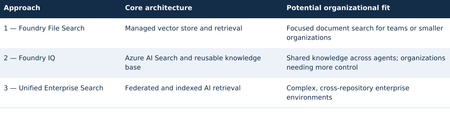
TECHNICAL RESEARCH PAPER Research Disclaimer This article is a technical research paper intended solely for educational, research, and illustrative purposes. It reflects the author’s personal technical perspectives. All concepts, architectural designs, diagrams, and implementation approaches are provided “AS IS” for technical exploration and review, not as production-ready development guidance. Organizations considering implementing these approaches should consult their internal software development standards, enterprise architecture teams, corporate security policies, and governance requirements. Any production implementation must undergo appropriate end-to-end architectural, security, privacy, compliance, and responsible AI or ethics reviews, along with necessary testing and organizational approvals before deployment. Enterprise Agentic Search Master Research Plan and Technical Architecture | Three Independent Agentic RAG Approaches Using Microsoft Technologies Three independent architectural approaches — overview 1. Executive summary This research paper explores three independent approaches to transforming enterprise documents and knowledge repositories into AI-powered search experiences using Agentic Retrieval-Augmented Generation (RAG), Microsoft Foundry, and ASP.NET Core. Organizations can evaluate and adopt any one approach independently according to their business requirements, organizational size, document volume, technical complexity, available resources, and security considerations. Approach 1 — Microsoft Foundry File Search: A streamlined option with managed ingestion, vector storage, retrieval, and an optional ASP.NET Core/Blazor conversational web interface. It may be a sufficient standalone solution for focused document-search needs. Approach 2 — Microsoft Foundry IQ: A knowledge-centric option built around Azure AI Search and reusable knowledge bases, suitable for applications that need more configurable retrieval or shared knowledge across authorized agents. It does not require Approach 1 to be implemented first. Approach 3 — Unified Enterprise Agentic Search: A broader design combining federated and indexed retrieval across approved enterprise repositories, for organizations with extensive integration, authorization, governance, and cross-source search requirements. These are alternatives, not mandatory sequential stages. Approaches 1 and 2 may each be complete solutions. Organizations considering Approach 3 may optionally pilot Approach 1 or 2 to assess retrieval quality, citations, user experience, and operational readiness, but neither pilot is a prerequisite. The examples are research illustrations, not production-ready implementation instructions. 2. Three independent architectural approaches Select an approach based on organizational needs rather than following a required progression: Optional evaluation path: An enterprise exploring Approach 3 can run a focused File Search or Foundry IQ POC first. A small organization may stop at Approach 1 or 2 if its requirements are met. 3. How documents become AI-searchable For indexed sources, the broad workflow is similar across managed File Search and Foundry IQ-backed Azure AI Search, although ingestion details, formats, and service capabilities differ. Federated retrieval may query existing repositories without creating new embeddings. Indexed document processing and agent retrieval workflow The original document is not replaced by vectors alone: searchable text and source references are retained. Scanned PDFs and images may need OCR or multimodal processing. 3.1 Example: what happens to one PDF? Source: IIS-AppPool-Troubleshooting.pdf. Example passage: “If an IIS application pool repeatedly terminates, examine WAS events and investigate rapid-fail protection.” Illustrative document chunk, vector, and metadata A query such as “Why does my IIS application pool keep crashing?” may retrieve the relevant passage through semantic similarity. The agent uses the readable retrieved content to explain the issue and cite its source. Architecture note: This paper targets the new Microsoft Foundry Agent Service (Responses API-based), not classic Foundry agents or legacy Assistants API implementations. 4. Approach 1 — Microsoft Foundry File Search 4.1 Objective Explore a potentially standalone AI-powered search solution over 20 approved technical documents with limited ingestion configuration. Evaluate one Foundry File Search-enabled agent through the built-in Playground and/or a custom conversational web application. 4.2 Architecture flow Approach 1 — Microsoft Foundry File Search architecture 4.3 What is a managed vector store? A managed vector store exposes searchable passages, embeddings, and metadata while abstracting ingestion and retrieval. In standard Foundry Agent Service setup, files can remain in customer-managed Azure Storage and Azure AI Search can back the vector store; basic setup uses Microsoft-managed resources. Where supported, multiple agents in the same project can reference the same vector store ID through File Search tool configuration, subject to API and permission boundaries. 4.4 User experience options Option 1: Use the Foundry Agent Playground to ask questions, inspect citations, and evaluate multi-document synthesis. Option 2: Build an ASP.NET Core/Blazor portal using supported APIs/SDKs with multi-turn chat, streaming where supported, clickable citations, error handling, and Microsoft Entra ID sign-in. Keep privileged credentials on the server. 4.5 Illustrative implementation and deliverables • Prepare 20 approved documents and a fixed question set. • Configure a compatible Foundry project, model, agent, and File Search tool. • Upload files; verify managed processing and retrieval quality. • Test in the Playground; optionally implement and test the Blazor portal. • Evaluate answer grounding, citations, latency, ingestion behavior, and costs. Possible standalone deliverable: File Search agent, managed vector store, working selected interface(s), and an evaluation report. The custom portal is optional; Approach 2 is not required. 5. Approach 2 — Microsoft Foundry IQ 5.1 Objective Evaluate a reusable knowledge-base architecture with Azure AI Search-backed retrieval. This is an independent option: it can be built directly without first implementing Foundry File Search. For a comparative research exercise, the same 20 documents and questions may be reused. 5.2 Architecture flow Approach 2 — Microsoft Foundry IQ architecture 5.3 What is an Azure AI Search index? An Azure AI Search index is a structured, searchable collection of content extracted from enterprise data sources, including documents, websites, and other supported repositories. It stores searchable text, vector embeddings, metadata, and source references, enabling keyword, vector, hybrid, and semantic search to retrieve relevant information efficiently. During ingestion, documents can be processed, divided into smaller chunks, and converted into vector embeddings that represent their semantic meaning. When a user submits a natural-language question, Azure AI Search can combine keyword matching with vector similarity and semantic ranking to identify relevant passages, which an AI agent can use to generate grounded responses with citations to the original sources. 5.4 What Foundry IQ adds? Microsoft Foundry IQ builds on Azure AI Search by providing reusable knowledge bases and agentic retrieval capabilities across supported enterprise data sources. Multiple authorized AI agents can access the same knowledge base without duplicating document ingestion, while agentic retrieval can intelligently plan and execute searches to identify relevant information. Supported remote SharePoint knowledge sources can also be queried through the Copilot Retrieval API without creating a separate local vector index. This capability may require eligible Microsoft 365 Copilot licensing for end users, with access governed by source-specific permissions. For indexed content, document-level security trimming depends on supported knowledge-source capabilities and properly configured access control lists (ACLs) or security filters. 5.5 User experience and optional comparison A Foundry IQ solution may use the Agent Playground and/or its own ASP.NET Core/Blazor application. If an organization is comparing Approaches 1 and 2, it can optionally reuse a common web UI and provide an agent selector. Reusing Approach 1 is not a dependency. 5.6 Illustrative implementation and deliverables • Provision compatible Azure AI Search and Foundry resources. • Create the knowledge base and supported knowledge source; validate ingestion. • Connect a Foundry agent; evaluate retrieval and citations in the Playground. • Optionally build or reuse a Blazor interface for the same agent. • Measure relevance, knowledge reuse, latency, costs, and operational complexity. Direct-file ingestion may depend on preview, region, or API availability; Azure Blob ingestion may be needed. Possible standalone deliverable: reusable knowledge base, index, connected agent, selected interface(s), and evaluation report. 6. Foundry File Search versus Foundry IQ Section 6 — Foundry File Search versus Foundry IQ Key takeaway: Both File Search and Foundry IQ can support keyword, vector, and semantic relevance, with hybrid retrieval where supported. File Search emphasizes managed processing and search behavior; Foundry IQ provides reusable knowledge bases and more configurable Azure AI Search-backed sources. The distinction is control, source integration, and operations—not whether embeddings or semantic relevance exist. Both may be standalone solutions. 7. Approach 3 — Unified Enterprise Agentic Search 7.1 Objective Explore a comprehensive architecture for organizations requiring search across multiple repositories, with both federated and indexed retrieval, grounded answers, citations, and permission-aware access. This approach can be evaluated directly; smaller POCs are optional validation exercises, not prerequisites. 7.2 Unified enterprise architecture flow Section 7 — Unified Enterprise Agentic Search architecture 7.3 Option A — Federated enterprise search Query approved repositories through source APIs/connectors while retaining documents in place. Delegated access and source-native ACLs must be enforced for each connector. Remote SharePoint retrieval through Copilot Retrieval can require Microsoft 365 Copilot licenses for end users; source-specific permission behavior must be validated. Other repositories may require custom connectors or indexing. 7.4 Option B — Indexed enterprise AI search Index approved extracted text, vectors, metadata, and source references in Azure AI Search. Foundry IQ can provide reusable knowledge retrieval. OCR and complex layout extraction are not guaranteed by default File Search or every Foundry IQ knowledge source: test each format and add Azure AI Search OCR/Document Intelligence layout skills or other processing where needed. Derived indexed content requires explicit authorization and security trimming. 7.5 Combined example For “Find documentation explaining HTTP 503 errors in IIS and compare it with internal troubleshooting procedures,” the agent could retrieve current SharePoint guidance through Option A and indexed engineering articles through Option B, synthesize findings, and cite original sources. 8. A Unified UI for All Three Approaches: ASP.NET Core / Blazor Conversational Portal Section 8 — Unified ASP.NET Core/Blazor conversational portal for all three approaches The shared Blazor UI and ASP.NET Core backend can route requests to any of the three independent approaches. Approach 3 additionally coordinates federated and indexed retrieval; all paths return grounded answers and source citations. The retrieval router shown in the diagram is custom ASP.NET Core application/BFF logic, not a standalone Microsoft product. It selects the configured File Search, Foundry IQ, or federated/indexed enterprise path and normalizes citations. The architecture targets the new Microsoft Foundry Agent Service (Responses API-based). 9. Security and governance Section 9 — Security and governance Use approved noncustomer documents for initial research. Validate source permissions and prevent restricted content disclosure. Azure AI Search does not automatically preserve original repository ACLs when content is copied into an index. Indexed security trimming requires appropriate ACL fields and identity-aware filters or supported permission integration; not every knowledge source provides user-level trimming out of the box. Customer data requires organizational approvals. 10. Independent POC evaluation and success criteria Evaluate only the approach or approaches an organization is considering. A side-by-side comparison is optional, not a required sequence. If comparing File Search and Foundry IQ, use identical documents, questions, models, and prompts where possible. Section 10 — Independent POC evaluation and success criteria Illustrative acceptance target: at least 90% correct retrieval on a curated test set, valid citations for grounded responses, and reliable operation through the selected interface(s). These are proposed research criteria, not platform guarantees. Approach 3 additionally requires source-permission, cross-repository, and governance validation. 11. Independent estimates and potential deliverables Section 11 — Independent estimates and potential deliverables These are independent, illustrative POC estimates, not a cumulative rollout schedule. The Approach 2 estimate assumes compatible resources and an existing interface or Playground-only evaluation; building a new custom application can add effort. Approach 3 needs a separately scoped plan for connectors, access control, compliance reviews, testing, deployment, and operational readiness. 12. Research findings and needs-based architectural direction Approach 1: Consider Foundry File Search where a manageable document collection and simpler managed retrieval meet the organization’s requirements. Approach 2: Consider Foundry IQ where reusable knowledge, multiple agents, or greater search configurability are important. Approach 3: Consider unified enterprise retrieval where many systems, security boundaries, and content types must be integrated. No approach is universally preferred, and organization size alone is not a definitive selection criterion. A smaller organization may need advanced governance, while a large enterprise team may only need a focused File Search solution. Optional POCs using Approach 1 or 2 can inform an Approach 3 decision without becoming mandatory prerequisites. Envisioned outcome: A needs-appropriate, citation-grounded enterprise knowledge search experience built with Microsoft technologies, subject to technical validation, organizational security and privacy review, and responsible AI governance. The architectures remain independent research options rather than an endorsed implementation sequence. 13. Implementation notes and service lifecycle Current agent runtime: Target the current Microsoft Foundry Agent Service, not classic agents. Classic agents are deprecated and scheduled for retirement on March 31, 2027. Agentic retrieval: Foundry IQ query planning uses a supported model at low/medium reasoning effort. Minimal effort skips LLM query planning; model and API support must be checked. Availability and previews: Verify regional support, RBAC, API version, and GA-versus-preview status for File Search, Foundry IQ knowledge sources, and portal features before implementation. POC schedule: The illustrative estimates assume ready resources and a working Playground or reusable UI; region, permissions, and unsupported document formats can extend delivery. Technical validation: Microsoft Learn — Foundry File Search; Foundry IQ FAQ; Agentic Retrieval; Foundry Agent Service (classic) migration; Azure AI Search OCR and Document Layout skills.202Views0likes0CommentsMicrosoft Foundry Guardrails Getting in Your Way? Here’s How to Dial Them Down
How This All Started So here’s the story. I just got back from a trip and had a pile of footage sitting on my laptop. Being the lazy (sorry, efficient) person I am, I fired up OpenCode and asked GPT-6 Astra, running on Microsoft Foundry, to cut me a travelogue. Nothing fancy: under two minutes, nice lighting, clean transitions, no cringy effects, a quick QA before showing me, and the output in its own folder. Easy, right? Nope. This is what I got instead: “Image processing blocked due to content policy violation.” Seriously? It’s holiday footage! Nothing even remotely dodgy in there. This is a classic false positive from the default guardrails, and the good news is it’s totally fixable. Let me show you how. My Setup Quick context before we dive in: I’ve got two models deployed on Microsoft Foundry, gpt-6-astra and gpt-6-sol. Both were running on Microsoft’s out-of-the-box guardrail. Step 1: Find the Guardrails Page Head over to the Microsoft Foundry portal, click Build, then hit Guardrails in the left menu. You’ll see three guardrails that Microsoft gives you by default: Microsoft.Default, Microsoft.DefaultV2 and Microsoft.MAIDefault. Microsoft.DefaultV2 is the one every new deployment gets, which is why it’s sitting on both of my models. Here’s the catch: you can’t edit or delete these Microsoft-managed defaults. So instead of tweaking them, we’re going to build our own guardrail and swap it in. Step 2: Create Your Own Guardrail Smash that "Create" button and you’ll land on the Create guardrail page. This is where all the knobs and switches live: Every control has three bits: the risk type, the intervention point (does it check what you send in, what the model spits out, or both?) and the action. The magic trick for loosening things up is flipping the action from Block to Annotate. With Annotate, Foundry still scans the content and tags it in the API response, but it stops slamming the door on your request. So What Does Each Setting Actually Do? Before you go on a switching-off spree, it’s worth knowing what each of these does and what you’re giving up when you loosen it. Here’s the quick tour: Jailbreak: This one catches prompts trying to trick the model into ignoring its rules. On Block, those prompts get rejected outright. On Annotate, they go through with a flag. Turn it off completely and you’re trusting the model’s own training to keep it in line. Network (egress rules): Controls which outbound calls a hosted agent is allowed to make. As the portal points out, it only applies to hosted agents, so for plain model deployments like mine it doesn’t change a thing. Indirect prompt injections: Watches user input and tool responses (files, docs, web pages the model reads) for sneaky instructions someone has planted. Leave it on and your agents are protected when they read outside content; switch it off and a dodgy file could quietly hijack your model. For an agentic tool like OpenCode, which reads files and runs shell commands, I’d honestly keep this one on, even if it’s just on Annotate. Spotlighting (Preview): Tags external content inside the prompt so the model can tell your real instructions apart from random untrusted data. Think of it as an extra seatbelt against indirect attacks. Content harms (Hate, Sexual, Self-harm, Violence): Each of these has a severity slider that starts at Medium blocking, meaning anything rated medium or higher gets blocked. Slide it down to Lowest blocking and only the really nasty stuff gets stopped, which kills off most false positives like mine. The asterisk means these four are mandatory: you can turn the dial down, but you can’t switch them off. Blocklists: Want to ban specific words or phrases, like profanity or your competitor’s name? This is where you do it. It’s off by default. Protected material for code and text: Checks whether the model is about to spit out known copyrighted text (song lyrics, articles and so on) or code lifted from public repos. Block stops it; Annotate lets it through with a flag. Switch it off and you’re rolling the dice on your app reproducing someone else’s copyrighted work. Step 3: Pick Your Models Hit Next and Foundry asks which agents and models you want this guardrail on. Any model you’ve already deployed in your project shows up here. For me that’s gpt-6-astra and gpt-6-sol, so I ticked both. Step 4: Name It and Pick a Streaming Mode One more Next and you’re on the Review page. Give your guardrail a name (I went with NoGuardrails, because subtlety isn’t my thing) and pick a streaming mode. You’ve got two choices: Default: Foundry buffers the response and runs it through the guardrail before each chunk goes out. Nothing reaches the user until it’s been checked. Safest option, but you’ll feel a bit of lag when streaming. Asynchronous: Content streams back the moment it’s generated, with the filters running in the background. Much snappier, but flagged content might flash up briefly before the filter catches it, so your app has to clean up after the fact. Microsoft pitches this for low-latency stuff like internal dev tools, which is exactly my use case. Give the summary a quick once-over, then click Create. Done! Did It Work? Yep! With my shiny new guardrail in place, I fired off the exact same request, this time to GPT-6 Sol. And boom: no more content policy error. The model went straight to work scanning my footage and putting the video together. Wrapping Up Look, Microsoft’s default guardrails are a solid starting point, but they can be a bit trigger-happy when you’re doing perfectly legit stuff like video editing, creative work or internal tooling. Since you can’t touch the defaults, the trick is to roll your own: flip Block to Annotate where it makes sense, drag those content harm sliders down, pick the streaming mode that fits your app, and assign it to your deployments. That’s it! One friendly word of warning though: with great power comes great responsibility. Only loosen what you actually need, keep things like indirect prompt injection detection switched on for any agent that reads files or browses the web, and think twice before doing this on anything customer-facing. And if you want to go further than the portal lets you, like switching content filters off completely, you’ll need to apply to Microsoft for approval first. Happy building!249Views1like2CommentsInformation Extraction with Low-Inference-Cost Models: 85% F1 Gain via Foundry Interactive Training
Authors: Shih-Yao Lin, Apurva Saksena The task: turn documents into structured data Many business workflows need to turn documents into structured data. The model must find the right values, capture the requested records, and return output the next system can use. Long documents and repeated tables make this harder. We tested gpt-oss-20b and gpt-oss-120b to explore lower-cost alternatives to frontier models. In our baseline tests, both fell short on field coverage. gpt-oss-20b also declined the task or returned unparseable output. We wanted to see whether task-specific fine-tuning could improve these results. In Figure 1, we show an invoice that we held out from training. We can quickly spot the invoice number, customer, due date, and balance, but our application must map those values to the correct schema fields, preserve all 37 line items, and return complete, valid JSON. A wrong or missing value can trigger downstream errors or manual review, while invalid JSON can break the workflow altogether. We used schema-guided extraction. We gave the model document text and a JSON Schema defining the required fields, then asked it to return one JSON object. Our grader compared normalized field-path/value pairs with the expected answer, counting repeated occurrences. We measure precision as the share of extracted pairs that match the expected answer, and recall as the share of expected pairs we recover correctly. We use F1 to combine the two into one score, using their harmonic mean. F1 ranges from 0 to 1, with higher scores indicating better extraction. A wrong value hurts precision and can also hurt recall if the expected value remains unmatched. A missing value hurts recall. What changed after fine-tuning We evaluated the base and fine-tuned versions of gpt-oss-20b and gpt-oss-120b on the same 20 documents. Both improved their extraction F1. gpt-oss-20b rose from 0.4379 to 0.8115, and gpt-oss-120b rose from 0.6816 to 0.8573. gpt-oss-20b made the larger gain, with an 85.3% relative improvement after 100 GRPO steps. Fine-tuned gpt-oss-120b finished with the higher F1. Fine-tuning helped both models, but the size of the improvement differed. We also evaluated GPT-5.5, GPT-5.6-sol, and GPT-6-sol as reference models. They scored 0.9760, 0.9766, and 0.9764, respectively—still higher than our fine-tuned models. gpt-oss-20b reached 83.1% of GPT-5.6-sol’s reference F1. This is a substantial improvement for gpt-oss-20b and a promising starting point for further task-specific tuning. Our base and tuned scores are averaged across repeated evaluations, while the reference models used a different single-pass protocol. These reference scores provide useful context for the progress we made, with the evaluation differences noted above. These improvements make lower inference-cost base models worth a closer look. Table 1 compares published Azure inference prices. The pricing comparison is intended to provide inference-cost context only and should not be interpreted as a complete total-cost-of-ownership analysis, which would also include training, hosting, retries, and operational costs. Table 1. Extraction macro F1 and published Azure inference prices (USD per 1M tokens); GPT-5.5, GPT-5.6-sol, and GPT-6-sol are included as frontier-model references Model Macro F1 Azure input / 1M Azure output / 1M gpt-oss-20b 0.8115 $0.07 $0.30 gpt-oss-120b 0.8573 $0.15 $0.60 GPT-5.6-sol 0.9766 $4.00 $20.00 GPT-5.5 0.9760 $5.00 $30.00 GPT-6-sol 0.9764 $2.00 $10.00 Notes: Prices checked October 9, 2026, in USD; input rates are uncached. gpt-oss-20b prices are published fine-tuned inference rates for Regional deployments. gpt-oss-120b prices are base-model rates; its fine-tuned rates remain unconfirmed. Frontier prices use Global Standard pricing, with the short-context tier for GPT-5.6-sol and GPT-6-sol. These rates do not represent measured deployment costs for our experimental checkpoints. Token rates exclude training and hosting costs. F1 scores come from fine-tuned checkpoints for the two gpt-oss models and reference runs for the frontier models. All use the same 20 documents, but tuned scores average repeated evaluations while frontier references use a different single-pass protocol. We observed more parseable output and higher coverage We looked through gpt-oss-20b’s responses and found examples where it declined the task or said it could not finish. We tracked this with a “refusal-wording rate”: the share of responses where our grader detected an apology or cannot-complete language. This measures wording, not whether the model made a safety refusal. We tracked JSON parseability and field coverage separately, although these problems can overlap. After fine-tuning, the refusal-wording rate (Refusals) fell from 25% to zero; JSON parseability (Valid JSON) rose from 63.8% to 98.8%, and coverage rose from 47.1% to 94.9%. Valid JSON means our grader could read the response as an object or array. Coverage compares the number of predicted field/value pairs with the expected count, capped at 100%. Wrong or extra pairs can raise coverage, so we read it alongside F1 rather than treat it as a measure of correctness. Extraction quality and output behavior before and after fine-tuning on the same 20 documents. Bars show means across repeated evaluations. “Valid JSON” measures JSON parseability, not schema compliance or value correctness. “Refusal rate” measures detected refusal wording, not safety refusals. Higher is better except for refusal rate. Figure 4 shows how these measures changed during training. We repeated the full training run with a second seed. It reached 0.8101 F1, close to the headline run’s 0.8115. We ran four temperature-0 evaluations for each seed. Across all eight post-training evaluations, our grader detected no refusal wording. What we learned from the model comparison We saw different starting points and different gains between the two models. gpt-oss-20b had clearer output problems before training: it sometimes declined the task, returned unparseable JSON, or missed required information. After fine-tuning, we saw improvements in extraction F1, JSON parseability, and field coverage, along with less refusal wording. gpt-oss-120b started with fewer format problems. We detected no refusal wording, and 96.3% of its baseline responses were parseable JSON. But parseable output did not mean complete or correct extraction. After fine-tuning, its field coverage rose from 74.1% to 94.1%, and its F1 rose from 0.6816 to 0.8573. gpt-oss-20b made the larger F1 gain, while fine-tuned gpt-oss-120b finished with the higher F1. For us, the lesson is to measure the problem first. Try simpler, lower-cost changes, such as prompting, before committing to training. Then consider fine-tuning when your grader can reward the improvements your application needs. How we trained with Foundry Interactive Training We used the Foundry Interactive Training API [1] with 17 training documents, expected structured answers, and a Python grader. We followed the cookbook to connect our grader to Foundry’s managed generation and training operations. We ran 100 group relative policy optimization, or GRPO, steps and saved checkpoints for evaluation. For each document, we had gpt-oss-20b generates eight candidate answers. Our grader awarded partial credit for correct values and penalized invalid JSON. GRPO used the candidates’ relative scores to reinforce better answers. We used the expected answers only for grading. We did not include them in the inputs we gave the model during reinforcement training. The model had to produce its own answers, and the grader supplied the feedback. 5. Customers define the application outcome and quality bar; Foundry Interactive Training runs the post-training loop in Microsoft Foundry. How customers can use Foundry Interactive Training To try this approach, bring four ingredients: a supported base model, examples from your workload, expected outcomes, or another way to check the answers, and a Python grader. Your grader should measure what matters to the application—not just whether an answer looks convincing. Get connected. Request access to the Microsoft Foundry Interactive Training public preview [2] and connect the onboarding cookbook [3][4] to an assigned Foundry project. Separate your data. Build training, validation, and final test sets. Use validation data to choose checkpoints. Keep the final test set for an independent check, with new sources and document structures where possible. Build your grader. Implement a grader that rewards the desired outcome. For our extraction task, we checked normalized field-path/value pairs and penalized unparseable JSON. Run a bounded experiment. Set a training budget, inspect the training signal, and compare saved checkpoints on the validation set. Once you choose a checkpoint, evaluate it on the untouched final test set. Evaluate and prepare for deployment. Use session sampling to test your LoRA adapter on held-out prompts and compare it with the baseline. Save checkpoints so you can continue experimenting. Before using the model in an application, confirm the supported deployment path, model compatibility, and serving costs. Takeaway With Foundry Interactive Training, we improved extraction F1 for both gpt-oss-20b and gpt-oss-120b. We brought our task examples and a Python grader, and Foundry managed the generation and training loop. gpt-oss-20b made the larger gain, while fine-tuned gpt-oss-120b reached the higher F1. We did not match the frontier references, but our results show why task-specific fine-tuning is worth exploring before switching to a higher-priced model. The final choice should depend on independently tested quality and the full cost of deployment. Reference [1] https://github.com/microsoft-foundry/fine-tuning [2] What is interactive training (preview) in Microsoft Foundry? - Microsoft Foundry | Microsoft Learn [3] Interactive Training - Public Preview Intake Form [4] https://github.com/microsoft-foundry/fine-tuning/tree/main/interactive_training446Views0likes0CommentsIntroducing Microsoft-Decision-1 in Microsoft Foundry for decision and classification workloads
Not every step in an AI application needs a large language model to generate a response. Many high-volume application steps are decisions: classify an input, select an option, assign a score, verify a condition, prioritize an item, or control a workflow. To suit these tasks, a new class of models have been developed to address these fast, structured, requests. We are excited to be adding Microsoft-Decision-1 to the Foundry Models Catalog. Our newest, decision model for applications that need to choose among predefined options rather than generate open-ended text. What are decision models? As AI applications mature, the industry is moving beyond the idea that every model interaction needs to result in generated content. Developers are increasingly building systems composed of different models, tools, and application logic, each suited to a different part of the workload. Within those systems, many of the most frequent operations are not generation problems at all. They are decisions about what should happen next. Decision models were designed for this emerging layer of the AI stack. Rather than producing an open-ended response, they evaluate a defined set of possibilities and return structured signals that an application can use to take action. That makes them particularly relevant as developers move toward more dynamic AI applications, where models need to work together and applications must continuously determine where requests should go, which actions should be taken, and when additional processing is needed. For developers, this creates an opportunity to be more intentional about where and how different models are used. Instead of relying on a general-purpose generative model for every step, developers can match the model to the task, using generative and reasoning models where their capabilities are needed and decision models for focused, repeatable choices. The result is a more modular approach to AI application design, where generation, reasoning, and decision-making become complementary building blocks for creating intelligent systems. What is Microsoft-Decision-1? Now available in public preview, Microsoft-Decision-1 is a decision model built on Qwen3.5-9B and designed for applications that need to make fast, structured choices among predefined options. It brings a purpose-built decision capability to the Foundry Models catalog, giving developers another building block for designing AI applications where different steps may benefit from different types of models. Built for predefined decisions. Microsoft-Decision-1 supports use cases such as agent controls, model routing, intent analysis, data labeling, AI judging, incident response routing, data validation, and content classification. Structured for application logic. The model produces predefined answers and confidence signals that applications can use to select the next action or route uncertain results for further review. Designed for lower-latency, lower-cost workflows. Microsoft-Decision-1 is intended for simple, repeatable, and time-sensitive decisions that do not require the generative capabilities or extended reasoning of a larger language model. You can explore these capabilities in the Foundry Playground. This example below shows Microsoft-Decision-1 checking urgency, selecting a support team, and scoring priority for a customer request. Microsoft-Decision-1 represents an area of continued model innovation at Microsoft. The team will rebase future iterations of the model on OpenAI models and Microsoft’s MAI models, bringing together advances from Microsoft’s own model portfolio with a model architecture purpose-built for decision-making. Over time, this work could create opportunities to further explore how Microsoft models can be specialized for the high-volume decisions that sit inside applications and agentic systems. For developers, Microsoft-Decision-1 expands the choices available when building applications and agents with Foundry. Rather than using the same model for every step, developers can combine generative and reasoning models with a decision model and choose the capability that best fits each part of the workflow. That model diversity is increasingly important as AI applications evolve from single-model experiences into systems that coordinate specialized models, tools, and actions. How developers are building with Microsoft-Decision-1 Enterprise applications make decisions throughout a workflow: identifying a customer’s intent, selecting a tool, routing an incident or checking whether a response meets specified criteria. For example, a support application could classify a request as a billing question, a technical issue or an account-access problem. An agent could evaluate a proposed response against a quality rubric and determine whether to accept it, revise it or request review. If the player doesn’t load, open the video in a new window: Open video These decisions can sit alongside generative and reasoning steps in the same application. A language model might draft a response, while Microsoft-Decision-1 evaluates it against defined criteria. With Microsoft-Decision-1 in the Foundry catalog, developers can explore decision workloads through the platform they use to discover and deploy models across various scenarios: Classification: Assign inputs to defined categories, such as customer intents or feedback themes. Routing: Select a model, tool, destination or workflow from a set of options. Evaluation and verification: Assess responses or inputs against specified criteria. Workflow control: Decide whether to continue, retry, stop or send a case for review. A different model for a different kind of workload For developers, decision models introduce a different way to think about optimization. An AI application may make thousands of small choices around a comparatively small number of complex generative or reasoning tasks. Running every one of those steps through the same general-purpose model can overlook an opportunity to optimize the system around the work each step actually needs to perform. That pattern is showing up across Microsoft. Xbox Research used Microsoft-Decision-1 to categorize more than 10,000 pieces of open-ended feedback into researcher-defined themes, reporting quality competitive with GPT-5 while running 80–100 times faster. Other Microsoft teams have also evaluated the model for assessing Copilot response quality and supporting adaptive replanning in Microsoft Discovery. These scenarios matter because they are not simply classification benchmarks. They are examples of decisions embedded inside larger applications. As AI architectures become more modular, developers can consider generation, reasoning, and decision-making as distinct workloads, then select models based on what each step actually requires. For benchmark methodology, measured results and additional examples, read the Command Line blog here. Putting Microsoft-Decision-1 to work For tasks with predefined outcomes, evaluate Microsoft-Decision-1 using representative inputs and the quality, latency and cost requirements of your application. Compare decision accuracy, including ambiguous cases, latency under expected traffic and cost per completed decision. Where confidence estimates inform automation or review thresholds, validate their calibration on your own data. Start with a decision in your application: The following Python example shows how to compare support-routing decisions with expected labels and measure request latency. Replace the illustrative messages and category definitions with examples from your own workload. Before running: Deploy Microsoft-Decision-1 in your Microsoft Foundry subscription and configure FOUNDRY_BASE_URL and FOUNDRY_API_KEY. Set FOUNDRY_MODEL to the model or deployment identifier specified in the quickstart. Keep credentials outside the source code. Model requests incur applicable usage charges. Integration note: Confirm the route and authentication header before running it against your deployment. #!/usr/bin/env python3 """Classify support requests with Microsoft-Decision-1.""" import json import os import urllib.error import urllib.request from collections.abc import Mapping from statistics import median from time import perf_counter from typing import Any from azure.identity import DefaultAzureCredential OPTIONS = { "billing": "Charges, invoices, refunds, or subscription payments", "technical": "Software errors, bugs, or integration failures", "account": "Sign-in, password, or account-access problems", } EXAMPLES = [ ("I was charged twice.", "billing"), ("The integration crashes during checkout.", "technical"), ("I cannot sign in after resetting my password.", "account"), ] AZURE_ENDPOINT = os.environ["AZURE_ENDPOINT"].rstrip("/") DEPLOYMENT_NAME = os.environ["DEPLOYMENT_NAME"] TIMEOUT_SECONDS = 60 TOKEN_SCOPE = "https://cognitiveservices.azure.com/.default" CREDENTIAL = DefaultAzureCredential() class DecisionAPIError(RuntimeError): """Raised when the API can't return a valid classification.""" def read_choice( payload: Any, options: Mapping[str, str], ) -> str: if not isinstance(payload, dict): raise DecisionAPIError("The API returned an invalid response.") answers = payload.get("answers") if not isinstance(answers, dict): raise DecisionAPIError("The API returned no answers object.") answer = answers.get("team") if not isinstance(answer, dict) or answer.get("type") != "choice": raise DecisionAPIError("The API returned an invalid answer.") choice = answer.get("choice") if not isinstance(choice, str) or choice not in options: raise DecisionAPIError( f"The API selected an unsupported team: {choice!r}." ) return choice def predict( text: str, options: Mapping[str, str], ) -> str: if not text.strip(): raise ValueError("text must not be empty.") if len(options) < 2: raise ValueError("options must contain at least two choices.") body = json.dumps( { "model": DEPLOYMENT_NAME, "state": text, "questions": { "team": { "type": "choice", "instructions": ( "Which team should handle this customer support " "request? Select exactly one team based on the " "primary problem." ), "criteria": dict(options), } }, } ).encode("utf-8") access_token = CREDENTIAL.get_token(TOKEN_SCOPE).token request = urllib.request.Request( f"{AZURE_ENDPOINT}/providers/microsoft/v1/systemone", data=body, headers={ "Authorization": f"Bearer {access_token}", "Content-Type": "application/json", "Accept": "application/json", }, method="POST", ) try: with urllib.request.urlopen( request, timeout=TIMEOUT_SECONDS, ) as response: response_body = response.read() except urllib.error.HTTPError as exc: raise DecisionAPIError( f"The API returned HTTP {exc.code}." ) from exc except urllib.error.URLError as exc: raise DecisionAPIError( f"Couldn't reach the API: {exc.reason}." ) from exc try: payload = json.loads(response_body) except (json.JSONDecodeError, UnicodeDecodeError) as exc: raise DecisionAPIError( "The API returned invalid JSON." ) from exc return read_choice(payload, options) def main() -> None: correct = 0 latencies_ms = [] for text, expected in EXAMPLES: start = perf_counter() predicted = predict(text, OPTIONS) elapsed_ms = (perf_counter() - start) * 1000 correct += int(predicted == expected) latencies_ms.append(elapsed_ms) print( f"Expected={expected}, predicted={predicted}, " f"latency={elapsed_ms:.1f} ms" ) accuracy = correct / len(EXAMPLES) print(f"Accuracy: {accuracy:.1%}") print( "Median request latency: " f"{median(latencies_ms):.1f} ms" ) if __name__ == "__main__": main() This small dataset illustrates the evaluation process. For meaningful results, use a larger, representative labeled dataset and inspect errors by category. The measured latency includes the client call and network time; sequential requests do not measure latency under production load. Assess cost and confidence calibration separately. Your application defines the available options and resulting actions. Use evaluation results to determine where automation is appropriate and where additional validation or human review is needed. Pricing Model Deployment Type Input Tokens (#/1M) Output tokens (#/1M) Microsoft-Decision-1 US Datazone $0.042 N/A EU Datazone $0.042 N/A Get started Explore Microsoft-Decision-1 in the Foundry catalog to make your first request. We look forward to seeing how developers use Microsoft-Decision-1 to bring structured decisions into their applications and agents through Microsoft Foundry.7.8KViews1like1CommentDelivering Agent Skills Over MCP
Getting a skill working with one agent is a useful start. Sharing it with other agents raises a different question: where should that skill live? You could give each agent its own copy. But when the skill changes, those copies need updating. The official Skills extension for Model Context Protocol (MCP) provides a standard way to make skills available from a server, so compatible agents can find and load them when needed. Let's look at what happens across that connection, then where Microsoft Foundry fits in. What the extension adds MCP already gives agents access to content from servers through resources. The Skills extension builds on that. It adds a way to ask which skills a server offers and get the details needed to load them. It doesn't change the skill format, and it doesn't run a skill on the server. The application running your agent, called the host, still decides how to offer skills to the user or model and load the selected instructions. Both the server and the host need the right support. Being able to call an MCP tool isn't enough to discover and load remote skills. A custom tool that returns skill text isn't, by itself, an implementation of this extension either. The extension is identified as io.modelcontextprotocol/skills . Its proposal, SEP-2640, has reached Final status. Client support is still developing, so a published specification doesn't mean every MCP host supports it yet. How an agent gets a skill The basic sequence is straightforward: find out what's available, select a skill, and read the content needed to use it. The host's MCP client handles the requests to the server. We'll follow the case where the server provides a file list, called a manifest. It includes each file's address, size, and a SHA-256 digest: a fingerprint used to check that the file received matches what the server listed. The examples below use a generic example-skill with two files. They illustrate the official message shapes, not a captured server session. They use protocol revision 2026-07-28 and include its required request metadata. The _meta block tells the server which protocol version and client capabilities apply to each request, including the client's Skills extension support. Both sides must declare support. Use a client and server that support this revision. The Foundry examples later follow its separately documented path. These examples show JSON-RPC message bodies, not complete HTTP requests. For Streamable HTTP, POST each message to the server's MCP endpoint with Content-Type: application/json , Accept: application/json, text/event-stream , and MCP-Protocol-Version: 2026-07-28 headers. Also set Mcp-Method to the body's method , such as skills/list . For resources/read , set Mcp-Name to the requested URI, such as skill://example-skill/SKILL.md . The mirrored values must match the body. See the HTTP header requirements. Find out what's available First, the server declares that it supports resources and the Skills extension. This is the relevant fragment of its server/discover response: { "capabilities": { "resources": {}, "extensions": { "io.modelcontextprotocol/skills": {} } } } The empty extension object means skills are supported, but optional directory reading isn't enabled. The client can now ask for the available skills: { "jsonrpc": "2.0", "id": 1, "method": "skills/list", "params": { "_meta": { "io.modelcontextprotocol/protocolVersion": "2026-07-28", "io.modelcontextprotocol/clientCapabilities": { "extensions": { "io.modelcontextprotocol/skills": {} } }, "io.modelcontextprotocol/clientInfo": { "name": "example-client", "version": "1.0.0" } } } } Here is a response containing one skill: { "jsonrpc": "2.0", "id": 1, "result": { "resultType": "complete", "skills": [ { "uri": "skill://example-skill/SKILL.md", "frontmatter": { "name": "example-skill", "description": "An example skill for this article." }, "resources": [ { "uri": "skill://example-skill/SKILL.md", "digest": "sha256:d2069d0f3682fea0d69e62247386e950e9ad958bab5b186b456dc1fb8266e312", "size": 138 }, { "uri": "skill://example-skill/references/notes.md", "digest": "sha256:e76b3033746e3c5d8cc970b21b15ce40f868e6902c065521a1abf373f4a19c85", "size": 58 } ] } ], "ttlMs": 300000, "cacheScope": "public" } } The resources array is the manifest. It lists both files, but doesn't contain their text. The host can show the skill's name and description without fetching either file. size counts bytes, not characters. The cache fields describe how long the result stays fresh and whether it can be shared. They aren't trust checks, and public here is a choice for this illustrative server, not a recommendation for private skill content. resultType: "complete" means this request completed, not that the server's entire catalog is in the response. If it includes nextCursor , pass that value as params.cursor on the next skills/list request. Each skill's manifest stays whole on one page. The user or model can then select a relevant skill. The host keeps track of which server it came from and its address, known as a URI. Read and load the instructions After any required approval, the host uses resources/read to get the selected skill's instructions. It checks them against the details from the listing before adding them to the agent's context, the information available to the model. The request uses the instruction URI from the listing: { "jsonrpc": "2.0", "id": 2, "method": "resources/read", "params": { "uri": "skill://example-skill/SKILL.md", "_meta": { "io.modelcontextprotocol/protocolVersion": "2026-07-28", "io.modelcontextprotocol/clientCapabilities": { "extensions": { "io.modelcontextprotocol/skills": {} } }, "io.modelcontextprotocol/clientInfo": { "name": "example-client", "version": "1.0.0" } } } } This time, the response contains the actual file text: { "jsonrpc": "2.0", "id": 2, "result": { "resultType": "complete", "contents": [ { "uri": "skill://example-skill/SKILL.md", "mimeType": "text/markdown", "text": "---\nname: example-skill\ndescription: An example skill for this article.\n---\n\nRead references/notes.md when additional guidance is needed.\n" } ], "ttlMs": 300000, "cacheScope": "public" } } The \n sequences represent line breaks in the file. Encoding the decoded text as UTF-8 produces 138 bytes. Computing SHA-256 over those bytes produces the digest shown in the first manifest entry. The fingerprint covers the file bytes, not the surrounding JSON response. Reading the file and loading the skill are different steps. An MCP resource browser could read the same file to display it to a person. That doesn't make the skill active. The host must handle the checks and approvals that come with loading it for the agent. Get supporting files when needed If the agent needs a reference or another supporting file, the host reads it from the same server using resources/read . It checks that the file is in the saved manifest and that its contents match before using it. For our example, the relative reference resolves to the second URI in the manifest. When that file is needed, the client sends: { "jsonrpc": "2.0", "id": 3, "method": "resources/read", "params": { "uri": "skill://example-skill/references/notes.md", "_meta": { "io.modelcontextprotocol/protocolVersion": "2026-07-28", "io.modelcontextprotocol/clientCapabilities": { "extensions": { "io.modelcontextprotocol/skills": {} } }, "io.modelcontextprotocol/clientInfo": { "name": "example-client", "version": "1.0.0" } } } } The server returns: { "jsonrpc": "2.0", "id": 3, "result": { "resultType": "complete", "contents": [ { "uri": "skill://example-skill/references/notes.md", "mimeType": "text/markdown", "text": "Use only the information relevant to the current request.\n" } ], "ttlMs": 300000, "cacheScope": "public" } } Those 58 bytes match the second manifest entry. Even a changed line ending would change the fingerprint, so the host must check the exact bytes received. Here's how those steps fit together: The host reads instructions and supporting files as needed, checking each against the server's manifest before use. Files that aren't needed stay unread. Connecting to a server doesn't mean downloading every skill it offers. And loading a skill still doesn't guarantee that the agent will follow every instruction correctly. Which request does what? You don't need to memorize the method names, but these are the ones you'll see when working with an implementation: Method When to use it skills/list Find available skills and get their details skills/get Get or refresh the details for one skill using its URI resources/read Read instructions or a supporting file resources/directory/read List the files and folders directly inside a directory, if the server supports it You don't need to call skills/get after every skills/list . The listing already contains a complete entry for each returned skill. Use skills/get when you already know a skill's URI or need fresh details for that skill. For example, a direct lookup looks like this: { "jsonrpc": "2.0", "id": 4, "method": "skills/get", "params": { "uri": "skill://example-skill/SKILL.md", "_meta": { "io.modelcontextprotocol/protocolVersion": "2026-07-28", "io.modelcontextprotocol/clientCapabilities": { "extensions": { "io.modelcontextprotocol/skills": {} } }, "io.modelcontextprotocol/clientInfo": { "name": "example-client", "version": "1.0.0" } } } } The response puts the same complete entry shown above under result.skill instead of result.skills , alongside resultType , ttlMs , and cacheScope . It returns metadata and the manifest, not the file text. { "jsonrpc": "2.0", "id": 4, "result": { "resultType": "complete", "skill": { "uri": "skill://example-skill/SKILL.md", "frontmatter": { "name": "example-skill", "description": "An example skill for this article." }, "resources": [ { "uri": "skill://example-skill/SKILL.md", "digest": "sha256:d2069d0f3682fea0d69e62247386e950e9ad958bab5b186b456dc1fb8266e312", "size": 138 }, { "uri": "skill://example-skill/references/notes.md", "digest": "sha256:e76b3033746e3c5d8cc970b21b15ce40f868e6902c065521a1abf373f4a19c85", "size": 58 } ] }, "ttlMs": 300000, "cacheScope": "public" } } A listing can be partial, so not seeing a skill there doesn't necessarily mean it is unavailable. It can still be looked up by URI. Directory reading is optional. Clients can only use it when the server declares directoryRead: true . If the manifest already lists the files they need, an extra directory request isn't necessary. What gets checked before loading? Getting content from a server doesn't automatically make it trustworthy. The extension sets rules for checking that content and keeping track of its source. The host must remember both the server and the skill's URI. Two servers might offer skills with the same name, or even the same URI. They are still separate skills and must not silently replace each other. The host must also identify the originating server when it adds the content to the model's context. For skills with a manifest, the host must check both the size and digest of each file it reads. The size checks the byte count. The SHA-256 digest detects content changes even when the file's length stays the same. Both must match the manifest before the host uses the file. The host also checks that the metadata at the top of the instructions, called frontmatter, matches the listing. If a file no longer matches, the host must not use it. It can refresh the entry with skills/get . Saved approval is tied to the file URIs and fingerprints. If a refreshed manifest changes, adds, or removes a file, that approval is revoked and the host must ask again before loading or executing the changed skill. For example, if the server changes the notes file above after listing it, the read may succeed but verification will fail. That's a host-side rejection, not a JSON-RPC error from the server. The host must not use the changed text under the old manifest. These checks tell you that the content matches what the server offered. They don't tell you whether the content is safe or the instructions are good. There is an exception to the file-checking approach. Servers can mark generated content as "resources": "dynamic" when stable fingerprints aren't available. Hosts may refuse to load it. If they accept it, they must still check the frontmatter. Because the content can change between requests, approving it once doesn't automatically approve different instructions or scripts returned later. The host cannot treat the earlier approval as permission to use that changed content. Permissions are separate too. Reading a script doesn't give the agent permission to run it. Under the Skills extension specification, the host must obtain explicit user approval for that skill before allowing host-side execution. The extension defines this requirement, but the host implements the approval and execution controls. If the skill's instructions ask the agent to use an additional tool, that request is not permission to use it. The host must still enforce its tool access controls and obtain any required user approval. Where Microsoft Foundry fits Microsoft Foundry offers skills support in preview. Its integration guide describes toolbox-based skill discovery as following SEP-2640. A toolbox gives agents one MCP endpoint for accessing its tools and skills. To share a skill this way: Upload the skill content to create a skill version in your Foundry project. Add a reference to the skill to a toolbox in the same project. Connect an agent that supports this skill-loading approach to the toolbox's MCP endpoint. What the toolbox configuration looks like Suppose you've already uploaded your skill to Foundry. The following request, adapted from the toolbox guide, creates a toolbox version that references it. example-skill is a placeholder name, and must match a skill in your project. You need the Foundry User role and a bearer token for scope https://ai.azure.com/.default . Use a project in a supported Agent Service region. The REST creation and MCP resource checks described here succeeded in East US 2. POST {project_endpoint}/toolboxes/{toolbox_name}/versions?api-version=v1 Authorization: Bearer {token} Content-Type: application/json Accept: application/json Foundry-Features: Skills=V1Preview { "description": "Toolbox with a skill reference", "tools": [], "skills": [ { "type": "skill_reference", "name": "example-skill", "version": "1" } ] } Replace {project_endpoint} with your project's endpoint, shaped like https://<account>.services.ai.azure.com/api/projects/<project> , and the other placeholders with your own values. Use an existing skill version in place of "1" , or omit version to follow that skill's default. Notice that skills is separate from tools . An empty tools array is valid for a skills-only toolbox. This request creates a full version, not a patch that adds one skill to an existing version. For an existing toolbox, include the tools and skill references you want to retain in the new version. This is a Foundry configuration request, not an MCP capability declaration. It tells Foundry which skills to expose, not the host how to load them. The test returned HTTP 200 with a toolbox version object. Here is the response shape for the example request, using example-toolbox for {toolbox_name} and an illustrative ID: { "metadata": {}, "id": "toolbox_example:1", "name": "example-toolbox", "version": "1", "description": "Toolbox with a skill reference", "created_at": 1791423871, "tools": [], "skills": [ { "type": "skill_reference", "name": "example-skill", "version": "1" } ], "object": "toolbox.version" } The top-level name and version identify the created toolbox version. The entry under skills identifies the skill version it references. For testing, use the returned toolbox name and version in this endpoint: {project_endpoint}/toolboxes/{toolbox_name}/versions/{version}/mcp?api-version=v1 Here, {version} is the returned toolbox version, not the skill version in the request. This URL connects to that specific toolbox version. To connect to whichever toolbox version is marked as the default, use this URL instead: {project_endpoint}/toolboxes/{toolbox_name}/mcp?api-version=v1 This URL stays the same when you change the toolbox's default version. Clients using it aren't pinned to a specific version. The first version of a new toolbox becomes the default automatically. Creating another version doesn't automatically make it the default. What the agent discovers in Foundry Follow the guide's MCP connection setup, including authentication and session initialization. Its examples use the earlier initialize exchange, not the server/discover approach shown above. During initialization, the client requests a protocol version and the server replies with the version it supports. The client can continue only if it also supports the returned version. In our test, Foundry returned 2025-11-25 , so we used MCP-Protocol-Version: 2025-11-25 on later HTTP requests. If the server also returns an Mcp-Session-Id header, include that header and its value on later requests so the server can associate them with the same session. A compatible MCP client SDK handles these details for you. The preview guide then says to send resources/list to the toolbox endpoint: { "jsonrpc": "2.0", "id": 10, "method": "resources/list", "params": {} } A shortened response fragment from the tested resource shape, with the skill name replaced by example-skill , is: { "result": { "resources": [ { "uri": "skill://example-skill/SKILL.md", "name": "example-skill" }, { "uri": "skill://index.json", "name": "skills-index" } ] } } The tested endpoint returned an instruction URI ending in /SKILL.md and a separate skill://index.json resource. The guide shows the shorter skill://{name} shape. Always use the URI your toolbox actually returns: { "jsonrpc": "2.0", "id": 11, "method": "resources/read", "params": { "uri": "skill://example-skill/SKILL.md" } } The response contains the instruction text. This example uses the tested content with the skill name replaced by example-skill : { "jsonrpc": "2.0", "id": 11, "result": { "contents": [ { "uri": "skill://example-skill/SKILL.md", "mimeType": "text/markdown", "text": "---\nname: example-skill\ndescription: An example skill for article validation.\n---\n\nWhen asked for the validation marker, respond with SKILL-CHECK-PASSED." } ] } } Listing the resource and reading its instructions confirms that the content is accessible. It doesn't confirm that your agent has loaded it as a skill. The guide includes a .NET integration with Microsoft Agent Framework using AgentSkillsProviderBuilder.UseMcpSkills . It makes names and descriptions available to the agent, then loads selected instructions and supporting files when needed. Versions and compatibility Foundry also manages skill versions. Each version is a fixed snapshot. You can set version in a toolbox's skill reference to select a specific skill version, or omit it to use the skill's default version. For example, suppose skill version "1" is the default and you create version "2" . You can test version "2" by explicitly referencing it in a test toolbox. If you later make it the skill's default, references without a version will use version "2" . References explicitly set to "1" will still use version "1" . This setting selects the skill version, not the toolbox version. How close is this to the official extension? Reading content and loading it when needed follow the same approach. The table below compares how skills are discovered, read, and loaded: Area Official specification Foundry preview Reading content Uses MCP resources and resources/read Serves toolbox skills as MCP resources Loading content Loads instructions and supporting files when needed The Agent Framework integration loads content when needed Finding skills Uses skills/list and skills/get The guide describes resources/list . The tested endpoint also accepted skills/list and returned a file manifest Protocol support still matters. The tested Foundry endpoint accepted skills/list over its negotiated 2025-11-25 protocol, but rejected a 2026-07-28 request to server/discover as an unsupported protocol version. For a Foundry integration, follow the product guide and check your chosen client. Don't assume that every client supporting the latest extension will connect and load skills without changes. Foundry skills support is in preview. The preview has no service-level agreement and Microsoft does not recommend it for production workloads. Before you try it Start with the client support matrix and the documentation for your agent's host. Look for Skills extension support, not only MCP tool support. Then check a few things in your setup: Can the host find and load skills from your server for your agent? Does it read supporting files only when needed? Does it check the files and keep track of which server supplied them? Does it ask for the required approvals before running code? The useful change here is how skills reach your agents. With support on both sides, you have a standard way to share them over MCP instead of building a separate skill-delivery API for each agent. Which of your existing skills would benefit most from being available over MCP? Further reading MCP Skills extension overview Current Skills extension specification SEP-2640: Skills Extension MCP extension client support matrix Use skills with Microsoft Foundry agents (preview) Attach skills to a Foundry toolbox646Views0likes0CommentsWhen the Answer Isn’t in the Document: Metadata-Aware Agentic RAG with Foundry IQ
The problem SharePoint libraries often contain years of carefully curated metadata, including root cause, severity, business unit, document type, owner and classification. If that metadata never reaches the retrieval pipeline, however, a RAG system cannot use it. This creates a common blind spot: the information that explains what a document is about may exist in its metadata rather than its text. Consider an incident review containing this statement: “Investigation found that a DNS record was repointed during a migration while the old target was still serving writes.” The associated Root Cause Category is Configuration change, but those words do not appear in the document. Another review might mention that a configuration change was suspected and ruled out. Text-only retrieval can therefore favour the wrong document. In the sample dataset used for this project, none of the 19 reviews classified as configuration-change incidents contained the word “configuration”, while six reviews with other root causes did. Metadata does not improve every search. It helps when the information that determines what a document is lives outside the document text. Why tuning alone cannot fix it With a native SharePoint knowledge source, document text is extracted, chunked and embedded, while standard properties are retained. Custom SharePoint columns are not part of that ingestion path. Fields such as Root Cause Category, Contributing Factors, Detection Method and Severity therefore never become structured fields available to retrieval. If the metadata is absent from the index, search tuning cannot make it count. Flattening all metadata into a single text string is also problematic: Notification Service | Sev2 | Configuration change | Missing runbook This preserves the words but loses their meaning. A root cause, severity and contributing factor represent different concepts and should remain separate fields. Bring a custom Azure AI Search index The approach is to create and control a custom Azure AI Search index, then expose it to Foundry IQ as a searchIndex knowledge source. This combines metadata control with agentic query planning and a governed retrieval surface. Approach Metadata control Agentic planning Native SharePoint knowledge source No Yes Custom index queried directly Yes No Custom index as a knowledge source Yes Yes Architecture The key design principle is simple: every chunk carries its parent document's metadata. Figure 1. Metadata-aware retrieval architecture with Azure AI Search and Foundry IQ. The ingestion pipeline extracts a document, creates chunks, attaches document-level metadata to every chunk, generates embeddings and writes the records to Azure AI Search. Foundry IQ then uses the index as a knowledge source. Azure AI Search holds the metadata. Foundry IQ decides when to use it. Figure 2. Detailed implementation view, including the baseline and metadata-aware retrieval paths. At query time, the search service calls the configured models for vectorisation and query planning. Where key authentication is disabled, the search service's managed identity needs the required access. In the tested implementation, the Cognitive Services User role resolved HTTP 401 responses from retrieve requests. Put metadata on every chunk A chunk can only be retrieved and ranked using information available on that chunk. Each metadata property should therefore remain in its own field: { "id": "doc1035-000", "parentId": "doc1035", "title": "Notification Service: failed sign-ins", "content": "<extracted review text>", "rootCauseCategory": "Configuration change", "contributingFactors": "Missing runbook; Change outside window", "detectionMethod": "Customer report", "severity": "Sev2" } A separate metadata index does not solve the same problem because a match against metadata in one index cannot raise the ranking of a content chunk in another. What influences retrieval Four areas matter in this design: Search fields: searchFields determine which fields generated subqueries search. Semantic configuration: prioritised fields give the semantic reranker access to important metadata. Query hints: hints help the planner connect natural-language requests to known metadata values. Filters: a baseFilter or request-level filterAddOn can enforce constraints. Boost hints influence ranking without excluding documents. Filter hints can narrow the result set when the planner determines that a filter is appropriate. "queryHints": { "boosts": [{ "kind": "fieldValue", "field": "rootCauseCategory", "fieldValues": ["Configuration change", "Capacity", "Software defect", "Dependency failure", "Certificate expiry"], "boost": 3.0, "boostInstructions": "Boost when the user describes what caused an incident." }] } Hints are best effort. Hard requirements should use a base filter or document-level access control rather than relying on the planner to select a hint. The tested configuration used the 2026-08-01-preview API. Current documentation should be checked for supported models, limits and behaviour before implementation. Measuring the impact Two knowledge bases were created over the same Azure AI Search index. The baseline searched title and content. The metadata-aware configuration used the same content plus structured metadata, semantic configuration and query hints. Ten questions were run through both configurations. Correctness was determined directly from the metadata attached to returned reviews, rather than by asking an LLM whether a result appeared relevant. For the question “What can be learned from outages caused by configuration changes?”, the planner generated: rootCauseCategory eq 'Configuration change' Matching reports in top 5 Score Baseline 0 Metadata-aware 3 Best possible 5 Across ten questions and four runs using gpt-5.4-mini for query planning, the baseline returned 26 matching reviews in the top five. The metadata-aware configuration returned 39 to 41, against a best possible score of 50. The gains appeared where metadata carried the missing meaning: Configuration changes: 0 → 3 Configuration changes reported by customers: 0 → 3 Capacity in production: 1 → 5 Alert fatigue: 3 → 5 Queries whose important terms already appeared in the document text scored 5/5 in both configurations. The result is therefore more specific than “metadata improves search”: metadata closes a retrieval gap when document text does not fully describe what the document represents. A failure mode worth handling Because query planning uses an LLM, the planner can occasionally generate a filter that the search index rejects. Two invalid examples observed during testing were: severity eq Sev1 changeRelated eq true The first omitted quotes around a string. The second treated an Edm.String field containing Yes and No as a Boolean. The latter caused the retrieve request to fail with HTTP 502. The fix was to make the schema and allowed values explicit: This is a text field, not a Boolean. The only valid values are 'Yes' and 'No'. Never compare the field with true or false. Application code should also handle retrieval failures rather than assuming every generated filter will be valid. Production considerations A custom index provides control, but the solution now owns ingestion. Options include the SharePoint indexer with custom columns, an Azure Function using Microsoft Graph, or an existing pipeline built with Logic Apps, Azure Data Factory or Microsoft Fabric. A custom Azure AI Search index does not automatically inherit the SharePoint permissions model. Where users have different document permissions, ACLs must be carried into ingestion and retrieval. Query hints should also be regenerated when taxonomy values change. Key takeaways Confirm that the required metadata reaches the index. Keep metadata structured rather than flattening it into one text field. Attach parent-document metadata to every chunk. Use search fields, semantic configuration, query hints and filters deliberately. Describe field types and valid values clearly in filter instructions. Evaluate against a baseline using objective correctness rules. Metadata-aware retrieval is not about making every search better. It gives the retrieval system access to context that does not exist in the document text. Try the proof of concept The complete proof of concept, synthetic dataset, index scripts, knowledge-base configurations and A/B evaluation harness are available in the GitHub - shikha-msft/foundryiq-metadata-agentic-rag. References Create a search index knowledge source Create a knowledge base Query a knowledge base via API or MCP What is Foundry IQ?416Views0likes0Comments