microsoft flow
1508 Topics
Unattended RPA — the real problem isn't starting the bot
Unattended RPA is not just about running a bot without a user I was working on an unattended desktop automation recently, and one thing that stood out to me was that making the bot run automatically is actually the easier part. The real question is: What happens when nobody is there to fix it? For example, the bot starts processing invoices at night. The machine is available. The user session is ready. The desktop flow starts normally. But halfway through the process, the legacy application shows a popup that wasn't there during development. The bot stops. There is no person sitting in front of the machine. Now the problem is no longer just a failed desktop flow. The question becomes how the automation is going to recover. This made me look at unattended RPA a little differently. Before moving a desktop automation to production, I think we should consider things like: What if the machine is unavailable? What if someone is already logged in? What if the target application is down? What if the application UI changes? What if credentials expire? What if the bot fails after completing 50% of the transactions? How do we know which transactions were completed? Can the process be restarted without processing the same transaction twice? For me, an unattended automation is not really unattended if someone from the support team has to keep checking it manually. The automation needs a proper failure and recovery strategy as well. The interesting part of RPA isn't making the happy path work. It's deciding what should happen when the happy path doesn't happen. What has been your experience with unattended desktop flows in production? #PowerAutomate #PowerAutomateDesktop #RPA #UnattendedRPA #PowerPlatform
Web invoke in power automate says unauthorized but can browse from browser
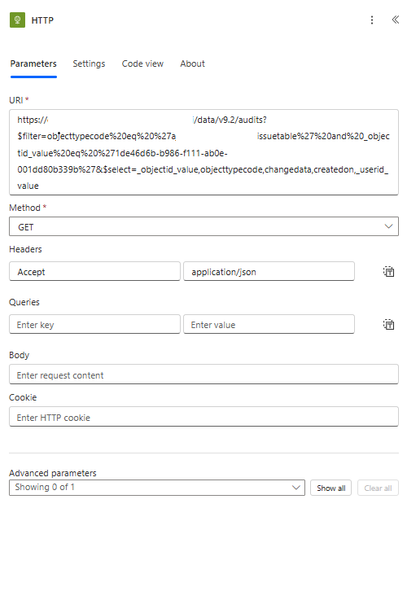
I am able to browse to this url directly from browser https://my365.crm9.dynamics.com/api/data/v9.2/audits?$filter=objecttypecode%20eq%20%27myissuetable%27%20and%20_objectid_value%20eq%20%271de46d6b-b986-f111-ab0e-001dd80b339b%27&$select=_objectid_value,objecttypecode,changedata,createdon,_userid_value but when i use the invoke http from power automate it says unauthorized. i am using the same account. What is the issue is there anything i need to do so that it works?
Populating word template stored in Organizational Asset Library (OAL) using Power Automate
The objective is to implement an automated document generation solution that leverages the Microsoft SharePoint Organizational Asset Library (OAL) to provide users with standardized Word templates. These templates must dynamically self-populate with real-time identity data (Name, Email, Job Title, and Department, for now which can be extended) sourced from Microsoft Entra ID (formerly Azure Active Directory) upon instantiation. In other words, how to use a Word Template stored in Microsoft SharePoint Organizational Asset Library to populate with his or her own user information like Name, Email, Job Title, Department etc getting fetched from Azure Active Directory, whenever that user opens the template by going to File -> New -> Selecting Organization Tab and selecting the template. How can we populate this template using Power Automate?power apps free subscription-cancel
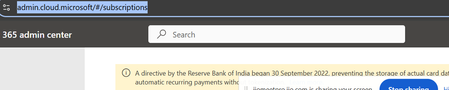
Hi All, I am using below id for power apps(email address removed for privacy reasons) using free subscription. with in one month i have cancelled my payment in bank. As of now i am not able to log in admin.cloud.microsoft. Microsoft authentication is not working . I can not delete and re add again. cancel subscription by bank side only enough or we need to do it in microsoft account (email address removed for privacy reasons)
Power Automate - iAuditor integration to Excel for business
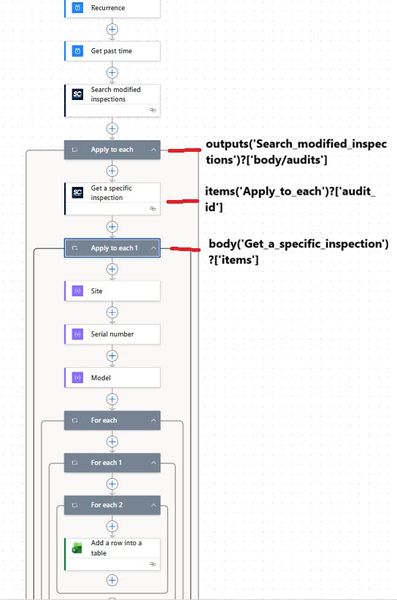
Hi all, I'm trying to build a flow in Power Automate to feed data in Excel file (located on SharePoint) used for my Power BI report but i don't know why it does not want to work. This is my flow as shown in the photo In the first "For Each" action i have " body('Site') ", second " body('Serial Number') "..... When i test this is how it looks like If i remove the second and third FOR EACH, it goes to the excel action and stops there. Does anyone have a similar flow or does anyone know what i'm doing wrong? Thank you in advance if anyone has a solution.Can we fill *.pdf in File Identifier on Get file metadata
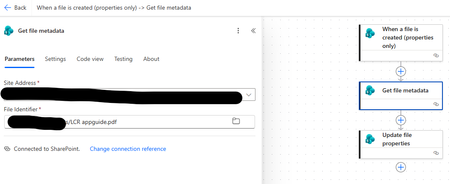
Sir, I'm a rookie of Power Automate, so i'm tried to created flow to automatic fill metadata column in SharePoint Library as below. So, if i have specific file identifier, the flow was running successful, but if i have fill *.pdf then the flow was running fail. In fact, i cannot specify file identifier was uploaded in SharePoint but this flow must run automatically. My question is how to fix on this an issue? Many thanks for advice. Sonchai M. Flow Running fail
Instant flow is not triggered
I have a power flow that should be triggered when new item is created on SharePoint list. New item was created on SharePoint list, but flow was not triggered. Issue started yesterday. I checked connections and they are active and are fine. Nothing was changed in the solution. Does someone know how to fix it?SharePoint List Mobile Simple View not Using Selected Field
Hello, The SharePoint list my flow feeds into needs to be mobile-friendly, however whenever I configure mobile simple view for a view of the list, it will not display the field I selected, it only displays the Title field. Does anyone know why this might be? Any help would be appreciated! Thank you!