microsoft edge
224 Topics
Edge sync fails after restart — MSA key error
Edge sync works after signing in, but gets stuck on “Initializing” after reopening — persists after Windows repair and testing with a new Windows user Hi everyone, Microsoft Support suggested that I post here for further help. My personal Microsoft account syncs successfully when I first sign in to Edge. However, after closing and reopening the browser, sync gets stuck on “Initializing” / “Setting up sync.” Signing in again can temporarily restore it, but the problem returns after restarting Edge. The issue also reproduces under a newly created Windows local user account. Environment Microsoft Edge: 156.0.4314.58 Windows 11 Home China, version 26H2, build 26300.9711, 64-bit Account type: Personal Microsoft account (MSA), not a work or school account The same Microsoft account has been syncing successfully on my phone Steps to reproduce Sign in to Edge with my Microsoft account and enable sync. Sync works successfully. Close and reopen Edge. Sync remains stuck on “Initializing,” and all data types show “Not Running.” Current edge://sync-internals results Transport State: Initializing User Actionable Error: None Disable Reasons: None Sync Feature Enabled: true Setup In Progress: false Sync Consent: true Auth Error: OK since browser startup MainSyncToken: Last Token Request Result: OK Has Token: true Last Token Error: None KeyDataToken: Last Token Request Result: OK Has Token: true Last Token Error: None MSA Account Key Status: Download Key Result: Fail Set Key Result: Fail Net Error Code: n/a HTTP Response Code: n/a Process Key Result: n/a Encryption: Cryptographer Ready To Encrypt: false Cryptographer Has Pending Keys: true Has Keystore Key: false Passphrase Required: false Passphrase Type: kKeystorePassphrase Server Connection: not attempted Sync Engine: Backend Status: Initialized BlockReason: None Syncer: Unset DataType Manager: Stopped All data types: Not Running Updates Downloaded / Successful Commits: 0 No enabled sync-blocking policies are shown. Troubleshooting already completed Tested with a separate Edge user-data directory: initial sign-in synced successfully, but reopening reproduced the issue. Tested with extensions disabled: no improvement. Tested the separate Edge instance with --no-proxy-server: no improvement. This does not rule out system-level network filtering. Tested --enable-features=msForceOneAuthWAM: no improvement, although I did not independently verify whether the authentication library actually switched. Tried stopping sync while keeping data, then enabling it again: no improvement. Completed DISM repair successfully. Subsequent SFC and component-store checks reported no remaining corruption. Completed a Windows ISO in-place repair, keeping personal files and applications: the sync problem persisted. Created a new standard Windows local user and tested Edge there: first sync succeeded, but reopening Edge reproduced the same failure. Authentication tokens appear to be obtained successfully, while the sync encryption-key stage remains unsuccessful. I understand that the n/a HTTP and network fields do not establish whether a request was sent or rejected. Questions Is this a known issue affecting personal-account sync in this Edge version? What diagnostic logs would help distinguish a startup/key-loading problem from an account-side sync issue? Is there a supported workaround or fix that preserves existing browser data and cloud sync data? I can provide additional sanitized diagnostics. I would prefer to avoid further profile deletion or cloud-sync resets unless the logs indicate that they are necessary. Thank you for your help.342Views2likes3Comments
Microsoft Edge Enterprise — Intermittent Blue Coat Proxy Authentication Prompt
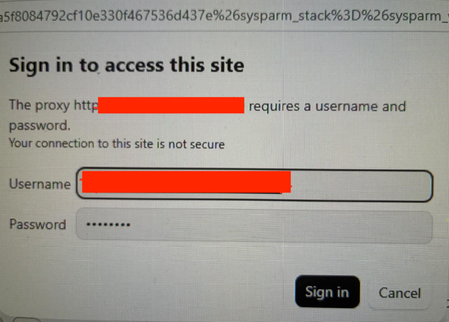
Product: Microsoft Edge for Business / Microsoft Edge Enterprise Component: Proxy authentication, HTTP networking and integrated authentication Operating system: Windows 11 Enterprise Proxy: Blue Coat / Broadcom forward proxy, port 8080 Proxy authentication configuration: Basic Auth/ IWARealm exact authentication method to be confirmed Affected browser: Microsoft Edge for Business Comparison browser: Mozilla Firefox, where the same behaviour has not been observed Impact: Intermittent interruption of browsing and loss of access to existing tabs until the user reauthenticates We are experiencing intermittent, unexpected proxy authentication prompts in Microsoft Edge for Business. The dialog states: Sign in to access this site. The proxy http://[bluecoat-host-url]:8080 requires a username and password. Your connection to this site is not secure. The prompt appears sporadically, sometimes while the browser is idle or while tabs displaying otherwise idle ServiceNow, deepl etc. pages cannot be accessed until user reauthenticates with autofill if proxy password is saved in order to be able to access those sites again. No explicit navigation or user interaction is necessarily taking place when the dialog appears. This behaviour was not observed previously and has become noticeable more recently especially since the migration of a lot of our workloads to the microsoft cloud. Firefox does not appear to exhibit the same symptom under comparable. We suspect that a background request, a new or reused proxy connection, proxy-session reauthentication, or an incomplete integrated-authentication exchange may be triggering the prompt. However, we have not yet identified the exact request or established whether the root cause is Edge, the proxy configuration, PAC routing, or the authentication infrastructure. usage conditions. Edge should silently authenticate to the configured enterprise proxy through the organisation's approved authentication mechanism, without unexpectedly displaying a credential prompt during normal browsing or background activity.484Views0likes2Comments
Feature Request: Expose a Versioned UI State API in Microsoft Edge for AI Agent Integration
I'm submitting this to the Tech Community to amplify a formal Feature Change Request (FCR) already on record with the Microsoft Edge product team via the official Feedback Portal — where it has already moved to "We're Reviewing This" status within 48 hours of submission (September 16, 2026). The core problem: Microsoft Edge does not expose its live UI state to AI agents — including Microsoft's own Copilot. This forces agents to generate step-by-step instructions based on stale training data, guessed UI layouts, and cached assumptions. The result is real, visible, recurring failure: instructions referencing moved menus, renamed paths, occluded click targets, and frozen containers that agents cannot detect. Three concrete Feature Change Requests are on the table: FCR-001 — Versioned UI State API Edge should expose a versioned, permissioned browser-side API (e.g., a Manifest v3 edgeUIState permission + browser.edgeUI.getSnapshot() method) that allows approved agents to query live UI layout metadata — control labels, element positions, sidebar geometry, overlay presence, and container status. Versioned so agents can declare compatibility ranges and degrade gracefully across Edge update cycles. FCR-002 — Container & Overlay Awareness Edge should surface a lightweight heartbeat signal (~500ms) to credentialed agent sessions covering: container responsive/frozen state, sidebar bounding rectangle in viewport-relative coordinates, and full or partial overlay presence. This directly resolves Copilot sidebar occlusion failures and Application Guard container freeze blindness. FCR-003 — Official UI-Check Protocol Specification Microsoft should publish and maintain a formal specification defining when and how Edge-integrated AI agents are required to perform a live UI check before generating user-facing instructions — including required fallback behavior and disclaimer language when live UI data is unavailable. Published alongside WebView2 and extension API references, with a named owner and versioned changelog. Why this matters right now: These failures occur in standard Edge configurations and are disproportionately likely during AI-assisted task flows — precisely because those flows involve the Copilot sidebar being open. Single-agent failure is a user frustration. Systemic agent failure across every Edge user running Copilot is a platform trust problem. Feedback Portal submission (status: We're Reviewing This): https://feedbackportal.microsoft.com/feedback/idea/e3dfa689-02b2-f111-aad1-000d3a02f23c If this resonates with your workflow or development experience — please upvote, comment, and share. The more traction this gets in the community, the stronger the signal to the product team that this is a priority worth accelerating. — CA_MGooGG | Chicago, IL | September 18, 2026203Views0likes0Comments
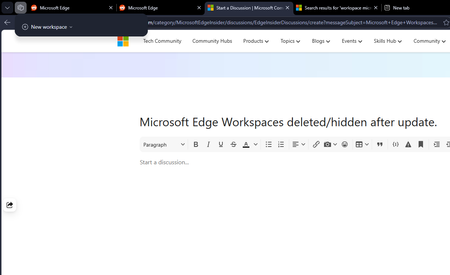
Microsoft Edge Workspaces deleted/hidden after update.
All my workspaces in Edge are hidden and/or are deleted. I updated my windows yesterday night (the restart also updated Edge which was pending) and noticed this issue this morning. I had 10+ workspaces and none of them are here to be found. Tried restarting the browser but no luck there.526Views0likes3Comments
Microsoft Edge default browser with Intune
Hello everyone, I am looking for the best way to configure Microsoft Edge as the default browser for Windows devices managed through Microsoft Intune. I have reviewed the available Microsoft Edge settings in the Settings Catalog but have not been able to identify a specific setting that configures Edge as the default browser. Is there a supported and recommended way to enforce Microsoft Edge as the default browser for managed Windows 10/11 devices? If there are multiple approaches available, I would appreciate recommendations on the preferred method for enterprise environments. Thank you.700Views0likes2CommentsSecurity Review for Microsoft Edge version 152
We have reviewed the new settings in Microsoft Edge version 152 and determined that there are no additional security settings that require enforcement. The Microsoft Edge version 151 security baseline continues to be our recommended configuration which can be downloaded from the Microsoft Security Compliance Toolkit. Microsoft Edge version 152 introduced 4 new Computer and User settings; we have included a spreadsheet listing the new settings to make it easier for you to find. Starting with version 152 Microsoft Edge is moving to a more frequent release cycle. To better align with the needs of the enterprise customers, the Microsoft Edge security baseline is expected to align with the Extended Stable Channel, which provides major feature updates on an eight-week cadence while continuing to receive security and quality updates between releases. This approach provides organizations with additional time to evaluate and deploy feature changes while ensuring security protections remain current. Why the change? Security baselines are intended to provide guidance for managing security relevant configuration settings, not to track every feature introduced in a browser release. With the move to a two-week release cadence, publishing baseline updates for every release would increase operational overhead while providing limited security benefit. The Extended Stable cadence offers a more practical balance for enterprise customers by allowing additional time for testing and evaluation, while continuing to receive security and critical fixes between major feature releases. By aligning with Extended Stable, we can update the baselines less frequently and focus on publishing them earlier in the release cycle, giving IT administrators more time to review and plan for upcoming changes. Our goal is to make security baseline adoption more predictable and easier to manage while continuing to provide timely security guidance. As a friendly reminder, all available settings for Microsoft Edge are documented here, and all available settings for Microsoft Edge Update are documented here. Please continue to give us feedback through the Security Baselines Discussion site or this post.2.1KViews0likes6CommentsSecurity baseline for Microsoft Edge version 151
We are pleased to announce the enterprise-ready release of the security baseline for Microsoft Edge version 151! We have reviewed the settings in Microsoft Edge version 151 and updated our guidance with six new recommendations. We have also identified one additional setting that organizations should consider evaluating in their environments. A new Microsoft Edge security baseline package was just released to the Download Center. You can download the new package from the Security Compliance Toolkit. Enable Process Isolation (added) We are enforcing ‘Enable Process Isolation’ to help protect Microsoft Edge from unauthorized access, modification, and tampering by other applications running on the device. This setting strengthens browser process integrity and helps safeguard sensitive data used by Microsoft Edge. Organizations that encounter compatibility issues with software that depends on browser process injection should treat such configurations as exceptions requiring explicit risk acceptance and compatibility validation. Enable renderer in app container (added) We are enforcing the default and enabling ‘Enable renderer in app container’ to strengthen Microsoft Edge’s browser isolation protections by ensuring renderer processes run within the additional restrictions provided by AppContainer. This helps reduce the impact of browser-based attacks and limits the ability of exploited renderer processes to interact with system resources. Organizations that require this setting to be disabled due to incompatible software should treat such configurations as exceptions that require explicit risk acceptance. Enable the network service sandbox (added) We are enforcing the default and enabling ‘Enable the network service sandbox’ to ensure Microsoft Edge network-facing processes operate within sandbox isolation boundaries that help reduce the impact of exploitation and limit access to system resources. Because disabling the network service sandbox weakens a core browser security protection, organizations should treat any requirement to disable this setting as an exception scenario requiring explicit risk acceptance and compatibility validation. Configure browser process code integrity guard (added) We are enabling ‘Configure browser process code integrity guard setting’ with a value of ‘Enable code integrity guard enforcement in the browser process’. The setting strengthens protections against unauthorized code injection into Microsoft Edge browser processes. Some enterprise applications, extensions, accessibility tools, or security products may still rely on legacy injection techniques and require compatibility validation. We encourage organizations to fully test this setting in their environments and work with vendors to identify or remediate incompatible software. Enable Application Bound Encryption (added) We are enabling ‘Enable Application Bound Encryption’ to strengthen protections for browser-stored credentials, authentication tokens, and other sensitive data by binding encryption more closely to the browser process. This helps reduce the risk of unauthorized access to protected browser data by malware or other untrusted software. Because disabling this setting weakens an important protection boundary, organizations should treat any requirement to disable the feature as an exception requiring explicit risk review. Enhance the security state in Microsoft Edge (added) We are enabling ‘Enhance the security state in Microsoft Edge’ and configuring the setting to Balanced to provide additional protection against modern web-based attacks while maintaining compatibility for most enterprise users. In Balanced mode, Microsoft Edge applies additional mitigations such as disabling just-in-time (JIT) JavaScript compilation and enabling added operating system protections on processes used to load sites that users do not frequently visit, helping reduce the risk of memory-related vulnerabilities. Because these protections can introduce compatibility issues for some applications or workflows, organizations should validate critical business sites and applications during their normal testing process prior to broad deployment and configure exceptions as needed. Additional details can be found here. Configure Automatic HTTPS (worth considering) We previously released a blog discussing a new feature called Automatic HTTPS. This setting can automatically switch your connections to websites from HTTP to HTTPS on sites that are highly likely to support the more secure protocol. This option helps ensure that users' network traffic is more secure and less susceptible to SSL stripping attacks. The best part, the end user doesn’t get prompted, it just works! This new feature has two configuration options: Navigations delivered over HTTP are switched to HTTPS’ (UpgradeCapableDomains) and ‘All navigation delivered over HTTP are switched to HTTPS’ (AlwaysUpgrade). There are trade-offs for each configuration: the UpgradeCapableDomains option only upgrades to HTTPS if Microsoft believes the site is likely to work over HTTPS, and this setting is unavailable if you’ve disabled the ComponentUpdatesEnabled policy. The more secure AlwaysUpgrade option unconditionally updates all HTTP requests to HTTPS, which will result in a user-visible error page if the target site does not support HTTPS. We encourage organizations to consider implementing and testing Automatic HTTPS within their environment. Collectively, these changes continue our focus on strengthening browser isolation, sandboxing, process integrity, and protection of sensitive browser data while balancing enterprise compatibility requirements. Microsoft Edge version 151 introduced 4 new computer and user settings. We have included a spreadsheet listing the new settings in the release to make it easier for you to find them. As a friendly reminder, all available settings for Microsoft Edge are documented here, and all available settings for Microsoft Edge Update are documented here. Please continue to give us feedback through the Security Baseline Community or in comments on this post.2.6KViews0likes6CommentsSecurity Review for Microsoft Edge version 150
We have reviewed the new settings in Microsoft Edge version 150 and determined that there are no additional security settings that require enforcement. The Microsoft Edge version 139 security baseline continues to be our recommended configuration which can be downloaded from the Microsoft Security Compliance Toolkit. Microsoft Edge version 150 introduced 8 new Computer and User settings; we have included a spreadsheet listing the new settings to make it easier for you to find. As a friendly reminder, all available settings for Microsoft Edge are documented here, and all available settings for Microsoft Edge Update are documented here. Please continue to give us feedback through the Security Baselines Discussion site or this post.
Feature Request: Native Multi-Container Tabs (Session Isolation) for Edge Workspaces and Tab Groups
Microsoft Edge developer team, As a developer who regularly tests complex web applications locally and on staging environments, I rely heavily on Microsoft Edge's Tab Groups and Workspaces to keep my projects organized. However, testing multi-role workflows—such as simultaneously testing Admin, Manager, and Standard User accounts on localhost—is currently very frustrating. When logging into a secondary account in another tab within the same Edge window, the newly created authentication token overwrites the existing cookies, localStorage, and session context across all open tabs for that domain. This causes the first tab to automatically switch sessions upon refresh or navigation, breaking side-by-side workflow testing. Mozilla Firefox solves this problem cleanly with Multi-Account and Temporary Containers, allowing tabs inside the same window to maintain fully isolated storage contexts. Bringing native container tabs or tab-level session isolation to Microsoft Edge, especially tightly integrated with Tab Groups, would eliminate the need to run multiple heavy browser profiles or separate windows. It would make Edge the absolute premier browser for developers, QA engineers, and power users who manage multiple user roles daily. Please consider adding tab-level container isolation to the Edge product roadmap.453Views2likes2Comments