microsoft defender for storage
41 TopicsDeploy Microsoft Defender for Cloud via Terraform
Terraform is an Infrastructure as a Code tool created by Hashicorp. It’s used to manage your infrastructure in Azure, as well as other clouds. In this article, we’ll be showing you how to deploy Microsoft Defender for Cloud (MDC) using Terraform from scratch.Microsoft Defender for Cloud Cost Estimation Dashboard
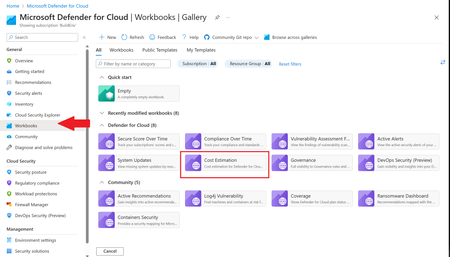
This blog was updated on April 16 th , 2023 to reflect the latest version of the Cost Estimation workbook. Microsoft Defender for Cloud provides advanced threat detection capabilities across your cloud workloads. This includes comprehensive coverage plans for compute, PaaS and data resources in your environment. Before enabling Defender for Cloud across subscriptions, customers are often interested in having a cost estimation to make sure the cost aligns with the team’s budget. We previously released the Microsoft Defender for Storage Price Estimation Workbook, which was widely and positively received by customers. Based on customer feedback, we have extended this offering by creating one comprehensive workbook that covers most Microsoft Defender for Cloud plans. This includes Defender for Containers, App Service, Servers, Storage, Cloud Security Posture Management and Databases. The Cost Estimation workbook is out-of-the box and can be found in the Defender for Cloud portal. After reading this blog and using the workbook, be sure to leave your feedback to be considered for future enhancements. Please remember these numbers are only estimated based on retail prices and do not provide actual billing data. For reference on how these prices are calculated, visit the Pricing—Microsoft Defender | Microsoft Azure. Overview The cost estimation workbook provides a consolidated price estimation for Microsoft Defender for Cloud plans based on the resource telemetry in your organization’s environment. The workbook allows you to select which subscriptions you would like to estimate the price for as well as the Defender Plans. In a single pane of glass, organizations can see the estimated cost per plan on each subscription as well as the grand total for all the selected subscriptions and plans. To see which plans are currently being used on the subscription, consider using the coverage workbook. Defender Cloud Security Posture Management (CSPM) Defender CSPM protects all resources across your subscriptions, but billing only applies to Compute, Databases and Storage accounts. Billable workloads include VMs, Storage accounts, open-source relational databases and SQL PaaS & Servers on machines. See here for more information regarding pricing. On the backend, the workbook checks to see how many billable resources were detected and if any of the above plans are enabled on the subscription. It then takes the number of billable resources and multiplies it by the Defender CSPM price. Defender for App Service The estimation for Defender for App Services is based on the retail price of $14.60 USD per App Service per month. Check out the Defender for App Service Price Estimation Dashboard for a more detailed view on estimated pricing with information such as CPU time and a list of App Services detected. Defender for Containers The estimation for Defender for Containers is calculated based on the average number of worker nodes in the cluster during the past 30 days. For a more detailed view on containers pricing such as average vCores detected and the number of image scans included, consider also viewing the stand-alone Defender for Containers Cost Estimation Workbook. Defender for Databases Pricing for Defender for Databases includes Defender for SQL Databases and Defender for open-source relational databases (OSS DBs). This includes PostgreSQL, MySQL and MariaDB. All estimations are based on the retail price of $15 USD per resource per month. On the backend, the workbook runs a query to find all SQL databases and OSS DBs in the selected subscriptions and multiplies the total amount by 15 to get the estimated monthly cost. Defender for Key Vault Defender for Key Vault cost estimation is not included in the out of the box workbook, however, a stand-alone workbook is available in the Defender for Cloud GitHub. The Defender for Key Vault dashboard considers all Key Vaults with or without Defender for Key Vault enabled on the selected subscriptions. The calculations are based on the retail price of $0.02 USD per 10k transactions. The “Estimated Cost (7 days)” column takes the total Key Vault transactions of the last 7 days, divides them by 10K and multiples them by 0.02. In “Estimated Monthly Price”, the results of “Estimated Cost (7 days)” are multiplied by 4.35 to get the monthly estimate. Defender for Servers Defender for Servers includes two plan options, Plan 1 and Plan 2. The workbook gives you the option to toggle between the two plans to see the difference in how they would effect pricing. Plan 1 is currently charged at $5 per month where as Plan 2 is currently charged at $15. Defender for Storage The Defender for Storage workbook allows you to estimate the cost of the two pricing plans: the legacy per-transaction plan and the new per-storage plan. The workbook looks at historical file and blob transaction data on supported storage types such as Blob Storage, Azure Files, and Azure Data Lake Storage Gen 2. We have released a new version of this workbook, and you can find it here: Microsoft-Defender-for-Cloud/Workbooks/Microsoft Defender for Storage Price Estimation and learn more about the storage workbook in Microsoft Defender for Storage – Price Estimation blog post. Limitations Azure Monitor Metrics data backends have limits and the number of requests to fetch data might time out. To solve this, narrow your scope by reducing the selected subscriptions and Defender plans. The workbook currently only includes Azure resources. Acknowledgements Special thanks to everyone who contributed to different versions of this workbook: Fernanda Vela, Helder Pinto, Lili Davoudian, Sarah Kriwet, Safeena Begum Lepakshi, Tom Janetscheck, Amit Biton, Ahmed Masalha, Keren Damari, Nir Sela, Mark Kendrick, Yaniv Shasha, Mauricio Zaragoza, Kafeel Tahir, Mary Lieb, Chris Tucci, Brian Roosevelt References: What is Microsoft Defender for Cloud? - Microsoft Defender for Cloud | Microsoft Learn Pricing—Microsoft Defender | Microsoft Azure Workbooks gallery in Microsoft Defender for Cloud | Microsoft Docs Pricing Calculator | Microsoft Azure Microsoft Defender for Key Vault Price Estimation Workbook Microsoft Defender for App Services Price Estimation Workbook Microsoft Defender for Containers Cost Estimation Workbook Coverage WorkbookMicrosoft Defender for Storage – Price Estimation Dashboard
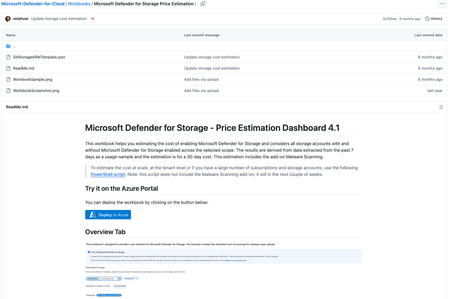
Blog post updated on April 17th, 2024. Blog post updated in September 2025 Estimate the cost of Microsoft Defender for Storage Microsoft Defender for Storage is an Azure-native layer of security intelligence that detects potential threats to your storage accounts. It helps prevent the three major impacts on your data and workload: malicious file uploads, sensitive data exfiltration, and data corruption. This blog post explains how to use a new workbook that helps you estimate the cost of Microsoft Defender for Storage and add-ons, like Malware Scanning, based on your current storage usage. Prerequisites To use the cost estimation workbook, you need the following: At least one Azure subscription with Storage Accounts (Defender for Storage is not required) Access to the Azure portal Subscription or resource-level reader permission At least Workbook Contributor permissions on the targeted resource group to save the workbook Access the cost estimation workbook The workbook is available in the Microsoft Defender for Cloud’s GitHub repository. You can access it directly from this link. Deploy it Go to the Workbook’s location Microsoft-Defender-for-Cloud/Workbooks/Microsoft Defender for Storage Price Estimation at main · Azure/Microsoft-Defender-for-Cloud (github.com) In the ReadMe.md file, click the button “Deploy to Azure” This will take you to the Azure portal and the template settings will display for you to fill them. The subscription, resource group and region are required for you to Review + Create. After clicking on “Review + Create” the workbook will show in your resource group. Click on it and then on “Open Workbook”. How it looks like The workbook will display the following information in the tab “Defender for Storage coverage”: Column name Description Subscription Subscription name in the scope. In trial True/False value if the subscription has a free trial. Is enabled Enabled/Disabled value if there’s a Defender for Storage plan enabled. DF-Storage plan The Defender for Storage plan enabled at the subscription-level or if it’s disabled. Malware scanning enabled True/False value if the Defender for Storage add-on Malware Scanning enabled at the subscription-level. For Classic plans, it will show in blank since this feature is not available there. Malware scanning cap The cap setting value at the subscription level. Sensitive data discovery enabled True/False value if the Defender for Storage add-on Sensitive Data Discovery is enabled at the subscription-level. For Classic plans, it will show in blank since this feature is not available there. The tab “Cost estimation” will display the following information: Column name Description Subscription Subscription name in the scope. Storage account Storage account name in the scope. Estimated monthly transactions Transactions (Azure Files and Azure Blobs) taken from a 7-day usage-sample and then used for a 30-day result. Overage transactions Total transactions (Azure Files and Azure Blobs) that are more or equal to 73M. Storage account cost Cost without considering overage. This is $10 USD. Estimated overage charge Overage transactions cost. Estimated monthly cost (activity monitoring) “Storage account cost” + “Estimated overage charge” Estimated monthly uploaded GBs 7-day ingress bytes taken from microsoft.storage/storageaccounts/blobservices-Transaction-Ingress; then this is extrapolated to estimate the monthly total based on a standard 30-day month, and finally, it converts this monthly total from bytes to gigabytes using the factor 1073741824 (bytes per gigabyte). Only Azure Blobs are pulled because Malware Scanning scans Blobs. The APIs in the filter are: AppendFile, CopyBlob, CreatePathFile, FlushFile, PutBlob, PutBlock, PutBlockFromURL, PutBlockList. Estimated malware scanning cost Cost considering “Estimated monthly uploaded GBs”. Malware Scanning cost is currently $0.15 USD per GB scanned. Note: You can filter the results by subscription and storage account. Workbook estimation limitations This tool estimates malware scanning costs based on the total volume of blobs uploaded, as indicated by Blob Ingress metrics. Please consider the following: Multiple scans: Specific upload methods, such as PutBlockList operations, may trigger multiple scans for a single blob (e.g., when writing logs to the same blob). This tool does not accurately capture the additional costs from multiple scans triggered by such operations. Index Tag costs: Costs associated with blob index tags, which store scan times and results on supported blobs, are not included in these estimates. Learn more on index tags costs in the Azure Storage Blobs Pricing page. Blob size: The estimation accounts for all uploaded blobs; however, only blobs smaller than 2GB are actually scanned. Good to know Note: Resources protected before March 28, 2023, are protected by Defender for Storage (classic) plan. Customers who protected storage accounts prior to this (under the per-transaction or per-storage account plans) are encouraged to migrate to the new plan to enjoy enhanced capabilities. Please note that after March 28, 2023, all new subscriptions created through the Azure portal will enable the new Defender for Storage (per-storage account plan) by default. Learn about migrating to the new plan. The cost of Defender for Storage is based on the number of storage accounts within a subscription. Storage accounts that have less than 73 million monthly transactions, are billed at $10 USD each. Storage accounts with higher transaction volume (above 73M monthly transactions) will experience an overage charge of $0.1492 per additional 1 million transactions. This PowerShell script helps you enumerate all storage accounts in your environment and get the transaction metrics for the last week. Calculating across several large subscriptions or a tenant To pull Blob and File Transactions from each Storage Account in larger subscriptions or across a tenant use this PowerShell script. The Price Estimation used in the script is calculated differently from the workbook described in this blog post. Note that the PowerShell script does not currently estimate the add-on Malware Scanning. This will come in the next couple of weeks. Known Issues Azure Monitor Metrics data backends have limits and probably the number of requests to fetch data across Storage Accounts might time out. To solve this, you will need to narrow the scope (reduce the selected Storage Accounts). Errors might reflect by showing 0 transactions in Files and Blobs. To verify this error, go to Edit Mode and the "Timed out" message will be displayed in the query. If you don’t have permissions to read on the storage accounts, there might be an error like this: Contributors: Eitan Shteinberg, Fernanda Vela, Rogério Barros, Hasan Abo-Shally, Dick Lake, Shay Amar, Daniela Villareal, Reviewer: Yuri Diogenes References: Microsoft-Defender-for-Cloud/Workbooks/Microsoft Defender for Storage Price Estimation at main · Azure/Microsoft-Defender-for-Cloud (github.com) Pricing—Microsoft Defender for Cloud | Microsoft Azure Pricing Calculator | Microsoft Azure Microsoft Defender for Storage - the benefits and features | Microsoft Docs Azure-Security-Center/Powershell scripts/Read Azure Storage Transaction Metrics at main · Azure/Azur... Microsoft-Defender-for-Cloud/Powershell scripts/Storage Price Estimation Script at main · Azure/Micr...New express configuration for Vulnerability Assessment in Microsoft Defender for SQL- Public Preview
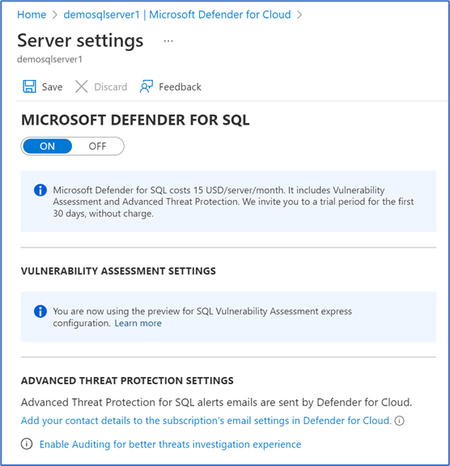
Users of Microsoft Defender for SQL can enjoy full database protection from two components: Advanced Threat Protection (ATP) for real-time detection of attacks and Vulnerability Assessment (VA) that scans, flags, and reports on database misconfigurations that may result in vulnerabilities for attackers to exploit. We are pleased to announce the public preview of the new express configuration experience for Vulnerability Assessment in Microsoft Defender for SQL that provides security teams with streamlined configuration experience on Azure SQL Databases and Azure Synapse Dedicated SQL Pools (formerly SQL DW). Benefits of Microsoft Defender for SQL Vulnerability Assessment express configuration Until now, the Vulnerability Assessment within Defender for SQL requires a customer-managed Azure storage account for correct configuration to store scan results and baseline settings. With the new express configuration experience for vulnerability assessments, security teams can: Configure vulnerability assessment with one click (within the SQL resource UI in Defender for Cloud blade), without any additional settings or dependencies on customer-managed storage accounts. Microsoft Defender for SQL Settings Blade • Apply baselines without rescanning a database - once you select “Add all results as baseline”, the status of that finding will change from Unhealthy to Healthy immediately Status becomes healthy immediately • Set baselines at scale (multiple rules at once, can also be based on latest scan results) • Enable the vulnerability assessment capability for all Azure SQL Servers when turning on the Microsoft Defender for SQL bundle at the subscription-level Get Started The new configuration experience is available through the Microsoft Defender for Cloud blade under your Azure SQL Server resource at no extra cost for Microsoft Defender for SQL customers, or when configuring the Defender for SQL bundle at the subscription level. For the purpose of the public preview, express configuration will only support server-level policies on logical servers containing: Azure SQL Databases and Azure Synapse Dedicated SQL Pools (formerly SQL DW). Express configuration will be applied in the following scenarios: The Microsoft Defender for SQL plan is enabled on the SQL Server (this is the new default configuration for vulnerability assessment). Microsoft Defender for SQL plan was turned on the subscription level after the public preview release date (available December 22). Customer chose to switch from the SQL Server/Database Microsoft Defender for Cloud blade or the server settings blade. Microsoft Defender for Cloud blade: SQL vulnerability assessment is not configured warning Settings blade: SQL vulnerability assessment is not configured warning in Settings blade Common Questions Q: What else do I need to know before switching to express configuration? A: Not all classic configuration features are available in express configuration so please review the full comparison in the official documentation. Also, be aware that switching from classic to express configuration during the preview will not migrate existing baselines and scan history. Q: What happens to the Azure storage accounts currently configured for VA after switching to express configuration? A: Express configuration doesn’t change the data in the storage accounts, it just stops writing baselines and scan results to those accounts. You are not required to maintain these files for SQL vulnerability assessment to work after switching to express configuration, but you may want to keep your old baseline definitions in case you’ll need them for reference in the future. Q: Where are the scan results and baselines stored now with the express configuration of VA? A: On internal storage accounts that comply with our data residency standards. Customers will no longer have direct access to these files. Q: Does express configuration change scan behaviour? A: No, express configuration provides the same scanning behaviour and performance. Q: Does express configuration have any effect on pricing? A: Enabling or switching to express configuration comes at no extra cost. Since you are no longer required to maintain a storage account, you will no longer have to pay additional storage fees (if you choose to delete old scan and baseline data) Additional Resources Microsoft Docs: SQL vulnerability assessment - Azure SQL Database & SQL Managed Instance & Azure Synapse Analytics | Microsoft Docs Supplemental Terms of Use for Microsoft Azure Previews Huge thanks to the reviewers of this post: @Dick Lake, Senior Product Manager, Microsoft Defender for Cloud @Linnet Kariuki, Program Manager, Microsoft Defender for Cloud