microsoft defender for identity
236 Topics
Monitoring work from home
My boss has asked me if there is a way to see just how "busy" people who are working from home are. I have this data in Sentinel: Entra sign-in logs Defender for Endpoint logs Office 365 logs Most, if not all, on premise AD login events Netskope (current ZTNA solution) logs I have my known office location IPs so i could just exclude those and look for activity from other IPs however many times people will work in the morning or on the way to work appearing from a non corporate IP, come into the office appearing to come from a corporate IP, and then from home again in the evening. I need a way to query Sentinel looking for people who appear to be working but not coming from Corp IP. If they came from different IPs on the same day including Corp check to see if those non Corp are before and after business hours and exclude those. Anyone know of a good query to achieve this? Or maybe a tool that can extract and generate a report?82Views0likes0CommentsStop identity attacks before they start with Microsoft ISPM recommendations
Many major breaches involve compromised identities, excessive privileges, or misconfigured access. Long before ransomware detonates or data leaves the building, adversaries are quietly abusing valid accounts, excessive privileges or other misconfigurations to move deeper into the environment. Identity has become one of the most important attack surfaces you defend. That is why Microsoft has a dedicated team of researchers who study how identity attacks actually happen. Just as important, we turn what they learn into action. Real attacker behavior becomes concrete recommendations you can use to harden your environment before an attack begins. With Microsoft Defender, that research reaches you as Identity Security Posture Management (ISPM) recommendations: prioritized guidance that tells you what to fix, why it matters, and how to remediate it. What are identity security posture recommendations? Identity security posture recommendations are prioritized, attack-driven recommendations that address the weaknesses attackers exploit most, from overprivileged accounts to weak credentials and risky permissions. Rather than handing you a long hygiene checklist, ISPM recommendations tie each recommendation to a real attack technique. That shifts the question from "what setting do I need to change?" to "what attack am I going to prevent today?" That framing also changes how you prioritize. You can start with the fixes that close the most dangerous attack paths first, not just the ones that are quickest to clear. It gives identity admins and the SOC and others shared view of the same risk, and as our researchers uncover new techniques, the recommendations evolve, so your posture keeps pace with the threat. New recommendations We are excited to announce five new ISPM recommendations geared toward emerging attack patterns you need to be aware of: Ensure no privileged SaaS app accounts exist outside of IdP control Most SaaS platforms let you create admin accounts directly inside the app, separate from your corporate identity provider (IdP). Those local admins are convenient, but they sit outside the protections every other identity relies on: No outside centrally managed identity controls as Conditional Access, and little to no monitoring. Attackers know it. We’ve seen a rise in SaaS data-exfiltration campaigns that specifically hunt for these app-native admin accounts, because once they find one they can sign in and operate without tripping any of your usual defenses. This recommendation surfaces those accounts so you can bring them under your identity provider, where you can manage them with single sign-on, multifactor authentication, Conditional Access, and lifecycle governance apply automatically and where your SOC can finally see them. This attack pattern aligns with MITRE ATT&CK techniques including Valid Cloud Accounts (T1078.004) and Account Manipulation (T1098). Ensure service accounts are not assigned Domain Admin or Global Admin roles Service accounts run your apps and integrations, and because they are not tied to a person, they are easy to over-provision and easy to forget. When one is assigned Domain Admin or Global Admin, it becomes a quiet path to the top of your environment. Supply-chain intrusions like SolarWinds showed how attackers ride a trusted service identity straight into the highest levels of access, often without anyone noticing, because no one watches a service account the way they watch a user. This recommendation flags service accounts holding those top-tier roles so you can right-size them. It shrinks the blast radius if one is ever compromised and keeps a non-human account from becoming a hidden administrative backdoor. This attack pattern aligns with MITRE ATT&CK techniques including Valid Accounts: Domain Accounts (T1078.002) and Cloud Accounts (T1078.004) Ensure non-admin accounts cannot reset passwords for sensitive groups Sometimes a standard user account quietly holds the ability to reset passwords for members of a sensitive group, a leftover of delegated permissions no one revisited. On paper that user is low privilege. In practice they are one password reset away from becoming an administrator. Attackers look for exactly this kind of shadow admin: compromise an unremarkable account, reset a privileged password, and walk in through the front door, no exploit required. This recommendation finds those unintended password-reset rights over sensitive groups and helps you remove them, closing a direct path from ordinary user to full administrator. This attack pattern aligns with MITRE ATT&CK techniques as Account Manipulation (T1098) Ensure non-admin identities cannot have WriteDACL permissions on sensitive groups Deep in Active Directory, some permissions can be abused to grant additional rights and gain control of a sensitive group. One of them, the right to modify an object's access control list (known as WriteDACL), is especially dangerous in the wrong hands. If a non-admin identity holds it over a sensitive group, that identity can simply rewrite the group's permissions and grant itself privileged control. It is one of the most reliable escalation paths attackers use. This recommendation identifies non-admin identities with that permission over sensitive groups so you can strip it, eliminating a well-worn route from a regular account to Domain Admin. This attack pattern aligns with MITRE ATT&CK techniques as Account Manipulation (T1098) Ensure external and guest accounts are not granted privileged roles Guest and external accounts make collaboration easy, but they live partly outside your control. Their security depends on another organization's hygiene, and they blend in, which makes them an attractive target. When one of these accounts is also granted a privileged role, a single compromise on the other side of that relationship becomes a privileged foothold inside your tenant. This recommendation highlights external and guest identities holding sensitive roles so you can remove that access, preventing an outside account from being used for persistence, escalation, or reaching your data. This attack pattern aligns with MITRE ATT&CK techniques as Valid Cloud Accounts (T1078.004) and Account Manipulation Cloud Roles (T1098.003) Additional high-impact identity posture recommendations In addition to the five new recommendations, several existing ISPM recommendations remain especially important. We continue to see attackers exploit the weaknesses they address, which makes them high-value fixes for strengthening your identity posture. Here is why each one still earns priority. Remove dormant accounts from sensitive groups A privileged account no one uses is a gift to an attacker. It still carries powerful access, but because nobody signs into it, nobody notices when someone else does. Ransomware crews and intrusion groups seek out these forgotten admin accounts precisely because they can operate from one for weeks without raising suspicion. Removing dormant privileged accounts takes that stealthy, high-impact option off the table before it is ever used. Reduce lateral movement path risk to sensitive entities Reduce lateral movement path risk to sensitive entities helps close one of the most common ways identity attacks become domain-wide compromises: an attacker starts with a non-sensitive account, then follows permissions, group memberships, local admin rights, active sessions, or other identity relationships until they can reach highly sensitive credentials. This maps to well-known lateral movement and privilege escalation techniques, where adversaries abuse excessive permissions or exposed credential paths to move from an initial foothold toward Domain Admin or another high-value identity. This recommendation highlights exposed entities with risky lateral movement paths and provides remediation guidance to reduce the number of non-sensitive accounts on each path. By removing unnecessary privileges and memberships, teams can shrink the attack graph around sensitive entities and prevent a small compromise from becoming a privileged identity breach Use least privileged administrative role Use least privileged administrative roles in Microsoft Entra ID reduces the blast radius of a compromised admin account. In many identity attacks, adversaries first gain access through phishing, password spray, or stolen credentials, then abuse valid cloud accounts to escalate privileges, create persistence, or access sensitive data. This maps to the known attack technique Valid Accounts where an attacker uses a legitimate account’s assigned permissions instead of malware or exploits. Assigning narrow, task-specific admin roles instead of broad roles like Global Administrator limits what an attacker can do if that account is compromised and makes privilege escalation harder. Ensure Sign-in frequency is enabled and browser sessions are not persistent for Administrative users Ensure Sign-in frequency is enabled and browser sessions are not persistent for Administrative users reduces the window of opportunity after an admin session is stolen. This maps to known session-theft techniques such as Steal Web Session Cookie and Web Session Cookie, where adversaries use stolen authentication cookies to access cloud services as an already-authenticated user, sometimes bypassing MFA because the session was established before the theft. By requiring admins to reauthenticate more often and preventing persistent browser sessions, organizations make stolen sessions expire sooner and reduce the chance that a compromised admin browser session becomes long-lived access to sensitive systems. Stay ahead of attackers Attackers keep evolving, so your identity posture has to evolve with them. The strongest defense is not a one-time cleanup, it is continuously closing the gaps attackers depend on, from stolen credentials to excessive privilege and lateral movement. That is exactly what ISPM recommendations are built to help you do, turning live attacker research into clear actions you can take today. In the Microsoft Defender portal, review your ISPM recommendations, start with the five new proactive exposures, and prioritize the highest-risk attack paths first. Every path you close is one an attacker cannot take. Next steps Start by reviewing your identity security posture recommendations in the Microsoft Defender portal under Exposure management > Recommendations. Prioritize recommendations that expose privileged identities, sensitive groups, service accounts, or attack paths to critical assets, then remediate unnecessary privileges, delegated permissions, and unmanaged identity access. To explore your Microsoft Identity Security Posture Management (ISPM) recommendations, see: https://security.microsoft.com/exposure-secure-scores Documentation For more details as licensing and prerequisites, see: Microsoft Defender for Identity security posture assessments - Microsoft Defender for Identity | Microsoft Learn1.3KViews0likes0CommentsKerberos and the End of RC4: Protocol Hardening and Preparing for CVE‑2026‑20833
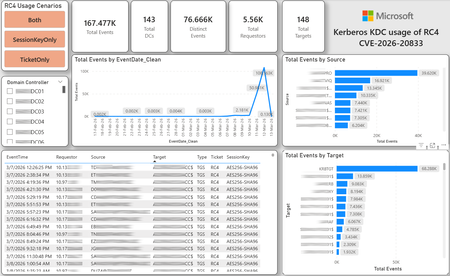
CVE-2026-20833 addresses the continued use of the RC4‑HMAC algorithm within the Kerberos protocol in Active Directory environments. Although RC4 has been retained for many years for compatibility with legacy systems, it is now considered cryptographically weak and unsuitable for modern authentication scenarios. As part of the security evolution of Kerberos, Microsoft has initiated a process of progressive protocol hardening, whose objective is to eliminate RC4 as an implicit fallback, establishing AES128 and AES256 as the default and recommended algorithms. This change should not be treated as optional or merely preventive. It represents a structural change in Kerberos behavior that will be progressively enforced through Windows security updates, culminating in a model where RC4 will no longer be implicitly accepted by the KDC. If Active Directory environments maintain service accounts, applications, or systems dependent on RC4, authentication failures may occur after the application of the updates planned for 2026, especially during the enforcement phases introduced starting in April and finalized in July 2026. For this reason, it is essential that organizations proactively identify and eliminate RC4 dependencies, ensuring that accounts, services, and applications are properly configured to use AES128 or AES256 before the definitive changes to Kerberos protocol behavior take effect. Official Microsoft References CVE-2026-25177 - Security Update Guide - Microsoft - Active Directory Domain Services Elevation of Privilege Vulnerability Microsoft Support – How to manage Kerberos KDC usage of RC4 for service account ticket issuance changes related to CVE-2026-20833 (KB 5073381) Microsoft Learn – Detect and Remediate RC4 Usage in Kerberos AskDS – What is going on with RC4 in Kerberos? Beyond RC4 for Windows authentication | Microsoft Windows Server Blog So, you think you’re ready for enforcing AES for Kerberos? | Microsoft Community Hub Risk Associated with the Vulnerability When RC4 is used in Kerberos tickets, an authenticated attacker can request Service Tickets (TGS) for valid SPNs, capture these tickets, and perform offline brute-force attacks, particularly Kerberoasting scenarios, with the goal of recovering service account passwords. Compared to AES, RC4 allows significantly faster cracking, especially for older accounts or accounts with weak passwords. Technical Overview of the Exploitation In simplified terms, the exploitation flow occurs as follows: The attacker requests a TGS for a valid SPN. The KDC issues the ticket using RC4, when that algorithm is still accepted. The ticket is captured and analyzed offline. The service account password is recovered. The compromised account is used for lateral movement or privilege escalation. Official Timeline Defined by Microsoft Important clarification on enforcement behavior Explicit account encryption type configurations continue to be honored even during enforcement mode. The Kerberos hardening associated with CVE‑2026‑20833 focuses on changing the default behavior of the KDC, enforcing AES-only encryption for TGS ticket issuance when no explicit configuration exists. This approach follows the same enforcement model previously applied to Kerberos session keys in earlier security updates (for example, KB5021131 related to CVE‑2022‑37966), representing another step in the progressive removal of RC4 as an implicit fallback. January 2026 – Audit Phase Starting in January 2026, Microsoft initiated the Audit Phase related to changes in RC4 usage within Kerberos, as described in the official guidance associated with CVE-2026-20833. The primary objective of this phase is to allow organizations to identify existing RC4 dependencies before enforcement changes are applied in later phases. During this phase, no functional breakage is expected, as RC4 is still permitted by the KDC. However, additional auditing mechanisms were introduced, providing greater visibility into how Kerberos tickets are issued in the environment. Analysis is primarily based on the following events recorded in the Security Log of Domain Controllers: Event ID 4768 – Kerberos Authentication Service (AS request / Ticket Granting Ticket) Event ID 4769 – Kerberos Service Ticket Operations (Ticket Granting Service – TGS) Additional events related to the KDCSVC service These events allow identification of: the account that requested authentication the requested service or SPN the source host of the request the encryption algorithm used for the ticket and session key This information is critical for detecting scenarios where RC4 is still being implicitly used, enabling operations teams to plan remediation ahead of the enforcement phase. If these events are not being logged on Domain Controllers, it is necessary to verify whether Kerberos auditing is properly enabled. For Kerberos authentication events to be recorded in the Security Log, the corresponding audit policies must be configured. The minimum recommended configuration is to enable Success auditing for the following subcategories: Kerberos Authentication Service Kerberos Service Ticket Operations Verification can be performed directly on a Domain Controller using the following commands: auditpol /get /subcategory:"Kerberos Service Ticket Operations" auditpol /get /subcategory:"Kerberos Authentication Service" In enterprise environments, the recommended approach is to apply this configuration via Group Policy, ensuring consistency across all Domain Controllers. The corresponding policy can be found at: Computer Configuration - Policies - Windows Settings - Security Settings - Advanced Audit Policy Configuration - Audit Policies - Account Logon Once enabled, these audits record events 4768 and 4769 in the Domain Controllers’ Security Log, allowing analysis tools—such as inventory scripts or SIEM/Log Analytics queries—to accurately identify where RC4 is still present in the Kerberos authentication flow. April 2026 – Enforcement with Manual Rollback With the April 2026 update, the KDC begins operating in AES-only mode (0x18) when the msDS-SupportedEncryptionTypes attribute is not defined. This means RC4 is no longer accepted as an implicit fallback. During this phase, applications, accounts, or computers that still implicitly depend on RC4 may start failing. Manual rollback remains possible via explicit configuration of the attribute in Active Directory. July 2026 – Final Enforcement Starting in July 2026, audit mode and rollback options are removed. RC4 will only function if explicitly configured—a practice that is strongly discouraged. This represents the point of no return in the hardening process. Official Monitoring Approach Microsoft provides official scripts in the repository: https://github.com/microsoft/Kerberos-Crypto/tree/main/scripts The two primary scripts used in this analysis are: Get-KerbEncryptionUsage.ps1 The Get-KerbEncryptionUsage.ps1 script, provided by Microsoft in the Kerberos‑Crypto repository, is designed to identify how Kerberos tickets are issued in the environment by analyzing authentication events recorded on Domain Controllers. Data collection is primarily based on: Event ID 4768 – Kerberos Authentication Service (AS‑REQ / TGT issuance) Event ID 4769 – Kerberos Service Ticket Operations (TGS issuance) From these events, the script extracts and consolidates several relevant fields for authentication flow analysis: Time – when the authentication occurred Requestor – IP address or host that initiated the request Source – account that requested the ticket Target – requested service or SPN Type – operation type (AS or TGS) Ticket – algorithm used to encrypt the ticket SessionKey – algorithm used to protect the session key Based on these fields, it becomes possible to objectively identify which algorithms are being used in the environment, both for ticket issuance and session establishment. This visibility is essential for detecting RC4 dependencies in the Kerberos authentication flow, enabling precise identification of which clients, services, or accounts still rely on this legacy algorithm. Example usage: .\Get-KerbEncryptionUsage.ps1 -Encryption RC4 -Searchscope AllKdcs | Export-Csv -Path .\KerbUsage_RC4_All_ThisDC.csv -NoTypeInformation -Encoding UTF8 Data Consolidation and Analysis In enterprise environments, where event volumes may be high, it is recommended to consolidate script results into analytical tools such as Power BI to facilitate visualization and investigation. The presented image illustrates an example dashboard built from collected results, enabling visibility into: Total events analyzed Number of Domain Controllers involved Number of requesting clients (Requestors) Most frequently involved services or SPNs (Targets) Temporal distribution of events RC4 usage scenarios (Ticket, SessionKey, or both) This type of visualization enables rapid identification of RC4 usage patterns, remediation prioritization, and progress tracking as dependencies are eliminated. Additionally, dashboards help answer key operational questions, such as: Which services still depend on RC4 Which clients are negotiating RC4 for sessions Which Domain Controllers are issuing these tickets Whether RC4 usage is decreasing over time This combined automated collection + analytical visualization approach is the recommended strategy to prepare environments for the Microsoft changes related to CVE‑2026‑20833 and the progressive removal of RC4 in Kerberos. Visualizing Results with Power BI To facilitate analysis and monitoring of RC4 usage in Kerberos, it is recommended to consolidate script results into a Power BI analytical dashboard. 1. Install Power BI Desktop Download and install Power BI Desktop from the official Microsoft website 2. Execute data collection After running the Get-KerbEncryptionUsage.ps1 script, save the generated CSV file to the following directory: C:\Temp\Kerberos_KDC_usage_of_RC4_Logs\KerbEncryptionUsage_RC4.csv 3. Open the dashboard in Power BI Open the file RC4-KerbEncryptionUsage-Dashboards.pbix using Power BI Desktop. If you are interested, please leave a comment on this post with your email address, and I will be happy to share with you. 4. Update the data source If the CSV file is located in a different directory, it will be necessary to adjust the data source path in Power BI. As illustrated, the dashboard uses a parameter named CsvFilePath, which defines the path to the collected CSV file. To adjust it: Open Transform Data in Power BI. Locate the CsvFilePath parameter in the list of Queries. Update the value to the directory where the CSV file was saved. Click Refresh Preview or Refresh to update the data. Click Home → Close & Apply. This approach allows rapid identification of RC4 dependencies, prioritization of remediation actions, and tracking of progress throughout the elimination process. List-AccountKeys.ps1 This script is used to identify which long-term keys are present on user, computer, and service accounts, enabling verification of whether RC4 is still required or whether AES128/AES256 keys are already available. Interpreting Observed Scenarios Microsoft recommends analyzing RC4 usage by jointly considering two key fields present in Kerberos events: Ticket Encryption Type Session Encryption Type Each combination represents a distinct Kerberos behavior, indicating the source of the issue, risk level, and remediation point in the environment. In addition to events 4768 and 4769, updates released starting January 13, 2026, introduce new Kdcsvc events in the System Event Log that assist in identifying RC4 dependencies ahead of enforcement. These events include: Event ID 201 – RC4 usage detected because the client advertises only RC4 and the service does not have msDS-SupportedEncryptionTypes defined. Event ID 202 – RC4 usage detected because the service account does not have AES keys and the msDS-SupportedEncryptionTypes attribute is not defined. Event ID 203 – RC4 usage blocked (enforcement phase) because the client advertises only RC4 and the service does not have msDS-SupportedEncryptionTypes defined. Event ID 204 – RC4 usage blocked (enforcement phase) because the service account does not have AES keys and msDS-SupportedEncryptionTypes is not defined. Event ID 205 – Detection of explicit enablement of insecure algorithms (such as RC4) in the domain policy DefaultDomainSupportedEncTypes. Event ID 206 – RC4 usage detected because the service accepts only AES, but the client does not advertise AES support. Event ID 207 – RC4 usage detected because the service is configured for AES, but the service account does not have AES keys. Event ID 208 – RC4 usage blocked (enforcement phase) because the service accepts only AES and the client does not advertise AES support. Event ID 209 – RC4 usage blocked (enforcement phase) because the service accepts only AES, but the service account does not have AES keys. https://support.microsoft.com/en-gb/topic/how-to-manage-kerberos-kdc-usage-of-rc4-for-service-account-ticket-issuance-changes-related-to-cve-2026-20833-1ebcda33-720a-4da8-93c1-b0496e1910dc They indicate situations where RC4 usage will be blocked in future phases, allowing early detection of configuration issues in clients, services, or accounts. These events are logged under: Log: System Source: Kdcsvc Below are the primary scenarios observed during the analysis of Kerberos authentication behavior, highlighting how RC4 usage manifests across different ticket and session encryption combinations. Each scenario represents a distinct risk profile and indicates specific remediation actions required to ensure compliance with the upcoming enforcement phases. Scenario A – RC4 / RC4 In this scenario, both the Kerberos ticket and the session key are issued using RC4. This is the worst possible scenario from a security and compatibility perspective, as it indicates full and explicit dependence on RC4 in the authentication flow. This condition significantly increases exposure to Kerberoasting attacks, since RC4‑encrypted tickets can be subjected to offline brute-force attacks to recover service account passwords. In addition, environments remaining in this state have a high probability of authentication failure after the April 2026 updates, when RC4 will no longer be accepted as an implicit fallback by the KDC. Events Associated with This Scenario During the Audit Phase, this scenario is typically associated with: Event ID 201 – Kdcsvc Indicates that: the client advertises only RC4 the service does not have msDS-SupportedEncryptionTypes defined the Domain Controller does not have DefaultDomainSupportedEncTypes defined This means RC4 is being used implicitly. This event indicates that the authentication will fail during the enforcement phase. Event ID 202 – Kdcsvc Indicates that: the service account does not have AES keys the service does not have msDS-SupportedEncryptionTypes defined This typically occurs when: legacy accounts have never had their passwords reset only RC4 keys exist in Active Directory Possible Causes Common causes include: the originating client (Requestor) advertises only RC4 the target service (Target) is not explicitly configured to support AES the account has only legacy RC4 keys the msDS-SupportedEncryptionTypes attribute is not defined Recommended Actions To remediate this scenario: Correctly identify the object involved in the authentication flow, typically: a service account (SPN) a computer account or a Domain Controller computer object Verify whether the object has AES keys available using analysis tools or scripts such as List-AccountKeys.ps1. If AES keys are not present, reset the account password, forcing generation of modern cryptographic keys (AES128 and AES256). Explicitly define the msDS-SupportedEncryptionTypes attribute to enable AES support. Recommended value for modern environments: 0x18 (AES128 + AES256) = 24 As illustrated below, this configuration can be applied directly to the msDS-SupportedEncryptionTypes attribute in Active Directory. AES can also be enabled via Active Directory Users and Computers by explicitly selecting: This account supports Kerberos AES 128 bit encryption This account supports Kerberos AES 256 bit encryption These options ensure that new Kerberos tickets are issued using AES algorithms instead of RC4. Temporary RC4 Usage (Controlled Rollback) In transitional scenarios—during migration or troubleshooting—it may be acceptable to temporarily use: 0x1C (RC4 + AES) = 28 This configuration allows the object to accept both RC4 and AES simultaneously, functioning as a controlled rollback while legacy dependencies are identified and corrected. However, the final objective must be to fully eliminate RC4 before the final enforcement phase in July 2026, ensuring the environment operates exclusively with AES128 and AES256. Scenario B – AES / RC4 In this case, the ticket is protected with AES, but the session is still negotiated using RC4. This typically indicates a client limitation, legacy configuration, or restricted advertisement of supported algorithms. Events Associated with This Scenario During the Audit Phase, this scenario may generate: Event ID 206 Indicates that: the service accepts only AES the client does not advertise AES in the Advertised Etypes In this case, the client is the issue. Recommended Action Investigate the Requestor Validate operating system, client type, and advertised algorithms Review legacy GPOs, hardening configurations, or settings that still force RC4 For Linux clients or third‑party applications, review krb5.conf, keytabs, and Kerberos libraries Scenario C – RC4 / AES Here, the session already uses AES, but the ticket is still issued using RC4. This indicates an implicit RC4 dependency on the Target or KDC side, and the environment may fail once enforcement begins. Events Associated with This Scenario This scenario may generate: Event ID 205 Indicates that the domain has explicit insecure algorithm configuration in: DefaultDomainSupportedEncTypes This means RC4 is explicitly allowed at the domain level. Recommended Action Correct the Target object Explicitly define msDS-SupportedEncryptionTypes with 0x18 = 24 Revalidate new ticket issuance to confirm full migration to AES / AES Conclusion CVE‑2026‑20833 represents a structural change in Kerberos behavior within Active Directory environments. Proper monitoring is essential before April 2026, and the msDS-SupportedEncryptionTypes attribute becomes the primary control point for service accounts, computer accounts, and Domain Controllers. July 2026 represents the final enforcement point, after which there will be no implicit rollback to RC4.33KViews4likes16CommentsAuthorization and Governance for AI Agents: Runtime Authorization Beyond Identity at Scale
Designing Authorization‑Aware AI Agents at Scale Enforcing Runtime RBAC + ABAC with Approval Injection (JIT) Microsoft Entra Agent Identity enables organizations to govern and manage AI agent identities in Copilot Studio, improving visibility and identity-level control. However, as enterprises deploy multiple autonomous AI agents, identity and OAuth permissions alone cannot answer a more critical question: “Should this action be executed now, by this agent, for this user, under the current business and regulatory context?” This post introduces a reusable Authorization Fabric—combining a Policy Enforcement Point (PEP) and Policy Decision Point (PDP)—implemented as a Microsoft Entra‑protected endpoint using Azure Functions/App Service authentication. Every AI agent (Copilot Studio or AI Foundry/Semantic Kernel) calls this fabric before tool execution, receiving a deterministic runtime decision: ALLOW / DENY / REQUIRE_APPROVAL / MASK Who this is for Anyone building AI agents (Copilot Studio, AI Foundry/Semantic Kernel) that call tools, workflows, or APIs Organizations scaling to multiple agents and needing consistent runtime controls Teams operating in regulated or security‑sensitive environments, where decisions must be deterministic and auditable Why a V2? Identity is necessary—runtime authorization is missing Entra Agent Identity (preview) integrates Copilot Studio agents with Microsoft Entra so that newly created agents automatically get an Entra agent identity, manageable in the Entra admin center, and identity activity is logged in Entra. That solves who the agent is and improves identity governance visibility. But multi-agent deployments introduce a new risk class: Autonomous execution sprawl — many agents, operating with delegated privileges, invoking the same backends independently. OAuth and API permissions answer “can the agent call this API?” They do not answer “should the agent execute this action under business policy, compliance constraints, data boundaries, and approval thresholds?” This is where a runtime authorization decision plane becomes essential. The pattern: Microsoft Entra‑Protected Authorization Fabric (PEP + PDP) Instead of embedding RBAC logic independently inside every agent, use a shared fabric: PEP (Policy Enforcement Point): Gatekeeper invoked before any tool/action PDP (Policy Decision Point): Evaluates RBAC + ABAC + approval policies Decision output: ALLOW / DENY / REQUIRE_APPROVAL / MASK This Authorization Fabric functions as a shared enterprise control plane, decoupling authorization logic from individual agents and enforcing policies consistently across all autonomous execution paths. Architecture (POC reference architecture) Use a single runtime decision plane that sits between agents and tools. What’s important here Every agent (Copilot Studio or AI Foundry/SK) calls the Authorization Fabric API first The fabric is a protected endpoint (Microsoft Entra‑protected endpoint required) Tools (Graph/ERP/CRM/custom APIs) are invoked only after an ALLOW decision (or approval) Trust boundaries enforced by this architecture Agents never call business tools directly without a prior authorization decision The Authorization Fabric validates caller identity via Microsoft Entra Authorization decisions are centralized, consistent, and auditable Approval workflows act as a runtime “break-glass” control for high-impact actions This ensures identity, intent, and execution are independently enforced, rather than implicitly trusted. Runtime flow (Decision → Approval → Execution) Here is the runtime sequence as a simple flow (you can keep your Mermaid diagram too). ```mermaid flowchart TD START(["START"]) --> S1["[1] User Request"] S1 --> S2["[2] Agent Extracts Intent\n(action, resource, attributes)"] S2 --> S3["[3] Call /authorize\n(Entra protected)"] S3 --> S4 subgraph S4["[4] PDP Evaluation"] ABAC["ABAC: Tenant · Region · Data Sensitivity"] RBAC["RBAC: Entitlement Check"] Threshold["Approval Threshold"] ABAC --> RBAC --> Threshold end S4 --> Decision{"[5] Decision?"} Decision -->|"ALLOW"| Exec["Execute Tool / API"] Decision -->|"MASK"| Masked["Execute with Masked Data"] Decision -->|"DENY"| Block["Block Request"] Decision -->|"REQUIRE_APPROVAL"| Approve{"[6] Approval Flow"} Approve -->|"Approved"| Exec Approve -->|"Rejected"| Block Exec --> Audit["[7] Audit & Telemetry"] Masked --> Audit Block --> Audit Audit --> ENDNODE(["END"]) style START fill:#4A90D9,stroke:#333,color:#fff style ENDNODE fill:#4A90D9,stroke:#333,color:#fff style S1 fill:#5B5FC7,stroke:#333,color:#fff style S2 fill:#5B5FC7,stroke:#333,color:#fff style S3 fill:#E8A838,stroke:#333,color:#fff style S4 fill:#FFF3E0,stroke:#E8A838,stroke-width:2px style ABAC fill:#FCE4B2,stroke:#999 style RBAC fill:#FCE4B2,stroke:#999 style Threshold fill:#FCE4B2,stroke:#999 style Decision fill:#fff,stroke:#333 style Exec fill:#2ECC71,stroke:#333,color:#fff style Masked fill:#27AE60,stroke:#333,color:#fff style Block fill:#C0392B,stroke:#333,color:#fff style Approve fill:#F39C12,stroke:#333,color:#fff style Audit fill:#3498DB,stroke:#333,color:#fff ``` Design principle: No tool execution occurs until the Authorization Fabric returns ALLOW or REQUIRE_APPROVAL is satisfied via an approval workflow. Where Power Automate fits (important for readers) In most Copilot Studio implementations, Agents calls Power Automate (agent flows), is the practical integration layer that calls enterprise services and APIs. Copilot Studio supports “agent flows” as a way to extend agent capabilities with low-code workflows. For this pattern, Power Automate typically: acquires/uses the right identity context for the call (depending on your tenant setup), and calls the /authorize endpoint of the Authorization Fabric, returns the decision payload to the agent for branching. Copilot Studio also supports calling REST endpoints directly using the HTTP Request node, including passing headers such as Authorization: Bearer <token>. Protected endpoint only: Securing the Authorization Fabric with Microsoft Entra For this V2 pattern, the Authorization Fabric must be protected using Microsoft Entra‑protected endpoint on Azure Functions/App Service (built‑in auth). Microsoft Learn provides the configuration guidance for enabling Microsoft Entra as the authentication provider for Azure App Service / Azure Functions. Step 1 — Create the Authorization Fabric API (Azure Function) Expose an authorization endpoint: HTTP Step 2 — Enable Microsoft Entra‑protected endpoint on the Function App In Azure Portal: Function App → Authentication Add identity provider → Microsoft Choose Workforce configuration (enterprise tenant) Set Require authentication for all requests This ensures the Authorization Fabric is not callable without a valid Entra token. Step 3 — Optional hardening (recommended) Depending on enterprise posture, layer: IP restrictions / Private endpoints APIM in front of the Function for rate limiting, request normalization, centralized logging (For a POC, keep it minimal—add hardening incrementally.) Externalizing policy (so governance scales) To make this pattern reusable across multiple agents, policies should not be hardcoded inside each agent. Instead, store policy definitions in a central policy store such as Cosmos DB (or equivalent configuration store), and have the PDP load/evaluate policies at runtime. Why this matters: Policy changes apply across all agents instantly (no agent republish) Central governance + versioning + rollback becomes possible Audit and reporting become consistent across environments (For the POC, a single JSON document per policy pack in Cosmos DB is sufficient. For production, add versioning and staged rollout.) Store one PolicyPack JSON document per environment (dev/test/prod). Include version, effectiveFrom, priority for safe rollout/rollback. Minimal decision contract (standard request / response) To keep the fabric reusable across agents, standardize the request payload. Request payload (example) Decision response (deterministic) Example scenario (1 minute to understand) Scenario: A user asks a Finance agent to create a Purchase Order for 70,000. Even if the user has API permission and the agent can technically call the ERP API, runtime policy should return: REQUIRE_APPROVAL (threshold exceeded) trigger an approval workflow execute only after approval is granted This is the difference between API access and authorized business execution. Sample Policy Model (RBAC + ABAC + Approval) This POC policy model intentionally stays simple while demonstrating both coarse and fine-grained governance. 1) Coarse‑grained RBAC (roles → actions) FinanceAnalyst CreatePO up to 50,000 ViewVendor FinanceManager CreatePO up to 100,000 and/or approve higher spend 2) Fine‑grained ABAC (conditions at runtime) ABAC evaluates context such as region, classification, tenant boundary, and risk: 3) Approval injection (Agent‑level JIT execution) For higher-risk/high-impact actions, the fabric returns REQUIRE_APPROVAL rather than hard deny (when appropriate): How policies should be evaluated (deterministic order) To ensure predictable and auditable behavior, evaluate in a deterministic order: Tenant isolation & residency (ABAC hard deny first) Classification rules (deny or mask) RBAC entitlement validation Threshold/risk evaluation Approval injection (JIT step-up) This prevents approval workflows from bypassing foundational security boundaries such as tenant isolation or data sovereignty. Copilot Studio integration (enforcing runtime authorization) Copilot Studio can call external REST APIs using the HTTP Request node, including passing headers such as Authorization: Bearer <token> and binding response schema for branching logic. Copilot Studio also supports using flows with agents (“agent flows”) to extend capabilities and orchestrate actions. Option A (Recommended): Copilot Studio → Agent Flow (Power Automate) → Authorization Fabric Why: Flows are a practical place to handle token acquisition patterns, approval orchestration, and standardized logging. Topic flow: Extract user intent + parameters Call an agent flow that: calls /authorize returns decision payload Branch in the topic: If ALLOW → proceed to tool call If REQUIRE_APPROVAL → trigger approval flow; proceed only if approved If DENY → stop and explain policy reason Important: Tool execution must never be reachable through an alternate topic path that bypasses the authorization check. Option B: Direct HTTP Request node to Authorization Fabric Use the Send HTTP request node to call the authorization endpoint and branch using the response schema. This approach is clean, but token acquisition and secure secretless authentication are often simpler when handled via a managed integration layer (flow + connector). AI Foundry / Semantic Kernel integration (tool invocation gate) For Foundry/SK agents, the integration point is before tool execution. Semantic Kernel supports Azure AI agent patterns and tool integration, making it a natural place to enforce a pre-tool authorization check. Pseudo-pattern: Agent extracts intent + context Calls Authorization Fabric Enforces decision Executes tool only when allowed (or after approval) Telemetry & audit (what Security Architects will ask for) Even the best policy engine is incomplete without audit trails. At minimum, log: agentId, userUPN, action, resource decision + reason + policyIds approval outcome (if any) correlationId for downstream tool execution Why it matters: you now have a defensible answer to: “Why did an autonomous agent execute this action?” Security signal bonus: Denials, unusual approval rates, and repeated policy mismatches can also indicate prompt injection attempts, mis-scoped agents, or governance drift. What this enables (and why it scales) With a shared Authorization Fabric: Avoid duplicating authorization logic across agents Standardize decisions across Copilot Studio + Foundry agents Update governance once (policy change) and apply everywhere Make autonomy safer without blocking productivity Closing: Identity gets you who. Runtime authorization gets you whether/when/how. Copilot Studio can automatically create Entra agent identities (preview), improving identity governance and visibility for agents. But safe autonomy requires a runtime decision plane. Securing that plane as an Entra-protected endpoint is foundational for enterprise deployments. In enterprise environments, autonomous execution without runtime authorization is equivalent to privileged access without PIM—powerful, fast, and operationally risky.Monthly News-August 2026
Microsoft Defender Monthly news - August 2026 Edition This is our monthly "What's new" blog post, summarizing product updates and various new assets we released over the past month across our Defender products. In this edition, we are looking at all the goodness from July 2026. We are now including news related to Defender for Cloud in the Defender portal. For all other Defender for Cloud news, have a look at the dedicated Defender for Cloud Monthly News here. 🚀 New Virtual Ninja Show episode: Redefining identity security for the modern enterprise One policy engine to govern them all: Securing agentic AI with Microsoft Purview Building a modern detection pipeline with ContentOps Securing local AI agents with Microsoft Defender Microsoft Defender: Extending critical protection for emerging threats in Team Actionable threat insights (find all of them here) Email threat landscape: Q2 2026 trends and insights Enhancing AI security through global AI red teaming Least privilege for AI agents: Identity, access, and tool binding Microsoft Defender (Public Preview) Microsoft Defender now assesses posture risk for AI agents, including enterprise agents and local agents discovered on endpoint devices. Risk levels are based on active risk indicators, such as configuration, access, runtime activity, endpoint and user context, and active alerts. Security teams can use posture risk and recommendations to prioritize risky agents and improve agent security posture. For more information, see AI agent posture risk in Microsoft Defender. (Generally available) The Domain investigation page allows you to investigate an Active Directory domain. It shows Active Directory domain security, including domain properties, deployment health, identity summary, service account breakdown, sensitive entities, active recommendations, group policies, and trust relationships. For more information, see Investigate a domain . (Generally available) With a Microsoft Agent 365 license, Microsoft Defender provides discovery, security posture, threat detection and investigation, and real-time protection for the AI agents in your tenant. Onboarding includes enabling data collection, connecting the Microsoft 365 app connector, and connecting Copilot Studio for real-time protection of Copilot Studio agents. For more information, see Protect AI agents using Microsoft Defender. (Generally available) Improved access to Playbook Generator: Following the GA release of Playbook Generator May 31st, the team focused on streamlining the onboarding experience and reducing friction related to Security Copilot wallet provisioning. Playbook Generator remains included with Microsoft Sentinel and does not consume SCUs for generating, testing, or running playbooks, yet customer feedback highlighted friction around Security Copilot wallet provisioning and initial setup requirements. The team worked on simplifying access and reducing onboarding barriers so organizations can more quickly take advantage of AI-assisted playbook creation, testing, and automation capabilities. For all other Sentinel News, have a look at the "What's new in Microsoft Sentinel blog post - July edition" Identity Security (Generally available) Migration of Defender for Identity sensors from v2.x to v3.x is now generally available. For more information, see Migrate to Defender for Identity sensor v3.x. Migration readiness reasons on the Sensors page: When a server is marked Not ready for migration on the Sensors page, you can now hover over the status to see a tooltip that lists the specific reasons the server doesn't meet the migration prerequisites. For more information, see Troubleshoot "Not ready for migration" status. (Public Preview) Expanded SaaS app support in Password protection. The Password protection page now includes password risks from SaaS apps connected through Defender for Cloud Apps, in addition to Active Directory, Microsoft Entra ID, and Okta. SaaS apps that support SaaS Security Posture Management (SSPM), such as Salesforce and ServiceNow, appear on the Password Hygiene and Password Policies tabs. Each SaaS app requires a Defender for Cloud Apps app connector. For more information, see Investigate identity password protection. Automatic RPC auditing on domain controllers: Defender for Identity now automatically enables RPC auditing on domain controllers when you upgrade to sensor version 3.0.8 or later. You no longer need to apply a tag manually to enable RPC auditing. For more information, see Configure RPC auditing. Microsoft Defender Experts MDR General Availability of Microsoft Defender Experts MDR P2: Microsoft Defender Experts MDR (formerly Microsoft Defender Experts for XDR) is expanding with new third-party and multi-cloud coverage powered by Microsoft Sentinel, with the launch of Defender Experts MDR P2 service. Defender Experts MDR provides a 24/7 managed detection and response service that reduces noise, adds expert context, and drives action. In addition to the Microsoft Defender products, this new service supports key non-Microsoft sources across cloud (AWS), identity (Okta), email (Proofpoint), network (Palo Alto Networks, Cisco, Fortinet, ZScaler), and endpoint (CrowdStrike) that are ingested in Microsoft Sentinel, providing E2E visibility and protection for customers operating heterogenous environments. Defender Experts will continue expanding our scope to other non-Microsoft products to deliver on this promise. For more information, see the Microsoft Defender Experts MDR documentation. Microsoft Security Exposure Management / Defender Vulnerability Management (Private Preview) Codename MDASH - Agentic code scanner is now available in private preview in Microsoft Security Exposure Management. Codename MDASH uses a multi-model agentic AI system to detect code vulnerabilities with greater depth and accuracy than traditional static analysis. Security teams can run scans from Defender CLI or through a GitHub connector, review findings in the Defender portal, and use results to help prioritize code security risks. For more information, see Agentic code security overview. (Private Preview) Codename MDASH - MAI-Augmented scan profile private preview. The MAI-Augmented scan profile is now available in preview as part of Codename MDASH. The MAI-Augmented profile can be used when triggering a scan through the Defender CLI. It includes MAI-Cyber-1-Flash, a new cyber-specialized model that extends the current agentic scanner in addition to the existing required models. Security teams can choose this profile when triggering a scan from Defender CLI or continue using a scan profile based on the existing models. For more information, see Scan with a scan profile. OT data connectors in Microsoft Security Exposure Management: Microsoft Security Exposure Management now supports operational technology (OT) data connectors for Armis, Dragos, and Forescout. OT data connectors bring OT asset and vulnerability data from supported third-party OT platforms into the Defender portal. This helps security teams view OT devices alongside other assets, enrich device inventory with OT context, and investigate vulnerabilities across IT and OT environments. For more information, see OT data connectors. Microsoft Defender for Endpoint (Public Preview) AI agent runtime protection includes these enhancements: - Vendor-supported agent event interfaces now work with standard platform and engine update channels, so no Beta channel configuration is required. Agent-native event inspection now supports Codex CLI and the GitHub Copilot app. - Network inspection is now supported for agents that don't expose vendor-supported event interfaces, including OpenClaw and similar Node.js-based Claw agents. For more information, see AI agent runtime protection with Defender for Endpoint. (Generally available) Available from Defender for Endpoint on Linux version 101.26042.0011 and later. The Defender Deployment Tool for Linux simplifies deployment by combining installation, onboarding, upgrades, and uninstallation into a single workflow. The tool automates prerequisite validation, supports custom installation paths, enables deployment of specific Defender versions from preferred update channels, and works seamlessly in environments that use local repositories. In addition to a simplified deployment experience, customers can now gain complete visibility into deployment progress through Device Timeline integration, providing step-by-step installation, upgrade, and onboarding status, Advanced Hunting queries for fleet-wide deployment monitoring, and detailed error reporting, including deployment stage, status, exit code, and failure reason to simplify troubleshooting. These capabilities help administrators quickly identify deployment issues, track onboarding progress, and understand deployment outcomes across their Linux estate. Microsoft Defender for Office 365 Unified RBAC is the default permission model for new Defender for Office 365 Plan 2 organizations. Starting July 2026, new Defender for Office 365 Plan 2 organizations use the Microsoft Defender unified role-based access control (Unified RBAC) model by default. For more information, see Configure Unified RBAC for Defender for Office 365 and MC1246006. Microsoft 365 E3 now includes Microsoft Defender for Office 365 Plan 1. For more information about what's included in each plan, see Microsoft Defender for Office 365 Plan 1 vs. Plan 2 cheat sheet. Prompt injection protection: Defender for Office 365 now detects prompt injection attacks hidden in inbound email. For more information, see Prompt injection protection in Defender for Office 365.2.6KViews1like0CommentsSentinel - Defender XDR KQL Queries Library
Hello all, I’ve been building something over the past few weeks that I think the security community might find useful. https://goxdr.fyi is a searchable KQL query library for Microsoft Sentinel and Defender XDR. The name comes from a nickname my colleagues gave me (GoX) combined with XDR. I also picked up https://goxdr.fyi as a short and easy to remember domain for it. You can check it out here: https://goxdr.fyi The idea came from my own day to day work as someone working in IAM and SOC operations. I constantly find myself writing and refining KQL queries for threat hunting, detection engineering and incident investigation. Over time I realized I had a growing collection of queries that I kept going back to and I thought why not make these available to others? It currently has 117 queries covering identity security, BEC/AiTM detection, NTLM and LDAP attack hunting, OAuth governance, AI/Copilot security, Sentinel alert trending, SOC performance metrics and more. Some of these queries are ones I wrote from scratch based on real scenarios I encountered in production environments. Others are community queries I tested and validated in my own setup. Only the ones I found genuinely useful and that actually worked against real data made it in. Each query comes with a description explaining what it detects and why it matters, along with severity levels, platform tags (Sentinel, XDR or both) and a copy button so you can paste it directly into Advanced Hunting or use it as the basis for an Analytics Rule. The site is open source, hosted on GitHub Pages and licensed under CC BY 4.0. No sign-up, no paywall, no tracking. The source is available. I’ll keep adding queries as new scenarios come up. If there’s enough interest I’m also considering adding Cortex XQL queries for Palo Alto environments. Suggestions, feedback or ideas for new detections are always welcome. Feel free to reach out. Thanks182Views0likes0CommentsMonthly news - July 2026
Microsoft Defender Monthly news - July 2026 Edition This is our monthly "What's new" blog post, summarizing product updates and various new assets we released over the past month across our Defender products. In this edition, we are looking at all the goodness from June 2026. We are now including news related to Defender for Cloud in the Defender portal. For all other Defender for Cloud news, have a look at the dedicated Defender for Cloud Monthly News here. 🚀 New Virtual Ninja Show episode: Redefining identity security for the modern enterprise One policy engine to govern them all: Securing agentic AI with Microsoft Purview Building a modern detection pipeline with ContentOps Securing local AI agents with Microsoft Defender Microsoft Defender: Extending critical protection for emerging threats in Team Weekly Security News: We publish a short 1ish minute video every week with updates across our Microsoft Security stack. Subscribe to our YouTube channel, so you don't miss the next episode. Actionable threat insights (find all of them here) Securing AI agents: When AI tools move from reading to acting Chromium extension uses AI‑related branding to redirect browser search Photo ZIP campaign targeting hospitality industry delivers Node.js implant for persistent access Microsoft Defender Two Workbooks capabilities in the unified Microsoft Defender portal moved to GA: Advanced Hunting connector - build custom dashboards directly on top of Advanced Hunting (XDR) dat. Query XDR tables and visualize them in Workbooks for richer investigations and reports. Workspace filter / multi-workspace experience - scope and filter workbooks by workspace, with workspace selection integrated into the workbook itself rather than relying on the global selector. MTO Tenant Groups let MSSPs and large enterprises organize their multitenant view in Microsoft Defender by grouping tenants logically (e.g., by region, business unit, or customer cohort). Learn more here. Custom Detections support in Microsoft Sentinel Repositories. Custom Detections can now be managed as code in Microsoft Sentinel Repositories, the same way customers already manage analytic rules, playbooks, parsers and workbooks. Detection engineers connect a GitHub or Azure DevOps repo to their workspace; Custom Detections placed in the repo are reconciled on every commit. A standalone Bicep path via the Microsoft Security Bicep extension lets teams deploy from any CI/CD pipeline (ADO Pipelines, GitHub Actions, custom runners). (General Availability) The following advanced hunting schema tables are now generally available: The CloudAuditEvents table contains information about cloud audit events for various cloud platforms protected by the organization's Defender for Cloud. The CloudDnsEvents table contains information about DNS activity events from cloud infrastructure environments. The CloudProcessEvents table contains information about process events in multicloud hosted environments. (Public Preview) The AgentsInfo table in advanced hunting is now available in preview. The AIAgentsInfo table is transitioning to this new table, which provides a unified schema that supports agent inventory and governance for all agent types, including Copilot Studio, Microsoft Foundry, Microsoft 365 Copilot, third-party, and endpoint-discovered agents. Microsoft Agent 365 customers should use the AgentsInfo table today. The AIAgentsInfo table remains accessible until July 1, 2026. Update your queries to use AgentsInfo before this date. For more information, see Advanced hunting schema - Naming changes. For all other Sentinel News, have a look at the "What's new in Microsoft Sentinel blog post - June edition" Identity Security (Public Preview) The Identity Security dashboard now includes a new Human identities card that shows your human identities by source (Entra ID, SaaS, and on-premises), giving you a single view of where your human identities live. For more information, see Identity Security dashboard. (Public Preview) On the Coverage and maturity page, the Review and improve coverage side panel for SaaS Identities now includes an Observed column and a Show Only Observed Applications toggle. By default, the panel shows only SaaS applications detected in your environment. Turn off the toggle to see other supported SaaS applications you can onboard to expand your identity coverage. For more information, see Coverage and maturity. New alerts were added to the Defender for Identity security alerts related to Microsoft Entra ID, Active Directory as well as other identity providers. For a full list of those new alerts, check out our documentation. Recent ShinyHunters attacks on Salesforce show how OAuth tokens and connected apps are being weaponized to bypass MFA at scale. The upgraded Salesforce connector for Defender for Cloud Apps helps detect these attacks faster, with richer connected-app context and investigation-ready signals. Customers already using the connector are advised to enable the additional events in the Salesforce console for tighter protection, and eligible customers not yet using it are advised to connect Salesforce. Learn more. Microsoft Defender for Endpoint / Microsoft Defender Vulnerability Management (Public Preview) Local AI agent discovery: as part of the Defender AI agents experience, Microsoft Defender now automatically discovers supported local AI agents running on onboarded Windows & macOS devices. Discovered agents appear as assets in the AI agent inventory, exposure map, and advanced hunting, giving security teams visibility into local AI agent usage across the organization. For more information, see Discover local AI agents. (Preview) Local AI agent runtime protection on Windows endpoints is now available in public preview. Microsoft Defender inspects the agent loop (user prompts, tool calls, and tool responses) and can block risky activity before it executes, helping stop prompt injection and unsafe agent actions at the device level. Blocked and audited events appear as alerts in Microsoft Defender to support incident correlation and investigation workflows. The new version of the Defender deployment tool for Windows streamlines onboarding and enhances security by: Bundling the onboarding package directly into the tool's executable. Generating a key during deployment package creation that is required for running the tool. Enabling users to configure an expiry date for the package to reduce the risk of unauthorized use. In addition: You have the option of downloading the package as either an .exe or a .zip file, whichever best suits your organization's needs. A new Deployment packages page in the Defender portal facilitates management of downloaded packages by providing centralized visibility into all the packages and their current status. Now generally available: Selective Response Actions enables organizations to tailor high-impact security operations on devices during onboarding. It provides precise control over how response actions are applied on Tier-0 systems and other high-value assets, helping maintain operational stability while delivering strong protection. The new exposure score model in Defender Vulnerability Management is now generally available. This model improves risk prioritization and recommendation impact accuracy by incorporating exploit prediction data (EPSS) and asset context factors such as internet-facing status and criticality. More details here. Microsoft Secure Score now includes the Reduce unnecessary inbound internet exposure on internet-facing devices recommendation, which helps identify devices that are accessible from the public internet and may represent unnecessary attack surface. This recommendation provides centralized visibility into internet-facing devices across the environment. Many predefined SaaS application classification rules were added to the critical assets list. Have a look at our documentation for the full list. These classifications require onboarding to Microsoft Defender for Cloud Apps.1.9KViews2likes6CommentsEmpowering SOC Analysts: Investigating Identity Threats with Microsoft Defender XDR
Identities have been a top threat vector forever. However, the rise of cloud identity attacks and an ever increasingly complex digital estate has made a tough problem even harder. Securing identities has always required a close partnership between two different functional teams – the identity and access management teams that are responsible for managing, authenticating, and authorizing user access to protected systems and data; and the security teams that detect and respond to threats across the entire digital estate. Nowhere is this more apparent than during a security incident. Let’s take a look at a common attack type like this phishing email example below: While this is a straightforward scenario, it’s still extremely effective as many organizations aren’t equipped to protect against it. The 2024 Verizon Data Breach Investigation report detailed how the median time for an attacker to access data from phishing is now just 60 seconds, giving the security team little time to triage alerts across email, identity, and endpoints, coordinate with the IAM team to disable the user and reset the password, and clean up any affected devices and inboxes. This is where implementing an integrated Identity Threat Detection and Response (ITDR) solution comes in. Our solution breaks down the existing silos between your identity and security teams by natively integrating our IAM solution, Microsoft Entra ID, and our identity threat protection solution, Microsoft Defender for Identity into our Extended Detection and Response (XDR) platform. Our ITDR offering is unique in that it delivers robust ITDR capabilities where your teams already work today. This means empowering the SOC to investigate identity alerts directly within Defender while also surfacing necessary insights from those investigations for Identity Admins directly within the Entra experience. Enhancing XDR with ITDR Identity is a core pillar of our XDR solution. Capitalizing on Microsoft’s leadership in both Identity and Access Management (IAM) and security, Defender correlates identity data and insights with Endpoint, Cloud, SaaS app and collaboration alerts to help security professionals better understand the full scope of security threats without spending hours triaging and correlating alerts. Customers benefit from the following within the Defender experience: 1. Enriched visibility across the identity fabric The ITDR dashboard provides the SOC with a single, prioritized view of Identity-specific security information and recommendations. Pulling relevant alerts and insights from across their identity footprint, this pane helps SOC teams better understand their identity posture and quickly manage potential identity-related security risks. Additionally, the recently updated identity inventory provides visibility into all the identities within their fabric including human and non-human, on-premises or in the cloud, from Microsoft or another provider. Each one of those identities also has a corresponding identity page which offers even more insights into the identity itself and allows the SOC to take action on that identity, right from the experience. 2. Proactive Identity posture and prevention The robust posture recommendations within Microsoft Security Exposure Management include Identity-specific posture recommendations (ISPM’s) that range from spotting common misconfigurations to helping customers address vulnerabilities across Active Directory, Entra ID and other common identity fabric elements, before they can be exploited. This is further enriched with attack path modeling, which provides a prioritized queue of possible attack paths that could be exploited by a threat actor. This helps the SOC and identity teams understand the entire scope of vulnerabilities—from initial access to reach critical data—and work together to prioritize the highest priority exposures. Again, because of the native integration between Entra ID and Defender the recommendations surfaced to identity admins and SOC professionals are consistent, helping the two teams work in unison to strengthen their overall identity. Defender for Identity provides dedicated sensors for Domain Controllers, Active Directory Federation Services (ADFS), Active Directory Certificate Services (AD CS) and Entra ID Connect to provide comprehensive visibility into on-premises identity environments while Entra ID does the same for cloud identities. 3. Incident-level visibility Microsoft Defender uses XDR-level detections to automatically correlate all related alerts into prioritized incidents – making it easy for analysts to see which alerts are tied to a broader incident and need to be addressed first. Incidents are automatically updated if new related alerts are triggered, so analysts can be confident they’re always looking at the latest info. Incidents are also automatically enriched with identity-related insights – like recently logged on users on an endpoint, recent activity, MFA type, open incidents, Entra ID risk level, and more—so the SOC team can quickly understand the full context of a user without needing to go hunting. All of this information is synced automatically with Microsoft Entra, ensuring both the identity and SOC teams are looking at the same data. This context is also showcased within the hunting experience. Customers can hunt for emerging threats across identity and other domains right from the same pane. 4. Automated Threats Response With attackers moving laterally in just minutes, even the best security teams will be challenged to respond in time with manual processes. Microsoft Defender utilizes AI to automatically take action on in-progress attacks and prevent lateral movement. This built-in, self-defense capability uses the correlated signals in XDR, the latest threat intelligence, and machine learning backed models to accurately predict the attack path used and block an attacker’s next move before it happens with above 99% confidence. Disruption attacks only take the minimum action necessary to stop the attacker – like disabling a compromise user or containing an affected endpoint – limiting the impact on the organization and leaving the SOC and identity teams in control to complete the investigation and bring assets back online. Security professionals can take direct action on identities right from the XDR experience through actions like “Confirm user as compromised” or “Disable user,” to mitigate an active threat. These updates are reflected automatically in the Entra portal, so they work in conjunction with Entra’s risk based conditional access. That way, when an identity is confirmed as compromised by the SOC, the risk level within Entra will automatically be raised and the relevant conditional access policies will be triggered at the next login to prevent future attacks. This signal loop protects customers both proactively through continuous monitoring and zero-trust policy engine , and reactively through real-time alerts and response from both Entra ID and Defender XDR. Conclusion In today's dynamic cyber landscape and with the complexity of modern identity environments, SOC analysts require a single pane of glass view into and the ability to effectively combat identity threats. Microsoft XDR, with its integration of Microsoft Defender for Identity and Microsoft Entra ID, provides a unified platform that enhances identity threat detection, investigation, and response capabilities, across on-prem and cloud. The seamless flow of data, alerts and workflows between IAM and Security teams created by this integration closes the loop between reactive and preventative identity protection helping organizations stay ahead of adversaries and ensure the security and integrity of their systems and data.2.5KViews2likes1CommentSecuring the invisible workforce
Non-human identities are now the majority of the identity estate in most enterprises. Service principals access organizational resources across SharePoint, Azure, and Microsoft 365, Service accounts run critical business processes on-premises, OAuth apps move data across SaaS boundaries, and AI agents increasingly operate autonomously at machine speed. As NHIs have grown in number and importance, so to have the threats targeting them. Midnight Blizzard showed how damaging compromised NHI can be. Attackers moved laterally across cloud resources and accessed sensitive data without ever triggering user-centric controls like MFA. The challenge many security teams are faced with however is that they simply do not have the visibility into what NHI’s even exist within their organization. Unlike their human counterparts, NHI can vary drastically in purpose, behaviour and risk profile. The one consistency is that most organizations lack a formal process for their creation, management and governance. For instance, while these identities often carry high and standing privileges, those permissions are typically granted at creation and never revisited. They authenticate programmatically so they cannot be enrolled in, or benefit from the protections of multi-factor authentication. As AI adoption accelerates, this issue has become even more urgent. Every AI agent needs an identity to function. That identity accesses data, invokes APIs, and takes action, autonomously, continuously, and at an unprecedented velocity. But because AI tooling has moved faster than guidance, many agents were never given identities of their own, many riding on existing Service Principles. This means that those ordinary app registrations may in fact represent autonomous agents making decisions and taking action. This new reality further compresses the window between compromise and impact and makes securing non-human identities a prerequisite for safely deploying AI at enterprise scale. Today, I am excited to share more about the non-human identity protection available within Microsoft Defender. These capabilities bring NHIs into the same unified platform where security teams already work and protect human identities with purpose-built experiences for discovery, risk assessment, business context, governance, threat detection, and attack disruption. The Challenge: We hear consistently from customers that they cannot answer fundamental questions about their NHI estate: How many non-human identities exist? Across Entra ID, Active Directory, and SaaS applications, the true count consistently exceeds expectations, often by an order of magnitude. Which ones are still in use? NHIs accumulate over time. Decommissioning is rare and dormant identities retain active permissions indefinitely. Which ones hold more access than they need? Permissions are granted broadly at provisioning and seldom revisited. Over-privilege is not the exception—it is the default state. Who is responsible for them? Without established ownership, remediating a risky NHI requires significant manual effort just to identify the right person to engage. Which ones are powering AI agents? Many agents ride on NHIs created long before the agent existed, making them indistinguishable from routine integrations. These are the questions that drive the capabilities we are delivering. Raising the bar for NHI protection with Defender Microsoft Defender helps protect non-human identities through six integrated focus areas: Visibility, Risk analysis, relationships and access mapping, governance policies, AI Agent awareness and Detection and Disruption. Together, these areas help organizations discover NHI risk, understand relationships and permissions, enforce governance, identify AI-driven identity activity, and detect or disrupt threats before they escalate. 1. Visibility: When Entra service principals, Active Directory service accounts, and SaaS-connected OAuth apps are managed in separate consoles with separate workflows, security teams cannot form a coherent picture of NHI exposure. These gaps in visibility translate directly into gaps in protection. Defender delivers a unified identity inventory for both human and non-human identities within a single view and investigation workflow. For non-human identities, coverage includes: Source Coverage Microsoft Entra ID All service principals Active Directory All service accounts SaaS Apps All OAuth-connected apps This consolidated inventory is the foundation that security insights, risk scoring, business context, governance, and threat detection all build on. Security teams work from one place, using the same investigation workflows they already use for human identities, across the entire NHI population. 2. Risk insights and analysis: Visibility into what exists is the starting point. What security teams need next is a clear understanding of which identities carry risk, what kind of risk, and how they should prioritize. Similar to how we review risk signals for human identities, Defender continuously evaluates the NHI estate and surfaces findings across key risk pivots: Unused Identities NHIs that have not authenticated over extended periods but retain active permissions. These identities serve no current business purpose while remaining fully available for misuse if compromised. Over-Privileged Identities NHIs whose granted permissions significantly exceed their observed usage. Defender analyses the gap between what an identity can do and what it actually does, identifying where privilege can be safely reduced without impacting operations. High-Privileged Identities Some NHI’s however require elevated roles or broad permissions to perform their intended use. These NHIs pose the highest lateral movement risk if compromised. For context, these privileges can sometimes exceed the access held by admins in the organization. Identity Risk Score for NHIs The new Identity Risk Score within Defender also extends to NHI. Ever NHI now has a dynamic risk score , informed by Microsoft’s global threat intelligence, exposure indicators, and observed activity patterns. The score is fully explainable. For every NHI, Defender shows the specific factors that contributed—what combination of privilege, exposure, and activity drove the assessment, and why. Analysts see the reasoning directly: an identity scored high because it is unused, holds broad directory permissions, and is published by an unverified publisher. This means analysts can act on the score with confidence, without needing to conduct a separate investigation to understand what it means. These insights allow teams to rank their entire NHI estate by risk and systematically focus investigation where it matters most. 3. Relationship mapping: Knowing that an NHI is risky is necessary but not sufficient for remediation. Security teams need business context: what application depends on this identity, who owns it, what resources can it access, and with what permissions. Without this information, even a critical finding stalls. Can we disable this identity, or will it break a production workflow? Who do we contact to coordinate? What is the scope of exposure if this identity is compromised? Defender introduces a Graph for NHIs that visually maps these relationships directly. What application depends on this NHI? Understanding downstream dependencies before taking remediation action. Who owns it? Identifying the owner for coordinated response. What resources or crown jewels does it access, and with what permissions? Determining the sensitivity of accessed resources to assess actual severity. With this context directly available in the investigation experience, security teams can assess risk, evaluate business impact, and coordinate remediation without switching tools or conducting manual discovery. 4. Governance policies When we extrapolate this out to enterprise scale, with thousands to tens of thousands of NHIs, manual remediation simply cannot keep pace with the rate at which risk accumulates. Organizations need governance policies that enforce decisions automatically and consistently. Defender enables this through governance policies. Organizations can define policies that leverage the insights Defender surfaces like unused timeframe, privilege level, risk score, over-privilege status, AI agent association and then map them to automated disablement of identities that exceed acceptable risk. Example: An NHI that has been unused for 90+ days, holds high-privilege roles, and carries a risk score above 70 exceeds the organization’s risk tolerance → disable the identity. This shifts NHI security from periodic audit cycles to continuous posture management. The NHI estate stays within organizational risk tolerance because policy enforces the standard automatically, at the scale the environment demands. 5. AI Agent awareness Agents built on platforms like Copilot Studio, Azure AI Foundry, and third-party frameworks require identities to authenticate, access data, and take action. In practice, many agents operate using traditional NHI that were provisioned for other workloads, making them indistinguishable from routine integrations at the identity layer. The risk profile, however, is materially different: Agents are autonomous. They make decisions and execute actions without human approval at each step. Agents are high-velocity. They perform hundreds of operations per minute across multiple systems. Agents interact with sensitive data. They access documents, query databases, read communications, and invoke APIs, often with broad permissions to support flexible workflows. When a misconfigured identity backs an AI agent, the risk compounds significantly because the agent continues to operate autonomously, with legitimate access, at machine speed, across whatever resources it can reach. Defender infers which NHIs are used by AI agents and surfaces this signal directly in the inventory, risk insights, and assessment. This enables security teams to prioritize investigation of agent-backed NHIs and apply differentiated governance like stricter controls, shorter review cycles, and tighter privilege boundaries for identities backing 6. Detection and disruption Posture and governance reduce the attack surface. But when an attacker compromises a non-human identity, detection speed and response automation determine whether the attack is contained or succeeds. Microsoft Defender brings the same detection and disruption capabilities that protect human identities to the non-human estate. Threat Detection for NHIs Defender detects anomalous and malicious activity involving non-human identities using behavioral analytics and Microsoft’s global threat intelligence. Detections are purpose-built for how NHIs operate because the signals indicating compromise in a NHI is fundamentally different from those in a human account, and our detection models reflect that. Every alert is enriched with full context from the identity inventory, risk insights, and graph. Analysts see not just what happened, but which identity was involved, what it can reach, who owns it, and how critical it is immediately, without manual correlation. Disrupting Attacker Persistence We are introducing new disruption capabilities designed to address the persistence techniques attackers use against non-human identities. These capabilities focus on the specific actions that turn a legitimate non-human Identity into an attack path, such as adding credentials for off-tenant use or modifying permissions and role assignments to expand access. Rather than broad remediation, the approach targets the exact moves attackers use to establish and maintain control. By directly addressing actions like unauthorized credential additions and privilege expansion, these capabilities help remove attacker access while preserving legitimate application functionality. Why This Maters Every AI agent requires an identity. As organizations scale agent deployments, the NHI estate grows with them and inherits every existing gap: over-privilege, absent ownership, insufficient monitoring. What has changed is speed. An AI agent with a compromised identity operates autonomously and never sleeps. The window between compromise and impact has compressed to the point where periodic manual review is no longer adequate. Automated visibility, continuous risk assessment, policy-driven governance, and real-time detection and disruption are now requirements. The organizations investing in NHI protection today are building the security foundation their AI strategy depends on. Getting Started Non-human identity protection is available in Microsoft Defender today: Visit the unified identity inventory in Defender to see all NHIs across Entra ID, Active Directory, and SaaS. Review risk insights to identify unused, over-privileged, high-risk NHIs, and NHIs used by agents. Explore the identity graph to understand business context, ownership, and resource access. Configure risk-based governance policies to enforce organizational risk tolerance at scale. These capabilities are integrated into the same platform and workflows security teams already use for human identity protection—no separate tools, no additional deployment. Learn more about the NHI protections provided by Defender within our docs here.1.3KViews1like0CommentsIntroducing the new Defender for Identity Health Alert API
Microsoft Defender for Identity (MDI) is a cloud-based security solution that helps monitor and protect identities and infrastructure across your organization. MDI is a core component of Microsoft Defender XDR, leveraging signals from both on-premises Active Directory and cloud identities to help you better identify, detect, and investigate advanced cyberthreats directed at your organization. Recently, Defender for Identity (MDI) introduced Graph based API to view Defender for Identity Health issues.10KViews3likes6Comments