microsoft defender for endpoint
794 TopicsDefender XDR: Tables not supported for table management
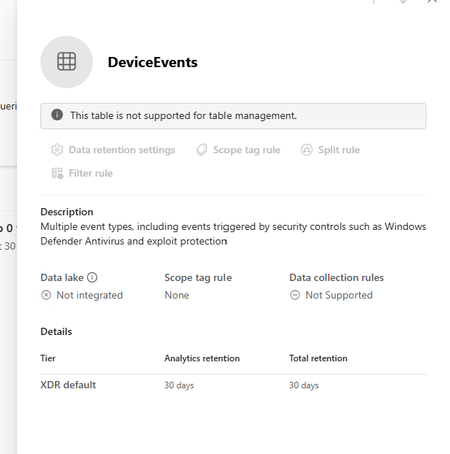
I am trying to extend the table retention of specific tables to allow them to flow to Sentinel Analytics but keep getting the message "This table is not supported for table management" in the Sentinel > Configuration > Tables page. The Sentinel workspace is connected in System > Settings > Microsoft Sentinel. I can see the table type is XDR in the list which seems to be the reason why it can't be managed. Any ideas why this table is not able to be managed.55Views0likes1CommentMonthly News-August 2026
Microsoft Defender Monthly news - August 2026 Edition This is our monthly "What's new" blog post, summarizing product updates and various new assets we released over the past month across our Defender products. In this edition, we are looking at all the goodness from July 2026. We are now including news related to Defender for Cloud in the Defender portal. For all other Defender for Cloud news, have a look at the dedicated Defender for Cloud Monthly News here. 🚀 New Virtual Ninja Show episode: Redefining identity security for the modern enterprise One policy engine to govern them all: Securing agentic AI with Microsoft Purview Building a modern detection pipeline with ContentOps Securing local AI agents with Microsoft Defender Microsoft Defender: Extending critical protection for emerging threats in Team Actionable threat insights (find all of them here) Email threat landscape: Q2 2026 trends and insights Enhancing AI security through global AI red teaming Least privilege for AI agents: Identity, access, and tool binding Microsoft Defender (Public Preview) Microsoft Defender now assesses posture risk for AI agents, including enterprise agents and local agents discovered on endpoint devices. Risk levels are based on active risk indicators, such as configuration, access, runtime activity, endpoint and user context, and active alerts. Security teams can use posture risk and recommendations to prioritize risky agents and improve agent security posture. For more information, see AI agent posture risk in Microsoft Defender. (Generally available) The Domain investigation page allows you to investigate an Active Directory domain. It shows Active Directory domain security, including domain properties, deployment health, identity summary, service account breakdown, sensitive entities, active recommendations, group policies, and trust relationships. For more information, see Investigate a domain . (Generally available) With a Microsoft Agent 365 license, Microsoft Defender provides discovery, security posture, threat detection and investigation, and real-time protection for the AI agents in your tenant. Onboarding includes enabling data collection, connecting the Microsoft 365 app connector, and connecting Copilot Studio for real-time protection of Copilot Studio agents. For more information, see Protect AI agents using Microsoft Defender. (Generally available) Improved access to Playbook Generator: Following the GA release of Playbook Generator May 31st, the team focused on streamlining the onboarding experience and reducing friction related to Security Copilot wallet provisioning. Playbook Generator remains included with Microsoft Sentinel and does not consume SCUs for generating, testing, or running playbooks, yet customer feedback highlighted friction around Security Copilot wallet provisioning and initial setup requirements. The team worked on simplifying access and reducing onboarding barriers so organizations can more quickly take advantage of AI-assisted playbook creation, testing, and automation capabilities. For all other Sentinel News, have a look at the "What's new in Microsoft Sentinel blog post - July edition" Identity Security (Generally available) Migration of Defender for Identity sensors from v2.x to v3.x is now generally available. For more information, see Migrate to Defender for Identity sensor v3.x. Migration readiness reasons on the Sensors page: When a server is marked Not ready for migration on the Sensors page, you can now hover over the status to see a tooltip that lists the specific reasons the server doesn't meet the migration prerequisites. For more information, see Troubleshoot "Not ready for migration" status. (Public Preview) Expanded SaaS app support in Password protection. The Password protection page now includes password risks from SaaS apps connected through Defender for Cloud Apps, in addition to Active Directory, Microsoft Entra ID, and Okta. SaaS apps that support SaaS Security Posture Management (SSPM), such as Salesforce and ServiceNow, appear on the Password Hygiene and Password Policies tabs. Each SaaS app requires a Defender for Cloud Apps app connector. For more information, see Investigate identity password protection. Automatic RPC auditing on domain controllers: Defender for Identity now automatically enables RPC auditing on domain controllers when you upgrade to sensor version 3.0.8 or later. You no longer need to apply a tag manually to enable RPC auditing. For more information, see Configure RPC auditing. Microsoft Defender Experts MDR General Availability of Microsoft Defender Experts MDR P2: Microsoft Defender Experts MDR (formerly Microsoft Defender Experts for XDR) is expanding with new third-party and multi-cloud coverage powered by Microsoft Sentinel, with the launch of Defender Experts MDR P2 service. Defender Experts MDR provides a 24/7 managed detection and response service that reduces noise, adds expert context, and drives action. In addition to the Microsoft Defender products, this new service supports key non-Microsoft sources across cloud (AWS), identity (Okta), email (Proofpoint), network (Palo Alto Networks, Cisco, Fortinet, ZScaler), and endpoint (CrowdStrike) that are ingested in Microsoft Sentinel, providing E2E visibility and protection for customers operating heterogenous environments. Defender Experts will continue expanding our scope to other non-Microsoft products to deliver on this promise. For more information, see the Microsoft Defender Experts MDR documentation. Microsoft Security Exposure Management / Defender Vulnerability Management (Private Preview) Codename MDASH - Agentic code scanner is now available in private preview in Microsoft Security Exposure Management. Codename MDASH uses a multi-model agentic AI system to detect code vulnerabilities with greater depth and accuracy than traditional static analysis. Security teams can run scans from Defender CLI or through a GitHub connector, review findings in the Defender portal, and use results to help prioritize code security risks. For more information, see Agentic code security overview. (Private Preview) Codename MDASH - MAI-Augmented scan profile private preview. The MAI-Augmented scan profile is now available in preview as part of Codename MDASH. The MAI-Augmented profile can be used when triggering a scan through the Defender CLI. It includes MAI-Cyber-1-Flash, a new cyber-specialized model that extends the current agentic scanner in addition to the existing required models. Security teams can choose this profile when triggering a scan from Defender CLI or continue using a scan profile based on the existing models. For more information, see Scan with a scan profile. OT data connectors in Microsoft Security Exposure Management: Microsoft Security Exposure Management now supports operational technology (OT) data connectors for Armis, Dragos, and Forescout. OT data connectors bring OT asset and vulnerability data from supported third-party OT platforms into the Defender portal. This helps security teams view OT devices alongside other assets, enrich device inventory with OT context, and investigate vulnerabilities across IT and OT environments. For more information, see OT data connectors. Microsoft Defender for Endpoint (Public Preview) AI agent runtime protection includes these enhancements: - Vendor-supported agent event interfaces now work with standard platform and engine update channels, so no Beta channel configuration is required. Agent-native event inspection now supports Codex CLI and the GitHub Copilot app. - Network inspection is now supported for agents that don't expose vendor-supported event interfaces, including OpenClaw and similar Node.js-based Claw agents. For more information, see AI agent runtime protection with Defender for Endpoint. (Generally available) Available from Defender for Endpoint on Linux version 101.26042.0011 and later. The Defender Deployment Tool for Linux simplifies deployment by combining installation, onboarding, upgrades, and uninstallation into a single workflow. The tool automates prerequisite validation, supports custom installation paths, enables deployment of specific Defender versions from preferred update channels, and works seamlessly in environments that use local repositories. In addition to a simplified deployment experience, customers can now gain complete visibility into deployment progress through Device Timeline integration, providing step-by-step installation, upgrade, and onboarding status, Advanced Hunting queries for fleet-wide deployment monitoring, and detailed error reporting, including deployment stage, status, exit code, and failure reason to simplify troubleshooting. These capabilities help administrators quickly identify deployment issues, track onboarding progress, and understand deployment outcomes across their Linux estate. Microsoft Defender for Office 365 Unified RBAC is the default permission model for new Defender for Office 365 Plan 2 organizations. Starting July 2026, new Defender for Office 365 Plan 2 organizations use the Microsoft Defender unified role-based access control (Unified RBAC) model by default. For more information, see Configure Unified RBAC for Defender for Office 365 and MC1246006. Microsoft 365 E3 now includes Microsoft Defender for Office 365 Plan 1. For more information about what's included in each plan, see Microsoft Defender for Office 365 Plan 1 vs. Plan 2 cheat sheet. Prompt injection protection: Defender for Office 365 now detects prompt injection attacks hidden in inbound email. For more information, see Prompt injection protection in Defender for Office 365.2KViews1like0CommentsSentinel - Defender XDR KQL Queries Library
Hello all, I’ve been building something over the past few weeks that I think the security community might find useful. https://goxdr.fyi is a searchable KQL query library for Microsoft Sentinel and Defender XDR. The name comes from a nickname my colleagues gave me (GoX) combined with XDR. I also picked up https://goxdr.fyi as a short and easy to remember domain for it. You can check it out here: https://goxdr.fyi The idea came from my own day to day work as someone working in IAM and SOC operations. I constantly find myself writing and refining KQL queries for threat hunting, detection engineering and incident investigation. Over time I realized I had a growing collection of queries that I kept going back to and I thought why not make these available to others? It currently has 117 queries covering identity security, BEC/AiTM detection, NTLM and LDAP attack hunting, OAuth governance, AI/Copilot security, Sentinel alert trending, SOC performance metrics and more. Some of these queries are ones I wrote from scratch based on real scenarios I encountered in production environments. Others are community queries I tested and validated in my own setup. Only the ones I found genuinely useful and that actually worked against real data made it in. Each query comes with a description explaining what it detects and why it matters, along with severity levels, platform tags (Sentinel, XDR or both) and a copy button so you can paste it directly into Advanced Hunting or use it as the basis for an Analytics Rule. The site is open source, hosted on GitHub Pages and licensed under CC BY 4.0. No sign-up, no paywall, no tracking. The source is available. I’ll keep adding queries as new scenarios come up. If there’s enough interest I’m also considering adding Cortex XQL queries for Palo Alto environments. Suggestions, feedback or ideas for new detections are always welcome. Feel free to reach out. Thanks104Views0likes0CommentsDefenderXDR "Preparing new space for data and connecting them" is stuck , and never finished !
Hello everyone, I am delivering SC-200 courses and on the lab environment of Skillable (or even free-tiers) when you have to "initiate" the data space for DefenderXDR, the process seems to be stuck .... never finished and we are "locked" in the page of a ...coffee cup and the phrase "Hang on. We are preparing new spaces for your data and connecting them. " does anyone else have same problem ? Any resolution , (I have already open a support ticket to Skillable support, but I haven't got resolution for over 1+day , and cannot open or continue the lab (for connecting or onboarding Microsoft Defender for Endpoint ) which is frustrating for the participants-students Thanks Panos204Views1like2CommentsFeature Request: Manual Invocation Mode for Embedded Security Copilot Experiences to reduce cost !
Hello, I see that Copilot for Security in XDR dashboards , if used in embedded mode (I mean whenever you are opening a case to investigate) you get AUTOMATICALLY a summary of the incident , and you are consuming SCU costs. I want a way either globally as a tenant option, or through a pwsh to be able to DISABLE this, or be able to PRESS the AI button AND THEN generate the AI reply (and consume SCU credits ..) Current behavior: Open Incident --> Copilot automatically generates Incident Summary --> SCUs ARE consumed Desired behavior: Open Incident --> No AI execution --> Click "Generate Summary" MANUALLY --> SCUs consumed I am not talking about RBAC controls to assign WHO of my admins can use Security Copilot, I have set that, BUT I want my admin to decide IF they want AI to help them (and consume - pay for that SCU credits-costs) OR NOT !! At the moment I havent found any solution, except to educate my admin to press CANCEL the moment he/she opens such an XDR dashboard ! :) Does anyone knows something ? Regards, Panos124Views0likes2CommentsMonthly news - July 2026
Microsoft Defender Monthly news - July 2026 Edition This is our monthly "What's new" blog post, summarizing product updates and various new assets we released over the past month across our Defender products. In this edition, we are looking at all the goodness from June 2026. We are now including news related to Defender for Cloud in the Defender portal. For all other Defender for Cloud news, have a look at the dedicated Defender for Cloud Monthly News here. 🚀 New Virtual Ninja Show episode: Redefining identity security for the modern enterprise One policy engine to govern them all: Securing agentic AI with Microsoft Purview Building a modern detection pipeline with ContentOps Securing local AI agents with Microsoft Defender Microsoft Defender: Extending critical protection for emerging threats in Team Weekly Security News: We publish a short 1ish minute video every week with updates across our Microsoft Security stack. Subscribe to our YouTube channel, so you don't miss the next episode. Actionable threat insights (find all of them here) Securing AI agents: When AI tools move from reading to acting Chromium extension uses AI‑related branding to redirect browser search Photo ZIP campaign targeting hospitality industry delivers Node.js implant for persistent access Microsoft Defender Two Workbooks capabilities in the unified Microsoft Defender portal moved to GA: Advanced Hunting connector - build custom dashboards directly on top of Advanced Hunting (XDR) dat. Query XDR tables and visualize them in Workbooks for richer investigations and reports. Workspace filter / multi-workspace experience - scope and filter workbooks by workspace, with workspace selection integrated into the workbook itself rather than relying on the global selector. MTO Tenant Groups let MSSPs and large enterprises organize their multitenant view in Microsoft Defender by grouping tenants logically (e.g., by region, business unit, or customer cohort). Learn more here. Custom Detections support in Microsoft Sentinel Repositories. Custom Detections can now be managed as code in Microsoft Sentinel Repositories, the same way customers already manage analytic rules, playbooks, parsers and workbooks. Detection engineers connect a GitHub or Azure DevOps repo to their workspace; Custom Detections placed in the repo are reconciled on every commit. A standalone Bicep path via the Microsoft Security Bicep extension lets teams deploy from any CI/CD pipeline (ADO Pipelines, GitHub Actions, custom runners). (General Availability) The following advanced hunting schema tables are now generally available: The CloudAuditEvents table contains information about cloud audit events for various cloud platforms protected by the organization's Defender for Cloud. The CloudDnsEvents table contains information about DNS activity events from cloud infrastructure environments. The CloudProcessEvents table contains information about process events in multicloud hosted environments. (Public Preview) The AgentsInfo table in advanced hunting is now available in preview. The AIAgentsInfo table is transitioning to this new table, which provides a unified schema that supports agent inventory and governance for all agent types, including Copilot Studio, Microsoft Foundry, Microsoft 365 Copilot, third-party, and endpoint-discovered agents. Microsoft Agent 365 customers should use the AgentsInfo table today. The AIAgentsInfo table remains accessible until July 1, 2026. Update your queries to use AgentsInfo before this date. For more information, see Advanced hunting schema - Naming changes. For all other Sentinel News, have a look at the "What's new in Microsoft Sentinel blog post - June edition" Identity Security (Public Preview) The Identity Security dashboard now includes a new Human identities card that shows your human identities by source (Entra ID, SaaS, and on-premises), giving you a single view of where your human identities live. For more information, see Identity Security dashboard. (Public Preview) On the Coverage and maturity page, the Review and improve coverage side panel for SaaS Identities now includes an Observed column and a Show Only Observed Applications toggle. By default, the panel shows only SaaS applications detected in your environment. Turn off the toggle to see other supported SaaS applications you can onboard to expand your identity coverage. For more information, see Coverage and maturity. New alerts were added to the Defender for Identity security alerts related to Microsoft Entra ID, Active Directory as well as other identity providers. For a full list of those new alerts, check out our documentation. Recent ShinyHunters attacks on Salesforce show how OAuth tokens and connected apps are being weaponized to bypass MFA at scale. The upgraded Salesforce connector for Defender for Cloud Apps helps detect these attacks faster, with richer connected-app context and investigation-ready signals. Customers already using the connector are advised to enable the additional events in the Salesforce console for tighter protection, and eligible customers not yet using it are advised to connect Salesforce. Learn more. Microsoft Defender for Endpoint / Microsoft Defender Vulnerability Management (Public Preview) Local AI agent discovery: as part of the Defender AI agents experience, Microsoft Defender now automatically discovers supported local AI agents running on onboarded Windows & macOS devices. Discovered agents appear as assets in the AI agent inventory, exposure map, and advanced hunting, giving security teams visibility into local AI agent usage across the organization. For more information, see Discover local AI agents. (Preview) Local AI agent runtime protection on Windows endpoints is now available in public preview. Microsoft Defender inspects the agent loop (user prompts, tool calls, and tool responses) and can block risky activity before it executes, helping stop prompt injection and unsafe agent actions at the device level. Blocked and audited events appear as alerts in Microsoft Defender to support incident correlation and investigation workflows. The new version of the Defender deployment tool for Windows streamlines onboarding and enhances security by: Bundling the onboarding package directly into the tool's executable. Generating a key during deployment package creation that is required for running the tool. Enabling users to configure an expiry date for the package to reduce the risk of unauthorized use. In addition: You have the option of downloading the package as either an .exe or a .zip file, whichever best suits your organization's needs. A new Deployment packages page in the Defender portal facilitates management of downloaded packages by providing centralized visibility into all the packages and their current status. Now generally available: Selective Response Actions enables organizations to tailor high-impact security operations on devices during onboarding. It provides precise control over how response actions are applied on Tier-0 systems and other high-value assets, helping maintain operational stability while delivering strong protection. The new exposure score model in Defender Vulnerability Management is now generally available. This model improves risk prioritization and recommendation impact accuracy by incorporating exploit prediction data (EPSS) and asset context factors such as internet-facing status and criticality. More details here. Microsoft Secure Score now includes the Reduce unnecessary inbound internet exposure on internet-facing devices recommendation, which helps identify devices that are accessible from the public internet and may represent unnecessary attack surface. This recommendation provides centralized visibility into internet-facing devices across the environment. Many predefined SaaS application classification rules were added to the critical assets list. Have a look at our documentation for the full list. These classifications require onboarding to Microsoft Defender for Cloud Apps.1.7KViews2likes6CommentsMicrosoft Defender Incident – Handling incident severity change
There's no dedicated history/audit endpoint for field-level transitions (like "this incident went from Low → High at timestamp X") in the /security/incidents Graph API — the incident object only exposes the current severity plus a lastUpdateDateTime, not a change log. So this isn't something you're missing; it genuinely doesn't exist as a queryable history today. Also worth knowing before you build around it: Graph change notifications (webhooks) are not documented as supported for /security/incidents — subscription/webhook support is only documented for the legacy /security/alerts resource, and that resource is deprecated with removal expected around April 2026. So polling is currently the only supported pattern for incidents specifically, not a limitation of your approach — there's no webhook alternative to fall back to yet. Given that, the fix is in your polling strategy, not in finding a hidden feature: instead of filtering once at creation time and then ignoring the incident, poll using $filter=lastUpdateDateTime gt {last_poll_timestamp}. Since lastUpdateDateTime bumps on any property change — including a severity escalation — this catches incidents that started as Low/Informational and later got escalated, without re-fetching everything. A pattern that works well in practice: GET /security/incidents?$filter=lastUpdateDateTime gt {last_poll_time}&$orderby=lastUpdateDateTime asc Then in your own store, diff the incoming severity against what you last recorded for that id to detect the transition yourself — you're effectively reconstructing the history client-side since the API won't give it to you natively. Store (incidentId, severity, lastUpdateDateTime) on each poll and compare. One gotcha: this still won't tell you the exact moment the severity changed if multiple fields changed between polls — only that it changed sometime between your last two poll timestamps. If you need second-level precision on transition timing, you'd need to poll more frequently (your 5-minute interval is probably fine for SOC triage purposes, but not for precise SLA timestamping).107Views0likes0CommentsIs "Endpoint Security Policies" available to us? (error getting Intune policies)
Question We'd like to use Defender \ Endpoint Security Policies. Is that possible for my tenant's environment? Getting below error on "Defender \ Endpoint Security Policies" page "There seems to be an issue getting your Intune policies" Details of our environment Purpose of defender To protect our server fleet that's running outside of Azure Tenant GCC - Moderate Scoped Region Commercial Azure East US 2 Subscription Microsoft Defender for Servers Plan 1 (No other subscription, etc.) Defender Client OS Windows 2016, 2019, 2022 RHEL8, 9 (No desktops\laptops) Agents installed on each Windows and Linux server Defender is onboarded Arc is onboarded Configured Settings and Errors Defender \ Settings \ Configuration management \ Enforcement scope https://security.microsoft.com/securitysettings/endpoints/configuration_management2 Error at top of page "Intune is not configured to allow Microsoft Defender for Endpoint to manage security configuration settings." Use MDE to enforce security configuration settings from Intune Set to ON Enable configuration management Windows Server devices On tagged devices Windows Server Domain Controller devices On tagged devices Linux devices On tagged devices Security settings management for Microsoft Defender for Cloud onboarded devices. Set to ON Manage Security settings using Configuration Manager Set to OFF Defender \ Settings \ Configuration management \ Intune Permissions https://security.microsoft.com/securitysettings/endpoints/intune_permissions Getting error "Access needed You don't have the right permissions in AAD to view this information (in addition to those you already have in MDE). To adjust your permissions, go to the AAD portal." Defender \ Endpoint Security Policies https://security.microsoft.com/policy-inventory On main page, getting below error There seems to be an issue getting your Intune policies If I try to make a new policy There seems to be an issue loading the policy authoring wizard. Intune \ Endpoint security https://intune.microsoft.com/#view/Microsoft_Intune_Workflows/SecurityManagementMenu Getting Error You don't have access Intune roles | My permissions https://intune.microsoft.com/#view/Microsoft_Intune_DeviceSettings/RolesLandingMenuBlade/~/myPermissions You're an administrator with full permissions to all Microsoft Intune resources. Intune roles | Administrator Licensing https://intune.microsoft.com/#view/Microsoft_Intune_DeviceSettings/RolesLandingMenuBlade/~/administratorLicensing Allow admins without an Intune license to access Intune. Their scope of access is determined by the Intune roles you've assigned them. I've clicked the box "Allow access to unlicensed admins" Alternatives If Defender \ Endpoint Security Policies isn't available, as alternatives, I guess we could use SCCM Antimalware policies to manage Windows servers Deploying a central mdatp_managed.json to manage Linux servers However, it would be greatly preferred to use the Defender \ Endpoint Security Policies feature for Windows and Linux272Views0likes4CommentsTriage vulnerabilities with the Vulnerability Remediation Agent, now in public preview
As automation and AI accelerate the pace of vulnerability discovery, the window between disclosure and exploitation continues to shrink. For IT and security teams, the challenge is no longer just finding vulnerabilities - it's prioritizing the ones that matter and acting on them before they can be exploited. To help organizations close that gap, we're pleased to announce that the Vulnerability Remediation Agent for Security Copilot in Microsoft Intune is now in public preview and rolling out to all customers. Following a successful limited preview, the agent is now broadly available. This release brings agentic vulnerability remediation out of an early-access cohort and into the hands of every eligible organization - an important step in our continued investment in helping admins reduce exposure faster and with greater confidence. View eligibility prerequisites here. How the agent helps you identify and triage vulnerabilities The Vulnerability Remediation Agent uses data from Microsoft Defender Vulnerability Management to identify Common Vulnerabilities and Exposures (CVEs) across your Intune-managed Windows devices and apps, then prioritizes them for remediation. Rather than leaving admins to sift through lengthy CVE lists with little context, the agent surfaces a prioritized set of recommendations directly in the Intune admin center - accessible from both the Agents and Endpoint security pages. When the agent runs, it evaluates vulnerability data and ranks threats based on factors such as CVSS scores, exposure impact, and affected device count, so the most critical issues rise to the top. Drilling into any suggestion provides: The count of associated CVEs A Copilot-assisted summarized impact analysis Suggested actions and affected systems Exposed devices and potential impact Step-by-step guidance for remediating the threat using Intune After acting on a recommendation, admins can mark it as applied, allowing the agent to retain a record for tracking remediation actions over time. The result is a meaningful reduction in the time it takes to investigate, prioritize, and remediate - strengthening overall security posture. Introducing agentic identity for the Vulnerability Remediation Agent With this release, the agent now operates under Microsoft Entra agentic identity - a meaningful advancement in how autonomous agents are governed and secured. What it is. Agentic identity is a specialized identity in Microsoft Entra ID that allows the agent to operate securely and independently. During setup, the agent provisions a dedicated agentic identity and a corresponding agentic user in your tenant's Microsoft Entra directory. The agent then runs under the permissions delegated to that agentic user rather than under a human user account. Why it matters. Agentic identity decouples the agent from any one person, ensuring its behavior is strictly bound to the permissions and scope you delegate to it. This delivers clearer accountability, a cleaner audit trail, and enterprise-grade governance for autonomous operations. How it helps. Admins remain firmly in control. After setup, delegate the required read permissions to the agentic user in the Microsoft Intune and Microsoft Defender admin centers, then use the built-in Readiness Check to confirm everything is configured correctly before the agent runs. Learn more in Agent identity. Getting started: Connect → Enable → Run → Remediate → Track One of the design goals behind the Vulnerability Remediation Agent is to make agentic security approachable, not complex. Rather than stitching together signals across multiple tools and admin centers, the agent guides admins through a clear, repeatable flow - from connecting your data to tracking measurable improvement over time. Connect — bring Defender and Intune data together. The agent draws on Microsoft Defender Vulnerability Management for CVE intelligence and Microsoft Intune for device and configuration context. With the required Microsoft Defender and Microsoft Intune plugins in place, your vulnerability and management signals work as one. Learn more on what is needed to connect the experience. Enable — turn on the agent. From the Agents node in the Microsoft Intune admin center, set up the agent in a few guided steps. During setup, the agent provisions its Microsoft Entra agentic identity and surfaces the permissions and plugins it needs, so you know exactly what to delegate before the first run. Run — let automated prioritization do the heavy lifting. Once permissions are delegated and the Run Readiness Check passes, you can configure the agent to run on demand or schedule it to run automatically in the background on a cadence you define; scheduling is a unique capability that helps teams stay ahead of emerging risks without requiring constant manual intervention. Each run analyzes your environment and produces a prioritized list of recommendations ranked by CVSS score, exposure impact, and affected device count so the most critical risks rise to the top automatically. Remediate — act with guided, Intune-ready actions. Each recommendation includes a Copilot-assisted impact summary, exposed devices, and step-by-step guidance for remediating the threat using Intune. Admins move directly from insight to action, without leaving the admin center. Track — measure improvement over time. Recommendations can be marked as applied, and the agent retains a record of your remediation actions. The outcome is a streamlined operating model: connect once, enable with confidence, and let the agent drive a continuous cycle of prioritization, remediation, and view progress. For full prerequisites, licensing, plugin, and role requirements, see Vulnerability Remediation Agent overview and set up. The Vulnerability Remediation Agent represents a meaningful step toward a more proactive, AI-assisted security posture, one where admins spend less time sifting through CVE lists and more time acting on what matters most. We invite you to try the public preview today, connect your Defender and Intune data, and experience how agentic remediation can help your team stay ahead of emerging threats. As always, we'd love to hear your feedback as we continue investing in making security in Intune faster, smarter, and more accessible. Share your tips and lessons learned in the comments below or reach out to us on X @IntuneSuppTeam. Join our community! Discuss real-world scenarios, get expert guidance, connect with peers, and influence the future of Microsoft Security products. Learn more at aka.ms/JoinIntuneCommunity.3KViews0likes1CommentAutomating Daily MDE Compliance Monitoring Across Azure VMs
The Problem We’re Solving Most security teams have no automated way to know when a VM silently falls out of MDE coverage, whether because the agent stopped, the VM was newly provisioned without onboarding, or the device stopped reporting. This Logic App closes that gap and puts the right information in front of the right people every day. Disclaimer: This solution is designed for Azure Virtual Machines only. For non-Azure VMs onboarded to Microsoft Defender for Endpoint through Azure Arc, a separate companion blog will be published soon to cover that scenario. What changes once you deploy this Challenge Without This Logic App How This Logic App Helps Security gaps go undetected for days or weeks Any VM that is not onboarded or has stopped reporting is caught within 24 hours of the daily run No automated owner notification The VM's ServerOwner tag is read automatically, and the owner is emailed directly with full compliance details VMs with no owner fall through the cracks Flagged explicitly in the IT summary report with instructions for how to assign the tag Manual compliance reporting is time-consuming Full CSV report auto-attached to every daily IT summary; no manual extraction needed Agents silently stop reporting after onboarding Detects "Onboarded, Not Reporting" as a distinct status, separate from "Not Onboarded" Large multi-subscription environments are hard to cover Paginated queries across all enabled subscriptions; every running VM is checked Compliance States Detected Compliance Status Priority What It Means Not Onboarded P2, High The VM is running in Azure but has never appeared in MDE. There is zero security telemetry for this machine. Onboarded, Not Reporting P3, Medium The VM was previously enrolled but has not checked in within the configured window. The MDE agent may be stopped or the VM may have lost network connectivity to MDE. Compliant No alert VM is onboarded and checked in within the required time window. It is excluded from all notifications. Running VMs Only: This workflow queries Azure Resource Graph with a filter of powerState == "VM running". Deallocated, stopped, and powered-off VMs are intentionally excluded — they are not expected to report to MDE while offline. Only machines that are turned on are evaluated. Workflow Architecture The workflow runs as a sequential daily pipeline. All Azure VM data and MDE device data are collected into memory first, then each VM is evaluated in a single For Each loop. Execution Pipeline Recurrence trigger fires daily at 08:00 IST. CONFIG compose action reads MDE_LASTSEEN_HOURS (default 24). This defines the compliance window: how recently a VM must have reported to MDE to be considered Compliant. Init-varITTeamEmail and Init-varSenderEmail load the configurable email addresses used for sending and receiving notifications. Get-AllSubscriptions calls the Azure Management API to discover all subscriptions in the tenant. ForEach-Subscription runs a paginated Azure Resource Graph query per enabled subscription, collecting all running VMs along with Private IP, OS Type, Location, ServerOwner tag, and VM UUID. Init-MDEVariables then Paginate-MDEDevices call the MDE Security Center API in pages of 10,000 to load every enrolled device into the AllMDEDevices array. ForEach-AzureVM looks each Azure VM up in AllMDEDevices and determines compliance status and priority. Non-compliant handling builds HTML and CSV rows. If the VM has a ServerOwner tag, a compliance alert email goes to the owner with the IT Team CC'd. If there's no owner, the VM is appended to NoOwnerList. IT Summary email is sent once all VMs are processed. If any non-compliant VMs were found, the consolidated IT report is sent with the CSV attachment. Otherwise an All Clear email is sent. How Azure VM Data is Matched to MDE Data Each Azure VM is matched against the MDE device list using a two-level strategy. Both checks run for every VM on every run. Match Method How It Works Primary: Azure VM ID Compares azureVmId from the MDE device record (lowercase) against the VmId captured from Azure Resource Graph (lowercase). Immune to hostname changes; this is the preferred match. Fallback: Hostname + IP Checks that MDE computerDnsName starts with the Azure VM name (case-insensitive) AND lastIpAddress matches the Azure Private IP. Both conditions must be true. Not Found A synthetic MDE record with onboardingStatus: "NotFound" is created. The VM is treated as Not Onboarded and a P2 High alert is raised. Pagination Design The workflow handles large environments through two independent pagination mechanisms that run before any compliance evaluation begins. Data Source Page Size Mechanism Azure Resource Graph 1,000 VMs per page Uses $skipToken from the response. The Until loop re-queries with the token until no token is returned (last page). Variables VMSkipToken and VMFetchComplete manage loop state per subscription. Supports up to 50,000 VMs (50 pages). MDE Security Center API 10,000 devices per page Uses the $skip offset parameter. MDESkip is incremented by 10,000 each iteration. The loop stops when a page returns fewer than 10,000 records. Supports up to 500,000 MDE devices (50 pages × 10,000). Prerequisites Azure Resources Resource Requirement Notes Azure Logic App Standard plan, Stateful workflow Consumption plan also supported Managed Identity System-assigned on the Logic App Enable under Logic App > Identity Sender mailbox (varSenderEmail) Licensed Microsoft 365 account Emails are sent FROM this address IT Team email (varITTeamEmail) Valid email address or distribution list Receives all reports; CC'd on owner alerts Azure VMs Running, with ServerOwner tag (recommended) Tag value must be a valid email address MDE licensing Microsoft Defender for Endpoint P1 or P2 Tenant must be enrolled in MDE The ServerOwner Tag Server owner notifications rely on a VM-level Azure tag. Without it, the VM is included in the IT summary, but no individual alert is sent to an owner. Tag Name Expected Value Effect ServerOwner Valid email, e.g. john@yourcompany.com Compliance alert sent TO this address; IT Team CC'd If the tag is missing or empty, the VM is flagged in the Action Required: No Owner Tag Found section of the IT summary email, with step-by-step instructions for tagging it in the Azure Portal. Required Permissions & Why The Logic App's Managed Identity must be granted three API permissions. These are Application permissions that cannot be assigned through the Azure Portal UI, so the PowerShell script in Section 4.3 must be used. Admin consent is required. Permission Summary Permission API / Service AppId Why It Is Required user_impersonation Azure Management 797f4846-ba00-4fd7-ba43-dac1f8f63013 Allows the Managed Identity to call the Azure Resource Graph API to query VM inventory across all subscriptions. Without this, the workflow cannot discover VMs. WindowsDefenderATP.Read.All MDE Security Center fc780465-2017-40d4-a0c5-307022471b92 Allows reading all device records from the MDE API (/api/machines). This returns onboarding status, last seen time, and health status — the core compliance data. Mail.Send Microsoft Graph 00000003-0000-0000-c000-000000000000 Allows sending emails via the Graph /sendMail endpoint on behalf of the varSenderEmail mailbox. Without this, no alerts or reports can be sent. Important: The Azure Management and MDE permissions belong to separate service principals — they are NOT part of Microsoft Graph. Each permission must be assigned to its own service principal using the AppId shown above. The script in Section 4.2 handles this correctly. Where to find the required values Parameter Where to find it in Azure Portal $tenantID Azure Portal > Microsoft Entra ID > Overview > Tenant ID $managedIdentityObjectId Logic App > Settings > Identity > System assigned tab > Object (principal) ID Permission Assignment Script Run this in Azure Cloud Shell or any terminal with the Microsoft.Graph PowerShell module installed. Update $tenantID and $managedIdentityObjectId before running. # PowerShell # ── Update these two values before running ─────────────────────────── $tenantID = "<tenantID>" # Your Tenant ID $managedIdentityObjectId = "<objectID>" # MI Object ID # Install Microsoft.Graph if not already present if (!(Get-Module -ListAvailable -Name Microsoft.Graph)) { Install-Module -Name Microsoft.Graph -Scope CurrentUser -Force } # Connect to Microsoft Graph Connect-MgGraph -TenantId $tenantID ` -Scopes "AppRoleAssignment.ReadWrite.All","Application.Read.All" # MDE Compliance Logic App needs 3 permissions across 3 different service principals $permissions = @( @{ Permission="user_impersonation"; AppId="797f4846-ba00-4fd7-ba43-dac1f8f63013" }, @{ Permission="WindowsDefenderATP.Read.All"; AppId="fc780465-2017-40d4-a0c5-307022471b92" }, @{ Permission="Mail.Send"; AppId="00000003-0000-0000-c000-000000000000" } ) foreach ($entry in $permissions) { $sp = Get-MgServicePrincipal -Filter "AppId eq '$($entry.AppId)'" $appRole = $sp.AppRoles | Where-Object { $_.Value -eq $entry.Permission } if ($appRole -ne $null) { New-MgServicePrincipalAppRoleAssignment ` -ServicePrincipalId $sp.Id ` -PrincipalId $managedIdentityObjectId ` -ResourceId $sp.Id ` -AppRoleId $appRole.Id Write-Host "Assigned: $($entry.Permission)" -ForegroundColor Green } else { Write-Host "Not found: $($entry.Permission)" -ForegroundColor Yellow } } Write-Host "All permissions assigned." -ForegroundColor Green Verify Permissions Assigned # PowerShell # Run after the assignment script to verify all 3 permissions are present Get-MgServicePrincipalAppRoleAssignment ` -ServicePrincipalId $managedIdentityObjectId | Select-Object AppRoleId, PrincipalDisplayName | Format-Table -AutoSize Note: You should see three assignment rows in the output — one for each permission. If any are missing, re-run the assignment script. An error saying the assignment already exists is normal and can be safely ignored. Creating the Logic App Create the resource Azure Portal > search Logic Apps > + Create. Select your Subscription and Resource Group. Logic App name: la-mde-compliance-monitor. Plan type: Standard > Windows > select or create a Hosting Plan > Review + Create > Create. Once deployed, click Go to resource. Enable System-assigned Managed Identity Open the Logic App > left menu: Settings > Identity. On the System assigned tab, toggle Status to On. Click Save > Yes on the confirmation dialog. The Object (principal) ID appears. Copy this value for the PowerShell script. Run the Permissions Assignment script to assign all three permissions to this identity. Why Managed Identity: A System-assigned Managed Identity is automatically scoped to this Logic App and deleted when the Logic App is deleted. It authenticates to Azure Management API, MDE API, and Microsoft Graph without any stored passwords or client secrets. Create the workflow and import the JSON Logic App > left menu: Workflows > + Add. Workflow name: MDEComplianceMonitor. State type: Stateful. Click Create. Click the workflow name > left menu: Code. Press Ctrl + A > Delete to clear the editor completely. Paste the complete workflow JSON from the companion file (see Appendix A). Click Save. It should succeed with no validation errors. Important: Always use Stateful. Stateless workflows do not support run history, have a 5-minute timeout, and do not retain intermediate state — all of which are required by this workflow's pagination loops. Configuration: What You Can Change After importing the JSON, update only the values described below. Everything else runs automatically. Email Address Variables Variable Description Where to Update varITTeamEmail The IT Team email address. All IT Summary reports are sent TO this address. All per-VM owner emails CC this address. 3000 varSenderEmail The Microsoft 365 licensed account that emails are sent FROM via Graph API. Must have Mail.Send permission granted to the Managed Identity. 3000 Compliance look-up window: MDE_LASTSEEN_HOURS This setting in the CONFIG compose action defines how recently a VM must have reported to MDE to count as Compliant. Default is 24 hours. Value Behaviour 24 (default) Compliant if the VM checked in with MDE within the last 24 hours. Recommended starting point. 12 Stricter check; suitable for high-security environments requiring near-real-time coverage. 48 More relaxed; suitable for environments with scheduled maintenance windows or intermittent connectivity. Running VMs Only The Azure Resource Graph query includes a filter for powerState == "VM running". This means: Deallocated VMs are excluded (not expected to report to MDE while offline). Stopped (allocated) VMs are excluded. Newly started VMs are included and checked on the next daily run. To Change the Filter: To change the power state filter, locate the "query" string inside the Build-VMQuery-Paged action and modify the | where powerState == clause. For example, removing the filter entirely will check all VMs regardless of state. Sample Email Notifications The screenshots below show actual emails generated by this workflow. All sensitive data (email addresses, VM names, subscription IDs, IP addresses) has been redacted. Per-VM owner alert Sent to the server owner (ServerOwner tag) when their VM is non-compliant. The IT Team is CC'd. The email contains full server details, compliance status, priority, last MDE check-in time, and resolution SLA. Note: If no ServerOwner tag is set the VM is skipped here and included in the "No Owner Tag Found" section of the IT summary instead. IT Team Daily Summary Report Sent once per day to the IT Team after all owner emails are dispatched. Shows up to 20 VMs inline with a full CSV attachment containing the complete list, plus a dedicated section for VMs with no owner tag. Note: The CSV attachment always contains the complete list of all non-compliant VMs regardless of count. The inline HTML table is limited to 20 rows to keep the email size manageable. All Compliant VMs: If all VMs are compliant, you’ll see email like this: Post-Deployment Checklist Before you leave the workflow running unattended, walk through this checklist once. # Item 1 Logic App resource created (Standard plan, Stateful workflow) 2 System-assigned Managed Identity enabled; Object ID copied 3 PowerShell script run; user_impersonation, WindowsDefenderATP.Read.All, and Mail.Send assigned 4 Permissions verified using Get-MgServicePrincipalAppRoleAssignment (3 rows expected) 5 Workflow JSON pasted into Code view; saved without validation errors 6 varITTeamEmail updated to your IT security team or distribution list address 7 varSenderEmail updated to a licensed Microsoft 365 mailbox 8 MDE_LASTSEEN_HOURS reviewed (default 24, adjust if needed) 9 At least one Azure VM has the ServerOwner tag set with a valid email 10 Manual run triggered: Logic App > Overview > Run Trigger > Run 11 Run history shows Succeeded; no 401 or 403 errors on any HTTP action 12 IT Team received the daily summary email with CSV attachment 13 Server owner received a per-VM alert with the IT Team CC'd 14 Recurrence trigger confirmed running daily at 08:00 IST Wrapping Up What I love about this is how much it accomplishes with so little: a Logic App, a Managed Identity, and three permissions. No connectors, no secrets to rotate, no third-party services. Yet every morning, your security team starts the day knowing exactly which VMs are out of MDE coverage and which owners have already been notified. If you adopt this pattern, here are a few natural next steps to consider: Hook into Microsoft Sentinel by writing non-compliant VMs to a custom table for trend analysis. Auto-create ServiceNow or Jira tickets for VMs that remain non-compliant for more than 48 hours. Extend the match logic to include Arc-enabled servers, not just Azure VMs. Add a Teams adaptive card notification alongside email for faster response. I'd love to hear how you're solving MDE coverage gaps in your environment. Appendix A: Workflow JSON The complete Logic App workflow definition is provided below. To import it: open the Logic App in Azure Portal, navigate to the workflow, click Code view, press Ctrl + A to clear the existing content, paste the entire JSON, then click Save. { "definition": { "$schema": "https://schema.management.azure.com/providers/Microsoft.Logic/schemas/2016-06-01/workflowdefinition.json#", "contentVersion": "1.0.0.0", "triggers": { "Recurrence": { "recurrence": { "frequency": "Day", "interval": 1, "schedule": { "hours": [ "8" ], "minutes": [ 0 ] }, "timeZone": "India Standard Time" }, "evaluatedRecurrence": { "frequency": "Day", "interval": 1, "schedule": { "hours": [ "8" ], "minutes": [ 0 ] }, "timeZone": "India Standard Time" }, "type": "Recurrence" } }, "actions": { "CONFIG": { "runAfter": {}, "type": "Compose", "inputs": { "MDE_LASTSEEN_HOURS": 24 } }, "Set-ExcludedSubscriptions": { "runAfter": { "CONFIG": [ "Succeeded" ] }, "type": "Compose", "inputs": [] }, "Init-varITTeamEmail": { "runAfter": { "Set-ExcludedSubscriptions": [ "Succeeded" ] }, "type": "InitializeVariable", "inputs": { "variables": [ { "name": "varITTeamEmail", "type": "string", "value": "admin@contoso.onmicrosoft.com" } ] } }, "Init-varSenderEmail": { "runAfter": { "Init-varITTeamEmail": [ "Succeeded" ] }, "type": "InitializeVariable", "inputs": { "variables": [ { "name": "varSenderEmail", "type": "string", "value": "admin@contoso.onmicrosoft.com" } ] } }, "Get-AllSubscriptions": { "runAfter": { "Init-varSenderEmail": [ "Succeeded" ] }, "type": "Http", "inputs": { "uri": "https://management.azure.com/subscriptions?api-version=2022-12-01", "method": "GET", "headers": { "Content-Type": "application/json" }, "authentication": { "type": "ManagedServiceIdentity", "audience": "https://management.azure.com" }, "retryPolicy": { "type": "fixed", "count": 3, "interval": "PT60S" } } }, "Parse-AllSubscriptions": { "runAfter": { "Get-AllSubscriptions": [ "Succeeded" ] }, "type": "ParseJson", "inputs": { "content": "@body('Get-AllSubscriptions')", "schema": { "type": "object", "properties": { "value": { "type": "array", "items": { "type": "object", "properties": { "subscriptionId": { "type": "string" }, "displayName": { "type": "string" }, "state": { "type": "string" } } } } } } } }, "Init-AllVMs": { "runAfter": { "Parse-AllSubscriptions": [ "Succeeded" ] }, "type": "InitializeVariable", "inputs": { "variables": [ { "name": "AllVMs", "type": "array", "value": [] }, { "name": "VMSkipToken", "type": "string", "value": "INIT" }, { "name": "VMFetchComplete", "type": "boolean", "value": false } ] } }, "ForEach-Subscription": { "foreach": "@body('Parse-AllSubscriptions')?['value']", "actions": { "Check-SubscriptionEnabled": { "actions": { "Reset-VMSkipToken": { "type": "SetVariable", "inputs": { "name": "VMSkipToken", "value": "INIT" } }, "Reset-VMFetchComplete": { "runAfter": { "Reset-VMSkipToken": [ "Succeeded" ] }, "type": "SetVariable", "inputs": { "name": "VMFetchComplete", "value": false } }, "Until": { "actions": { "Build-VMQuery-Paged": { "type": "Compose", "inputs": { "subscriptions": [ "@{items('ForEach-Subscription')?['subscriptionId']}" ], "query": "Resources | where type == 'microsoft.compute/virtualmachines' | extend VMName = tostring(name), ResourceGroup = tostring(resourceGroup), Location = tostring(location), OSType = tostring(properties.storageProfile.osDisk.osType), VMSize = tostring(properties.hardwareProfile.vmSize), ServerOwner = tostring(tags.ServerOwner), Environment = tostring(tags.Environment), SubscriptionId = tostring(subscriptionId), nicId = tolower(tostring(properties.networkProfile.networkInterfaces[0].id)), VmId = tolower(tostring(properties.vmId)) | join kind=leftouter (Resources | where type == 'microsoft.network/networkinterfaces' | extend privateIP = tostring(properties.ipConfigurations[0].properties.privateIPAddress) | project nicId = tolower(id), privateIP) on nicId | join kind=leftouter (Resources | where type == 'microsoft.compute/virtualmachines' | extend powerState = tostring(properties.extended.instanceView.powerState.displayStatus) | project id, powerState) on id | where powerState == 'VM running' | project VMName, ResourceGroup, Location, OSType, VMSize, ServerOwner, Environment = 'Azure', SubscriptionId, PrivateIP = privateIP, VmId, CloudEnvironment = 'Azure'", "options": { "$skipToken": "@if(equals(variables('VMSkipToken'), 'INIT'), '', variables('VMSkipToken'))" }, "$top": 1000 } }, "Get-VMs-Paged": { "runAfter": { "Build-VMQuery-Paged": [ "Succeeded" ] }, "type": "Http", "inputs": { "uri": "https://management.azure.com/providers/Microsoft.ResourceGraph/resources?api-version=2021-03-01", "method": "POST", "headers": { "Content-Type": "application/json" }, "body": "@outputs('Build-VMQuery-Paged')", "authentication": { "type": "ManagedServiceIdentity", "audience": "https://management.azure.com" } }, "runtimeConfiguration": { "contentTransfer": { "transferMode": "Chunked" } } }, "ForEach-VM-Result-Paged": { "foreach": "@body('Get-VMs-Paged')?['data']", "actions": { "Append-SingleVM-Paged": { "type": "AppendToArrayVariable", "inputs": { "name": "AllVMs", "value": "@items('ForEach-VM-Result-Paged')" } } }, "runAfter": { "Get-VMs-Paged": [ "Succeeded" ] }, "type": "Foreach" }, "Check-VMSkipToken": { "actions": { "Set-VMFetchComplete": { "type": "SetVariable", "inputs": { "name": "VMFetchComplete", "value": true } } }, "runAfter": { "ForEach-VM-Result-Paged": [ "Succeeded" ] }, "else": { "actions": { "Set-VMSkipToken": { "type": "SetVariable", "inputs": { "name": "VMSkipToken", "value": "@body('Get-VMs-Paged')?['$skipToken']" } } } }, "expression": { "or": [ { "equals": [ "@string(body('Get-VMs-Paged')?['$skipToken'])", "" ] } ] }, "type": "If" } }, "runAfter": { "Reset-VMFetchComplete": [ "Succeeded" ] }, "expression": "@equals(variables('VMFetchComplete'), true)", "limit": { "count": 50, "timeout": "PT1H" }, "type": "Until" } }, "else": { "actions": {} }, "expression": { "and": [ { "equals": [ "@items('ForEach-Subscription')?['state']", "Enabled" ] } ] }, "type": "If" } }, "runAfter": { "Init-AllVMs": [ "Succeeded" ] }, "type": "Foreach" }, "Init-MDEVariables": { "runAfter": { "ForEach-Subscription": [ "Succeeded" ] }, "type": "InitializeVariable", "inputs": { "variables": [ { "name": "AllMDEDevices", "type": "array" }, { "name": "MDESkip", "type": "integer", "value": 0 }, { "name": "MDEFetchComplete", "type": "boolean", "value": false } ] } }, "Paginate-MDEDevices": { "actions": { "Get-MDEDevices-Page": { "type": "Http", "inputs": { "uri": "https://api.securitycenter.microsoft.com/api/machines?$select=computerDnsName,id,osPlatform,lastSeen,onboardingStatus,healthStatus,lastIpAddress&$top=10000&$skip=@{variables('MDESkip')}", "method": "GET", "headers": { "Content-Type": "application/json" }, "authentication": { "type": "ManagedServiceIdentity", "audience": "https://api.securitycenter.microsoft.com" }, "retryPolicy": { "type": "fixed", "count": 3, "interval": "PT60S" } }, "runtimeConfiguration": { "contentTransfer": { "transferMode": "Chunked" } } }, "Parse-MDEPage": { "runAfter": { "Get-MDEDevices-Page": [ "Succeeded" ] }, "type": "ParseJson", "inputs": { "content": "@body('Get-MDEDevices-Page')", "schema": { "type": "object", "properties": { "value": { "type": "array", "items": { "type": "object", "properties": { "computerDnsName": { "type": [ "string", "null" ] }, "id": { "type": [ "string", "null" ] }, "osPlatform": { "type": [ "string", "null" ] }, "lastSeen": { "type": [ "string", "null" ] }, "onboardingStatus": { "type": [ "string", "null" ] }, "healthStatus": { "type": [ "string", "null" ] }, "lastIpAddress": { "type": [ "string", "null" ] }, "azureVmId": { "type": [ "string", "null" ] } } } } } } } }, "Append-MDEPage-ToArray": { "foreach": "@body('Parse-MDEPage')?['value']", "actions": { "Append-SingleMDEDevice": { "type": "AppendToArrayVariable", "inputs": { "name": "AllMDEDevices", "value": "@items('Append-MDEPage-ToArray')" } } }, "runAfter": { "Parse-MDEPage": [ "Succeeded" ] }, "type": "Foreach" }, "Check-PageSize": { "actions": { "Set-FetchComplete-True": { "type": "SetVariable", "inputs": { "name": "MDEFetchComplete", "value": true } } }, "runAfter": { "Append-MDEPage-ToArray": [ "Succeeded" ] }, "else": { "actions": { "Increment-MDESkip": { "type": "IncrementVariable", "inputs": { "name": "MDESkip", "value": 10000 } } } }, "expression": { "and": [ { "less": [ "@length(body('Parse-MDEPage')?['value'])", 10000 ] } ] }, "type": "If" } }, "runAfter": { "Init-MDEVariables": [ "Succeeded" ] }, "expression": "@equals(variables('MDEFetchComplete'), true)", "limit": { "count": 50, "timeout": "PT1H" }, "type": "Until" }, "Init-Variables": { "runAfter": { "Paginate-MDEDevices": [ "Succeeded" ] }, "type": "InitializeVariable", "inputs": { "variables": [ { "name": "EmailsSent", "type": "array", "value": [] }, { "name": "NoOwnerList", "type": "array", "value": [] }, { "name": "NonCompliantList", "type": "array", "value": [] }, { "name": "SummaryStats", "type": "object", "value": { "TotalNonCompliant": 0, "P1Critical": 0, "P2High": 0, "P3Medium": 0, "P4Low": 0, "EmailsSent": 0, "NoOwnerFound": 0 } }, { "name": "HTMLRows", "type": "string" }, { "name": "NonCompliantCount", "type": "integer", "value": 0 }, { "name": "CSVRows", "type": "string", "value": "@{concat('\"VM Name\",\"Private IP\",\"OS Type\",\"Location\",\"Server Owner\",\"MDE Status\",\"Last Seen\",\"Priority\",\"Action Taken\",\"Subscription ID\"', decodeUriComponent('%0A'))}" }, { "name": "HTMLRowCount", "type": "integer", "value": 0 } ] } }, "ForEach-AzureVM": { "foreach": "@variables('AllVMs')", "actions": { "Find-VMInMDE-Filter": { "type": "Query", "inputs": { "from": "@variables('AllMDEDevices')", "where": "@or(and(not(equals(item()?['azureVmId'], null)), not(equals(item()?['azureVmId'], '')), equals(toLower(item()?['azureVmId']), toLower(items('ForEach-AzureVM')?['VmId']))), and(or(equals(item()?['azureVmId'], null), equals(item()?['azureVmId'], '')), startsWith(toLower(item()?['computerDnsName']), toLower(items('ForEach-AzureVM')?['VMName'])), equals(item()?['lastIpAddress'], items('ForEach-AzureVM')?['PrivateIP'])))" } }, "Find-VMInMDE": { "runAfter": { "Find-VMInMDE-Filter": [ "Succeeded" ] }, "type": "Compose", "inputs": "@if(greater(length(body('Find-VMInMDE-Filter')), 0), first(body('Find-VMInMDE-Filter')), json('{\"computerDnsName\":\"NOT_FOUND\",\"onboardingStatus\":\"NotFound\",\"lastSeen\":\"1900-01-01T00:00:00Z\",\"lastIpAddress\":\"N/A\",\"healthStatus\":\"Unknown\"}'))" }, "Get-ComplianceStatus": { "runAfter": { "Find-VMInMDE": [ "Succeeded" ] }, "type": "Compose", "inputs": "@if(equals(outputs('Find-VMInMDE')?['computerDnsName'], 'NOT_FOUND'), 'Not Onboarded', if(equals(outputs('Find-VMInMDE')?['onboardingStatus'], 'Onboarded'), if(greater(outputs('Find-VMInMDE')?['lastSeen'], addHours(utcNow(), mul(-1, outputs('CONFIG')?['MDE_LASTSEEN_HOURS']))), 'Compliant', 'Onboarded - Not Reporting'), 'Not Onboarded'))" }, "Get-Priority": { "runAfter": { "Get-ComplianceStatus": [ "Succeeded" ] }, "type": "Compose", "inputs": "@if(equals(outputs('Get-ComplianceStatus'), 'Not Onboarded'), 'P2 - High', if(equals(outputs('Get-ComplianceStatus'), 'Onboarded - Not Reporting'), 'P3 - Medium', if(equals(outputs('Get-ComplianceStatus'), 'Compliant'), 'Compliant', 'P4 - Low')))" }, "Is-NonCompliant": { "actions": { "Append-CSVRows": { "type": "AppendToStringVariable", "inputs": { "name": "CSVRows", "value": "\"@{items('ForEach-AzureVM')?['VMName']}\",\"@{if(equals(items('ForEach-AzureVM')?['PrivateIP'], ''), 'N/A', items('ForEach-AzureVM')?['PrivateIP'])}\",\"@{items('ForEach-AzureVM')?['OSType']}\",\"@{items('ForEach-AzureVM')?['Location']}\",\"@{if(equals(items('ForEach-AzureVM')?['ServerOwner'], ''), 'No Owner Tag', items('ForEach-AzureVM')?['ServerOwner'])}\",\"@{outputs('Get-ComplianceStatus')}\",\"@{if(equals(outputs('Find-VMInMDE')?['onboardingStatus'], 'Onboarded'), if(equals(outputs('Find-VMInMDE')?['lastSeen'], '1900-01-01T00:00:00Z'), 'Never', concat(convertTimeZone(outputs('Find-VMInMDE')?['lastSeen'], 'UTC', 'India Standard Time', 'dd-MM-yyyy HH:mm:ss'), ' (', string(div(sub(ticks(utcNow()), ticks(outputs('Find-VMInMDE')?['lastSeen'])), 864000000000)), ' days ago)')), concat(outputs('Find-VMInMDE')?['onboardingStatus'], ' - Last Seen: ', convertTimeZone(outputs('Find-VMInMDE')?['lastSeen'], 'UTC', 'India Standard Time', 'dd-MM-yyyy HH:mm:ss')))}\",\"@{outputs('Get-Priority')}\",\"@{if(equals(items('ForEach-AzureVM')?['ServerOwner'], ''), 'IT Team Notified', 'Email sent to Server Owner')}\",\"@{items('ForEach-AzureVM')?['SubscriptionId']}\"@{decodeUriComponent('%0A')}" } }, "Check-HTMLRowCount": { "actions": { "Append-HTMLRows": { "type": "AppendToStringVariable", "inputs": { "name": "HTMLRows", "value": "<tr><td style=\"padding:8px 10px;border:1px solid #ddd;font-weight:600;\">@{items('ForEach-AzureVM')?['VMName']}</td><td style=\"padding:8px 10px;border:1px solid #ddd;word-wrap:break-word;\">@{if(equals(items('ForEach-AzureVM')?['PrivateIP'], ''), 'N/A', items('ForEach-AzureVM')?['PrivateIP'])}</td><td style=\"padding:8px 10px;border:1px solid #ddd;word-wrap:break-word;\">@{items('ForEach-AzureVM')?['OSType']}</td><td style=\"padding:8px 10px;border:1px solid #ddd;word-wrap:break-word;\">@{items('ForEach-AzureVM')?['Location']}</td><td style=\"padding:8px 10px;border:1px solid #ddd;word-wrap:break-word;\">@{if(equals(items('ForEach-AzureVM')?['ServerOwner'], ''), 'No Owner Tag', items('ForEach-AzureVM')?['ServerOwner'])}</td><td style=\"padding:8px 10px;border:1px solid #ddd;color:#c80000;\">@{outputs('Get-ComplianceStatus')}</td><td style=\"padding:8px 10px;border:1px solid #ddd;word-wrap:break-word;\">@{if(equals(outputs('Find-VMInMDE')?['onboardingStatus'], 'Onboarded'), if(equals(outputs('Find-VMInMDE')?['lastSeen'], '1900-01-01T00:00:00Z'), 'Never', concat(convertTimeZone(outputs('Find-VMInMDE')?['lastSeen'], 'UTC', 'India Standard Time', 'dd-MM-yyyy HH:mm:ss'), ' (', string(div(sub(ticks(utcNow()), ticks(outputs('Find-VMInMDE')?['lastSeen'])), 864000000000)), ' days ago)')), concat(outputs('Find-VMInMDE')?['onboardingStatus'], ' - Last Seen: ', convertTimeZone(outputs('Find-VMInMDE')?['lastSeen'], 'UTC', 'India Standard Time', 'dd-MM-yyyy HH:mm:ss')))}</td><td style=\"padding:8px 10px;border:1px solid #ddd;word-wrap:break-word;\">@{outputs('Get-Priority')}</td><td style=\"padding:8px 10px;border:1px solid #ddd;word-wrap:break-word;\">@{if(equals(items('ForEach-AzureVM')?['ServerOwner'], ''), 'IT Team Notified', 'Email sent to Server Owner')}</td><td style=\"padding:8px 10px;border:1px solid #ddd;word-break:break-all;\">@{items('ForEach-AzureVM')?['SubscriptionId']}</td></tr>" } }, "Increment-HTMLRowCount": { "runAfter": { "Append-HTMLRows": [ "Succeeded" ] }, "type": "IncrementVariable", "inputs": { "name": "HTMLRowCount", "value": 1 } } }, "runAfter": { "Append-CSVRows": [ "Succeeded" ] }, "else": { "actions": {} }, "expression": { "and": [ { "less": [ "@variables('HTMLRowCount')", 20 ] } ] }, "type": "If" }, "Increment-NonCompliantCount": { "runAfter": { "Check-HTMLRowCount": [ "Succeeded" ] }, "type": "IncrementVariable", "inputs": { "name": "NonCompliantCount", "value": 1 } }, "Check-ServerOwner": { "actions": { "Send-OwnerEmail": { "type": "Http", "inputs": { "uri": "@{concat('https://graph.microsoft.com/v1.0/users/', encodeURIComponent(variables('varSenderEmail')), '/sendMail')}", "method": "POST", "headers": { "Content-Type": "application/json" }, "body": { "message": { "subject": "[@{outputs('Get-Priority')}] MDE Compliance Alert - @{items('ForEach-AzureVM')?['VMName']}", "body": { "contentType": "HTML", "content": "<html><body style=\"font-family:Segoe UI,Arial,sans-serif;color:#1a1a1a;\"><div style=\"max-width:680px;margin:24px auto;border:1px solid #e0e0e0;border-radius:8px;overflow:hidden;\"><div style=\"background:#c80000;padding:20px 28px;\"><h2 style=\"color:#fff;margin:0;\">MDE Compliance Alert</h2><p style=\"color:#ffcccc;margin:6px 0 0;font-size:13px;\">Priority: @{outputs('Get-Priority')}</p></div><div style=\"padding:28px;\"><p style=\"margin-top:0;font-size:14px;\">Your server <strong>@{items('ForEach-AzureVM')?['VMName']}</strong> has a Microsoft Defender for Endpoint compliance issue requiring immediate attention.</p><table style=\"width:100%;border-collapse:collapse;font-size:14px;\"><thead><tr style=\"background:#f5f5f5;\"><th style=\"text-align:left;padding:10px 14px;border:1px solid #ddd;width:38%;\">Field</th><th style=\"text-align:left;padding:10px 14px;border:1px solid #ddd;word-wrap:break-word;\">Value</th></tr></thead><tbody><tr><td style=\"padding:9px 14px;border:1px solid #ddd;font-weight:600;\">Server Name</td><td style=\"padding:9px 14px;border:1px solid #ddd;word-wrap:break-word;\">@{items('ForEach-AzureVM')?['VMName']}</td></tr><tr style=\"background:#fafafa;\"><td style=\"padding:9px 14px;border:1px solid #ddd;font-weight:600;\">Private IP</td><td style=\"padding:9px 14px;border:1px solid #ddd;word-wrap:break-word;\">@{if(equals(items('ForEach-AzureVM')?['PrivateIP'], ''), 'N/A', items('ForEach-AzureVM')?['PrivateIP'])}</td></tr><tr><td style=\"padding:9px 14px;border:1px solid #ddd;font-weight:600;\">OS Type</td><td style=\"padding:9px 14px;border:1px solid #ddd;word-wrap:break-word;\">@{items('ForEach-AzureVM')?['OSType']}</td></tr><tr style=\"background:#fafafa;\"><td style=\"padding:9px 14px;border:1px solid #ddd;font-weight:600;\">Location</td><td style=\"padding:9px 14px;border:1px solid #ddd;word-wrap:break-word;\">@{items('ForEach-AzureVM')?['Location']}</td></tr><tr><td style=\"padding:9px 14px;border:1px solid #ddd;font-weight:600;\">Compliance Status</td><td style=\"padding:9px 14px;border:1px solid #ddd;color:#c80000;font-weight:700;\">@{outputs('Get-ComplianceStatus')}</td></tr><tr style=\"background:#fafafa;\"><td style=\"padding:9px 14px;border:1px solid #ddd;font-weight:600;\">Priority</td><td style=\"padding:9px 14px;border:1px solid #ddd;font-weight:700;\">@{outputs('Get-Priority')}</td></tr><tr><td style=\"padding:9px 14px;border:1px solid #ddd;font-weight:600;\">MDE Onboarding Status</td><td style=\"padding:9px 14px;border:1px solid #ddd;word-wrap:break-word;\">@{outputs('Find-VMInMDE')?['onboardingStatus']}</td></tr><tr style=\"background:#fafafa;\"><td style=\"padding:9px 14px;border:1px solid #ddd;font-weight:600;\">Last Seen in MDE (IST)</td><td style=\"padding:9px 14px;border:1px solid #ddd;word-wrap:break-word;\">@{if(equals(outputs('Find-VMInMDE')?['lastSeen'], '1900-01-01T00:00:00Z'), 'Never', concat(convertTimeZone(outputs('Find-VMInMDE')?['lastSeen'], 'UTC', 'India Standard Time', 'dd-MM-yyyy HH:mm:ss'), ' (', string(div(sub(ticks(utcNow()), ticks(outputs('Find-VMInMDE')?['lastSeen'])), 864000000000)), ' days ago)'))}</td></tr><tr><td style=\"padding:9px 14px;border:1px solid #ddd;font-weight:600;\">Resource Group</td><td style=\"padding:9px 14px;border:1px solid #ddd;word-wrap:break-word;\">@{items('ForEach-AzureVM')?['ResourceGroup']}</td></tr><tr style=\"background:#fafafa;\"><td style=\"padding:9px 14px;border:1px solid #ddd;font-weight:600;\">Subscription ID</td><td style=\"padding:9px 14px;border:1px solid #ddd;word-break:break-all;\">@{items('ForEach-AzureVM')?['SubscriptionId']}</td></tr></tbody></table><br/><table style=\"width:100%;border-collapse:collapse;\"><tr style=\"background:#fff8e1;\"><td style=\"padding:10px 14px;border:1px solid #ffe082;font-size:13px;\"><strong>Resolution SLA:</strong> P1 Critical - 24hrs | P2 High - 48hrs | P3 Medium - 72hrs</td></tr></table><br/><p style=\"font-size:13px;color:#555;\">For assistance contact IT Security: <a href=\"mailto:@{variables('varITTeamEmail')}\">@{variables('varITTeamEmail')}</a></p></div></div></body></html>" }, "toRecipients": [ { "emailAddress": { "address": "@{items('ForEach-AzureVM')?['ServerOwner']}" } } ], "ccRecipients": [ { "emailAddress": { "address": "@variables('varITTeamEmail')" } } ] }, "saveToSentItems": "true" }, "authentication": { "type": "ManagedServiceIdentity", "audience": "https://graph.microsoft.com" }, "retryPolicy": { "type": "fixed", "count": 2, "interval": "PT60S" } }, "runtimeConfiguration": { "contentTransfer": { "transferMode": "Chunked" } } }, "Append-EmailsSent": { "runAfter": { "Send-OwnerEmail": [ "Succeeded" ] }, "type": "AppendToArrayVariable", "inputs": { "name": "EmailsSent", "value": "@{items('ForEach-AzureVM')?['VMName']} → @{items('ForEach-AzureVM')?['ServerOwner']}" } } }, "runAfter": { "Increment-NonCompliantCount": [ "Succeeded" ] }, "else": { "actions": { "Append-NoOwnerList": { "type": "AppendToArrayVariable", "inputs": { "name": "NoOwnerList", "value": "<tr><td style=\"padding:8px 10px;border:1px solid #ddd;font-weight:600;\">@{items('ForEach-AzureVM')?['VMName']}</td><td style=\"padding:8px 10px;border:1px solid #ddd;word-wrap:break-word;\">@{if(equals(items('ForEach-AzureVM')?['PrivateIP'], ''), 'N/A', items('ForEach-AzureVM')?['PrivateIP'])}</td><td style=\"padding:8px 10px;border:1px solid #ddd;word-wrap:break-word;\">@{outputs('Get-ComplianceStatus')}</td><td style=\"padding:8px 10px;border:1px solid #ddd;font-weight:700;\">@{outputs('Get-Priority')}</td></tr>" } } } }, "expression": { "and": [ { "not": { "equals": [ "@items('ForEach-AzureVM')?['ServerOwner']", "" ] } } ] }, "type": "If" } }, "runAfter": { "Get-Priority": [ "Succeeded" ] }, "else": { "actions": {} }, "expression": { "and": [ { "not": { "equals": [ "@outputs('Get-ComplianceStatus')", "Compliant" ] } } ] }, "type": "If" } }, "runAfter": { "Init-Variables": [ "Succeeded" ] }, "type": "Foreach", "runtimeConfiguration": { "concurrency": { "repetitions": 1 } } }, "Check-AnyNonCompliant": { "actions": { "Send-ITSummaryEmail": { "type": "Http", "inputs": { "uri": "@{concat('https://graph.microsoft.com/v1.0/users/', encodeURIComponent(variables('varSenderEmail')), '/sendMail')}", "method": "POST", "headers": { "Content-Type": "application/json" }, "body": { "message": { "subject": "MDE Compliance Report (Azure Workloads) - @{variables('NonCompliantCount')} Non-Compliant VMs Found", "body": { "contentType": "HTML", "content": "<html><body style=\"font-family:Segoe UI,Arial,sans-serif;color:#1a1a1a;\"><div style=\"max-width:1400px;margin:24px auto;border:1px solid #e0e0e0;border-radius:8px;\"><div style=\"background:#0078d4;padding:20px 28px;\"><h2 style=\"color:#fff;margin:0;\">MDE Compliance Daily Report</h2><p style=\"color:#cce4ff;margin:6px 0 0;font-size:13px;\">Generated: @{convertTimeZone(utcNow(), 'UTC', 'India Standard Time', 'dd-MM-yyyy HH:mm:ss')} IST</p></div><div style=\"padding:28px;\"><table style=\"border-collapse:collapse;font-size:14px;margin-bottom:28px;\"><thead><tr style=\"background:#f0f0f0;\"><th style=\"padding:10px 18px;border:1px solid #ddd;word-wrap:break-word;\">Metric</th><th style=\"padding:10px 18px;border:1px solid #ddd;word-wrap:break-word;\">Value</th></tr></thead><tbody><tr><td style=\"padding:9px 18px;border:1px solid #ddd;word-wrap:break-word;\">Total Non-Compliant VMs</td><td style=\"padding:9px 18px;border:1px solid #ddd;font-weight:700;color:#c80000;\">@{variables('NonCompliantCount')}</td></tr><tr style=\"background:#fafafa;\"><td style=\"padding:9px 18px;border:1px solid #ddd;word-wrap:break-word;\">Server Owners Notified</td><td style=\"padding:9px 18px;border:1px solid #ddd;color:#107c10;font-weight:600;\">@{length(variables('EmailsSent'))}</td></tr><tr><td style=\"padding:9px 18px;border:1px solid #ddd;word-wrap:break-word;\">No Owner Tag</td><td style=\"padding:9px 18px;border:1px solid #ddd;color:#e65100;font-weight:600;\">@{length(variables('NoOwnerList'))}</td></tr></tbody></table><p style=\"background:#fff3cd;border:1px solid #ffc107;padding:10px 14px;border-radius:4px;font-size:13px;margin-bottom:16px;\">This report shows the first <strong>20 non-compliant VMs</strong> only. <strong>Please check the attached CSV file</strong> for the complete list.</p><table style=\"width:100%;table-layout:fixed;border-collapse:collapse;font-size:13px;\"><colgroup><col style=\"width:120px\"><col style=\"width:90px\"><col style=\"width:70px\"><col style=\"width:100px\"><col style=\"width:160px\"><col style=\"width:110px\"><col style=\"width:165px\"><col style=\"width:80px\"><col style=\"width:90px\"><col style=\"width:195px\"></colgroup><thead><tr style=\"background:#0078d4;color:#fff;\"><th style=\"padding:10px 12px;border:1px solid #005a9e;\">VM Name</th><th style=\"padding:10px 12px;border:1px solid #005a9e;\">Private IP</th><th style=\"padding:10px 12px;border:1px solid #005a9e;\">OS Type</th><th style=\"padding:10px 12px;border:1px solid #005a9e;\">Location</th><th style=\"padding:10px 12px;border:1px solid #005a9e;\">Server Owner</th><th style=\"padding:10px 12px;border:1px solid #005a9e;\">MDE Status</th><th style=\"padding:10px 12px;border:1px solid #005a9e;\">Last Seen (IST)</th><th style=\"padding:10px 12px;border:1px solid #005a9e;\">Priority</th><th style=\"padding:10px 12px;border:1px solid #005a9e;\">Action Taken</th><th style=\"padding:10px 12px;border:1px solid #005a9e;\">Subscription ID</th></tr></thead><tbody>@{variables('HTMLRows')}</tbody></table><br/><h3 style=\"border-bottom:2px solid #e65100;padding-bottom:8px;\">Action Required - No Owner Tag Found</h3><div style=\"background:#fff8f0;border:1px solid #ffccbc;padding:16px;border-radius:4px;font-size:13px;margin-bottom:16px;\"><p style=\"margin:0 0 8px 0;\">The following <strong>@{length(variables('NoOwnerList'))}</strong> server(s) have no <strong>ServerOwner</strong> tag assigned.</p><ol style=\"margin:0;padding-left:20px;\"><li style=\"margin-bottom:6px;\">Identify the owner of each server below</li><li style=\"margin-bottom:6px;\">Go to the VM in Azure Portal → Tags → Add tag</li><li style=\"margin-bottom:6px;\"><strong>Tag Name:</strong> ServerOwner | <strong>Tag Value:</strong> owner email address</li><li>Once tagged, the next daily report will automatically notify the owner</li></ol></div><table style=\"width:100%;table-layout:fixed;border-collapse:collapse;font-size:13px;\"><thead><tr style=\"background:#e65100;color:#fff;\"><th style=\"padding:10px 12px;border:1px solid #bf360c;text-align:left;\">VM Name</th><th style=\"padding:10px 12px;border:1px solid #bf360c;text-align:left;\">Private IP</th><th style=\"padding:10px 12px;border:1px solid #bf360c;text-align:left;\">MDE Status</th><th style=\"padding:10px 12px;border:1px solid #bf360c;text-align:left;\">Priority</th></tr></thead><tbody>@{if(equals(length(variables('NoOwnerList')), 0), '<tr><td colspan=\"4\" style=\"padding:12px;text-align:center;\">None - All servers have owner tags assigned</td></tr>', join(variables('NoOwnerList'), ''))}</tbody></table></div></div></body></html>" }, "toRecipients": [ { "emailAddress": { "address": "@variables('varITTeamEmail')" } } ], "attachments": [ { "@@odata.type": "#microsoft.graph.fileAttachment", "name": "@{concat('MDE-Compliance-Report-', convertTimeZone(utcNow(), 'UTC', 'India Standard Time', 'dd-MM-yyyy'), '.csv')}", "contentType": "text/csv", "contentBytes": "@{base64(variables('CSVRows'))}" } ] }, "saveToSentItems": "true" }, "authentication": { "type": "ManagedServiceIdentity", "audience": "https://graph.microsoft.com" } }, "runtimeConfiguration": { "contentTransfer": { "transferMode": "Chunked" } } } }, "runAfter": { "ForEach-AzureVM": [ "Succeeded" ] }, "else": { "actions": { "Send-AllClearEmail": { "type": "Http", "inputs": { "uri": "@{concat('https://graph.microsoft.com/v1.0/users/', encodeURIComponent(variables('varSenderEmail')), '/sendMail')}", "method": "POST", "headers": { "Content-Type": "application/json" }, "body": { "message": { "subject": "[@{convertTimeZone(utcNow(), 'UTC', 'India Standard Time', 'dd-MM-yyyy')}] MDE Compliance Report - All VMs Compliant", "body": { "contentType": "HTML", "content": "<html><body style=\"font-family:Segoe UI,Arial,sans-serif;color:#1a1a1a;\"><div style=\"max-width:600px;margin:24px auto;border:1px solid #e0e0e0;border-radius:8px;overflow:hidden;\"><div style=\"background:#107c10;padding:20px 28px;\"><h2 style=\"color:#fff;margin:0;\">MDE Compliance Report</h2><p style=\"color:#c8e6c9;margin:6px 0 0;font-size:13px;\">Generated: @{convertTimeZone(utcNow(), 'UTC', 'India Standard Time', 'dd-MM-yyyy HH:mm:ss')} IST</p></div><div style=\"padding:28px;text-align:center;\"><h2 style=\"color:#107c10;\">All VMs Compliant</h2><p style=\"font-size:15px;color:#555;\">All Azure Virtual Machines are onboarded to Microsoft Defender for Endpoint and reporting within the required 24-hour window.</p><p style=\"font-size:13px;color:#888;\">No action required. The next report will be sent tomorrow at 08:00 IST.</p></div></div></body></html>" }, "toRecipients": [ { "emailAddress": { "address": "@variables('varITTeamEmail')" } } ] }, "saveToSentItems": "true" }, "authentication": { "type": "ManagedServiceIdentity", "audience": "https://graph.microsoft.com" } }, "runtimeConfiguration": { "contentTransfer": { "transferMode": "Chunked" } } } } }, "expression": { "and": [ { "greater": [ "@variables('NonCompliantCount')", 0 ] } ] }, "type": "If" } }, "parameters": { "$connections": { "type": "Object", "defaultValue": {} } } }, "parameters": { "$connections": { "type": "Object", "value": {} } } }