microsoft defender for endpoint
798 Topics
How to get alerted on pending items in the Action Center
Good morning all! Part of my daily duties is to ensure that items in the Action Center are acted upon in a timely manner. I have been trying to find ways to be able to be alerted on new items, but there is nothing in Microsoft documentation, or anything that is obvious. I have scoured the internet, where I stumbled upon an old post about having to use a PS script, but there has to be some sort of notification Microsoft can send out on these items?! Since these items are time sensitive, I am having to check constantly for any new soft/hard delete emails.492Views1like1Comment
Secure Linux desktops with Microsoft Defender
As more developers begin to use Linux desktops, they become more attractive to attackers: high-privilege, high-value, and easy for admins to overlook. A developer using Linux for day-to-day development may interact with source code repositories, continuous integration and continuous delivery (CI/CD) pipelines, cloud infrastructure, container environments and internal development platforms. If their workstation is compromised, an attacker doesn’t just gain access to a laptop, but a foothold in the pipelines that build and ship the organization’s software. As Linux adoption expands beyond the data center, organizations need a consistent approach to protecting Linux wherever it is used. That’s why we’ve extended our industry-leading endpoint protection in Microsoft Defender, bringing enterprise-grade protection, detection, vulnerability management and response capabilities to Linux workstations. Enterprise-grade protection for Linux desktops Defender support for Linux workstations spans all three key areas of endpoint security: Protect and detect Endpoint detection and response (EDR) Microsoft Defender next-gen antivirus Threat analytics Exposure management Microsoft Defender Vulnerability Management Device inventory Security settings management Investigate and respond Advanced hunting Live response Device isolation The result is broader Linux protection, delivered through the tools and processes security teams already trust. Give security teams a consistent and simplified view across the endpoint estate With Defender on Linux desktops, organizations can: Onboard quickly using the deployment methods already validated for Linux servers Reduce operational complexity by protecting Linux desktops and servers with one agent and one security operations experience Improve visibility across heterogeneous endpoint environments Strengthen developer workstation security where users interact with source code, cloud infrastructure and other critical resources Accelerate investigation and response through a consistent security operations experience Defender protects Linux desktops with the same deployment organizations already use to protect Linux servers. There is no separate desktop-specific agent to deploy or maintain, and existing deployment packages, deployment methods and security capabilities on Linux servers extend directly to Linux workstations. Defender automatically identifies whether a Linux device is a server or a workstation, so devices appear correctly within inventory and security workflows without any additional administrative effort. With Microsoft Defender, security operations teams can gain visibility into Linux workstations alongside the rest of their enterprise endpoint estate. They can respond through a single portal, whether Linux is running in the data centre, in the cloud, or on an engineer’s desk. Get started Defender support is based on the underlying Linux distribution and kernel version, regardless of the desktop environment running on top of the distribution. Every distribution currently supported by Microsoft Defender on Linux servers is supported on Linux desktops as well — including RHEL, CentOS, Ubuntu, Debian, SLES, Fedora and Oracle Linux, running GNOME, KDE or other desktop environments. Defender on Linux desktops requires the standalone Microsoft Defender for Endpoint Plan 2 or Microsoft 365 E5 and E7. If your organization runs Linux on developer, engineering or security desktops, now is the time to close that visibility gap. To join the public preview, onboard eligible Linux workstations using any of the existing deployment methods. Before you begin, review what’s new in Defender and complete the pre-requisites. This is another step towards our vision of helping organizations secure every endpoint, no matter which operating system or platform. To learn more about endpoint protection with Microsoft Defender, check out our website. To learn more about Microsoft Security solutions, visit our website. Bookmark the Security blog to keep up with our expert coverage on security matters. Follow us on LinkedIn (Microsoft Security) and X (@MSFTSecurity) for the latest news and updates on cybersecurity.
Microsoft Defender XDR / Defender for Endpoint data connectors inconsistent failures
Hello, We are deploying our SOC (Sentinel) environments via Bicep. Now the Defender XDR ( MicrosoftThreatProtection) and Defender for Endpoint ( MicrosoftDefenderAdvancedThreatProtection) data connectors are failing to deploy inconsistantly. It seems to be a known issue due to the following posts: - https://github.com/Azure/SimuLand/issues/23 - https://techcommunity.microsoft.com/t5/microsoft-sentinel/quot-missing-consent-invalid-license-quot-defender-for-endpoint/m-p/3027212 - https://github.com/Azure/Azure-Sentinel/issues/5007 Next to this issue I see almost no development on the data connectors API, is there some news to be spread how to enable data connectors automated in the future, since it seems to be moving to Content Hub. It is hard to find any docs about how to deploy this for example via Bicep!? Also I have a question regarding 'Tenant-based Microsoft Defender for Cloud (Preview)' data connector. We deploy this now via GenericUI data connector kind, but this has no option to enable it via automation. Same as the question in the previous paragraph, how would this be made possible?1.3KViews0likes1Comment
From “No” to “Now”: A 7-Layer Strategy for Enterprise AI Safety
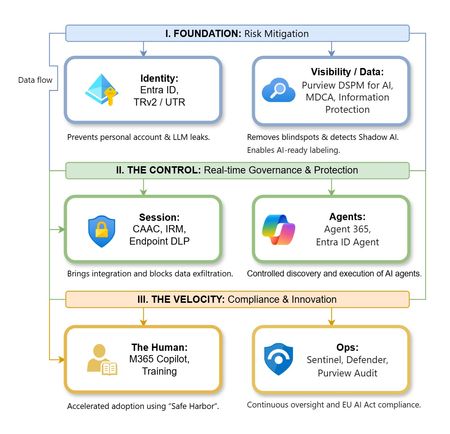
The “block” posture on Generative AI has failed. In a global enterprise, banning these tools doesn't stop usage; it simply pushes intellectual property into unmanaged channels and creates a massive visibility gap in corporate telemetry. The priority has now shifted from stopping AI to hardening the environment so that innovation can run at velocity without compromising data sovereignty. Traditional security perimeters are ineffective against the “slow bleed” of AI leakage - where data moves through prompts, clipboards, and autonomous agents rather than bulk file transfers. To secure this environment, a 7-layer defense-in-depth model is required to treat the conversation itself as the new perimeter. 1. Identity: The Only Verifiable Perimeter Identity is the primary control plane. Access to AI services must be treated with the same rigor as administrative access to core infrastructure. The strategy centers on enforcing device-bound Conditional Access, where access is strictly contingent on device health. To solve the "Account Leak" problem, the deployment of Tenant Restrictions v2 (TRv2) is essential to prevent users from signing into personal tenants using corporate-managed devices. For enhanced coverage, Universal Tenant Restrictions (UTR) via Global Secure Access (GSA) allows for consistent enforcement at the cloud edge. While TRv2 authentication-plane is GA, data-plane protection is GA for the Microsoft 365 admin center and remains in preview for other workloads such as SharePoint and Teams. 2. Eliminating the Visibility Gap (Shadow AI) You can’t secure what you can't see. Microsoft Defender for Cloud Apps (MDCA) serves to discover and govern the enterprise AI footprint, while Purview DSPM for AI (formerly AI Hub) monitors Copilot and third-party interactions. By categorizing tools using MDCA risk scores and compliance attributes, organizations can apply automated sanctioning decisions and enforce session controls for high-risk endpoints. 3. Data Hygiene: Hardening the “Work IQ” AI acts as a mirror of internal permissions. In a "flat" environment, AI acts like a search engine for your over-shared data. Hardening the foundation requires automated sensitivity labeling in Purview Information Protection. Identifying PII and proprietary code before assigning AI licenses ensures that labels travel with the data, preventing labeled content from being exfiltrated via prompts or unauthorized sharing. 4. Session Governance: Solving the “Clipboard Leak” The most common leak in 2025 is not a file upload; it’s a simple copy-paste action or a USB transfer. Deploying Conditional Access App Control (CAAC) via MDCA session policies allows sanctioned apps to function while specifically blocking cut/copy/paste. This is complemented by Endpoint DLP, which extends governance to the physical device level, preventing sensitive data from being moved to unmanaged USB storage or printers during an AI-assisted workflow. Purview Information Protection with IRM rounds this out by enforcing encryption and usage rights on the files themselves. When a user tries to print a "Do Not Print" document, Purview triggers an alert that flows into Microsoft Sentinel. This gives the SOC visibility into actual policy violations instead of them having to hunt through generic activity logs. 5. The “Agentic” Era: Agent 365 & Sharing Controls Now that we're moving from "Chat" to "Agents", Agent 365 and Entra Agent ID provide the necessary identity and control plane for autonomous entities. A quick tip: in large-scale tenants, default settings often present a governance risk. A critical first step is navigating to the Microsoft 365 admin center (Copilot > Agents) to disable the default “Anyone in organization” sharing option. Restricting agent creation and sharing to a validated security group is essential to prevent unvetted agent sprawl and ensure that only compliant agents are discoverable. 6. The Human Layer: “Safe Harbors” over Bans Security fails when it creates more friction than the risk it seeks to mitigate. Instead of an outright ban, investment in AI skilling-teaching users context minimization (redacting specifics before interacting with a model) - is the better path. Providing a sanctioned, enterprise-grade "Safe Harbor" like M365 Copilot offers a superior tool that naturally cuts down the use of Shadow AI. 7. Continuous Ops: Monitoring & Regulatory Audit Security is not a “set and forget” project, particularly with the EU AI Act on the horizon. Correlating AI interactions and DLP alerts in Microsoft Sentinel using Purview Audit (specifically the CopilotInteraction logs) data allows for real-time responses. Automated SOAR playbooks can then trigger protective actions - such as revoking an Agent ID - if an entity attempts to access sensitive HR or financial data. Final Thoughts Securing AI at scale is an architectural shift. By layering Identity, Session Governance, and Agentic Identity, AI moves from being a fragmented risk to a governed tool that actually works for the modern workplace.
RESYNC MICROSOFT DEFENDER FOR ENDPOINT
hey guys im a junior IT officer and i have been tasked with finding a way to get microsoft defender for enpoint to get fresh data without waiting 24hrs or the 4 hours that microsoft insists the resync will happen,I tried advanced hunting running queries directly there,i tried runnning an anti virus scan but nothing happened and APIs i tried looking for APIs that can initiate a restart but nothing...any ideas ? i read on here there was github repo for using powerBI with defender to get new data https://github.com/microsoft/MicrosoftDefenderForEndpoint-PowerBI but its not clear how that work...any intel would be helpful273Views0likes1CommentDefender streaming setup and integration with private event hub
Hey team, Do we know Defeneder supports private endpoint only event hubs to ingest data - I think only public is supported Configure Azure Event Hubs for Microsoft Defender XDR event ingestion - Microsoft Defender XDR | Microsoft Learn Could anyone please clarify?292Views0likes1Comment
Monitoring work from home
My boss has asked me if there is a way to see just how "busy" people who are working from home are. I have this data in Sentinel: Entra sign-in logs Defender for Endpoint logs Office 365 logs Most, if not all, on premise AD login events Netskope (current ZTNA solution) logs I have my known office location IPs so i could just exclude those and look for activity from other IPs however many times people will work in the morning or on the way to work appearing from a non corporate IP, come into the office appearing to come from a corporate IP, and then from home again in the evening. I need a way to query Sentinel looking for people who appear to be working but not coming from Corp IP. If they came from different IPs on the same day including Corp check to see if those non Corp are before and after business hours and exclude those. Anyone know of a good query to achieve this? Or maybe a tool that can extract and generate a report?229Views0likes0CommentsDefender XDR: Tables not supported for table management
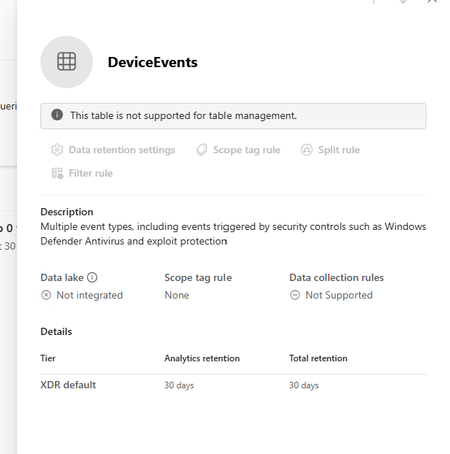
I am trying to extend the table retention of specific tables to allow them to flow to Sentinel Analytics but keep getting the message "This table is not supported for table management" in the Sentinel > Configuration > Tables page. The Sentinel workspace is connected in System > Settings > Microsoft Sentinel. I can see the table type is XDR in the list which seems to be the reason why it can't be managed. Any ideas why this table is not able to be managed.561Views0likes1CommentMonthly News-August 2026
Microsoft Defender Monthly news - August 2026 Edition This is our monthly "What's new" blog post, summarizing product updates and various new assets we released over the past month across our Defender products. In this edition, we are looking at all the goodness from July 2026. We are now including news related to Defender for Cloud in the Defender portal. For all other Defender for Cloud news, have a look at the dedicated Defender for Cloud Monthly News here. 🚀 New Virtual Ninja Show episode: Redefining identity security for the modern enterprise One policy engine to govern them all: Securing agentic AI with Microsoft Purview Building a modern detection pipeline with ContentOps Securing local AI agents with Microsoft Defender Microsoft Defender: Extending critical protection for emerging threats in Team Actionable threat insights (find all of them here) Email threat landscape: Q2 2026 trends and insights Enhancing AI security through global AI red teaming Least privilege for AI agents: Identity, access, and tool binding Microsoft Defender (Public Preview) Microsoft Defender now assesses posture risk for AI agents, including enterprise agents and local agents discovered on endpoint devices. Risk levels are based on active risk indicators, such as configuration, access, runtime activity, endpoint and user context, and active alerts. Security teams can use posture risk and recommendations to prioritize risky agents and improve agent security posture. For more information, see AI agent posture risk in Microsoft Defender. (Generally available) The Domain investigation page allows you to investigate an Active Directory domain. It shows Active Directory domain security, including domain properties, deployment health, identity summary, service account breakdown, sensitive entities, active recommendations, group policies, and trust relationships. For more information, see Investigate a domain . (Generally available) With a Microsoft Agent 365 license, Microsoft Defender provides discovery, security posture, threat detection and investigation, and real-time protection for the AI agents in your tenant. Onboarding includes enabling data collection, connecting the Microsoft 365 app connector, and connecting Copilot Studio for real-time protection of Copilot Studio agents. For more information, see Protect AI agents using Microsoft Defender. (Generally available) Improved access to Playbook Generator: Following the GA release of Playbook Generator May 31st, the team focused on streamlining the onboarding experience and reducing friction related to Security Copilot wallet provisioning. Playbook Generator remains included with Microsoft Sentinel and does not consume SCUs for generating, testing, or running playbooks, yet customer feedback highlighted friction around Security Copilot wallet provisioning and initial setup requirements. The team worked on simplifying access and reducing onboarding barriers so organizations can more quickly take advantage of AI-assisted playbook creation, testing, and automation capabilities. For all other Sentinel News, have a look at the "What's new in Microsoft Sentinel blog post - July edition" Identity Security (Generally available) Migration of Defender for Identity sensors from v2.x to v3.x is now generally available. For more information, see Migrate to Defender for Identity sensor v3.x. Migration readiness reasons on the Sensors page: When a server is marked Not ready for migration on the Sensors page, you can now hover over the status to see a tooltip that lists the specific reasons the server doesn't meet the migration prerequisites. For more information, see Troubleshoot "Not ready for migration" status. (Public Preview) Expanded SaaS app support in Password protection. The Password protection page now includes password risks from SaaS apps connected through Defender for Cloud Apps, in addition to Active Directory, Microsoft Entra ID, and Okta. SaaS apps that support SaaS Security Posture Management (SSPM), such as Salesforce and ServiceNow, appear on the Password Hygiene and Password Policies tabs. Each SaaS app requires a Defender for Cloud Apps app connector. For more information, see Investigate identity password protection. Automatic RPC auditing on domain controllers: Defender for Identity now automatically enables RPC auditing on domain controllers when you upgrade to sensor version 3.0.8 or later. You no longer need to apply a tag manually to enable RPC auditing. For more information, see Configure RPC auditing. Microsoft Defender Experts MDR General Availability of Microsoft Defender Experts MDR P2: Microsoft Defender Experts MDR (formerly Microsoft Defender Experts for XDR) is expanding with new third-party and multi-cloud coverage powered by Microsoft Sentinel, with the launch of Defender Experts MDR P2 service. Defender Experts MDR provides a 24/7 managed detection and response service that reduces noise, adds expert context, and drives action. In addition to the Microsoft Defender products, this new service supports key non-Microsoft sources across cloud (AWS), identity (Okta), email (Proofpoint), network (Palo Alto Networks, Cisco, Fortinet, ZScaler), and endpoint (CrowdStrike) that are ingested in Microsoft Sentinel, providing E2E visibility and protection for customers operating heterogenous environments. Defender Experts will continue expanding our scope to other non-Microsoft products to deliver on this promise. For more information, see the Microsoft Defender Experts MDR documentation. Microsoft Security Exposure Management / Defender Vulnerability Management (Private Preview) Codename MDASH - Agentic code scanner is now available in private preview in Microsoft Security Exposure Management. Codename MDASH uses a multi-model agentic AI system to detect code vulnerabilities with greater depth and accuracy than traditional static analysis. Security teams can run scans from Defender CLI or through a GitHub connector, review findings in the Defender portal, and use results to help prioritize code security risks. For more information, see Agentic code security overview. (Private Preview) Codename MDASH - MAI-Augmented scan profile private preview. The MAI-Augmented scan profile is now available in preview as part of Codename MDASH. The MAI-Augmented profile can be used when triggering a scan through the Defender CLI. It includes MAI-Cyber-1-Flash, a new cyber-specialized model that extends the current agentic scanner in addition to the existing required models. Security teams can choose this profile when triggering a scan from Defender CLI or continue using a scan profile based on the existing models. For more information, see Scan with a scan profile. OT data connectors in Microsoft Security Exposure Management: Microsoft Security Exposure Management now supports operational technology (OT) data connectors for Armis, Dragos, and Forescout. OT data connectors bring OT asset and vulnerability data from supported third-party OT platforms into the Defender portal. This helps security teams view OT devices alongside other assets, enrich device inventory with OT context, and investigate vulnerabilities across IT and OT environments. For more information, see OT data connectors. Microsoft Defender for Endpoint (Public Preview) AI agent runtime protection includes these enhancements: - Vendor-supported agent event interfaces now work with standard platform and engine update channels, so no Beta channel configuration is required. Agent-native event inspection now supports Codex CLI and the GitHub Copilot app. - Network inspection is now supported for agents that don't expose vendor-supported event interfaces, including OpenClaw and similar Node.js-based Claw agents. For more information, see AI agent runtime protection with Defender for Endpoint. (Generally available) Available from Defender for Endpoint on Linux version 101.26042.0011 and later. The Defender Deployment Tool for Linux simplifies deployment by combining installation, onboarding, upgrades, and uninstallation into a single workflow. The tool automates prerequisite validation, supports custom installation paths, enables deployment of specific Defender versions from preferred update channels, and works seamlessly in environments that use local repositories. In addition to a simplified deployment experience, customers can now gain complete visibility into deployment progress through Device Timeline integration, providing step-by-step installation, upgrade, and onboarding status, Advanced Hunting queries for fleet-wide deployment monitoring, and detailed error reporting, including deployment stage, status, exit code, and failure reason to simplify troubleshooting. These capabilities help administrators quickly identify deployment issues, track onboarding progress, and understand deployment outcomes across their Linux estate. Microsoft Defender for Office 365 Unified RBAC is the default permission model for new Defender for Office 365 Plan 2 organizations. Starting July 2026, new Defender for Office 365 Plan 2 organizations use the Microsoft Defender unified role-based access control (Unified RBAC) model by default. For more information, see Configure Unified RBAC for Defender for Office 365 and MC1246006. Microsoft 365 E3 now includes Microsoft Defender for Office 365 Plan 1. For more information about what's included in each plan, see Microsoft Defender for Office 365 Plan 1 vs. Plan 2 cheat sheet. Prompt injection protection: Defender for Office 365 now detects prompt injection attacks hidden in inbound email. For more information, see Prompt injection protection in Defender for Office 365.3.2KViews1like0CommentsTriage vulnerabilities with the Vulnerability Remediation Agent, now in public preview
As automation and AI accelerate the pace of vulnerability discovery, the window between disclosure and exploitation continues to shrink. For IT and security teams, the challenge is no longer just finding vulnerabilities - it's prioritizing the ones that matter and acting on them before they can be exploited. To help organizations close that gap, we're pleased to announce that the Vulnerability Remediation Agent for Security Copilot in Microsoft Intune is now in public preview and rolling out to all customers. Following a successful limited preview, the agent is now broadly available. This release brings agentic vulnerability remediation out of an early-access cohort and into the hands of every eligible organization - an important step in our continued investment in helping admins reduce exposure faster and with greater confidence. View eligibility prerequisites here. How the agent helps you identify and triage vulnerabilities The Vulnerability Remediation Agent uses data from Microsoft Defender Vulnerability Management to identify Common Vulnerabilities and Exposures (CVEs) across your Intune-managed Windows devices and apps, then prioritizes them for remediation. Rather than leaving admins to sift through lengthy CVE lists with little context, the agent surfaces a prioritized set of recommendations directly in the Intune admin center - accessible from both the Agents and Endpoint security pages. When the agent runs, it evaluates vulnerability data and ranks threats based on factors such as CVSS scores, exposure impact, and affected device count, so the most critical issues rise to the top. Drilling into any suggestion provides: The count of associated CVEs A Copilot-assisted summarized impact analysis Suggested actions and affected systems Exposed devices and potential impact Step-by-step guidance for remediating the threat using Intune After acting on a recommendation, admins can mark it as applied, allowing the agent to retain a record for tracking remediation actions over time. The result is a meaningful reduction in the time it takes to investigate, prioritize, and remediate - strengthening overall security posture. Introducing agentic identity for the Vulnerability Remediation Agent With this release, the agent now operates under Microsoft Entra agentic identity - a meaningful advancement in how autonomous agents are governed and secured. What it is. Agentic identity is a specialized identity in Microsoft Entra ID that allows the agent to operate securely and independently. During setup, the agent provisions a dedicated agentic identity and a corresponding agentic user in your tenant's Microsoft Entra directory. The agent then runs under the permissions delegated to that agentic user rather than under a human user account. Why it matters. Agentic identity decouples the agent from any one person, ensuring its behavior is strictly bound to the permissions and scope you delegate to it. This delivers clearer accountability, a cleaner audit trail, and enterprise-grade governance for autonomous operations. How it helps. Admins remain firmly in control. After setup, delegate the required read permissions to the agentic user in the Microsoft Intune and Microsoft Defender admin centers, then use the built-in Readiness Check to confirm everything is configured correctly before the agent runs. Learn more in Agent identity. Getting started: Connect → Enable → Run → Remediate → Track One of the design goals behind the Vulnerability Remediation Agent is to make agentic security approachable, not complex. Rather than stitching together signals across multiple tools and admin centers, the agent guides admins through a clear, repeatable flow - from connecting your data to tracking measurable improvement over time. Connect — bring Defender and Intune data together. The agent draws on Microsoft Defender Vulnerability Management for CVE intelligence and Microsoft Intune for device and configuration context. With the required Microsoft Defender and Microsoft Intune plugins in place, your vulnerability and management signals work as one. Learn more on what is needed to connect the experience. Enable — turn on the agent. From the Agents node in the Microsoft Intune admin center, set up the agent in a few guided steps. During setup, the agent provisions its Microsoft Entra agentic identity and surfaces the permissions and plugins it needs, so you know exactly what to delegate before the first run. Run — let automated prioritization do the heavy lifting. Once permissions are delegated and the Run Readiness Check passes, you can configure the agent to run on demand or schedule it to run automatically in the background on a cadence you define; scheduling is a unique capability that helps teams stay ahead of emerging risks without requiring constant manual intervention. Each run analyzes your environment and produces a prioritized list of recommendations ranked by CVSS score, exposure impact, and affected device count so the most critical risks rise to the top automatically. Remediate — act with guided, Intune-ready actions. Each recommendation includes a Copilot-assisted impact summary, exposed devices, and step-by-step guidance for remediating the threat using Intune. Admins move directly from insight to action, without leaving the admin center. Track — measure improvement over time. Recommendations can be marked as applied, and the agent retains a record of your remediation actions. The outcome is a streamlined operating model: connect once, enable with confidence, and let the agent drive a continuous cycle of prioritization, remediation, and view progress. For full prerequisites, licensing, plugin, and role requirements, see Vulnerability Remediation Agent overview and set up. The Vulnerability Remediation Agent represents a meaningful step toward a more proactive, AI-assisted security posture, one where admins spend less time sifting through CVE lists and more time acting on what matters most. We invite you to try the public preview today, connect your Defender and Intune data, and experience how agentic remediation can help your team stay ahead of emerging threats. As always, we'd love to hear your feedback as we continue investing in making security in Intune faster, smarter, and more accessible. Share your tips and lessons learned in the comments below or reach out to us on X @IntuneSuppTeam. Join our community! Discuss real-world scenarios, get expert guidance, connect with peers, and influence the future of Microsoft Security products. Learn more at aka.ms/JoinIntuneCommunity.3.5KViews0likes1Comment