microsoft copilot
477 TopicsDigital Deep Dive: Copilot Control System (CCS)
Join us for two days of insights, demos, and deep dives on Copilot Control System (CCS)! Learn how to secure, manage, and analyze Microsoft 365 Copilot, Copilot Chat, Microsoft Copilot Studio, and agents across your organization using the Copilot Control System (CCS). This two-day digital skilling event kicks off with a guided overview of CCS—your framework for managing Copilot securely, at scale, and with clarity. Day 1 dives into security, governance, and preparing your environment for Copilot and agents. Day 2 shifts to management controls, agent lifecycle, reporting, and user enablement. We’ll close with key takeaways and resources to support your next steps. What to Expect A breakdown of the Copilot Control System and how it applies across workloads Technical guidance for managing oversharing, insider risks, and web search settings Practical ways to build and secure enterprise-scale agents Lifecycle management approaches for Copilot agents and Copilot Studio makers Insights on measurement, analytics, and usage trends Guidance on enabling users and aligning AI adoption with organizational goals Live AMAs with Microsoft product team members throughout the event Day 1: Foundations & Security – Tuesday, June 17, 2025 (PT) Time Session Title Speaker(s) Description 8:00–8:30 AM PT Introduction to Copilot Control System Ben Summers Overview of the event structure, CCS components, and session navigation tips. 8:30–9:30 AM PT Secure Microsoft 365 Copilot and agents Sophie Ke, Dave Minasyan Addressing oversharing risks using SAM and Purview. 9:30–10:30 AM PT Prevent data loss and insider risks for Microsoft 365 Copilot Erica Toelle Using Microsoft Purview to mitigate insider threats and enforce protections. 10:30–11:00 AM PT Understanding web search controls in Microsoft 365 Copilot Alex Pozin, Suhel Parekh Configuring and governing Copilot's web search behavior. 11:00 AM–12:00 PM PT Build enterprise-scale agents securely Mik Ferland Best practices for secure agent lifecycle management and governance. Day 2: Management & Adoption – Wednesday, June 18, 2025 (PT) Time Session Title Speaker(s) Description 8:00–9:00 AM PT Copilot agent management and controls James Bell, Ganesh Krishnamurthy How to manage Copilot agents in the Microsoft 365 admin center. 9:00–10:00 AM PT Empower Copilot Studio makers with enterprise-grade management controls Asaf Tzuk Governance, visibility, and cost management in Copilot Studio. 10:00–11:00 AM PT Measure usage and impact of Copilot and agents Mike Walsh, Samer Baroudi Using Copilot Analytics to assess adoption, usage, and impact. 11:00 AM–12:00 PM PT Practical guidance for AI and collaboration adoption Karuana Gatimu Real-world strategies for enabling collaboration and AI adoption. 12:00–12:15 PM PT That’s a wrap! What’s next for your Copilot Control System journey Efe Abugo Key takeaways, resources, and how to continue learning after the event. How to Participate Register for the Microsoft Tech Community using your email if you haven’t already. This allows you to post comments and ask questions. Visit each individual session page during its scheduled time to join the conversation. You can post your questions in the comments, and product team members will respond live during the AMA. Watch the session live or catch the recording on demand after the event. Keep the conversation going in the Microsoft 365 Copilot Tech Community discussion space after the sessions conclude. It’s a great place to follow up, share what’s working, and connect with others exploring similar topics. Hope to see you there! Come ready to learn and ask our experts all of your burning questions! Access session presentations Looking for session materials or presentations? Visit the new Copilot Control System page on AMC to download resources and explore more content from the event.100KViews37likes68CommentsResearcher agent in Microsoft 365 Copilot
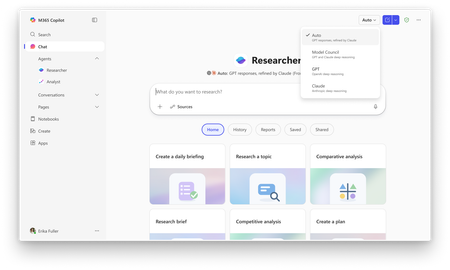
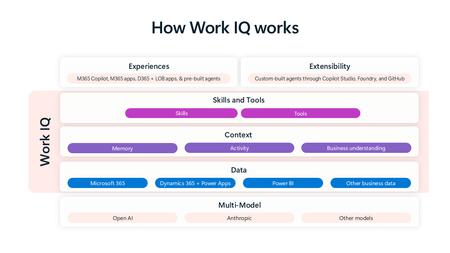
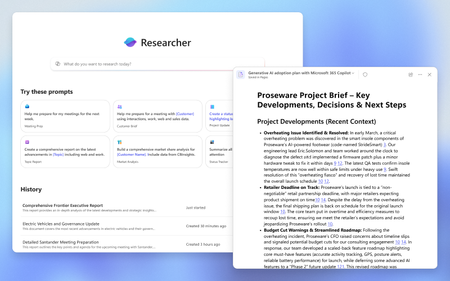
Gaurav Anand, CVP, Microsoft 365 Engineering Recent advancements in reasoning models are transforming chain-of-thought based iterative reasoning, enabling AI systems to distill vast amounts of data into well-founded conclusions. While some web-centric deep research tools have emerged, modern information workers need these models to reason across both enterprise and web data. For M365 users, producing thorough, accurate, and deeply contextualized research reports is crucial, as these reports can influence market-entry strategies, sales pitches, and R&D investments. Researcher addresses this gap by navigating and reasoning over enterprise data sources such as emails, chats, meeting recordings, documents, and ISV/LOB applications. Although these workflows are slower than the near real-time performance of Microsoft 365 Copilot Chat, the resulting depth and accuracy saves employees hours of time and effort. Our Approach Our approach mirrors the methodology a human would take when tasked with researching a subject: seek any needed clarification, devise a higher-order plan, and then break the problem into subtasks. They would then begin an iterative loop of Reason → Retrieve → Review for each subtask, collecting findings on a scratch pad until further research would unlikely yield any new information, at which point they would synthesize the final report. We instilled these behaviors into the Researcher with a structured, multi-phase process. Initial planning phase (P 0 ) The agent analyzes the user utterance and context to formulate a high-level plan. During this phase, the agent might ask the user clarifying questions to ensure the final output aligns with user expectations in both content and format. We define insights from this phase as I 0 . Iterative research phase The Researcher agent then loops through iterative cycles until it hits diminishing returns, starting with j = 1. Reasoning (R j ): Deep analysis to identify which subtask to tackle and what specific details are missing Retrieval (T j ): Search across documents, emails, messages, calendar, transcripts and/or web data to fetch the missing details. Review (V j ): Evaluating the collected evidence, computing its relevance to the original user utterance, and preserving the findings on a “scratch pad” We define ΔI j to be the new insights gained in iteration j from R j , T j , and V j . These are added to the prior knowledge: (I j = I j-1 ∪ ΔI j ). Note that with each cycle, the marginal insight ΔI j tends to diminish. The agent monitors this and essentially implements a check to conclude further research at iteration m when ΔI m < ε. Synthesis phase The agent synthesizes the aggregate I m by consolidating findings, analyzing patterns, drawing conclusions, and drafting a coherent report. The output includes explanations and cites sources to provide traceability. The Researcher agent in action To illustrate, if a user asks: "How did our Product P perform in Q4 compared to industry trends?”, the phases would be as follows. Planning Identifying subtasks: (1) get internal Q4 sales numbers for Product P; (2) find industry news or analyst reports on Q4 trends. Asking clarifying questions e.g., a specific region or competitor focus. Iterative research In iteration 1, it: Reasons: Start with internal sales data Retrieves: Pulls the Q4 sales report Reviews: Observes contribution of feature F in driving Product P’s sales growth In iteration 2, it: Reasons: Adapt the plan to explore feature F Retrieves: Retrieves internal and external communications about F; web search for competitor offerings Reviews: Customer reception of F; related industry news Iteration by iteration, it gathers pieces of the puzzle until new iterations yield only minor details. Synthesis Researcher then drafts a report, detailing a thorough comparison of Product P’s Q4 performance to the market, citing the internal sales numbers and external industry analysis, highlighting that feature F was a competitive differentiator. Technical Implementation Our current implementation leverages OpenAI’s deep research model, powered by a version of the upcoming OpenAI o3 model trained specifically for research tasks. Performance benchmarks highlight its efficacy, achieving 26.6% accuracy on the Humanity’s Last Exam (HLEx) and an average score of 72.6% on the GAIA reasoning benchmark 1 . Included below are a few technical approaches that were employed to build Researcher: Reasoning over enterprise data We have expanded the model’s toolkit with Copilot tools that can retrieve both first-party enterprise data—like meetings, events, and internal documents—as well as third-party content through graph connectors, such as shared company wikis and integrated CRM systems. These tools are part of the Copilot Control System that allows IT administrators and security professionals to secure, manage and analyze the use of Researcher. The Copilot tools are provided to the model using a familiar interface that the model was trained on such as the ability to “open” a document and “scroll” or “find” information within it. We have experimented with different techniques to address deviations from the distribution of the model’s original training data due to inherent differences between web and enterprise research queries. Internal evaluations revealed that the Researcher typically requires 30–50% more iterations to achieve equivalent coverage on enterprise-specific queries compared to its performance on public web data. Personalization with enterprise context Unlike web research where results are uniform regardless of user, Researcher produces highly personalized results. It leverages the enterprise knowledge graph to integrate user and organizational context, including details about people, projects, products, and the unique interplay of these entities within the user's work. For instance, when a user says, “Help me learn more about Olympus,” the system quickly identifies that Olympus is an internal AI initiative and understands that the user's team plans to take a dependency on it. This rich contextualization enables the system to: Ask more nuanced clarifying questions, such as: “Should we focus on the foundational research aspects of Olympus, or are you more interested in integration details?” Tailor the starting condition (P₀) for the deep research model so it’s not only precise but also personalized, thereby mitigating its lack of familiarity with company-specific jargon. Deep retrieval complementing deep reasoning Researcher retrieves a broad set of results for each query and semantic passages for each returned document to increase the insights gained per iteration T j. Instead of a serial iterative approach, Researcher first performs broad but shallow retrieval across heterogenous data sources and then lets the model decide the domains and entities to zoom into. Integrating specialized agents In enterprise contexts, interpreting data often demands the nuanced perspective of domain-specific experts. That’s why agents are a critical part of the Microsoft 365 Copilot ecosystem. Researcher is being extended to seamlessly integrate with other Agents. For instance, Researcher can leverage the Sales Agent to apply advanced time-series modeling to provide an insight like, “Sales in Europe are expected to be 5% above quota, driven by product X,” Moreover, these tools and Agents can be chained together. For example, if a user asks, {help me prepare for my customer meetings next week}, the system first employs calendar search to identify the relevant customers; and then, in addition to pulling searching over recent communications, it also retrieves the CRM information from the Sales agent. By allowing Researcher to delegate complex subtasks to these specialists, we help compress multi-step reasoning iterations into a single step and complement Researcher agent’s intelligence with specialist knowledge. Results and Impact Even in early testing, Researcher has demonstrated tangible benefits. Response quality We evaluated Researcher extensively in early trials, focusing on complex prompts that require consulting multiple sources. For quality assessment, we employed a framework called ACRU, which rates each answer on four dimensions: Accuracy(factual correctness) Completeness (coverage of all key points) Relevance(focus on the user’s query without extraneous info) Usefulness(utility of the answer for accomplishing the task) Each dimension is scored from 1 (very poor) to 5 (excellent) by both human and LLM-based reviewers. When we compared Researcher’s performance against our baseline M365 Copilot Chat on a diverse set of 1K queries, we saw an increase of 88.5% in accuracy, 70.4% increase in completeness, 25.9% increase in relevance, and 22.2% increase in utility. It is worth noting that the agent’s improved accuracy comes from its ability to double-check facts. It cites on average ~10.1 sources per response in our above evaluation. 61.5% of the answers included at least one enterprise document as a source, 58.5% included a web page, 55.4% cited an email, and 33.8% pulled in a snippet from a meeting transcript. Time savings For this measurement, we surveyed two groups of internal users: 22 Product Managers responsible for crafting product strategy documents and project updates to align stakeholders 12 Account Managers interacting with Microsoft customers, writing client proposals, and maintaining clear communication with stakeholders The feedback from both groups has been extremely positive. Users reported tasks that previously took days of manual research could be completed in minutes with the agent’s help. Overall, our pilot users estimated that Researcher saved them 6–8 hours per week, essentially eliminating an entire day’s worth of drudgery. Here is verbatim from a product manager “it even found data in an archive I wouldn’t have checked. Knowing the AI searched everywhere—my meeting transcripts, shared files, the web—makes me trust the final recommendation much more.”. I have found myself using Researcher daily. Researcher’s intelligence to reason and connect the dots leads to magical moments. Below is a snippet from a report to prepare for my upcoming meetings. The appointment at 11:30am was a placeholder for me to send out broad communication to the team with some survey results. Researcher identified that I had done this already and encouraged me to use the time instead to collect feedback from the team. What's Next Reinforcement Learning We will continue to improve the quality of Researcher to make reports more complete, accurate and useful. The next phase of adaptation to enterprise data will involve post-training reasoning models on real-world, multi-step work tasks using reinforcement learning. This will involve learning a policy function (π(s)→a), which picks the next step a as a function of its current state s to maximize the cumulative reward: Steps are range of actions accessible to the model (reasoning, tools, synthesizing) State encapsulates the user’s initial utterance and the insights I n thus far Reward function evaluates output quality at each decision point Formally, we interleave internal reasoning and actions to build the cumulative insight I(i)=I(i-1)+R(s i ,a i ), where (R(s i ,a i )) denotes the reward obtained by taking action a, given the state s i. Through successive iterations, the model learns an optimized policy ((π(s)). To achieve this, we will focus on creating datasets for high quality research reports and investing in robust evaluation metrics and benchmarks. User control Researcher reasons across knowledge sources that the user has access to and find the most useful nuggets of information. However, we understand our users and enterprises often need more control over the information sources. To this end, Researcher will allow “steerability” over the sources from which the report will be created. Below is an early visual of what this could look like. Agentic orchestration Agentic orchestration is a core capability of Researcher. We have already integrated a few Microsoft agents, and we will generalize this capability. Moreover, we will afford end users and admins the ability to customize Researcher by bringing their own agents into the Researcher workflow. For example, imagine a law firm has created an agent to format reports into legal briefs. We will allow the output of Researcher to be chained with this custom agent to customize the output. Conclusion Researcher can significantly transform knowledge workers’ everyday tasks. Early results show that users trust the agent to deliver factually accurate and detailed reports that save time and drive productivity. As we expand the capabilities of Researcher, improve quality and allow deeper customization, we envision a future where Researcher evolves into a trusted and indispensable tool in the workplace. For additional details on Researcher, including rollout and availability for customers, please also check out our blog post highlighting reasoning agents within M365 Copilot and more. 1 Introducing deep research | OpenAI129KViews16likes7Comments
Copilot Studio + SharePoint: Markdown (.md) Files in Doc Libraries Supported as Knowledge Sources?
Hi all, We’ve been doing some deeper testing with Copilot Studio agents grounded in SharePoint knowledge sources, and I’m hoping to clarify whether what we’re seeing is a known limitation or an undocumented gap. Scenario A Copilot Studio agent uses SharePoint document libraries as a knowledge source The library contains Markdown (.md) files that are intentionally used as canonical design references The same .md files: ✅ Work well when uploaded directly to the agent ❌ Are not retrievable or citable when stored in a SharePoint library and added as a SharePoint knowledge source To help with grounding, we created modern SharePoint index pages that: Explain what the markdown collections are (Patterns, ADRs, Guardrails) Link directly to the canonical folders and files Explicitly state that the .md files are the source of truth The agent can: Discover and summarize the index pages correctly Understand that .md artifacts exist and where they live But it cannot: Read the content of the individual .md files Apply a specific pattern or ADR from those files in a design conversation Cite them as sources, even when permissions and search indexing are confirmed What We’ve Checked Permissions (agent user has access) Folder depth (kept shallow) Search results (markdown files appear in SharePoint search) SharePoint indexing status Work IQ enabled Same content works when attached directly to the agent This behavior also seems consistent with what others have reported here: Markdown works when uploaded directly Markdown retrieval degrades when hosted in SharePoint libraries Questions for the Product Team / Community Are Markdown (.md) files in SharePoint document libraries officially supported as Copilot Studio knowledge sources today? If yes, are there specific constraints (file size, rendering, parsing, indexing) that differ from Word/PDF? If no (or “not yet”), is this a known limitation on the roadmap? Is the recommended pattern to: Convert important markdown files into .aspx pages, or Use thin “index / summary” pages and keep markdown canonical until retrieval improves? We’re happy to adapt our information architecture — just trying to align with the intended platform direction rather than work against it. Thanks in advance for any guidance or clarification. This capability is extremely powerful, and clearer expectations here would help a lot of teams make the right design tradeoffs.4.1KViews15likes9CommentsIntroducing Copilot Memory: A More Productive and Personalized AI for the Way You Work
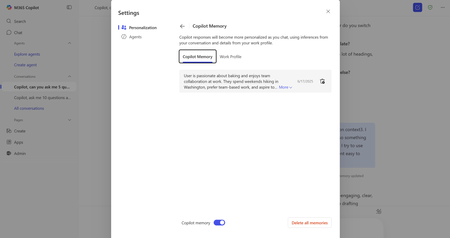
At Microsoft, we believe AI should work for you—not the other way around. That’s why we’re introducing memory in Copilot, a new capability that makes your Copilot more productive, more helpful, and more in tune with how you work.73KViews15likes23Comments