microsoft copilot admin
12 Topics
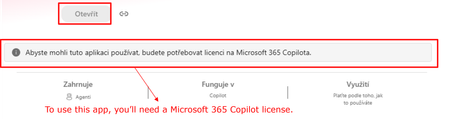
Agent Builder agents require Microsoft 365 Copilot license for users without a license?
Hi all, Has anyone noticed a recent change in how Copilot Agent Builder (in Copilot Chat) agents work for users without a Microsoft 365 Copilot license? Our setup is: Agent created by a user with a Microsoft 365 Copilot license Created directly in Agent Builder, not published through Copilot Studio The agent is published and available within our tenant Some consumers do not have a Microsoft 365 Copilot license Copilot Credits are available (also for the environment where the agent is) and have not been exhausted This setup was working normal ly just two days ago. Unlicensed users could use the shared agents and usage was covered by Copilot Credits. Now those same users are getting a message saying that a Microsoft 365 Copilot license is required. Has anyone else started seeing this? I’m trying to understand whether we are looking at a configuration issue in our tenant or whether something has recently changed in the service/licensing behavior. Thanks for experiences!215Views1like4Comments
Please Remove Daily Cap Usage for Free Copilot Text Chat
Dear Microsoft Copilot Team, I am writing to express my disappointment with the new daily usage caps on Microsoft Copilot, particularly for ordinary text-based conversations. In the past, I could use Copilot freely for everyday questions, learning, research, brainstorming, and general conversations without constantly worrying about reaching a daily limit. The newer restrictions have made the experience significantly more frustrating and less useful. I understand that running AI services requires computing resources and that Microsoft must manage operating costs. However, I believe ordinary text chat should remain uncapped, especially when it was previously possible to use Copilot much more freely. Text conversations are a fundamental part of the service, and users should not have to stop in the middle of a useful discussion because they have exhausted a daily allowance. The move toward a unified Copilot experience should make the product simpler, more consistent, and more useful—not make existing users feel that they have lost access to a service they have come to rely on. I am therefore asking Microsoft to: Remove daily usage caps entirely for ordinary text-based Copilot conversations, including for free users. Keep basic text chat freely accessible without arbitrary daily cutoffs or lengthy waiting periods. If stricter limits are necessary for resource-intensive features such as image generation or advanced research, apply those limits separately rather than restricting ordinary text conversations. Clearly communicate any usage policies and reconsider changes that negatively affect the experience of long-time users. Unlimited text chat would help preserve user trust, encourage continued engagement, and distinguish Copilot as an accessible AI assistant for everyone. Restricting basic conversations risks pushing loyal users toward competing services that offer a more suitable experience. I hope Microsoft will take this feedback seriously and reconsider the current daily cap policy. Please restore uncapped text chat so users can rely on Copilot whenever they need assistance, without worrying about running out of messages. People on Reddit and online have been criticizing these changes ever since Copilot was unified under one product between enterprise and personal, If you guys dont do anything now it might reduce user trust and might be bad business decisions so please fix Copilot Thank you for your time and consideration. I look forward to seeing Microsoft make Copilot more accessible and user-friendly again.320Views4likes2Comments
Copilot Premium License Not Being Recognized in Copilot Standalone App
I'm experiencing an issue where the standalone Copilot app is not recognizing my Copilot Premium license. I've already worked with Microsoft Support to troubleshoot the problem. During the session, we reset Copilot, confirmed that my web-based Copilot experience is correctly showing and using the Premium version, all other office 365 apps is using the Premium version as well, and performed several other troubleshooting steps. I've also uninstalled and reinstalled Microsoft 365 multiple times. Although the issue remains unresolved, the support representative was extremely helpful and assisted in thoroughly troubleshooting and isolating the problem. Based on our testing, it appears the issue is specific to the standalone Copilot app, as my Premium subscription functions correctly in the web version. Has anyone experienced this issue before, or can someone help identify a solution? Any assistance would be greatly appreciated. Thank you.143Views0likes2CommentsFix all annoying Copilot bugs
I’m experiencing an issue with Microsoft Edge on Android. Starting today (September 22, 2026), whenever I try to visit copilot.microsoft.com, Edge automatically redirects me to the Google Play Store to install the Copilot app. I prefer using Copilot in the browser and do not want to install the app. And even when i try to install the copilot app it does not let me do anything and thinks I need a license or subscription to access it like copilot is litterly supposed to be free and also even when i try to get rid of the app redirection it for some dumb reason it redirects me to from copilot.microsoft.com to copilot.com and they put in restrictions like after a lot of chats you must wait for a specific time period and a couple months ago you guys removed the ability to use copilot without registration like come on that is so dumb I want Microsoft Copilot to be fixed revert how copilot was before how is this consumer friendly350Views1like2CommentsDifference between Copilot Agent settings and Microsoft Agent 365 Agent settings
Hello, I am trying to better understand the distinction between the agent governance settings available in the Microsoft 365 admin center. Currently, I can find seemingly similar agent access settings in two different locations: Copilot → Settings → Agents Agents → Settings → User Access (Microsoft Agent 365) For example, both locations appear to provide controls such as : Who can access agents Whether access is granted to all users or specific groups Agent usage permissions From an administrator perspective, it is not clear whether these are two different configuration scopes, two different management experiences, or simply two entry points to the same underlying policy. So : What is the intended difference between the Copilot settings experience and the Agent 365 settings experience ? Which interface should be considered the primary administration location going forward ? Are the settings synchronized and backed by the same configuration objects ? Is one of these experiences planned to replace the other in the future ? What governance scenarios should be managed in Copilot settings versus Agent 365 settings ? Thank you for your help.160Views0likes1Comment
Copilot Access not working for only 1 user
Hello, I am facing an issue where I have 1 user that is unable to get answers out of the chatbot on teams. The user is opening the chatbot using the 'open with copilot' option like the rest of the team members, but when they ask a questions, the chatbot returns that it has not found information on the topic, even when the information is in the training documents the chatbot reads off of. Other users can ask the same questions and get valid answers, it is only not working for this specific user. Any suggestions on how to resolve this?256Views0likes1Comment
Access to Office App Context and Setting CEA as Default in Microsoft 365 Copilot
Hello everyone, I’m exploring Custom Engine Agents (CEA) in Microsoft 365 Copilot and have two questions regarding their integration with Microsoft 365 applications. Can a Custom Engine Agent access the current Office application context? When a CEA is added to Microsoft 365 Copilot, is there a supported way for the CEA to access the content of the Microsoft 365 application where Copilot is currently being used? For example: Word: Can the CEA read and/or modify the document currently open in Word? Outlook: Can the CEA access the current email/thread and perform write operations such as drafting or modifying content? PowerPoint: Can the CEA access and modify the presentation currently open? Other Microsoft 365 applications: Are similar capabilities available in other applications where Microsoft 365 Copilot is supported? Essentially, I’m trying to understand whether a Custom Engine Agent can leverage the same application context and read/write capabilities that the native Microsoft 365 Copilot has within these applications. If this is supported, what APIs, SDKs, or integration patterns should be used? Can a Custom Engine Agent be configured as the default mode? Is there a supported way to: Disable or bypass the default Microsoft 365 Copilot experience/mode, and Configure a Custom Engine Agent as the default agent/mode that users interact with when they open Copilot? For example, if an organization has a custom agent that should handle the majority of Copilot interactions, can that agent be configured as the default instead of the standard Microsoft 365 Copilot? I’d appreciate any clarification on the current capabilities, limitations, and recommended architecture for these scenarios. Thanks130Views0likes0CommentsAccess to Office App Context and Setting CEA as Default in Microsoft 365 Copilot
<p>Hello everyone,</p> <p> I’m exploring <strong>Custom Engine Agents (CEA) in Microsoft 365 Copilot</strong> and have two questions regarding their integration with Microsoft 365 applications. </p> <p><strong>1. Can a Custom Engine Agent access the current Office application context?</strong></p> <p> When a CEA is added to Microsoft 365 Copilot, is there a supported way for the CEA to access the content of the Office application where Copilot is currently being used? </p> <p>For example:</p> <ul> <li><strong>Word:</strong> Can the CEA read and/or modify the document currently open in Word?</li> <li><strong>Outlook:</strong> Can the CEA access the current email/thread and perform write operations such as drafting or modifying content?</li> <li><strong>PowerPoint:</strong> Can the CEA access and modify the presentation currently open?</li> <li>Similarly, can it access the context of other Microsoft 365 applications where Copilot is available?</li> </ul> <p> Essentially, I’m trying to understand whether a <strong>Custom Engine Agent can leverage the same application context and read/write capabilities that the native Microsoft 365 Copilot has within these applications</strong>. </p> <p> If this is supported, what APIs, SDKs, or integration patterns should be used? </p> <p><strong>2. Can a Custom Engine Agent be configured as the default mode?</strong></p> <p> Is there a supported way to: </p> <ul> <li>Disable or bypass the default Microsoft 365 Copilot experience/mode, and</li> <li>Configure a <strong>Custom Engine Agent as the default agent/mode</strong> that users interact with when they open Copilot?</li> </ul> <p> For example, if an organization has a custom agent that should handle the majority of Copilot interactions, can that agent be configured as the default instead of the standard Microsoft 365 Copilot? </p> <p> I’d appreciate any clarification on the current capabilities, limitations, or recommended architecture for these scenarios. If there is any official documentation covering these capabilities, please share it as well. </p> <p>Thanks!</p>122Views0likes0CommentsAccess to Office App Context and Setting CEA as Default in Microsoft 365 Copilot
Hello everyone, I’m exploring **Custom Engine Agents (CEA) in Microsoft 365 Copilot** and have two questions regarding their integration with Microsoft 365 applications. ### 1. Can a Custom Engine Agent access the current Office application context? When a CEA is added to Microsoft 365 Copilot, is there a supported way for the CEA to access the content of the Office 365 application where Copilot is currently being used? For example: - **Word:** Can the CEA read and/or modify the document currently open in Word? - **Outlook:** Can the CEA access the current email/thread and perform write operations such as drafting or modifying content? - **PowerPoint:** Can the CEA access and modify the presentation currently open? - Similarly, other Microsoft 365 applications where Copilot is available. Essentially, I’m trying to understand whether a **Custom Engine Agent can leverage the same application context and read/write capabilities that the native Microsoft 365 Copilot has within these applications**. If this is supported, what APIs, SDKs, or integration patterns should be used? ### 2. Can a Custom Engine Agent be configured as the default mode? Is there a supported way to: - Disable or bypass the default Microsoft 365 Copilot experience/mode, and - Configure a **Custom Engine Agent as the default agent/mode** that users interact with when they open Copilot? For example, if an organization has a custom agent that should handle the majority of Copilot interactions, can that agent be configured as the default instead of the standard Microsoft 365 Copilot? I’d appreciate any clarification on the current capabilities, limitations, or recommended architecture for these scenarios. Thanks117Views0likes0CommentsDigital Deep Dive: Copilot Control System (CCS)
Join us for two days of insights, demos, and deep dives on Copilot Control System (CCS)! Learn how to secure, manage, and analyze Microsoft 365 Copilot, Copilot Chat, Microsoft Copilot Studio, and agents across your organization using the Copilot Control System (CCS). This two-day digital skilling event kicks off with a guided overview of CCS—your framework for managing Copilot securely, at scale, and with clarity. Day 1 dives into security, governance, and preparing your environment for Copilot and agents. Day 2 shifts to management controls, agent lifecycle, reporting, and user enablement. We’ll close with key takeaways and resources to support your next steps. What to Expect A breakdown of the Copilot Control System and how it applies across workloads Technical guidance for managing oversharing, insider risks, and web search settings Practical ways to build and secure enterprise-scale agents Lifecycle management approaches for Copilot agents and Copilot Studio makers Insights on measurement, analytics, and usage trends Guidance on enabling users and aligning AI adoption with organizational goals Live AMAs with Microsoft product team members throughout the event Day 1: Foundations & Security – Tuesday, June 17, 2025 (PT) Time Session Title Speaker(s) Description 8:00–8:30 AM PT Introduction to Copilot Control System Ben Summers Overview of the event structure, CCS components, and session navigation tips. 8:30–9:30 AM PT Secure Microsoft 365 Copilot and agents Sophie Ke, Dave Minasyan Addressing oversharing risks using SAM and Purview. 9:30–10:30 AM PT Prevent data loss and insider risks for Microsoft 365 Copilot Erica Toelle Using Microsoft Purview to mitigate insider threats and enforce protections. 10:30–11:00 AM PT Understanding web search controls in Microsoft 365 Copilot Alex Pozin, Suhel Parekh Configuring and governing Copilot's web search behavior. 11:00 AM–12:00 PM PT Build enterprise-scale agents securely Mik Ferland Best practices for secure agent lifecycle management and governance. Day 2: Management & Adoption – Wednesday, June 18, 2025 (PT) Time Session Title Speaker(s) Description 8:00–9:00 AM PT Copilot agent management and controls James Bell, Ganesh Krishnamurthy How to manage Copilot agents in the Microsoft 365 admin center. 9:00–10:00 AM PT Empower Copilot Studio makers with enterprise-grade management controls Asaf Tzuk Governance, visibility, and cost management in Copilot Studio. 10:00–11:00 AM PT Measure usage and impact of Copilot and agents Mike Walsh, Samer Baroudi Using Copilot Analytics to assess adoption, usage, and impact. 11:00 AM–12:00 PM PT Practical guidance for AI and collaboration adoption Karuana Gatimu Real-world strategies for enabling collaboration and AI adoption. 12:00–12:15 PM PT That’s a wrap! What’s next for your Copilot Control System journey Efe Abugo Key takeaways, resources, and how to continue learning after the event. How to Participate Register for the Microsoft Tech Community using your email if you haven’t already. This allows you to post comments and ask questions. Visit each individual session page during its scheduled time to join the conversation. You can post your questions in the comments, and product team members will respond live during the AMA. Watch the session live or catch the recording on demand after the event. Keep the conversation going in the Microsoft 365 Copilot Tech Community discussion space after the sessions conclude. It’s a great place to follow up, share what’s working, and connect with others exploring similar topics. Hope to see you there! Come ready to learn and ask our experts all of your burning questions! Access session presentations Looking for session materials or presentations? Visit the new Copilot Control System page on AMC to download resources and explore more content from the event.100KViews37likes68Comments