microsoft account
4 Topics
Is Cloud Clipboard Syncing Service counterpart at Microsoft servers working?
Hi everyone! I have just given up trying to make Windows Cloud Clipboard Syncing work. Yes, I have tried roughly everything to fix it - except for a rain dancing. For instance, prayers and candles were not helpful at all 😋. Now, being a bit more serious, I will not enumerate in detail here everything I have tried but it ranged from from UI settings on and off, logging with a local account and back with Microsoft account, restarting and setting values to entries on Registry and Group Policy Editor. No joy! My theory: the problem is not at my side. Not on my account, my computers nor my Windows configuration. I firmly believe that the service at Microsoft side is not coping with the huge load of Ctrl+C from every user worldwide with 2+ devices logged in with the same account. So, my question is quite simple: how do I know if the Windows Cloud Clipboard Service counterpart at Microsoft servers is working properly? Is there a tool to forcefully test this API interface and thus say "you computer configuration is at fault" or "sorry, we have dropped the ball and the Clipboard Cloud Service is not available right now"? Is there a way to download the Cloud Clipboard associated to my account somehow to help debug the problem? Note: although this problem seems unrelated to my Windows version, I am running on both machines Windows 10 Pro v1909 (retail, not insider) build 18363.1082. Thanks a lot for your inputs! Sandro edit 2020-11-06: this discussion has been also posted at https://www.askwoody.com/forums/topic/is-cloud-clipboard-service-counterpart-at-microsoft-servers-working/#post-2310042 .999Views0likes0Comments
Can't Remove Microsoft Account After Windows 10 ESU Enrollment
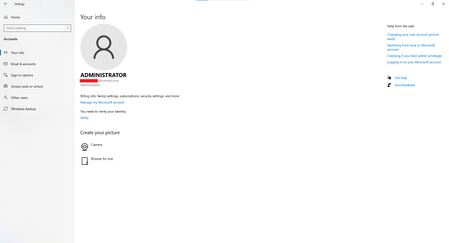
Hi, I enrolled my Windows 10 PC in the Extended Security Updates (ESU) program using my Microsoft account so I could continue receiving security updates after Windows 10 reached end of support. The update installed successfully, but now I can't remove my Microsoft account from Windows. Here's my situation: I sign in with a local Administrator account, not a Microsoft account. netplwiz confirms my account is local. However, Settings → Accounts → Your info shows my Microsoft email address. Under Settings → Accounts → Email & accounts, my Microsoft account appears under Accounts used by other apps with "All apps can sign me in." There is no Remove, Disconnect, or Sign out option. I've already tried: Removing all Microsoft-related entries from Credential Manager. Restarting the PC. Removing the device from my Microsoft account online. None of these removed the account from Windows. Is this expected behavior after enrolling in Windows 10 ESU? Is there any supported way to disconnect the Microsoft account? Thanks in advance.400Views0likes4Comments