microsoft 365
5301 TopicsPrepare for the launch of growth margins with API readiness resources
Starting October 1, 2026, growth margins will provide eligible partners with incremental margin on qualifying Microsoft 365 growth opportunities. Built on partner feedback, growth margins give you more flexibility to structure deals, compete for new business, reward reseller performance, and reinvest in capabilities that support long-term growth. Review the available readiness resources now so you can maximize growth opportunities, maintain business continuity, and prepare for upcoming technical changes. Technical guidance is available to help you navigate API changes and implement best practices for data export and billing automation. Review the partner resource collection. Evaluate opportunities to incorporate growth margins into your Microsoft 365 sales and growth strategies. Eligible partners may open an advisory case with Microsoft Partner Technical Consulting for API transition guidance.47Views0likes0CommentsCopilot, Microsoft 365 & Power Platform Community call
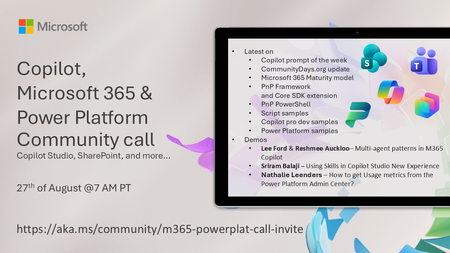
💡 Copilot, Microsoft 365 & Power Platform weekly community call focuses on different use cases and features within the Microsoft 365 and Power Platform - across Microsoft 365 Copilot, Copilot Studio, SharePoint, Power Apps and more. Demos in this call are presented by the community members 🙏 👏 Looking to catch up on the latest news and updates, including cool community demos, this call is for you! 📅 On 27th of August we'll have following agenda: Copilot prompt of the week CommunityDays.org update Microsoft 365 Maturity model PnP Framework and Core SDK extension PnP PowerShell Script samples Copilot pro dev samples Power Platform samples Lee Ford & Reshmee Auckloo– Multi-agent patterns in M365 Copilot Sriram Balaji – Using Skills in Copilot Studio New Experience Nathalie Leenders – How to get Usage metrics from the Power Platform Admin Center? 📅 Download recurrent invite from https://aka.ms/community/m365-powerplat-dev-call-invite 📞 & 📺 Join the Microsoft Teams meeting live at https://aka.ms/community/m365-powerplat-dev-call-join 💡 Building something cool for Copilot, Microsoft 365 or Power Platform (Copilot Studio, SharePoint, Power Apps, etc)? We are always looking for presenters - Volunteer for a community call demo at https://aka.ms/community/request/demo 👋 See you in the call! 📖 Resources: Previous community call recordings and demos from the Microsoft Community Learning YouTube channel at https://aka.ms/community/youtube Microsoft 365 & Power Platform samples from Microsoft and community - https://aka.ms/community/samples Microsoft 365 & Power Platform community details - https://aka.ms/community/home 🧡 Sharing is caring!84Views0likes0CommentsCopilot, Microsoft 365 & Power Platform product updates call
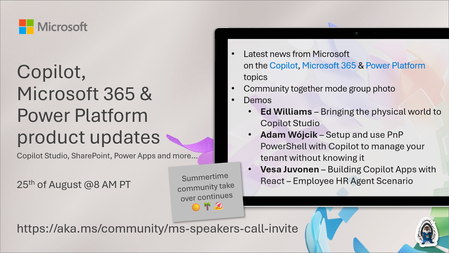
💡Copilot, Microsoft 365 & Power Platform product updates call concentrates on the different use cases and features within the Microsoft 365 and in Power Platform. Call includes topics like Microsoft 365 Copilot, Copilot Studio, Microsoft Teams, Power Platform, Microsoft Graph, Microsoft Viva, Microsoft Search, Microsoft Lists, SharePoint, Power Automate, Power Apps and more. 👏 Weekly Tuesday call is for all community members to see Microsoft PMs, engineering and Cloud Advocates showcasing the art of possible with Microsoft 365 and Power Platform. 📅 On the 18th of August we'll have following agenda: News and updates from Microsoft Together mode group photo Ed Williams – Bringing the physical world to Copilot Studio Adam Wójcik – Setup and use PnP PowerShell with Copilot to manage your tenant without knowing it Vesa Juvonen – Building Copilot Apps with React – Employee HR Agent Scenario 📞 & 📺 Join the Microsoft Teams meeting live at https://aka.ms/community/ms-speakers-call-join 🗓️ Download recurrent invite for this weekly call from https://aka.ms/community/ms-speakers-call-invite 👋 See you in the call! 💡 Building something cool for Microsoft 365 or Power Platform (Copilot, SharePoint, Power Apps, etc)? We are always looking for presenters - Volunteer for a community call demo at https://aka.ms/community/request/demo 📖 Resources: Previous community call recordings and demos from the Microsoft Community Learning YouTube channel at https://aka.ms/community/youtube Microsoft 365 & Power Platform samples from Microsoft and community - https://aka.ms/community/samples Microsoft 365 & Power Platform community details - https://aka.ms/community/home 🧡 Sharing is caring!153Views0likes0CommentsHow to Fix Outlook Notifications Not Working: A Complete Troubleshooting Guide
Have you ever been waiting for an important email, only to realize hours later that Outlook never notified you? It is frustrating, especially when you rely on email for work, meetings, customer messages, or time-sensitive updates. Link to the post44Views0likes0CommentsHow to Fix OneDrive Stuck on Processing Changes: 10 Easy Solutions
f you use OneDrive to keep your files synchronized across your computer and the cloud, you probably expect it to work quietly in the background. Most of the time, it does. But occasionally, OneDrive can get stuck on “Processing changes”, leaving files unsynchronized and creating uncertainty about whether your latest work has actually been uploaded. Link to the post38Views0likes0Comments
Benefit expiration tied to membership end date
The benefit end date is now aligned with the membership end date. (Source) That means, if my Partner Core Benefits expire on day X, the Microsoft 365 internal use benefits also expire on day X. On the surface, this makes perfect sense, but, in practice, this makes renewal extremely inconvenient: Partner programs cannot be renewed before they expire, so I can only renew them on day X or later. Microsoft 365 subscriptions must be renewed before they expire, so I must renew them no later than day X. That means that the person responsible for renewing these things must work on day X - no matter if it's a week-end, a national holiday or a long-planned vacation. Getting sick or having a power outage on that day is out of the question as well, or all the Microsoft 365 mail accounts will stop working. Can Microsoft do something to make this a little less stressful for us poor sysadmins? Either add a few grace days to the expiry of Microsoft 365, or allow us to voluntarily renew our partner subscriptions earlier - I don't mind losing a few days of benefits, if it help ensure that everything can be done well ahead of time.46Views0likes0CommentsHow to Fix SharePoint Files Not Opening: Common Causes and Easy Solutions
SharePoint makes it easy for teams to store, share, and work on files from almost anywhere. But when you click on a document and it refuses to open, that convenience can quickly turn into frustration. You may see a blank page, an error message, an endless loading screen, or nothing at all. Sometimes the problem affects only one file, while in other cases, an entire SharePoint library seems to stop working. Link to the post52Views0likes0Comments**bleep**. Security Update (like KB5101650) breaking SmartCard Authentication for Office 2024 apps to O365
Looking for some support on this issue. I have Win11 clients that were upgraded from 24H2 to 25H2 last year. They were functioning well until earlier this year when the Cumulative Updates started breaking smartcard authentication on our clients (day after installing/rebooting/cache clearing). This seems to be a known issue but are there any real fixes? Symptom is that after the update is installed, next day (after a reboot or cache cleared) the user starts their Outlook or Teams application, when receiving the prompt that says "you will be prompted for your PIN" nothing follows, you will see the blue dots circling and after 5 or so minutes it times out. Clicking on the "..." shows an informational message error #50058, which says that not enough information was provided. The authentication process is failing... BTW - web authentication works just fine, it's just the local application (Teams, Outlook, etc.) that fail. I found that creating a new account on the system seems to work just fine, but for people that have established accounts and program environments that are setup for them to work, creating a new account is very unappealing to them. I'd like to be able to just get their current accounts working. Creating a new profile, wiping current profile info from registry doesn't seem to work thanks to automagic backups the OS is doing, but even that would still require setting up a new profile and copying over non AAPDAT file structure info... Does Microsoft not have a fix to this "known" issue? I spent a few weeks really digging into this and the best I can find as a work around is to disable the automatic backups of the NTUSER.DAT, blow away current profile info in registry, rename current profile structure, and then have the user login "anew". Again, this still requires a copy of the non-AAPDAT data back into the new structure (at least permissions won't be an issue) but that will not restore all application-based information for that user--that still will have to be re-created, which I think the users will not want to do because it means starting over from scratch.194Views0likes2CommentsHow to Fix Microsoft 365 Activation Failed: A Complete Troubleshooting Guide
Seeing the “Microsoft 365 Activation Failed” message can be frustrating, especially when you need to open Word, Excel, PowerPoint, or Outlook and get work done. In many cases, the problem is not as serious as it looks. Activation can fail because of an incorrect Microsoft account, an expired subscription, an internet connection problem, conflicting Office installations, outdated Office apps, or an issue with the device’s date and time settings. Link to the post78Views0likes1Comment