microsoft 365 apps for mac
58 TopicsWhen Excel couldn't save a file, 3E0CF950.MACTF was created, but where and by which program?
. Currently running: Mac OS 10.14.6 Excel with Office for Mac 2021 Manual copies to iCloud. Also running with Parallels Desktop: Windows 10 Excel with Office 365 for Windows Autosave copies to OneDrive. Hello, I would appreciate some assistance with an unusual problem involving Excel for Mac 2021 and possibly with Mac OS X, Excel for Windows 365, iCloud, and OneDrive. I generally create, edit, and save my workbooks using Excel for Mac and Excel for Windows 365 on the same file and never had any problem. After making edits to a workbook, I tried to save the file in Excel for Mac 2021. A message appeared saying that it could not save it due to some sharing violation. It did not specify the message's source, nor a directory path or the enclosing directory name to help locate the file. Instead, it instructed me to close the workbook without saving it and to access a file named 3E0CF950.MACTF, rename it and save it as a regular Excel file. Microsoft technical support instructed me to search at: /Library/Containers/com.microsoft.Excel/Data/Library/Preferences/AutroRecovery But the was no AutoRecovery directory. I also searched unsuccessfully on iCloud Drive and OneDrive, where I have autosave enabled when I edit my workbooks in Windows 10. I have also searched for it using Spotlight and the FIND command of the Finder with hidden files made visible. Nada. Although Microsoft tech support thinks that the file does not exist, however, I think it's unlikely that I would get a message so detailed to include the filename if none was created. A similar issue happened about a year ago before I had Excel for Windows installed. I was never able to find a resolution for it. Has anyone else experienced this? Before giving up, would anyone happen to know: Other locations to search on my Mac? A safe command line for Terminal to search more thoroughly? If Excel would create temp files with the ".MACTF" extension, or could this be a product of the Mac OS, iCloud or the OneDrive to which I enable autosave when I edit my Excel workbooks in WIndows? Whether the file name "3E0CF950.MACTF" ïs a random name, or is it a generic file name specific to my issue, and if so, what does it mean? If it's normal for Excel for Mac 2021 to lack an AuitoRecovery folder? Your kind assistance would be much appreciated. Please advise.17KViews0likes9Comments
New Outlook for mac not syncing passw
I am having one weird issue in new Outlook (16.57 or later), where users change password (From Nomad or AD or System pref or anywhere else like from Okta) and then they are not getting/sending emails once they send it just hang on the outbox. Tried to close/quite/relaunch the outlook but no success. Previously we had the new toggle button where our users use to use that to fix this issue but now Microsoft has removed that option as well. We are using the Nomad and OKTA back in IDP. Is there anyone else facing this issue, if yes, please share the solution.4.5KViews0likes4Comments
How can I stop MS Word from automatically moving the view of document?
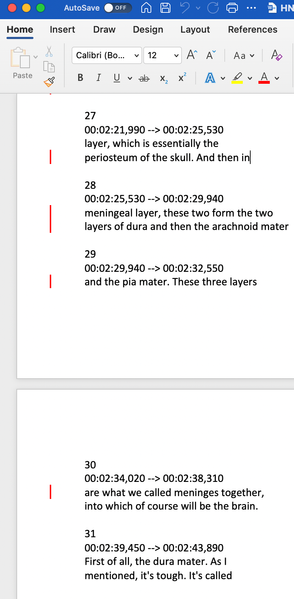
I am editing a word document (with office 365) in Macbook air M1. This is a new Macbook and I have not used Mac before. I have been a long time user of MS Office in Windows OS. Issue-1: Let's say I am on page-3 of a 10-page word document. I stop editing on page-3, and scroll to some other page (e.g. page-7) but I do not click on that page-7 yet. Then I go to another app (say my browser) and come back to the word document which still show the page-7 that I was reading before. Now I want to edit on page-7, so I click on the line that I that I want to edit. But MS word automatically goes back to page-3 where I was originally working on. This makes me go back to the page-7 again and find the line that I intended to edit which is very very annoying and inconvenient. Is there a way by which I can disable MS Word from going back to original editing page and stay on the page that I click on after coming back from another app? Issue-2: Is there any way to stop MS Word from automatically bringing the editing line to the top of the screen if the page that contains the line is on the next page but is still visible on the screen below the previous page? Here are the picture to show the issue-2. The first picture shows that two pages are visible on the screen and I am working on the first page that is shown. But then if I select click on a line on the next page with the same view, MS Word automatically bring that page and line at the top of the screen (picture-2). I want to disable this feature. If needed I would like to bring that page up manually. Is there any way? Picture-1 Picture-2Office license used too many times
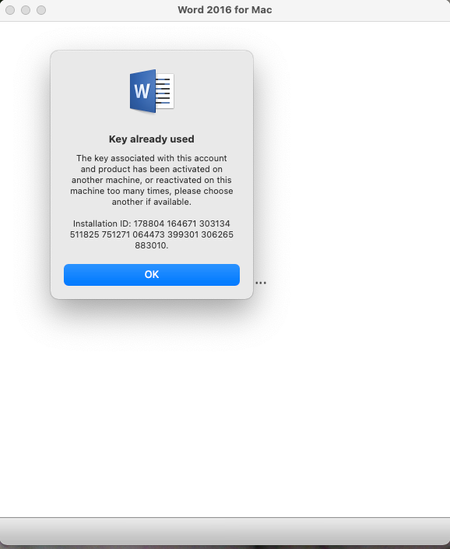
I bought Office 2016 for Mac in Sept 2017. I just got a new Macbook (the old one is fully erased and reset to factory) and installed the Office product on it. When I try to activate I get an error saying that the installation limit is reached. I can't use my key. I don't see a way on the MS site to view "devices" where I could deactivate the old one. How do I get this reset so that I can use the product I paid for on the new Macbook?2.1KViews0likes2Comments
Track Changes icon in Ribbon changed from switch to dropdown (with no update)
I am using Office 365 on a Mac, and use the Track Changes function in Word a lot. Yesterday, the Track Changes icon in the Ribbon changed from the usual green "switch" icon to a page-and-pen icon with a drop-down menu. The drop down options are "For Everyone" or "Just Me". There was no update of the software -- I just noticed that it had changed. At same time, the Track Changes switch icon disappeared from the Quick Access toolbar, where I had placed it for convenience. Many of my ribbon settings were reset, too. Does anyone know why/how this might have happened, and how I can restore the switch icon for Track Changes (and get it back in the Quick Access toolbar too)? Thank you.5.1KViews3likes10Comments
Is Office 365 untouchable?
We just purcahsed a company that has Office 365 installed on all their Macs. We only use plain Office for all our Macs which is installed with a corporate serial number. I need to completely remove Office 365 from the new Macs and install our version. On the new Macs I've been removing the license (if there is one) and trying to delete all components using a script. When I reinstall our version with the serial number Office looks and acts exactly like it did when it was 365. I can tell this because the user can still select Log In and get back into their 360 account. When I install our version from scratch, there is a Log in button but it takes you to a blank screen. Even after deleting everything on the Mac that contains the word Microsoft, reinstall our version with our serial number it hasn't changed anything. Can Office 365 be completely removed so I can install a different version?
Mac Office - Teams app won't reliably allow remote support
Hi, at our large company, the Mac Teams app does not reliably allow remote support, maybe 1/2 the time it works. Steps that lead up to issue: 1. Tech receives a Teams text (ping) from an end user with a tech issue 2. Tech agrees to remote support that end user on his or her issue (Mac computer to Mac computer, both are using Macs running Teams build 1.4.00.22368) 3. Tech clicks phone icon at upper right of Teams GUI 4. phone call occurs normally, no issues 5. Tech asks user to screen share 6. Tech sees "Request Remote Control" button on his/her screen 7. Tech clicks "Request Remote Control" button 8. user sees prompt to allow remote control and grants it 9. Expected behavior - tech can control user's screen 10. Actual behavior - tech cannot control user's screen Note: if Remote support works, it works for the entire session with that user Is there some other setup step that is required to allow Teams to work for all users? The guess is that some of the users have something turned on or off, this would explain why it works for some and not others. You would think installing Office for Mac would be sufficient!
Office 2021 for Mac hangs and asks for reactivation constantly
Just upgraded my Macbook running macOS Big Sur from Office 2010 to Office 2021. Purchased from Amazon. Installed ok, but hangs a lot and although I have activated it via Microsoft , it requests reactivation again and again every time I use one of the Apps. It is unusable at the moment. Very disappointed as it cost a lot of money. No access to any tech support at Microsoft as all appears to be online without any satisfactory solutions My old 2010 version worked perfectly , but was no longer supported. how ironic! Any advice appreciated.
Problème avec les fichiers récents
Bonjour, J'utilise office Mac et j'ai un souci quand je veux ouvrir un fichier qui s'affiche dans la liste "fichier récents". il est visible mais Word me dit qu'il n'es pas accessible. Quand je recherche par spotlight, il le trouve et je peux l'ouvrir sans problème. Je n'arrive pas à comprendre ce qu'il se passe. Un point également, quand j'ouvre la fenêtre "fichiers récents", sur l'icône "Récents" il y a un point d'exclamation. Ca explique peut-etre quelque chose mais je ne sais pas quoi 😉 ! Je suis connecté, le fichier, c'est moi qui l'ai créé et c'est compliqué d'aller le chercher en permanence. L'un d'entre vous aurait-il une explication ? Merci, Wadih
Rebooted my Macbook and Powerpoint disappeared
I need some help. I did a simple reboot of my Macbook and when I went back in, Powerpoint had disappeared. I still have Word, Excel, Outlook, Teams, and Notes. How do I restore it? I have a subscription to Office for Mac professional. Thanks!647Views0likes0Comments