messaging
832 TopicsMicrosoft Teams updates : Two presenters can share their screens
Summary Starting in late November 2026, Microsoft Teams will support simultaneous screen sharing by two Microsoft Teams will allow two presenters to share screens simultaneously in meetings starting late November 2026. This feature enhances collaboration by displaying both shared contents at once. Tenant admins can control this setting, and meeting organizers can enable or disable it per meeting. No compliance issues identified. Rollout Schedule: General Availability (Worldwide): We will begin rolling out in late November 2026 and expect to complete by mid-December 2026. Impact on Your Organization: This capability will be enabled for all meetings by default, allowing a second presenter to start sharing without requiring the first presenter to stop. When enabled, participants can see both shared content streams at the same time, creating a more seamless experience for scenarios such as comparing documents, presenting complementary information, or collaborating across multiple sources. Meeting organizers will also have a meeting option to control whether multiple presenters can share simultaneously in an individual meeting. Action Required/Recommendations: Organizations will have tenant-level admin control to determine whether simultaneous sharing is available to their users. Review your organization's sharing policies and inform users and support teams about the new experience.1KViews4likes2CommentsMicrosoft Teams update: QR code protection for messages from external users
Microsoft Teams is adding extra security to protect users from phishing and fraud. QR code images sent by external users will be hidden by default. Users can choose to reveal the image before viewing or scanning the QR code. Rollout schedule Targeted Release: Beginning in October 2026 General Availability (Worldwide): Beginning in late October 2026 Impact on your organization Who is affected Organizations that allow communication with external users in Microsoft Teams. Users who receive Teams messages from external senders. Teams administrators and support teams that manage external collaboration policies. QR code images sent by external users will be blurred by default in Teams messages. Users can reveal the image if they trust the sender and want to scan the QR code. A blurred image does not mean the QR code has been identified as malicious. This protection will be applied automatically to QR codes received from external users. No admin configuration or policy changes are required. The feature will be enabled by default during the rollout. Action required and recommendations No admin action is required before rollout. Inform users that QR code images from external senders may appear blurred by default. Remind users to verify the sender before revealing or scanning QR codes. Review existing user education materials related to phishing awareness, QR code safety, and external collaboration. Update internal help desk documentation to reflect the new user experience. https://www.linkedin.com/feed/update/urn:li:activity:7520938452184408065/111Views0likes0CommentsReport Hypes Attacks Through Teams Federated Chat
A report by a security company described how 30% of “monitored organizations” experienced an attack by a spurious IT worker over Teams federated chat. These kinds of social engineering attacks do happen, but Teams includes an array of defensive features that Microsoft 365 tenants can use to resist this kind of activity. The interesting question is just how prevalent these attacks are in the wider Teams installed base and how many of the tenants who are successfully attacked use features like an external access allow list. https://office365itpros.com/2026/10/28/federated-chat-attack/67Views0likes0Comments
Shared Channels: @Channel mentions fail to trigger activity notifications for team-shared members
Hello everyone, I am facing a persistent issue regarding notification behavior in Microsoft Teams Shared Channels that I hope someone can clarify or help with. Scenario: We have a Shared Channel that is shared with multiple teams (e.g., 17 teams in total). Note: I know that this way of communicating is not the recommended way, but we are not allowed to use any Viva products etc. Users accessing the channel are members of those shared-in teams, but they are not listed as direct individual members in the Shared Channel's own member list. Users have their channel notification settings correctly configured to receive notifications (e.g., "All new posts" or standard banner/activity settings). The Problem: When someone uses a channel mention (e.g., @ChannelName) in this shared channel, the users who have access via the team-sharing mechanism do not receive any activity feed notifications. The workaround/oddity: They only receive the activity notification if we explicitly add each user as a direct individual member to the Shared Channel. The dilemma: Since the channel is shared with 17 teams, adding hundreds of users manually or via scripts as direct members creates massive redundancy and clutters the UI (users see the team and the channel redundantly). Inconsistency: We noticed that in older shared channels created some time ago, channel mentions worked across team shares without needing direct individual memberships. It seems newer shared channels behave differently and strictly require direct membership to trigger activity feed notifications for @Channel mentions. Questions: Is this a known design limitation or a recent backend change in Microsoft Teams for newer Shared Channels regarding how @Channel mentions resolve indirect team members? How are organizations supposed to utilize @Channel mentions effectively in large-scale collaborations involving multiple shared teams without bloating the direct membership list? Any insights or workarounds would be greatly appreciated. Thank you!450Views0likes2CommentsTeams Enables Easier File Sharing in Federated Chat
A change to Teams makes it easier for users to share files in federated chat. Sounds good, but Microsoft planned to overwrite existing tenant controls to make the feature work, and that’s wasn't so good. That issue is now resolved, but the real question is whether Microsoft 365 tenants want users to share files through federated chat. I’m not so sure and would control this facility tightly. Apart from anything else, you might need some more MDO licenses to protect against possible infection. https://office365itpros.com/2026/10/02/easier-federated-chat/170Views0likes0Comments
Is there any rate limiting on inbound messages through bot framework?
I found this documentation regarding rate limits for app using bot framework - https://learn.microsoft.com/en-us/microsoftteams/platform/bots/how-to/rate-limit. However, it seems to be applicable to outbound messages from our service backend to MS Teams. Is there any similar rate limiting for messages being pushed to our backend from Teams conversations?144Views0likes0CommentsHow to Validate That Your BizTalk SB-Messaging Adapter Is Really Using AMQP
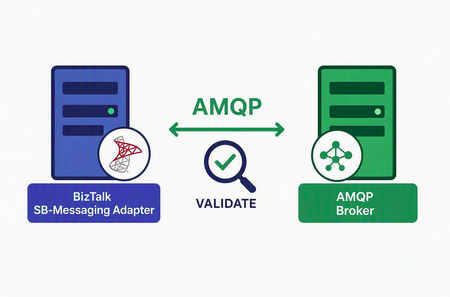
On September 30, 2026, Azure Service Bus stops accepting the Service Bus Messaging Protocol (SBMP) — the protocol the BizTalk SB-Messaging adapter has always used. The failure mode is not a warning in a log file; it is a refused connection. To keep those integrations running, a BizTalk Server 2020 hotfix adds a new Azure.Messaging.ServiceBus AMQP implementation to the adapter in place of the legacy SBMP path. This post walks through how to validate the hotfix was successfully deployed and is using AMQP and not SBMP. Required baseline: BizTalk Server 2020 with Cumulative Update 6 or Cumulative Update 7 installed, plus the SB-Messaging AMQP hotfix — KB5091379, obtained by opening a Microsoft support case. The hotfix is not offered through Windows Update or the regular CU download, and it will not install on a CU5 or earlier baseline. Every node in the BizTalk group needs it. A multi-server group will happily run the affected host instance on an unpatched node, and your test may land on the one server where the fix is not active. Patch and restart host instances everywhere, then record the edition, CU level, hotfix number, and component build per server. Hotfix location: https://1drv.ms/f/c/cac4b5f5988b8228/IgCrzn_KTaZ8T5tuKmcdPgXxARuOLcGHDhxVLgeysj44GWE?e=w5AcpM Once the baseline is confirmed, test in a non-production environment that reproduces production topology, authentication, and the full network path — proxy, firewall, private endpoint, and DNS. And list every materially different configuration you intend to validate: each send port and receive location, queue, topic, and subscription usage, 32-bit versus 64-bit hosts, and features such as sessions, ordered delivery, or transactions. A green result on one port does not validate the others. Method 1: Verify the active connection on port 5671 (recommended) The adapter selects AMQP over TCP, and Azure Service Bus uses TCP port 5671 for AMQP over TLS. Correlating an established 5671 connection with the correct BTSNTSvc or BTSNTSvc64 process demonstrates that the BizTalk host is using the AMQP transport. Run elevated PowerShell while the receive location is enabled and actively polling: $hostProcesses = Get-Process BTSNTSvc, BTSNTSvc64 -ErrorAction SilentlyContinue Get-NetTCPConnection -State Established -RemotePort 5671 | Where-Object OwningProcess -in $hostProcesses.Id | ForEach-Object { $process = Get-Process -Id $_.OwningProcess [pscustomobject]@{ Process = $process.ProcessName ProcessId = $_.OwningProcess LocalAddress = $_.LocalAddress LocalPort = $_.LocalPort RemoteAddress = $_.RemoteAddress RemotePort = $_.RemotePort State = $_.State } } Expected result: Process is BTSNTSvc or BTSNTSvc64. Remote port is 5671. State is Established. The remote address resolves to or corresponds to the Service Bus namespace. What an empty result means: not much, on its own. An empty result is inconclusive, not a failure. Confirm the port or receive location is enabled, the host instance is running, traffic is actually flowing during the check, and that DNS, firewall, or private endpoint rules permit the connection — then repeat. One important exception: if your environment routes AMQP over WebSockets on TCP 443, you should not expect a 5671 connection at all. In that case skip to Method 2. Method 2: Capture adapter traces When the connection view is unavailable or ambiguous, the trace is the more definitive answer, because it shows which code path executed rather than which socket happened to be open. BizTalk adapter tracing uses ETW through BT.Trace.Tracer, and entries containing [SBMessaging-AMQP] confirm that the new AMQP-specific implementation executed. Start BizTalk adapter tracing immediately before the test — not hours earlier. Send or receive a single, uniquely identifiable test message through the target port or receive location. Stop tracing as soon as the message completes. Search the captured output for [SBMessaging-AMQP] entries inside the test window, and match them to the host instance and configuration you were exercising. Method 3: Block the legacy SBMP ports Methods 3 and 4 are corroborating tests, not proof, and belong in an isolated environment. Legacy SBMP commonly uses TCP ports 9350 through 9354. If the isolated AMQP workload continues to operate while those ports are blocked and TCP 5671 remains available, the result corroborates that the workload does not depend on SBMP. Record the original firewall rules before you start and restore them immediately afterwards — this test has a real blast radius if it escapes the test subnet. Method 4: Large message functional test In Basic and Standard tiers, the maximum message size is 256 KB, regardless of SDK or protocol, so this test does not apply there. In Premium, the legacy SBMP path supports messages only up to 1 MB, whereas AMQP supports larger messages up to the entity’s configured maximum of 100 MB. Successfully processing a Premium message larger than 1 MB therefore provides supplementary evidence that the adapter is using AMQP. Read a failure carefully: entity limits, timeouts, and pipeline constraints all produce the same symptom, so a failed large-message test is not by itself evidence that the hotfix did not take. Verify payload integrity and the event log, then remove the test message and restore any temporary entity settings. Do not stop at the protocol Confirming that AMQP is in use answers the transport question. It does not answer whether your solution still behaves the same way. AMQP and SBMP differ in a handful of behavioural details, so before you call the validation complete, run the scenarios your integrations depend on and compare against a pre-change baseline: Send and receive across each representative queue, topic, and subscription path, checking message body and application-property fidelity. Peek-lock completion, abandon, defer, dead-letter, and retry behaviour, plus sessions, ordering, transactions, and duplicate detection where you use them. Authentication renewal, and recovery after a host instance restart or a brief network interruption. Throughput and latency within your accepted baseline, with no new event log errors, suspended instances, duplicates, or lost messages.635Views0likes2CommentsHow to receive app mentions only from a channel, while having the consent to read user messages?
We're building a Teams bot (Azure Bot + Entra app) that a customer adds into a standard Teams channel. Members @mention the bot and it replies in the same thread. To make replies useful, when the bot is mentioned we want to read recent messages in that thread for context, including messages where the bot was not mentioned. We have two requirements that appear to be in tension, and we'd like your guidance on the best-supported way to satisfy both: a. Delivery: we want Teams to send our bot only the activities where it is @mentioned (not every channel message), to avoid unnecessary inbound load and Bot Framework rate-limit pressure in busy channels. b. Context read: on those mention turns, we want to read recent thread messages via Microsoft Graph (/teams/{team}/channels/{channel}/messages/{id}/replies). We've identified two approaches, each with their drawbacks: a. RSC (ChannelMessage.Read.Group) - all channel messages; team-scoped & consented by team owner at install (low friction) Concern: RSC forces delivery of every channel message; heavy backend filtering + bot framework rate-limit risk b. App permission (ChannelMessage.Read.All) - @mention-only; tenant-wide consent; tenant-admin consent Concerns: setup friction (admin consent URL, per app per tenant); read grant spans all standard channels, including ones the app isn't a member of Our core question: Option 1 gives the delivery we don't want but the scoping we like; Option 2 gives the delivery we want but a tenant-wide read grant we'd prefer to avoid. Specifically: Is there any supported way to keep @mention-only delivery and a channel-scoped (RSC-style) read grant, i.e. decouple RSC's message delivery from its read authorization? Can the tenant-wide read in Option 2 be narrowed to specific teams/channels (e.g., via a Teams application access policy or any resource-scoping mechanism), so the app can only read where it's intended to operate? Given our two requirements, which approach does Microsoft recommend, and is there any option we've missed? TIA!315Views0likes1CommentTeams Gets Messaging Reminders
The Teams Remind Me feature is a new action available to allow users to create future reminders for chat and channel messages. When the set time comes around, Teams notifies the user about the marked messages, with the intention that users can pick up a topic discussed in a chat or channel conversation. It’s a good idea that’s similar to the way that email reminders work. The only wonder is why reminders have not appeared in Teams before now. https://office365itpros.com/2026/09/16/remind-me-teams/502Views0likes0CommentsTeams Clamps Down on MOERA-Only Tenants
The latest restriction on tenants using MOERA (service domain) addresses in production is that Teams will restrict external collaboration from September 2026. At this point, there is zero sense in any organization using a MOERA-only tenant for production purposes. Restrictions in Exchange Online and Teams should drive that point home, and the likelihood is that further clampdowns will follow in the future. https://office365itpros.com/2026/09/02/moera-only-tenants-external-collab/204Views0likes0Comments