meetings
51 Topics
Do SfB Conference IDs ever stop working?
I've noticed that SfB Conference IDs remain live long after the scheduled meeting. I don't just mean by a few minutes, I can go back to old invitations from last month and still click on the link to go back into the conference. All the uploaded material is still there. Worse still, we have PSTN dial in conferencing enabled with toll free numbers so any invite particpant can go back to the old invite, dial into the conference ID (not PIN is required because the original meeting has already been had) and meet gratis. Anyone else noticed this? Any way to forcethose old Conference IDs to be stop working? Or revert back to the pre meeting condition where the meeting organiser is required to start the call before people can join?Solved13KViews0likes7Comments
Meeting join with iOS SfB app
Hi, since the Nov 2016 cumulative update meeting join with iOS 10 started to work. Unfortunately, we see with iOS 10.3 beta 1 that, again, meeting join doesn't work. When opening a meeting link in Safari, Safari requests to open the SfB app which works. But the app doesn't offer the options to sign in or to join as guest. The app only shows the login screen and does not start the meeting. Using iPhone and iPad with iOS 10.3 beta 1 and Lync Server 2013 on-premise with Nov 2016 CU installed. This post is to let Microsoft know in advance that there might be a change required again. We don't want to wait as long as we had to with the iOS 10 release until the fix was published (2 months?!) Cheers, Daniel1.8KViews1like4CommentsSkype Room Systems v2 - first impressions
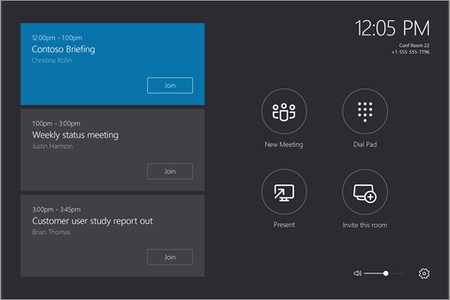
So we just installed a Skype Room Systems v2 (Logitech Group) in our largest conference room. Here are our first impressions when it comes to the software. We have Exchange 2016 on-premise and SfB Online in O365. There's one issue with dialing a number when you don't have PSTN Calling in your region. Maybe this is by design or maybe I just got it wrong (here's my discussion on that) You should disable the Surface Pro 4 built-in front and rear camera because otherwise when you choose to start the video, you have three cameras to choose from. It's not mentioned in the Deployment Guide but we figured it out they are in the Device Manager -> System Devices. Speaking of this, you shouldn't need to choose a camera at all if there's only one (1) camera - just default to that camera. We have a huge 100"+ projector screen in this conference room and when a single attendent call in with video, that person gets a full screen with their huge face. I don't know how we would technically solve this (I guess 2 * 55" is a better setup) but it feels like Big Brother ;). If a presenter in the room connects their laptop via HDMI and start something with a video (like Youtube) the sound outputs into the conference room and the sound is only catched up by the rooms speaker's which gives quite bad results. It should be able to get the sound from the HDMI input but then again, the deployment guide clearly states that "Audio playback over HDMI can only be heard locally" so maybe it's some technical reason why this is not possible. The DIY setup might be a little bit overly complicated selecting the correct inputs/outputs etc. Since the SRS application only works on "certified" versions, it should be possible for Microsoft to automate this and verify the settings remain the same after updates etc. But they have mentioned automated deployment scripts are coming. The dock (Surface Pro 4) screen is quite sensitive to fat fingerprints so after a while you need to clean it but maybe someone has some magical solution for that :) I hope the OMS management/monitoring solution will be available soon so we effectively can monitor the SRS so we can be proactive because users in general don't create a support ticket for conference room systems, they just give up :) Then there are some minor Logitech hardware first impressions but that's not related to Microsoft.28KViews10likes76Comments
How does a Skype Room System Authenticate
So more on the woes of SrS. I need to understand how this authenticates to SfB. Here is what I have done. I plug my laptop into an ethernet port. I can easily sign into SfB on premise with the SrS account. I take the same cable and ethernet port and plug it into the Srs, It does not authenticate (Exchange online works fine). On internal wireless I try the same thing with my laptop and iPhone, both authenticate to SfB with the SrS account no problem. I try the same wireless with the SrS (disabled the ethernet on the device through admin), still cannot login. Connect to guest wireless, which goes through a different router and public DNS, everything works fine. So does this connect like a mobile device or the regular desktop client? What DNS records does it use, and how does it authenticate, through Access Edge, or internal?4.5KViews1like3CommentsStuck on SrS with Exchange Online and SfB On Premise
I am running SfB on Premise and Exchange online. I have gone through the docs here https://technet.microsoft.com/en-us/library/mt691569.aspx. However we are running with ADFS. So how do I create a room in O365 while using SfB on Premise. The new-mailbox assumes that this is a cloud only account without on premise. If I understand it right, I have to first create the account in Office 365, THEN create the AD account then enable the on-premise csmeetingroom? Is that really right? What happens if the AD account already exists?Solved1.5KViews0likes3Comments
Polycom RealPresence Trio 8800 Signs out
We are starting to deploy these conference devices in our environment and am finding that they sign out after a few days of inactivity. We have Exchange resources we assigned S4B and Cloud licensing and have successfully signed into the devices and joined several skype for business meetings. The problem is the devices sign out anywhere between 1 to 3 days after being signed in and i have to reboot the device to force it to sign back in. We have over 200 VVX phones deployed and are not having this issue. Polycom seems to think that it has something to do with Skype for Business. Can anyone shed some light as to what i need to look at? Much appreciated.10KViews0likes15CommentsSkype Broadcast branding and custom "curtains" before & after broadcasting?
Hi all! When SFB Broadcasting was presented during the MS Ignite 2015 (Session BRK3198), we were all shown nice branding capabilitles and the possibility to add start/close curtains. Since this was in the roadmap at that time, it would be nice to hear an update on these settings. It is highly requested by our customers. / M1.9KViews0likes6CommentsSkype Room Systems v2 - possible to disable dial a number in New Meeting?
So we deployed a Skype Room Systems v2 (Logitech SmartDock) according to the deployment guide with our O365 tenant. Awesome! There are some license requirements for "Give the room a phone number and make or receive a calls from the room or join a dial-in conference using a phone number.": - E1 or E3 with Cloud PBX and a PSTN Voice Calling plan. Problem is, we're not in one of the 4 countries (France, Puerto Rico, US, UK) where PSTN Calling is available. No problem, we just skip that. It's still possible to join meetings, call into a conference and also dial-out of an conference with PSTN Conferencing which is a completely different service as I understand it. However, on the start screen of the Skype Room System, you can run New Meeting: This brings up the possibility to add an internal user from your directory OR dial a number. I can add internal Skype users: But if I just enter a number it will start Calling... but nothing happends. I suspect the SRS tries to use PSTN Calling to reach the person and since this is not available in my country, this will not work. See how it's supposed to work in this video at 1:01. Anything I'm missing?6KViews0likes4Comments
Presenting rights in hybrid setup
We plan to setup a S4B hybrid and I wonder what will be end user experience in the aspect of presenting rights. Currently every user has presenting rights onprem. Will onprem users have presenting rights if they get invited by a online user and the presenter meeting option is set to: Anyone from my organization.626Views0likes1Comment