meeting
51 Topics
MS Teams policy doesn't work as it is set
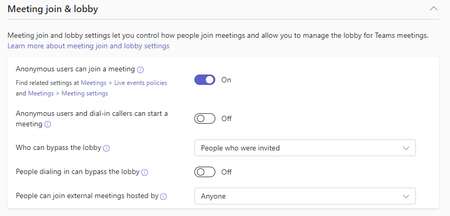
hi, we have the Meeting join & lobby settings like this: the problem is that some users if they create a meeting, their all invited participants land in the lobby. Yes - we have a few policies, and yes all have the same settings regarding Meeting join & lobby. Do you have any idea what's wrong?669Views0likes1Comment
Scheduled meeting appears in calendar at a different time
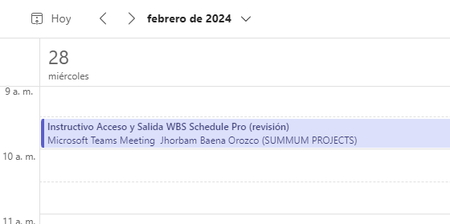
Best regard. Yesterday at 8:25am I scheduled a meeting for the afternoon of that day from 2:30pm to 3:00pm and I sent the invitation, when it appeared on my calendar the meeting appeared graphically to run from 9:30am to 10:00am. When I entered the meeting to edit it, the screen that appears shows that it was scheduled from 2:30pm to 3:00pm. Can someone help me or explain to me why these cases occur? Screenshots. /************************************************** ******************************************/ MEETING ON CALENDAR (as it appears) /************************************************** ******************************************/ MEETING IN EDIT MODE (actual schedule appears from 2:30pm to 3:00pm)5.2KViews1like11Comments
Teams meeting history question
Hello, I have the following scenario here- There are three email addresses, for simplicity sake I will name them as EmailA, EmailB and EmailC. My phone has Teams setup and is logged in as EmailA. EmailB sent a Teams meeting invite to EmailC. I used my phone to open the invite email sent to EmailC, I then joined the Teams meeting as EmailA because I was already logged in as EmailA on Teams. Is it possible to still view the meeting history in this case? I couldn't find any sort of chat or meeting history under EmailA account. The meeting invite was listed under the calendar for EmailC.Solved1.8KViews0likes2CommentsHide bar at top of teams sharing
Hi all When I share my screen in meetings it involves using a browser i.e. I`m presenting things using google chrome. I get a bar asking me to change my screen size/settings etc on teams. It's frustrating because I have to click away or wait a moment. Is there a way to stop this from appearing?? thanks!Solved456KViews55likes137Comments
is `Anonymous join meeting` policy Organization-wide policy?
Hello experts! I would like to block Teams video call/meeting with anonymous for organization wide and allow only for few employees by request. According to MS article, it is organization-wide and also can be applied for the per-meeting organizer. but the article example below says like it can't be made what I think because Organization-wide is higher prioirity. Is it possible to make apposite way of example below? Thank you Jun Article --------------- https://docs.microsoft.com/ko-kr/microsoftteams/meeting-settings-in-teams Since both the organization-wide and per-organizer policies control anonymous join, the more restrictive setting will be effective. For example, if you don't allow anonymous join at the organization level, that will be your effective policy regardless of what you configure for the per-organizer policy. Therefore, in order to allow anonymous users to join meetings, you must configure both policies to allow anonymous join by setting the following values: -DisableAnonymousJoin set to $false -AllowAnonymousUsersToJoinMeeting set to $true Any other combination of values will prevent anonymous users from joining meetings. --------------------------------Solved2.5KViews0likes5Comments
Registered meeting without registration?
Hi everyone, How can i create a meeting that i can publicise using a link - in the same way registered meetings work, except i dont want them to fill out a form. I just want them to have the option of 'registering' ie putting it in their calendar via an email link, without me having to send an invite directly to them. Thanks!1.9KViews0likes1CommentMeeting window not displaying in chromebook
Hi Everyone, I have been using teams in a chromebook without problems, but looks like the new update is causing me a problem. When I join a meeting, the meeting window does not appear and the main window displays a bar with the description "Click here to go back to the meeting". If I click the bar, it flashes a second window but disappears instantaneously. I saw some articles about configuration to turn on meetings in new window, but this option doesn't appear here. Any ideas of this problem?6KViews2likes16CommentsTeams on Android automatically switching to secondary tenant
Hello, my company's Teams account has also been linked as guest to a customer tenant. What is happening is that each time I click on a link to a Teams meeting created by my customer on his tenant, my Android Teams switches automatically from my primary tenant to customer's one and, at that point, I get an error message linked to authorization (maybe some missing license on my customer's tenant for my account). Question is: is there a way to tell Teams on Android to always use my primary tenant when joining meetings, so that I can join any customer meeting as a guest? Thanks, Domenico.2.5KViews1like1CommentGetting access to Teams meeting files
I was added to a bi-weekly Teams meeting today. This meeting had been scheduled weeks ago and had other attendees on it. Before I was added, they saved documents to the meeting's Files tab. When I got invited to the meeting, none of the documents in the Files tab showed up for me. Is there a way to get access to these documents in the Files tab without moving them somewhere else?5.2KViews1like2Comments