mcp
44 Topics
Web IQ: Web Search and Grounding APIs for AI Agents
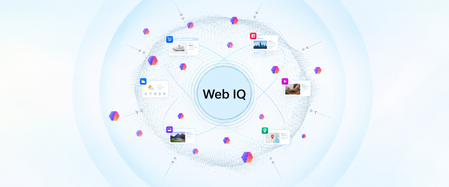
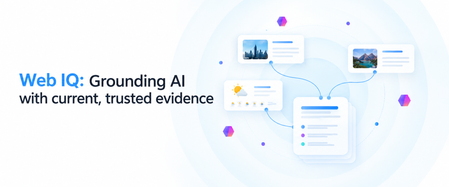
Web IQ gives AI agents current, citable evidence from across the web. We explain what it is, how its four layers (Bing's web substrate, Harrier embeddings, DiskANN, and structured evidence) work together, and how it pairs with Microsoft IQ to ground agents in web and enterprise context.When AI Starts Taking Action: Building Execution Boundaries with OpenSandbox and AKS
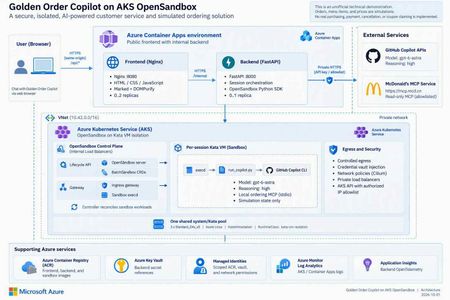
1. An agent needs more than a smarter model Imagine you are building a food-ordering assistant. In its first version, it says, “You might enjoy a burger and fries.” That is primarily a content-generation problem. In the next version, it queries coupons, reads a menu, calculates prices, creates files, and calls a local program to create an order. The engineering problem has changed. You are no longer asking a model to speak. You are allowing software to act on someone's behalf. This is a distinction I emphasize in technical talks: model capability determines what the agent can propose; the execution platform determines where, with which permissions, and for how long those proposals can become actions. Running every agent's tool processes inside the business API container creates awkward coupling. Leftover files, stuck processes, dependency changes, or excessive resource consumption from one session can affect another. Even if customers cannot invoke an arbitrary shell, CLI processes, tool dependencies, and temporary state still need boundaries. A sandbox is therefore not an instruction that says “please be safe.” It is a working environment with a lifecycle, a resource budget, and an access policy. Figure 1. A tool protocol, a working environment, and runtime isolation solve different problems. 2. Separate three concepts that often get conflated MCP describes tool interaction; it does not put tools inside a VM The Model Context Protocol gives model-facing applications a consistent way to discover and invoke tools. But “called through MCP” does not automatically mean “executed within a security boundary.” An MCP server can run on a developer's laptop, in a business-service container, remotely, or in a dedicated sandbox. Whether a tool can write data, who may invoke it, and how its side effects can be reversed are separate design questions. OpenSandbox makes the working environment an application resource OpenSandbox is an open-source platform for agent execution environments. It exposes sandbox lifecycle, command execution, file operations, and network-access capabilities. Applications use SDKs and APIs to create environments, run work, retrieve results, and clean up. Docker supports a local starting point; Kubernetes provides a cluster deployment path.1 Think of it as a workspace management system: it allocates a room, delivers materials, exposes ways to work, and reclaims the room at the end of its lease. The strength of the walls depends on the runtime and deployment underneath. OpenSandbox is not a language model, not a replacement for Kubernetes, and not synonymous with Kata. The upstream project also provides pools, multiple runtime paths, and snapshot-related capabilities. Availability, state semantics, and infrastructure requirements must be checked against the selected version and runtime. A project-wide feature list is not a promise that every backend behaves identically.1, 5 Kata adds a separate guest kernel to the sandbox pod Conventional containers generally share the host kernel. Kata Containers runs workloads in lightweight virtual machines, adding a VM boundary. With AKS Pod Sandboxing, the isolation unit is the pod using the Kata runtime, with its own guest kernel.2, 3 That does not mean every container in the same pod gets its own VM. Nor does a VM replace application authentication, outbound restrictions, or business approvals. The useful summary is: MCP defines the tool interface. OpenSandbox manages the working environment. Kata provides runtime isolation. The application still owns authorization and business rules. 3. What does “per-session Kata VM” actually isolate? In this project, a session is identified by session_id. The backend creates an OpenSandbox sandbox for a new session, and its pod selects the Kata RuntimeClass. Later requests in the same session reuse that environment. Several distinctions matter: It is not a new VM for every message. Related turns can reuse files and temporary state produced by the tools. It is not an Azure VM purchased for every user. Kata pod VMs run on AKS nodes; multiple sandboxes can share a node's underlying compute resources. It is not one sandbox per node. Capacity depends on resource settings, VM overhead, system components, and concurrent work. A session ID is not authorization. It identifies routing and resource mappings; production services must validate session ownership. My favorite analogy is a campus: AKS is the campus, nodes are buildings, Kata sandboxes are workrooms, and OpenSandbox is the workspace management system. A session repeatedly uses the same room; a lifecycle policy eventually clears it. That final step matters. Files surviving between turns does not mean they survive sandbox deletion. Orders, code artifacts, or audit records that must outlive the environment need explicit, governed persistence. Figure 2. This project hosts its frontend and backend in regular ACA, and OpenSandbox/Kata on AKS. Model inference is called through an external API, not hosted on the AKS nodes. 4. OpenSandbox on AKS: installation is not the finish line Kubernetes supplies scheduling and declarative resource management. OpenSandbox turns that infrastructure into sandbox operations that an application can consume. The execution path in this project is: The FastAPI backend requests a sandbox through the OpenSandbox SDK. The lifecycle service creates a BatchSandbox resource. The controller reconciles that declaration into a sandbox pod. The pod starts with the Kata runtime. The SDK accesses execd through the gateway for command and file operations. Deletion or expiration reclaims the sandbox. The upstream Kubernetes operator also supports pool allocation. However, warming an image in this sample is not the same as maintaining a ready-to-allocate pool of sandbox instances. Cached image layers and ready idle sandboxes are different latency optimizations.5 4.1 Declare the runtime, then verify the running boundary The important part of the project's BatchSandbox pod template is: spec: runtimeClassName: kata-vm-isolation nodeSelector: kubernetes.azure.com/kata-vm-isolation: "true" securityContext: seccompProfile: type: RuntimeDefault This is a fragment of the pod template, not a complete manifest that works independently of cluster prerequisites. The deployed example uses one shared system/Kata pool: three Standard_D4s_v5 Azure Linux nodes with KataVmIsolation, created through AKS API 2026-07-01. The model is gpt-6-astra accessed through GitHub Copilot APIs; this is not a GPU model-serving deployment. To avoid confusing “Kata appears in the configuration” with “the boundary is working,” deployment checks inspect the actual pool properties, three Ready nodes, the RuntimeClass, and the guest kernel inside a temporary Kata pod. The kernel check is a deployment acceptance signal, not a formal proof of the entire system's security. 4.2 More platform control also means more platform ownership OpenSandbox on AKS gives a team control over its runtime, images, network layout, and application integration. It also leaves the team responsible for node capacity, image provenance, control-plane upgrades, resource budgets, observability, recovery, and removal of temporary installation privileges. For simplicity, this demonstration uses a shared system/Kata pool. Three nodes are not presented as a high-availability guarantee. A production design should reconsider dedicated system and workload pools, zones, quotas, and tenant separation rather than copy the demonstration's footprint. 4.3 Credentials should be usable without being casually readable Credential Vault is especially interesting here. The trusted backend supplies credentials and bindings to OpenSandbox's egress sidecar. The Copilot workload process receives placeholders; the proxy injects authentication into matching outbound HTTPS requests.4 Precision matters: this reduces the workload's direct access to long-lived credentials; it does not make credentials disappear from the system. The backend and egress sidecar remain in the trusted computing base. It would be inaccurate to claim that real credentials can never exist anywhere within the pod VM. Preventing a model from reading a token also does not prevent misuse of operations authorized by that token. This project still restricts remote tools to read-only operations and uses exact hostname bindings for credential injection. Production systems should further scope operations, paths, tenants, and data. The upstream guide also explains that Kubernetes pause/resume can recreate the sidecar, requiring a trusted client to repopulate its in-memory vault.4 That distinction is valuable: restoring compute state, restoring identity context, and restoring business permissions are different operations. 5. Before comparing ACA Sandbox, stop treating it as another name for Dynamic Sessions Azure Container Apps includes several compute models: Model Primary concern Regular Container Apps Web apps, APIs, continuous services, and replica scaling Jobs Tasks that start, run, and complete Dynamic Sessions Isolated execution through a session pool and identifier Sandboxes Explicit lifecycle, state, and policy control over individual environments The current official overview describes ACA Sandboxes as a distinct resource model. A Microsoft.App/SandboxGroups resource is the management boundary for sandboxes, disk images, snapshots, volumes, and related resources. Documented capabilities include suspend/resume, memory and disk state, ports, egress policies, and Azure Blob/Data Disk volumes.6 Integration has its own control-plane contract: ARM manages sandbox groups, while the Sandboxes data plane manages individual instances, files, and related resources. The documentation requires a Microsoft Entra ID identity and the Container Apps SandboxGroup Data Owner role for sandbox management, assigned at an appropriate scope rather than granting broad access by default. These platform access requirements still do not replace your application's end-user authentication and authorization.6 Dynamic Sessions centers on Session Pool + identifier. A pool allocates a session, routes related requests to it, and reclaims it according to lifecycle and cooldown settings. Context can survive while that session exists; calling it “completely stateless per request” would be misleading. But it is not the same abstraction as a workspace with explicit snapshot and volume management.7, 8 There is also a release-status caveat. At the time of review, Microsoft Learn described these Sandboxes capabilities, while Microsoft's earlier repository documentation still carried an Early Access label and warned that early resources might need recreation.9 This article does not infer universal GA or regional access, nor does it treat the older “SDK coming soon” wording as current. Verify access, SDKs, RBAC, networking options, and service terms before adoption. Figure 3. This is an ownership comparison, not a security rating or performance ranking. 5.1 A comparison that helps make a decision Dimension OpenSandbox on AKS: this project's path ACA Sandboxes ACA Dynamic Sessions Main object OpenSandbox sandbox and Kubernetes workload Sandbox group and individual sandbox Session pool and identifier Platform operations Team operates OpenSandbox and configures AKS workloads/nodes; Azure still manages the AKS control plane Azure manages underlying infrastructure; the app explicitly manages sandbox lifecycle Azure manages pool allocation and session lifecycle Isolation This project explicitly selects Kata pod VMs Documented independent security boundary; this article does not infer a particular open-source runtime Officially documented Hyper-V isolation State Temporary per-session state here; upstream persistence/snapshot paths need separate configuration and validation Explicit suspend, resume, snapshots, and volumes Context while a session exists; treat state as ephemeral after reclamation Images and tools Custom images, CLI, MCP, and runtime policy OCI images converted to root filesystems; validate workload compatibility Built-in interpreters or custom container pools Network and credentials Team combines private networking, egress policy, Vault, and app authorization Service identity/network/policy capabilities; do not assume equivalence to OpenSandbox Vault Pool access and network controls; app owns identity and tool authorization Startup experience Depends on cache, scheduling, runtime, and initialization; no instant-start guarantee in this sample Documentation describes prewarmed subsecond startup/restore; measure your own workload Documentation describes low-latency prewarmed allocation; distinguish spare pool capacity from cold starts Team fit Kubernetes expertise and a need for deeper runtime control Managed infrastructure with explicit workspace state control Managed execution sessions without managing every environment's full lifecycle The ACA entries describe documented capabilities, not measurements from this project.6, 7, 8 A shared OCI image format does not make SDKs and APIs interchangeable. The existing backend depends on OpenSandbox creation, command-log, health, credential-proxy, and deletion semantics. Moving it to ACA Sandboxes requires mapping and testing those contracts, not changing an endpoint URL. Cost is also more than a price per hour. A useful measure is total cost per successfully completed task: execution resources, warm capacity, state storage, images, networking, logs, model usage, and operational effort. ACA documentation says stopped sandboxes incur no CPU/memory fees; that does not zero the bill for the application, storage, or dependencies. Deleting an AKS sandbox does not eliminate fixed node costs either.6 6. How I would choose for different scenarios Scenario A: upload a CSV and ask AI to run a short analysis If work is brief, the built-in runtime is sufficient, and state can be discarded afterward, I would evaluate Dynamic Sessions first to reduce platform work. Generated code remains untrusted input, and downloadable outputs still need content and authorization checks. Scenario B: a coding agent that works across turns and time This agent may need dependencies, a source tree, and process state. A user leaves, the environment pauses, and work continues later. ACA Sandboxes' explicit lifecycle is a compelling capability to validate. The design must still decide what may enter a snapshot, how credentials are reauthorized after restore, and how deletion policies meet business obligations. Scenario C: an enterprise with an established AKS platform If a team needs existing Kubernetes governance, runtime control, custom toolchains, or a platform built around a unified sandbox API, OpenSandbox on AKS is attractive. Its benefit is control and composability, not the assumption that open source removes operating costs. Scenario D: the agent only calls a governed business API If there is no generated-code execution, local tool process, or temporary filesystem requirement, a sandbox per user may be unnecessary. A regular ACA API with authentication, server-side permissions, and a well-defined tool gateway can be simpler. Not every agent needs a sandbox platform. These choices are not mutually exclusive. Our project uses regular ACA for the lightweight web/API layer and AKS for the execution plane. Different task classes could eventually use different execution backends, provided identity, lifecycle, results, and error contracts are explicit. 7. The concrete example: an ordering assistant that does not place real orders Project: kinfey/aks_opensbx_ghc_demo. This is an unofficial McDonald's-themed technical demonstration, not an official service or a real transaction system. Its value is not that AI can recommend a burger. It places several boundaries in an understandable business story: Application boundary: a public Nginx frontend and an internal FastAPI backend. Execution boundary: per-session OpenSandbox/Kata running Copilot CLI and local MCP. Operation boundary: selected read-only remote queries; order creation exists only in local simulation tools. Credential boundary: placeholders in the CLI workload, with authentication injected for allowed requests by a trusted egress proxy. Presentation boundary: original Markdown preserved in transit and sanitized before browser rendering. Figure 4. Querying external information and writing a simulated order are different paths, even when they appear in the same conversation. 7.1 What should a reasonable interaction look like? The following is an illustrative workflow, not an invented transcript of a live customer: A user asks, “Check current offers, then calculate a simulated meal.” The backend creates or reuses the session sandbox. Copilot invokes a read-only remote MCP tool for official offers rather than inventing them. Local get_menu and calculate_order tools price the simulation, clearly distinguished from official quotes. The assistant displays items and the total and asks for confirmation. Only after confirmation does it call local create_order, producing an explicitly simulated order. Session completion or the idle policy triggers sandbox cleanup; the order file is not retained as a durable business record. The tool rejects confirmed=false. Its limit should also be clear in any technical presentation: an agent-supplied boolean is not an independently authenticated, auditable purchase-approval system. Real commerce would require server-verifiable authorization bound to a user and the exact order contents. The current backend keeps session mappings in memory, runs at most one replica, and does not provide public user login or authenticated session ownership. These are demonstration constraints, not a production multitenancy template.10 7.2 Three lessons from making it work First: startup latency is not one number. An initial pull of the roughly 2.8 GB sandbox image took almost six minutes. That delay was not slow model inference, and it could not simply be attributed to feature approval. We moved image warmup outside the user request path and waited for actual execd health. End-to-end latency = queue/scheduling + image pull + guest startup + certificate/proxy setup + CLI startup + model/tool execution + result transport and rendering This is why a documented subsecond allocation from warm capacity should not be compared directly with one cold image pull in this project. A meaningful evaluation controls the image, cache state, concurrency, region, and measurement boundary, then tracks percentiles, failure rates, and cost per successful task. Second: a working isolation boundary does not guarantee a working data contract. We encountered a deceptively simple issue: the web renderer supported Markdown, but real replies still had no proper tables. CSS was not the problem: Copilot's default terminal output had already converted Markdown tables into character borders. Execd's line-oriented logging removed the terminators from nonempty lines. The fix extracted original assistant content from CLI JSONL, encoded it in a single-line JSON envelope across command logs, and decoded it back into Markdown in the backend. Marked and DOMPurify then preserved tables, headings, and code without inserting arbitrary model-generated HTML directly into the page. Third: acceptance must cover the real path. A browser test with a fixed reply proves that the renderer works, not that model output survives the CLI, logs, and API. The project added a live-model test that checks raw Markdown, actual DOM tables, mobile layout, and confirmed sandbox deletion.11 Similarly, successful remote tool use should be established from tool-execution events, not merely from the model saying “I checked.” The broader engineering rule is the same: prove completion with structured results and actual side effects, not a success-shaped sentence. 8. What I would add before calling this production I would not start by adding more tools. I would answer five questions: Question Required design Who owns the session? Authentication, tenant binding, server-side session ownership, and resource authorization Which state deserves to survive? Separate temporary workspace files, durable artifacts, business orders, and audit records Who may cause side effects? User approval bound to contents, idempotency, and auditable authorization beyond model instructions Where can the system fail? Stage-level startup metrics, admission control, budgets, timeouts, retries, and resource reclamation Can the execution backend change? Contract tests for create, execute, files, credentials, state restoration, and deletion For the last question, ACA Sandboxes is a worthwhile alternative backend to evaluate. But it should be a measured migration experiment with a deliberate identity design, not an untested promise of a seamless swap. Closing thought: an agent platform puts capability inside boundaries OpenSandbox gives applications an abstraction for working environments. AKS and Kata let a team implement that abstraction on observable, configurable infrastructure. ACA Sandboxes and Dynamic Sessions offer managed alternatives with different levels of operational ownership. I prefer to rewrite the selection question as three questions: What do we need to control? What are we willing to operate? How will we prove that execution completed as intended? Those questions are more useful than a simple “self-hosted versus serverless” debate. A reliable AI application needs both a capable model and a workspace with clear boundaries, a reclaimable lifecycle, and an auditable record of what happened. Further reading and scope Full deployment instructions: English README. Runnable source: project repository. The four diagram sets are original technical illustrations. imgs/ contains Chinese and English PNGs, scalable SVGs, and matching editable .excalidraw files. They are not benchmarks or product certifications. Resource descriptions are generic. Supply your own AZURE_RESOURCE_GROUP, AKS_NAME, and other configuration when reproducing the deployment. Sources OpenSandbox: scope, SDKs, runtimes, and examples Kata Containers: lightweight VM isolation OpenSandbox Credential Vault: broker and restore semantics, pinned revision OpenSandbox Kubernetes operator: BatchSandbox, Pool, snapshots, pinned revision Azure Container Apps Sandboxes overview Azure Container Apps Dynamic Sessions overview Official comparison of Dynamic Sessions and Sandboxes Microsoft's earlier ACA Sandboxes Early Access documentation This project: session management and runtime boundaries This project: real-reply end-to-end browser test401Views0likes0CommentsEngineering Agentic Recall Controls with MCP and Microsoft Foundry
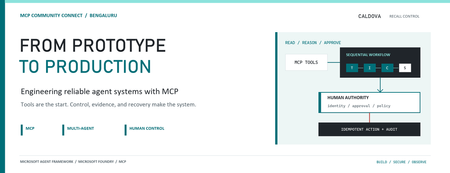
AI agents become operationally interesting when they can reach real systems. They also become operationally dangerous at exactly the same moment. Caldova Recall Control Tower is a developer demonstration built around that tension. It uses a fictional pharmaceutical recall to show how an agent can gather evidence and prepare a decision while deterministic application code retains authority over approval and inventory mutation. The implementation combines the Model Context Protocol (MCP), Microsoft Agent Framework, a Microsoft Foundry Hosted Agent, FastAPI, Microsoft Entra authentication, managed identity, and optimistic concurrency in Azure Blob Storage. Central design rule: Let the model interpret and recommend. Make ordinary code authenticate, authorize, mutate, and prove what happened. Caldova is fictional, all operational data is synthetic, and this sample is not a production recall system or a source of clinical advice. The scenario: useful reasoning, consequential action The demo starts with a temperature excursion affecting batch B-2408-AX7 of Caldova Relief 20 mg tablets. The synthetic inventory contains 2,196 units across two distribution centers and two retail stores. A useful system must establish the notice, locate every affected position, check supplier status, explain uncertainty, and recommend an action. That analysis is a good fit for specialized agents. Quarantining inventory is not. Quarantine changes operational state. It therefore needs an authenticated human, explicit authorization, a batch-scoped approval, concurrency control, idempotency, and an audit record. None of those guarantees should depend on a prompt being followed. The authenticated hosted application at the start of the fictional recall. Architecture: separate reasoning from authority The solution has two related but deliberately separate paths. Caldova separates model reasoning from application authority. Official Microsoft service icons identify Foundry Agent Service, App Service, Managed Identity, and Blob Storage. The reasoning path invokes a Hosted Agent through the Responses protocol. Four agents run in a fixed sequence: triage, inventory impact, supplier/compliance, and supervisor. The first three have narrow read-only tools. The supervisor has no tools and synthesizes the accumulated context into a decision brief. The authority path remains in the web application. It validates the EasyAuth identity claims, checks an approver allowlist, binds approval to the caller, batch, action, and current demo generation, and only then calls deterministic domain code. State is stored per actor in Blob Storage and updated with ETag match conditions so concurrent writes fail instead of silently overwriting each other. There is also a deterministic localhost demo. It reuses synthetic domain fixtures and demonstrates MCP contracts, approval, quarantine, and replay without a model or cloud account. It is useful for development, but its typed approver name and in-memory state are not production identity or durable compliance evidence. Building a narrow MCP surface MCP standardizes how an AI application discovers and calls external tools. It does not remove the need to design those tools carefully. Caldova exposes small, typed operations such as get_recall_notice , locate_inventory , and get_supplier_status . Inputs are constrained with Pydantic, and tool annotations tell clients that these operations are read-only and closed-world: @mcp.tool( title="Locate affected inventory", annotations=ToolAnnotations( read_only_hint=True, open_world_hint=False, ), ) def locate_inventory(batch_id: BatchId) -> dict[str, Any]: return STORE.locate_inventory(batch_id) The mutation tool is separately marked destructive and requires a batch-scoped approval token. Those annotations improve discovery and planning, but they are metadata, not an authorization boundary. The real check occurs inside quarantine_batch , below the model and below the tool description. The Hosted Agent does not receive the mutation tools at all. Its specialists call only three read operations through an isolated MCP stdio subprocess. This is stronger than asking an all-powerful agent to "please remain read-only": capability is constrained by construction. The subprocess boundary also keeps MCP v2 dependencies isolated from the Foundry hosting environment. Each call has a timeout, bounded concurrency, structured JSON handling, and a generic failure response that does not leak subprocess details. Fixed workflows beat vague autonomy for this case Multi-agent does not have to mean dynamic routing. Caldova uses an explicit sequence because the business dependency is explicit: validate the notice before locating inventory, locate inventory before checking supplier implications, and synthesize only after all three specialist outputs exist. return ( WorkflowBuilder(start_executor=triage, output_from=[supervisor]) .add_edge(triage, inventory) .add_edge(inventory, compliance) .add_edge(compliance, supervisor) .build() .as_agent() ) This topology is easier to test and reason about than an unconstrained planner. Each specialist has one job and one tool allowlist. Full context is passed where synthesis requires it, while the supervisor remains tool-free. Request isolation matters too. A hosted process can serve concurrent users, so workflow state must not leak between requests. The sample creates a fresh workflow agent for each request context rather than reusing mutable agent state globally. What the live hosted run showed The hosted application completed a read-only assessment for the synthetic batch. The resulting brief reported: 2,196 affected units across four locations. A high-risk inbound temperature excursion. Supplier acknowledgement, a 36-hour replacement estimate, and a drafted credit note. Unknown transit temperature details, excursion duration, stability impact, final supplier disposition, and potentially issued stock. A recommendation to hold or quarantine stock, explicitly stating that no quarantine had occurred. A required human approval before any inventory restriction. The live Hosted Agent decision brief. Transient response and correlation identifiers are masked; the operations rail is excluded because it contains actor-scoped audit data. The screenshot also shows an important truthfulness choice: the UI says Hosted workflow trace unavailable. The application does not invent stage completion or tool-call evidence when the hosted endpoint does not return trustworthy trace data. The answer can be displayed, but it must not be presented as proof of an internal execution path. Approval is a protocol, not a button The hosted web path uses App Service authentication with Microsoft Entra. The application accepts the injected principal only on the configured App Service host, validates tenant and object identifiers, applies a user allowlist, and performs an additional approver check for mutation requests. State-changing calls also require the expected origin and an application request header. Approval is then bound to five facts: The authenticated actor. The current demo generation. The affected batch. The quarantine action. A ten-minute validity window until first use. Resetting the demo creates a new generation, invalidating old handles. Consuming an approval does not make replay unsafe: the same bound handle can repeat the same quarantine operation, but domain code changes only positions that are not already quarantined. A second call reports an idempotent replay with zero additional positions changed. This is the difference between a human-in-the-loop interface and a human-authorized system. A modal dialog provides user experience; identity binding and deterministic policy provide control. Durable state needs concurrency semantics The hosted application stores each actor's synthetic session in a separate Blob object. A load returns both JSON state and its ETag. A save uses IfNotModified semantics; if another request updated the same state first, Azure Storage rejects the stale write and the API returns a conflict. conditions = ( {"etag": etag, "match_condition": MatchConditions.IfNotModified} if etag else {} ) await blob.upload_blob( json.dumps(state), overwrite=etag is not None, **conditions, ) Without that condition, two browser requests could both read the same approval state and overwrite one another using last-writer-wins behavior. Agent systems do not get a concurrency exemption: ordinary distributed-systems rules still apply. Fail closed, and make the failure legible The analysis adapter accepts only HTTPS Foundry endpoints with the expected path, uses a managed-identity token for https://ai.azure.com/.default , disables redirects, and enforces bounded connect and overall timeouts. It accepts only a completed assistant response with non-empty output text. If the endpoint times out, returns partial output, returns malformed data, or becomes unavailable, the application clears the analysis lease and reports that no inventory changed. It does not substitute a local answer and label it as hosted. Approval remains locked until a new hosted analysis succeeds. This can feel strict during a demo, but it protects provenance. A degraded fallback is useful only when the UI and audit model can identify it accurately. What is proven, and what is not The sample provides useful evidence for several engineering claims: Typed MCP tools reject malformed input. Hosted specialists receive read-only capabilities only. Approval is checked below the model and bound to identity and session state. Quarantine is idempotent in the synthetic domain. Blob ETags prevent stale session writes. Empty, partial, failed, and timed-out hosted responses fail closed. Local tests cover domain, MCP, workflow, API, and repository-hygiene behavior. It does not prove that the sample is a production recall platform. The scenario is synthetic. The local audit log is not tamper-evident. The hosted UI currently lacks trustworthy per-stage and per-tool trace rendering. Deployment-specific RBAC, EasyAuth configuration, telemetry access, model behavior, load characteristics, costs, and recovery procedures require validation in each environment. Evaluation evidence also expires. Golden cases and evaluator configuration are useful assets, but historical results are not a current release certificate. Re-run evaluations against the deployed agent version and inspect failures before making quality claims. Try the pattern Start with the deterministic path before provisioning cloud resources: Set-Location (git rev-parse --show-toplevel) py -3.13 -m venv caldova-recall-control/.venv ./caldova-recall-control/.venv/Scripts/python.exe -m pip install ` -r caldova-recall-control/requirements-ui.txt ./caldova-recall-control/.venv/Scripts/python.exe -m uvicorn ` control_tower_api:app ` --app-dir caldova-recall-control/src ` --host 127.0.0.1 ` --port 8091 Then inspect the MCP server over stdio: ./caldova-recall-control/.venv/Scripts/python.exe ` caldova-recall-control/scripts/inspect_mcp.py The inspector discovers the real tool schemas, reads the synthetic inventory, rejects malformed input and an unapproved mutation, and confirms the stock remains unchanged. Only after that local contract is understood should you configure a Foundry project, deployment identity, model deployment, and Hosted Agent. Engineering takeaways The most reusable lesson in Caldova is not the number of agents. It is the placement of authority. Give each model the smallest useful toolset. Prefer explicit workflow topology when the business process is known. Treat tool annotations as descriptive metadata, not access control. Bind consequential approval to authenticated identity, resource, action, and session generation. Put mutation and idempotency in deterministic domain code. Use optimistic concurrency for durable web state. Preserve provenance by failing closed instead of silently changing execution paths. Show only evidence the system actually captured. Agents are excellent at turning fragmented evidence into an actionable brief. Reliable systems make sure the brief and the action remain two different things. References Caldova source repository Model Context Protocol introduction Microsoft Agent Framework workflow capabilities Deploy a Hosted Agent in Microsoft Foundry Configure Microsoft Entra authentication for Azure App Service Manage concurrency in Azure Blob StorageMicrosoft Foundry Hosted Agents and MCP in Practice: Building Fibey Field Ops
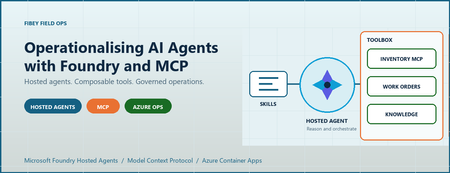
An agent can produce a convincing answer while the system around it is still difficult to deploy, authorize, debug, and recover. For AI engineers and developers, that is often the real gap between a promising prototype and an application people can depend on. Fibey Field Ops makes that gap concrete. It is a synthetic fiber-operations assistant built with Microsoft Foundry Hosted Agents, Model Context Protocol (MCP), and Azure Container Apps. This walkthrough follows one field-service task through the implementation, then examines the deployment and operational decisions behind it. Introduction: the application is more than the model Imagine a technician preparing a fiber work order. Before leaving the depot, they need the job details, available parts, relevant procedures, and network status. Those facts belong to different systems. A useful assistant must retrieve them, combine them, and explain what is missing without inventing an answer. The challenge is not simply selecting a capable model. It is establishing reliable contracts between the model, its tools, the hosting platform, and the application. Fibey demonstrates those contracts with one hosted agent, five instruction skills, eleven operational tools, and five supporting Container Apps. There is an important qualification: Fibey is a protected, synthetic-data demonstration, not a production-ready field-service system. Its gateway mappings and work orders remain in memory, and it does not enforce per-user session ownership or approval of operational writes. Those limitations are useful teaching material rather than details to hide. The Fibey repository contains the implementation, infrastructure, documentation, and presentation deck. Repository access depends on its permissions. 1. Separate reasoning, instructions, and tool execution MCP is a standard interface for discovering and invoking tools. In Fibey, the agent connects to one Microsoft Foundry Toolbox MCP endpoint. The toolbox exposes capabilities backed by an inventory MCP server, a work-orders OpenAPI service, and a Search knowledge base. That common interface does not make the underlying systems identical. OpenAPI still describes an HTTP API, inventory still implements MCP, and knowledge retrieval still depends on indexed documents. The toolbox centralizes the agent-facing integration and connection configuration while preserving those implementation choices. Four terms describe different responsibilities: Concept Responsibility in Fibey Agent Classifies the request, loads instructions, selects tools, and constructs the response Skill An instruction document for a task such as inventory lookup or field briefing Tool An operation with an advertised input schema and a result Toolbox The curated MCP surface and references to downstream connections Fibey's five skills cover inventory lookup, work-order management, knowledge retrieval, work-order preparation, and field briefings. The last two coordinate several tools; they do not create additional agents. The configured toolbox exposes eleven operational tools directly: six inventory/status operations, four work-order operations, and one knowledge-retrieval operation. The agent uses their actual names and schemas. Discovery wrappers such as tool_search and call_tool are relevant only when a toolbox exposes them; they are not mandatory steps before every call. This distinction matters when debugging. A missing wrapper is not necessarily a broken integration. A skill mentioning a capability is also not proof that the runtime can invoke it. The current tool schema is the executable contract. 2. Follow the hosted Azure architecture Microsoft Foundry hosts the agent container and exposes its endpoint. Azure Container Apps (ACA) hosts the application services around it. The deployment source of truth is azure.yaml , which declares the GPT-5.4-mini model deployment and the hosted agent's Responses 2.0.0 protocol. The design keeps the browser-facing application separate from agent execution and backend integration. That makes it easier to inspect each boundary, but it does not make the whole deployment private or remove the need for application authorization. Treat GPT-5.4-mini as the sample's configured baseline, not a claim that it is optimal for every workload. When evaluating another model, measure tool-selection accuracy, schema compliance, grounded answers, latency, and cost per completed task rather than choosing from a fluent demo response alone. The engineering architecture expands this presentation view with resource ownership, identities, configuration, and telemetry paths. The application request path The browser signs in through Microsoft Entra ID at the UI's ACA authentication boundary. An explicit allowlist restricts access to the intended user. Nginx serves the React application and proxies chat requests to the internal FastAPI gateway. The gateway invokes the Foundry-hosted agent using its managed identity. Server-sent events (SSE), a streaming HTTP format, carry answer text, tool activity, citations, failures, and completion back to the UI. Gateway and dashboard ingress are internal to the ACA environment. Inventory and work orders have external ingress so the toolbox can reach them, but their operational endpoints require separate API keys. External accessibility is not anonymous access, and internal ingress is not a complete network-isolation strategy. The knowledge and status paths The knowledge pipeline starts with eight Markdown documents in the repository. A setup script uploads them to a private Blob Storage container, configures a Search data source and indexer, verifies ingestion, and creates the knowledge source and knowledge base used by Foundry IQ. This is not an embedding pipeline assembled implicitly by the chat application. The current configuration uses minimal reasoning and extractive retrieval, with defaults of three output documents and 6,000 output tokens. Its knowledge-base configuration and MCP endpoint use preview APIs, which need lifecycle and support review before production adoption. Network status takes a different path. Inventory's get_network_status tool reads the configured internal HTML dashboard. It is a narrow HTTP fetch, not browser automation, arbitrary website navigation, or a real operational clearance. Azure Container Registry supplies container images. ACA logs go to Log Analytics. Hosted code enables OpenTelemetry, the standard instrumentation framework for traces and metrics, but the repository does not provision Application Insights. The project's linked trace destination must be configured and verified separately. 3. Trace a work-order briefing through the implementation The most useful demonstration starts with one concrete request: prepare a technician for a job. The field-briefing skill provides the instructions for combining work-order data, inventory, procedures, and status without pretending that one backend contains everything. Use a request such as the following in a prepared synthetic environment. The exact wording and tool order may vary; the important evidence is which operations succeeded and which facts support the answer. Brief me on WO-007, including stock, relevant procedures, safety, and network status. The intended flow is: Load the field-briefing instructions and retrieve WO-007. Identify required parts and use a batch stock check when several parts need checking. Combine procedure and safety questions into one focused knowledge retrieval. Read the configured synthetic status dashboard through inventory MCP. Produce a briefing grounded in successful results, with source references and explicit gaps. Batching is a useful engineering choice, not a claim of a measured performance improvement. One batch stock call avoids unnecessary repeated requests. Combining related retrieval questions can also reduce duplicate context and tool traffic. This screenshot was captured from an authenticated deployment. The displayed briefing identifies an unavailable connector kit and available test equipment. It illustrates a specific synthetic response, not current stock or a benchmark. Use the supported hosted integration The relevant implementation is the hosted entrypoint. It uses FoundryToolbox from agent_framework_foundry_hosting , a FoundryChatClient , a skills provider, and ResponsesHostServer.run_async() . The hosting helper does more than attach a bearer token. It authenticates MCP requests and forwards the hosted runtime's per-request call ID. Replacing it with a generic transport can lose context that the platform expects. The entrypoint also closes credentials and clients when execution exits. Hosted skill discovery prefers published skills when available and retains bundled instructions as a fallback in auto mode. Explicit mcp mode fails if published skills cannot be loaded; file mode uses the bundled documents. This makes the fallback intentional rather than silently running without the task instructions. Distinguish history from compute affinity The gateway maintains two hosted mappings. previous_response_id links conversation history, while agent_session_id preserves affinity to the hosted compute session. Losing one is not equivalent to losing the other. Both mappings are held in gateway memory, which is why it remains at one replica. A UUID (universally unique identifier) is a conversation handle, not proof of ownership. Reset clears the local mappings but does not reset work orders or delete the old remote compute session. There is also a privacy distinction between storage and telemetry. Gateway requests use stored Responses history, while the agent's model-call options use store: false . Sensitive tracing being disabled does not mean all conversation persistence is disabled. 4. Run locally without confusing development and cloud boundaries Local development is useful for inspecting the gateway and agent without rebuilding the hosted image. It still calls a real Foundry project, model, and toolbox. It is not an offline simulation, and tool writes can affect the configured synthetic backend. Use Python 3.12+, uv, Node.js 24 LTS, and an authorized Azure developer identity. The commands below run from the repository root in PowerShell. Keep the existing dependency locks and copy .env.example only when creating a new local configuration. uv sync --frozen Copy-Item .env.example .env Set FOUNDRY_PROJECT_ENDPOINT , FOUNDRY_MODEL , and TOOLBOX_MCP_URL in the ignored .env . Use your environment's actual values. Backend API keys belong in Foundry connections, not in the browser or prompts. Start the gateway: az login uv run --frozen uvicorn fibey.gateway.api_server:app --host 127.0.0.1 --port 8080 In another terminal, start the UI: Set-Location ui npm ci npm run dev Open http://localhost:5173 . Vite forwards /api to the gateway on port 8080. These development servers do not reproduce the cloud Entra boundary, and a cloud toolbox cannot reach your workstation's localhost . Inspect the API progressively With the local gateway running, start with a health request in a separate PowerShell terminal: $base = "http://127.0.0.1:8080" Invoke-RestMethod "$base/api/health" Next, create a UUID conversation and submit one synthetic request: $session = [guid]::NewGuid().ToString() $body = @{ message = "Show me WO-007."; session_id = $session } | ConvertTo-Json -Compress $response = Invoke-WebRequest "$base/api/chat" -Method Post -ContentType "application/json" -Body $body $response.Headers["X-Session-Id"] $response.Content This prints the completed SSE body rather than animating the stream. Reuse the same session for a follow-up by extracting a small helper: function Invoke-FibeyTurn { param([string] $Message, [string] $SessionId) $payload = @{ message = $Message; session_id = $SessionId } | ConvertTo-Json -Compress $result = Invoke-WebRequest "$base/api/chat" -Method Post ` -ContentType "application/json" -Body $payload return $result.Content } Invoke-FibeyTurn -Message "What parts does that work order need?" -SessionId $session The helper uses $base and $session from the preceding examples. It makes continuity explicit without hiding the API contract. The browser remains the better place to watch incremental text and activity. See local development for reset behavior and supporting-service details. 5. Deploy artifacts and infrastructure together Fibey's initial deployment is intentionally staged. A container image, its target port, its health probes, its registry association, and its runtime permissions must agree. Successfully building an image does not establish that agreement. The first supporting-infrastructure pass creates placeholder apps on port 80. Once all five real images have been published, a second pass applies the images with their application ports and probes. Plain azd deploy of a supporting service is not the initial port-switch mechanism for this sample. The deployment guide gives the complete sequence and prerequisites: Select the intended environment and provision the Foundry layer. Configure project aliases, the Entra application, the allowed user, and separate API keys. Provision placeholder supporting apps and verify scoped access and registry identity associations. Publish all five supporting images and confirm every image setting is populated. Provision supporting infrastructure again to apply the matching images, ports, and probes. Run knowledge setup, then toolbox setup. Deploy fibey-agent and perform protected-path acceptance checks. For example, this publication step comes after placeholders and access checks, not at the start of an unconfigured environment: azd publish status-dashboard azd publish inventory-mcp azd publish work-orders-api azd publish gateway azd publish ui Only after all five SERVICE_*_IMAGE_NAME settings exist should the next azd provision infra apply them. Keep those settings: an empty value selects a placeholder again. This is where DevOps becomes tangible. Review source, Bicep, locks, schemas, skills, and configuration together; record accepted image references, model configuration, toolbox version, and hosted-agent version. GitOps adds controlled reconciliation of reviewed desired state. The repository supplies the ingredients, not an existing CI/CD pipeline or GitOps controller. Toolbox promotion deserves the same discipline. The unversioned consumer endpoint follows the published default version. A version-specific developer endpoint can test a candidate before promotion. Updating a shared connection or default can affect consumers without rebuilding their images, so Git history alone is not a rollback mechanism. 6. Treat governance, observability, and scale as separate concerns Role-based access control (RBAC) grants an identity permission at a resource scope. The control plane creates and configures Azure resources; the data plane performs application work such as invoking agents, querying Search, or reading blobs. The identities used across those operations are not interchangeable. In particular, a successful UI login is not automatic end-user identity passthrough to every tool, and resource provisioning permissions do not establish all runtime permissions. Boundary Identity or credential Browser to UI Entra user, application registration, and user allowlist Gateway to Foundry Gateway managed identity with project-scoped invocation access Hosted agent to model and toolbox Foundry-provided runtime agent identity Toolbox to inventory and work orders Separate API keys stored in project connections Toolbox to Search knowledge base Foundry project managed identity Search indexer to documents Search managed identity with Blob reader access Image delivery adds another boundary: each supporting app needs both AcrPull and a registry association selecting its identity. The Foundry project identity used for infrastructure operations is also distinct from the hosted agent's runtime identity. Approval must exist outside the prompt Fibey's synthetic work-order writes run without an enforced human approval round trip. That is appropriate to understand in a disposable demo and inappropriate to conceal when discussing production. The hosted toolbox documentation is explicit: approval metadata alone does not block tools/call . The runtime must pause, collect a decision, and resume or reject the exact proposed operation. A prompt saying "ask first" is not equivalent to that control. Real writes need server-side authorization, approval tied to the arguments, idempotency, and a durable audit record. If a write's response is uncertain, read its state before retrying. Treat tool results as untrusted data rather than instructions. Debug the boundary that failed The activity sidebar makes tool use visible, but it is not a durable audit log or access to the model's hidden reasoning. Combine it with timestamps, request/session identifiers, ACA logs, and configured hosted traces. Keep sensitive message tracing off unless a controlled investigation explicitly requires it. Verify that a synthetic trace reaches the intended sink; enabled instrumentation alone does not prove ingestion. Symptom First checks UI returns 502 Gateway revision, target port, fixed Nginx upstream, SNI, and certificate trust Agent or tool returns 401/403 Identity, token audience, role scope, and downstream connection credential Knowledge retrieval fails Indexer completion, project Search role, API version, and advertised input schema Briefing receives 429 Model quota, concurrency, retrieval budgets, and repeated tool calls Stream ends early Terminal response event, timeout, malformed SSE, and transport failure The gateway must surface failed or truncated streams rather than treating partial text as a completed action. A final stream terminator after an error is not application success. Scale only after identifying state and capacity limits Foundry manages hosted runtime capabilities, but it does not externalize Fibey's gateway mappings or in-memory work orders. Adding replicas before redesigning that state would undermine continuity and consistent updates. Model throughput, hosted compute, downstream API capacity, Search, and ACA are separate constraints. Measure latency, errors, tokens, tool counts, and recovery under concurrent load. Registry storage/builds, model inference, compute, Search, Blob Storage, and telemetry all have costs; using a managed platform does not remove the need for budgets. 7. Evaluate the result before adding more agents The practical result is an inspectable workflow that combines heterogeneous systems into a grounded response. We can demonstrate inventory lookup, a synthetic work order, cited knowledge, a fixed status fetch, and a combined briefing through one agent-facing toolbox. That is functional evidence, not a production certification or benchmark. This post does not establish latency percentiles, cost per successful task, throughput, or availability under load. Those measurements should be acceptance criteria for an adaptation, not numbers inferred from a screenshot. Multi-agent coordination is a possible next design, not deployed Fibey behavior. A coordinator could delegate read-only inventory and procedure tasks while a restricted specialist handles approved writes. Each handoff would need typed inputs/results, correlation IDs, deadlines, cancellation, and budgets. Sharing a toolbox alone does not implement that coordination. Specialists also introduce additional failure paths, identity decisions, and state. Start with them only when task complexity, ownership, or isolation requirements justify the cost. The current five skills already provide modular instructions without creating five independently operated agents. 8. Summary: reuse the engineering boundaries Fibey's reusable pattern is the separation of model reasoning, task instructions, tool contracts, hosted execution, and operational controls. MCP gives the agent a common tool interface; Foundry supplies managed hosting and integration capabilities. The application team remains responsible for the guarantees around its data and actions. Start with one workflow and verify each boundary. Then add durable state, per-user authorization, enforced approvals, secret rotation, appropriate networking, evaluation, and recovery before introducing real operational data or more autonomous behavior. For a practical starting point, use the repository, follow the deployment guide, and reproduce the session walkthrough with synthetic data. The presentation deck provides the same architecture and demo sequence for a team discussion. References The repository describes what this sample implements. Microsoft documentation describes the surrounding platform capabilities, responsibilities, and supported integration contracts. Read both before adapting the solution, especially where preview APIs, identity behavior, or approval enforcement affect your requirements. Fibey Field Ops repository Fibey engineering architecture Fibey deployment guide Fibey toolbox integration Microsoft Foundry hosted agents Use a toolbox with a hosted agent Official Python hosted-agent toolbox sampleExplore the latest in MCP: All recordings from MCP Live!
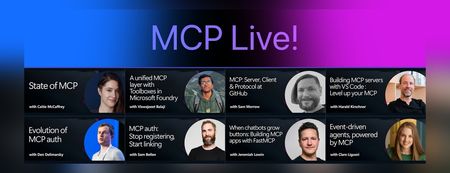
We recently hosted MCP Live!, a free half-day event featuring the people building the Model Context Protocol and putting it into practice. The Model Context Protocol (MCP) is the open standard for connecting AI models to tools and data. MCP servers let agents work with external data sources and capabilities across clients such as VS Code, GitHub Copilot, Claude, and other AI applications. Across the event, speakers explored: The state of MCP, the latest specification updates, and the protocol roadmap MCP server and client development at GitHub and in Visual Studio Code Enterprise-ready tools, authentication, governance, and security Interactive MCP Apps built with FastMCP Event-driven agents powered by MCP triggers and events Watch the complete MCP Live playlist, or browse the individual session recordings below along with links to related documentation, code, and resources. State of MCP 📺 Watch YouTube recording Join Caitie McCaffrey for a look at the state of the Model Context Protocol and the major changes introduced in the latest 2026-07-28 MCP specification release. Learn about the protocol's updated roadmap and emerging protocol priorities, including Agentic Messaging Primitives, and how they enable new patterns for agent-to-agent communication. Get a preview of where the protocol is headed and what these changes mean for developers building the next generation of AI agents. View the slides Follow Caitie on: LinkedIn | X MCP specification 2026-07-28 release MCP conformance tests MCP Server Cards working group A unified MCP layer with Toolboxes in Microsoft Foundry 📺 Watch YouTube recording Viswajeeet Balaji shows how Toolboxes in Microsoft Foundry make MCP enterprise-ready. It supports runtime tool search, MCP skill extensions, and the latest MCP 07-28 specification—while letting teams bring OpenAPI tools and A2A agents, expose them through MCP, and reuse the same unified configuration across agents. A centralized governance layer adds consistent authentication and guardrails without requiring every agent to rebuild its integrations. View the slides Follow Viswajeeet on: LinkedIn Documentation: Toolboxes in Microsoft Foundry Blog post: Building agents that act on your behalf with Toolboxes MCP: Server, Client & Protocol at GitHub 📺 Watch YouTube recording Sam Morrow is a co-creator of GitHub's MCP, an MCP Spec Maintainer, and Copilot client developer. Find out the latest MCP features his team is shipping on both the server and client side, as well as the parts of the spec that he's most excited about. Learn about some of the recent challenges, future plans, and insights from working across the MCP stack, and get a sneak peek at what's coming next. GitHub MCP Server Follow Sam on: LinkedIn | X Building MCP servers with VS Code — Level up your MCP 📺 Watch YouTube recording Harald Kirschner shows how MCP servers have evolved beyond local tool calls into richer, production-ready agent capabilities. Through a live VS Code demo, he builds an agentic achievement tracker that uses tools, elicitation, progress notifications, an interactive MCP App, stateless HTTP, and Agent Plugins—showing how to design, debug, and distribute modern MCP integrations. View the slides Follow Harald on: LinkedIn | X Documentation: MCP servers in VS Code Official MCP Registry MCP Registry repository Evolution of MCP auth 📺 Watch YouTube recording Den Delimarsky, Lead Maintainer of MCP and Member of Technical Staff at Anthropic, discusses how MCP authorization reached its current state: the original OAuth profile, protected resource metadata, the shift in client registration with servers, and enterprise-managed authorization. He also covers what the maintainers are working on next, including agent identity. View the slides Follow Den on: LinkedIn MCP auth: Stop registering, Start linking 📺 Watch YouTube recording Sam Bellen explains how Dynamic Client Registration made every MCP client mint a fresh client_id with every server it met, a per-server credential tax that quietly breaks down once clients start connecting to servers opportunistically. He shows how Client ID Metadata Documents flip the model: your client_id becomes a URL the server fetches on demand, giving you one durable identity that works everywhere, with a live demo of the flow end to end. View the slides Follow Sam on: LinkedIn DCR vs. CIMD demo with xmcp and Auth0 When chatbots grow buttons: Building MCP apps with FastMCP 📺 Watch YouTube recording Chat is great, but sometimes the answer is a button, a chart, or a form. MCP Apps let servers render interactive interfaces directly inside AI clients. Jeremiah Lowin, creator of FastMCP, shows how to build them in Python with FastMCP and Prefab, from simple components to dynamically generated interfaces. Follow Jeremiah on: LinkedIn FastMCP FastMCP authentication Event-driven agents, powered by MCP 📺 Watch YouTube recording Clare Liguori discusses the MCP Triggers & Events experimental extension, which lets agents poll MCP servers for events and get webhook triggers. She explores the new agent architectures the extension enables and presents a live demo. View the slides Follow Clare on: LinkedIn | X MCP Triggers & Events Working Group MCP events serverless earthquake agent demoIntroducing Inside Microsoft Foundry: Quickstart 🎬
Discover Inside Microsoft Foundry: Quickstart, a new video series for developers building AI agents. Starting with "What does it really take to ship an AI agent?", the series explores real-world challenges such as model selection, grounding agents in data, evaluation, deployment, observability, and governance. Follow along as we show how the Microsoft Foundry ecosystem helps developers move from prototype to production, with new episodes released in the coming weeks.Join us for our MCP Live! — A free livestream covering all things MCP
The Model Context Protocol (MCP) is the open standard for connecting AI models to tools and data. It was first introduced to the world by Anthropic in November 2024, and is now the most widely adopted standard in the world of Generative AI. You can now use MCP servers to connect agents to your data sources across multiple clients: VS Code, Claude Desktop, Codex, Copilot App, Goose, and many more. Plus, MCP is the most common way to build your own agents that connect to internal enterprise tools, like when using Microsoft agent-framework or Langchain. To celebrate the success of MCP and its rich ecosystem, we are hosting MCP Live! on September 9th, from 9AM to 1PM PT. We'll hear both from the teams at Microsoft that are implementing MCP, but also from core MCP maintainers and the global community of MCP developers. Register here: https://aka.ms/MCPLive/99/b Here's our current planned agenda: Time Topic Speakers 9 AM PT Welcome to MCP Live! Liam Hampton and Pamela Fox (Microsoft/GitHub), MCP advocates 9:05 AM State of MCP Caitie McCaffrey (Microsoft), MCP core maintainer 9:40 AM MCP: Server, Client & Protocol at GitHub Sam Morrow (GitHub), GitHub MCP server maintainer 10:05 AM A unified MCP layer with Toolboxes in Microsoft Foundry Viswajeeet Balaji (Microsoft), Principal Software Engineer 10:30 AM Building MCP servers in VS Code Harald Kirschner (Microsoft), VS Code Principal PM 11:15 AM MCP Authorization: DCR, EMA, and more! Den Delimarsky (Anthropic), Sam Bellen (Okta) 12:05 AM Building MCP apps with FastMCP Jeremiah Lowin (Prefect), FastMCP maintainer 12:30 AM MCP Tasks, Events, Triggers Clare Liguori (Amazon), MCP core maintainer 12:45 AM Event-driven agents, powered by MCP Liam Hampton and Pamela Fox (Microsoft/GitHub), MCP advocates We're very excited to bring together so many folks working on both the MCP specification and on production MCP servers, so we can all learn about the latest MCP features and best practices together. Learn more MCP Brand new to MCP? We still want you to join! If you want, you can learn MCP fundamentals from our free resources: MCP-for-beginners : A step-by-step written tutorial covering all the MCP features Python + MCP series : Recordings of a 3-part livestream series focusing on building MCP servers with Python Meet the MCP community Want to meet the MCP community in person? We're also planning several IRL events: San Francisco (14 Sep 2026) Bengaluru (26 Sep 2026) Hope to see you in the live chat on September 9th!1.3KViews0likes0CommentsLearn how to use the four IQs: Web IQ, Work IQ, Fabric IQ, Foundry IQ
We just concluded Microsoft IQ Deep Dive with Python, a three-part livestream series all about Microsoft IQ. We showed how to use the four IQs to ground your AI applications and agents: Work IQ: user-specific retrieval of M365 data, like Teams chats, emails, and calendar events. Fabric IQ: retrieval of data stored in OneLake, via Fabric ontologies, graphs, and data agents. Web IQ: real-time web results with super low latency Foundry IQ: multi-source agentic retrieval on search indexes plus remote sources (including Web IQ, Work IQ, and Fabric IQ) The four IQs are all exposed as MCP endpoints, so you can easily integrate into your own agents, or add to your Foundry agents via the Foundry Toolbox. Check out our code samples for Python notebooks and agents that use each of the MCP servers and APIs. All of the materials from our series are available for you to keep learning from, and linked below: Video recordings of each stream PowerPoint slides that you can use for reviewing or even teaching the material to your own community An annotated write-up of each presentation, so you can quickly read through 🙋🏽♂️ Have follow up questions? Join the weekly Python+AI office hours on Foundry Discord. Microsoft IQ Deep Dive with Python: Foundry IQ 📺 Watch YouTube recording In the first session, we dived into Foundry IQ (Azure AI Search), exploring how it helps agents and applications work with curated knowledge and organizational context. We built knowledge bases in Python and connected them to multiple knowledge sources, including file knowledge sources, search indexes built from ingested data, and the Web IQ MCP server. Then we performed multi-source agentic retrieval on those knowledge bases, which executes queries in parallel and merges the results with state-of-the-art ranking models. Finally, we built agents in Python using Microsoft Agent Framework and grounded their responses in Foundry IQ results three different ways: a custom tool calling the knowledge base API, the knowledge base MCP endpoint, and a Foundry Toolbox. We deployed those agents to Foundry Agent Service as hosted agents and published one to Teams. 🖼️ Slides for this session 📝 Write-up for this session 💻 Code repository with examples: iqdeepdive Microsoft IQ Deep Dive with Python: Work IQ 📺 Watch YouTube recording In the second session, we focused on Work IQ and how it brings workplace context into AI-powered experiences. We compared Work IQ to Microsoft Graph, then explored all three protocols it speaks — A2A, MCP, and REST — with runnable Python notebooks for each. We walked through the 10 generic tools that Work IQ exposes over MCP, including ask, which calls Microsoft 365 Copilot directly, and do_action, the only write path. We also connected Work IQ to a Foundry IQ knowledge base as a knowledge source, so a single query returns a blended answer across indexed HR documents and live work context. Then we wired Work IQ into a Microsoft Agent Framework agent as an MCP tool, and finished with Agent 365 autopilots — agents that get their own Microsoft 365 identity, mailbox, and place in the org chart, and act as themselves rather than on behalf of you. A live demo showed the Work Mate autopilot reading its own mailbox in Teams and emailing a customer directly. 🖼️ Slides for this session 📝 Write-up for this session 💻 Code repository with examples: iqdeepdive Microsoft IQ Deep Dive with Python: Fabric IQ 📺 Watch YouTube recording In the final session, we explored Fabric IQ and how it connects AI experiences to structured business data stored in Microsoft Fabric's OneLake. We introduced the key components of Fabric IQ — ontologies, graphs, semantic models, and data agents — and showed how each one helps describe, organize, and reason over operational data. Ontologies provide a shared business vocabulary that maps entity types, properties, and relationships to actual OneLake data. Graphs offer dedicated graph database capabilities for queries requiring extensive relationship traversal. Semantic models expose Power BI analytics through DAX measures on star-schema tables. Data agents combine all of these behind a single conversational interface that selects the right source and query language automatically. For each component, we demonstrated the Ontology MCP server and Data Agent MCP server for agent integration, and showed how to add each as a knowledge source to Foundry IQ knowledge bases for multi-source retrieval. 🖼️ Slides for this session 📝 Write-up for this session 💻 Code repository with examples: iqdeepdive2.1KViews2likes0Comments