mbr2gpt
4 Topics
0x000000e blue screen error on boot after mbr2gpt
Hello, I just tried converting my boot disk to gpt in order to upgrade to Windows 11 from 10. I don't have screenshots on the cmd while doing so, but I remember it said it was successful. I have disabled CSM support and enabled Secure boot and made sure it says secure boot is active on the BIOS as well, but I still get this error when trying to boot. I do have 2 identical boot options which I've read can happen after mbr2gpt, but neither seem to work. I am able to boot in safe mode and would love any help getting my PC to boot now, and while I'm fine with wiping and rebuilding windows as a last resort, I would love to not have to reinstall everything. I take being able to boot in safe mode as a sign I might just have to repair with my partitions or something so I'm hoping I don't have to reset everything. Thank you!493Views1like7Comments
Problems with partitions when using MBR2GPT
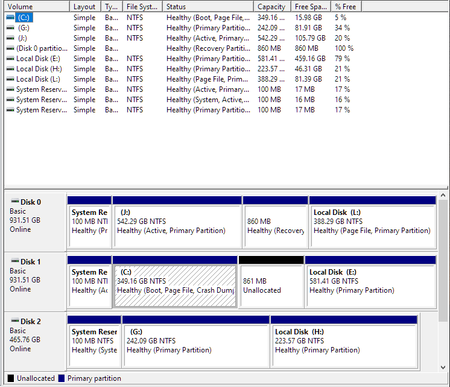
I'm not sure how to proceed to prepare for Windows 11. When running mbr2gpt, I get the following: C:\WINDOWS\system32>mbr2gpt /validate /allowFullOS MBR2GPT: Attempting to validate disk 2 MBR2GPT: Retrieving layout of disk MBR2GPT: Validating layout, disk sector size is: 512 bytes Cannot find OS partition(s) for disk 2 Here's my disk layout: I got to this point thinking I needed to delete the Recovery Partition. It now is the 861MB Unallocated partition. What should I do to prepare for a successful run of mbr2gpt? My system is as follows and is running Windows 10 Pro 21H1: AMD Ryzen 5 5600x, 32GB RAM, Asus Tuf Gaming Pro X570 Wifi The OS being used (C Drive) was a clone of that on the G Drive. The intent of the clone is to provide a backup and to move the OS from a smaller drive to a larger, newer one.11KViews1like11Comments