mac
6 TopicsICS Meeting invite is added to Outlook App on Mac, but no acceptance options given to User
Hi Tech Folks, Mac Users receive .ics calendar invites via email from other users using Outlook. When they right-click and open the .ics file via Outlook App, it opens and can be added to their calendar without a problem. But there are not given an option to Accept/Reject the invite and sender does not get a confirmation. So no notification goes to meeting Host/Organizer/Sender. Question: How can this be fixed? How User can send the response and Organizer get notified? Thanks, Ali P.s: .ics file is working fine in Outlook Desktop app in Windows3.5KViews0likes2Comments
Synchronization issue in New Outlook for Mac – ״Failed to refresh subscriptions.״
Hello, I am using Microsoft 365 (Exchange Online) on Mac, running macOS 26.1 (Tahoe). My Outlook client is: Outlook for Mac Version 16.103.3 (25113013), with a Microsoft 365 Subscription license. Since yesterday morning, in the New Outlook interface, my inbox has suddenly appeared empty, and I constantly receive the following error message: “Failed to refresh subscriptions.” It’s important to note: In Legacy Outlook, everything works perfectly. The web version and the Outlook app on my mobile phone also work well. The issue persists regardless of the network I am on (home, office, cellular, etc.). Troubleshooting steps I already tried: • Updating Outlook to the latest version • Removing and re‑adding the account • Clearing cache and preferences • Formatting my Mac and reinstalling everything from scratch Unfortunately, none of these steps has resolved the issue. Is this a known bug, and is there a recommended workaround or an upcoming fix? Appreciate assistance on that issue.1.8KViews1like6Comments
Outlook for Mac - does it use new Autodiscover feature (Office 365 Direct Connect)?
Specifically, I'm referring to the step outlined in "Step 4" in this page: Outlook 2016 implementation of Autodiscover (microsoft.com) I realize that support KB is for Windows' Outlook, but I am indeed asking the question - does Outlook for Mac also do this new trick? If so, is there a specific version where this feature was added? Thanks in advance.1.6KViews0likes0Comments
MAc OSX - Outlook 365 - shortcut keys (e.g. Ctrl 2 for Calendar) collide with Defaults in OSX
1) Was there really no consideration given to different platforms and their common (RH) 2) Can I override shortcuts in Outlook365 and map them myself? I hope that the result is that I should rename all my local OSX Control key mappings to support outlook online.870Views0likes0Comments
way to find snoozed emails which have met their snoozed time - Outlook on Mac
I like and use the snooze function a lot. However sometimes a snoozed email meets the snoozed time and i cannot address it.... and it gets lost in my inbox. Is there a way for me to filter for any email that has been snoozed in the past? I know outlook knows as it shows the snooze icon. but i have not found a way to filter for these emails500Views0likes1Comment
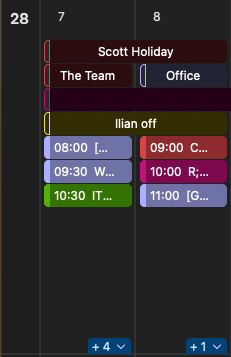
Outlook for Mac event hard limit hiding events with a '+' in all views
Since a recent update, Outlook for Mac now rolls up events into a plus(+) button on Day, Three Day, Working Week and Month views. What this means is that despite having plenty of space to show events, they're hidden behind another button. I have a very busy calendar and mostly use the month view - I have a portrait monitor particularly used for the calendar at the office which is now totally useless because all the real estate that aspect creates is wasted. I don't understand what added value the + button brings when there is space to be used and I have tried and failed to find something I can configure to change it! Month View Example - Seems to have a 7 event hard limit Day View Example - Hard limit of three for all day events I would also love love love the ability to scroll through months in month view - for example, in the last two weeks of a month I want to be viewing the next 4-5 weeks not two weeks in the past I don't care about and only two weeks into the future. Seems like an easy ask?201Views0likes2Comments