logic apps
402 Topics
From Form to Action: A Governed, Event-Driven AI Intake Pipeline with Azure Integration Services
A production-minded reference architecture using Azure Integration Services and Microsoft Foundry to turn document-heavy intake into governed, traceable work. TL;DR: Calling a model is one step in AI-powered intake. Production readiness depends on everything around the model: authenticated entry, controlled model consumption, durable asynchronous processing, explicit failure handling, and one correlation ID carried from the gateway to the final event. This post walks through a permit-intake reference architecture on Azure Integration Services and a companion repository you can run offline, without an Azure subscription. The Problem: Intake is where AI Prototypes Stall Many teams have built an AI prototype that reads a scanned form, extracts the key fields, and returns clean, structured data. That prototype proves the model can do the job. Taking it to production raises a different set of questions: Who is allowed to call this, and how many times per minute? What happens when the model returns a 429 or the CRM is down for maintenance? Which team consumed those tokens? Can you show me everything that happened to application #00417? Who is notified when a record is created, and what breaks when we add another subscriber? None of those questions is about the model, yet each one can decide whether the solution ships. The underlying customer problem is broader than “How do we read a form?” It’s “How do we accept responsibility for a submission, process it reliably across slow or unavailable dependencies, and give applicants and operators a trustworthy status?” That framing moves the design from a single AI call to a governed system of connected services. In this post, I use a fictional county’s building-permit intake as the running example. A resident submits a permit packet, and the county needs to validate it, extract the key fields, score it against intake policy, record it in a case system, and notify the right people, with a complete audit trail. The same shape appears in insurance first notice of loss, benefits enrollment, supplier onboarding, and claims intake. The repository keeps the domain in schemas and configuration: replace the schemas and labels, and keep the boundaries. My thesis is simple: the hard part of production AI intake is connecting the services around the model reliably and under governance, not calling the model. The model is one component of the system. It isn’t the system. Scope note: This is a production-minded reference architecture, not a production-ready template. The people, permit data, identifiers, and URLs in this post are synthetic, and the screenshots and trace rows show only that synthetic data. The repository favors demonstration clarity: public endpoints, simple SKUs, and simulated fallbacks. Architecture at a Glance Figure 1. The governed, event-driven permit-intake flow. One correlation ID follows the permit from the gateway to the published event. The design separates the acceptance path from the processing path. API Management owns the caller-facing contract and hands the work to a queue. Slow or failure-prone work happens after that hand-off. The flow reads left to right: Portal → API Management → Logic App → Service Bus → Function → Case system → Event Grid → Subscribers │ Document Intelligence + Foundry model (through the AI gateway) Responsibility Service Why this service Governed front door and AI gateway Azure API Management One policy boundary for business APIs and model APIs Low-code validation, enrichment, and routing Azure Logic Apps Business-visible run history; easy to change routing rules Durable hand-off and back-pressure Azure Service Bus Retries, duplicate detection, and dead-lettering Processing worker Azure Functions Scales with queue depth; runs the shared orchestrator Field extraction Azure Document Intelligence Layout and key-value extraction from the packet Policy-oriented scoring Azure OpenAI in Microsoft Foundry Models Rubric-based completeness and consistency review Fan-out to downstream consumers Azure Event Grid Decoupled subscribers via CloudEvents One correlation ID across the flow Application Insights End-to-end transactions plus one KQL join Discovery and reuse Azure API Center A catalog of the Permits and model APIs The case-system box is deliberately not a CRM product. The repository’s crm.py is an adapter: an in-memory stub by default, or an HTTP call to whatever CRM_BASE points at. Swap in Dynamics 365 or your records system without changing the orchestration contract. Let’s walk through the design decisions that matter most. API Management is more than a Proxy API Management is often introduced as a proxy. In this architecture, it’s the governance boundary, and it governs two surfaces. Figure 2. One gateway governs both the business API and the model API. Surface 1: The Permits API The Entra-protected variant of the inbound policy (permits-api.policy.xml, abridged) authenticates, throttles, and stamps a correlation ID before any backend code runs: <inbound> <base /> <validate-azure-ad-token tenant-id="{{tenant-id}}" failed-validation-httpcode="401"> <audiences><audience>api://ais-demo-permits</audience></audiences> </validate-azure-ad-token> <rate-limit-by-key calls="60" renewal-period="60" counter-key="@(context.Subscription?.Key ?? context.Request.IpAddress)" /> <set-variable name="correlationId" value="@(context.Request.Headers.GetValueOrDefault("X-Correlation-Id", Guid.NewGuid().ToString()))" /> <set-header name="X-Correlation-Id" exists-action="override"> <value>@((string)context.Variables["correlationId"])</value> </set-header> <set-backend-service backend-id="permit-intake-logicapp" /> </inbound> Three lines of intent are worth calling out: validate-azure-ad-token rejects missing, invalid, or expired Microsoft Entra tokens with a 401 at the edge, so unauthenticated requests are rejected before they reach the backend. It knows the Entra issuers and signing keys for your tenant, so there’s no OpenID configuration URL to maintain. rate-limit-by-key gives each consumer its own budget and returns 429 with Retry-After when it’s exceeded. The correlation ID is created here (or accepted from a trusted caller) and echoed back on the 202 Accepted response. That single value is how you’ll find this permit later. The deployed demo authenticates callers with API Management subscription keys and applies the same rate limit and correlation ID. To adopt the Entra variant, register an app for the api://ais-demo-permits audience, register a backend for the Logic App trigger, and then swap the policy. Surface 2: The Model API (The AI Gateway) The Function doesn’t call the model endpoint directly. It calls the Azure OpenAI v1 API through API Management, where a second policy applies (abridged): <inbound> <base /> <llm-content-safety backend-id="content-safety-backend" shield-prompt="true"> <categories output-type="EightSeverityLevels"> <category name="Hate" threshold="4" /> <category name="SelfHarm" threshold="4" /> <category name="Sexual" threshold="4" /> <category name="Violence" threshold="4" /> </categories> </llm-content-safety> <llm-token-limit counter-key="@(context.Subscription?.Id ?? "anonymous")" tokens-per-minute="20000" token-quota="2000000" token-quota-period="Monthly" estimate-prompt-tokens="false" /> <llm-emit-token-metric namespace="ais-demo-ai-gateway"> <dimension name="Subscription" value="@(context.Subscription?.Name ?? "unknown")" /> <dimension name="Department" value="@(context.Request.Headers.GetValueOrDefault("x-dept", "unknown"))" /> </llm-emit-token-metric> <set-header name="api-key" exists-action="delete" /> <authentication-managed-identity resource="https://cognitiveservices.azure.com" /> <set-backend-service backend-id="foundry-models-backend" /> </inbound> In order, that policy: llm-content-safety sends the prompt to Azure AI Content Safety, with Prompt Shields for injection attempts, and returns 403 for prompts that exceed the configured thresholds, before they reach the model. llm-token-limit gives each consumer a tokens-per-minute budget (429) and a monthly token quota (403). llm-emit-token-metric publishes token usage to Application Insights with a department dimension for showback or chargeback. Managed identity authenticates the gateway to the model. The caller’s API Management subscription key is stripped, and local (key) auth is disabled on the Foundry resource, so the Function doesn’t hold a model key, which helps reduce the risk of key leakage. The backend also has a circuit breaker that trips after three 429 or 5xx responses within a minute, pauses calls for a minute (or for the Retry-After period the model returns), and then resumes. The repository includes sample KQL for token monitoring and chargeback views. The key point: conventional APIs and AI endpoints share one governed boundary. Your security team reviews one set of policies, and your platform team gets one place to see who is calling what. Discovery: Azure API Center API Management governs runtime traffic; Azure API Center is where people find the APIs. The repository links API Center to API Management, so the Permits APIs and the model API are cataloged with their definitions, lifecycle stage, and environment. Before a team builds another intake API or model proxy, they search the catalog and still call API Management at runtime. API Center isn’t on the request path. Why the Flow is Asynchronous The Permits API returns 202 Accepted with a correlation ID. It doesn’t wait for extraction, scoring, or the case system. That’s deliberate: document analysis, model calls, record writes, and notifications all have different latency and failure behavior, and holding the caller’s request open couples the caller to each of them. Governance boundary: 202 means the platform durably accepted responsibility for the permit. It doesn’t mean extraction succeeded, a model approved anything, or a record was committed. The repository enforces that literally. On the direct route (POST /permits), API Management writes to Service Bus and checks the answer before it says yes: <send-request mode="new" response-variable-name="sbresponse" timeout="20" ignore-error="true"> <!-- POST to https://{namespace}.servicebus.windows.net/permits-in/messages with managed identity --> </send-request> <choose> <when condition="@(context.Variables.GetValueOrDefault<IResponse>("sbresponse") == null || context.Variables.GetValueOrDefault<IResponse>("sbresponse").StatusCode != 201)"> <return-response> <set-status code="503" reason="Service Unavailable" /> <!-- plus Retry-After --> </return-response> </when> </choose> <!-- only now: return 202 Accepted with X-Correlation-Id --> If Service Bus doesn’t confirm the write (an error status, a timeout, or no connection), the caller gets 503 with Retry-After, not a 202 for work that wasn’t queued. Logic Apps: Validate, Enrich, Route The Logic App workflow checks the payload, attaches the correlation ID, and hands the message to Service Bus with its own managed identity. If required fields are missing, it returns 400 immediately. Here’s the send step: "Send_to_Service_Bus": { "type": "Http", "inputs": { "method": "POST", "uri": "https://@{parameters('serviceBusNamespace')}.servicebus.windows.net/@{parameters('permitsQueue')}/messages", "headers": { "BrokerProperties": "@{string(outputs('Broker_properties'))}" }, "body": "@outputs('Enrich_message')", "authentication": { "type": "ManagedServiceIdentity", "audience": "https://servicebus.azure.net" } } } A preceding Broker_properties step sets MessageId to the parcel number and CorrelationId to the request’s correlation ID. Bicep loads this same workflow JSON when it deploys the Logic App, so each deployment applies the workflow definition from the repository. Business analysts can read the run history in the Azure portal. If the county adds a new permit type or a routing rule, that change happens in the workflow, not in Python. Design choice: The template deploys both routes. POST /permits-orchestrated goes through this Logic App. POST /permits uses a direct-enqueue policy that writes straight to Service Bus with the API Management managed identity; it’s the portal’s default and the route the trace below uses. Use the direct route when you don’t need low-code enrichment. Keep the Logic App when business users own the routing rules. Service Bus: The Durable Hand-off The permits-in queue is configured in Bicep with: maxDeliveryCount: 5, a message is delivered up to five times (the first attempt plus four retries) before it’s moved to the dead-letter subqueue. requiresDuplicateDetection: true with a 10-minute window, resubmitting the same messageId (the parcel number) doesn’t create a second message. See duplicate detection. deadLetteringOnMessageExpiration: true, expired messages are kept for inspection instead of being dropped. Functions: One Orchestrator, Many Hosts A Service Bus–triggered Function (Python 3.14 on Flex Consumption) reads the correlation ID from the message properties and runs a framework-agnostic orchestrator. A message without a permit type raises an error, so Service Bus retries it and then moves it to the dead-letter queue. The orchestrator does four things in order: extract → score → record → publish. def process_permit(permit: dict, correlation_id: str) -> ProcessResult: extracted = document_intelligence.extract_fields(permit) # Document Intelligence compliance = ai_gateway.score_compliance(extracted) # model via the API Management AI gateway status = "IntakeReview" if compliance.score >= settings.compliance_threshold else "NeedsAttention" permit_id = crm.create_permit_record(extracted, compliance, correlation_id, status) event_grid.publish_permit_created(PermitEvent(permitId=permit_id, complianceScore=compliance.score, correlationId=correlation_id)) ... Notice what the model doesn’t do: it doesn’t approve or deny anything. The score (0–100, against a rubric for completeness, consistency, and policy fit) only decides which human review state the permit lands in, IntakeReview or NeedsAttention, and that state is written to the case record. The call uses the Responses API on gpt-5.4-mini with structured output: the response must match a JSON schema (score, missing, flags), so downstream code receives a consistent, schema-validated shape. There’s no dated api-version to maintain: client = OpenAI( base_url=f"{apim_base}/openai/v1/", api_key=subscription_key, default_headers={"api-key": subscription_key, "x-dept": "permitting"}, ) review = client.responses.parse( model="gpt-5.4-mini", instructions=RUBRIC, input=fields_json, text_format=Review, reasoning={"effort": "low"}, store=False, ).output_parsed The caller authenticates to API Management, not to the model: the api-key header carries the caller’s API Management subscription key (the template renames this API’s subscription-key header to api-key). The OpenAI client requires api_key and also sends it as a bearer token, but the gateway replaces that header with its own managed-identity token before calling the model. For production, swap the subscription key for a Microsoft Entra token (api_key=token_provider) and validate it at the gateway. The same process_permit function is hosted by the Function, by a FastAPI service for the portal, and by the Python SDK walkthrough. That keeps the demo, the tests, and the deployed worker running the same code. Event Grid: Fan-out without Coupling After the CRM write, the Function publishes a PermitCreated CloudEvent. Two subscribers react independently: an analytics/audit queue and, when you supply a webhook URL, a resident notification webhook. Each subscription makes up to 30 delivery attempts over 24 hours. Adding a third subscriber, such as a GIS update or an inspector scheduling system, is a new subscription. It’s not a change to the permit flow. Commands and Events are Different Things Service Bus carries a command: “process this permit.” Event Grid carries a fact: “this permit was created,” published only after the record write succeeds. Keeping them separate makes retries, ownership, and subscriber behavior easier to reason about, a poison message can be retried and dead-lettered without a PermitCreated event going out for work that didn’t finish. Four rules follow: Message identity: a stable message ID (the parcel number) and the correlation ID as a message property. In the repository. Idempotency: a redelivered message must confirm earlier work, not create a duplicate record. Production work. Dead-letter ownership: someone watches the queue, reads the reason codes, and is authorized to replay. Operational. Status: callers need a status resource (accepted, processing, needs review, completed, failed) that doesn’t expose document contents. Production works the repository returns only the correlation ID. How Failures are Handled and What Still Needs Work A production-minded design makes failure behavior explicit before the happy path is trusted. The table separates what the repository does today from what still belongs on the production path: Failure What happens in the repository Still needed for production Caller has no valid token 401 at API Management (Entra policy variant); no backend call Entra validation on every public API Caller exceeds its rate limit 429 with Retry-After Per-consumer products and quotas Payload missing required fields Orchestrated route: 400 from the Logic App, passed back by API Management. Direct route: accepted, then dead-lettered by the Function if type is missing The same validation on the direct route Queue unavailable Direct route: 503 with Retry-After. Orchestrated route: the Logic App run fails and returns an error. Neither returns 202 An alert on enqueue failures Malformed message on the queue Delivered up to five times, then dead-lettered (MaxDeliveryCountExceeded) A named owner and a replay procedure Prompt blocked by content safety, or monthly token quota spent 403 from the gateway; Service Bus redelivers the message, then dead-letters it Route to NeedsAttention with a reason instead of dead-lettering Model unavailable (429 or 5xx from the gateway or model) The OpenAI client retries twice, then Service Bus redelivers the message and finally dead-letters it. The backend circuit breaker pauses calls to the model while it’s tripped Route to NeedsAttention with the reason model_unavailable, keeping the deterministic validation results Case system unavailable The Function fails before publishing; the message is redelivered An idempotency key on the record write Event Grid unavailable after the record write The Function fails; a retry can repeat the record write A transactional outbox for the event A notification subscriber is down Event Grid retries that subscriber only (30 attempts over 24 hours) — Two rows deserve a closer look. Model unavailable: today, a model failure retries and then dead-letters the permit. A better design keeps the deterministic validation results, routes the permit to NeedsAttention with a reason such as model_unavailable, and never treats a missing score as approval. Case system unavailable: the record write is the commit point for PermitCreated, so the event must never go out before it. Idempotency keys plus an outbox let a committed record and its event be reconciled. A prototype doesn’t need these safeguards; a production service does. AI is Optional and Bounded The non-AI capabilities like durable acceptance, extraction, deterministic validation, the case record, and events are useful with generative AI turned off. The model’s score is advisory: it prioritizes review and surfaces gaps. It must never quietly become the approval decision. Extraction output is evidence to validate, not ground truth. Deterministic rules own required fields, allowed values, and hard policy constraints. In the repository, the Logic App rejects a packet without name or type, and the Function dead-letters a message without type. The model doesn’t enforce either rule. The model’s output is schema-constrained (score, missing, flags) and labeled advisory. Low scores, conflicting evidence, and model failures route to people. Logs carry identifiers and stage outcomes, not document bodies. Before any real workload, evaluate the scorer in Microsoft Foundry with synthetic or properly governed labeled data. The scorer is a direct model call through API Management, not a Foundry agent, so use dataset-based evaluators and graders, and keep an authorized person in the loop for consequential decisions. Trace One Permit End to End Governance is only useful if you can prove what happened. Here’s one synthetic permit created through the demo environment. Submit. The client posts the permit to API Management: { "name": "[Applicant Name]", "type": "Building", "parcel": "AIS-TT-102242", "applicantEmail": "[Applicant Email]" } Govern and accept durably. On the direct /permits route, API Management applies its policies, stamps a correlation ID, writes the message to permits-in, and only after Service Bus answers 201, returns 202 Accepted with X-Correlation-Id: xxxxxxxx-xxxx-xxxx-xxxx-xxxxxxxx. Process. The Function picks up the message and extracts the fields. This run had no document attached, so it used the repository’s synthetic extraction fallback; attach a document URL to exercise Document Intelligence. Score, behind content safety. The Function calls the model through the AI gateway. Content Safety and Prompt Shields screen the prompt first; then gpt-5.4-mini returns a score of 22 and lists missing applicant contact details and a project description. Status: NeedsAttention, which is the expected result for a packet missing those details. (Simulated mode scores the same packet 100.) Record and publish. The case-system adapter creates P-E6980B0C, and the Function publishes PermitCreated; Event Grid delivers it to the analytics queue. Reconstruct. One query returns the whole journey. The portal shows the same journey to a business audience: Figure 3. The portal’s processing result and hop-by-hop trace. This screenshot is from simulated mode, so all values are synthetic and the applicant is shown as a placeholder. In Application Insights the journey is two operations. The intake operation is the API Management request and its Service Bus write. The processing operation is one end-to-end transaction: the Function, its call back through the AI gateway, the Content Safety checks, the model call, and the Event Grid publish. The Service Bus hop doesn’t carry W3C trace context, so the correlation ID is the join key, API Management logs it as a header, and the Function’s log lines name it. This query finds the operations that mention it: let cid = '<correlation-id>'; let hits = union AppRequests, AppDependencies, AppTraces, AppExceptions | where OperationId == cid or Message has cid or tostring(Properties) has cid; let ops = hits | where isnotempty(OperationId) and OperationId != '00000000000000000000000000000000' | distinct OperationId; union (union AppRequests, AppDependencies, AppExceptions | where OperationId in (ops)), (hits | where Type == 'AppTraces') | project TimeGenerated, Type, Name = coalesce(Name, Message, OuterMessage), ResultCode, DurationMs, AppRoleName | order by TimeGenerated asc For the permit above, it returned: Operation Hop Component Result Duration (ms) Intake POST /permits API Management 202 1,471 Intake POST /permits-in/messages Service Bus enqueue 201 177 Processing ServiceBusProcessor.ProcessMessage Azure Functions — 5,875 Processing POST /openai/v1/responses AI gateway (called by the Function) 200 4,542 Processing POST /contentsafety/text:analyze Content Safety 200 777 Processing POST /contentsafety/text:shieldPrompt Prompt Shields 200 235 Processing POST /openai/v1/responses Foundry model (gpt-5.4-mini) 200 2,705 Processing POST /api/events Event Grid publish 200 83 Durations come from one run in a demo environment, including cold starts. They aren’t performance figures. Figure 4. The processing operation for the same permit in Application Insights. The durations match the table above. Resource names and tenant identifiers are redacted. When a caseworker asks, “What happened to application #00417?”, the answer can come from one query instead of separate log searches across teams. Run it Locally, then Deploy it The repository is designed so you can understand the architecture before you spend anything on Azure. 1. Offline Simulation (no Azure Subscription) uv sync --extra dev # Python 3.14 cp .env.example .env # SIMULATED_MODE=true by default uv run ais-demo # runs steps B1–B8 end to end In simulated mode, each adapter (Service Bus, Document Intelligence, the model, CRM, Event Grid, Azure Monitor) is replaced by an in-memory stand-in with the same interface. The walkthrough submits a permit, enqueues it, extracts and scores it, writes the record, publishes the event, dead-letters a deliberately malformed message, and prints the correlated trace. The test suite (uv run pytest) covers the same paths. To see the business view, start the API and portal together: ./scripts/setup.sh ./scripts/app.sh start # API on :8000, portal on :5173 (Node.js 24 LTS) 2. Same Interface, Azure-backed Adapters Each adapter module checks one setting: if settings.simulated_mode or not settings.servicebus_fqdn: return _consume_simulated(handler) return _consume_live(handler, settings) # azure-servicebus + DefaultAzureCredential Set SIMULATED_MODE=false, provide the endpoints, and the same orchestrator talks to real services. Live adapters authenticate with DefaultAzureCredential, so the deployed Function uses its managed identity for Service Bus, Document Intelligence, Event Grid, and Azure Monitor. Both Python hosts export OpenTelemetry to Application Insights, and the Function’s log lines name the correlation ID. 3. Deploy with Bicep and Clean up az group create -n rg-ais-demo -l eastus2 az deployment group what-if -g rg-ais-demo \ --template-file infra/main.bicep --parameters infra/main.bicepparam az deployment group create -g rg-ais-demo \ --template-file infra/main.bicep --parameters infra/main.bicepparam # or: azd provision --preview && azd provision One deployment creates and wires the whole stack: Service Bus and Event Grid (with the analytics subscription, plus the notification webhook subscription when you pass notificationWebhookUrl), Document Intelligence, a Microsoft Foundry resource with the gpt-5.4-mini deployment, the Logic App workflow, a Flex Consumption Function App on Python 3.14, API Management with all three APIs (/permits, /permits-orchestrated, and /openai) and their policies, API Center, and the managed-identity role assignments it needs. Local (key) auth is disabled on Service Bus, Event Grid, Document Intelligence, and the Foundry resource. The template defaults to the BasicV2 tier of API Management; the sample main.bicepparam sets the classic Developer tier to match the existing demo environment, so change apimSku for a new environment. For a faster inner loop, pass deployApim=false. After provisioning, publish the Function code; the deployment guide has the details, and a GitHub Actions workflow runs the same what-if and provision steps with OpenID Connect. When you’re done: az group delete -n rg-ais-demo --yes --no-wait The repository also includes a demo track that tells the same story two ways: an Azure portal click-through for business stakeholders (steps A1–A15) and a Python SDK walkthrough for engineers (steps B1–B8). Production Boundaries: What this Reference doesn’t Do This repository is a production-minded reference architecture: it anticipates production concerns while staying candid about what it doesn’t prove. A production path starts from your organization’s requirements and platform standards. Here’s the gap: Area In the repository Before production Networking Public endpoints Private endpoints, virtual network integration, and a WAF in front of internal API Management (reference architecture) Identity Managed identity to Service Bus, Event Grid, Document Intelligence, and the Foundry resource, with local auth disabled; API Management subscription keys for callers (an Entra token policy is provided) Microsoft Entra token validation on every public API; the Function’s API Management subscription key in Key Vault or replaced by Entra auth AI safety Content Safety and Prompt Shields at the gateway; structured output; advisory-only scoring Tuned thresholds and blocklists, response-side checks, and offline and continuous evaluation gated in CI Data retention In-memory or simulated CRM A real system of record with retention, residency, and deletion policies agreed with records owners Consistency Retries, duplicate detection, and dead-lettering Idempotency keys and an outbox for the record write and event publish Caller status The correlation ID A status resource (accepted, processing, needs review, completed, failed) Access control One demo subscription Per-consumer products, least-privilege RBAC, and separated duties for operators and reviewers Operational ownership Demo scripts Dashboards, alerts on dead-letter depth and token budgets, runbooks, and named owners for every queue Human review Score routes to a review state Documented reviewer workflow, override capture, and periodic sampling of AI-assisted decisions Figure 5. The same services in a network-isolated API Management landing zone. The repository’s production path maps each of these items to the Azure Well-Architected Framework pillars. It also sketches how the AI gateway grows into a multi-region front door with backend pools, circuit breakers, and semantic caching, without changing the governance policies you already have. Map the Article to the Repository Article Repository location Shared pipeline src/ais_demo/orchestrator.py Governed intake (direct, orchestrated, Entra variant) apim/policies/permits-api*.xml AI gateway apim/policies/aoai-api.policy.xml Logic App workflow integration/logicapp/permit-intake-workflow.json Durable command and dead-lettering src/ais_demo/integrations/service_bus.py Extraction src/ais_demo/integrations/document_intelligence.py Advisory scoring src/ais_demo/integrations/ai_gateway.py Case-system adapter src/ais_demo/integrations/crm.py Events src/ais_demo/integrations/event_grid.py Trace join src/ais_demo/integrations/monitor.py Infrastructure infra/main.bicep and infra/modules/ Runbooks docs/deployment-guide.md and docs/demo-track.md Production path docs/production-path.md Key Takeaways Put the model behind the same gateway as your APIs. Content safety, token limits, usage metrics, and managed identity help turn model access into something you can govern and attribute. Accept fast, process durably and mean it. Return 202 only after the queue confirms the message. That helps shield residents from downstream outages and gives operators a dead-letter queue to inspect instead of a lost request. Keep AI advisory. Let the model route work to people. Don’t let it make the decision. Create one correlation ID at the edge and carry it through each hop. It’s one of the simplest audit trails you can build. Decouple what happens next. Event Grid lets new consumers subscribe without touching the intake flow. What to do Next Agree on the acceptance contract: exactly when 202 is returned and how callers check status. Run the simulated portal and Python walkthroughs with one synthetic correlation ID. Test the failure paths: queue unavailable, poison message, model unavailable, case system unavailable, and a trace gap. Add idempotent record writes and an outbox for event publication. Evaluate the advisory model separately from deterministic rules and human approval. Complete an architecture, privacy, security, and Well-Architected review for your subscription before using real data. Try It Repository: github.com/honestypugh2/ais-demo. Start with uv run ais-demo, no Azure subscription required. Adapt it: Change the schemas in src/ais_demo/schemas/permit.py, update USE_CASE_PROFILE and the samples in data/, and keep the topology. Go deeper: AI gateway capabilities in API Management · Service Bus dead-letter queues · Event-driven architecture style · Investigate transactions in Application Insights Related reading: Grounding Copilot Studio Agents with Azure AI Search and Foundry IQ Models will change. The work around them is what moves intake from form to action: a governed front door, durable hand-offs, advisory scoring, and one correlation ID from submission to the final event. Clone the repository, run it offline, and adapt the schemas to your own intake process. Comments and questions are welcome below. The sample code in this post and the companion repository is provided "as is" under the MIT license for demonstration purposes. It uses synthetic data only and isn't intended for production use without additional security, reliability, and compliance review. Nothing in this post is legal, compliance, security, or deployment assurance, and it doesn't represent a customer implementation. The county and applicant in this example are fictional. Check product availability, quotas, model access, and regional capabilities for your own subscription.485Views0likes0Comments💲Announcing Free Grant and Pricing for Logic Apps Automation
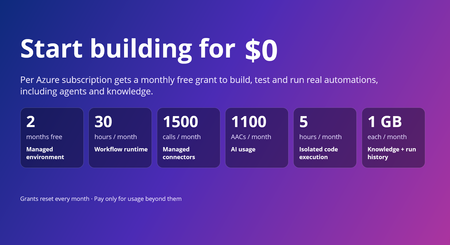
Today, we're announcing pricing for Azure Logic Apps Automation, now in public preview, along with monthly free grants that make it easier to start building, experimenting, and bringing automations to life. Logic Apps Automation is Azure's fully managed platform for business process automation and orchestration, including AI-powered automation. It's built for every builder with an automation problem, not just developers, and the free grants make it easy to go from idea to a working automation without a purchase decision up front. The free grant covers one managed environment per subscription and includes usage across key Logic Apps Automation capabilities, so you can start with your first use case, experiment with AI-powered automation, and run workloads in production within the included limits; then move to paid usage as your needs grow. Start today @ https://auto.azure.com/ Start free with monthly grants Every Azure subscription gets a monthly free grant across the platform. The only exception is Managed Environment which is a one-time free grant for first 60 days. When the usage stays within these limits you pay nothing. When it goes beyond these limits, you pay only for the additional usage. Usage Component Monthly free grant (per subscription) Core Platform Managed environment One environment, free for the first 60 days (2 months) Core Platform Workflow runtime 108,000 execution-seconds (about 30 hours) Core Platform Data retention 1 GB Optional Capabilities Managed connector calls 1,000 Standard + 500 Enterprise Optional Capabilities Knowledge storage 1 GB Optional Capabilities AI usage 1,100 AACs Optional Capabilities Isolated code execution 18,000 seconds (about 5 hours) What this means in practice Explore the platform, not a trimmed-down experience. The grants include workflow runtime, AI usage, knowledge, connectors, and sandboxed code, so you can explore every capability from day one. Build and iterate without watching the meter. With approximately 30 hours of execution time included each month, you can author, test, and run workflows as you build out your automation. Scale into paid usage as your needs grow. Grants reset every month, and you pay only for usage beyond them. Simple, usage-based pricing Beyond the included grants, Logic Apps Automation uses a pay-as-you-go pricing model across the capabilities your automations use. Billing has two parts: Core Platform: the managed environment, workflow runtime, and run-history retention that provide the foundation for your automations. Optional Capabilities: AI usage, knowledge storage, isolated code execution via sandbox and managed connectors, billed only when your workflows use them. For rates, regional pricing, and a worked monthly cost example, see Azure Logic Apps Automation pricing. How does the free grant works The free grant applies to the first environment you create in a subscription. Look for the Free tag next to an environment's name to see which is the free one Free environment period: The managed environment is free for 60 days, starting from the time you create it. Existing customers: If you already use Logic Apps Automation, create a new environment to use the free grant. The first new environment you create in your subscription receives it. Track your usage: In your environment, go to Settings and select the Free Grants tab to see your monthly limits and how much you've used. Important: Free grants are tied to the free environment. If you delete your free environment, you lose the ability to use the free grants, and you can't get them back by creating a new environment. Availability Logic Apps Automation is in public preview in Australia East, East Asia, North Central US, Southeast Asia, Sweden Central, UK South, and West US. Preview pricing and availability may change before general availability. Get started If you already have an Azure subscription, your included grants are available to help you start building today. Create your first Automation project, start from a template or with the AI workflow assistant, and explore what you can build with Logic Apps Automation. Get started with Logic Apps Automation Quickstart: build your first workflow Read the full pricing details MS Learn documentation Watch the Logic Apps Automation video series Share feedback or request a feature, or just let us know what you build with Automation!582Views0likes0CommentsLogic Apps Aviators Newsletter - October 2026
In this issue: Ace Aviator of the Month News from our product group News from our community Ace Aviator of the Month October 2026's Ace Aviator: Hicham Boutaleb & Azure Solution Architect @ 5-Nines Consulting What's your role and title? What are your responsibilities? I work as an Enterprise Integration Architect, helping organizations design, implement, and modernize integration platforms using Microsoft technologies. My responsibilities include defining architecture, leading technical delivery, supporting development teams, ensuring best practices around security and governance, and helping customers get the most value from Azure services such as Logic Apps, API Management, Service Bus, and Azure Functions. Can you give us some insights into your day-to-day activities and what a typical day in your role looks like? No two days are exactly the same, which is one of the things I enjoy most about my role. A typical day usually involves a mix of: - Designing integration and automation solutions. - Reviewing architectures and code with project teams. - Supporting customers in solving complex technical challenges. - Running workshops and knowledge-sharing sessions. - Evaluating new Azure capabilities and how they can benefit ongoing projects. - Collaborating with business stakeholders to translate requirements into scalable technical solutions. I also dedicate time to continuous learning because the cloud ecosystem evolves incredibly fast, and staying up to date is essential. What motivates and inspires you to be an active member of the Aviators/Microsoft community? The community is one of the best accelerators of professional growth. What motivates me most is the opportunity to learn from others while also giving back through sharing experiences, lessons learned, and practical solutions. I believe that technology is not just about tools—it's about people. The Microsoft community creates an environment where professionals can collaborate, innovate, and help each other succeed. Seeing someone solve a problem using knowledge I've shared is incredibly rewarding. Looking back, what advice do you wish you had been given earlier that you'd now share with those looking to get into STEM/technology? I would tell my younger self: Don't focus only on technology, focus on problem-solving and communication. Technical skills are important, but the ability to understand business challenges, communicate clearly, and work effectively with others often has an even greater impact on your career. I would also encourage people to: - Stay curious and never stop learning. - Build real projects rather than only collecting certifications. - Don't be afraid of failure—every mistake is an opportunity to learn. - Invest in your professional network early. The technology will change throughout your career, but adaptability and curiosity will always remain valuable. What has helped you grow professionally? Several factors have contributed to my growth: - Working on diverse and challenging projects. - Learning from experienced mentors and colleagues. - Being willing to step outside my comfort zone. - Participating in technical communities and events. - Maintaining a mindset of continuous improvement. Some of my biggest learning moments came from difficult projects where I had to solve problems I had never encountered before. Those experiences often teach more than success alone. If you had a magic wand that could create a feature in Logic Apps, what would it be and why? If I had a magic wand, I'd add an AI-powered end-to-end message tracking feature in Logic Apps that automatically follows a message across all workflows and Azure services it traverses. It would provide a single, intelligent view of the entire journey, making troubleshooting and root-cause analysis much faster and easier. News from our product group Your Certificate Renewed. Your Gateway Didn't Notice. Learn how certificate renewal can create outages when Azure Application Gateway does not detect an updated certificate in Azure Key Vault. The article explains certificate refresh behavior and practical steps for ensuring renewed certificates propagate reliably to dependent gateway infrastructure. How to Validate That Your BizTalk SB-Messaging Adapter Is Really Using AMQP Prepare BizTalk Server integrations for the retirement of the legacy Service Bus Messaging Protocol by confirming that the SB-Messaging adapter uses AMQP. This guide covers the required BizTalk Server 2020 hotfix and shows how to verify active AMQP-over-TLS connections on port 5671 across every relevant host and messaging configuration. Migrate Data Ingestion from Data Collector to Log Ingestion - Part 2 Continue migrating from the deprecated Data Collector API to the Azure Monitor Log Ingestion API by handling its smaller payload limit. The article demonstrates how to calculate and split large datasets into appropriately sized chunks in Azure Logic Apps so ingestion requests remain below the 1 MB limit. Bring Azure Logic Apps connectors into your .NET applications with the Azure Connectors SDK Explore the preview Azure Connectors SDK for calling Azure Logic Apps connectors directly from .NET applications without hosting a workflow. Strongly typed asynchronous clients, Azure Identity integration, and support for managed identities make it easier to connect application code to Microsoft and third-party services. Agentic Refactoring of Legacy Integration Workloads to Azure Logic Apps Standard See how agentic AI can accelerate the refactoring of legacy integration workloads into Azure Logic Apps Standard. This Microsoft Azure Developers video explores an AI-assisted modernization approach for analyzing existing solutions and moving them toward cloud-native workflows. Connect Azure Functions to SharePoint using Managed Connectors Learn how Azure Functions can connect to SharePoint using managed connectors. This Microsoft Azure Developers video demonstrates how connector capabilities simplify authentication and integration between function code and SharePoint. Connect SaaS & Enterprise Systems with Azure Functions This Microsoft Azure Developers video showcases how Azure Functions can use managed connectors for scalable, event-driven automation. It demonstrates integration with services such as SharePoint and Teams, highlighting how triggers and actions can reduce the need for manual polling and simplify authentication handling. The session walks through building practical workflows that connect SaaS and enterprise systems using Azure Functions. News from our community Logic Apps Community Day — 3 December 2026 Post by Ahmed Bayoumy Logic Apps Community Day returns on 3 December 2026 as a free, online event streamed live on YouTube. The program focuses on Logic Apps, the wider Azure integration stack, and AI patterns built on integration platforms. Organizers describe eight community speaking slots, combining longer sessions with lightning talks, and invite practitioners to submit examples, client cases, comparisons, or AI features. The event is intended for a worldwide audience and includes discussions, a published agenda, and opportunities for community members to share practical experience. Azure Logic Apps: Workflow Automation, Enterprise Integration, Connectors, B2B, Security, Networking, Monitoring, DevSecOps, Governance, and AI-Enable Post by Sanjeeve Kumar Gajadi This extensive guide presents Azure Logic Apps as an enterprise orchestration and integration layer rather than only a visual automation tool. It discusses Consumption and Standard hosting, triggers, actions, connectors, API Management, Service Bus, Event Grid, SAP, B2B protocols, managed identities, private networking, monitoring, reliability, DevOps, governance, and cost management. The article also considers AI-enabled orchestration and human approval patterns. Its central guidance is to design workflows around business processes, resilience, security, observability, and operational ownership while moving complex computation to suitable application services. Azure Logic Apps Handbook: 50 Expert Tips and Best Practices Post by Sandro Pereira Sandro Pereira introduces a free handbook containing 50 expert tips and best practices for Azure Logic Apps. The guide is aimed at architects, developers, integration specialists, DevOps engineers, and leaders working with cloud automation. Its coverage includes Logic Apps capabilities, practical use cases, workflow optimization, security, common pitfalls, and implementation strategies. The accompanying article explains that the handbook is intended to help readers design reliable, scalable, and maintainable workflows, and provides access to the downloadable resource through the linked publication. Build and Debug Logic Apps Standard Locally in VS Code Post by Stephen W. Thomas Stephen W. Thomas demonstrates how to build and debug Azure Logic Apps Standard workflows locally in Visual Studio Code without deploying resources to Azure. The walkthrough covers installing the extension, creating a stateful workflow with built-in operations, using local storage emulation, and sending a request from Postman. It also shows how to pause workflow execution at a breakpoint and inspect the results. The accompanying guide helps developers reproduce the setup and explore a practical local development loop while avoiding Azure charges during development and debugging. Azure API Management Premium v2 Workspaces and Dedicated Workspace Gateways in a Private Network Post by Şahin Özdemir Şahin Özdemir shares lessons from configuring Azure API Management Premium v2 workspaces and dedicated workspace gateways in a fully private network. The article covers Premium v2 virtual network integration, workspace isolation for multiple teams, internal-only workspace gateways, required Bicep resources and associations, and network security group rules. It also calls out deployment pitfalls and the less obvious Microsoft.ApiManagement/gateways/configConnections resource used to associate workspaces with gateways. The first part keeps API Management externally accessible while placing workspaces and their gateways inside the private network. Getting Started with Logic Apps Standard (in 2026) Video by Stephen W. Thomas Stephen W. Thomas shows how to set up Azure Logic Apps Standard locally in Visual Studio Code in under five minutes with no Azure charges. The updated installation brings in the Azure Functions runtime, Azure tooling, C# support, and storage emulators. The video creates a local workspace using built-in connectors, starts the workflow with F5, copies its callable URL, and sends a request from Postman. It also demonstrates breakpoints, debugger variables, action inputs, and stepping into custom in-process C# code for a complete local development experience.294Views0likes0CommentsBring Azure Logic Apps connectors into your .NET applications with the Azure Connectors SDK
Modern business applications rarely work in isolation. An order exception might need an email, a support case might need a Teams notification, and a completed document might need to be stored in SharePoint. Developers can build each integration directly against a service API, but that also means owning different authentication models, request and response shapes, pagination rules, and error handling for every service. The Azure Connectors SDK brings the typed experience of a .NET client library to Connector Namespace, which makes the Logic Apps and Power Platform connector runtime available to developers as a programmable integration layer. Your application can call connector operations through generated clients and models while Azure manages the connection to the external service. In this post, we will build a small Azure function app that reacts to a new email through a Connector trigger and sends a formatted review email through the Office 365 Outlook connector. The same pattern can then be extended to many other business systems. Preview: Azure Connectors SDK is currently in preview. Preview features are provided without a service-level agreement and are not recommended for production workloads. APIs and setup steps can change before general availability. Why this matters Integration code often starts with one HTTP call and grows into a collection of service-specific concerns. The Azure Connectors SDK gives .NET developers: Typed clients, request models, and response models generated from connector contracts Async operations with cancellation-token support Azure credential integration for authenticating the calling application Consistent connector exceptions and diagnostics Built-in retry support for transient failures Pagination, binary payload, and dynamic-schema support where connectors expose them OpenTelemetry integration for tracing connector calls Access to a broad connector ecosystem that includes Microsoft 365, Azure services, data platforms, storage, messaging, and SaaS applications The SDK does not put external-service credentials in your application. Instead, your code authenticates to a Connector Namespace connection. That connection holds the authorization for Office 365 Outlook or another target service. Scenario: notify operations about an order exception Imagine an order service that flags transactions for manual review by sending an email to an Office 365 mailbox. The subject identifies the order and the body briefly explains the exception: To: orders@contoso.com Subject: Order exception: SO-10482 Body: Customer requested a delivery-address change after payment. Connector Namespace polls the mailbox for new messages matching the subject filter and calls an Azure function app's Connector trigger. The function reads the typed email payload and sends a formatted review email to a separate operations inbox. Unlike an HTTP-triggered function, there is no application endpoint or 202 Accepted response to invoke. Prerequisites You need: An Azure subscription in which Connector Namespace is available Permission to create Connector Namespace resources and connections .NET 10 SDK Azure Functions Core Tools v4 Azure CLI Azure Developer CLI ( azd ) for deployment, or an existing .NET 10 isolated-worker function app An Office 365 account that can authorize the connection and send email At the time of writing, Connector Namespace is available in a limited set of preview regions. Confirm current region availability before creating the resource. 1. Create an Office 365 connection First sign in and select the subscription that will own the Connector Namespace: az login az account set --subscription "<subscription-id>" $subscriptionId = "<subscription-id>" $resourceGroup = "<resource-group>" $namespaceName = "<connector-namespace-name>" $connectionName = "office365-orders" $location = "<supported-azure-region>" $apiVersion = "2026-05-01-preview" $nsId = "/subscriptions/$subscriptionId/resourceGroups/$resourceGroup/providers/Microsoft.Web/connectorGateways/$namespaceName" Create a Connector Namespace with a system-assigned managed identity: $namespace = @{ location = $location identity = @{ type = "SystemAssigned" } properties = @{} } | ConvertTo-Json -Depth 5 -Compress $tempFile = Join-Path $env:TEMP "connector-namespace.json" [System.IO.File]::WriteAllText($tempFile, $namespace) az rest --method PUT ` --uri "https://management.azure.com${nsId}?api-version=$apiVersion" ` --body "@$tempFile" ` --headers "Content-Type=application/json" ` --output none Remove-Item $tempFile Create the Office 365 connection: $connection = @{ properties = @{ connectorName = "office365" } } | ConvertTo-Json -Depth 5 -Compress $tempFile = Join-Path $env:TEMP "connector-connection.json" [System.IO.File]::WriteAllText($tempFile, $connection) az rest --method PUT ` --uri "https://management.azure.com${nsId}/connections/${connectionName}?api-version=$apiVersion" ` --body "@$tempFile" ` --headers "Content-Type=application/json" ` --output none Remove-Item $tempFile The new connection is not authorized yet. Request an OAuth consent link and open it in your browser: $consentRequest = @{ parameters = @( @{ redirectUrl = "https://portal.azure.com" parameterName = "token" } ) } | ConvertTo-Json -Depth 5 -Compress $tempFile = Join-Path $env:TEMP "connector-consent.json" [System.IO.File]::WriteAllText($tempFile, $consentRequest) $consent = az rest --method POST ` --uri "https://management.azure.com${nsId}/connections/${connectionName}/listConsentLinks?api-version=$apiVersion" ` --body "@$tempFile" ` --headers "Content-Type=application/json" ` --output json | ConvertFrom-Json Remove-Item $tempFile Start-Process $consent.value[0].link Complete the sign-in and consent flow. Then verify that the connection reports Connected : az rest --method GET ` --uri "https://management.azure.com${nsId}/connections/${connectionName}?api-version=$apiVersion" ` --output json | ConvertFrom-Json | Select-Object -ExpandProperty properties | Select-Object -ExpandProperty statuses 2. Allow your local identity to call the connection OAuth consent authorizes the connection to call Office 365. A separate access policy authorizes your application to call the connection. This distinction is important: without the policy, the runtime call fails with HTTP 403 and a missing connection ACL message. Add an access policy for the identity currently signed in to Azure CLI: $userObjectId = az ad signed-in-user show --query id --output tsv $tenantId = az account show --query tenantId --output tsv $policy = @{ properties = @{ principal = @{ type = "ActiveDirectory" identity = @{ objectId = $userObjectId tenantId = $tenantId } } } } | ConvertTo-Json -Depth 6 -Compress $tempFile = Join-Path $env:TEMP "connector-policy.json" [System.IO.File]::WriteAllText($tempFile, $policy) az rest --method PUT ` --uri "https://management.azure.com${nsId}/connections/${connectionName}/accessPolicies/local-dev?api-version=$apiVersion" ` --body "@$tempFile" ` --headers "Content-Type=application/json" ` --output none Remove-Item $tempFile Access-policy changes can take a few minutes to reach the connector runtime. Finally, retrieve the connection runtime URL. Treat this value as application configuration rather than source code: $connection = az rest --method GET ` --uri "https://management.azure.com${nsId}/connections/${connectionName}?api-version=$apiVersion" ` --output json | ConvertFrom-Json $connectionRuntimeUrl = $connection.properties.connectionRuntimeUrl 3. Create the Azure function app Create an isolated-worker function app with the current Core Tools template. Some Core Tools v4 versions do not offer net10.0 as a func init --target-framework option; use the .NET 9 template, then change the generated project's TargetFramework to net10.0 before building: func init ConnectorsSdkOrderAlerts --worker-runtime dotnet-isolated --target-framework net9.0 Set-Location ConnectorsSdkOrderAlerts In ConnectorsSdkOrderAlerts.csproj , set: <TargetFramework>net10.0</TargetFramework> Add the connector packages: dotnet add package Azure.Connectors.Sdk --version 0.13.0-preview.1 dotnet add package Azure.Identity dotnet add package Microsoft.Azure.Functions.Worker.Extensions.Connector --version 0.2.0-alpha Register an Azure credential and only the connector client this function needs. DefaultAzureCredential can use your Azure CLI identity locally and the function app's managed identity in Azure: using Azure.Connectors.Sdk; using Azure.Core; using Azure.Identity; using Microsoft.Extensions.Configuration; using Microsoft.Extensions.DependencyInjection; using Microsoft.Extensions.Hosting; var host = new HostBuilder() .ConfigureFunctionsWorkerDefaults() .ConfigureServices((hostContext, services) => { services.AddSingleton<TokenCredential>(new DefaultAzureCredential()); services.AddOffice365Client( hostContext.Configuration.GetSection("Connectors:Office365")); }) .Build(); host.Run(); Add the function. The Connector trigger binds the OnNewEmailV3 callback to a typed payload. Filter the subject again in code, HTML-encode untrusted email fields, and send the review message through the generated SendEmailInput model: using System.Text.Encodings.Web; using Azure.Connectors.Sdk.Office365; using Azure.Connectors.Sdk.Office365.Models; using Microsoft.Azure.Functions.Worker; using Microsoft.Azure.Functions.Worker.Extensions.Connector; public sealed class OperationalAlertFunctions { private const string SubjectPrefix = "Order exception:"; private readonly Office365Client _office365Client; public OperationalAlertFunctions(Office365Client office365Client) { this._office365Client = office365Client; } [Function("OnOrderExceptionEmail")] public async Task OnOrderExceptionEmailAsync( [ConnectorTrigger] Office365OnNewEmailTriggerPayload payload, CancellationToken cancellationToken) { foreach (var message in payload.Body?.Value ?? []) { if (message?.Subject?.StartsWith( OperationalAlertFunctions.SubjectPrefix, StringComparison.OrdinalIgnoreCase) != true) { continue; } var orderId = message.Subject[OperationalAlertFunctions.SubjectPrefix.Length..].Trim(); if (string.IsNullOrWhiteSpace(orderId)) { continue; } var email = new SendEmailInput { To = "operations@contoso.com", Subject = $"Order {orderId} requires review", Body = "<h2>Order review required</h2>" + $"<p><strong>Order:</strong> {HtmlEncoder.Default.Encode(orderId)}</p>" + $"<p><strong>From:</strong> {HtmlEncoder.Default.Encode(message.From ?? string.Empty)}</p>" + $"<p><strong>Reason:</strong> {HtmlEncoder.Default.Encode(message.BodyPreview ?? string.Empty)}</p>" }; await this._office365Client.SendEmailAsync(email, cancellationToken); } } } Use a monitored mailbox or folder separate from the operations inbox. Keep the outgoing subject different from the trigger's subject filter so the notification cannot trigger itself. For production workloads, account for repeated callbacks and partial failures within a batch before performing non-idempotent actions such as sending mail. 4. Deploy and register the Connector trigger Keep the runtime URL out of source control. Set it for local development, then deploy the function app with a system-assigned managed identity and the same setting in its application configuration: $env:Connectors__Office365__ConnectionRuntimeUrl = $connectionRuntimeUrl The public Office 365 connector-trigger sample is a downloadable .NET 10 function app with deployment infrastructure, an OnNewEmail binding, and post-deploy trigger registration. Use its azd up workflow or deploy this function app through your existing pipeline. A locally running Functions host is not reachable by the Connector Namespace polling callback unless you provide a secure public callback endpoint. Once the function app is deployed, add its managed identity to the connection's access policies, just as you added your CLI identity for local development. For a system-assigned identity, get its principal ID and use it in the access policy from step 2 instead of $userObjectId : $functionAppName = "<function-app-name>" $functionObjectId = az functionapp identity show ` --resource-group $resourceGroup --name $functionAppName ` --query principalId --output tsv $policy = @{ properties = @{ principal = @{ type = "ActiveDirectory" identity = @{ objectId = $functionObjectId tenantId = $tenantId } } } } | ConvertTo-Json -Depth 6 -Compress $tempFile = [System.IO.Path]::GetTempFileName() try { [System.IO.File]::WriteAllText($tempFile, $policy) az rest --method PUT ` --uri "https://management.azure.com${nsId}/connections/${connectionName}/accessPolicies/order-alert-function?api-version=$apiVersion" ` --body "@$tempFile" ` --headers "Content-Type=application/json" ` --output none } finally { Remove-Item $tempFile } Obtain the Connector extension's system key and the function app's actual default hostname, then construct the callback URL for the deployed function. Do not assume that the hostname is <function-app-name>.azurewebsites.net ; the default hostname format can vary: $connectorExtensionKey = az functionapp keys list ` --resource-group $resourceGroup --name $functionAppName ` --query "systemKeys.connector_extension" --output tsv $functionAppHostname = az functionapp show ` --resource-group $resourceGroup --name $functionAppName ` --query "defaultHostName" --output tsv $callbackUrl = "https://$functionAppHostname/runtime/webhooks/connector?functionName=OnOrderExceptionEmail&code=$connectorExtensionKey" The system key is a secret. Do not log, publish, or commit the callback URL. Create the Office 365 polling trigger config using the same connection and a subject filter matching the incoming order messages: $triggerConfig = @{ properties = @{ operationName = "OnNewEmailV3" connectionDetails = @{ connectorName = "office365" connectionName = $connectionName } notificationDetails = @{ callbackUrl = $callbackUrl httpMethod = "Post" } parameters = @( @{ name = "folderPath"; value = "Inbox" } @{ name = "subjectFilter"; value = "Order exception:" } ) metadata = @{ destinationType = "functionApp" functionAppName = $functionAppName functionAppResourceGroup = $resourceGroup functionAppSubscriptionId = $subscriptionId functionName = "OnOrderExceptionEmail" recurrenceFrequency = "Minute" recurrenceInterval = "5" } } } | ConvertTo-Json -Depth 6 -Compress $tempFile = [System.IO.Path]::GetTempFileName() try { [System.IO.File]::WriteAllText($tempFile, $triggerConfig) az rest --method PUT ` --uri "https://management.azure.com${nsId}/triggerConfigs/order-exception-email?api-version=$apiVersion" ` --body "@$tempFile" ` --headers "Content-Type=application/json" ` --output none } finally { Remove-Item $tempFile } Confirm that the trigger config reports Enabled . Send a test email to the monitored mailbox, and allow for the polling interval before checking the function logs and the operations inbox: az rest --method GET ` --uri "https://management.azure.com${nsId}/triggerConfigs/order-exception-email?api-version=$apiVersion" ` --query "properties.{operation:operationName,state:state}" ` --output table Confirm all three outcomes before considering the test complete: The trigger config is Enabled and the function logs show the invocation. The operations inbox receives a review email with the expected order ID and reason. Unrelated messages do not produce review emails. From local development to Azure For a deployed function app, use its managed identity instead of a developer identity: Enable a system-assigned or user-assigned managed identity on the function app. Add that identity as an access policy on the Connector Namespace connection. Register DefaultAzureCredential or ManagedIdentityCredential as the TokenCredential . Store the connection runtime URL in function app configuration. Protect the Connector trigger callback with the Connector extension system key; use a stronger authorization model for production as appropriate. The external-service credential remains in the connector connection. The function app presents its Azure identity when it calls the runtime URL. The Connector Namespace uses the callback URL and its system key to invoke the function. Go beyond email The order-alert example is intentionally small, but the programming model supports much broader integration scenarios: Microsoft 365: work with Outlook, SharePoint, Teams, OneDrive, Excel, Planner, Forms, and Microsoft Entra ID-backed operations. Azure services: connect to Blob Storage, queues, tables, Event Grid, Event Hubs, Service Bus, Key Vault, Azure Monitor Logs, and Azure Data Factory. Business applications: integrate with Salesforce, Dynamics 365, Jira, ServiceNow-style workflows, DocuSign, Zendesk, and other SaaS systems represented in the connector catalog. Event-driven applications: register polling triggers that call back to an Azure function app when connector events occur. Data-rich APIs: consume paginated operations, binary content, and operations whose input or output schema is resolved dynamically. Observable integrations: capture connector activity in distributed traces with OpenTelemetry. Because connector clients are typed, developers can discover operations through IntelliSense and keep connector calls alongside the rest of their application code. The connection layer handles authorization to the external system, while Azure identity and access policies govern which application may use that connection. Troubleshooting The call returns 403 with “missing connection ACL.” The external OAuth connection may be healthy, but the calling Azure identity is not authorized. Add an access policy for the Azure CLI user during local development or the workload managed identity after deployment. Allow time for the policy to propagate. The connection remains in an error state. Complete the OAuth consent flow and query the connection again. Make sure the account used for consent has access to the target service. The client fails during startup because the runtime URL is missing. Make sure Connectors__Office365__ConnectionRuntimeUrl is present in the process environment. In a larger application, register only the connector clients whose configuration is available. Authentication works locally but fails in Azure. The local Azure CLI user and the function app managed identity are different principals. Add a separate connection access policy for the function app identity and use a managed-identity-capable credential in the deployed host. The email trigger does not fire. Verify the trigger config is Enabled , its operation is OnNewEmailV3 , its folderPath and subjectFilter match the test email, and its callback uses the deployed function's OnOrderExceptionEmail name and Connector extension system key. Polling is not instantaneous. Get started Explore the Azure Connectors SDK repository, try the samples, and tell us which connectors and application patterns would be most useful for your team. Azure Connectors SDK for .NET Azure Connectors SDK samples Downloadable Office 365 connector-trigger function app Azure Logic Apps connectors overview Azure Identity client library for .NET537Views0likes0Comments
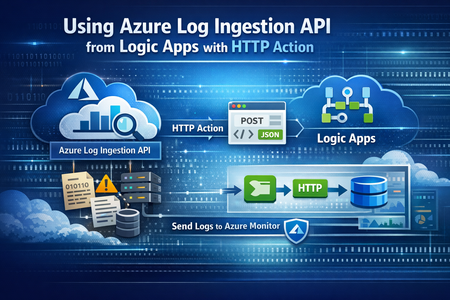
Migrate Data Ingestion from Data Collector to Log Ingestion - Part 2
In Part1, we discussed how to use HTTP action to migrate from the deprecated Data Collector API to Log Ingestion API. However, since the deprecated Data Collector API was allowing message payload up to 30MB, some migration scenarios encountered issues; since the new Log Ingestion API has only 1MB payload limit. This applies to both HTTP action, and the preview (Log Ingestion connector) Azure Monitor service limits - Azure Monitor | Microsoft Learn When sending payload larger than 1MB, the HTTP action would fail with the error: In order to overcome this, we can chunk the array payload, before calling the Ingestion API. We need to chunk the array payload, so each produced chunk is around 800KB To do this, you can divide the size of your full payload, by the number of records it has, and this would give an average record size. Then divide 800,000 bytes with the average record size, and this will give you the chunk size. For example, if your payload size is 1,200,259 bytes, and the number of records is 2500, then the average record size is: 1,200,259 / 2,500 =~ 480 bytes To find the chunk size, we divide 800,000 bytes by 480 bytes 800,000 / 480 =~ 1666 records. So if we send around 1600 records, this should be less than 1MB. To chunk your array payload, we can use the chunk expression inside a compose action. You can use the expression below for chunking inside the compose action: After the compose action, add for-each action, and use the output of the compose action as an input: Inside the for-each, use the normal HTTP to send the logs, and in the body, choose the for-each current item263Views1like0CommentsLogic Apps Aviators Newsletter - September 2026
In this issue: Ace Aviator of the Month News from our product group News from our community Ace Aviator of the Month September 2026's Ace Aviator: Parth Talaviya What's your role and title? What are your responsibilities? AI-Powered Azure/.NET Solution Architect I work as an Azure/.NET Solution Architect, combining technical leadership with building a Microsoft-focused boutique company. My work mainly revolves around application modernization and migration, cloud architecture, integrations, and team leadership. I also stay hands-on with development, architecture reviews, production troubleshooting, and mentoring developers. Can you give us some insights into your day-to-day activities and what a typical day in your role looks like? My day usually starts with thinking about how we can add more value to our clients' businesses. It includes reviewing project priorities, solving technical challenges, discussing architecture, supporting developers, and collaborating with stakeholders. I mainly work across .NET, Azure, APIs, integrations, DevOps, and AI automation, so every day brings something new to learn and solve. What motivates and inspires you to be an active member of the Aviators/Microsoft community? What really motivates me is how active and supportive the Microsoft community is. People are genuinely willing to help each other, share experiences, and solve problems together. Being able to use my own experience to help someone overcome a challenge genuinely makes my day, while learning from others keeps me motivated to continuously improve. Looking back, what advice do you wish you had been given earlier that you'd now share with those looking to get into STEM/technology? You don’t have to do everything alone. In technology, especially when you are stuck on a very specific problem, it can sometimes feel that way. Asking questions, learning from the community, and collaborating with others can make a huge difference. I would also say: embrace AI early, but use it wisely. Don’t use AI only to generate code. Use it to understand concepts, challenge your thinking, explore better approaches, review your work, and become a better problem-solver. What has helped you grow professionally? Continuous learning and solving real-world challenges have helped me grow the most. Working on legacy modernization, cloud architecture, large-scale data systems, automation, and AI has taught me to think beyond writing code and understand the broader business impact. Being part of a strong technical community has also helped significantly. Whenever you are stuck, there is often someone who has faced a similar challenge and is willing to share their experience. If you had a magic wand that could create a feature in Logic Apps, what would it be and why? I would create an AI-powered Copilot troubleshooting and self-healing assistant for Logic Apps. It could analyze failed workflows, understand the execution context, identify the likely root cause, suggest a fix, and provide safe recovery options. For complex integrations, this could save significant troubleshooting time and allow developers to focus more on building solutions rather than spending hours finding where something went wrong. News from our product group Use connectors with Managed Identity in the Logic Apps Standard extension Managed Identity is Azure's built-in way to authenticate to Microsoft Entra-protected resources without storing credentials, secrets, or connection strings. Deployed Logic Apps have supported it for some time, and this post explains connector support in the Logic Apps Standard extension. Introducing dependency telemetry in Application Insights for Azure API Management policies Running API platforms at scale requires both handling load and understanding where inefficiencies occur. This post introduces dependency telemetry in Application Insights for Azure API Management policies to help teams identify performance bottlenecks. Power Azure SRE Agent with the tools it needs Azure SRE Agent is an AI-powered service designed to reduce operational toil. Teams can use it to investigate incidents, identify probable causes, and automate health-related operational work using connected tools. Give your Copilot agents real tools, without hand-wiring MCP GitHub Copilot coding agents can work independently on branches, but some tasks require access to external systems. This post shows how to equip agents with real tools without manually wiring Model Context Protocol integrations. Zonal redundancy in API management Standard v2 APIs power modern mobile experiences, microservices, AI-driven applications, and business-critical integrations. This post explains zonal redundancy in Azure API Management Standard v2 for improving resilience as customers modernize their API platforms. BizTalk Server 2020 End-of-Sale Announcement Microsoft announces that BizTalk Server 2020 and Host Integration Server 2020 sales are expected to end on March 31, 2027. Existing licensed deployments can continue to be used, while mainstream support for BizTalk Server 2020 is scheduled through April 12, 2028. An optional paid extended-mainstream support offering is planned for eligible customers through April 10, 2030, with final terms to be published later. The post recommends beginning migration planning now, evaluating Azure Logic Apps Standard or Azure Logic Apps Hybrid, inventorying dependencies, and using the Logic Apps Migration Agent to assess and convert supported workloads. Logic App Storage Inspector Logic App Storage Inspector is a read-only Kudu site extension for examining storage used by an Azure Logic App Standard application. It supports searching workflow action and trigger history by workflow, date, or text, with results exportable as CSV or JSON. Users can browse and compare workflow-definition versions, review table and queue information, and monitor health indicators and refresh status. The extension isolates access to the current Logic App site, uses asynchronous paged operations for large storage accounts, and can be installed from Kudu Site Extensions. News from our community Azure Logic Apps Automation – A Practical Infrastructure Lab with Agentic Remediation Post by João Paulo Costa João Paulo Costa tests Azure Logic Apps Automation through an after-hours virtual-machine remediation lab. The workflow uses an agent to inspect VM metadata, tags, and runtime state, then apply guardrails before deciding whether to deallocate the resource, leave it unchanged, or request review. The article contrasts agentic decision-making with deterministic workflows, documents tool and connector choices, and examines preview limitations such as runtime-state retrieval and managed-identity support. It also emphasizes constrained permissions, explicit policies, verification after actions, and negative testing for production, exemptions, missing ownership, and disabled remediation. Agentic Integration: Non-Deterministic Experience, Solid Core Post by Massimo Crippa Massimo Crippa examines whether agentic capabilities make enterprise integration non-deterministic. He separates an agent’s variable decision-making from the predictable integration layer that executes selected capabilities. The article highlights durable messaging, reliable contracts, idempotency, transactional boundaries, retries, compensation, governance, and observability as continuing requirements. It presents tools as the boundary between reasoning and execution: agents determine what should happen, while integration platforms control how operations are performed safely. Azure Logic Apps is positioned as both a deterministic integration foundation and a platform that can expose governed capabilities to emerging agentic experiences. Build AI Agents in Azure Logic Apps (Conversational + Autonomous) Video by Rafsan Huseynov Rafsan Huseynov presents a video on building conversational and autonomous AI agents with Azure Logic Apps. The session describes Logic Apps as more than a background integration layer, covering orchestration, managed identities, agent loops, and the use of workflows as MCP tools. Demonstrations explore connections with Document Intelligence, Blob Storage, Microsoft Foundry, and Copilot Studio workflows, alongside conversational and autonomous agent patterns. The video also introduces a separate low-code automation experience with scoped permissions, while noting that the demonstrations use synthetic data and that the experience remains in preview. BizTalk to Logic Apps migration (three things, everyone gets wrong) Post by Brajesh Sinha Brajesh Sinha explains why simple counts of BizTalk orchestrations and maps produce unreliable Logic Apps migration estimates. One orchestration can fan out into several Azure resources, supposedly simple maps may hide substantial transformation complexity, and operational requirements are often omitted from statements of work. The article highlights the architecture, mapping, and production-readiness effort that teams frequently underestimate. It encourages migration planners to assess actual behavior and dependencies rather than relying on inventory totals, helping create more realistic timelines, scope, and delivery expectations. Hybrid Logic Apps on RKE2: a self-managed cluster with MetalLB Post by Sonny Gillissen Sonny Gillissen demonstrates how to run Azure Logic Apps Hybrid on a self-managed RKE2 Kubernetes cluster. Because RKE2 does not include a native load balancer, the walkthrough uses MetalLB to assign the ingress IP required by the deployment. It covers creating the cluster, configuring networking, connecting the environment to Azure Arc, and handling the platform-specific details needed for Logic Apps. The article provides a practical alternative for teams evaluating hybrid integration workloads outside managed Kubernetes services, extending earlier guidance for OpenShift environments. An Introduction to Logic Apps Standard SDK Video by Marcel Medina Marcel Medina shares a Coding Night ANZ recording introducing the Logic Apps Standard SDK. The session shows how the SDK brings a modern, code-first .NET development experience to Azure Logic Apps while retaining the platform’s connectors, triggers, monitoring, and managed runtime. It is aimed at developers who want familiar tooling and stronger source-driven workflow development without giving up managed integration capabilities. The post also thanks the community for its questions and participation and provides the complete session recording for anyone who missed the live event. Managed Identity in Logic Apps Standard: A Zero Trust Read Post by Steef-Jan Wiggers Steef-Jan Wiggers examines new Managed Identity support for connectors in the Logic Apps Standard local development experience. Developers can now use a consistent authentication model from development through production instead of swapping connection strings before deployment, removing a common source of unmanaged secrets. The article frames this improvement through Zero Trust while stressing that authentication alone does not replace disciplined RBAC. A working azd sample demonstrates the setup and highlights a critical application setting whose absence causes the otherwise correctly configured connection, access policy, and role assignment to fail.706Views0likes0CommentsBizTalk Server 2020 End-of-Sale Announcement
Executive Summary: BizTalk Server 2020 is the final release of BizTalk Server, and Microsoft expects sales of BizTalk Server 2020 and Host Integration Server 2020 to end March 31, 2027. Mainstream support for BizTalk Server 2020 continues through April 12, 2028, after which the product remains subject to Microsoft’s Fixed Lifecycle Policy. Microsoft also plans to offer eligible customers an optional, paid extended-mainstream support offering through April 10, 2030. Customers should begin planning their migration to Azure Logic Apps Standard or Azure Logic Apps Hybrid now, based on their deployment requirements. Closing a chapter Microsoft currently expects sales of BizTalk Server 2020 and Host Integration Server 2020 to end on March 31, 2027. Customers with existing valid licenses may continue to deploy and use the software in accordance with their licensing terms. Mainstream support for BizTalk Server 2020 continues through April 12, 2028. The end-of-sale date does not require customers to stop running licensed deployments, but customers should begin migration and licensing planning now because the extended-mainstream support offering described below remains subject to final eligibility, coverage, pricing, and purchasing terms. Microsoft plans to offer eligible BizTalk Server 2020 customers a paid, time-limited extended-mainstream support option from April 13, 2028, through April 10, 2030. The offering is intended to provide additional migration time, will have narrower coverage than the original mainstream-support phase, and will not add new product features. Eligibility, availability, supported components, servicing commitments, purchasing terms, and the official offering name will be published before enrollment opens. If you need to buy BizTalk Server 2020, or Host Integration Server 2020, you can do it until March 31, 2027. Recommended action Begin migrating your BizTalk Server workloads now, selecting Azure Logic Apps Standard or Azure Logic Apps Hybrid according to your organization’s hosting, networking, latency, data-residency, and operational requirements. Treat additional support coverage as contingency time rather than the default destination. Starting early gives teams time to inventory dependencies, redesign excluded capabilities, validate migrated solutions, and make commercial decisions before mainstream support ends. The Logic Apps Migration Agent can accelerate assessment and planning, convert supported artifacts, and assist with validation and deployment of refactored solutions on Azure Logic Apps Standard or Azure Logic Apps Hybrid. Extended-mainstream support scope Paid extended-mainstream support is planned as an optional, temporary bridge for eligible customers completing their migration. It is separate from the Extended Support phase available under Microsoft’s Fixed Lifecycle Policy and is expected to provide a different, narrower scope than the original mainstream-support phase. Microsoft expects the paid offering to run from April 13, 2028, through April 10, 2030. Certain BizTalk Server capabilities are expected to be excluded from the paid offering; the following list identifies the currently expected exclusions. Business Activity Monitoring (BAM) — The framework and tooling for capturing, tracking, and presenting near real-time business milestones, KPIs, and operational data from running BizTalk processes. Servicing, fixes, and updates for BAM components will not be provided under extended support. Enterprise Service Bus Toolkit (ESB Toolkit) — The libraries, itinerary services, and patterns that extend BizTalk with dynamic, itinerary-based routing, transformation, and centralized exception handling for service-oriented solutions. The ESB Toolkit will not receive servicing or support under extended support. Industry accelerators (SWIFT, HL7, and RosettaNet) — The domain-specific accelerators that provide schemas, pipelines, and validation for financial (SWIFT), healthcare (HL7), and supply-chain (RosettaNet) messaging standards. These accelerators will not receive servicing, schema updates, or support under extended support. Legacy enterprise adapters — The adapters that connect BizTalk to line-of-business and enterprise applications such as Siebel, PeopleSoft, TIBCO, and JD Edwards. These adapters will not receive servicing or support under extended support. Application Lifecycle Management (ALM) tooling and integrations — The BizTalk-specific tooling and integrations used for source control, automated build, deployment, and testing of BizTalk applications. These BizTalk-specific ALM components will not receive servicing or support under extended support. BizTalk Server images in Azure Marketplace — Microsoft currently expects to deprecate the BizTalk Server virtual-machine offer in Azure Marketplace. This affects the future availability of the Marketplace deployment image; it does not, by itself, make an otherwise eligible existing BizTalk Server 2020 deployment ineligible for paid extended-mainstream support. Microsoft will publish the effective date and guidance for existing virtual machines, new or replacement deployments, scaling, disaster recovery, customer-managed images, licensing, billing, patching, and support. New Visual Studio version support — Compatibility with Visual Studio versions newer than Visual Studio 2022 will not be added under extended support. Customers should review the Visual Studio 2022 lifecycle and support offering separately, because its coverage terms are independent of BizTalk Server extended support. Customers that depend on an excluded capability should prioritize the affected workloads in their migration plan. Use the Logic Apps Migration Agent to assess dependencies, inform target-architecture decisions, convert supported artifacts, and validate the migrated solution. Excluded BizTalk capabilities may require architectural redesign or manual implementation outside the agent. Customers are not required to purchase paid extended-mainstream support. Customers that do not enroll remain subject to Microsoft’s Fixed Lifecycle Policy and the applicable BizTalk Server 2020 lifecycle dates. The availability of technical support, non-security updates, security updates, and other services during the standard Extended Support phase depends on the policy requirements and the customer’s applicable support arrangement. The paid extended-mainstream support offering described here is an optional, separate offering for eligible customers that require additional coverage while completing their migration. After the end-of-sale date, customers that already hold valid BizTalk Server 2020 licenses may continue to deploy and use the software in accordance with the applicable licensing terms. Eligibility Paid extended mainstream support will be available to eligible customers with properly licensed BizTalk Server 2020 deployments. The final eligibility requirements will be provided in the published offering terms. Eligible products and versions: Paid extended-mainstream support is expected to be available for eligible deployments of BizTalk Server 2020 Enterprise, Standard, or Branch editions. Customers using Host Integration Server 2020 may also purchase the BizTalk Server paid extended-mainstream support offering to receive the applicable extended mainstream-support coverage for their HIS 2020 deployments, including customers that acquired BizTalk Server licences primarily to obtain HIS usage rights. BizTalk Server 2016, HIS 2016, and earlier versions will not be eligible. Azure Marketplace deployments: Existing BizTalk Server 2020 deployments created from eligible Azure Marketplace images are expected to qualify for paid extended-mainstream support, subject to the final offering terms. Customers must meet the applicable licensing, Software Assurance, supported-configuration, and complete-deployment coverage requirements. Microsoft will clarify how eligibility, licensed-core quantities, pricing, and purchasing apply when BizTalk Server software charges are included in the Azure Marketplace virtual-machine rate rather than acquired through a separate BizTalk Server licence agreement. Valid licenses: Customers are expected to maintain sufficient BizTalk Server licenses for each covered deployment in accordance with the applicable licensing model, including relevant core minimums, licensing of physical or virtual environments, and license-reassignment rules. Final extended-support licensing requirements will be stated in the published offering terms. Software Assurance: Active Software Assurance will be required at enrollment and throughout the applicable coverage period. Complete deployment coverage: Extended mainstream support must be purchased for all licensed cores in each enrolled deployment. Partial coverage of an enrolled production environment will not be permitted. Supported configuration: Covered environments must remain on a supported BizTalk Server 2020 configuration and meet published requirements for cumulative updates, operating systems, databases, and dependent components. Annual validation: Eligibility and licensed-core quantities will be confirmed for each coverage year. Customers must remain eligible to purchase Year 2 coverage. As part of the eligibility review, Microsoft may request licensing records, deployment inventories, configuration details, and migration-plan information. Complete requirements and enrollment instructions will be published before the offering becomes available. Purchasing details Paid extended mainstream support will be offered as annual coverage based on the licensed cores in each enrolled BizTalk Server 2020 deployment. Microsoft will publish final pricing, availability, enrollment dates, purchasing channels, and transaction terms before sales begin. Purchasing paid extended-mainstream support is optional and is not required for BizTalk Server 2020 to follow the Fixed Lifecycle Policy. Host Integration Server 2020: Eligible HIS 2020 customers will purchase coverage through the BizTalk Server paid extended-mainstream support offering. Customers that do not require HIS IBM Systems Network Architecture (SNA) capabilities should also evaluate Azure Logic Apps Standard or Azure Logic Apps Hybrid as a modernization alternative before purchasing additional support coverage. Azure Logic Apps Standard does not support SNA; customers that depend on HIS 2020 SNA capabilities must transition to Host Integration Server 2028. Coverage periods: Year 1 is expected to begin the next day mainstream support ends, on April 13, 2028, and continue through April 13, 2029. Year 2 is expected to run from April 14, 2029, through April 10, 2030. The final offering terms will confirm whether the boundary dates are inclusive and will specify the exact enrollment and coverage periods. Purchase sequence: Microsoft expects customers to purchase Year 1 coverage by April 11, 2028, to remain eligible to purchase Year 2 coverage. The final enrollment deadline and Year 2 eligibility conditions will be specified in the published offering terms. Price: Microsoft expects annual extended-mainstream support pricing to be 100% of the applicable BizTalk Server license cost under the customer's licensing agreement. Extended mainstream support is expected to be offered as an annual add-on for eligible BizTalk Server licenses. Final pricing and costs may vary by licensing agreement, geography, currency, available discounts, and the published offering terms. How to purchase: Customers will purchase coverage through an authorized Microsoft commercial licensing channel with support from their Microsoft account team or licensing partner. Separate support services: The annual extended-mainstream support fee is expected to cover only the servicing and support rights defined in the final offering terms. It will not include unlimited incident support, advisory services, migration delivery, solution implementation, or other professional services; customers may need a separate support plan or services agreement for those needs. Annual purchase: Coverage will not renew automatically. Customers must place a separate order and complete an eligibility review for each year. Support beyond April 10, 2030, is not planned. Contact your Microsoft account team or licensing partner to review eligible deployments, confirm licensed-core quantities, and obtain a quote when the offering becomes available. Discounts and incentives Microsoft plans to offer a targeted incentive for eligible existing BizTalk Server customers that are actively migrating to Azure Logic Apps Standard or Azure Logic Apps Hybrid. The incentive is designed to reduce near-term migration costs and support a faster move to the selected Logic Apps deployment model. It will not be automatic or broadly available; eligibility, approval, and final commercial terms must be confirmed by the customer’s Microsoft account team. Timing and important conditions Who can qualify: The incentive is intended exclusively for existing BizTalk Server 2020 customers approaching the announced BizTalk Server lifecycle milestones and actively migrating workloads to Azure Logic Apps Standard or Azure Logic Apps Hybrid. Redemption period: The incentive is expected to become available on August 31, 2026, and remain available through April 12, 2028, subject to publication of the program terms, eligibility approval, continued availability, and any applicable funding limits. Discount duration: The approved discount is expected to apply during the customer’s first qualifying Enterprise Agreement term after approval. The published program terms will define the eligible agreement types, qualifying start date, covered Azure services, discount duration, and treatment of renewals or agreement changes. Qualification: The incentive is subject to eligibility review and approval. Recommended action Ask your Microsoft account team or licensing partner to assess your migration scope, confirm which eligible migration path applies, and request consideration for the incentive. Migration support Contact your Microsoft account team to determine whether your organization is eligible for migration assistance delivered by the Azure Logic Apps product group or through another available migration-factory program. Program names, eligibility criteria, engagement scope, and availability will be confirmed through your account team. Migration options for Host Integration Server workloads Customers using Host Integration Server 2020 for application, data, messaging, or terminal integration—and who do not depend on HIS SNA capabilities—should evaluate Azure Logic Apps Standard or Azure Logic Apps Hybrid as a modernization target. Azure Logic Apps provides mainframe and midrange integration capabilities for scenarios involving IBM CICS, IMS, IBM i programs, DB2, IBM MQ, host files, and 3270 applications. Customers should assess each workload against the available connectors, supported protocols, networking, security, and operational requirements. Azure Logic Apps Standard does not support SNA. Customers running HIS 2020 workloads that depend on SNA capabilities must plan to transition to Host Integration Server 2028. Key dates March 31, 2027: Sales of BizTalk Server 2020 and Host Integration Server 2020 are expected to end. April 12, 2028: Mainstream support for BizTalk Server 2020 ends. April 13, 2028: BizTalk Server 2020 enters the Extended Support phase under Microsoft’s Fixed Lifecycle Policy, subject to the applicable policy requirements and lifecycle dates. April 13, 2028–April 10, 2030: Planned paid extended-mainstream support period for eligible BizTalk Server 2020 customers, subject to the final published offering terms. September 30, 2027: Host Integration Server 2028 is planned for release as a standalone product. Release timing is subject to change. July 7, 2030: Extended Support for Host Integration Server 2020 is currently scheduled to end. This date is separate from the planned BizTalk Server 2020 paid extended mainstream support period, which is expected to end April 10, 2030. Start your modernization journey with the Logic Apps Migration Agent. Use the agent to inventory and assess your BizTalk applications, prioritize integrations, build a phased migration plan, convert supported artifacts and workflows, and support validation, testing, and deployment to Azure Logic Apps Standard or Azure Logic Apps Hybrid. Excluded or unsupported BizTalk capabilities may require architectural redesign or manual implementation outside the agent. The agent’s AI-assisted, human-in-the-loop approach can accelerate modernization while your teams retain control of architecture and implementation decisions. Contact your Microsoft account team to discuss migration-assistance eligibility and commercial options. Learn more: BizTalk Server product lifecycle update | Bringing all your integration workloads to Logic Apps Standard | Fixed Lifecycle Policy – Extended Support1.8KViews1like0CommentsPower Azure SRE Agent with the tools it needs
What is the Azure SRE Agent Azure SRE Agent is an AI-powered service designed to reduce operational toil. Teams can use it to: Investigate incidents and identify probable causes. Automate health checks, compliance reviews, and other scheduled work. Answer questions such as “What changed before this service became degraded?” Propose remediations while allowing teams to require human approval. An effective investigation rarely depends on one source of information. An alert might originate in Azure Monitor, while deployment history lives in source control, telemetry stored in another observability platform, and incident records in a service-management tool. Without access to those systems, you must retrieve and transfer the information manually, adding context switching and slowing diagnosis. MCP servers can give SRE Agent tools to query telemetry, inspect deployments, retrieve database records, look up incidents, etc. SRE Agent provides native connection for some servers such as GitHub, Datadog, New Relic, and Splunk. Connector Namespace makes it easier to host additional remote MCP servers you want the agent to use. Removing remote MCP server hosting burden Connecting SRE Agent to an existing remote endpoint is straightforward. Hosting that endpoint yourself is not. You must deploy the server, provide secure HTTPS infrastructure, configure authentication, manage downstream credentials, scale the runtime, monitor its health, recover failed instances, and maintain it over time. These responsibilities are necessary, but the value is in the server’s tools not in operating another service. Azure Connector Namespace is a fully managed service for hosting connectors and MCP servers. You select the server you need and let the namespace handles the operational and maintenance tasks. The offering is currently in preview. See documentation for supported regions and other preview considerations. You’ll find a wide variety of servers in the Connector Namespace’s catalog. Some examples of useful servers for the SRE agent include: Database servers such as Azure SQL and Azure Cosmos DB Source control and CI/CD servers like GitLab Incident management servers like Jira and PagerDuty A note on what's currently in development: We're building “bring-your-own” server support, allowing you to supply your own server image while the namespace handles hosting and operations. Please keep an eye out for the blog post about this! Deploy server and connect it to SRE Agent The following example deploys the SQL MCP server in Connector Namespace and connects it to Azure SRE Agent. 1. Server deployment Prerequisite: Install the Azure Developer CLI (azd). Clone the sql-server-samples repo: git clone https://github.com/microsoft/sql-server-samples.git Navigate to the azure-sql-mcp sample cd sql-server-samples/samples/applications/azure-sql-mcp From the azure-sql-mcp folder, run the following to log into your Azure subscription and then deploy the server and related resources: azd auth login azd up The last command will prompt for the following before deployment: Prompt Suggested value Explanation Enter a unique environment name mcp-dev This name added as prefix to Azure resources created Select an Azure Subscription Pick your subscription Resources will deploy under this subscription Enter value for connectorNamespaceIdentityType UserAssigned User assigned identity is recommended as it’s not tied to resource lifecycle Enter value for deployerLoginName Enter your Azure subscription login email To give your identity access to the MCP server Enter value for the location Pick a supported region Supported regions: West Central US, Central US, East Asia, North Europe Once deployment finishes, copy the MCP endpoint for use later. It looks similar to: https://<app-name>.<region>.logic.azure.com/api/connectorGateways/123abc456defg7890/mcpServerConfigs/sql-mcp/mcp (Optional) Test deployed server in Visual Studio Code GitHub Copilot: Open command palette > search MCP: Add server > pick HTTP > enter MCP endpoint and server name > pick Local Workspace. Inside .vscode/mcp.json, click Start above server name, then allow authentication with Microsoft in the popup and log into Azure subscription account. 2. Configure MCP connector in SRE Agent Connector Namespace does not create the connection in SRE Agent. Add the server endpoint through SRE Agent’s existing MCP connection experience. Open the Azure SRE Agent portal On the left menu, go to Builder > Connectors, and select + Add connector Under Choose a connector, select the MCP tab, choose MCP server, and select Next Configure the connector: Field Value Name A descriptive name for the server Connection type Streamable-HTTP URI The hosted server endpoint from Connector Namespace Authentication method Managed identity (Selecting managed identity automatically creates an identity for the connector.) Azure AD token scope https://apihub.azure.com/.default Select Next. Before testing the connection, grant the managed identity access to the MCP server. 3. Authorize the managed identity Open the Azure portal, search for the managed identity by name. In the identity’s Overview page, click JSON View (top right) and copy the tenantId and principalId. The principal ID is also called the object ID. Open Connector Namespace portal and search for the deployed namespace. Inside the namespace, navigate to the MCP Connectors tab on the left, then select the SQL MCP server. Inside the MCP server, click Access Policies, then select Add Access Policy. Enter the tenant ID and principal ID, then select Create. 4. Test and finish the connection Return to Azure SRE Agent portal and select Test connection. After the test succeeds, select the server tools the agent should use. Select Add connector. Establishing the connection can take a minute. Select Refresh at the top of the connectors page until its status changes to Connected. The agent can now use the selected server tools in chat threads. The azd deployment from previous created and seeded a SQL database with sample blog post data, so you can ask something like: What are the top blog posts? For more details, see MCP connectors and tools in Azure SRE Agent. Focus on the server, not its infrastructure MCP servers can give Azure SRE Agent access to the additional systems it needs to investigate incidents and perform operational work effectively. However, operating every remote server yourself introduces infrastructure, security, and maintenance responsibilities that distract from that goal. Connector Namespace removes much of that friction. Your primary question becomes “Which MCP server do I want to host?” rather than “How will I deploy, secure, scale, monitor, and maintain it?” Once deployed, the hosted endpoint can be added to Azure SRE Agent through its existing MCP connection experience. That gives teams a straightforward path to extending the agent with more operational tools, without turning MCP server hosting into another platform they must build and run. Try Connector Namespace with Azure SRE Agent and share your feedback! Resources Azure SRE Agent Overview Set up an MCP connector in Azure SRE Agent Connector Namespace Overview Hosted MCP servers in Connector Namespace710Views0likes0CommentsUse connectors with Managed Identity in the Logic Apps Standard extension
Managed Identity is Azure’s built-in way to authenticate to Microsoft Entra-protected resources without storing credentials, secrets, or connection strings. Deployed Logic Apps have supported it for a while, but the developer inner loop was a different story. You would wire up one authentication method to run and debug locally, then swap it for another before deploying to the cloud. The Logic Apps Standard extension for Visual Studio Code now lets you create connectors that use Managed Identity as an authentication parameter and run them while you build and debug locally. This works for both Azure managed connectors and service provider connectors. When you run locally, the extension authenticates as your signed-in developer identity using the Azure default credentials pattern. After you deploy, the same connection authenticates with the app’s managed identity. Why this matters for developers You gain two things. Stronger security. Managed Identity removes the requirement to keep API keys or connection strings around to reach your target systems. As the Azure Logic Apps managed-identity guidance puts it, a managed identity “removes the need to store and manage credentials, secrets, or access tokens.” Fewer secrets in your settings mean a smaller attack surface and less to rotate. One setup for local and cloud. Many teams keep one authentication configuration for local runs and redefine it for cloud deployment, and those differences often cause deployment errors. With the Azure default credentials pattern, your app authenticates with your local sign-in while you develop, then with a managed identity after you deploy. The transition needs no code changes. One connection definition covers both environments. Prerequisites Make sure you are on these versions or later: Logic Apps Standard VS Code extension 5.961.19+ Bundle 1.165.52+ Azure CLI 2.51+ Az PowerShell module You must be logged on Azure CLI (using az login) and Az Powershell module (using Connect-AzAccount). How to enable Add the following app setting to both ./local.settings.json and ./workflow-designtime/local.settings.json: { "IsEncrypted": false, "Values": { "WORKFLOWS_AUTHENTICATION_METHOD": "managedServiceIdentity" } } Then reload the Visual Studio Code window so that both the extension and the design-time engine pick up the new setting. Both files matter. The design-time engine reads its own settings file to power the designer, so skipping it is a common reason the change does not take effect. From Logic Apps extension version 5.981.1, you can choose enable Managed Identity as an authentication method by default, by checking the following extension setting: If you are not ready to use managed identity yet, you can change the WORKFLOWS_AUTHENTICATION_METHOD value to Raw. But notice that this flag enables managed identity for the whole application, so if you are planning to use this feature you need it set to managedServiceIdentity. You might want to keep the existing behavior in case your existing CI/CD pipeline requires the Raw authentication method in connections.json or parameters.json. Also notice that this is a local only setting - it is added to local.settings.json files, which are not captured by source control. How it works This uses the Azure default credentials pattern. When your workflow needs a token, the credential chain tries a series of sources in order and stops at the first one that can issue a token. Locally, that resolves to your developer identity, such as your Azure CLI az login session, your Visual Studio Code sign-in, or Azure PowerShell. After you deploy, it resolves to the app’s managed identity, which can be system-assigned or user-assigned. The configuration stays the same across both environments. Whichever identity you use, your local user while developing or the managed identity once deployed, it needs the right RBAC roles on the resources it accesses. If a connection returns an authorization error, check the role assignment on the target resource first. The WORKFLOWS_AUTHENTICATION_METHOD flag behaves differently for each connector family. The next two sections cover both. Deep dive: Azure managed connectors For managed connectors, the flag does two things. It removes the requirement for a local connection key to authorize your logic app to talk to the managed connector, its access control layer (ACL). The change is transparent: the designer shows that you now have access to the connector. You can confirm it by inspecting the connection’s access policies. It authenticates the connector to the end system using the managed identity, or your user context when you run locally. You pick Managed Identity as the authentication type when you create the connection. Creating an Azure Blob Storage (managed) connection with Authentication Type set to “Logic Apps Managed Identity.” One limitation applies today. The Managed Identity implementation for managed connectors does not generate dynamic values inside the designer. You can still configure the connector, but you supply custom values instead of picking from dynamically populated dropdowns. Deep dive: Service provider connectors Service provider connectors support dynamic parameters today. You create the connection, choose Managed Identity as the authentication type, and keep using the designer’s dynamic values as usual, such as entering the fully qualified namespace for a Service Bus connection. Creating a Service Bus (service-provider) connection with Managed Identity. The connector supports dynamic parameters such as the Fully Qualified Namespace. Try it and let us know If you build integrations on Logic Apps Standard, update to the latest extension, set WORKFLOWS_AUTHENTICATION_METHOD to managedServiceIdentity, and give your connectors a passwordless local inner loop. This small setting removes secrets from your configuration and keeps authentication consistent from your laptop to the cloud. Have feedback, or a scenario you would like to see supported, such as dynamic values for managed connectors? Share it with the Logic Apps Aviators community at aka.ms/aistechcommunity. Your input shapes the roadmap. Learn more Authenticate connections with managed identities in Azure Logic Apps Create Standard logic app workflows with Visual Studio Code DefaultAzureCredential overview (Azure Identity client library)1.7KViews4likes1CommentLogic Apps Aviators Newsletter - August 2026
In this issue: Ace Aviator of the Month News from our product group News from our community Ace Aviator of the Month August 2026's Ace Aviator: Sonny Gillissen LinkedIn: https://www.linkedin.com/in/sonnygillissen/ What's your role and title? What are your responsibilities? Integration Architect / Cluster Lead I'm responsible for running Integration projects at our customers, and next to that I'm leading our team of Integration Experts by embedding our mission and vision deeply in the roots of our team. Can you give us some insights into your day-to-day activities and what a typical day in your role looks like? My day typically consists out of working together with my customer to validate our integration solutions and form next steps to provide the best fit. This could be meeting with the business to gather requirements, or check in with the team to find the best approach. From an internal perspective I'm working on our go-to-market to keep it aligned with the company's vision and movements in the market, together with our team of Integration Experts. What motivates and inspires you to be an active member of the Aviators/Microsoft community? The fact that it such an active community, and people are very much willing to help each other is what drives me te be an active member too. Especially when you could help someone with your expertise is what really makes my day and provides all the energy to keep outperforming myself, every single day. Looking back, what advice do you wish you had been given earlier that you'd now share with those looking to get into STEM/technology? You don't have to do everything alone. When working with techhology, it may feel like you're the only one at times, especially when you're hitting that one niche problem. But in fact, others can have such a positive impact, so keep asking. What has helped you grow professionally? First of, I really believe having a team of experts around you that you can collaborate with helped a lot. But on the other hand, actively sharing knowledge and digging into problems of others is what really helped me grow. Not only professionally, also as person. If you had a magic wand that could create a feature in Logic Apps, what would it be and why? This question was easier to answer when there wasn't a thing like Logic Apps Automation, as I believe this was my magic wand before: putting the power of integration in everyone's hand. But, with that said, I think it would be cool of you can have an “Logic Apps Agent” that creates and maintains your envisioned integration by itself, or with it’s Logic App co-workers (of course with some checkin’ in to you at times). In my opinion this would really bring the power of Logic Apps to literally everyone. News from our product group AI Gateway tier of API Management now in public preview The public-preview AI Gateway tier of Azure API Management provides a purpose-built experience for publishing and governing AI models, MCP servers, and tools. It supports models from Microsoft Foundry and other providers, connector-backed tools, card-based governance policies, Azure RBAC, and OpenTelemetry token-usage metrics. Changing the engine while the plane is flying: migrating 60,000 apps under live load This engineering account describes migrating roughly 60,000 Integration Account Function apps from end-of-life runtimes to Azure Functions v4 isolated worker. The team used shadow traffic, parity checks, progressive regional rollout, configuration-based rollback, privacy-preserving telemetry, and a stop-before-delete retirement process. Hybrid Logic Apps on RKE2: a self-managed cluster with MetalLB This walkthrough shows how to deploy Azure Logic Apps Hybrid on a self-managed RKE2 Kubernetes cluster using MetalLB. It covers Azure Arc, the Container Apps extension, custom locations, connected environments, ingress, and RKE2-specific fixes involving inotify limits, CoreDNS configuration, and the missing kube-dns service alias. Announcing Flat File Schema Generation support in Azure Logic Apps Standard Azure Logic Apps Standard now provides a preview built-in action that generates BizTalk-compatible flat-file XSD schemas at runtime from sample payloads. It supports common delimited and fixed-width formats and can feed generated schemas into Flat File Encoding or Decoding actions. Hybrid Logic Apps Deployment on Red Hat OpenShift This guide explains how to deploy Azure Logic Apps Hybrid on self-managed Red Hat OpenShift or Azure Red Hat OpenShift. It covers Azure Arc, SMB storage, OpenShift security context constraints, the Container Apps extension, custom locations, connected environments, ingress choices, DNS configuration, and troubleshooting. Coding with Logic Apps Standard: Local Functions This article introduces Local Functions in Azure Logic Apps Standard, which let developers write, debug, and deploy custom .NET code alongside workflows in the same project. Workflow-scoped code can share the Logic App’s deployment, scaling, security, and operational boundary without requiring a separate Azure Functions resource. Common scenarios include message validation, payload enrichment, custom parsing, business rules, and BizTalk modernization. The article also explains when Local Functions are preferable to independently hosted Azure Functions and how they fit into a unified CI/CD process. News from our community What's New with Logic Apps Post by Gabriel Yang The article reviews how announcements from Integrate 2026 move Azure Logic Apps toward a central role in enterprise automation and AI orchestration. It covers Logic Apps Automation, AI-assisted workflow authoring, Knowledge as a Service, direct Azure AI Foundry Agent invocation, the Logic Apps Standard SDK for C#, and Azure Connector Namespace access from custom applications. Together, these capabilities reduce infrastructure and integration complexity while retaining governance and scalability. The broader value is a more accessible orchestration layer connecting enterprise systems, knowledge, agents, and operational business processes. Monitoring Is Not Reconciliation Post by Al Ghoniem, MBA The article distinguishes technical monitoring from business reconciliation in enterprise integrations. Successful Logic Apps runs, Service Bus metrics, and API responses show that known work executed, but cannot prove every expected transaction reached the target correctly. Effective reconciliation compares expected and actual states using independent reference sets, stable business identifiers, appropriate timing windows, and risk-based matching depth. It also requires liveness checks, explicit ownership, and controlled recovery decisions. The approach helps detect missing, duplicate, late, or inconsistent transactions before customers, auditors, or downstream controls expose them. Power Automate's Big Brother - Azure Functions Connector Namespaces Video by Sean Astrakhan The video demonstrates using Azure Functions connector namespaces to trigger Python code from services such as Dataverse, Outlook, and SharePoint. A Dataverse record-creation scenario invokes a function that populates an expiration date, with GitHub Copilot helping author, deploy, and test the solution. The example also highlights the need to direct Copilot toward connector namespaces instead of older HTTP-trigger and webhook patterns. This approach combines managed connector access with pro-code flexibility, reducing separate flow and connection requirements while making Azure Functions more approachable for integration developers. Building Stateful Agentic AI Workflows with Azure Standard Logic Apps Post by Sakshi Mittal The guide explains how stateful agentic workflows extend Azure Logic Apps Standard beyond fixed API orchestration. It compares autonomous agents for repetitive background tasks with conversational agents for interactive scenarios, then outlines prerequisites such as AI model access, connectors, RBAC, managed identities, and Application Insights. It contrasts adaptive agent state with conventional workflow run state and reviews benefits including automation, scale, and contextual decisions. It also highlights trade-offs around cost, nondeterminism, debugging, privacy, latency, and governance, helping teams choose an appropriate pattern before production. Logic Apps Automation Preview Post by Steef-Jan Wiggers This assessment examines Logic Apps Automation as a managed, single-tenant experience with Microsoft-managed capacity, a project-and-application hierarchy, agent tooling, sandboxed code execution, and real-time run history. A failure-triage example shows how agents can use runbook knowledge and structured outputs while deterministic branches control tickets and retries. The article also identifies preview limitations, including missing CI/CD, ownership transfer, audit visibility, and uncertain network support. Its central recommendation is to pilot nonregulated workloads while defining project ownership, app-level access, governance, and deployment requirements before broader enterprise adoption. Azure Logic Apps Standard | Testing Series Post by Andrew Wilson The article introduces a practical testing series for Azure Logic Apps Standard, addressing reliance on manual runs and run-history inspection as workflow estates grow. It proposes layered validation covering testable workflow design, mocked action outputs, unit tests derived from workflow definitions in Visual Studio Code, integration tests, and agent-assisted testing. The approach emphasizes deterministic boundaries, separation of orchestration from connector-heavy implementation, observability through tracking and correlation, and behavior-focused environment parity. These practices aim to create faster feedback, clearer regression detection, and repeatable confidence across frequent workflow changes and deployments. Mastering Error Handling and Retry Design in Logic Apps Post by Parth T. Distributed workflows routinely face timeouts, throttling, network interruptions, and unavailable dependencies, making resilience a core Logic Apps design concern. The article outlines how to identify likely failure points, use fallback paths and compensating actions, and apply bounded retries with exponential backoff and idempotent operations. It also emphasizes thorough logging, correlation identifiers, stakeholder notifications, and deliberate testing of failure scenarios such as invalid responses and partial execution. These practices help teams prevent cascading failures, improve diagnosis, and maintain stable business processes when transient or permanent faults occur. Introduction to Knowledge Base as a Service KBaaS | Built-In Knowledge for Azure Logic Apps Video by Srikanth Gunnala Building retrieval-augmented agents normally requires document chunking, embeddings, a vector store, retrieval logic, and orchestration. This video introduces Knowledge Base as a Service in Azure Logic Apps, which manages those components behind a built-in knowledge-base experience. It demonstrates connecting Azure Cosmos DB and Azure OpenAI, uploading documentation, and attaching the resulting knowledge base to a conversational agent. An internal API documentation assistant provides the practical scenario, showing how an agent can answer questions with responses grounded in uploaded source material while reducing custom RAG infrastructure and setup work. Knowledge Base as a Service in Azure Logic Apps Post by Steef-Jan Wiggers Knowledge retrieval for Logic Apps agents has traditionally required a separately configured search index, indexer, data source, chunking strategy, and embeddings pipeline. This walkthrough explains how the preview Knowledge Base as a Service capability instead parses, chunks, summarizes, vectorizes, and stores uploaded content through Azure Cosmos DB and Azure OpenAI. An HR policy agent demonstrates grounded answers, citations, and appropriate fallback for out-of-scope questions. The article also provides deployment steps, a Bicep-based sample, and practical notes on portal persistence, connection configuration, model availability, authentication, and workflow schema requirements. Vibe Coding Logic Apps in Azure: Automating Complex Workflows with AI Assistance Post by Marcel Broschk The article examines how natural-language, AI-assisted development can accelerate Azure Logic Apps workflow creation without replacing engineering judgment. It covers the native workflow assistant, GitHub Copilot scaffolding, structured prompts, agent-and-workflow patterns, MCP servers, and AI-oriented designs such as retrieval-augmented generation. It also recommends repository-level Copilot instructions, automated tests, static analysis, security controls, and human review. The approach helps integration teams move from intent to deployable workflows faster while retaining responsibility for architecture, authentication, error handling, governance, and operational reliability. Are Azure Logic Apps really low-code or no-code? Post by Chris Bradshaw The article evaluates whether Azure Logic Apps is genuinely no-code and concludes that low-code is the more accurate description. Simple connector-based workflows may require no coding, but production integrations commonly involve expressions, JSON editing, error handling, transformations, infrastructure as code, deployment pipelines, and governance. It offers practical guidance for choosing Logic Apps for orchestration and visible workflows, Azure Functions for custom logic and performance, or a hybrid architecture combining both. This framing helps teams match each service to the problem rather than relying on marketing labels. Azure Logic Apps at Integrate 2026: The Announcements Post by Steef-Jan Wiggers The article reviews five Azure Logic Apps announcements from Integrate 2026 and their implications for integration architects. It covers Logic Apps Automation, Knowledge as a Service, native Azure AI Foundry agent integration, the Logic Apps Standard SDK, and Azure Connector Namespace. Together, these capabilities simplify managed workflow hosting, retrieval-augmented generation, agent orchestration, code-first C# development, and connector reuse outside the workflow runtime. The analysis positions Logic Apps as an enterprise AI connectivity and orchestration layer and recommends revisiting hosting, knowledge retrieval, and SDK adoption decisions. Azure Logic Apps Agent Loop Production Operations Post by Steef-Jan Wiggers Production agent loops require more than successful workflow runs. This article explains how Standard Logic Apps can use Application Insights, run history, and KQL queries to monitor requests, dependencies, exceptions, tool calls, token use, and execution duration. It compares Standard and Consumption pricing, outlines tool, throttling, and conversation-history limits, and describes repeatable deployment through source-controlled workflow definitions, zip deployment, Azure CLI, and environment-specific settings. The guidance helps teams evaluate operational readiness, cost behavior, observability, and deployment practices before moving agentic workflows into production. Event-Driven Automation Post by Uttam Chaturvedi File-arrival notifications can be automated with an Azure Logic Apps Consumption workflow. This walkthrough creates a private Blob Storage container, configures a blob-created trigger, sends file metadata to a REST endpoint through an HTTP action, and emails the team through Office 365 Outlook. It also covers resource organization, testing, run history, security, pricing, and possible extensions such as Teams notifications, SQL persistence, Azure Functions, approvals, and CI/CD deployment. The pattern demonstrates event-driven integration without manually operated scripts or continuously running servers. Azure Logic Apps Tracking Properties – A Complete Team Guide (Part 2) Post by Sandro Pereira Tracking Properties improve Logic Apps observability by adding relevant business and technical context to action telemetry. This guide shows how to configure them on individual actions through the designer’s Settings pane or the trackedProperties section in code view. Values may be static, dynamic, or combined, although expressions must be entered manually without IntelliSense and should be validated carefully. Recommended practices include tracking useful identifiers, standardizing property names, keeping values concise, and excluding credentials or personal data, making Log Analytics queries, dashboards, monitoring, and troubleshooting more consistent. Navigating Cost Pitfalls in Logic App Consumption Plans Post by Parth T. Consumption-based Logic Apps can accumulate unexpected charges through frequent polling, premium connectors, redundant actions, large loops, unnecessary runs, retries, API calls, and oversized payloads. This article recommends event-based triggers, appropriate polling intervals, trigger conditions, simpler workflow logic, filtered or batched processing, and reduced connector calls. It also advises continuous monitoring with Azure Monitor and Cost Management, budgets and alerts, periodic execution reviews, managed identities, and documented architectures. These practices support more predictable spending while preserving workflow performance, scalability, governance, and operational visibility. Streamlining Logic Apps: The Importance of Versioning and CI/CD Post by Parth T. Reliable Logic Apps delivery requires disciplined change tracking and automated deployment rather than manual updates. This article explains how version control supports traceability, collaboration, audits, troubleshooting, and rollback, while CI/CD validates, tests, and promotes workflow changes consistently across environments. Recommended practices include semantic versioning, Git repositories, feature branches, ARM or Bicep infrastructure definitions, parameterized environment settings, Key Vault secrets, approval gates, release notes, monitoring, and rollback plans. Together, these methods reduce deployment risk and downtime while improving release speed, consistency, governance, and maintainability.466Views0likes0Comments