logic app
14 Topics
Connect to SharePoint Online using a Logic App and Key Vault
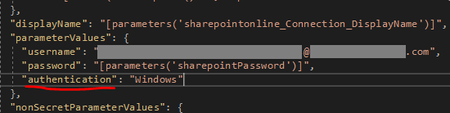
I'm looking for info on how to connect to SharePoint Online using a Logic App and Key Vault. Also, what authentication method should be used? Currently, we are using service accounts to connect to SPO, but the accounts require password updates every quarter and maintaining this is getting out of control.8.1KViews0likes2Comments
Call SAP OData Service in Logic App through On-Premise Data Gateway
Hello, I want to call an Odata Service of my SAP system. The service is only available in the private network, therefore the call only works via an On Premise Data Gateway. This gateway is already set up and works in the Azure Portal. Using a Postman Collection I have built a Custom Connector which I call in my Logic App. The connector is connected via the gateway to a computer which is logged on to the VPN. My problem is that I can't provide the authentication data for the logon to the SAP system and therefore for the call of the OData service. Is there a possibility to include this authentication data in the request? I have already been able to connect successfully to the SAP system via that gateway, but only to call RFC modules, for example. Is there a way to do this with an OData service? What is the best way for calling an on-premise SAP OData Service in a Logic App? Or is there maybe a way to send an Http request via the On Premise Data Gateway? Thank you!6.8KViews0likes2Comments
"Resource not found" error while using Sharepoint in Logic Apps
Hi All, I have created a Logic App where i want to use the Sharepoint trigger "When a file is created in folder". When i provide the site of Sharepoint and then click Folder Id then it is giving me error "Resource not found". The same thing was working 2 days earlier without any issue and it was showing me the folders hierarchy on sharepoint site. There has not been any change in the permission of the user through which i have connected to sharepoint and the user is Global Administrator on Sharepoint site. Anyone has any suggestion about how it can be resolved? Thanks Vishnu5.4KViews0likes1CommentAzure SharePoint Logic App Connector Security
Using the SharePoint Logic App connector, how can the Azure Key Vault be leveraged in place of a hard-coding AD account? Currently, we are using a dedicated AD account to authenticate with SharePoint, and our password policy requires we update the password every X months. As the usage of Azure and SPO grows, this model is quickly becoming unmanageable.5.2KViews0likes1Comment
assign an logic apps system assigned managed identity to a role with terraform and arm template
Hi there, i am trying to assign an logic apps system assigned managed identity to a role for starting/stopping a virtual machine. i use terraform to deploy the logic app template like this: resource "azurerm_template_deployment" "myterraformscheduledvmdown" { name = "scheduledvmdown" resource_group_name = "j14t23resources" template_body = <<DEPLOY { "$schema": "https://schema.management.azure.com/schemas/2019-04-01/deploymentTemplate.json#", "contentVersion": "1.0.0.0", "parameters": { }, "variables": { }, "resources": [ { "type": "Microsoft.Logic/workflows", "apiVersion": "2019-05-01", "name": "scheduledvmdown", "location": "westus2", "identity": { "type": "SystemAssigned" }, "properties": .... } } ], "outputs": { "appid": { "type": "string", "value": "[reference(resourceId('Microsoft.Logic/workflows/', 'scheduledvmdown'), '2019-05-01', 'Full').Identity.tenantId]" } } } DEPLOY parameters = { } deployment_mode = "Incremental" } output "appid" { value = "${lookup(azurerm_template_deployment.myterraformscheduledvmdown.outputs, "appid")}" } resource "azurerm_role_assignment" "scheduletovmdown" { scope = azurerm_linux_virtual_machine.myterraformvm.id role_definition_name = "Virtual Machine Contributor" principal_id = azurerm_template_deployment.myterraformscheduledvmdown.outputs["appid"] } i get the following error message while trying to deploy: Error: authorization.RoleAssignmentsClient#Create: Failure responding to request: StatusCode=400 -- Original Error: autorest/azure: Service returned an error. Status=400 Code="PrincipalNotFound" Message="Principal xxxxxxxxxxxxxxxxxxxxxxxxxxxxxx does not exist in the directory xxxxx-x-x-x-xxxx." my assumption is, that i do not get the right id with the templates Output: "[reference(resourceId('Microsoft.Logic/workflows/', 'scheduledvmdown'), '2019-05-01', 'Full').Identity.tenantId]" do you have any idea what i did wrong? or a nicer approach to assign the apps generated identity to a vm? thanks tbz4.6KViews0likes1Comment
Wrong MDATP Logic App Connector Auth. endpoint for USgov
I'm trying to create a logic app that will trigger when a new WDATP alert occurs inside of a USgov region using the MDATP connector in the logic app designer. When I click the "Sign in" button it takes me to the authentication URL at https://login.microsoftonline.com/ which is not the proper authentication endpoint for USgov (it should redirect me to https://login.microsoftonline.us) This causes an error response letting me know that I'm making a request to a public endpoint instead of the government endpoint, and that the application must send the user to the right endpoint. I've spent hours looking for ways to change the authentication endpoint to the USgov one in the Microsoft Defender ATP logic app connector and I'm out of ideas. Has anyone encountered this issue and was able to edit the connector's request? or found a workaround? I'd love to hear from someone, thank you!2.2KViews0likes1Comment
Azure Logic App - Slow Performance with Docker Containers/Python
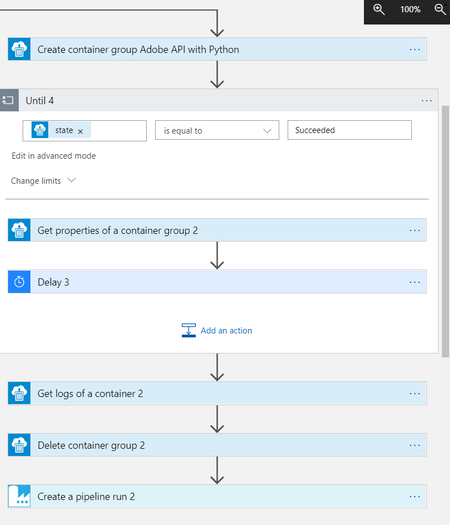
I have a python script that uses an adobe api to fetch web traffic analytics reports and write them to an Azure SQL database. This script takes about 10 minutes to run and complete successfully when run on my local machine. I packaged this up in to a docker container and have the container configured to run in our Azure logic app as seen in the photo. I have the time limit for the container running set to 3 hours (limit setting in the Until loop) and looking at the logs the script gets nowhere near completion. Why do I see such poor performance when running the container in the logic app vs. my local machine? Are there ways to increase resources for logic apps? Any ideas would help, thanks.2KViews1like0CommentsIngesting .CSV log files from Azure Blob Storage into Microsoft Sentinel
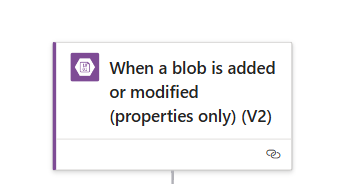
Overview: Organizations generate vast amounts of log data from various applications, services, and systems. These logs are often stored in .CSV (Comma-Separated Values) format in Azure Blob Storage, a scalable cloud-based storage solution. To enhance security monitoring, compliance, and threat detection, it is important to bring this log data into a centralized security tool like Microsoft Sentinel. The main goal is to automatically collect and analyze .CSV log files stored in Azure Blob Storage using Sentinel’s advanced analytics and automation capabilities. This enables better visibility into security events and helps in proactive threat management. Benefits: Flexible Log Ingestion via logic app: Allows ingestion of logs from systems without built-in Sentinel connectors, including custom, third-party, or legacy systems. Uses Existing Storage Workflows: Reuses Azure Blob Storage where logs are already being saved, with no need to change current export methods. Structured and Clean Data Format: .CSV files offer a structured format that makes mapping and parsing data into Sentinel efficient and reliable. Enables Custom Analysis: Once in Sentinel, the data can be queried using Kusto Query Language (KQL) for in-depth analysis and reporting. Operational Efficiency: Reduces manual efforts in collecting, uploading, or processing logs. Saves time for IT and security teams by automating the data pipeline. Improves Threat Visibility: Ingested data is available in real-time. Dashboards and visualizations make it easy to understand what's happening. Pre-requisites: Log Analytics Workspace A configured workspace to receive and analyze the ingested data. Blob Storage Path The exact location in Azure Blob Storage where the CSV log files are stored. Required Roles and Permissions Microsoft Sentinel Contributor– to manage Sentinel resources. Logic App Contributor– to create and manage automation workflows. Access to the Storage Account– to read and retrieve log files from Blob Storage. Implementation Steps: Configure the Logic App trigger to run whenever a new blob is added or an existing one is modified. Select the storage account and container details, then configure the recurrence based on how frequently data is uploaded to the storage account. Choose the authentication type to connect with storage account. CSV Retrieval: Use the Logic App action to retrieve the CSV blob content by specifying the exact file path of the container. CSV Parsing: Use built-in Logic App actions along with regex to parse the CSV content. Apply the Composeaction to split the file contents by new lines, converting them into an array for structured processing. Here is the expression used in SplitLines compose action: split(body('Get_blob_content_(V2)'),decodeUriComponent('%0D%0A')) Follow the below MS Doc to write expressions: Removing last(empty) line from previous output using another compose action as shown below, take(outputs('SplitLines'),add(length(outputs('SplitLines')),-1)) Separating field names using compose action: split(first(outputs('SplitLines')), ',') Column Mapping: Repeat the required expression using the Select action to map each column from the CSV file to its corresponding field in the structured output. **From**: **`skip(outputs('RemoveLastLine'), 1)`** **Map:** **`outputs('SplitFieldName')[0]`** **`split(item(), ',')?[0]`** **`outputs('SplitFieldName')[1]`** **`split(item(), ',')?[1]`** Data Ingestion to Sentinel: Leveraging the Microsoft Sentinel connector to ingest the parsed data into the appropriate table. The connection to be configured using the workspace ID, shared key, and target table name. Key Highlights: The Logic App is triggered whenever a file is added or modified in the Blob container. The CSV content is parsed within the Logic App before being ingested into Sentinel. Leveraged the Microsoft Sentinel connector to ingest the parsed data into Sentinel. To support dynamic updates, we recommended overwriting the existing CSV file in the storage account. Outcome: Log Visibility in Sentinel Workspace: Once the Logic App is triggered, the custom table will be created automatically in Microsoft Sentinel, and logs can be viewed by running a KQL query in the Sentinel workspace. Conclusion: Ingesting .CSV log files from Azure Blob Storage into Microsoft Sentinel is a powerful way to centralize and automate the organization’s security monitoring. It enhances visibility, supports compliance, and empowers security teams with timely insights and alerts.