llm
11 TopicsHow to use any Python AI agent framework with free GitHub Models
I ❤️ when companies offer free tiers for developer services, since it gives everyone a way to learn new technologies without breaking the bank. Free tiers are especially important for students and people between jobs, when the desire to learn is high but the available cash is low. That's why I'm such a fan of GitHub Models: free, high-quality generative AI models available to anyone with a GitHub account. The available models include the latest OpenAI LLMs (like o3-mini), LLMs from the research community (like Phi and Llama), LLMs from other popular providers (like Mistral and Jamba), multimodal models (like gpt-4o and llama-vision-instruct) and even a few embedding models (from OpenAI and Cohere). With access to such a range of models, you can prototype complex multi-model workflows to improve your productivity or heck, just make something fun for yourself. 🤗 To use GitHub Models, you can start off in no-code mode: open the playground for a model, send a few requests, tweak the parameters, and check out the answers. When you're ready to write code, select "Use this model". A screen will pop up where you can select a programming language (Python/JavaScript/C#/Java/REST) and select an SDK (which varies depending on model). Then you'll get instructions and code for that model, language, and SDK. But here's what's really cool about GitHub Models: you can use them with all the popular Python AI frameworks, even if the framework has no specific integration with GitHub Models. How is that possible? The vast majority of Python AI frameworks support the OpenAI Chat Completions API, since that API became a defacto standard supported by many LLM API providers besides OpenAI itself. GitHub Models also provide OpenAI-compatible endpoints for chat completion models. Therefore, any Python AI framework that supports OpenAI-like models can be used with GitHub Models as well. 🎉 To prove it, I've made a new repository with examples from eight different Python AI agent packages, all working with GitHub Models: python-ai-agent-frameworks-demos. There are examples for AutoGen, LangGraph, Llamaindex, OpenAI Agents SDK, OpenAI standard SDK, PydanticAI, Semantic Kernel, and SmolAgents. You can open that repository in GitHub Codespaces, install the packages, and get the examples running immediately. Now let's walk through the API connection code for GitHub Models for each framework. Even if I missed your favorite framework, I hope my tips here will help you connect any framework to GitHub Models. OpenAI I'll start with openai , the package that started it all! import openai client = openai.OpenAI( api_key=os.environ["GITHUB_TOKEN"], base_url="https://models.inference.ai.azure.com") The code above demonstrates the two key parameters we'll need to configure for all frameworks: api_key : When using OpenAI.com, you pass your OpenAI API key here. When using GitHub Models, you pass in a Personal Access Token (PAT). If you open the repository (or any repository) in GitHub Codespaces, a PAT is already stored in the GITHUB_TOKEN environment variable. However, if you're working locally with GitHub Models, you'll need to generate a PAT yourself and store it. PATs expire after a while, so you need to generate new PATs every so often. base_url : This parameter tells the OpenAI client to send all requests to "https://models.inference.ai.azure.com" instead of the OpenAI.com API servers. That's the domain that hosts the OpenAI-compatible endpoint for GitHub Models, so you'll always pass that domain as the base URL. If we're working with the new openai-agents SDK, we use very similar code, but we must use the AsyncOpenAI client from openai instead. Lately, Python AI packages are defaulting to async, because it's so much better for performance. import agents import openai client = openai.AsyncOpenAI( base_url="https://models.inference.ai.azure.com", api_key=os.environ["GITHUB_TOKEN"]) model = agents.OpenAIChatCompletionsModel( model="gpt-4o", openai_client=client) spanish_agent = agents.Agent( name="Spanish agent", instructions="You only speak Spanish.", model=model) PydanticAI Now let's look at all of the packages that make it really easy for us, by allowing us to directly bring in an instance of either OpenAI or AsyncOpenAI . For PydanticAI, we configure an AsyncOpenAI client, then construct an OpenAIModel object from PydanticAI, and pass that model to the agent: import openai import pydantic_ai import pydantic_ai.models.openai client = openai.AsyncOpenAI( api_key=os.environ["GITHUB_TOKEN"], base_url="https://models.inference.ai.azure.com") model = pydantic_ai.models.openai.OpenAIModel( "gpt-4o", provider=OpenAIProvider(openai_client=client)) spanish_agent = pydantic_ai.Agent( model, system_prompt="You only speak Spanish.") Semantic Kernel For Semantic Kernel, the code is very similar. We configure an AsyncOpenAI client, then construct an OpenAIChatCompletion object from Semantic Kernel, and add that object to the kernel. import openai import semantic_kernel.connectors.ai.open_ai import semantic_kernel.agents chat_client = openai.AsyncOpenAI( api_key=os.environ["GITHUB_TOKEN"], base_url="https://models.inference.ai.azure.com") chat = semantic_kernel.connectors.ai.open_ai.OpenAIChatCompletion( ai_model_id="gpt-4o", async_client=chat_client) kernel.add_service(chat) spanish_agent = semantic_kernel.agents.ChatCompletionAgent( kernel=kernel, name="Spanish agent" instructions="You only speak Spanish") AutoGen Next, we'll check out a few frameworks that have their own wrapper of the OpenAI clients, so we won't be using any classes from openai directly. For AutoGen, we configure both the OpenAI parameters and the model name in the same object, then pass that to each agent: import autogen_ext.models.openai import autogen_agentchat.agents client = autogen_ext.models.openai.OpenAIChatCompletionClient( model="gpt-4o", api_key=os.environ["GITHUB_TOKEN"], base_url="https://models.inference.ai.azure.com") spanish_agent = autogen_agentchat.agents.AssistantAgent( "spanish_agent", model_client=client, system_message="You only speak Spanish") LangGraph For LangGraph, we configure a very similar object, which even has the same parameter names: import langchain_openai import langgraph.graph model = langchain_openai.ChatOpenAI( model="gpt-4o", api_key=os.environ["GITHUB_TOKEN"], base_url="https://models.inference.ai.azure.com", ) def call_model(state): messages = state["messages"] response = model.invoke(messages) return {"messages": [response]} workflow = langgraph.graph.StateGraph(MessagesState) workflow.add_node("agent", call_model) SmolAgents Once again, for SmolAgents, we configure a similar object, though with slightly different parameter names: import smolagents model = smolagents.OpenAIServerModel( model_id="gpt-4o", api_key=os.environ["GITHUB_TOKEN"], api_base="https://models.inference.ai.azure.com") agent = smolagents.CodeAgent(model=model) Llamaindex I saved Llamaindex for last, as it is the most different. The llama-index package has a different constructor for OpenAI.com versus OpenAI-like servers, so I opted to use that OpenAILike constructor instead. However, I also needed an embeddings model for my example, and the package doesn't have an OpenAIEmbeddingsLike constructor, so I used the standard OpenAIEmbedding constructor. import llama_index.embeddings.openai import llama_index.llms.openai_like import llama_index.core.agent.workflow Settings.llm = llama_index.llms.openai_like.OpenAILike( model="gpt-4o", api_key=os.environ["GITHUB_TOKEN"], api_base="https://models.inference.ai.azure.com", is_chat_model=True) Settings.embed_model = llama_index.embeddings.openai.OpenAIEmbedding( model="text-embedding-3-small", api_key=os.environ["GITHUB_TOKEN"], api_base="https://models.inference.ai.azure.com") agent = llama_index.core.agent.workflow.ReActAgent( tools=query_engine_tools, llm=Settings.llm) Choose your models wisely! In all of the examples above, I specified the gpt-4o model. The gpt-4o model is a great choice for agents because it supports function calling, and many agent frameworks only work (or work best) with models that natively support function calling. Fortunately, GitHub Models includes multiple models that support function calling, at least in my basic experiments: gpt-4o gpt-4o-mini o3-mini AI21-Jamba-1.5-Large AI21-Jamba-1.5-Mini Codestral-2501 Cohere-command-r Ministral-3B Mistral-Large-2411 Mistral-Nemo Mistral-small You might find that some models work better than others, especially if you're using agents with multiple tools. With GitHub Models, it's very easy to experiment and see for yourself, by simply changing the model name and re-running the code. Join the AI Agents Hackathon We are currently running a free virtual hackathon from April 8th - 30th, to challenge developers to create agentic applications using Microsoft technologies. You could build an agent entirely using GitHub Models and submit it to the hackathon for a chance to win amazing prizes! You can also join our 30+ streams about building AI agents, including a stream all about prototyping with GitHub Models. Learn more and register at https://aka.ms/agentshack3KViews3likes0CommentsAI Sparks: Unleashing Agents with the AI Toolkit
The final episode of our "AI Sparks" series delved deep into the exciting world of AI Agents and their practical implementation. We also covered a fair part of MCP with Microsoft AI Toolkit extension for VS Code. We kicked off by charting the evolutionary path of intelligent conversational systems. Starting with the rudimentary rule-based Basic Chatbots, we then explored the advancements brought by Basic Generative AI Chatbots, which offered contextually aware interactions. Then we explored the Retrieval-Augmented Generation (RAG), highlighting its ability to ground generative models in specific knowledge bases, significantly enhancing accuracy and relevance. The limitations were also discussed for the above mentioned techniques. The session was then centralized to the theme – Agents and Agentic Frameworks. We uncovered the fundamental shift from basic chatbots to autonomous agents capable of planning, decision-making, and executing tasks. We moved forward with detailed discussion on the distinction between Single Agentic systems, where one core agent orchestrates the process, and Multi-Agent Architectures, where multiple specialized agents collaborate to achieve complex goals. A key part of building robust and reliable AI Agents, as we discussed, revolves around carefully considering four critical factors. Firstly, Knowledge-Providing agents with the right context is paramount for them to operate effectively and make informed decisions. Secondly, equipping agents with the necessary Actions by granting them access to the appropriate tools allows them to execute tasks and achieve desired outcomes. Thirdly, Security is non-negotiable; ensuring agents have access only to the data and services they genuinely need is crucial for maintaining privacy and preventing unintended actions. Finally, establishing robust Evaluations mechanisms is essential to verify that agents are completing tasks correctly and meeting the required standards. These four pillars – Knowledge, Actions, Security, and Evaluation – form the bedrock of any successful agentic implementation. To illustrate the transformative power of AI Agents, we explored several interesting use cases and applications. These ranged from intelligent personal assistants capable of managing schedules and automating workflows to sophisticated problem-solving systems in domains like customer service. A significant portion of the session was dedicated to practical implementation through demonstrations. We highlighted key frameworks that are empowering developers to build agentic systems.: Semantic Kernel: We highlighted its modularity and rich set of features for integrating various AI services and tools. Autogen Studio: The focus here was on its capabilities for facilitating the creation and management of multi-agent conversations and workflows. Agent Service: We discussed its role in providing a more streamlined and managed environment for deploying and scaling AI agents. The major point of attraction was that these were demonstrated using the local LLMs which were hosted using AI Toolkit. This showcased the ease with which developers can utilize VS Code AI toolkit to build and experiment with agentic workflows directly within their familiar development environment. Finally, we demystified the concept of Model Context Protocol (MCP) and demonstrated how seamlessly it can be implemented using the Agent Builder within the VS Code AI Toolkit. We demonstrated this with a basic Website development using MCP. This practical demonstration underscored the toolkit's power in simplifying the development of complex solutions that can maintain context and engage in more natural, multi-step interactions. The "AI Sparks" series concluded with a discussion, where attendees had a clearer understanding of the evolution, potential and practicalities of AI Agents. The session underscored that we are on the cusp of a new era of intelligent systems that are not just reactive but actively work alongside us to achieve goals. The tools and frameworks are maturing, and the possibilities for agentic applications are sparking innovation across various industries. It was an exciting journey, and engagement during the final session on AI Sparks around Agents truly highlighted the transformative potential of this field. "AI Sparks" Series Roadmap: The "AI Sparks" series delved deeper into specific topics using AI Toolkit for Visual Studio Code, including: Introduction to AI toolkit and feature walkthrough: Introduction to the AI Toolkit extension for VS Code a powerful way to explore and integrate the latest AI models from OpenAI, Meta, Deepseek, Mistral, and more. Introduction to SLMs and local model with use cases: Explore Small Language Models (SLMs) and how they compare to larger models. Building RAG Applications: Create powerful applications that combine the strengths of LLMs with external knowledge sources. Multimodal Support and Image Analysis: Working with vision models and building multimodal applications. Evaluation and Model Selection: Evaluate model performance and choose the best model for your needs. Agents and Agentic Frameworks: Exploring the cutting edge of AI agents and how they can be used to build more complex and autonomous systems. The full playlist of the series with all the episodes of "AI Sparks" is available at AI Sparks Playlist. Continue the discussion and questions in Microsoft AI Discord Community where we have a dedicated AI-sparks channel. All the code samples can be found on AI_Toolkit_Samples .We look forward to continuing these insightful discussions in future series!460Views2likes0Comments
Mind the Specs: Grading formal specifications and KPIs as artefacts for LLM-driven code generation
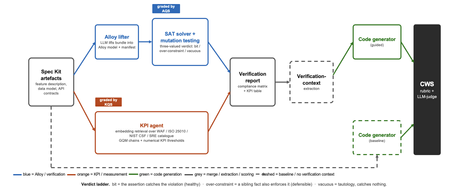
Large language models now write code straight from a prompt, but the specification in between is never checked, and a model asked to judge its own work brings the same blind spots to the review. We built a pipeline that lifts a plain-language requirements bundle into two graded specifications (a formal Alloy model and a set of numerical KPI targets), scores both before a single line of code is written, and hands the graded result to the code generator. It starts from GitHub Spec Kit and the Azure Well-Architected Framework. Here is what we built, and what we learned from running it at scale. The problem Writing software used to be four separate activities: gathering requirements, writing a specification, verifying it, and implementing it. A language model collapses all four into a single step. Two of those activities used to give us a quality signal before any code existed: a formal specification you could inspect, and measurable targets an implementation had to hit. The prompt-to-code loop inherits neither. There is no externally observable signal, before a line of code is written, that the requirements a model received are even well-formed enough to drive a correct implementation. You might think the model could just check its own work. It cannot do so reliably. Ask a language model to check the logic it just wrote: not only will it bring the same blind spot to the review, but its stochastic nature will make it produce different answers on each run. A SAT solver does not behave this way. Its verdict is deterministic: the same specification produces the same verdict every time. The thing that historically kept formal specification out of everyday development was never its rigour, it was the cost of writing the specification by hand. And that is exactly the step a language model can now do. What we built We built an agentic pipeline that sits between the requirements and the generated code. In plain terms it takes the requirements once, turns them into two things that can be checked by a machine: a precise description of rules that the system must obey, and a set of measurable targets that the system must hit. These artefacts are both graded, and are handed to the code generator. We split the work in two and gave each half to the tool that is good at it. The language model does the creative part, turning messy prose into formal structure. Deterministic checks, not the model's own opinion, grade what it produces. From a single Spec Kit artefacts bundle the pipeline builds two graded specifications before any code exists, and then carries both into code generation. Since these grades are computed deterministically rather than just generated, you can actually trust them. The input is a GitHub Spec Kit bundle. Spec Kit is an open-source, specification-first toolkit: instead of prompting for code directly, you describe what you want to build, and it produces a set of structured artefacts, a feature specification, a data model, and a set of API contracts. Our pipeline reads that bundle and turns it into the two graded specifications in parallel. overview. Spec Kit artefacts on the left. The Alloy lifter (with SAT solver and the attack step) and the KPI agent run in parallel. Their graded outputs are merged into a verification report that feeds the guided code generator. A dashed baseline path feeds the goal alone to the generator for comparison. Lift the requirements into a formal model The first half is structural. An Alloy lifter translates the requirements into a formal model written in Alloy, a specification language whose rules a SAT solver can check exhaustively, and whose verdict is deterministic, so the grade never depends on asking an LLM what it thinks. A banking requirement like "zero balance discrepancies" becomes a precise, checkable rule: the money leaving one account and the money arriving in another must always add up to the balances you started with, so a transfer can never quietly create or destroy money. The solver searches for any scenario that would break the rule. We modified Spec Kit's templates to force the model to output functional requirements and their corresponding Alloy code blocks in a structured format. Against the stock templates, that change alone nearly doubled the Alloy code compilation rate, jumping from 40 to 74 percent. A machine-written specification cannot be trusted, though, so the lifter does more than write it: it attacks it. Each load-bearing rule is deliberately broken by clearing its body and injecting a clause that forces a violation and the solver is re-run on the broken model. If the solver fails after this mutation, the original rule genuinely caught the violation it was meant to catch. If it still passes, the rule never really constrained anything on its own. Mutation testing usually grades a test suite against a specification that is assumed correct; here the roles are reversed, and the specification itself is on trial. Turn the requirements into measurable targets The second half is measurable. A KPI agent takes the same Spec Kit bundle, retrieves the most relevant principles from the Azure Well-Architected Framework, and derives numerical targets in the Goal-Question-Metric style. Each target carries an explicit threshold, a direction, and a measurement method, the kind of target a monitoring tool could actually track. Where earlier automated approaches stopped at describing quality in words, this half emits the actual numbers an implementation has to satisfy. And the knowledge base is a setting, not a fixture: swapping the Well-Architected Framework for ISO 25010, the NIST Cybersecurity Framework, or Google's SRE workbook requires zero changes to the underlying code. Review the report before any code Both graded halves merge into one human-readable verification report: the patterns the model applied, which rules passed, the counterexamples the solver found, the attack results, and the KPI threshold table. A developer reads it first and can see exactly where the specification is weak: a rule that passed for the wrong reason, or a requirement that nothing covers. After revising the specification, they re-run the lifting phase. Because the process is cached, re-runs are cheap, allowing the developer to loop until the report looks perfect, all before any code exists. The work shifts from reviewing generated code after the fact to curating a specification and reading a report before anything is built. Carry the graded context into code generation Only then does the report do its real job. In the guided pipeline, the merged report becomes the context handed to a code generator, which is asked to implement each rule, requirement, and KPI threshold and to leave markers tracing the code back to them. A baseline generator gets only the plain-language goal. Same generator, same settings; the only difference is whether it can see the graded specification. Feeding graded artefacts, rather than raw prose, into code generation is the piece that ties the whole pipeline together. So three choices separate this from simply asking a model for a spec: the specification is attacked rather than trusted, the targets are numbers rather than prose, and what reaches the code generator is graded evidence rather than raw text. How we tested it We ran the pipeline at scale: 270 Alloy lifts and 1,930 KPI records, across three application domains chosen to differ sharply (banking, software-as-a-service, and healthcare), three levels of requirement detail, four knowledge bases, and three model tiers, with ten runs of each combination so a real effect could be told apart from noise. For the code-generation half, we generated two codes for each case, once with the graded report as context and once from the plain-language goal alone, and compared the two. What we found First, the foundation: the specifications proved gradeable. The rubric cleanly separated sound specifications from degenerate ones. Because it returned the same verdict run after run, the grades are reliable enough to act on. The three key observations are as follows: The model matters more than the prompt Of the two knobs a practitioner controls, the model you choose and the amount of detail you write, the model dominated by roughly nine to one. A weak model could not be rescued by richer requirements. But you do not need the most expensive one: a mid-tier model delivered about 98 percent of the best model's quality at under a third of the cost and about half the time. The cheapest tier was a false economy, producing a model the analyser could even load only 23 percent of the time. More detail can backfire More requirements are not always better. Sparse and standard requirements scored the same, but over-specified requirements collapsed: KPI quality fell from about 0.89 to about 0.73, and the effect held across all four knowledge bases. Pile in too much numerical detail and the pipeline starts echoing the numbers it was handed instead of deriving sound ones, which is the opposite of what more detail is supposed to buy. Graded context produces far better code This is the payoff, and it is the point of the whole pipeline. Across all nine combinations of domain and detail, code generated with the graded verification context scored about 8 out of 10, against about 1 out of 10 for the same generator given only the plain-language goal. The guided code carried the traceability back to each requirement, the named rules, and the structural patterns that a bare prompt gives us no way to know about. This part of the study is a single run per combination, so we report the size and the consistency of the gap rather than a precise average, but the gap was large and it held in every case. What this means for you Four things to take from our study into your own work: Write requirements at a standard, middle level of detail. Not sparse, and not exhaustively numerical. The middle is the sweet spot on both halves of the specification. Reach for a capable mid-tier model before you invest in heavy prompt engineering. Model choice moves quality more than requirement detail does, and the mid tier is the value leader. Give the code generator externally graded context instead of letting it specify for itself. That is where most of the quality gain came from. Treat the knowledge base as a setting worth tuning, not a fixed ingredient. Each is a recommendation that data supports under the conditions we tested, not a universal law. The limit Every grade measures structure, not meaning. A high score says the specification is well-formed, discriminating, and stable. It does not say whether the invariants are the right ones, or the thresholds are the right ones for your deployment. A specification can be perfectly well-formed and still describe the wrong system. That judgement stays with a human, which is where we think it belongs. The pipeline is built to make that judgement efficient by moving it earlier, to curating the specification and reading the report, rather than to remove it. Generated code should not be shipped end to end without human validation. Try it The full pipeline, every input, and the artefacts behind every figure are in the project repository. If you want the Microsoft tools it builds on, start here: Project repository: https://github.com/RadaanMadhan/Specification-Led-Development GitHub Spec Kit: https://github.com/github/spec-kit Azure Well-Architected Framework: https://learn.microsoft.com/en-us/azure/well-architected/ If you'd like to explore the work in more detail, we've included the full technical report in the project repository, covering the related work, methodology, pipeline design, experimental setup, and extended results. About the team This project was carried out by six students at Imperial College London: Leon Hausmann, Charlotte Maxwell, Radaan Madhan, Keshav Das, Anson Huang, and Ander Cobo, in collaboration with Microsoft and supervised by Lee Stott (Microsoft) and Max Cattafi (Imperial College London)268Views1like0CommentsFunction Calling with Small Language Models
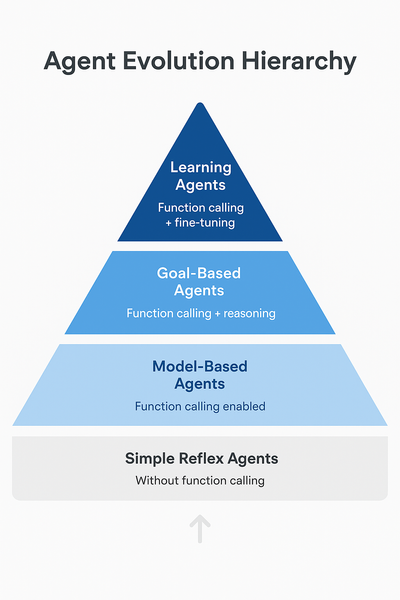
In our previous article on running Phi-4 locally, we built a web-enhanced assistant that could search the internet and provide informed answers. Here's what that implementation looked like: def web_enhanced_query(question): # 1. ALWAYS search (hardcoded decision) search_results = search_web(question) # 2. Inject results into prompt prompt = f"""Here are recent search results: {search_results} Question: {question} Using only the information above, give a clear answer.""" # 3. Model just summarizes what it reads return ask_phi4(endpoint, model_id, prompt) Today, we're upgrading to true function calling. With this, we have ability to transform small language models from passive text generators into intelligent agents that can: Decide when to use external tools Reason which tool bests fit each task Execute real-world actions thrugh apis Function calling represents a significant evolution in AI capabilities. Let's understand where this positions our small language models: Agent Classification Framework Simple Reflex Agents (Basic) React to immediate input with predefined rules Example: Thermostat, basic chatbot Without function calling, models operate here Model-Based Agents (Intermediate) Maintain internal state and context Example: Robot vacuum with room mapping Function calling enables this level Goal-Based Agents (Advanced) Plan multi-step sequences to achieve objectives Example: Route planner, task scheduler Function calling + reasoning enables this Learning Agents (Expert) Adapt and improve over time Example: Recommendation systems Future: Function calling + fine-tuning As usual with these articles, let's get ready to get our hands dirty! Project Setup Let's set up our environment for building function-calling assistants. Prerequisites First, ensure you have Foundry Local installed and a model running. We'll use Qwen 2.5-7B for this tutorial as it has excellent function calling support. Important: Not all small language models support function calling equally. Qwen 2.5 was specifically trained for this capability and provides a reliable experience through Foundry Local. # 1. Check Foundry Local is installed foundry --version # 2. Start the Foundry Local service foundry service start # 3. Download and run Qwen 2.5-7B foundry model run qwen2.5-7b Python Environment Setup # 1. Create Python virtual environment python -m venv venv source venv/bin/activate # Windows: venv\Scripts\activate # 2. Install dependencies pip install openai requests python-dotenv # 3. Get a free OpenWeatherMap API key # Sign up at: https://openweathermap.org/api ``` Create `.env` file: ``` OPENWEATHER_API_KEY=your_api_key_here ``` Building a Weather-Aware Assistant So in this scenario, a user wants to plan outdoor activities but needs weather context. Without function calling, You will get something like this: User: "Should I schedule my team lunch outside at 2pm in Birmingham?" Model: "That depends on weather conditions. Please check the forecast for rain and temperature." However, with fucntion-calling you get an answer that is able to look up the weather and reply with the needed context. We will do that now. Understanding Foundry Local's Function Calling Implementation Before we start coding, there's an important implementation detail to understand. Foundry Local uses a non-standard function calling format. Instead of returning function calls in the standard OpenAI tool_calls field, Qwen models return the function call as JSON text in the response content. For example, when you ask about weather, instead of: # Standard OpenAI format message.tool_calls = [ {"name": "get_weather", "arguments": {"location": "Birmingham"}} ] You get: # Foundry Local format message.content = '{"name": "get_weather", "arguments": {"location": "Birmingham"}}' This means we need to parse the JSON from the content ourselves. Don't worry—this is straightforward, and I'll show you exactly how to handle it! Step 1: Define the Weather Tool Create weather_assistant.py: import os from openai import OpenAI import requests import json import re from dotenv import load_dotenv load_dotenv() # Initialize Foundry Local client client = OpenAI( base_url="http://127.0.0.1:59752/v1/", api_key="not-needed" ) # Define weather tool tools = [ { "type": "function", "function": { "name": "get_weather", "description": "Get current weather information for a location", "parameters": { "type": "object", "properties": { "location": { "type": "string", "description": "The city or location name" }, "units": { "type": "string", "description": "Temperature units", "enum": ["celsius", "fahrenheit"], "default": "celsius" } }, "required": ["location"] } } } ] A tool is necessary because it provides the model with a structured specification of what external functions are available and how to use them. The tool definition contains the function name, description, parameters schema, and information returned. Step 2: Implement the Weather Function def get_weather(location: str, units: str = "celsius") -> dict: """Fetch weather data from OpenWeatherMap API""" api_key = os.getenv("OPENWEATHER_API_KEY") url = "http://api.openweathermap.org/data/2.5/weather" params = { "q": location, "appid": api_key, "units": "metric" if units == "celsius" else "imperial" } response = requests.get(url, params=params, timeout=5) response.raise_for_status() data = response.json() temp_unit = "°C" if units == "celsius" else "°F" return { "location": data["name"], "temperature": f"{round(data['main']['temp'])}{temp_unit}", "feels_like": f"{round(data['main']['feels_like'])}{temp_unit}", "conditions": data["weather"][0]["description"], "humidity": f"{data['main']['humidity']}%", "wind_speed": f"{round(data['wind']['speed'] * 3.6)} km/h" } The model calls this function to get the weather data. it contacts OpenWeatherMap API, gets real weather data and returns it as a python dictionary Step 3: Parse Function Calls from Content This is the crucial step where we handle Foundry Local's non-standard format: def parse_function_call(content: str): """Extract function call JSON from model response""" if not content: return None json_pattern = r'\{"name":\s*"get_weather",\s*"arguments":\s*\{[^}]+\}\}' match = re.search(json_pattern, content) if match: try: return json.loads(match.group()) except json.JSONDecodeError: pass try: parsed = json.loads(content.strip()) if isinstance(parsed, dict) and "name" in parsed: return parsed except json.JSONDecodeError: pass return None Step 4: Main Chat Function with Function Calling and lastly, calling the model. Notice the tools and tool_choice parameter. Tools tells the model it is allowed to output a tool_call requesting that the function be executed. While tool_choice instructs the model how to decide whether to call a tool. def chat(user_message: str) -> str: """Process user message with function calling support""" messages = [ {"role": "user", "content": user_message} ] response = client.chat.completions.create( model="qwen2.5-7b-instruct-generic-cpu:4", messages=messages, tools=tools, tool_choice="auto", temperature=0.3, max_tokens=500 ) message = response.choices[0].message if message.content: function_call = parse_function_call(message.content) if function_call and function_call.get("name") == "get_weather": print(f"\n[Function Call] {function_call.get('name')}({function_call.get('arguments')})") args = function_call.get("arguments", {}) weather_data = get_weather(**args) print(f"[Result] {weather_data}\n") final_prompt = f"""User asked: "{user_message}" Weather data: {json.dumps(weather_data, indent=2)} Provide a natural response based on this weather information.""" final_response = client.chat.completions.create( model="qwen2.5-7b-instruct-generic-cpu:4", messages=[{"role": "user", "content": final_prompt}], max_tokens=200, temperature=0.7 ) return final_response.choices[0].message.content return message.content Step 5: Run the script Now put all the above together and run the script def main(): """Interactive weather assistant""" print("\nWeather Assistant") print("=" * 50) print("Ask about weather or general questions.") print("Type 'exit' to quit\n") while True: user_input = input("You: ").strip() if user_input.lower() in ['exit', 'quit']: print("\nGoodbye!") break if user_input: response = chat(user_input) print(f"Assistant: {response}\n") if __name__ == "__main__": if not os.getenv("OPENWEATHER_API_KEY"): print("Error: OPENWEATHER_API_KEY not set") print("Set it with: export OPENWEATHER_API_KEY='your_key_here'") exit(1) main() Note: Make sure Qwen 2.5 is running in Foundry Local in a new terminal Now let's talk about Model Context Protocol! Our weather assistant works beautifully with a single function, but what happens when you need dozens of tools? Database queries, file operations, calendar integration, email—each would require similar setup code. This is where Model Context Protocol (MCP) comes in. MCP is an open standard that provides pre-built, standardized servers for common tools. Instead of writing custom integration code for every capability, you can connect to MCP servers that handle the complexity for you. With MCP, You only need one command to enable weather, database, and file access npx @modelcontextprotocol/server-weather npx @modelcontextprotocol/server-sqlite npx @modelcontextprotocol/server-filesystem Your model automatically discovers and uses these tools without custom integration code. Learn more: Model Context Protocol Documentation EdgeAI Course - Module 03: MCP Integration Key Takeaways Function calling transforms models into agents - From passive text generators to active problem-solvers Qwen 2.5 has excellent function calling support - Specifically trained for reliable tool use Foundry Local uses non-standard format - Parse JSON from content instead of tool_calls field Start simple, then scale with MCP - Build one tool to understand the pattern, then leverage standards Documentation Running Phi-4 Locally with Foundry Local Phi-4: Small Language Models That Pack a Punch Microsoft Foundry Local GitHub EdgeAI for Beginners Course OpenWeatherMap API Documentation Model Context Protocol Qwen 2.5 Documentation Thank you for reading! I hope this article helps you build more capable AI agents with small language models. Function calling opens up incredible possibilities—from simple weather assistants to complex multi-tool workflows. Start with one tool, understand the pattern, and scale from there.1.2KViews1like0CommentsRunning Phi-4 Locally with Microsoft Foundry Local: A Step-by-Step Guide
In our previous post, we explored how Phi-4 represents a new frontier in AI efficiency that delivers performance comparable to models 5x its size while being small enough to run on your laptop. Today, we're taking the next step: getting Phi-4 up and running locally on your machine using Microsoft Foundry Local. Whether you're a developer building AI-powered applications, an educator exploring AI capabilities, or simply curious about running state-of-the-art models without relying on cloud APIs, this guide will walk you through the entire process. Microsoft Foundry Local brings the power of Azure AI Foundry to your local device without requiring an Azure subscription, making local AI development more accessible than ever. So why do you want to run Phi-4 Locally? Before we dive into the setup, let's quickly recap why running models locally matters: Privacy and Control: Your data never leaves your machine. This is crucial for sensitive applications in healthcare, finance, or education where data privacy is paramount. Cost Efficiency: No API costs, no rate limits. Once you have the model downloaded, inference is completely free. Speed and Reliability: No network latency or dependency on external services. Your AI applications work even when you're offline. Learning and Experimentation: Full control over model parameters, prompts, and fine-tuning opportunities without restrictions. With Phi-4's compact size, these benefits are now accessible to anyone with a modern laptop—no expensive GPU required. What You'll Need Before we begin, make sure you have: Operating System: Windows 10/11, macOS (Intel or Apple Silicon), or Linux RAM: Minimum 16GB (32GB recommended for optimal performance) Storage: At least 5 - 10GB of free disk space Processor: Any modern CPU (GPU optional but provides faster inference) Note: Phi-4 works remarkably well even on consumer hardware 😀. Step 1: Installing Microsoft Foundry Local Microsoft Foundry Local is designed to make running AI models locally as simple as possible. It handles model downloads, manages memory efficiently, provides OpenAI-compatible APIs, and automatically optimizes for your hardware. For Windows Users: Open PowerShell or Command Prompt and run: winget install Microsoft.FoundryLocal For macOS Users (Apple Silicon): Open Terminal and run: brew install microsoft/foundrylocal/foundrylocal Verify Installation: Open your terminal and type. This should return the Microsoft Foundry Local version, confirming installation: foundry --version Step 2: Downloading Phi-4-Mini For this tutorial, we'll use Phi-4-mini, the lightweight 3.8 billion parameter version that's perfect for learning and experimentation. Open your terminal and run: foundry model run phi-4-mini You should see your download begin and something similar to the image below Available Phi Models on Foundry Local While we're using phi-4-mini for this guide, Foundry Local offers several Phi model variants and other open-source models optimized for different hardware and use cases: Model Hardware Type Size Best For phi-4-mini GPU chat-completion 3.72 GB Learning, fast responses, resource-constrained environments with GPU phi-4-mini CPU chat-completion 4.80 GB Learning, fast responses, CPU-only systems phi-4-mini-reasoning GPU chat-completion 3.15 GB Reasoning tasks with GPU acceleration phi-4-mini-reasoning CPU chat-completion 4.52 GB Mathematical proofs, logic puzzles with lower resource requirements phi-4 GPU chat-completion 8.37 GB Maximum reasoning performance, complex tasks with GPU phi-4 CPU chat-completion 10.16 GB Maximum reasoning performance, CPU-only systems phi-3.5-mini GPU chat-completion 2.16 GB Most lightweight option with GPU support phi-3.5-mini CPU chat-completion 2.53 GB Most lightweight option, CPU-optimized phi-3-mini-128k GPU chat-completion 2.13 GB Extended context (128k tokens), GPU-optimized phi-3-mini-128k CPU chat-completion 2.54 GB Extended context (128k tokens), CPU-optimized phi-3-mini-4k GPU chat-completion 2.13 GB Standard context (4k tokens), GPU-optimized phi-3-mini-4k CPU chat-completion 2.53 GB Standard context (4k tokens), CPU-optimized Note: Foundry Local automatically selects the best variant for your hardware. If you have an NVIDIA GPU, it will use the GPU-optimized version. Otherwise, it will use the CPU-optimized version. run the command below to see full list of models foundry model list Step 3: Test It Out Once the download completes, an interactive session will begin. Let's test Phi-4-mini's capabilities with a few different prompts: Example 1: Explanation Phi-4-mini provides a thorough, well-structured explanation! It starts with the basic definition, explains the process in biological systems, gives real-world examples (plant cells, human blood cells). The response is detailed yet accessible. Example 2: Mathematical Problem Solving Excellent step-by-step solution! Phi-4-mini breaks down the problem methodically: 1. Distributes on the left side 2. Isolates the variable terms 3. Simplifies progressively 4. Arrives at the final answer: x = 11 The model shows its work clearly, making it easy to follow the logic and ideal for educational purposes Example 3: Code Generation The model provides a concise Python function using string slicing ([::-1]) - the most Pythonic approach to reversing a string. It includes clear documentation with a docstring explaining the function's purpose, provides example usage demonstrating the output, and even explains how the slicing notation works under the hood. The response shows that the model understands not just how to write the code, but why this approach is preferred - noting that the [::-1] slice notation means "start at the end of the string and end at position 0, move with the step -1, negative one, which means one step backwards." This showcases the model's ability to generate production-ready code with proper documentation while being educational about Python idioms. To exit the interactive session, type `/bye` Step 4: Extending Phi-4 with Real-Time Tools Understanding Phi-4's Knowledge Cutoff Like all language models, Phi-4 has a knowledge cutoff date from its training data (typically several months old). This means it won't know about very recent events, current prices, or breaking news. For example, if you ask "Who won the 2024 NBA championship?" it might not have the answer. The good thing is, there's a powerful work-around. While Phi-4 is incredibly capable, connecting it to external tools like web search, databases, or APIs transforms it from a static knowledge base into a dynamic reasoning engine. This is where Microsoft Foundry's REST API comes in. Microsoft Foundry provides a simple API that lets you integrate Phi-4 into Python applications and connect it to real-time data sources. Here's a practical example: building a web-enhanced AI assistant. Web-Enhanced AI Assistant This simple application combines Phi-4's reasoning with real-time web search, allowing it to answer current questions accurately. Prerequisites: pip install foundry-local-sdk requests ddgs Create phi4_web_assistant.py: import requests from foundry_local import FoundryLocalManager from ddgs import DDGS import json def search_web(query): """Search the web and return top results""" try: results = list(DDGS().text(query, max_results=3)) if not results: return "No search results found." search_summary = "\n\n".join([ f"[Source {i+1}] {r['title']}\n{r['body'][:500]}" for i, r in enumerate(results) ]) return search_summary except Exception as e: return f"Search failed: {e}" def ask_phi4(endpoint, model_id, prompt): """Send a prompt to Phi-4 and stream response""" response = requests.post( f"{endpoint}/chat/completions", json={ "model": model_id, "messages": [{"role": "user", "content": prompt}], "stream": True }, stream=True, timeout=180 ) full_response = "" for line in response.iter_lines(): if line: line_text = line.decode('utf-8') if line_text.startswith('data: '): line_text = line_text[6:] # Remove 'data: ' prefix if line_text.strip() == '[DONE]': break try: data = json.loads(line_text) if 'choices' in data and len(data['choices']) > 0: delta = data['choices'][0].get('delta', {}) if 'content' in delta: chunk = delta['content'] print(chunk, end="", flush=True) full_response += chunk except json.JSONDecodeError: continue print() return full_response def web_enhanced_query(question): """Combine web search with Phi-4 reasoning""" # By using an alias, the most suitable model will be downloaded # to your device automatically alias = "phi-4-mini" # Create a FoundryLocalManager instance. This will start the Foundry # Local service if it is not already running and load the specified model. manager = FoundryLocalManager(alias) model_info = manager.get_model_info(alias) print("🔍 Searching the web...\n") search_results = search_web(question) prompt = f"""Here are recent search results: {search_results} Question: {question} Using only the information above, give a clear answer with specific details.""" print("🤖 Phi-4 Answer:\n") return ask_phi4(manager.endpoint, model_info.id, prompt) if __name__ == "__main__": # Try different questions question = "Who won the 2024 NBA championship?" # question = "What is the latest iPhone model released in 2024?" # question = "What is the current price of Bitcoin?" print(f"Question: {question}\n") print("=" * 60 + "\n") web_enhanced_query(question) print("\n" + "=" * 60) Run It: python phi4_web_assistant.py What Makes This Powerful By connecting Phi-4 to external tools, you create an intelligent system that: Accesses Real-Time Information: Get news, weather, sports scores, and breaking developments Verifies Facts: Cross-reference information with multiple sources Extends Capabilities: Connect to databases, APIs, file systems, or any other tool Enables Complex Applications: Build research assistants, customer support bots, educational tutors, and personal assistants This same pattern can be applied to connect Phi-4 to: Databases: Query your company's internal data APIs: Weather services, stock prices, translation services File Systems: Analyze documents and spreadsheets IoT Devices: Control smart home systems The possibilities are endless when you combine local AI reasoning with real-world data access. Troubleshooting Common Issues Service not running: Make sure Foundry Local is properly installed and the service is running. Try restarting with foundry --version to verify installation. Model downloads slowly: Check your internet connection and ensure you have enough disk space (5-10GB per model). Out of memory: Close other applications or try using a smaller model variant like phi-3.5-mini instead of the full phi-4. Connection issues: Verify that no other services are using the same ports. Foundry Local typically runs on http://localhost:5272. Model not found: Run foundry model list to see available models, then use foundry model run <model-name> to download and run a specific model. Your Next Steps with Foundry Local Congratulations! You now have Phi-4 running locally through Microsoft Foundry Local and understand how to extend it with external tools like web search. This combination of local AI reasoning with real-time data access opens up countless possibilities for building intelligent applications. Coming in Future Posts In the coming weeks, we'll explore advanced topics using Hugging Face: Fine-tuning Phi models on your own data for domain-specific applications Phi-4-multimodal: Analyze images, process audio, and combine multiple data types Advanced deployment patterns: RAG systems and multi-agent orchestration Resources to Explore EdgeAI for Beginners Course: Comprehensive 36-45 hour course covering Edge AI fundamentals, optimization, and production deployment Phi-4 Technical Report: Deep dive into architecture and benchmarks Phi Cookbook on GitHub: Practical examples and recipes Foundry Local Documentation: Complete technical documentation and API reference Module 08: Foundry Local Toolkit: 10 comprehensive samples including RAG applications and multi-agent systems Keep experimenting with Foundry Local, and stay tuned as we unlock the full potential of Edge AI! What will you build with Phi-4? Share your ideas and projects in the comments below!4.5KViews1like1Comment