lists
14 Topics
Pulling URLs from infinite scroll SharePoint page
I'm trying to put together a list of articles and their URL from a corporate intranet that is built on SharePoint. These articles are displayed on pages titled with the name of each department followed by news -- so "Department A News", "Department B News", etc. The pages where they're shown are infinite scroll. Only a few items are shown initially and then more articles are shown as you scroll down until eventually all articles are shown. The URL for the page with the infinite scroll all have the following format: https://<domain>.sharepoint.com/sites/<site>/_layouts/15/news.aspx?newsSource=3&instanceId=xxxxxxxx-xxxx-xxxx-xxxx-xxxxxxxxxxxx&webPartId=xxxxxxxx-xxxx-xxxx-xxxx-xxxxxxxxxxxx&serverRelativeUrl=%2Fsites%2F<site>&pagesListId=xxxxxxxx-xxxx-xxxx-xxxx-xxxxxxxxxxxx Looking through the URL, it appears to have the following IDs built in: instanceId webPartId serverRelativeUrl pagesListId I hoped the articles were just a list and that I could use pagesListId to grab them, but I got a "Enter a valid integer." error when I tried using "Get item" with the pagesListId. I tried using "Send an HTTP request to SharePoint" using the full URL in the uri like: _api/search/query?querytext='path: https://<domain>.sharepoint.com/sites/<site>/_layouts/15/news.aspx?newsSource=3&instanceId=xxxxxxxx-xxxx-xxxx-xxxx-xxxxxxxxxxxx&webPartId=xxxxxxxx-xxxx-xxxx-xxxx-xxxxxxxxxxxx&serverRelativeUrl=%2Fsites%2F<site>&pagesListId=xxxxxxxx-xxxx-xxxx-xxxx-xxxxxxxxxxxx' That gave me an error that read "The query string "querytext" is missing or invalid." Any idea how to pull from these kinds of SharePoint sites?
List index that resets annually.
Hello, I am new to using Microsoft lists, but I am trying to make a better test request system. Each of our test reports are labeled by the following: "GTLB"-YR-index. The index resets every year. For example, the 18th test request we receive in 2021 will be labeled as GTLB-21-18. When 2022 rolls around, I want this list to automatically create the test-id and call it GTLB-22-01. Is there a way I can do this with Microsoft flow, as it doesn't look to be possible to refer to another row in the list within the actual list application. Additionally, we would like to keep the global ID (just called ID and automatically created and populated by sharepoint/list) and have it be visible in another column, in case we want to see how many tests we ran total, and to just keep a unique identifier.
Flow to automate email to user in a list
I'm trying to do something which I really feel shouldn't be that difficult. I have an MS lists page with two columns. One contains users in my organisation (it's not just their name in basic text - it is checked against their active directory record). The other contains a date which they will be on call. What I want to do is use flows to automate an email to be sent to the user when the date assigned to them is reached. Basically, notify them they are on call. Any help much appreciated! ThanksSolved
MS Lists approval status column formatting when browser language changes
Dear all, I've created rules to format the approval status column, but when I've changed the browser language the formatting rules have don't worked correctly. I've noted that the Json created uses the value of the element, but it changes when the language change. How can I solve the problem? Thanks for your help
Send image from SharePoint documents to specific Lists item.
I'm currently in the middle of creating an Asset Tracker using PowerApps. I'm aiming to have the app work as so: Users are able to submit a form which creates an Item in SharePoint Lists, once that form is submitted the app then takes you to a new page where a user can snap a picture of the device, and then send that photo off to SP using Flow (DataUriToBinary), and that photo is automatically added to the Lists Item that the user just created using the PowerApp. So far, we have the forms being submitted successfully, and the picture being snapped of the device is ending up in a SharePoint document store. I am struggling to find a way to get that image from the SP library sent over to the correct List Item, is this something that's possible? Thanks in advance.
Headers doesn't update when exporting to Excel
Hello, guys! So, i have a List on Sharepoint (also MS Teams) which i use to register some user infos. I have headers like LOCALIZATION, NAME, ID, COUNTRY, EMAIL, etc. But, after i changed some of the headers, when i export the list to Excel (it downloads as a query file), it shows other headers entirely different on it. I tried to refresh many times and it doesn't update. Can someone help?
Updates from one list applied to another list (multiple fields)
Hi I have two lists - the first is the master list, the second has 4-5 columns of the same data. Is there a way to make updates to the first list and have them repeat on the second list? I have a matching value for each item across each list. But the updates could be to all the fields and I don't just have one set value - I have around 100. For example - Master List Name Surname Room Pool Notes John Smith A3 Barclay 4 Words, words, words The data above is already on List 2, but if the room, pool or notes were updated in the Master List, is there a way to "copy" that to List 2? Thanks for any help!Configuring approvals for lists and libraries
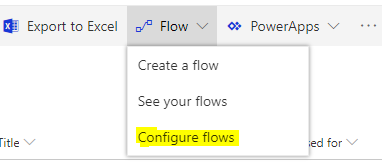
We are adding a new menu item under the Flow menu that will let customers configure the type of approvals they would like to use in their lists and libraries (Request sign-off, or Content approval), or turn approvals off altogether. We have added this feature based on the feedback that we received for the rollout of the Request sign-off feature, where some customers preferred to use the Content approval feature which changes the visibility of the current item based on the approval status, and there are fixed approvers for a given list or library, or other customers had other custom flows configured for their list or library, and did not want to have Request sign-off to become a source of confusion for their users. To make changes, as site owner, you will be able click on Flow->Configure flows in the command bar of your list or library: Then in the panel that appears, pick the approval method that you'd like, or turn approvals off altogether: The new configuration panel will become available for our Targeted Release customers in early September, and then go to the rest of our customers. We expect to complete the rollout by September 19. Please continue to keep the feedback for our features coming, and tell us how we can make SharePoint work better for you.Multiple sharepoint lists sharing same columns
Hi, I'm new to Sharepoint and I have an issue where I'm not able to find a way to share list data. What I tried to do is have 3 sets of lists each with their own columns and columns that they share. Each list has a custom level of priviledges: LIST.A: Column1 Column2 Column3 Column4 Access by users set.A LIST.B: Column1 Column4 Column5 Access by users set.B LIST.C: Column1 Column2 Column4 Column6 Access by users set.C Is there a way to do this? Thanks, Nikola