list modern experience
5 Topics
Spurious blank entry at top of a choice column entry
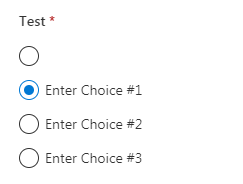
Hello all, With Sharepoint New Experience, I have created a list with a column, which is of type Choice, and contains a couple of items. When I go back to my list and create a new item, my data item always shows a blank item at the top of the list, which looks a bit, well, daft. Here is a snapshot of it 'in action': I created the column like this: I have tried many, many options, also with Chrome and IE11, but I always get the nameless option at the top. It is also the same if I use a drop-down menu; there's a blank entry at the top. There are no extra lines in the 'Type each choice' field. A google search appears to show that I am the only person in the world with this problem (everybody else appears to want a blank entry. I don't want one!) What am I doing wrong? Thanks in advance, Chris10KViews3likes22Comments