life sciences
300 Topics
Clinical precision starts with more complete documentation
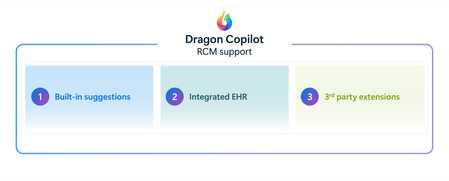
This blog is authored by Josh Waldo, Product Manager Every patient has a story, and that story deserves to be accurately reflected in the clinical documentation. Clinicians work hard to assess, diagnose, and care for patients, often while balancing complex cases, competing priorities, and limited time. While the diagnosis itself may be clear, the documentation does not always capture every detail that helps tell the full patient story. Important clinical information about severity, complexity, acuity, or related conditions may be discussed during the encounter but not fully reflected in the medical record. These details matter. Clinical documentation serves as the foundation for communication across care teams, supports quality reporting and care coordination, and provides an accurate record of the care delivered. Dragon Copilot helps clinicians create more complete documentation by identifying potential opportunities where additional specificity may be appropriate based on information already present within the encounter. This capability helps ensure that the documentation more fully reflects the clinician's assessment and the patient's clinical story. Rather than asking clinicians to remember every documentation requirement or revisit records after the encounter, Dragon Copilot can surface contextual suggestions that highlight where additional detail may strengthen the completeness of the note. For example, when documenting certain conditions, clinicians may receive suggestions that help capture additional clinically relevant details that were discussed during the visit and support a more complete description of the patient's condition. Importantly, these suggestions do not change a diagnosis, influence clinical decision-making, or replace clinician judgment. The clinician remains responsible for every diagnosis and every documentation decision. Dragon Copilot simply helps ensure that the documentation accurately reflects what the clinician already knows and has determined. Supporting better documentation without disrupting workflow Documentation quality should not require additional chart reviews, extensive research, or time-consuming follow-up work. Dragon Copilot is designed to fit naturally into existing clinical workflows, providing documentation support within the course of the encounter. By surfacing opportunities for greater specificity at the point of documentation, clinicians can address potential gaps in the moment rather than correcting them later. This may help reduce the need for downstream clarification requests from CDI and coding teams, saving time while improving the completeness of the medical record. Most importantly, clinicians remain in control. Suggestions are simply that suggestions. The clinician decides what is relevant, appropriate, and ultimately included in the note. Why more complete documentation matters Clinical documentation is used by many people beyond the author of the note. Physicians, nurses, specialists, care coordinators, coding professionals, quality teams, and healthcare organizations all rely on documentation to understand a patient's condition and the care that was provided. When documentation more fully reflects the clinician's assessment, it can support clearer communication across teams and a more consistent understanding of the patient's clinical status throughout the care journey. More complete documentation can also help organizations better reflect patient complexity, support quality initiatives, and reduce the administrative effort associated with documentation clarification and follow-up. For clinicians, that means less time spent revisiting notes and more confidence that the patient's story has been accurately captured in the record. AI that supports clinical expertise Dragon Copilot is built on a simple principle: AI should support clinical expertise, not replace it. Diagnosis specificity suggestions is built on a foundation of proven clinical AI innovation, informed by more than a decade of real-world healthcare experience. Drawing on years of clinician interactions and documentation insights, the feature is designed to surface meaningful opportunities for greater diagnostic specificity while fitting naturally into existing workflows. The technology does not diagnose patients, recommend treatments, or override clinical judgment. Instead, it acts as an intelligent assistant that helps clinicians identify opportunities to enhance documentation based on information already available during the encounter. By reducing some of the cognitive burden associated with documentation, Dragon Copilot allows clinicians to focus their attention where it matters most: caring for patients. Helping the right patient story reach the medical record Healthcare organizations continue to look for ways to improve documentation quality while reducing administrative burden. Achieving both goals requires technology that works alongside clinicians, helping them document care more efficiently without creating additional work. By helping clinicians capture greater detail within their existing workflows, Dragon Copilot supports more complete records, more accurate documentation, and a smoother documentation experience. Because better documentation is not about changing the diagnosis. It is about helping ensure that the right patient story is reflected in the medical record with greater clarity, completeness, and confidence. Learn more about Dragon Copilot.Operationalizing AI powered medical imaging pipeline for cohort building
Authors: Jared Erwin, Senior Software Engineer, HLS Nursing AI and Data Platform, Faculty UW School of Medicine Manoj Kumar, Director, HLS - Data & AI HLS Frontiers AI Alberto Santamaria-Pang, Principal Applied Data Scientist, HLS Frontiers AI and Adjunct Faculty, Johns Hopkins Medicine Overview In Part 1, of this series, we showed how natural language could be used to define medical imaging cohorts and retrieve relevant studies in seconds instead of months. That proof-of-concept demonstrated the value of the idea — but not how to make it repeatable, or production-ready. This post focuses on how we turned that prototype into a production-oriented Azure Machine Learning pipeline — to scale execution and produce clear, versioned artifacts that could drive an interactive cohort exploration UI. If you're building ML pipelines for medical imaging, or any domain where data is large, messy, and locked behind access controls, we hope our experience saves you time. From scripts to a pipeline: Why Azure ML components? The original hackathon implementation consisted of notebooks and scripts that required careful manual execution. To make the system repeatable and auditable, we standardized it using Azure ML pipelines. Azure ML pipelines gave us: Componentized execution — each processing step is a self-contained unit with defined inputs, outputs, and dependencies Parallel branches — steps that don't depend on each other run concurrently Reproducibility — every run is versioned and logged with full lineage Compute flexibility — run on CPU for metadata extraction, GPU for model inference, without manual orchestration The pipeline architecture The pipeline consists of 5 python components arranged in a DAG with two parallel branches: [0]scans a DICOM directory and extracts metadata from headers — study/series UIDs, modality, body part, slice counts. [1]classifies each series by anatomy and orientation using a multi-tier strategy (more on this below). [2] and [3] form the search pipeline: anatomy labels are converted to natural language text templates, then encoded with BiomedCLIP into a FAISS vector index. [4]generates 2D UMAP coordinates from the embeddings for the interactive scatter plot visualization in the UI. The image depicts a flowchart detailing the process of DICOM metadata extraction, anatomy classification, visualization enrichment, and text template generation, followed by the creation of a FAISS vector index. Components 2 and 4 run in parallel after component 1 completes, saving roughly 10-15% of total execution time. It's a modest gain for a single run, but it adds up when iterating on pipeline parameters. [1] Anatomy classification, integrating MedImageInsight The Anatomy classification component in the pipeline relies on MedImageInsight (MI2). MedImageInsight is Microsoft's foundation model for medical image understanding, available through the Azure AI Foundry model catalog. Unlike generative models, MedImageInsight is an embedding model — it maps medical images and text into a shared 1024-dimensional vector space, enabling tasks like classification and similarity search by comparing image embeddings against text label embeddings. Given a DICOM image, we compare its embedding against candidate labels (e.g., "Brain", "Chest", "Abdomen") to determine the body part, scan orientation, and other imaging characteristics through zero-shot classification. We also may get directly annotated anatomy from component 0, the DICOM metadata extractor component. We can combine both data points to build our final search index. [2] [3] FAISS index construction As an input to the FAISS index, we first run component 2, the text template generator. This component takes the metadata and anatomy information from components 0 and 1 and feeds them into 5 different agents with different instructions on how to describe the DICOM study. This results in textual descriptions which some variation, referred to as text templates, which can be indexed in the next component The FAISS index builder (component 3) uses BiomedCLIP to encode all text templates into 512-dimensional vectors: MODEL_NAME = "hf-hub:microsoft/BiomedCLIP-PubMedBERT_256-vit_base_patch16_224" @torch.no_grad() def encode(self, texts: List[str], batch_size: int = 256) -> np.ndarray: embeddings = [] for i in range(0, len(texts), batch_size): batch = texts[i:i+batch_size] tokens = self.tokenizer(batch).to(self.device) batch_embeddings = self.model.encode_text(tokens) batch_embeddings = F.normalize(batch_embeddings, dim=-1) # L2 normalize embeddings.append(batch_embeddings.cpu().numpy()) return np.vstack(embeddings) We L2-normalize all vectors and use faiss.IndexFlatIP (inner product), which is equivalent to cosine similarity on normalized vectors. For our current dataset sizes (thousands of series), flat indexing is fast enough. For hospital-scale datasets with millions of images, we might switch to IndexIVFFlat or IndexHNSW for approximate nearest neighbor search. In the cohort explorer app, a user will enter a natural language query, which is then converted to embeddings using the same BiomedCLIP model. This allows a search using the FAISS index to find relevant DICOM studies. [4] Visualization: making embeddings explorable The scatter plot in the UI is often the first thing users interact with. It needs to show meaningful clusters without requiring users to understand dimensionality reduction. Component 4 takes the embeddings from component 1 and projects them to 2D with UMAP: umap = UMAP( n_components=2, n_neighbors=10, # Balances local vs. global structure min_dist=0.5, # Prevents over-clustering metric='cosine', # Matches our embedding similarity metric random_state=42 # Reproducible layouts ) coordinates_2d = umap.fit_transform(features) Each point in the scatter plot corresponds to a single DICOM series produced by the pipeline, with color, grouping, and hover metadata derived directly from the JSON artifacts emitted by components 1 and 4. Each pipeline run produces a small set of well-defined artifacts — metadata tables, embedding vectors, UMAP coordinates, and the FAISS index — which are consumed directly by the cohort exploration UI. The cohort explorer application can reload or switch between datasets. The diagram is a screen capture of an Azure ML pipeline. It includes 5 pipeline components along with connecting arrows showing incoming and outgoing data, including the final outputs of the pipeline. Pipeline execution: time, cost, and what we learned Here's what a typical pipeline run looks like for a dataset of ~4,500 DICOM series: Component Task Approximate Time (CPU) Approximate Time (GPU) 0 - DICOM Metadata Extractor Scan files, extract headers 5-10 min 5-10 min 1 - Anatomy Classification Classify anatomy/orientation 90-120 min 5-10 min 2 - Text Template Generator Generate 5 templates per series 5-10 min 5-10 min 3 - FAISS Index Builder BiomedCLIP encoding + FAISS build 60-90 min 10-15 min 4 - Visualization Enrichment UMAP + color assignment 20-40 min 5-10 min Azure ML overhead Compute provisioning, env setup 5-10 min 5-10 min Total ~200-300 min ~30-50 min Key observations: Azure ML overhead is significant when doing quick iteration and testing. Compute provisioning, conda environment builds, and data mounting add several minutes before any component code runs. We first built each component as python code to run locally and debug before our first Azure ML run. This way we quickly iterated and avoided cost until we were ready. BiomedCLIP encoding dominates on CPU. Component 3 is the bottleneck. Moving to GPU compute for this component cuts encoding time roughly in half, but GPU clusters cost more. For a pipeline you run occasionally, CPU is fine. For frequent re-indexing, GPU pays for itself. Batch size tuning matters. The default BiomedCLIP batch size of 256 balances memory and throughput. On GPU, you can push to 512. On CPU with limited RAM, drop to 128. At Scale: 120,000 Images, CPU vs. GPU We ran the full pipeline against a larger dataset of ~120,000 images to understand how compute choice affects end-to-end time and cost: CPU Pipeline GPU Pipeline Pipeline compute time 4 days, 12 hours (108 hrs) 15 hours Pipeline compute cost ~$0.25/hr × 108 hrs = ~$27 ~$3.00/hr × 15 hrs = ~$45 MedImageInsight endpoint (MaaP on Standard_NC4as_T4_v3) ~$151 ~$21 Total estimated cost ~$178 ~$66 Both pipeline runs make the same ~120,000 classification calls to the MedImageInsight endpoint, but those calls are spread out over different time periods depending on how quickly and efficiently the pipeline can make the calls to MedImageInsight. The hourly cost for MedImageInsight on a Standard_NC4as_T4_v3 VM is ~$1.40/hr. Resulting in the estimated costs for MedImageInsight in the table above. GPU compute was roughly 7× faster at about 0.37× the total cost when endpoint costs are included. This was a key learning and clearly indicates the benefits of the more powerful compute resources. MedImageInsight can be deployed in two ways, depending on dataset size and operational needs. For smaller or infrequently processed datasets, we deploy MedImageInsight as a managed Azure ML online endpoint and invoke it from the pipeline. This keeps the pipeline simpler and avoids managing the MedImageInsight compute directly, while offering comparable performance at modest scale. For larger batch workloads, an alternative approach is to load MedImageInsight directly on the Azure ML pipeline’s GPU-backed compute. In this model, the pipeline handles both model loading and classification, eliminating per-request network round trips and the fixed cost of hosting a persistent endpoint. While this approach requires slightly longer pipeline run time, it becomes more cost‑effective at scale by avoiding endpoint overhead and improving throughput during bulk processing. Possible future enhancements Additional modalities: Extending the pipeline and classification to CT, X-ray, and ultrasound imaging, and build on the pattern for pathology images Image embeddings fusion: Combining MedImageInsight image embeddings with text embeddings for hybrid search Condition-aware search: Enabling queries about findings and conditions, not just imaging parameters The gap between a hackathon demo and a production system is where the real engineering happens. We hope sharing our journey helps others building similar systems. If you’re interested in partnering with us to work toward this goal or need access to the GitHub repo with the pipeline and UI code, contact authors through your Microsoft account team or reach out to Microsoft HLS AI frontier team The healthcare AI models in Microsoft Foundry are intended for research and model development exploration. The models are not designed or intended to be deployed in clinical settings as-is nor for use in the diagnosis or treatment of any health or medical condition, and the individual models' performances for such purposes have not been established. You bear sole responsibility and liability for any use of the healthcare AI models, including verification of outputs and incorporation into any product or service intended for a medical purpose or to inform clinical decision-making, compliance with applicable healthcare laws and regulations, and obtaining any necessary clearances or approvals.Fabric Data Agents can choose Query Language based on Context
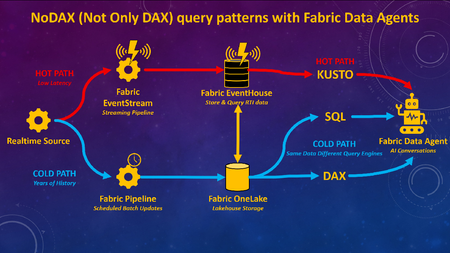
What if you could combine decades of historical analysis with live, real-time data in one seamless AI chat experience? Traditionally, analyzing large volumes of past data (Analytics / Business Intelligence) has been a separate architecture, or has at least required separate toolsets, from monitoring what’s happening right now (real-time, IoT, etc). With Fabric Data Agents, analytics for large volumes of historical data can be accessible with real-time data via a single AI query endpoint. Analytics can be used to gain understanding from historical data, and findings can be put into action for real-time scenarios, all through a single interface for the end users. Figure 1.0 – Fabric Data Agent can use different query languages for optimal performance with a lambda-style RTI architecture on Fabric Many of the demos I’ve seen for Fabric Data Agents will highlight the capability to connect to different types of queries and sources via a single endpoint such as Lakehouses (SQL), Warehouses (SQL), Semantic Models (DAX), Eventhouses (Kusto), and Ontologies. What I have not seen frequently discussed is adding different query engines on the same data for the purpose of optimizing query performance based upon the context of the query and the latency of the data, as per Figure 1.0 above. To be clear, I am not advocating duplication of data for the purpose of query performance. Rather, this architecture would enable Fabric Data Agents to choose the best query language for the context of the query. Hence the acronym I created for this blog article “NoDAX” which stands for “Not Only DAX.” NoSQL “Not Only SQL” is a real term referring to non-relational database systems designed for flexible schemas, horizontal scaling, and high-performance access to large, distributed datasets. NoDAX exists only within this blog post, and represents the availability of multiple query languages within a single Fabric Data Agent. The best query language can be used based on the context of the question and query. Not only DAX but also SQL, Kusto, and Ontologies can be queried to generate the most efficient contextual query. Figure 1.1 – Explaining the NoDAX acronym created for this article Why does this use case matter? The ability to query both the past and the present in one interface isn’t just a novel technical capability. Many analytic solutions can benefit from a pattern of [analysis + action]. Analytics by itself is great at understanding the past. We can look at years of historical data to figure out patterns, drivers of performance, and what went right or wrong. Historical context is incredibly valuable, but understanding the past doesn’t improve outcomes in the future. The real value comes when we connect findings from the past to decisions we make right now and in the future. If you discover historical data patterns that lead to an inventory shortage, a fraud event, or a patient risk score increasing, you can apply that insight to the latest operational data and act on ongoing workflows. Analytics and action have to reinforce each other. Analytics without action doesn’t create value. But action without understanding can easily make things worse. I once had a veteran analytics manager say to me “Without carefully considered and vetted KPIs you are flying blind. But be careful, because a KPI without proper context and understanding will quickly become a blunt object that an empty suit uses to whack somebody over the head.” Figure 1.2 – The purpose of this architecture is to learn from the past to improve the present and future Different Query Languages without data duplication A Fabric real-time architecture can be part of a design pattern that is similar to if not a version of a Lambda architecture. With a Lambda architecture, hot path data is available for real-time alerting and analytics while cold path data is stored for deep and complete historical analytics and data science. Figure 1.3 – NoDAX architecture can query a lambda-style architecture via multiple query endpoints Per the diagram above, real-time data is available in Fabric ASAP and cycled through an Eventhouse. Historical data can either be batched into a Fabric Lakehouse / Warehouse or copied over from the Eventhouse. A Fabric Data Agent can then generate Kusto queries against the Eventhouse, SQL queries against the Lakehouse / Warehouse, or DAX queries against the Warehouse / Lakehouse via the Direct Lake Semantic Model. DAX is often the best query language for data having deep history with complext analytic logic. SQL can be the best query language for retrieving historical row-level information from a robust relational database. Kusto can be used to query what’s happening right now via a real-time Eventhouse. Lambda architectures have been around for years, so why is this architecture a new option? Past lambda architectures would have hot path data available in a streaming toolset such as Azure Eventhub, and then store historical cold path data in a tool such as Azure Data Lake. Hot path alerting and reporting was usually disparate from historical cold path analytics. Per the diagram 3.4 below, with Microsoft Fabric, you can now: implement both the hot and cold path in a single Fabric environment (Eventstream, Eventhouse, Lakehouse / Warehouse). Ontologies are also an option. query the hot and cold path data via a single agentic endpoint using a Fabric Data agent Query either the hot or cold path using the optimal query language for the context of the question (DAX, SQL, Kusto, Ontologies) Figure 1.4 – Fabric not only unifies components of lambda-style architecture, but Data Agent also unites the query endpoints for AI unification Example use case for Healthcare Here’s an example of a Healthcare use case: A user might ask a question “Show me the percentage of patients who had their pain scores checked every hour for gall bladder removals on floor 5 over the last 3 years.” This will ideally filter three years worth of data for patients with specific procedure codes, filtered for specific rooms, and calculate the pain score check compliance for those visits. This query is ideal for the DAX language with a Semantic Model. The user might then want to see details for a specific time period, and ask “Show me the pain score results for patients who had their gall bladder removed on July 3 2024 on floor 5.” A SQL query might be the best option here against the Fabric Warehouse or Lakehouse, since SQL is better than DAX at retrieving row-level information. Then the user might want to know what is happening today. “Show me the pain score checks for inpatients right now who had their gall bladder removed on floor 5.” The Kusto language can retrieve the information that streams into a Fabric Eventhouse via an Eventstream. Based on the findings, the user may take an action. With the example above, a user was able to query deep history with analytic logic, retrieve historical row-level information from a robust relational database, and then view what’s happening right now for those patients. Action can then be taken in the here and now. Here are some additional use cases for Finance, Supply Chain, and Manufacturing in addition to Healthcare: Figure 1.5 – Industry use cases for Fabric Data Agent with multiple endpoints Video Summary Below is my video summary and demo of the Fabric Data Agent NoDAX architecture: Configure Fabric Data Agent for NoDAX query patterns When more than one source is added to a Fabric Data Agent, by default the source used for a specific query will be chosen based on interpreting available metadata. The Data Agents have a field called "Agent instructions" which can be used to provide detailed instructions about choosing the right source for the right question. Here’s a screenshot of the Agent instructions: Figure 1.6 – Agent instructions will guide the Fabric Data Agent to the best query endpoint I would recommend extensive unit testing and iterative improvements to the Agent instructions based upon your own data and use cases. Here’s a few examples that worked for my initial testing. I would recommend much more robust and carefully designed prompts for a production solution, but this is a baseline of an approach I found to work based on the demo in the video above: The KQL database named SeattleFireEventHouse is a live stream of 911 calls to the fire department in the city of Seattle. Whenever someone asks for “most recent” or “newest” or “latest” use SeattleFireEventHouse The lakehouse SeattleFireLakehouse should be queried with a SQL statement when someone asks for a list of incidents before the year 2026. Use SQL to retrieve row level requests for historical data. The semantic model SeattleFireSemantic Model should be queried when questions ask about historical analytic trends such as call volume averages, Year over year changes, and queries that aggregate data for analytic queries.How Microsoft Scout Brings Agentic AI to Everyday Healthcare and Life Sciences Work
Healthcare and life sciences teams are asked to do the impossible every day: deliver better outcomes, move faster, and stretch every dollar — all while navigating some of the most regulated, documentation-heavy workflows in any industry. The promise of AI has never been about replacing the experts who do this work. It’s about giving them their time back. That promise is entering a new phase. We’re moving from AI that answers to AI that acts — agentic AI that can carry out multi-step work across your applications, your documents, and the web, with you in control. Nowhere is the opportunity more concrete than in the daily operational grind of healthcare and life sciences. From answering to doing Most knowledge work in HLS isn’t blocked by a lack of information — it’s blocked by the effort of pulling that information together and turning it into action. Gathering the right documents. Summarizing a thread. Drafting the first version. Updating five systems with the same three facts. Microsoft Scout is designed for exactly this layer of work. Think of it as an agentic AI teammate on your desktop — one that can read and organize files, search across your email, calendar, and Teams, browse the web, and complete genuinely multi-step tasks on your behalf. Crucially, it can run on a schedule, so routine work happens before you sit down, and it keeps a human in the loop for anything that matters. Real-world ways HLS teams can do more with less Provider operations: Assemble the documentation needed for a referral or prior-authorization request, summarize the relevant history, and draft the submission — turning a 30-minute scramble into a two-minute review. Clinical research coordination: Pull together study start-up documents, track outstanding site communications, and draft consistent follow-ups, so coordinators spend their time on sites and patients rather than inboxes. Medical affairs and field medical: Prepare for an engagement by gathering the latest publications and prior interactions into a single brief, then capture a structured summary afterward — every meeting, consistently. Commercial and market access: Stand up an account briefing or a competitive news roundup on a recurring schedule, so the team starts every week informed instead of researching from scratch. The thread running through all of these is the same: reclaim capacity, increase consistency, and accelerate speed to market — doing more with the people and budget you already have. Built for the trust HLS demands In this industry, “helpful” is not enough; it has to be trustworthy. Agentic AI for healthcare and life sciences has to respect enterprise security and data boundaries, keep sensitive information under your control, and keep a person in command of consequential decisions. The goal is to automate the busywork around expert judgment — never to automate the judgment itself. A family of AI that works the way you do Scout is part of a broader shift in how Microsoft is bringing AI to work. Where Microsoft 365 Copilot brings AI into the flow of the apps you already use, and Microsoft Cowork reimagines how teams collaborate with AI, Scout focuses on agentic action at the desktop — automating end-to-end tasks and recurring workflows. Together they point to the same future: more of your day spent on the work only you can do. Start small, compound the gains You don’t need a transformation program to begin. Pick one repetitive, high-friction workflow — the weekly roundup, the recurring briefing, the documentation prep that nobody enjoys — and let agentic AI take the first pass. The time you reclaim funds the next idea. We’ll be sharing practical, healthcare- and life-sciences-specific playbooks here every week. Subscribe to the blog, and tell us in the comments: what’s the one recurring task you’d hand to an AI teammate first? Learn more about Microsoft Scout: Introducing Microsoft Scout: Your always-on personal agent | Microsoft 365 Blog Microsoft Scout (Frontier) overview | Microsoft LearnThe Agent Era Has Already Arrived in Healthcare. Are You Ready to Govern It?
Start here. Answer honestly. Right now, how many AI agents are running inside your organization? Who built them? Which patient data, claims information, or proprietary research are they configured to access? If your CISO walked into your office tomorrow and asked for a complete inventory of every agent in your enterprise, including each one's owner, the systems it is permitted to access, and the policies that govern how it operates, could you produce that inventory before lunch? When the analyst who built that clinical summarization agent moves to a new role next quarter, what happens to the agent? Does its access continue? Does anyone notice? If a regulator opened an audit tomorrow, could you prove that every AI agent operating in your environment is subject to the same lifecycle controls, identity standards, and data protection policies you apply to your human workforce? Could you disable a compromised agent enterprise-wide with a single click, the same way you would revoke a lost access credential? If those questions made you hesitate, you are not alone. Almost no healthcare or life sciences organization can answer them confidently today. And that gap is exactly where the next decade of risk, and the next decade of competitive advantage, will be decided. The quiet crisis nobody talks about yet Healthcare and life sciences leaders are caught in a paradox. You need AI to survive the operational pressures squeezing your organization from every direction. Physician burnout is at crisis levels, with 45.2% of US physicians reporting symptoms in recent Mayo Clinic research. Revenue cycle complexity continues to climb, and McKinsey now estimates that the cost to collect consumes 30 to 60 percent of net patient revenue at many provider organizations. Prior authorization backlogs delay care. Clinical trial timelines stretch into years. Documentation burden eats hours that belong to patients. So you started piloting Microsoft 365 Copilot. You experimented with agents in Copilot Studio. Maybe a clinical team built an agent to draft discharge summaries. A revenue cycle group spun up an agent to triage denials. A medical affairs team built one to comb through literature. Each one delivered value. Each one was approved on its own merits. And then a quiet thing happened. You lost track of how many agents you have. According to KPMG's AI Quarterly Pulse Survey, 88 percent of organizations are now exploring or piloting AI agents. IDC projects that 1.3 billion agents will be in operation by 2028. Inside your own walls, the number is climbing fast. Each new agent is a digital identity that authenticates into your environment, accesses your data, and executes work on behalf of your business. Most have no formal owner. Most have no documented access scope. Most have no decommissioning plan. Most have never been reviewed by Compliance. Microsoft's 2024 Data Security Index found that 84 percent of organizations lack confidence in their AI data security posture, and 40 percent have already experienced an AI related data security incident. That is not a future problem. That is a now problem. If shadow IT was the defining governance challenge of the last decade, agent sprawl is the defining challenge of this one. And in healthcare and life sciences, where ePHI, member PII, and proprietary clinical trial data are at stake, the consequences are not theoretical. They are existential. The reframe that changes everything Here is the counterintuitive truth that separates HLS organizations that scale AI from those stuck in pilot purgatory. Governance is not the brake on AI adoption. Governance is the accelerator. When security, identity, and agent oversight are engineered in from day one, your teams stop tiptoeing. They build with confidence because the guardrails are real. They expand into clinical use cases because Compliance trusts the foundation. They scale wall-to-wall because IT can prove every agent is accounted for. The organizations that lead with trust end up moving faster in the long run, not slower. This is the bet behind Microsoft Agent 365 and Microsoft 365 E7. What Agent 365 and Microsoft 365 E7 actually are Microsoft 365 E7, announced March 6, 2026 and now generally available, is the Frontier Suite. It is Microsoft's answer to a single question that every healthcare CIO, CISO, and COO is wrestling with: how do you run AI safely, at scale, across an entire organization? E7 is not another SKU on top of your existing stack. It is one cohesive platform that brings together four essential capabilities: Microsoft 365 E5 for your enterprise productivity, collaboration, and security foundation, including Microsoft Defender, Microsoft Purview, and Microsoft Intune. Microsoft 365 Copilot for AI grounded in your organizational data through Work IQ, embedded in the flow of work for clinicians, researchers, operations teams, and administrators. Microsoft Entra Suite for identity governance, Conditional Access, and Zero Trust network access, extended consistently across users, applications, and AI agents. Microsoft Agent 365 as the centralized control plane to observe, govern, and secure every AI agent, whether built by Microsoft, your internal teams, or external partners. Agent 365 is also available as a standalone capability. But the magic happens when it works alongside the rest of E7, because that is where AI, identity, security, and governance stop being separate disciplines and become one operating system for the agentic era. The mental model that unlocks everything: agents are first-class digital identities Here is the simplest way to understand what Agent 365 does. Microsoft 365 governs your enterprise identities. Agent 365 governs your agent identities. The same control plane disciplines apply to both. Think about the rigor you apply to any privileged identity in your environment, whether a service account, an API integration, or a third-party application connector. You issue it a unique identity in Microsoft Entra. You assign a human owner who is accountable. You scope its access to least privilege. You apply DLP, sensitivity labels, and Conditional Access. You monitor for anomalous behavior. You have a documented decommissioning path. Identities that no one watches over become identities that get exploited. Now ask yourself how the last AI agent in your environment was created. The honest answer at most organizations: someone opened Copilot Studio, pointed it at a SharePoint library of clinical protocols, gave it a name, and moved on. No documented owner. No access review. No retirement plan. Compliance was never consulted. You would never stand up a privileged service account that way. Yet that is exactly how most organizations are standing up the fastest-growing class of digital identities in their environment. Agent 365 closes that gap by extending the identity, security, and lifecycle controls you already trust for users and applications so they apply with the same rigor to AI agents. Every agent receives a unique Entra Agent ID, a first-class identity in Azure AD with the same governance primitives as any other privileged identity. Every agent has a designated human owner who is accountable for its scope and behavior. Access is granted explicitly through Conditional Access and policy templates, so each agent operates only against the resources its purpose requires. Microsoft Purview DLP and sensitivity labels govern which data the agent is permitted to read, generate, or share. Microsoft Defender monitors agent activity for anomalies and surfaces alerts the same way it does for any other identity-driven risk. Lifecycle rules flag or auto-retire agents that are dormant, orphaned, or risky, eliminating the unowned automations that quietly accumulate in every enterprise. This is not metaphor. It is the actual architecture. The fastest path to governing agents is to extend the identity infrastructure you already trust. The three pillars of Agent 365: Observe, Govern, Secure Pillar 1: Observe. Know what is actually happening. You cannot govern what you cannot see. The first job of Agent 365 is to give you complete, continuous visibility into every AI agent operating in your environment. The Agent Registry is the single authoritative inventory of every agent, whether built by Microsoft, custom developed by your team, deployed by a partner, or discovered as a shadow agent operating without oversight. Each entry shows the owner, purpose, capabilities, lifecycle status, and business context. Agent Analytics tracks adoption, quality, performance, and business impact. Agent Map visualizes how agents connect with other agents, people, tools, and data sources, surfacing dependencies and risk concentrations you would never spot in a spreadsheet. Real time monitoring flows directly into Microsoft Defender, so unusual agent behavior generates alerts the same way unusual user behavior does today. For a health system CISO, that means finally being able to answer the question: which agents are touching ePHI, and is every one of them authorized? For a life sciences compliance officer, it means audit ready visibility into every AI system operating across R&D, regulatory affairs, and commercial. For a payer operations leader, it means knowing which claims processing agents are actually delivering accuracy and throughput, and which are quietly underperforming. Pillar 2: Govern. Set the rules. Control the lifecycle. Visibility is the start. Control is what turns visibility into outcomes. Agent 365 ensures that every agent is approved, compliant, and accountable from creation through retirement. IT led onboarding workflows make sure each agent launches with the right identity, access, and ownership before it ever touches data. Policy templates enforce data handling, permission, and usage rules consistently from day one through Defender, Entra, and Purview. Rules based agent management gives admins an automated If This Then That interface. If an agent is unused for 90 days, auto retire it. If an agent is flagged as risky, block it and alert the security operations team. No human in the loop required for the routine cases, full alerting and override for the exceptions. Ownership enforcement requires every agent to have a designated human owner. When that owner leaves the organization, the platform flags the orphaned agent for bulk reassignment, so nothing operates without clear accountability. The Tools Gateway brokers and audits tool access for agents, enabling least privilege at the action level, not just the identity level. For HLS specifically, that translates to outcomes you can take to your board. A hospital CIO can ensure any agent touching Epic or Cerner goes through standardized approval. A pharma IT director can enforce that clinical trial matching agents only touch de identified data unless elevated permissions are explicitly granted and documented. A payer compliance team can automatically retire agents tied to a completed open enrollment campaign instead of letting them silently expand the attack surface. Pillar 3: Secure. Protect agents and data with the stack you already trust. The final pillar is what makes Agent 365 production grade for healthcare and life sciences. Security and compliance are not bolted on. They are the same proven Microsoft security stack you already run for your users, extended natively to agents. Microsoft Purview, your data security and compliance backbone: Data Security Posture Management for AI gives visibility into how agents interact with sensitive data and detects risky usage patterns. Data Loss Prevention stops agents from accessing or processing files labeled Highly Confidential, even when a user prompts them to. Sensitivity labels are inherited automatically by agent outputs, governing how data is viewed, extracted, or shared downstream. Insider Risk Management detects risky behavior by users interacting with agents, such as unusual prompt patterns or excessive access to sensitive data. Communication Compliance monitors AI driven interactions for regulatory or ethical violations and unauthorized disclosures. eDiscovery and Audit logs every agent interaction, giving legal, compliance, and IT teams the transparency required for HIPAA, GDPR, and FDA 21 CFR Part 11. Oversharing Assessments run weekly checks for sensitive data exposure across SharePoint sites and agent access patterns. Microsoft Entra, your identity control plane: Entra Agent ID gives every agent a unique identity in Azure AD, so Conditional Access, role based access, and risk based policies apply individually. Conditional Access for agents enforces policies like only allow this prior authorization agent to access claims data from approved devices and locations during business hours. Identity Governance provides access packages for agents with reduced scope permissions and least privilege defaults. Block at Scale lets you instantly disable all high-risk agents from Entra in a single action. Microsoft Defender, your threat protection layer: Security Posture Management identifies and remediates agent misconfigurations, such as agents running with no authentication. Threat Detection and Blocking monitors suspicious agent activity, generates alerts, and blocks unauthorized tool invocations. Threat Investigation and Hunting collects unified agent observability logs so SOC teams can forensically trace every action an agent took. One Click Kill Switch instantly disables any agent and surfaces the complete audit trail of every action it took before being stopped. For a hospital security operations team, that means the same DLP policies protecting patient records in email and Teams now protect agents that summarize clinical notes. For a life sciences data protection officer, it means agents accessing proprietary compound data respect the same sensitivity labels as human researchers. For a payer CISO, it means an anomalous claims agent can be killed in seconds, with a complete forensic record of every member record it touched. Why this only works as an integrated platform Individual capabilities are useful. Integration is what makes them transformative. Here is the contrast HLS leaders feel today versus what changes the moment E7 lights up. Without an integrated platform, you operate with: Fragmented tools for identity, security, compliance, and AI, each with its own console and its own gaps. No centralized agent inventory, forcing your IT and security teams to track bots and automations in spreadsheets. Inconsistent policy enforcement across agents, creating compliance gaps every audit team will eventually find. Blind spots where agents access data, invoke tools, or interact with other agents without any oversight. Manual triage when an incident hits, because nothing connects user identity, agent identity, and data classification in one view. With Microsoft 365 E7, you gain: A Unified Agent Registry providing a single source of truth for every agent, whether Microsoft built, custom developed, partner deployed, or shadow discovered. Entra Agent ID giving each agent a unique identity, so Conditional Access, role based access, and risk based policies apply at the individual agent level. Full lifecycle governance with standardized onboarding, periodic review, ownership transfers, auto retirement of dormant agents, and structured offboarding. Policy by design, where Purview DLP, sensitivity labels, and compliance rules extend to all agent interactions through pre built templates applied consistently from day one. One click disable to instantly freeze any agent, with Defender threat detection extended to agents and full audit trails for forensic investigation. Expanded threat coverage that addresses agent sprawl, overprivileged access, tool misuse, misconfiguration, and inter agent risk patterns no legacy tool was designed to see. Shared registry and controls that let IT, Security, and Compliance reference the same authoritative inventory across Defender, Entra, and Purview, eliminating the silos that slow incident response. This is the reason E7 exists as a platform, not a bundle. AI, identity, security, and governance stop being separate disciplines and start operating as one system. What this is actually worth: the Forrester numbers Microsoft commissioned Forrester to conduct a Total Economic Impact study of Microsoft 365 Copilot, published in March 2025. The composite organization in that study, modeled on real customer interviews, achieved: 132 percent three-year ROI with payback in under one year. 9 hours saved per Copilot user per month through automation of routine work like drafting, summarizing, and analysis. Up to 2.6 percent top line revenue lift through better qualified opportunities, improved win rates, and stronger retention in customer facing teams. 25 percent acceleration in new employee onboarding as new hires ramp faster on summarized institutional knowledge. Those are the verified numbers. The bigger story for HLS is what they look like when applied to clinical, claims, and research workflows where every reclaimed hour is an hour that goes back to patients, members, or science. AI is already defending AI The same agentic capabilities transforming clinical and operational workflows are now embedded in your security stack. Microsoft Security Copilot agents work alongside human analysts inside Defender, Entra, Purview, and Intune, accelerating threat response and absorbing the manual load that today drowns most security operations teams. Independent benchmarks back the impact. In a 162 admin randomized study published in 2025, the Conditional Access Optimization Agent in Microsoft Entra completed configuration tasks 43 percent faster and produced 48 percent more accurate Conditional Access policies than admins working without it. Security triage, alert investigation, and identity hygiene are following the same trajectory. For HLS security teams already stretched thin, that is hours reclaimed every week to focus on the threats that actually matter, with the same Agent 365 governance applying to the security agents themselves. The defenders are governed by the same rules as the workforce they defend. How HLS organizations are putting Agent 365 to work Here is how the value shows up across the three biggest HLS segments. For providers: reclaiming time for care The challenge: clinicians spend more time on documentation than on patients. Care coordination is fragmented. Burnout is gutting retention. The strategy: deploy agents that absorb administrative load while Agent 365 ensures every one of them respects ePHI boundaries. Clinical documentation agents integrated with Microsoft Dragon Copilot structure dictation against EHR requirements, apply billing codes, and flag missing elements before submission. Care coordination agents generate care plans, allocate tasks, and surface relevant patient context during multidisciplinary rounds, optimized for HL7 FHIR interoperability. Patient intake and scheduling agents built in Copilot Studio handle appointment booking, reminders, eligibility verification, and referral management. Handoff and shift summary agents pull from multiple systems to generate complete handoff summaries for nurses and physicians transitioning between shifts, reducing communication gaps that drive adverse events. The aha moment: applied across a 10,000 employee health system, nine hours per user per month is more than one million reclaimed hours a year. That is the equivalent of hundreds of full time clinicians, returned to direct patient care, with every agent governed under the same Conditional Access and DLP policies your IT team already manages today. For payers: transforming revenue cycle and member experience The challenge: prior auth backlogs delay care. Denial rates climb. Member services teams drown in volume. The strategy: agentic AI rewires the most expensive, most manual workflows in your operation while Agent 365 keeps every agent inside the lines on member PII. Prior authorization agents autonomously gather clinical documentation, cross reference medical policy, determine approval criteria, and route decisions, accelerating turnaround from days to hours. Claims processing agents automate billing and denial management. With cost to collect running 30 to 60 percent of net patient revenue at many organizations, even modest automation produces material margin recovery. Denial resolution and appeals agents analyze denial patterns, surface root causes, generate appeal documentation, and track success rates over time, turning a cost center into a continuous improvement engine. Member services agents integrated with Microsoft 365 Copilot Chat handle benefits inquiries, claims status, and self service triage, deflecting call volume and improving first contact resolution. Fraud detection and risk adjustment agents scan claims data for anomalies and optimize coding accuracy for Medicare Advantage and ACA populations. The aha moment: a payer CISO can disable an anomalous prior auth agent in one click and produce a complete forensic record of every member record it accessed, while Compliance simultaneously confirms the agent never violated DLP. That is regulatory readiness that legacy automation cannot deliver. For life sciences and pharma: accelerating discovery and commercialization The challenge: clinical trials take years. Regulatory submissions consume teams. Medical affairs cannot keep up with literature volume. The strategy: orchestrate agents across R&D, regulatory, medical, and commercial, with Agent 365 enforcing the data classification rules that proprietary IP and clinical data demand. Clinical trial matching agents scan patient profiles and eligibility criteria to surface trial opportunities, accelerating recruitment. Regulatory document preparation agents assemble submissions, cross reference data across modules, and ensure consistency in FDA, EMA, and global filings. Medical research and literature review agents powered by Microsoft GraphRAG retrieve research backed insights with verified source references, giving medical science liaisons trustworthy synthesis on demand. Pharmacovigilance agents monitor safety databases, flag potential adverse events, and generate timely case reports. Commercial insights and launch planning agents synthesize market data, payer policy, and HCP sentiment for sharper launch and field strategy. The aha moment: cutting even three months off a regulatory cycle on a single high revenue product can mean tens of millions in additional sales, while Purview sensitivity labels guarantee every agent accessing proprietary compound data respects the same data classification as your senior researchers. A phased path that actually works in regulated industries In regulated industries, a big bang AI rollout is a recipe for incidents. The HLS organizations getting this right are following a five-phase pattern that builds expertise and validates governance before scale. Establish. Form a cross-functional champion team across IT, Compliance, Clinical Operations, and Research. Define what risks you are mitigating and what outcomes you are unlocking. Inventory the agents already in flight. Configure. Stand up identity, DLP, and policy templates in Microsoft 365 Admin Center, Power Platform Admin Center, and Microsoft Purview. Enforce that any agent handling PHI runs in a secure environment with audit logging on by default. Pilot. Choose a small group of makers in a controlled environment. Start with non-critical workflows like internal reporting or scheduling before moving to clinical or member facing use cases. Run weekly reviews with Compliance and Security. Empower. Launch role specific training for clinicians, researchers, makers, and IT. Stand up a Center of Excellence to provide templates, best practices, and reusable patterns. Promote success stories internally to build momentum. Scale. Expand agent development across departments with governance as a guardrail, not a gate. Use pay as you go metering to track usage and optimize licensing. Refine policies continuously based on Purview signals and audit results. The strategic insight: organizations that lead with governance reach scale faster than those that lead with experimentation. Trust is the unlock, not the obstacle. Governance is a team sport Here is the pattern we see again and again. The HLS organizations that succeed with AI at scale are not the ones with the smartest IT shop or the boldest Compliance officer. They are the ones whose IT, Security, Compliance, Clinical, Research, and Operations leaders sit at the same table on agent strategy from week one. Agent 365 was designed for that table. The Agent Registry is the shared truth. Purview policies satisfy your Compliance officer. Entra controls reassure your CISO. The lifecycle workflows give your CIO confidence. The clinical and research outcomes give your COO and Chief Medical Officer the business case. Everyone gets the view they need from the same single source. Stand up an agent governance council. Meet every two weeks. Use the Agent Registry as your standing agenda. Make decisions in plain sight. The organizations that do this consistently outperform on both speed and safety. The ones that try to keep AI inside a single function fall behind on both. Who contributes what Think back to the mental model. You would never let a single function authorize, configure, and oversee a new privileged system on its own, not when it touches ePHI, claims, or proprietary research. Security, IT, Compliance, Clinical, and the relevant business owner all weigh in because the stakes are too high for any one seat to carry alone. Agent governance demands the same multidisciplinary scrutiny, and the council is where that happens. Each seat brings something the others cannot. CIO. Owns the agent strategy and the platform investment. Translates board-level AI ambition into an operating model the rest of the organization can execute against. CISO and Security Operations. Define agent identity standards, Conditional Access policies, and incident response playbooks. Without this seat, an anomalous agent touching ePHI becomes a breach instead of a contained event. Chief Compliance Officer and Privacy. Translate HIPAA, GDPR, FDA 21 CFR Part 11, and state regulations into Purview policies and audit requirements. This is the seat that keeps you out of an OCR investigation or a 483 letter. Chief Medical Officer and Clinical Operations. Validate that clinical agents are safe, accurate, and aligned with care standards. Own the clinical risk review for any agent that touches patient care, the same way you would for a new clinical protocol. Chief Research Officer or Head of R&D. Govern how agents interact with proprietary trial data, compound libraries, and scientific IP. The seat that protects the next decade of pipeline value. COO and Revenue Cycle Leadership. Prioritize the operational workflows where agents will move the needle on cost to collect, denial rates, and throughput, and own the business outcomes that justify the investment. Center of Excellence Lead. Maintains templates, reusable patterns, and maker enablement. Turns every council decision into a guardrail builders can actually use the next morning. Frontline champions. Clinicians, claims specialists, and researchers who pilot, give feedback, and carry credibility back to their peers. The seat that decides whether agents get adopted or quietly ignored. When every one of these voices is in the room, your governance council operates like a tumor board for AI. Different lenses, one shared decision, full accountability. That is how regulated industries make complex calls safely, and it is exactly the muscle Agent 365 was built to support. Seven questions to bring to your next leadership meeting If you want to know whether your organization is ready, run through these together. The places you hesitate are exactly where Agent 365 and E7 deliver the most value. Visibility. Do you know which AI agents, bots, and automations are running in your environment today, who built them, what they have access to, and whether they are still needed? Control. If someone on your team builds a new AI agent tomorrow, what is the actual process to make sure it is approved and secured? Or could they deploy it with wide open access? Security. What prevents an AI agent from reading or transmitting patient data it should not? Do you have a way to detect and stop a rogue or compromised agent? Accountability. Who owns the outputs of an AI agent's actions? What is the offboarding process when the agent or its creator leaves? Scale. Six months from now, you may have a hundred agents deployed across departments. Are your oversight and compliance structures ready for that volume? Cross-functional alignment. How are your IT, Security, and Compliance teams partnering on AI today? Governance is a team sport. Data readiness. How confident are you that your data estate is clean, labeled, and governed well enough for AI to surface accurate answers and not outdated or conflicting information? If you hesitated on even one of those, you have just identified where Agent 365 and Microsoft 365 E7 will pay for themselves the fastest. The path forward Here is the honest truth. The healthcare and life sciences organizations that lead in the next decade will not be the ones that adopted AI first. They will be the ones that adopted AI safely, compliantly, and at scale, with intelligence and trust woven into every layer. Microsoft Agent 365 and Microsoft 365 E7 give you the only integrated platform that brings AI, identity, security, and governance into one cohesive system, running in the flow of work you already use. This is not about adding another tool to your stack. It is about extending the investments you have already made in Microsoft 365, Entra, Defender, and Purview to cover the fastest-growing class of digital identities in your environment. The agent era has already arrived. The question is whether you will govern it with confidence or chase it with anxiety. We would love to help you lead. Take the next step Explore Microsoft Agent 365: The Control Plane for Agents Microsoft Entra Agent ID: aka.ms/EntraAgentID Learn more about Microsoft 365 E7, the Frontier Suite: Introducing Microsoft 365 E7 See Microsoft 365 Copilot in action: Microsoft 365 Copilot Read the Forrester TEI study: The Total Economic Impact of Microsoft 365 CopilotHealthcare Agent Orchestrator: Multi-agent Framework for Domain-Specific Decision Support
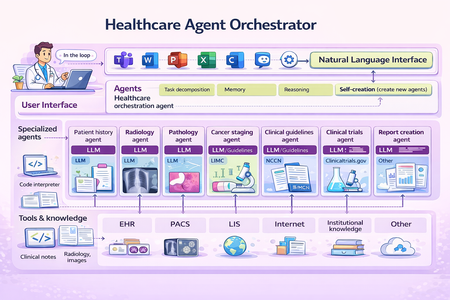
At Microsoft Build, we introduced the Healthcare Agent Orchestrator, now available in Azure AI Foundry Agent Catalog . In this blog, we unpack the science: how we structured the architecture, curated real tumor board data, and built robust agent coordination that brings AI into real healthcare workflows. Healthcare Agent Orchestrator assisting a simulated tumor board meeting. Introduction Healthcare is inherently collaborative. Critical decisions often require input from multiple specialists—radiologists, pathologists, oncologists, and geneticists—working together to deliver the best outcomes for patients. Yet most AI systems today are designed around narrow tasks or single-agent architectures, failing to reflect the real-world teamwork that defines healthcare practice. That’s why we developed the Healthcare Agent Orchestrator: an orchestrator and code sample built around Microsoft’s industry-leading healthcare AI models, designed to support reasoning and multidisciplinary collaboration -- enabling modular, interpretable AI workflows that mirror how healthcare teams actually work. The orchestrator brings together Microsoft healthcare AI models—such as MedImageParse for image recognition, CXRReportGen for automated radiology reporting, and MedImageInsight for retrieval and similarity analysis—into a unified, task-aware system that enables developers to build an agent that reflects real-word healthcare decision making pattern. This work was led by Yu (Aiden) Gu, Principal Applied Scientist at Microsoft Research, who conceived the study, defined the research direction, and led the design and development of the Healthcare Agent Orchestrator proof-of-concept. Healthcare Is Naturally Multi-Agent Healthcare decision-making often requires synthesizing diverse data types—radiologic images, pathology slides, genetic markers, and unstructured clinical narratives—while reconciling differing expert perspectives. In a molecular tumor board, for instance, a radiologist might highlight a suspicious lesion on CT imaging, a pathologist may flag discordant biopsy findings, and a geneticist could identify a mutation pointing toward an alternate treatment path. Effective collaboration in these settings hinges not on isolated analysis, but on structured dialogue—where evidence is surfaced, assumptions are challenged, and hypotheses are iteratively refined. To support the development of healthcare agent orchestrator, we partnered with a leading healthcare provider organization, who independently curated and de-identified a proprietary dataset comprising longitudinal patient records and real tumor board transcripts—capturing the complexity of multidisciplinary discussions. We provided guidance on data types most relevant for evaluating agent coordination, reasoning handoffs, and task alignment in collaborative settings. We then applied LLM-based structuring techniques to convert de-identified free-form transcripts into interpretable units, followed by expert review to ensure domain fidelity and relevance. This dataset provides a critical foundation for assessing agent coordination, reasoning handoffs, and task alignment in simulated collaborative settings. Why General-Purpose LLMs Fall Short for Healthcare Collaboration While general-purpose large language models have delivered remarkable results in many domains, they face key limitations in high-stakes healthcare environments: Precision is critical: Even small hallucinations or inconsistencies can compromise safety and decision quality Multi-modal integration is required: Many healthcare decisions involve interpreting and correlating diverse data types—images, reports, structured records—much of which is not available in public training sets Transparency and traceability matter: Users must understand how conclusions are formed and be able to audit intermediate steps The Healthcare Agent Orchestrator addresses these challenges by pairing general reasoning capabilities with specialized agents that operate over imaging, genomics, and structured EHRs—ensuring grounded, explainable results aligned with clinical expectations. Each agent contributes domain-specific expertise, while the orchestrator ensures coherence, oversight, and explainability—resulting in outputs that are both grounded and verifiable. Architecture: Coordinating Specialists Through Orchestration Healthcare Agent Orchestrator. Healthcare Agent Orchestrator’s multi-agent framework is built on modular AI infrastructure, designed for secure, scalable collaboration: Semantic Kernel: A lightweight, open-source development kit for building AI agents and integrating the latest AI models into C#, Python, or Java codebases. It acts as efficient middleware for rapidly delivering enterprise-grade solutions—modular, extensible, and designed to support responsible AI at scale. Model Context Protocol (MCP): an open standard that enables developers to build secure, two-way connections between their data sources and AI-powered tools. Magentic-One: Microsoft’s generalist multi-agent system for solving open-ended web and file-based tasks across domains—built on Microsoft AutoGen, our popular open-source framework for developing multi-agent applications. Each agent is orchestrated within the system and integrated via Semantic Kernel’s group chat infrastructure, with support for communication and modular deployment via Azure. This orchestration ensures that each model—whether interpreting a lung nodule, analyzing a biopsy image, or summarizing a genomic variant—is applied precisely where its expertise is most relevant, without overloading a single system with every task. The modularity of the framework also future-proofs: as new health AI models and tools emerge, they can be seamlessly incorporated into the ecosystem without disrupting existing workflows—enabling continuous innovation while maintaining clinical stability. Microsoft’s healthcare AI models at the Core Healthcare agent orchestrator also enables developers to explore the capabilities of Microsoft’s latest healthcare AI models: CXRReportGen: Integrates multimodal inputs—including current and prior X-ray images and report context—to generate grounded, interpretable radiology reports. The model has shown improved accuracy and transparency in automated chest X-ray interpretation, evaluated on both public and private data. MedImageParse 3 : A biomedical foundation model for imaging parsing that can jointly conduct segmentation, detection, and recognition across 9 imaging modalities. MedImageInsight 4 : Facilitates fast retrieval of clinically similar cases, supports disease classification across broad range of medical image modalities, accelerating second opinion generation and diagnostic review workflows. Each model has the ability to act as a specialized agent within the system, contributing focused expertise while allowing flexible, context-aware collaboration orchestrated at the system level. CXRReportGen is included in the initial release and supports the development and testing of grounded radiology report generation. Other Microsoft healthcare models such as MedImageParse and MedImageInsight are being explored in internal prototypes to expand the orchestrator’s capabilities across segmentation, detection, and image retrieval tasks. Seamless Integration with Microsoft Teams Rather than creating new silos, Healthcare Agent Orchestrator integrates directly into the tools clinicians already use—specifically Microsoft Teams. Developers are investigating how clinicians can engage with agents through natural conversation, asking questions, requesting second opinions, or cross-validating findings—all without leaving their primary collaboration environment. This approach minimizes friction, improves user experience, and brings cutting-edge AI into real-world care settings. Building Toward Robust, Trustworthy Multi-Agent Collaboration Think of the orchestrator as managing a secure, structured group chat. Each participant is a specialized AI agent—such as a ‘Radiology’ agent, ‘PatientHistory’ agent, or 'ClinicalTrials‘ agent. At the center is the ‘Orchestrator’ agent, which moderates the interaction: assigning tasks, maintaining shared context, and resolving conflicting outputs. Agents can also communicate directly with one another, exchanging intermediate results or clarifying inputs. Meanwhile, the user can engage either with the orchestrator or with specific agents as needed. Each agent is configured with instructions (the system prompt that guides its reasoning), and a description (used by both the UI and the orchestrator to determine when the agent should be activated). For example, the Radiology agent is paired with the cxr_report_gen tool, which wraps Microsoft’s CXRReportGen model for generating findings from chest X-ray images. Tools like this are declared under the agent’s tools field and allow it to call foundation models or other capabilities on demand—such as the clinical_trials tool 5 for querying ClinicalTrials.gov. Only one agent is marked as facilitator, designating it as the moderator of the conversation; in this scenario, the Orchestrator agent fills that role. Early observations highlight that multi-agent orchestration introduces new complexities—even as it improves specialization and task alignment. To address these emergent challenges, we are actively evolving the framework across several dimensions: Mitigating Error Propagation Across Agents: Ensuring that early-stage errors by one agent do not cascade unchecked through subsequent reasoning steps. This includes introducing critical checkpoints where outputs from key agents are verified before being consumed by others. Optimizing Agent Selection and Specialization: Recognizing that more agents are not always better. Adding unnecessary or redundant agents can introduce noise and confusion. We’ve implemented a systematic framework that emphasizes a few highly suited agents per task —dynamically selected based on case complexity and domain needs—while continuously tracking performance gains and catching regressions early. Improving Transparency and Hand-off Clarity: Structuring agent interactions to make intermediate outputs and rationales visible, enabling developers (and the system itself) to trace how conclusions were reached, catch inconsistencies early, and intervene when necessary. Adapting General Frameworks for Healthcare Complexity Generic orchestration frameworks like Semantic Kernel provide a strong foundation—but healthcare demands more. The stakes are higher, the data more nuanced, and the workflows require precision, traceability, and regulatory compliance. Here’s how we’ve extended and adapted these systems to help address healthcare demands: Precision and Safety: We introduced domain-aware verification checkpoints and task-specific agent constraints to reduce inappropriate tool usage—supporting more reliable reasoning. To help uphold the high standards required in healthcare, we defined two complementary metric systems (Check Healthcare Agent Orchestrator Evaluation for more details): Core Metrics: monitor health agents selection accuracy, intent resolution, contextual relevance, and information aggregation RoughMetric: a composite score based on ROUGE that helps quantify the precision of generated outputs and conversation reliability. TBFact: A modified version of RadFact 2 that measures factuality of claims in agents' messages and helps identifying omissions and hallucination Domain-Specific Tool Planning: Healthcare agents must reason across multimodal inputs—such as chest X-rays, CT slices, pathology images, and structured EHRs. We’ve customized Semantic Kernel’s tool invocation and planning modules to reflect clinical workflows, not generic task chains. These infrastructure-level adaptations are designed to complement Microsoft Healthcare AI models—such as CXRReportGen, MedImageParse, and MedImageInsight—working together to enable coordinated, domain-aware reasoning across complex healthcare tasks. Enabling Collaborative, Trustworthy AI in Healthcare Healthcare demands AI systems that are as collaborative, adaptive, and trustworthy as the clinical teams they aim to support. The Healthcare Agent Orchestrator is a concrete step toward that vision—pairing specialized health AI models with a flexible, multi-agent coordination framework, purpose-built to reflect the complexity of real clinical decision-making. By aligning with existing healthcare workflows and enabling transparent, role-specific collaboration, this system shows promise to empower clinicians to work more effectively—with AI as a partner, not a replacement. Healthcare Multi-Agent Orchestrator and the Microsoft healthcare AI models are intended for research and development use. Healthcare Multi-Agent Orchestrator and the healthcare AI models not designed or intended to be deployed in clinical settings as-is nor is it intended for use in the diagnosis or treatment of any health or medical condition, and its performance for such purposes has not been established. You bear sole responsibility and liability for any use of Healthcare Multi-Agent Orchestrator or the healthcare AI models, including verification of outputs and incorporation into any product or service intended for a medical purpose or to inform clinical decision-making, compliance with applicable healthcare laws and regulations, and obtaining any necessary clearances or approvals. 1 arXiv, Universal Abstraction: Harnessing Frontier Models to Structure Real-World Data at Scale, February 2, 2025 2 arXiv, MAIRA-2: Grounded Radiology Report Generation, June 6, 2024 3 Nature Method, A foundation model for joint segmentation, detection and recognition of biomedical objects across nine modalities, Nov 18, 2024 4 arXiv, Medimageinsight: An open-source embedding model for general domain medical imaging, Oct 9, 2024 5 Machine Learning for Healthcare Conference, Scaling Clinical Trial Matching Using Large Language Models: A Case Study in Oncology, August 4, 2023